Introduction to OpenEA MT5
OpenEA MT5 is an automated trading Expert Advisor (EA) designed for the MetaTrader 5 platform, featuring neural-network integration and flexible automatic lot sizing. The EA is built to support database-connected AI trading logic while maintaining customizable risk controls and trade management settings. With support for auto lot calculation, order limits and alert systems, OpenEA MT5 is suitable for traders seeking a lightweight yet scalable automated trading solution.
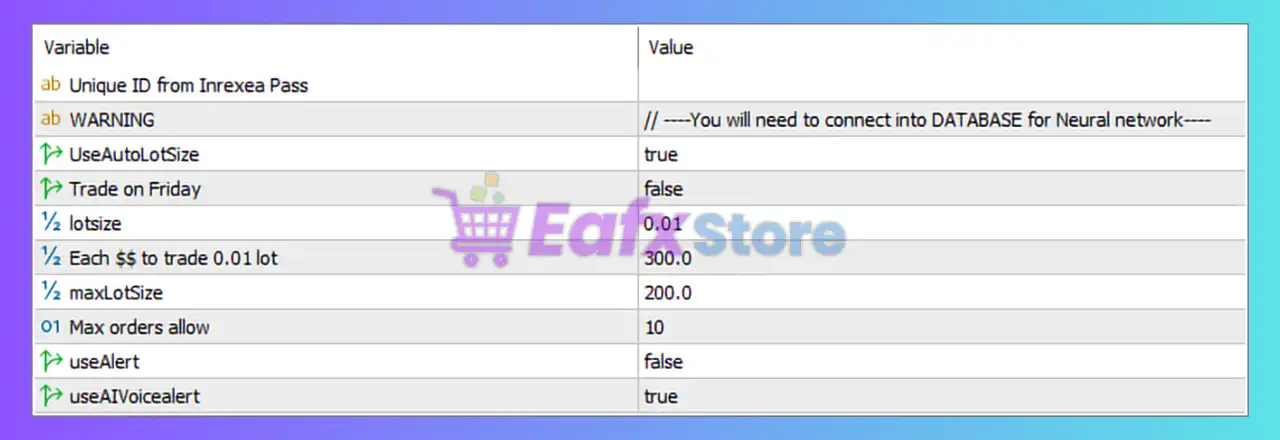
Full Parameters
- Unique ID from Inrexea Pass =: Field reserved for entering a unique identification key from the Inrexea Pass system.
- WARNING = // —-You will need to connect into DATABASE for Neural network—-: Indicates that database connectivity is required for neural network functionality.
- UseAutoLotSize = true: Enables automatic lot size calculation based on account balance or internal EA logic.
- Trade on Friday = false: Disables trading activity on Friday.
- lotsize = 0.01: Sets the default fixed trading lot size to 0.01.
- Each $$ to trade 0.01 lot = 300.0: Requires 300.0 account currency units for every 0.01 lot traded when using auto lot sizing.
- maxLotSize = 200.0: Maximum allowed lot size capped at 200.0 lots.
- Max orders allow = 10: Limits the number of simultaneously open orders to 10.
- useAlert = false: Disables standard alert notifications.
- useAIVoicealert = true: Enables AI voice alert notifications for trading events.
Conclusion
The OpenEA MT5 settings provide a streamlined framework for AI-assisted automated trading with neural-network compatibility and scalable lot sizing. By combining automatic risk scaling, order limitations, and AI voice notifications, the EA offers both flexibility and intelligent trade management.
Understanding these parameters helps traders optimize performance, maintain risk control, and integrate advanced automation features effectively.
FAQs
❓ What does UseAutoLotSize = true do?
It automatically calculates lot size based on account balance or EA logic.
❓ Why is Trade on Friday = false important?
It prevents trading on Friday to avoid weekend gaps and unstable market conditions.
❓ What does Each $$ to trade 0.01 lot = 300.0 mean?
It means every 300.0 account currency units correspond to 0.01 lot size in auto lot mode.
❓ Why is maxLotSize = 200.0 used?
It limits the maximum trade size to 200.0 lots for risk control.
❓ What is the purpose of useAIVoicealert = true?
It enables AI-generated voice alerts for important trading events and notifications.