






Ultra Beast EA MT5 with SetFiles (Unlimited)

Subscriptions for Special Plan
- 30 EA package is more economical!
- Special package with 99%
- Download 1 EA/Day

Subscriptions for Premium Membership
- Download Unlimited in 1 Year
- Get 100% Discount
- Get free access to all

Subscriptions for Gold Membership
- 1 Year Membership
- Get 100% Discount
- Access EA+Indicator+Course
Frequently bought together 🎁
Add these products to enhance your purchase




Quick Verdict
Ultra Beast EA is a feature-rich grid trading EA that incorporates an RSI filter and bidirectional trading capabilities. While actual trading results are impressive, the absence of stop-loss orders combined with increasing trade volumes makes prudent risk management essential.
Best For
✅ Gold Traders: Designed for automated XAUUSD trading.
✅ Grid Traders: Suitable for traders familiar with grid-based strategies.
✅ Scalping Users: Built to capture shorter-term market movements.
✅ RSI Strategy Users: Includes configurable 70/30 RSI filtering.
✅ Experienced EA Traders: Better suited to users who understand grid exposure and margin risk.
Overall Rating
8.5/10 ⭐⭐⭐⭐⭐
| Category | Rating |
|---|---|
| Strategy & Entry Logic | 8.5/10 |
| Risk Management | 7.8/10 |
| Features & Automation | 8.8/10 |
| Trading Results Evidence | 8.9/10 |
| Configuration Flexibility | 8.7/10 |
| Overall Rating | 8.5/10 |
What is Ultra Beast EA MT5?
Ultra Beast EA MT5 is an automated trading Expert Advisor (EA) built around grid-style position management. The system can open additional positions at predefined price intervals rather than relying on a single entry. As the trading cycle develops, the EA can increase position size according to the configured LotMultiplier.
The configuration is particularly notable because it combines grid entries with lot multiplication. This can potentially increase recovery speed when price moves favorably, but it can also increase account exposure when the market continues moving against the open positions.

How Does Ultra Beast EA MT5 Work?
Grid-Based Entries
The EA uses a grid trading approach, opening additional positions as price moves through predefined levels.
Progressive Position Sizing
When new Grid positions are added, the EA can increase their lot size according to its money-management logic.
Controlled Trade Cycles
Each trading sequence is limited to a predefined number of positions to help control the total number of open trades.
RSI Entry Filter
The built-in RSI filter evaluates overbought and oversold market conditions before allowing suitable trading opportunities.
Two-Way Trading
The EA can open both Buy and Sell positions, allowing it to respond to different market directions.
Take Profit Management
Positions are managed toward a predefined profit objective, allowing the EA to automatically close trades when its target conditions are reached.
Optional Stop Loss
The EA includes a Stop Loss function, but it can be switched on or off depending on the trader’s preferred risk-management approach.
Key Features of Ultra Beast EA
Grid Trading System
Uses structured grid-based position management to capture opportunities as market price moves.
Adaptive Lot Management
Adjusts position size according to the configured money-management logic as new trades are added.
Take Profit Control
Provides predefined profit-target management to help automate trade exits.
Dual-Direction Trading
Supports both Buy and Sell positions, allowing the EA to respond to different market directions.
RSI Market Filter
Uses RSI conditions to help filter potential entries and avoid unsuitable market conditions.
Multiple Trade Management
Can manage several positions within the same trading cycle according to the configured strategy.
Optional Stop Loss
Includes a Stop Loss function that can be enabled when additional downside protection is required.
Automated Position Management
Handles entries and trade management automatically without requiring constant manual intervention.
Ultra Beast EA MT5 Review
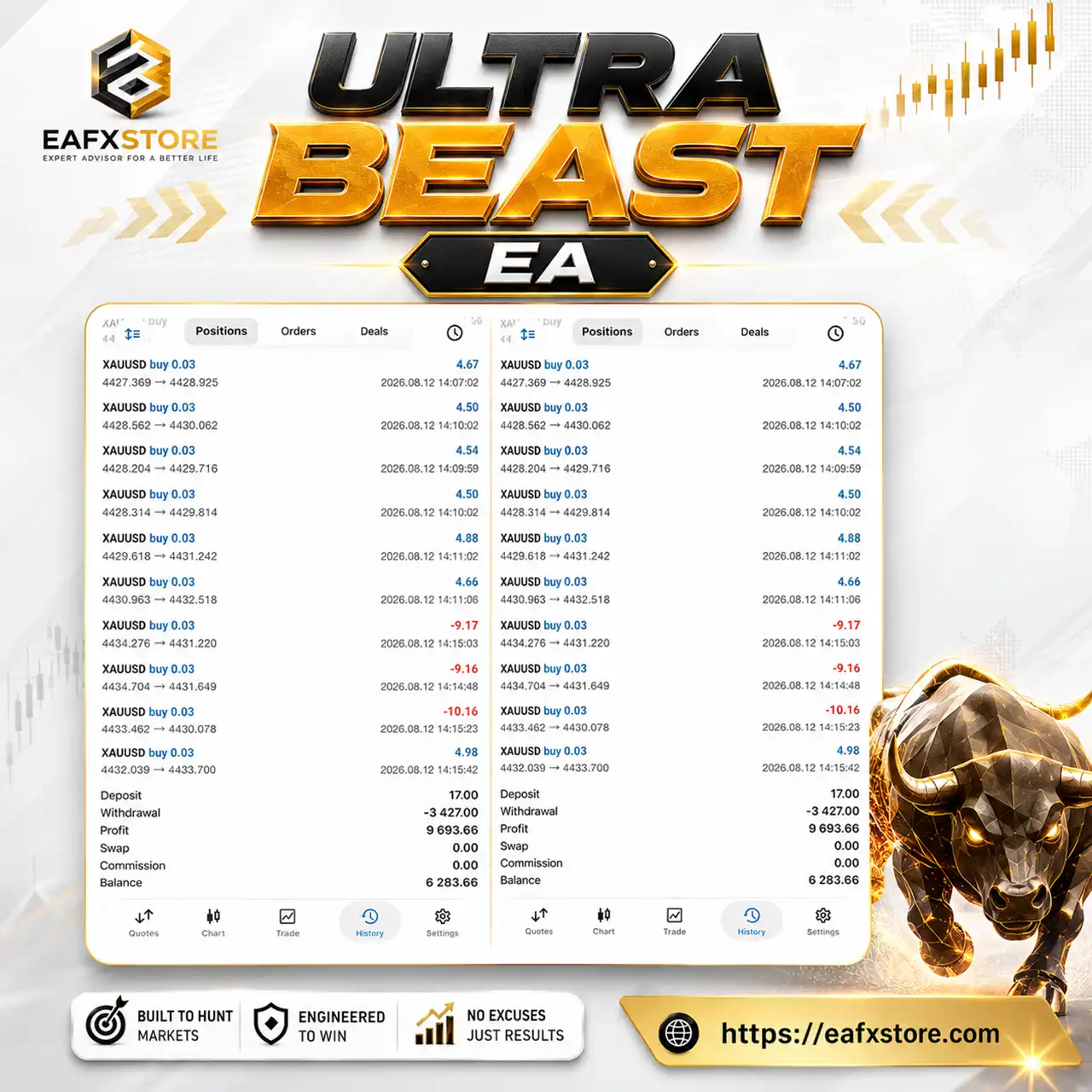
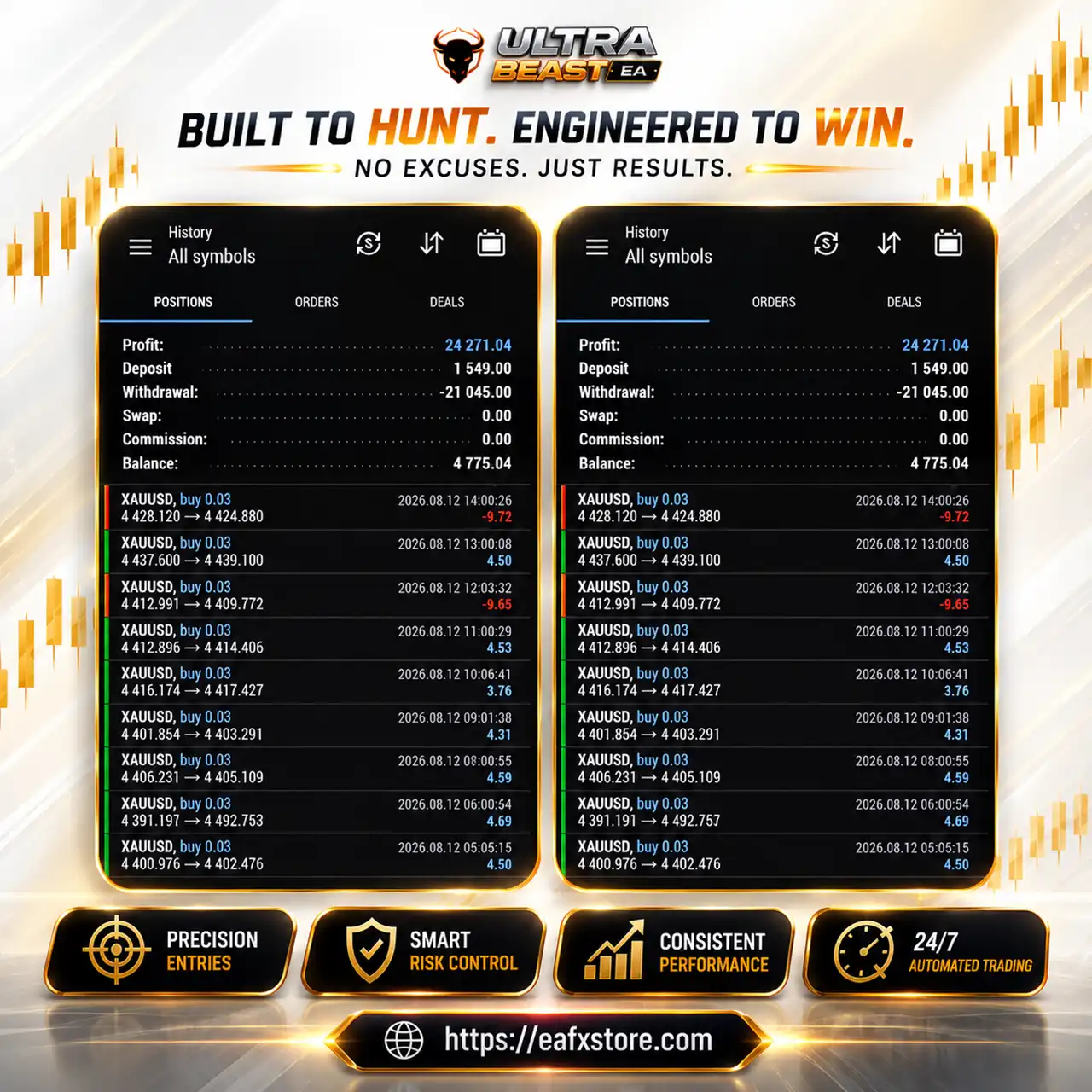
The results for Ultra Beast EA are presented via an account history featuring numerous XAUUSD trades.
While this performance serves as useful evidence of actual trading activity, it should be viewed as an account history record rather than an independently verified Live Signal or tracked data on Myfxbook.
Ultra Beast EA MT5 Results
Ultra Beast EA Results
Why Ultra Beast EA MT5 Stands Out
Grid and Money Management in One System
Ultra Beast combines grid positioning with a configurable lot multiplier, allowing the EA to manage a sequence of positions rather than depending on a single market entry.
Flexible Trading Direction
With both Buy and Sell trading enabled, the EA is not restricted to one market direction.
RSI Confirmation
The integrated 70/30 RSI filter provides another layer of entry filtering beyond the grid mechanism.
Adjustable Risk Parameters
Traders can modify the initial lot, multiplier, grid spacing, maximum trades and Stop Loss settings according to their preferred risk profile.
Simple Configuration
The supplied settings are relatively straightforward, making it easy to understand the primary components that control the EA’s behavior.
Risk Management Features
Initial Lot Control
The EA starts with 0.01 lots, allowing traders to define a relatively small base position.
Maximum Trade Limit
Each trading cycle is limited to 6 trades, helping establish a predefined position count.
Grid Distance
The 30.0-pip grid step controls how closely additional positions can be opened.
Stop Loss Option
A stop-loss level of 100.0 pips has been set and can be modified according to the user’s strategy.
RSI Filter
The active 70/30 RSI filter can help restrict entries based on overbought and oversold conditions.
Lot Multiplier Awareness
The 1.5× multiplier can increase exposure as additional positions are opened, making position sizing one of the most important risk considerations.
Recommended Trading Conditions
For the best performance, the following setup is recommended:
| Features | Type |
|---|---|
| Trading platform | MetaTrader 5 (MT5) |
| Time frames | Any |
| Currency pairs | XAUUSD (Gold) |
| Minimum / Recommended deposit | $1,000+ |
| Minimum / Recommended leverage | 1:100+ |
| Account type | Any |
| Product type | NoDLL |
| Additional services | Unlock and Decompile |
| Recommended brokers | Exness Broker, Icmarkets Broker |
| Recommended VPS | MyfxVPS.com (Blue VPS, Golden VPS). Lowest Latency, 2 week Free Trial, 100% Free for 12-18 Months. |
Product Download Package?
The download package of the product suite includes:
Experts
 Ultra Beast EA.ex5
SetFiles
UltraBeast_Gold.set
UltraBeast_Signal.set
 Reviewed by David Easton
Weaknesses and Risk Warnings
Lot Multiplier Increases Exposure
The 1.5 multiplier can make later positions significantly larger than the initial 0.01-lot trade.
Grid Risk During Strong Trends
A prolonged one-directional move can cause multiple positions to accumulate before the market reverses.
Maximum Six Trades Can Still Create Exposure
Although 6 trades may appear limited, the combination of grid entries and lot multiplication can produce considerably larger total exposure.
No Independently Verified Track Record Shown
Trading activity that lacks a verified Myfxbook profile or real trading signal data.
Who Should Use Ultra Beast EA MT5?
Experienced Grid Traders
Ultra Beast is best suited to traders who understand how grid systems behave during both ranging and strongly trending markets.
XAUUSD Traders
The supplied results and marketing materials focus on Gold/XAUUSD, making the EA relevant to traders specializing in the Gold market.
Traders Comfortable With Dynamic Exposure
Users should understand that the 1.5 lot multiplier can increase position size as a cycle develops.
Automated Trading Users
The EA is suitable for traders who want automated position opening and management through MetaTrader 5.
Traders Who Can Monitor Margin
Because grid systems can accumulate multiple positions, users should be comfortable monitoring free margin and overall account exposure.
Final Verdict
Ultra Beast EA MT5 is a straightforward but potentially aggressive automated trading system built around grid entries, lot multiplication, Take Profit management, RSI filtering and dual-direction trading.
For traders who understand grid trading and are comfortable managing exposure, Ultra Beast offers a flexible automated framework with clear parameters and straightforward configuration.
🔢 Ultra Beast EA MT5 Settings Guide
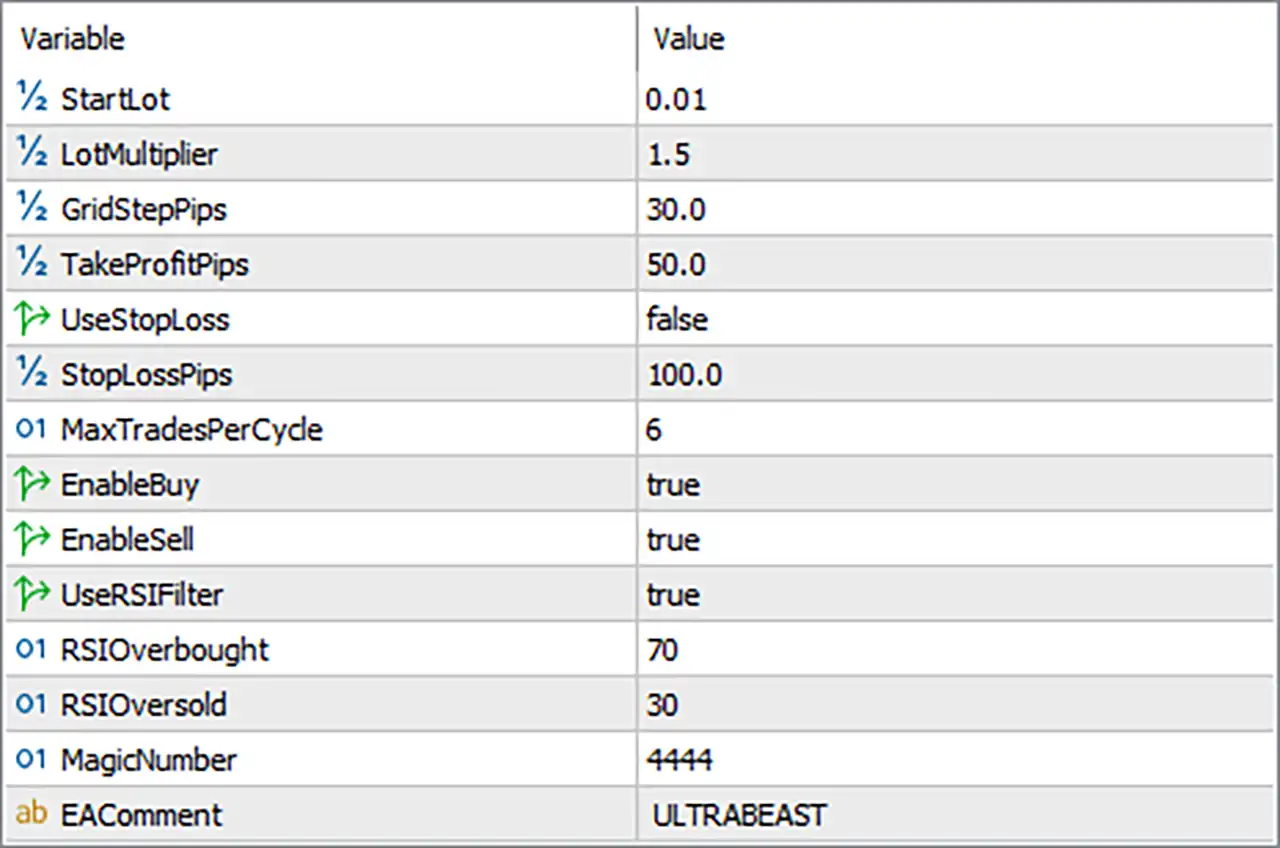
Ultra Beast EA MT5 is an automated trading Expert Advisor configuration built around grid-style trade management, adjustable lot multiplication, Take Profit control, RSI filtering, and dual-direction trading. The supplied settings show a starting lot of 0.01, a 1.5 lot multiplier, a 30.0-pip grid step, and a maximum of 6 trades per cycle.
Ultra Beast EA MT5 Settings Panel
🔄 Core Trading & Grid Settings
🔹 StartLot: 0.01 — Sets the initial trading volume at 0.01 lots for the first position in a trading cycle.
🔹 LotMultiplier: 1.5 — Sets the lot-size multiplier to 1.5, allowing subsequent positions to increase according to the EA’s grid/money-management logic.
🔹 GridStepPips: 30.0 — Sets the distance between grid entries to 30.0 pips.
🔹 TakeProfitPips: 50.0 — Sets the Take Profit target to 50.0 pips according to the EA’s trading logic.
🔹 UseStopLoss: false — Disables the Stop Loss mechanism in the current configuration.
🔹 StopLossPips: 100.0 — Defines a Stop Loss distance of 100.0 pips when UseStopLoss is enabled.
🔹 MaxTradesPerCycle: 6 — Limits each trading cycle to a maximum of 6 trades.
🔄 Direction & RSI Filter Settings
🔹 EnableBuy: true — Enables the EA to open Buy positions.
🔹 EnableSell: true — Enables the EA to open Sell positions.
🔹 UseRSIFilter: true — Activates the RSI filter to help control trade entries based on RSI conditions.
🔹 RSIOverbought: 70 — Sets the RSI overbought threshold to 70.
🔹 RSIOversold: 30 — Sets the RSI oversold threshold to 30.
🔄 Trade Identification
🔹 MagicNumber: 4444 — Assigns 4444 as the unique Magic Number used by the EA to identify and manage its automated trades.
🔹 EAComment: ULTRABEAST — Uses ULTRABEAST as the trade comment, making positions generated by the EA easier to identify.
🔄 Ultra Beast EA MT5 Settings Summary
🔹 Start Lot: 0.01
🔹 Lot Multiplier: 1.5
🔹 Grid Step: 30.0 pips
🔹 Take Profit: 50.0 pips
🔹 Stop Loss: false
🔹 Stop Loss Distance: 100.0 pips
🔹 Maximum Trades Per Cycle: 6
🔹 Buy Trading: true
🔹 Sell Trading: true
🔹 RSI Filter: true
🔹 RSI Overbought: 70
🔹 RSI Oversold: 30
🔹 Magic Number: 4444
🔹 EA Comment: ULTRABEAST
🔄 How the Current Configuration Works
With StartLot = 0.01 and LotMultiplier = 1.5, the EA is configured to increase position size according to a 1.5× progression when additional grid positions are opened.
The GridStepPips = 30.0 determines the spacing between successive grid entries, while MaxTradesPerCycle = 6 limits the number of positions within one trading cycle.
Both Buy and Sell trading are enabled. The RSI filter is also active, using 70 as the overbought level and 30 as the oversold level.
An important point is that UseStopLoss = false. Although StopLossPips = 100.0 is configured, the 100.0-pip Stop Loss is not active while the Stop Loss switch remains disabled.
🔄 Risk Management Considerations
🔹 Lot Multiplication: The 1.5 multiplier can increase position exposure as additional trades are opened, so position sizing should be tested carefully.
🔹 Grid Trading Exposure: A 30.0-pip grid combined with up to 6 trades per cycle can create multiple simultaneous positions during sustained market movement.
🔹 Stop Loss Disabled: UseStopLoss = false means the configured 100.0-pip Stop Loss is currently inactive.
🔹 Two-Way Trading: Both EnableBuy = true and EnableSell = true allow the EA to trade in both directions.
🔹 RSI Protection: The active RSI filter uses 70 and 30 as its key thresholds, potentially filtering entries during overbought or oversold conditions.
🔢 Conclusion
Ultra Beast EA MT5 provides a straightforward configuration combining grid-based position management, lot multiplication, Take Profit control, RSI filtering, and two-way automated trading.
The current setup starts with 0.01 lots, uses a 1.5 multiplier, places grid entries at 30.0 pips, and targets 50.0 pips for Take Profit. The EA can open up to 6 trades per cycle.
The RSI filter is enabled with 70 as the overbought level and 30 as the oversold level. Both Buy and Sell trading are active. However, the Stop Loss is disabled, meaning the configured 100.0-pip Stop Loss does not currently protect positions.
Because the configuration combines grid spacing, position multiplication, and up to 6 trades per cycle, traders should carefully evaluate maximum exposure, drawdown, and margin requirements through backtesting and forward testing before using it on a live account.
🔢 FAQs
❓ What is the starting lot size of Ultra Beast EA MT5?
The StartLot is set to 0.01 lots.
❓ Does Ultra Beast EA MT5 use a lot multiplier?
Yes. LotMultiplier = 1.5, meaning the EA can increase subsequent position sizes according to its internal grid/money-management logic.
❓ How many trades can the EA open in one cycle?
The MaxTradesPerCycle is set to 6.
❓ Is the Stop Loss enabled?
No. UseStopLoss = false. The configured StopLossPips = 100.0 is therefore inactive until Stop Loss is enabled.
❓ What RSI levels are used by Ultra Beast EA MT5?
The RSI filter is enabled with RSIOverbought = 70 and RSIOversold = 30.
User Reviews
Only logged in customers who have purchased this product may leave a review.
❓ What is the starting lot size of Ultra Beast EA MT5?
Ultra Beast EA MT5 starts with a 0.01-lot position, providing the initial trading volume before additional grid positions are opened according to the strategy.
❓ Does Ultra Beast EA MT5 increase lot sizes after new entries?
Yes. Ultra Beast EA MT5 uses a 1.5 lot multiplier, allowing subsequent grid positions to increase according to its money-management logic.
❓ What is the grid distance used by Ultra Beast EA MT5?
Ultra Beast EA MT5 uses a 30.0-pip GridStep, determining the distance between successive positions opened within the same trading cycle.
❓ How many trades can Ultra Beast EA MT5 open per cycle?
Ultra Beast EA MT5 allows a maximum of 6 trades per cycle, limiting the number of positions that can be opened during a single grid sequence.
❓ Is Stop Loss enabled in Ultra Beast EA MT5?
No. Ultra Beast EA MT5 currently has UseStopLoss = false, so the configured 100.0-pip Stop Loss remains inactive until the feature is enabled.
❓ What is the Take Profit setting of Ultra Beast EA MT5?
Ultra Beast EA MT5 is configured with a 50.0-pip Take Profit, according to the supplied settings and the EA's internal trade-management logic.
❓ Can Ultra Beast EA MT5 trade both Buy and Sell positions?
Yes. Ultra Beast EA MT5 has both EnableBuy = true and EnableSell = true, allowing automated trading in both market directions.
❓ Does Ultra Beast EA MT5 use an RSI filter?
Yes. Ultra Beast EA MT5 has the RSI filter enabled, using 70 as the overbought threshold and 30 as the oversold threshold.
❓ What Magic Number does Ultra Beast EA MT5 use?
Ultra Beast EA MT5 uses MagicNumber = 4444, helping identify and manage trades opened by the EA separately from other strategies.
❓ What are the main risks of the Ultra Beast EA MT5 settings?
Ultra Beast EA MT5 combines grid entries, a 1.5 multiplier, up to 6 trades, and no active Stop Loss, so exposure and drawdown should be carefully tested.
🔥 Get This EA for FREE with Our Membership! 🚀🚀
Unlock access to this EA, premium Indicators, and exclusive trading tools completely FREE with any of our Membership Plans! Thousands of traders already benefit from our VIP library—join them and level up your trading instantly. Choose Your Membership:
- SPECIAL – 1 Month Membership
- GOLD – 1 Year Membership
- PREMIUM – 1 Year Membership
-
 Original price was: $999.00.$89.00Current price is: $89.00.
 -
 Original price was: $249.00.$89.00Current price is: $89.00.
 -
 Price range: $65.00 through $599.00
 -
 Original price was: $200.00.$69.00Current price is: $69.00.
-
 1Original price was: $599.00.$59.00Current price is: $59.00.
 -
 1Original price was: $11,000.00.$89.00Current price is: $89.00.
 -
 0Original price was: $500.00.$69.00Current price is: $69.00.
 -
 3Original price was: $999.00.$69.00Current price is: $69.00.
There are no reviews yet.