




Sentinel EA MT5 (Latest version) - Unlimited

Subscriptions for Special Plan
- 30 EA package is more economical!
- Special package with 99%
- Download 1 EA/Day

Subscriptions for Premium Membership
- Download Unlimited in 1 Year
- Get 100% Discount
- Get free access to all

Subscriptions for Gold Membership
- 1 Year Membership
- Get 100% Discount
- Access EA+Indicator+Course
Frequently bought together 🎁
Add these products to enhance your purchase



Quick Verdict
Sentinel EA MT5 is a portfolio-focused system for traders who want diversified automated trading from one chart. Its live record shows meaningful growth over 36+ weeks, while the backtests demonstrate strong Profit Factor and high winning-trade percentages. The main consideration is that live equity drawdown can be substantial.
Best For
✅ Multi-pair portfolio traders
✅ MT5 automated trading users
✅ Risk-conscious traders
✅ Traders seeking one-chart operation
✅ Experienced traders comfortable monitoring drawdown
Overall Rating
⭐⭐⭐⭐⭐ 8.9/10
| Category | Rating |
|---|---|
| Strategy Design | 9.0/10 |
| Portfolio Management | 9.2/10 |
| Risk Controls | 9.1/10 |
| Backtest Performance | 9.0/10 |
| Live Track Record | 8.0/10 |
| Ease of Use | 8.8/10 |
| Overall Rating | 8.9/10 |
What is Sentinel EA MT5?
Sentinel EA MT5 is a multi-pair portfolio trading Expert Advisor (EA) developed for MetaTrader 5.
Unlike a conventional single-symbol EA, Sentinel is designed to monitor a portfolio from one controller chart. The recommended setup uses an EURUSD M5 chart, while the EA can internally monitor and trade several additional currency pairs.
The system is not designed to constantly enter trades. Instead, an automated entry must satisfy several conditions involving the market setup, execution environment, available margin and portfolio limitations.
 Vendor Website: View here
Delivery time 24h-48h after payment.
Refund if not delivered.
You will receive the current version without any limitations (ID+Time).
How Does Sentinel EA MT5 Work?
One Chart Controls the Portfolio
Sentinel is designed to run from an EURUSD M5 controller chart while internally monitoring the configured portfolio pairs.
This avoids the need to open and manage a separate chart for every symbol.
Multiple Markets Are Monitored
The EA can monitor up to seven configured currency pairs, with five core pairs recommended as the primary portfolio.
This gives the system access to different market opportunities instead of relying entirely on one currency pair.
Selective Entries Are Used
Sentinel does not attempt to trade every market movement.
A new automated position is allowed only when the required trading conditions, execution environment, margin availability and portfolio limits agree.
The Entry Engine Comes First
The strategy separates opportunity identification from subsequent position management.
A directional setup must first qualify before the management layer becomes involved.
Controlled Grid Management
Sentinel uses a Hybrid Grid approach. The grid is described as a management layer rather than an initial signal-generation mechanism.
The idea is to qualify the trade first and then use controlled basket management if price temporarily moves against the position.
Portfolio Exposure Is Monitored
The Global Portfolio Guard evaluates the overall account rather than looking only at individual trades.
This allows Sentinel to consider active baskets, floating P/L, equity, drawdown and available free margin.
Automated and Manual Controls Are Available
Sentinel can operate automatically while also providing Buy, Sell and Close controls through its dashboard.
Manual orders can then be managed through the EA’s normal position-management framework.
Key Features of Sentinel EA MT5
Multi-Pair Portfolio Trading
Sentinel can monitor multiple currency pairs from one controller chart, providing a diversified trading structure.
One-Chart Operation
The recommended setup is centered around one EURUSD M5 chart, simplifying platform organization.
Seven Supported Pairs
The system supports five core pairs plus two optional pairs, giving traders flexibility over portfolio size.
Hybrid Grid Management
The Hybrid Grid is designed to act after a qualified entry rather than simply opening positions indiscriminately to recover losses.
Global Portfolio Guard
Account-level protection coordinates exposure across the entire Sentinel portfolio.
Equity-Based Protection
The system can monitor account equity and apply configured portfolio-level protection when predefined thresholds are reached.
Economic News Filter
Sentinel includes a high-impact economic-news filter designed to restrict automated activity around important scheduled events.
Free-Margin Validation
Before sending orders, the EA can evaluate available free margin to help prevent unsuitable entries under insufficient account capacity.
Spread and Rollover Protection
Execution conditions such as spread and rollover are considered as part of the system’s layered protection framework.
Transparent Decision Dashboard
The dashboard can display the current operating state, reason and action, allowing users to understand what the EA is currently doing.
Manual Buy, Sell and Close Controls
Users retain manual control through the dashboard while Sentinel continues to manage eligible positions according to its configured framework.
Verified Live Signal Performance
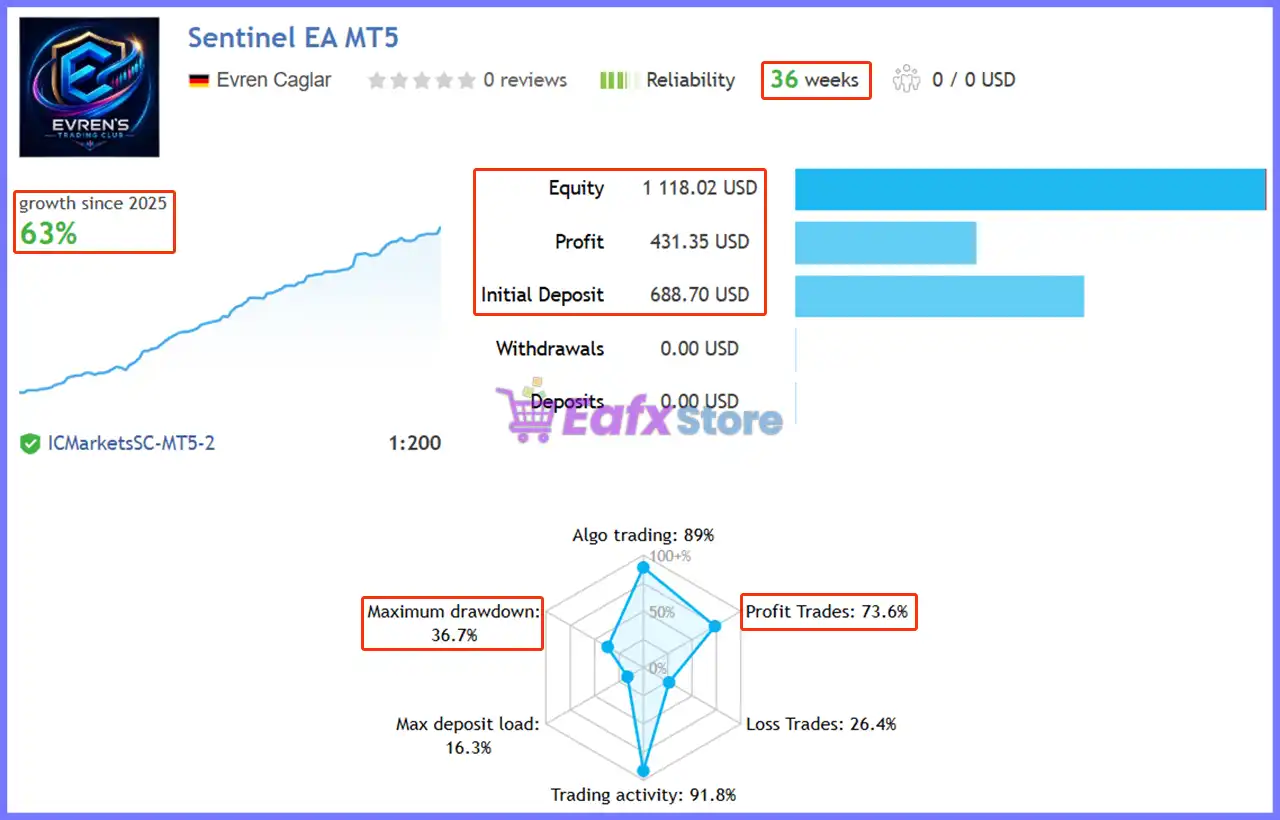
Sentinel EA has a publicly accessible MQL5 live signal. The supplied data is stated as of August 21, 2026, with more than 36 weeks of public monitoring.
Sentinel EA MT5 Live Signal
| Metric | Result |
|---|---|
| Public Monitoring History | 36+ weeks |
| Initial Deposit | $688.70 |
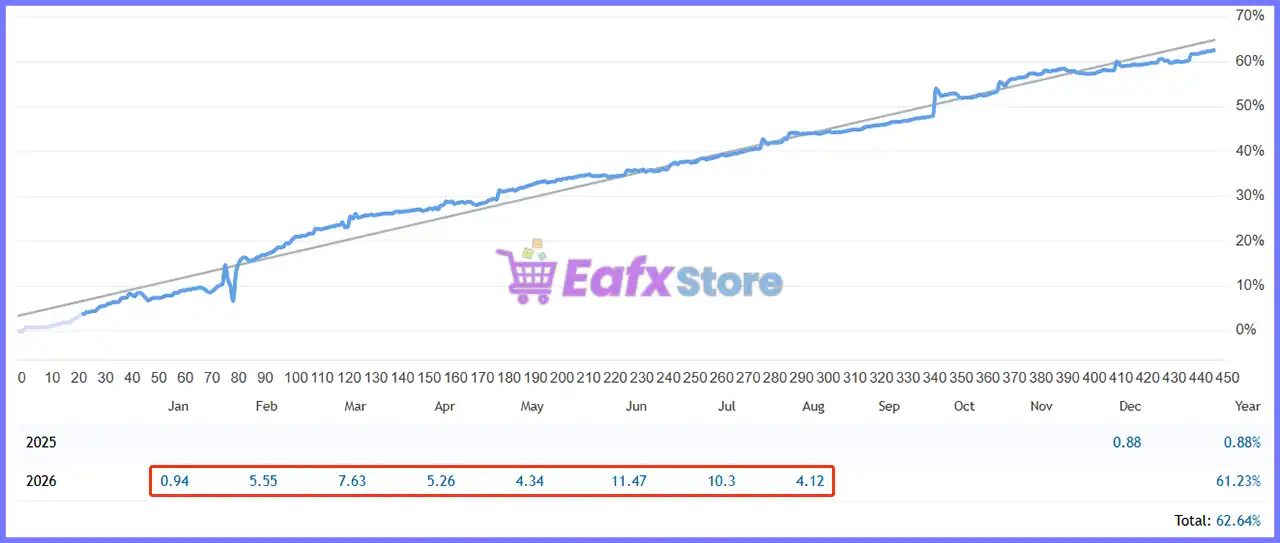
| Total Growth | 63% |
| Maximum Balance Drawdown | 36.7% |
| Profit Trades | 73.6% |
The live record shows approximately 62.64% growth from the stated initial deposit to the current balance.
For me as a seller, this is an important distinction: Sentinel should not be marketed as a low-drawdown system simply because the balance curve has performed well.
Traders need to understand the difference between realized balance drawdown and floating equity drawdown.
Historical Trading Results Performance
The supplied historical reports contain two separate GBPUSD M5 portfolio backtests. Each test uses multiple symbols and therefore should be interpreted as portfolio testing rather than a simple single-pair strategy test.
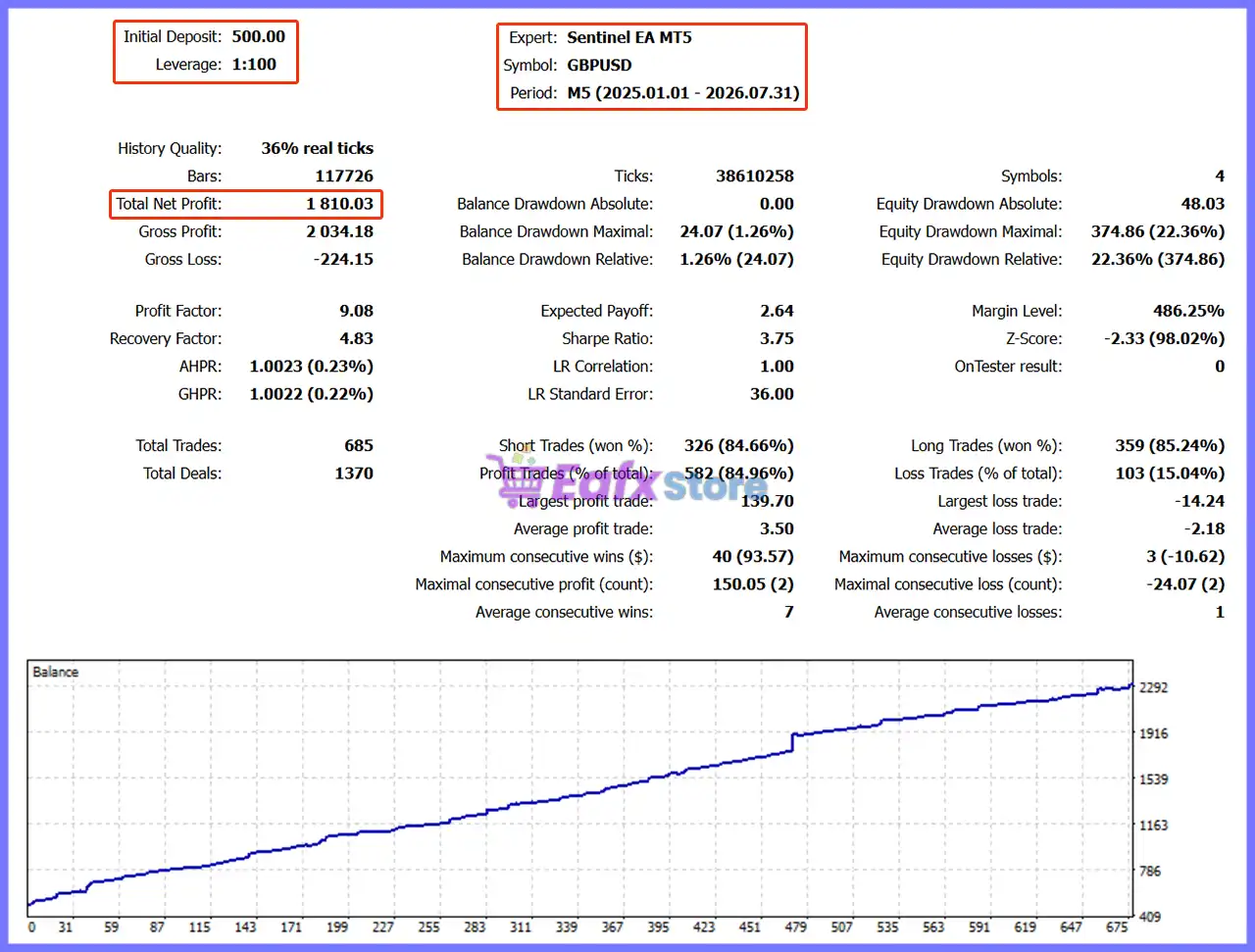
19-Month Backtest Results
Sentinel EA MT5 Backtest
| Metric | Result |
|---|---|
| Initial Deposit | $500.00 |
| Period | 2025.01.01 – 2026.07.31 |
| History Quality | 36% real ticks |
| Total Net Profit | $1,810.03 |
| Profit Factor | 9.08 |
| Balance Drawdown Maximal | $24.07 (1.26%) |
| Equity Drawdown Maximal | $374.86 (22.36%) |
| Total Trades | 685 |
| Profit Trades | 582 (84.96%) |
This test produced $1,810.03 in net profit from a $500.00 initial deposit.
The reported 9.08 Profit Factor is particularly strong, while the profitable-trade ratio reached 84.96%.
The balance drawdown remained low at 1.26%, although the maximum equity drawdown was considerably higher at 22.36%.
The balance curve displayed in the supplied report shows a generally upward progression throughout the tested period.
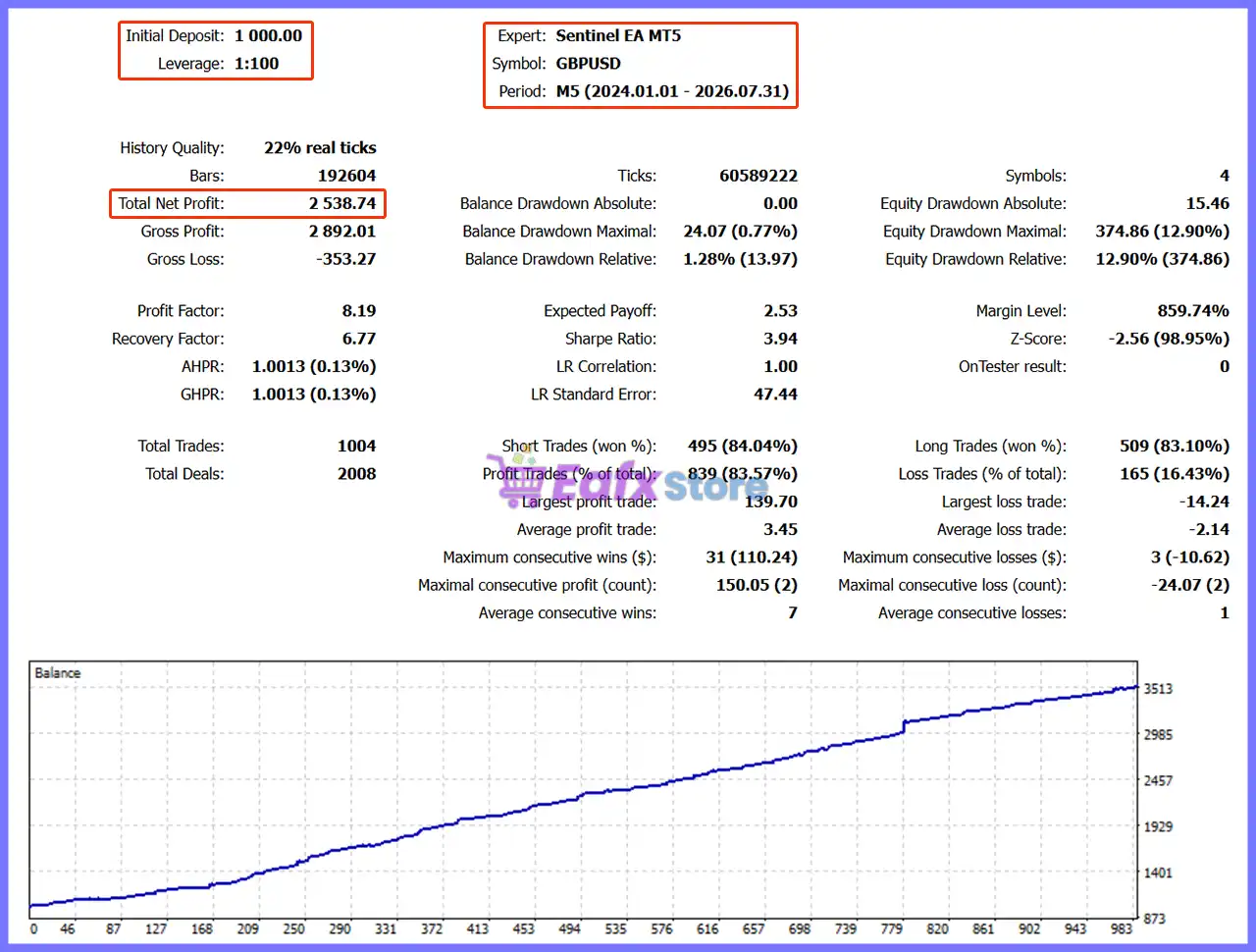
31-Month Backtest Results
Sentinel EA MT5 Backtest Results
| Metric | Result |
|---|---|
| Initial Deposit | $1,000.00 |
| Period | 2024.01.01 – 2026.07.31 |
| History Quality | 22% real ticks |
| Total Net Profit | $2,538.74 |
| Profit Factor | 8.19 |
| Balance Drawdown Maximal | $24.07 (0.77%) |
| Equity Drawdown Maximal | $374.86 (12.90%) |
| Total Trades | 1,004 |
| Profit Trades | 839 (83.57%) |
The longer test generated $2,538.74 in net profit from a $1,000.00 initial deposit.
The Profit Factor remained high at 8.19, while profitable trades accounted for 83.57% of total trades.
Maximum equity drawdown was 12.90%, lower than the 2025–2026 test, while the balance drawdown remained below 1%.
What the Historical Results Suggest
Across both supplied tests, Sentinel shows several attractive characteristics:
🔹 High reported Profit Factor
🔹 More than 83% profitable trades
🔹 Strong upward balance curves
🔹 Low reported balance drawdown
🔹 Multi-symbol portfolio testing
🔹 Positive results across different historical periods
However, the 22% and 36% real-tick history quality figures shown in the supplied reports should be considered when evaluating the reliability of the backtest evidence.
Backtests can also differ from live execution because of spreads, commissions, swaps, liquidity, slippage and broker-specific historical data.
User Reviews
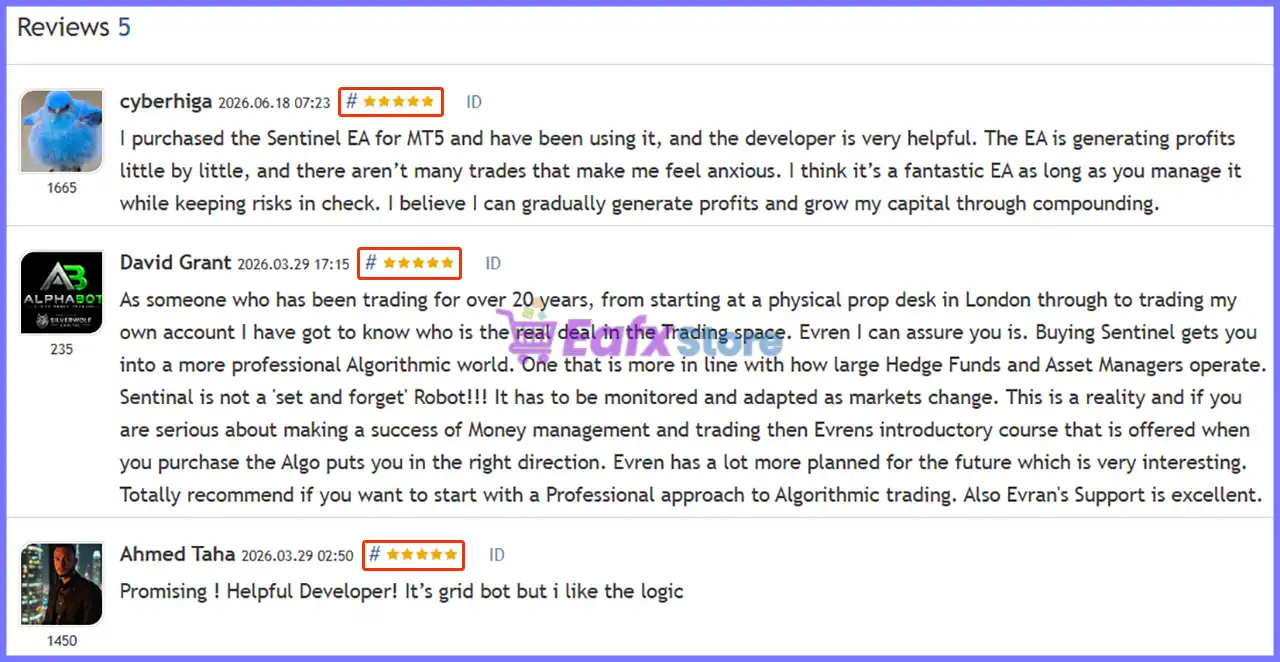
The supplied review image shows five total reviews, with three visible examples. I have included the visible reviews rather than inventing the missing two.
⭐⭐⭐⭐⭐ Cyberhiga (June 18, 2026)
“The buyer said Sentinel was generating profits gradually, with relatively few trades, and praised the developer’s support. They described the EA as a strong option when risk is managed carefully.”
⭐⭐⭐⭐⭐ David Grant (March 29, 2026)
“David Grant highlighted Sentinel’s professional algorithmic approach and excellent developer support. He also emphasized that the EA should be monitored and adapted as market conditions change rather than treated as a simple “set and forget” system.”
⭐⭐⭐⭐⭐ Ahmed Taha (March 29, 2026)
“Ahmed Taha described Sentinel as promising and praised the developer’s helpfulness, while noting that he liked the logic behind the grid approach.”
These are individual user opinions and should not be treated as independent guarantees of future performance.
User reviews of Sentinel EA MT5
Why Sentinel EA MT5 Stands Out
Portfolio-Level Architecture
One of Sentinel’s biggest advantages is that the system is designed around a complete portfolio rather than a single trading pair.
One-Chart Convenience
The ability to manage multiple symbols from one controller chart keeps the MT5 terminal cleaner and simplifies deployment.
Multiple Risk Layers
Sentinel combines portfolio equity protection, basket limits, free-margin checks, news filtering and execution-condition checks.
Transparent Decision State
The dashboard provides information about whether the EA is scanning, managing a basket, blocked by news or waiting for history.
Manual Control
Traders are not completely locked out of the system. The dashboard provides direct Buy, Sell and Close controls.
Risk Management Features
Global Portfolio Protection
Sentinel evaluates risk across the complete portfolio instead of treating every pair as an isolated strategy.
This is particularly useful when several currency pairs generate signals at the same time.
Maximum Active Basket Control
The EA can restrict how many active baskets are allowed simultaneously, helping prevent uncontrolled portfolio expansion.
Equity Protection
Portfolio-level equity thresholds can be configured to trigger protective actions when account conditions deteriorate.
Free-Margin Validation
Before an automated order request is sent, Sentinel can verify available free margin, helping avoid trades that could place excessive pressure on the account.
News Protection
The high-impact economic-news filter can block automated trading around important scheduled events when properly configured.
Spread and Execution Protection
Sentinel includes checks designed to identify unfavorable execution conditions, including spread and abnormal market conditions.
Daily Automated Entry Limit
The EA can restrict the number of automated entries within a trading day, adding another layer of control over trading frequency.
Master Buy and Sell Switches
The system provides master controls that allow traders to enable or disable automated Buy and Sell activity.
Recommended Trading Conditions
For optimal performance, the developer recommends:
| Features | Type |
|---|---|
| Trading platform | MetaTrader 5 (MT5) |
| Time frames | M5 (5 minute chart) |
| Currency pairs | EURUSD, GBPUSD, AUDCAD, EURCAD, NZDCAD, CADJPY and EURGBP |
| Minimum / Recommended deposit | $100+ |
| Minimum / Recommended leverage | Any |
| Account type | Raw / ECN account |
| Additional services | Unlock and Decompile |
| Recommended brokers | Exness Broker, Icmarkets Broker |
| Recommended VPS | MyfxVPS.com (Blue VPS, Golden VPS). Lowest Latency, 2 week Free Trial, 100% Free for 12-18 Months. |
Product Download Package?
The download package of the product suite includes:
✅ Experts: Sentinel EA MT5.ex5
➡️ Reviewed by David Easton
Weaknesses and Risk Warnings
Floating Equity Drawdown Is Significant
The supplied live signal reports 36.70% maximum drawdown. This is the most important risk consideration in the current performance data.
A trader must have sufficient capital and risk tolerance to withstand temporary floating losses.
Hybrid Grid Exposure
Although Sentinel emphasizes qualified entries before grid management, the system still uses a grid-based management component.
Grid strategies can create increasing exposure when markets move persistently against the initial position.
Live Results Are Not Identical to Backtests
The backtests show strong statistics, but live execution depends on broker conditions, spreads, commissions, slippage and liquidity.
Portfolio Correlation
Trading multiple currency pairs does not automatically eliminate risk. EUR, USD and CAD exposure can become correlated during major market events.
News Events Can Create Extreme Conditions
Even with a news filter, unexpected events, gaps and rapid market movements can occur outside the normal protection framework.
Backtest Quality Requires Attention
The supplied historical reports show 22% and 36% real-tick history quality.
Traders should therefore avoid treating the backtest numbers as perfect representations of every historical market tick.
Not a Set-and-Forget System
The supplied user feedback itself highlights that Sentinel should be monitored and adapted as market conditions change.
Who Should Use Sentinel EA MT5?
Suitable For
🔹 Experienced MT5 traders.
🔹 Multi-pair portfolio traders.
🔹 Traders seeking centralized risk management.
🔹 Users comfortable with automated basket management.
🔹 Traders who understand floating drawdown.
🔹 Traders who prefer one-chart operation.
🔹 Prop-firm and account-management traders who need portfolio restrictions.
Less Suitable For
Sentinel may not be appropriate for beginners who expect a completely hands-off robot or traders who are uncomfortable with significant floating equity drawdown.
It may also be unsuitable for traders who specifically want a pure non-grid strategy.
Final Verdict
Sentinel EA MT5 is a sophisticated portfolio-oriented Expert Advisor that combines selective entries with controlled basket management and account-level protection.
Its biggest strength is the architecture: instead of focusing on a single pair, Sentinel can monitor a portfolio of up to seven currency pairs while coordinating exposure through a Global Portfolio Guard.
🔢 Sentinel EA MT5 – Complete Settings Guide
Sentinel EA MT5 is a multi-symbol automated trading system designed to manage basket-based trading across several currency pairs while providing detailed controls for spreads, lot sizes, portfolio protection, recovery logic, news filtering, performance monitoring, and strategy testing.
Its configuration supports EURUSD, GBPUSD, AUDCAD, EURCAD, and NZDCAD by default, with optional support for CADJPY and EURGBP. The settings also include portfolio-level Stop Loss and Take Profit controls, conservative basket TP recovery, simultaneous-trade protection, and a configurable economic-news filter.
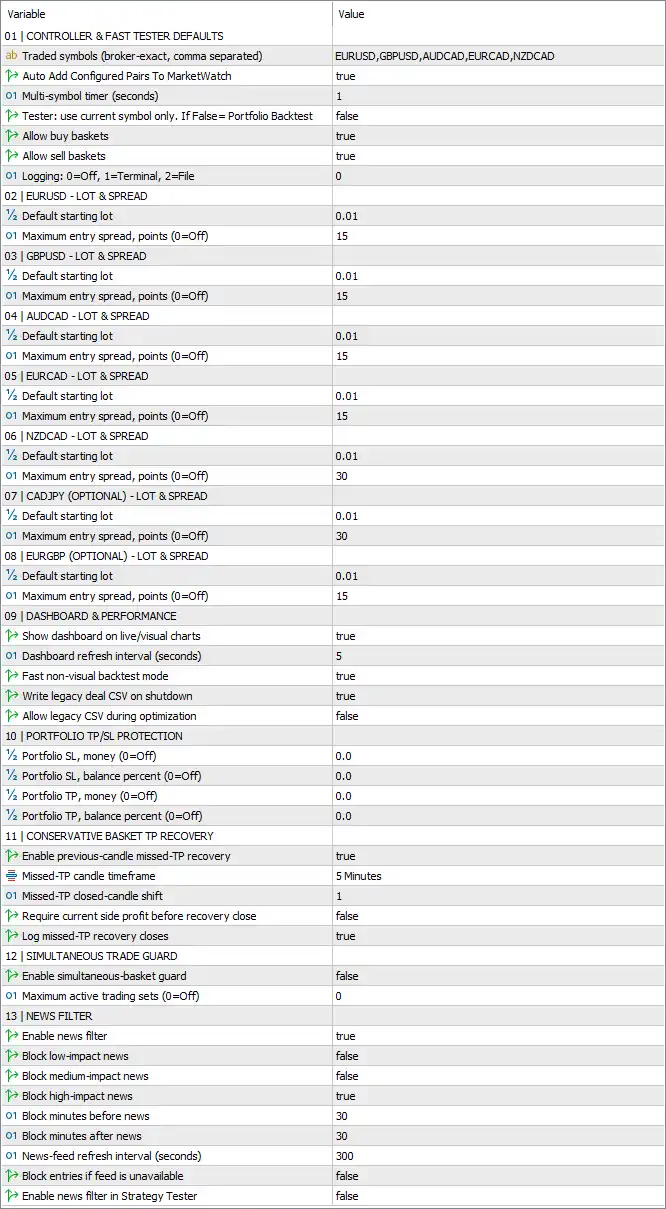
Sentinel EA MT5 Settings Panel
🔄 Controller & Fast Tester Defaults
🔹 Traded symbols (broker-exact, comma separated) = EURUSD, GBPUSD, AUDCAD, EURCAD, NZDCAD — Defines the default trading symbols using broker-exact names, separated by commas.
🔹 Auto Add Configured Pairs To MarketWatch = true — Automatically adds the configured currency pairs to the MT5 Market Watch when enabled.
🔹 Multi-symbol timer (seconds) = 1 — Sets the multi-symbol processing timer to 1 second, allowing the EA to refresh and evaluate its supported symbols at short intervals.
🔹 Tester: use current symbol only. If False = Portfolio Backtest = false — Disables current-symbol-only testing, meaning Portfolio Backtest mode is used when the tester operates with this setting disabled.
🔹 Allow buy baskets = true — Allows the EA to create and manage buy baskets across the configured trading symbols.
🔹 Allow sell baskets = true — Allows the EA to create and manage sell baskets across the configured trading symbols.
🔹 Logging: 0=Off, 1=Terminal, 2=File = 0 — Sets logging to 0, meaning logging is Off; 1 would represent Terminal logging and 2 would represent File logging.
🔄 EURUSD – Lot & Spread
🔹 Default starting lot = 0.01 — Sets the default starting position size for EURUSD to 0.01 lots.
🔹 Maximum entry spread, points (0=Off) = 15 — Limits EURUSD entries to a maximum spread of 15 points; a value of 0 would disable this restriction.
🔄 GBPUSD – Lot & Spread
🔹 Default starting lot = 0.01 — Sets the default starting position size for GBPUSD to 0.01 lots.
🔹 Maximum entry spread, points (0=Off) = 15 — Limits GBPUSD entries to a maximum spread of 15 points; 0 would turn the spread restriction off.
🔄 AUDCAD – Lot & Spread
🔹 Default starting lot = 0.01 — Sets the default starting position size for AUDCAD to 0.01 lots.
🔹 Maximum entry spread, points (0=Off) = 15 — Limits AUDCAD entries to a maximum spread of 15 points; 0 would disable the limit.
🔄 EURCAD – Lot & Spread
🔹 Default starting lot = 0.01 — Sets the default starting position size for EURCAD to 0.01 lots.
🔹 Maximum entry spread, points (0=Off) = 15 — Limits EURCAD entries to a maximum spread of 15 points; 0 would turn off the restriction.
🔄 NZDCAD – Lot & Spread
🔹 Default starting lot = 0.01 — Sets the default starting position size for NZDCAD to 0.01 lots.
🔹 Maximum entry spread, points (0=Off) = 30 — Limits NZDCAD entries to a maximum spread of 30 points; 0 would disable the spread filter.
🔄 CADJPY (Optional) – Lot & Spread
🔹 Default starting lot = 0.01 — Sets the default starting position size for optional CADJPY trading to 0.01 lots.
🔹 Maximum entry spread, points (0=Off) = 30 — Limits CADJPY entries to a maximum spread of 30 points; 0 would turn off the restriction.
🔄 EURGBP (Optional) – Lot & Spread
🔹 Default starting lot = 0.01 — Sets the default starting position size for optional EURGBP trading to 0.01 lots.
🔹 Maximum entry spread, points (0=Off) = 15 — Limits EURGBP entries to a maximum spread of 15 points; 0 would disable the spread restriction.
🔄 Dashboard & Performance
🔹 Show dashboard on live/visual charts = true — Displays the Sentinel EA MT5 dashboard on live charts and visual strategy-testing charts.
🔹 Dashboard refresh interval (seconds) = 5 — Refreshes the dashboard every 5 seconds.
🔹 Fast non-backtest mode = true — Enables the EA’s faster processing mode when it is not running a standard backtest.
🔹 Write legacy deal CSV on shutdown = true — Enables writing of the legacy deal CSV file when the EA shuts down.
🔹 Allow legacy CSV during optimization = false — Prevents the legacy CSV output from being generated during optimization runs.
🔄 Portfolio TP/SL Protection
🔹 Portfolio SL, money (0=Off) = 0.0 — Sets the portfolio Stop Loss in account money to 0.0, meaning the monetary portfolio SL is Off.
🔹 Portfolio SL, balance percent (0=Off) = 0.0 — Sets the portfolio Stop Loss as a balance percentage to 0.0%, meaning this protection is Off.
🔹 Portfolio TP, money (0=Off) = 0.0 — Sets the portfolio Take Profit in account money to 0.0, meaning the monetary portfolio TP is Off.
🔹 Portfolio TP, balance percent (0=Off) = 0.0 — Sets the portfolio Take Profit as a balance percentage to 0.0%, meaning this protection is Off.
🔄 Conservative Basket TP Recovery
🔹 Enable previous-close missed-TP recovery = true — Enables recovery logic designed to handle baskets where the intended Take Profit was missed after a previous close.
🔹 Missed-TP candle timeframe = 5 Minutes — Uses the 5 Minutes (M5) timeframe to evaluate missed-TP recovery conditions.
🔹 Missed-TP closed-candle shift = 1 — Uses closed candle shift 1 when evaluating the missed-TP recovery condition.
🔹 Require current side profit before recovery close = false — Does not require the currently active side of the basket to be profitable before a recovery close can occur.
🔹 Log missed-TP recovery closes = true — Enables logging of trades or baskets closed through the missed-TP recovery mechanism.
🔄 Simultaneous Trade Guard
🔹 Enable simultaneous-basket guard = false — Disables the simultaneous-basket protection mechanism in the current configuration.
🔹 Maximum active trading sets (0=Off) = 0 — Sets the maximum number of active trading sets to 0, which means this guard is Off.
🔄 News Filter
🔹 Enable news filter = true — Activates the economic-news filtering system.
🔹 Block low-impact news = false — Does not block trading around low-impact economic news.
🔹 Block medium-impact news = false — Does not block trading around medium-impact economic news.
🔹 Block high-impact news = true — Blocks trading around high-impact economic news.
🔹 Block minutes before news = 30 — Blocks applicable trading activity starting 30 minutes before a qualifying high-impact news event.
🔹 Block minutes after news = 30 — Keeps applicable trading activity blocked for 30 minutes after the qualifying news event.
🔹 News-feed refresh interval (seconds) = 300 — Refreshes the economic-news feed every 300 seconds, equivalent to 5 minutes.
🔹 Block entries if feed is unavailable = false — Allows the EA to continue entering trades if the news feed becomes unavailable rather than automatically blocking new entries.
🔹 Enable news filter in Strategy Tester = false — Disables the news filter during Strategy Tester runs.
🔢 Conclusion
Sentinel EA MT5 provides a comprehensive multi-symbol trading framework with extensive controls for basket execution, spread management, portfolio protection, recovery, news filtering, and performance monitoring.
The current configuration supports EURUSD, GBPUSD, AUDCAD, EURCAD, and NZDCAD, with CADJPY and EURGBP available as optional configurations. All configured starting lots are 0.01, while maximum entry spreads are 15 points for EURUSD, GBPUSD, AUDCAD, EURCAD, and EURGBP, and 30 points for NZDCAD and CADJPY.
Portfolio-level monetary and percentage-based TP/SL protections are currently disabled because all four portfolio protection values are 0.0. Conservative missed-TP recovery is enabled and uses the 5 Minutes timeframe with closed-candle shift 1.
The news filter is enabled and specifically blocks high-impact news, with a 30-minute block before and 30-minute block after qualifying events. Low- and medium-impact news are not blocked. The news feed refreshes every 300 seconds, while the EA is configured to continue operating if the news feed is unavailable. News filtering is disabled specifically in the Strategy Tester.
The current configuration is therefore focused on multi-symbol basket trading with high-impact news protection, controlled entry spreads, optional recovery management, and live dashboard monitoring. Traders should nevertheless test the settings under their broker’s actual spreads, contract specifications, execution conditions, and account requirements before using the EA with live capital.
🔢 FAQs
❓ Which currency pairs does Sentinel EA MT5 trade by default?
The default symbols are EURUSD, GBPUSD, AUDCAD, EURCAD, and NZDCAD. Optional configurations are also provided for CADJPY and EURGBP.
❓ What are the default starting lot sizes?
The default starting lot is 0.01 lots for every displayed symbol, including EURUSD, GBPUSD, AUDCAD, EURCAD, NZDCAD, CADJPY, and EURGBP.
❓ Does Sentinel EA MT5 use portfolio Take Profit and Stop Loss protection?
The portfolio TP/SL parameters are configured at 0.0, and because 0 = Off, both monetary and balance-percentage portfolio protections are currently disabled.
❓ How does the Sentinel EA MT5 news filter work?
The news filter is enabled and blocks high-impact news only. It blocks entries 30 minutes before and 30 minutes after qualifying events. Low- and medium-impact news blocking are both set to false.
❓ What happens if the news feed becomes unavailable?
Because Block entries if feed is unavailable = false, the EA is not configured to automatically block new entries when the news feed cannot be accessed. The news-feed refresh interval is 300 seconds.
User Reviews
Only logged in customers who have purchased this product may leave a review.
❓ What is Sentinel EA MT5 designed for?
Sentinel EA MT5 is a multi-pair portfolio system that manages up to seven Forex pairs from one EURUSD M5 chart using selective entries and risk controls.
❓ How many pairs can Sentinel EA MT5 trade?
Sentinel EA MT5 can monitor five core pairs plus two optional pairs: EURUSD, GBPUSD, AUDCAD, EURCAD, NZDCAD, CADJPY, and EURGBP.
❓ Does Sentinel EA MT5 require multiple charts?
No. Sentinel EA MT5 is designed to operate from one EURUSD M5 chart while internally monitoring and trading all configured portfolio pairs.
❓ What account type is recommended for Sentinel EA MT5?
A Raw-spread or ECN account is recommended for Sentinel EA MT5, with leverage of 1:100 or higher and reliable execution conditions preferred.
❓ Does Sentinel EA MT5 use a Grid strategy?
Yes, Sentinel EA MT5 uses a Hybrid Grid as a controlled management layer after qualified entries, rather than relying on grid positions to rescue poor trades.
❓ How does Sentinel EA MT5 control portfolio risk?
Sentinel EA MT5 uses a Global Portfolio Guard to monitor active baskets, equity, drawdown, free margin, and configurable portfolio-level limits.
❓ Does Sentinel EA MT5 have a news filter?
Yes. Sentinel EA MT5 includes a high-impact economic-news filter using an online ForexFactory/FairEconomy calendar feed with WebRequest access.
❓ Can users manually control trades with Sentinel EA MT5?
Yes. Sentinel EA MT5 provides Buy, Sell, and Close controls for individual portfolio pairs while still respecting the Global Portfolio Guard's active-basket limit.
❓ How should Sentinel EA MT5 be backtested?
Sentinel EA MT5 should be tested on EURUSD M5 using Every Tick or Real Ticks, with at least three years of historical data and sufficient data for enabled pairs.
-
 Original price was: $2,000.00.$249.00Current price is: $249.00.
 -
 Original price was: $1,450.00.$249.00Current price is: $249.00.
 -
 Original price was: $2,000.00.$249.00Current price is: $249.00.
 -
 Original price was: $3,175.00.$249.00Current price is: $249.00.
-
 0Original price was: $1,299.00.$249.00Current price is: $249.00.
 -
 1Original price was: $500.00.$249.00Current price is: $249.00.
 -
 0Original price was: $199.00.$179.00Current price is: $179.00.
 -
 0Original price was: $430.00.$249.00Current price is: $249.00.
There are no reviews yet.