


🔢 CeleritasForex EA MT4 Settings Guide: Complete Input Parameters Explained
CeleritasForex EA is an automated trading Expert Advisor with configurable position sizing, order volume, entry distance, trade identification, and slippage tolerance. These inputs help define how much volume the EA uses, how far apart relevant price levels or orders may be placed, and how its trades are identified within MetaTrader 4.
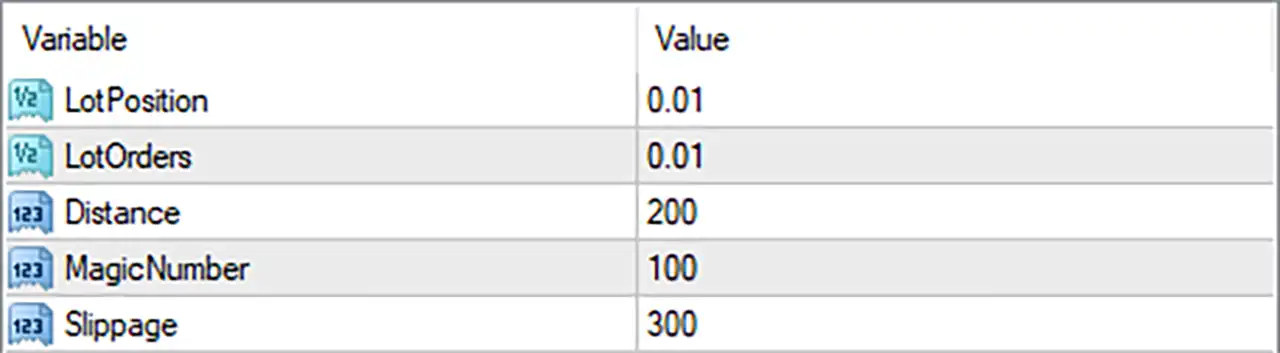
The displayed configuration uses a small lot size of 0.01, a distance setting of 200, a magic number of 100, and a slippage setting of 300. Understanding each parameter is important before testing the EA, particularly because the meaning of distance and slippage values can depend on the broker's symbol specifications and the EA's internal implementation.
⚙️ Position and Lot Size Settings
🔹 LotPosition = 0.01: Sets the position lot size to 0.01 lots, defining the configured trading volume for positions managed by this parameter.
🔹 LotOrders = 0.01: Sets the order lot size to 0.01 lots, which may determine the volume assigned to individual orders. The precise relationship between LotOrders and LotPosition depends on the EA's order-management logic.
⚙️ Distance Setting
🔹 Distance = 200: Sets the distance parameter to 200, potentially controlling the spacing between entry levels, pending orders, or other price-based actions. The input does not specify whether the unit is points or pips, so the resulting price distance should be verified on the intended trading symbol.
⚙️ Trade Identification
🔹 MagicNumber = 100: Assigns the magic number 100 to identify trades opened or managed by CeleritasForex EA MT4, helping distinguish its orders from manual trades or positions opened by other Expert Advisors.
⚙️ Order Execution Settings
🔹 Slippage = 300: Sets the permitted slippage parameter to 300, defining the configured tolerance for differences between the requested and executed price, subject to how the EA and MT4 trade-execution functions interpret this value. Confirm whether the EA uses points or another unit before live trading.
🔢 Conclusion
The current CeleritasForex EA MT4 configuration contains five inputs: LotPosition = 0.01, LotOrders = 0.01, Distance = 200, MagicNumber = 100, and Slippage = 300.
Both lot-size parameters are set to 0.01, while the distance parameter is 200. The magic number is 100, and the slippage setting is 300.
Before using these settings on a live account, verify the meaning of Distance = 200 and Slippage = 300 in the EA's implementation. Also confirm that the broker accepts the configured lot size and that the order volume behaves as expected. Testing on a demo account can help establish the EA's actual order-placement and execution behavior.


