


🔢 Stream Z50 EA MT4 Settings Guide: Complete Input Parameters Explained
Stream Z50 EA is an automated trading Expert Advisor for MetaTrader 4 with configurable risk management, trade exit levels, trailing stop functionality, and Bulls & Bears indicator parameters. Its settings allow traders to adjust position sizing, define Take Profit and Stop Loss levels, configure indicator timeframes, and control technical trade execution.
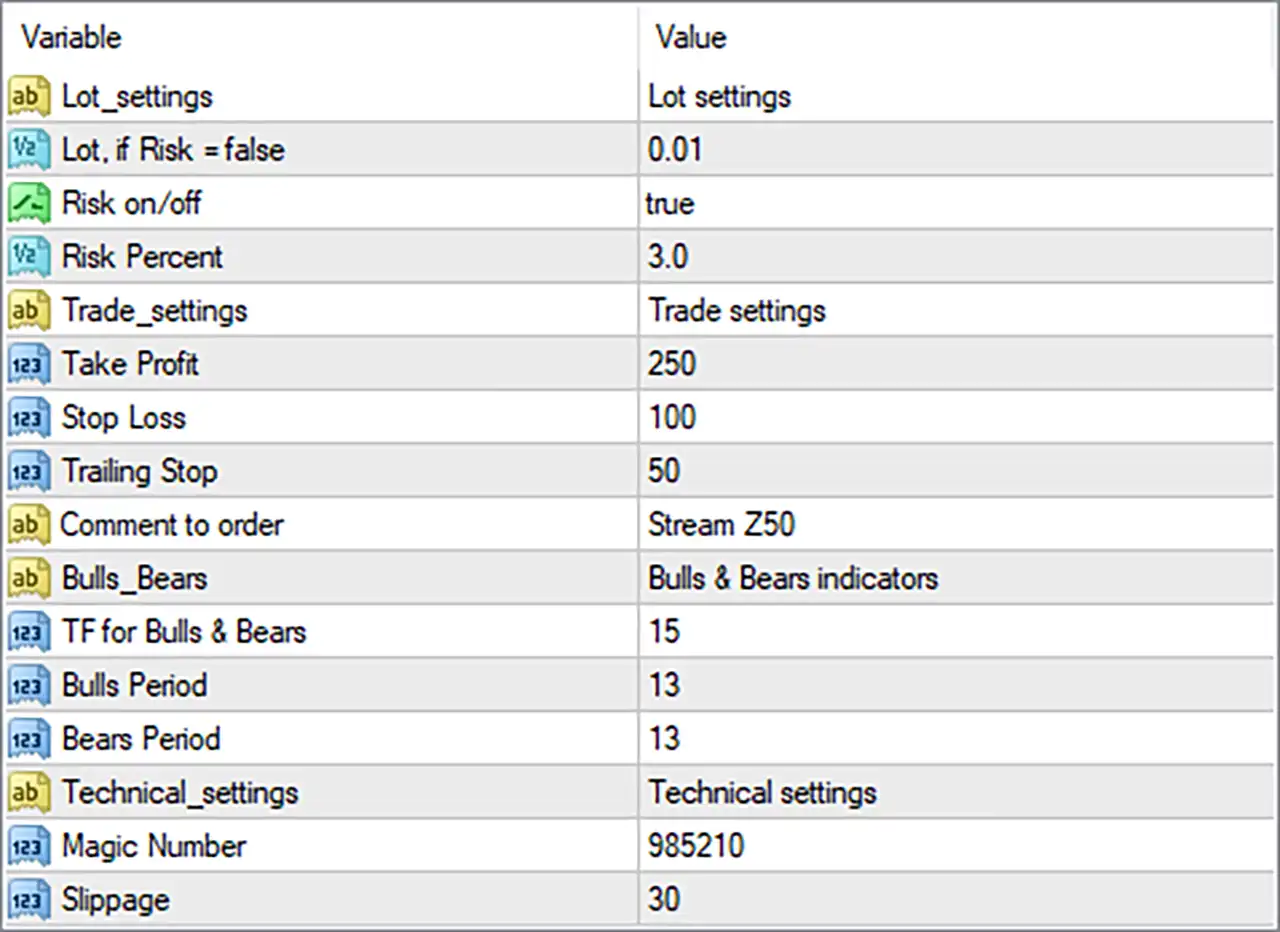
The current configuration uses risk-based position sizing with a 3.0% risk setting, a Take Profit of 250, a Stop Loss of 100, and a Trailing Stop of 50. Understanding each parameter helps traders evaluate how the EA is configured before testing it on a demo account or using it in a live trading environment.
⚙️ Lot Settings and Risk Management
🔹 Lot_settings = Lot settings: This is a section label that organizes the EA's position-sizing and risk-management inputs.
🔹 Lot, if Risk = false = 0.01: Defines the fixed trading volume as 0.01 lots when risk-based position sizing is disabled.
🔹 Risk on/off = true: Enables the EA's risk-based position-sizing mode, indicating that the Risk Percent setting is intended to influence the lot size calculated for trades.
🔹 Risk Percent = 3.0: Sets the configured risk percentage to 3.0, potentially allowing the EA to calculate position size based on a 3.0% risk allocation. The actual amount at risk depends on the EA's calculation method, account equity or balance reference, and Stop Loss distance.
⚙️ Trade Settings: Take Profit, Stop Loss, and Trailing Stop
🔹 Trade_settings = Trade settings: This section label groups the EA's trade management and order-related parameters.
🔹 Take Profit = 250: Sets the Take Profit parameter to 250, defining the configured profit target for a trade; the actual price distance depends on whether the EA interprets this value as points, pips, or another unit.
🔹 Stop Loss = 100: Sets the Stop Loss parameter to 100, defining the configured loss-limiting level for a trade; the exact monetary risk depends on the instrument, lot size, and unit convention used by the EA.
🔹 Trailing Stop = 50: Sets the trailing-stop distance or threshold to 50, allowing the EA to adjust a trade's protective stop as price moves favorably if trailing-stop management is implemented and active.
🔹 Comment to order = Stream Z50: Assigns the text Stream Z50 as the order comment, helping identify trades associated with this EA in the trading terminal and account history.
⚙️ Bulls & Bears Indicator Settings
🔹 Bulls_Bears = Bulls & Bears indicators: Identifies the indicator configuration section used by the EA's Bulls & Bears signal components.
🔹 TF for Bulls & Bears = 15: Sets the Bulls & Bears indicator timeframe parameter to 15, which commonly corresponds to the 15-minute (M15) timeframe in MetaTrader. Confirm that the EA uses this value as a timeframe selector.
🔹 Bulls Period = 13: Sets the Bulls indicator period to 13, determining the lookback period used by the corresponding Bulls calculation or signal component.
🔹 Bears Period = 13: Sets the Bears indicator period to 13, matching the Bulls period and defining the lookback period for the corresponding Bears calculation or signal component.
⚙️ Technical Settings
🔹 Technical_settings = Technical settings: This is a section label grouping technical execution parameters and trade identification settings.
🔹 Magic Number = 985210: Assigns the EA's magic number as 985210, allowing its trades to be identified separately from trades belonging to other Expert Advisors when trade management is implemented correctly.
🔹 Slippage = 30: Sets the permitted slippage parameter to 30, defining the execution-price deviation the EA is configured to tolerate when placing or managing orders. The practical price difference depends on the broker's point convention and the EA's implementation.
🔢 Conclusion
The Stream Z50 EA MT4 settings combine risk-based lot sizing, configurable trade exits, Bulls & Bears indicator inputs, and technical execution controls. The current setup has risk management enabled at 3.0%, Take Profit at 250, Stop Loss at 100, Trailing Stop at 50, and a magic number of 985210.
Before using these settings in live trading, traders should verify the EA's interpretation of points and pips, confirm how the 3.0% risk setting calculates lot size, and test whether the trailing stop operates as expected. A demo account and historical testing can help assess the configuration under different market conditions. These parameters do not guarantee profitable results, and risk-based sizing does not eliminate trading losses.


