





Giraffe Super Trend EA MT4 (Latest version) - Unlimited

Subscriptions for Special Plan
- 30 EA package is more economical!
- Special package with 99%
- Download 1 EA/Day

Subscriptions for Premium Membership
- Download Unlimited in 1 Year
- Get 100% Discount
- Get free access to all

Subscriptions for Gold Membership
- 1 Year Membership
- Get 100% Discount
- Access EA+Indicator+Course
Frequently bought together 🎁
Add these products to enhance your purchase




Quick Overview
Giraffe Super Trend EA is a trend based Expert Advisor for MetaTrader 4 that enters orders using Moving Averages, MACD and the Trend of larger timeframes. It can also trade in reverse, adds a spread filter, three money management types, adjustable trading hours and an information panel, and is described for the M30 and H1 charts of major pairs.
Best For:
✅ Forex traders using M30 and H1 charts.
✅ Users who like moving average systems.
✅ Traders who want a reverse order option.
✅ Users who need a spread filter.
✅ Traders who want three lot methods.
What is Giraffe Super Trend EA MT4?
Giraffe Super Trend EA is an Expert Advisor (EA) for MetaTrader 4. It enters orders using moving averages, MACD and the trend of larger timeframes.
It can also trade in reverse, and it offers a spread filter, three money management types, adjustable trading times and an information panel.
⭐ Vendor Website: View here
⭐ Delivery time 24h-48h after payment.
⭐ Refund if not delivered.
⭐ You will receive the current version without any limitations (ID+Time).
Giraffe Super Trend EA MT4 Review
How Does Giraffe Super Trend EA MT4 Work?
Signal Logic
Fast and slow moving averages and MACD decide entries, with the larger timeframe trend as confirmation.
Reverse Option
A setting lets the EA enter in the opposite direction of the standard signal.
Exits and Sizing
Each position has a stop loss and take profit, and lot size can be fixed, calculated or proportional.
Filters and Panel
A spread filter and adjustable trading hours limit entries, and a panel shows information on the chart.
Trading Strategy
Read Two Moving Averages
A fast and a slow average help decide when to open an order, and both can be adjusted to suit the chosen currency pair.
Confirm with MACD and Higher Timeframes
MACD and the trend of larger timeframes add confirmation, which helps avoid orders that go against the bigger move.
Trade in Reverse When Needed
A reverse setting lets the EA enter against the usual direction, so the same logic can be tested in both directions.
Use a Fixed Stop Loss and Take Profit
Each position carries a stop loss and a take profit set by price distance, and both can adapt to the chosen pair.
Control Time and Spread
Trading hours are adjustable and a spread filter blocks entries when the cost is too high for the broker.
Historical Trading Results Performance
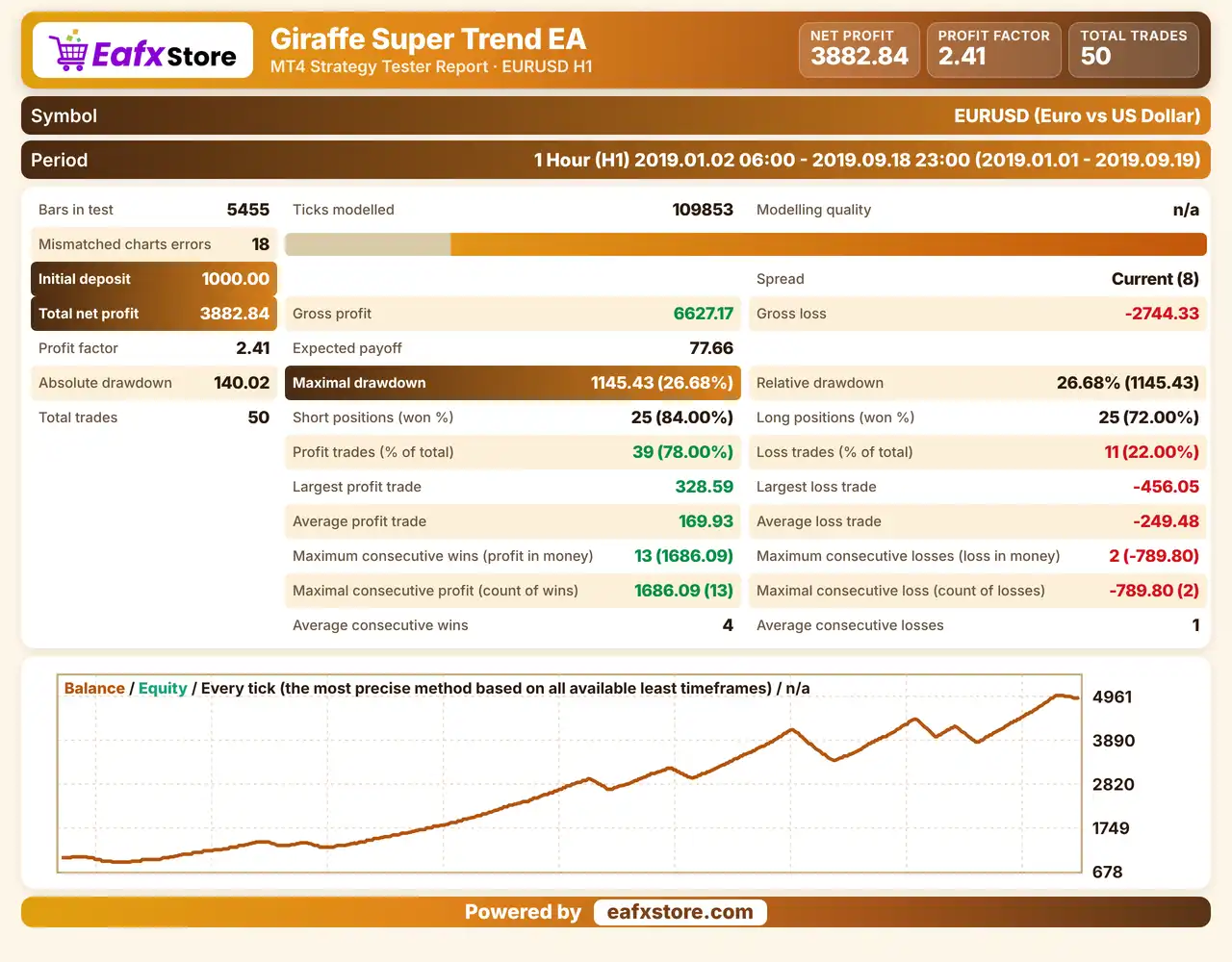
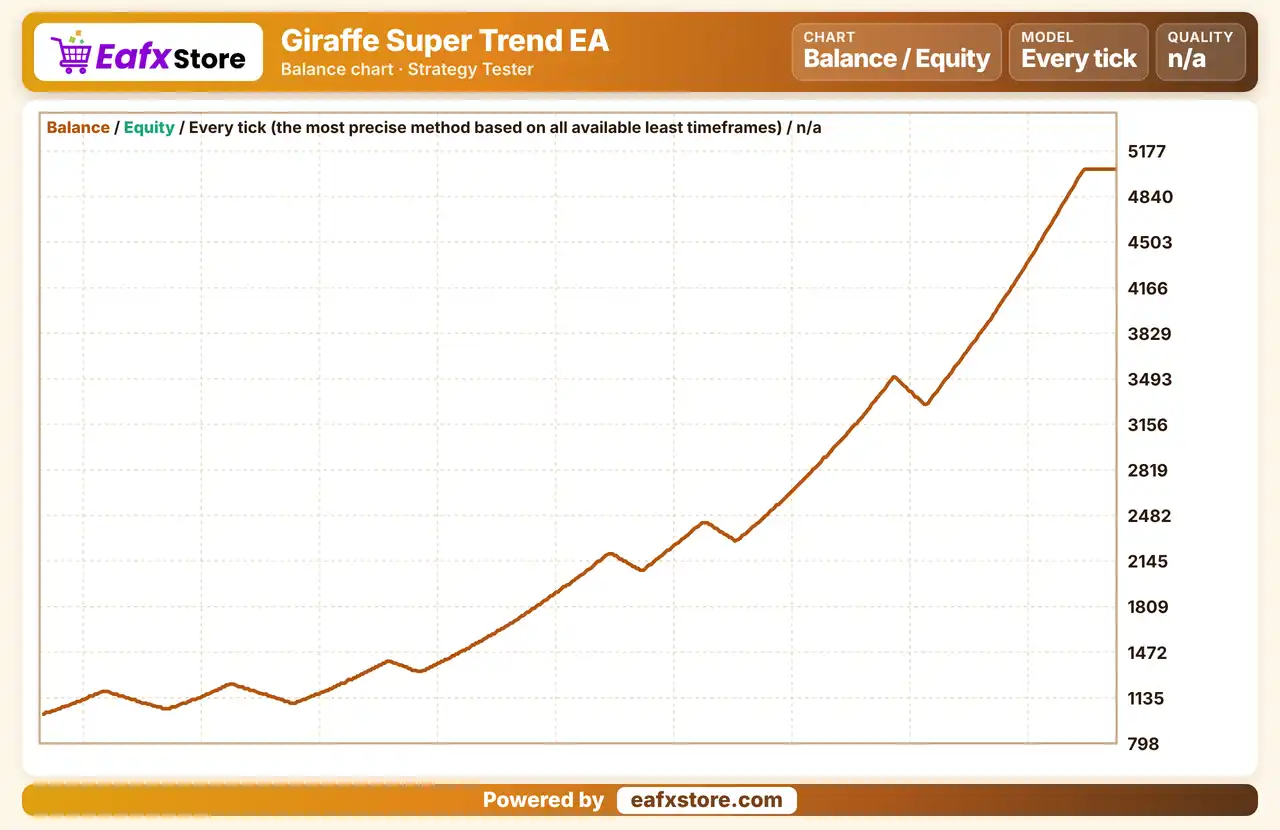
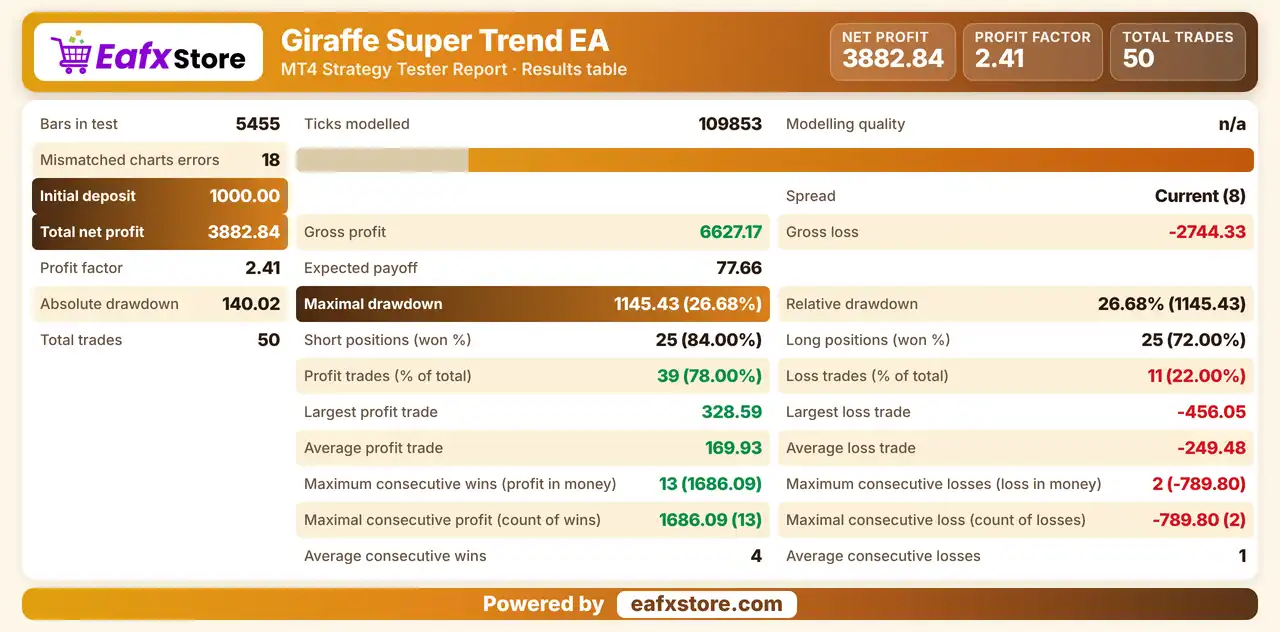
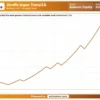
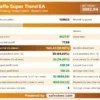
Giraffe Super Trend EA was backtested on XAUUSD (Gold). The report shows a net profit of $3,882.84 from an initial deposit of $1,000.
Giraffe Super Trend EA MT4 Backtest Results
Giraffe Super Trend EA Backtest Results
| Parameter | Results |
|---|---|
| Initial Deposit | $1,000 |
| Total Net Profit | $3,882.84 |
| Gross Profit | 6,627.17 |
| Gross Loss | -2,744.33 |
| Profit Factor | 2.41 |
| Total Trades | 50 |
| Winning Trades | 78.00% |
| Maximum Drawdown | 26.68% |
Key Features of Giraffe Super Trend EA MT4
Moving Average and MACD Signals
Fast and slow moving averages work with MACD to decide entries, which gives the EA a simple and familiar trend based logic.
Higher Timeframe Trend Check
The trend of larger timeframes is part of the decision, which reduces entries that fight the main direction of the market.
Reverse Order Option
A reverse setting lets the trader enter in the opposite direction of the standard signal, which allows both versions to be tested.
Three Money Management Types
Fixed lot, calculated lot and an internal proportional method are available, so sizing can follow the balance or stay constant.
Spread Filter and Time Control
Entries are blocked when the spread is too high, and the hours of trading can be adjusted to match the best part of the day.
Risk Management
Trend Signals Can Fail
Moving averages lag, so in sideways markets the EA can open orders that reverse soon after entry.
A Stop Loss Can Still Slip
Gaps and fast moves can pass the stop-loss level, so the real loss can be larger than planned.
A Fixed Target May Not Be Reached
Price can turn before the take-profit is touched, so many trades can end in a loss.
Reverse Mode Changes the Risk
Entering against the usual signal is a different style of trading, and it needs separate testing before use.
Proportional Lots Grow with the Balance
Sizing that follows the balance raises the lot as the account grows, so losses grow in the same way.
What Sets It Apart
Reverse Trading Option
The ability to enter against the usual signal is not common in simple moving average robots.
Three Lot Methods
Fixed, calculated and proportional sizing give flexible choices for accounts of different sizes.
Pair Aware Settings
Stop loss and take profit values are described as adapting to the chosen currency pair instead of staying fixed.
Ready Setup Choice
A ready setup option lets beginners start quickly while experienced traders can still enter their own values.
Strengths and Limitations
Strengths
🔹 Simple, familiar logic: moving averages and MACD are widely known tools, which makes the EA easy to understand and to review.
🔹 Flexible sizing: three money management types let traders choose between a fixed lot and sizing that follows the account balance.
🔹 Cost control: the spread filter and adjustable trading hours help avoid entries in conditions that are costly or unfavorable.
🔹 Clear information: the panel shows details of the EA on the chart, which helps with testing and monitoring during live use.
Limitations
🔹 Unclear description: parts of the product text are hard to follow, and the exact entry and exit rules are not fully explained.
🔹 Fixed exits: a fixed stop loss and take profit do not adapt to every market phase, so some trades may be closed too early or too late.
🔹 Broker dependence: results depend on the spread and liquidity of the broker, which differ greatly between providers.
🔹 No published performance: the product information includes no backtest or live report, so no returns or drawdown figures can be quoted here.
Recommended Trading Conditions
Recommended settings and parameters to pay attention to from developers and experts:
| Features | Type |
|---|---|
| Trading platform | MetaTrader 4 (MT4) |
| Time frames | M30, H1 |
| Currency pairs | USDCHF, EURUSD, USDCAD, AUDUSD, EURGBP and EURJPY |
| Minimum / Recommended deposit | $100+ |
| Minimum / Recommended leverage | Any |
| Account type | Any |
| Additional services | Unlock and Decompile |
| Recommended brokers | Exness Broker, Icmarkets Broker |
| Recommended VPS | MyfxVPS.com (Blue VPS, Golden VPS). Lowest Latency, 2 week Free Trial, 100% Free for 12-18 Months. |
Product Download Package?
The download package of the product suite includes:
✅ Experts: Giraffe Super Trend.ex5
Final Verdict
Giraffe Super Trend EA is a trend based robot for major forex pairs that uses fast and slow Moving Averages, MACD and larger timeframe trend, with a reverse option, a spread filter, adjustable hours and three lot methods. It suits traders who like simple, familiar tools on M30 and H1 charts who value a spread filter and flexible lot methods. The product text is unclear in places, fixed exits do not suit every phase and no results are published, so a demo test should come before any live trading.
🔢 Giraffe Super Trend EA MT4 Settings Guide: Complete Input Parameters Explained
Giraffe Super Trend EA is an automated trading Expert Advisor with configurable lot sizing, Take Profit and Stop Loss levels, moving-average parameters, trade direction controls, and order identification. Its input settings allow traders to customize position sizing and adjust the parameters that may influence the EA’s trading signals and execution behavior.
The displayed configuration uses calculated lot sizing, a fixed-lot reference of 0.01, a Take Profit value of 140, a Stop Loss value of 120, and moving-average periods of 40 and 110. Understanding each input helps traders configure the EA appropriately for their trading account, broker, and preferred risk level.
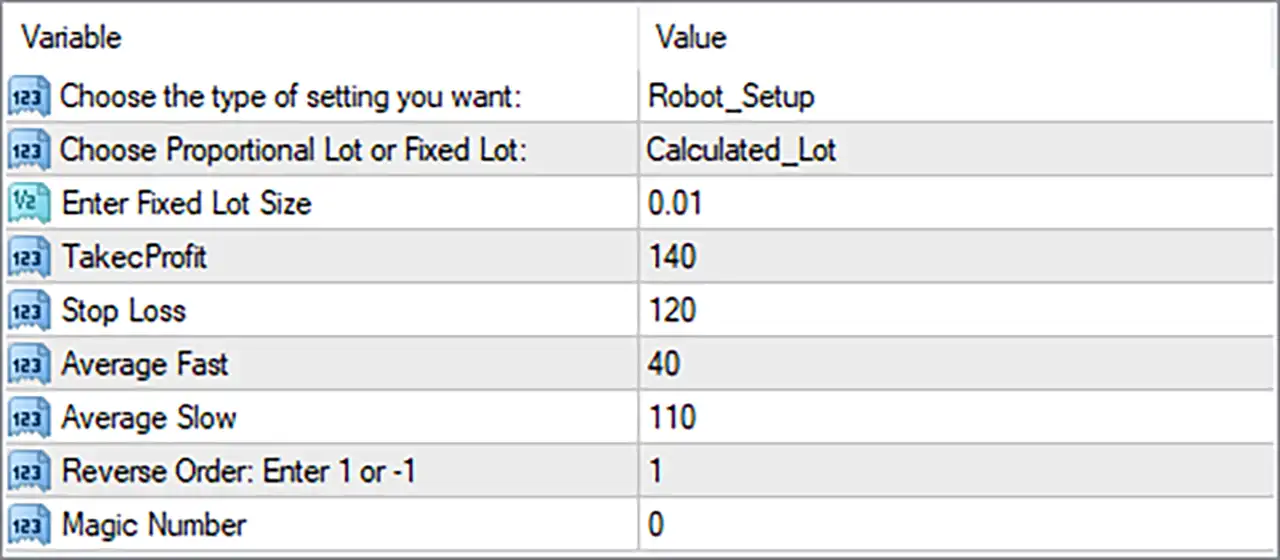
Giraffe Super Trend EA MT4 Settings Panel
⚙️ General and Lot Sizing Settings
🔹 Choose the type of setting you want = Robot_Setup: Selects the Robot_Setup configuration mode, which appears to control the EA’s setup or operating configuration. The exact differences between available modes depend on the EA’s internal implementation.
🔹 Choose Proportional Lot or Fixed Lot = Calculated_Lot: Selects Calculated_Lot as the lot-sizing method, indicating that the EA calculates trading volume rather than simply using a constant lot size for every order.
🔹 Enter Fixed Lot Size = 0.01: Sets the fixed-lot reference to 0.01 lots. This value is relevant when a fixed-lot mode is selected; its role while Calculated_Lot is active depends on the EA’s programming.
⚙️ Take Profit and Stop Loss Settings
🔹 TakecProfit = 140: Sets the Take Profit parameter to 140, defining the configured profit-taking distance or threshold for a trade. The actual price distance depends on whether the EA interprets this input as points, pips, or another unit.
🔹 Stop Loss = 120: Sets the Stop Loss parameter to 120, defining the configured loss-limiting distance or threshold for a trade. Confirm the unit and how the EA applies this value to individual orders before using it on a live account.
⚙️ Moving Average Settings
🔹 Average Fast = 40: Sets the fast moving-average period to 40, which may help the EA identify shorter-term price direction or changes in momentum as part of its entry logic.
🔹 Average Slow = 110: Sets the slow moving-average period to 110, potentially providing a longer-term trend reference against which the fast moving average or price action is evaluated.
⚙️ Trade Direction and Identification
🔹 Reverse Order: Enter 1 or -1 = 1: Sets the direction-control parameter to 1. The input description indicates that 1 and -1 are supported values, but the precise effect on buy and sell signals should be verified in the EA’s implementation before changing it.
🔹 Magic Number = 0: Sets the EA’s magic number to 0, a value used by MetaTrader 4 Expert Advisors to identify and distinguish their trades. If multiple EAs operate on the same account, verify whether this EA supports 0 and consider using distinct identifiers where appropriate.
🔢 Conclusion
The current Giraffe Super Trend EA MT4 configuration includes nine inputs covering setup mode, lot sizing, trade exits, moving-average periods, trade direction, and order identification.
🔹 Lot sizing: Calculated_Lot is selected, while the fixed-lot reference remains 0.01.
🔹 Trade exits: Take Profit is 140 and Stop Loss is 120; their units must be confirmed before live deployment.
🔹 Trend parameters: The fast and slow moving-average periods are 40 and 110, respectively.
🔹 Trade direction: The reverse-order parameter is set to 1.
🔹 Trade identification: The magic number is 0; confirm that this value is compatible with the EA and the other automated strategies on the account.
These values should be tested in MetaTrader 4’s Strategy Tester and on a demo account before live trading. Particular attention should be given to the calculated-lot formula, the units used for Take Profit and Stop Loss, and the behavior of the reverse-order setting. Automated trading carries financial risk, and the listed settings do not guarantee profitability.
User Reviews
Only logged in customers who have purchased this product may leave a review.
❓ What is Giraffe Super Trend EA MT4?
A trend based Expert Advisor for MetaTrader 4 that uses moving averages, MACD and the trend of larger timeframes to enter orders.
❓ Which timeframes does Giraffe Super Trend EA MT4 use?
M30 and H1.
❓ Which pairs suit Giraffe Super Trend EA MT4?
Several major pairs are listed, including USDCHF, EURUSD, USDCAD, AUDUSD, EURGBP and EURJPY.
❓ What is the reverse option in Giraffe Super Trend EA MT4?
A setting that lets the EA enter in the opposite direction of the standard signal.
❓ How is lot size set in Giraffe Super Trend EA MT4?
By a fixed lot, a calculated lot or an internal proportional method that follows the account balance.
❓ Does Giraffe Super Trend EA MT4 use a stop loss?
Yes. Each position carries a stop loss and a take profit set by price distance.
❓ Does Giraffe Super Trend EA MT4 have a spread filter?
Yes. It blocks entries when the spread is higher than the allowed level.
-
 Original price was: $2,000.00.$249.00Current price is: $249.00.
 -
 Original price was: $1,450.00.$249.00Current price is: $249.00.
 -
 Original price was: $2,000.00.$249.00Current price is: $249.00.
 -
 Original price was: $3,175.00.$249.00Current price is: $249.00.
-
 0Original price was: $290.00.$179.00Current price is: $179.00.
 -
 1Original price was: $500.00.$249.00Current price is: $249.00.
 -
 0Original price was: $778.00.$249.00Current price is: $249.00.
 -
 0Original price was: $500.00.$199.00Current price is: $199.00.
There are no reviews yet.