


🔢 EA Trade ATR Plus MT4 Settings Guide: Complete Input Parameters Explained
EA Trade ATR Plus MT4 is an automated trading Expert Advisor that uses Average True Range (ATR)-based parameters to configure trade protection and profit targets. Its input settings include a fixed-lot option, an ATR reference value, a Stop Loss multiplier, a Take Profit ratio, a balance-based lot calculation setting, and trading-hour restrictions.
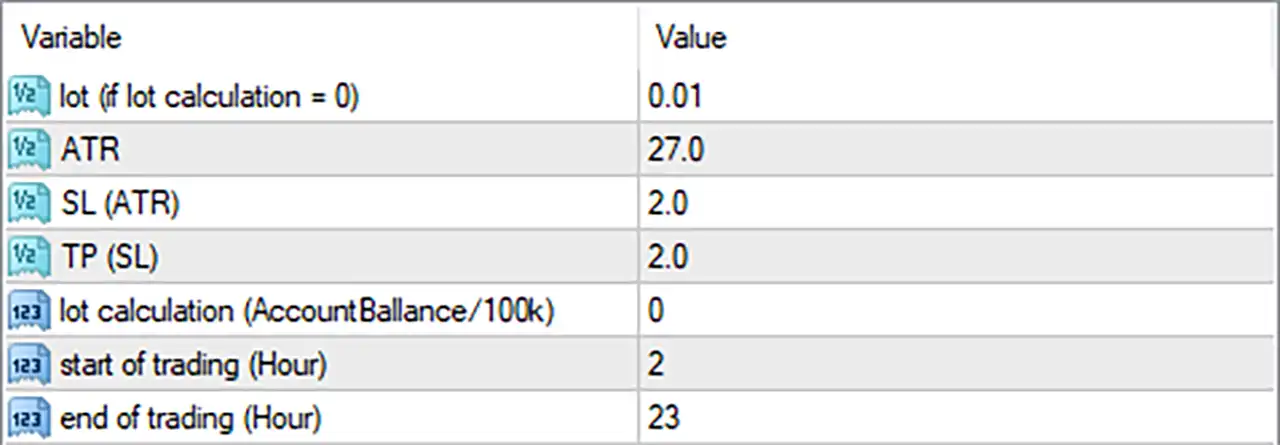
The current configuration uses a reference lot size of 0.01, an ATR value of 27.0, an ATR Stop Loss multiplier of 2.0, and a Take Profit ratio of 2.0. Understanding these inputs helps traders evaluate how the EA may calculate position sizes, establish trade exits, and control its trading schedule in MetaTrader 4.
⚙️ Lot Size and Position Sizing Settings
🔹 lot (if lot calculation = 0) = 0.01: Sets the fixed lot size to 0.01 when the lot calculation parameter is set to 0, providing the default trade volume for fixed-lot operation.
🔹 lot calculation (AccountBalance/100k) = 0: Selects the lot calculation mode using the value 0; based on the parameter description, this appears to disable the balance-based calculation and use the fixed lot size instead, although the precise behavior depends on the EA's internal logic.
⚙️ ATR-Based Stop Loss and Take Profit Settings
🔹 ATR = 27.0: Sets the ATR-related input to 27.0, which may serve as a volatility reference for calculating trade protection or exit distances; the exact role of this value depends on how the EA implements its ATR calculation.
🔹 SL (ATR) = 2.0: Sets the Stop Loss multiplier to 2.0, indicating that the EA may calculate the Stop Loss distance as twice its configured ATR reference when using ATR-based stop management.
🔹 TP (SL) = 2.0: Sets the Take Profit ratio to 2.0, indicating a potential reward-to-risk relationship of 2:1, where the target distance is twice the Stop Loss distance if the EA applies this parameter as a direct multiplier.
⚙️ Trading Time Settings
🔹 start of trading (Hour) = 2: Sets the trading start hour to 2, meaning the EA is configured to begin its permitted trading period at hour 02:00 according to the time reference used by the EA, commonly the broker's server time.
🔹 end of trading (Hour) = 23: Sets the trading end hour to 23, defining the end of the permitted trading period at hour 23:00 according to the EA's configured time reference.
🔢 Conclusion
The EA Trade ATR Plus MT4 settings provide a straightforward configuration for position sizing, volatility-based trade exits, and trading-hour control.
🔹 Position sizing: The fixed lot size is 0.01, and the balance-based lot calculation input is 0.
🔹 Volatility reference: The ATR input is 27.0, with a Stop Loss multiplier of 2.0.
🔹 Profit target: The Take Profit ratio is 2.0, potentially targeting twice the Stop Loss distance.
🔹 Trading schedule: The configured trading window starts at hour 2 and ends at hour 23.
Before using these settings on a live account, verify the EA's lot calculation logic, the unit used by the ATR input, the precise interpretation of the Take Profit ratio, and the broker time zone. Backtesting and demo trading can help assess the configuration under different market conditions. No parameter combination guarantees profitable trading.


