




EagleEye EA MT4 (Latest version) - Unlimited

Subscriptions for Special Plan
- 30 EA package is more economical!
- Special package with 99%
- Download 1 EA/Day

Subscriptions for Premium Membership
- Download Unlimited in 1 Year
- Get 100% Discount
- Get free access to all

Subscriptions for Gold Membership
- 1 Year Membership
- Get 100% Discount
- Access EA+Indicator+Course
Frequently bought together 🎁
Add these products to enhance your purchase


Quick Overview
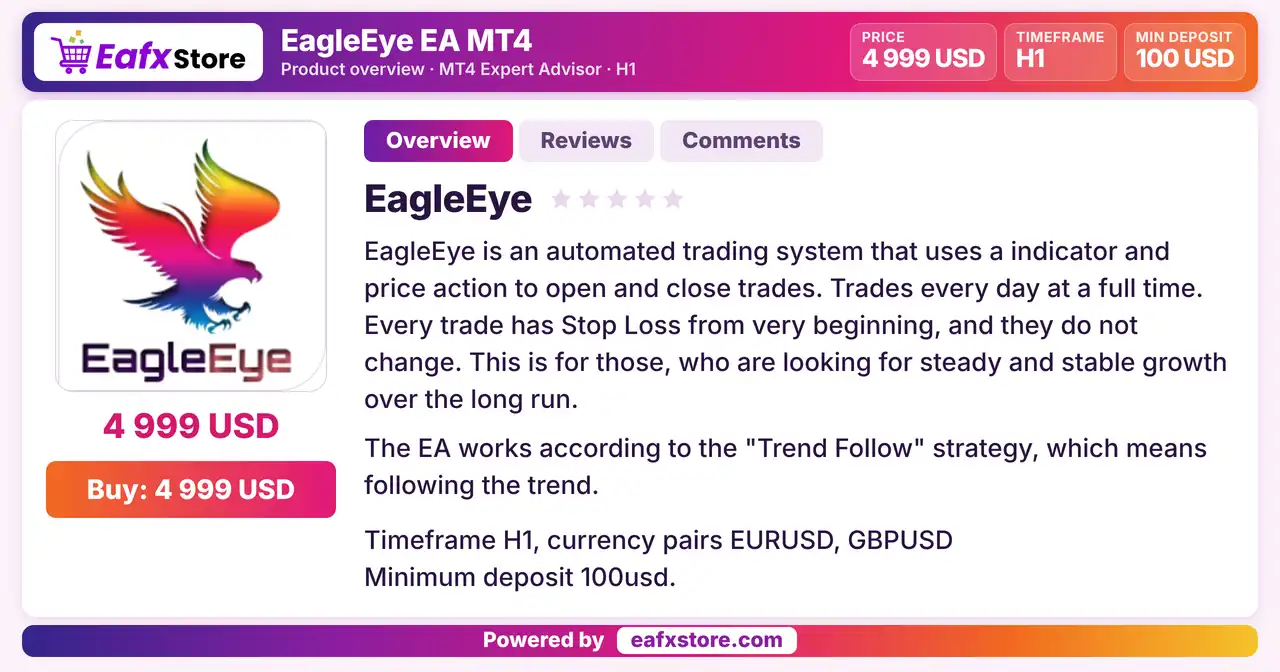
EagleEye EA is an automated Expert Advisor (EA) for MetaTrader 4 that uses an indicator and price action to open and close trades, following the trend on the H1 chart. It is described as using a stop loss on every trade from the start and no grid, martingale or hedge methods, and it offers fixed or risk based lots with trailing and break-even settings.
Best For:
✅ Trend followers on the H1 chart.
✅ EURUSD and GBPUSD traders.
✅ Users who want a stop on every trade.
✅ Traders who want no Grid or Martingale.
✅ Users starting with a small deposit.
What is EagleEye EA MT4?
EagleEye EA is an Expert Advisor (EA) for MetaTrader 4. It uses an indicator and price action to open and close trades, following the trend on the H1 chart.
It offers money management settings, order management settings and a hard stop loss on every position.
⭐ Vendor Website: View here
⭐ Delivery time 24h-48h after payment.
⭐ Refund if not delivered.
⭐ You will receive the current version without any limitations (ID+Time).
EagleEye EA MT4 Review
How Does EagleEye EA MT4 Work?
Trend Follow Logic
The EA follows the trend with an indicator and price action on the H1 chart.
Stop Loss
Every position has a stop loss from the very beginning.
Order Management
Trailing stop, trailing step, break-even, maximum orders, slippage and magic number can be set.
Money Management
A fixed lot or a percentage based automatic lot can be used, with minimum and maximum lot limits.
Historical Trading Results Performance
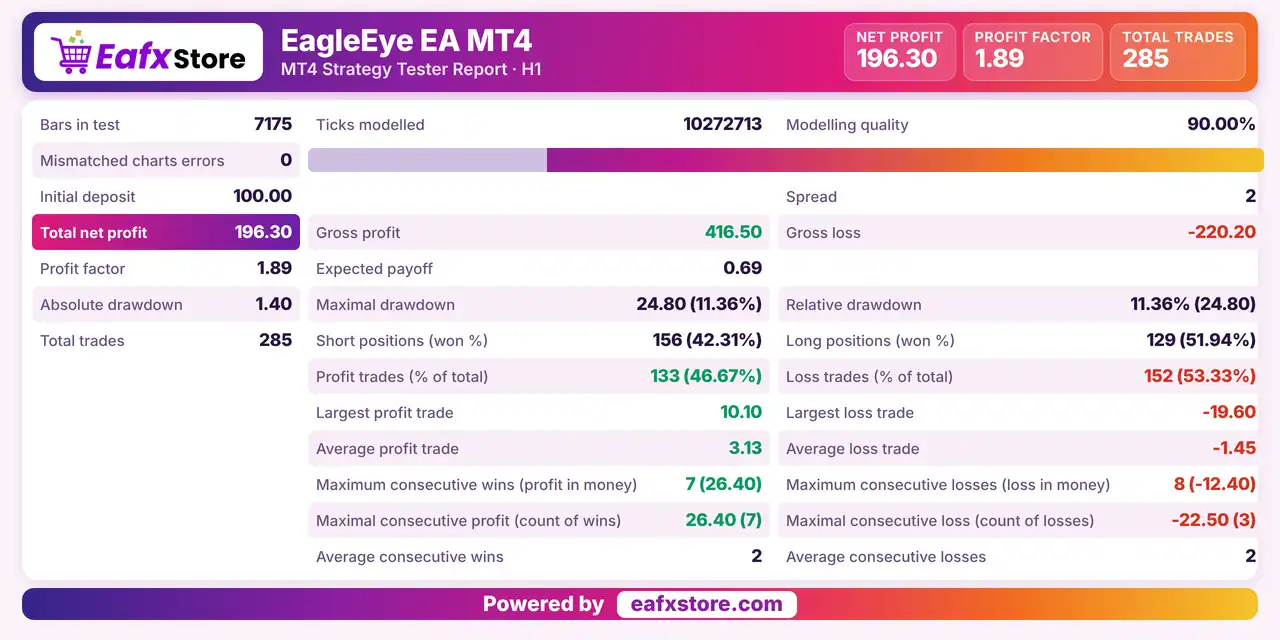
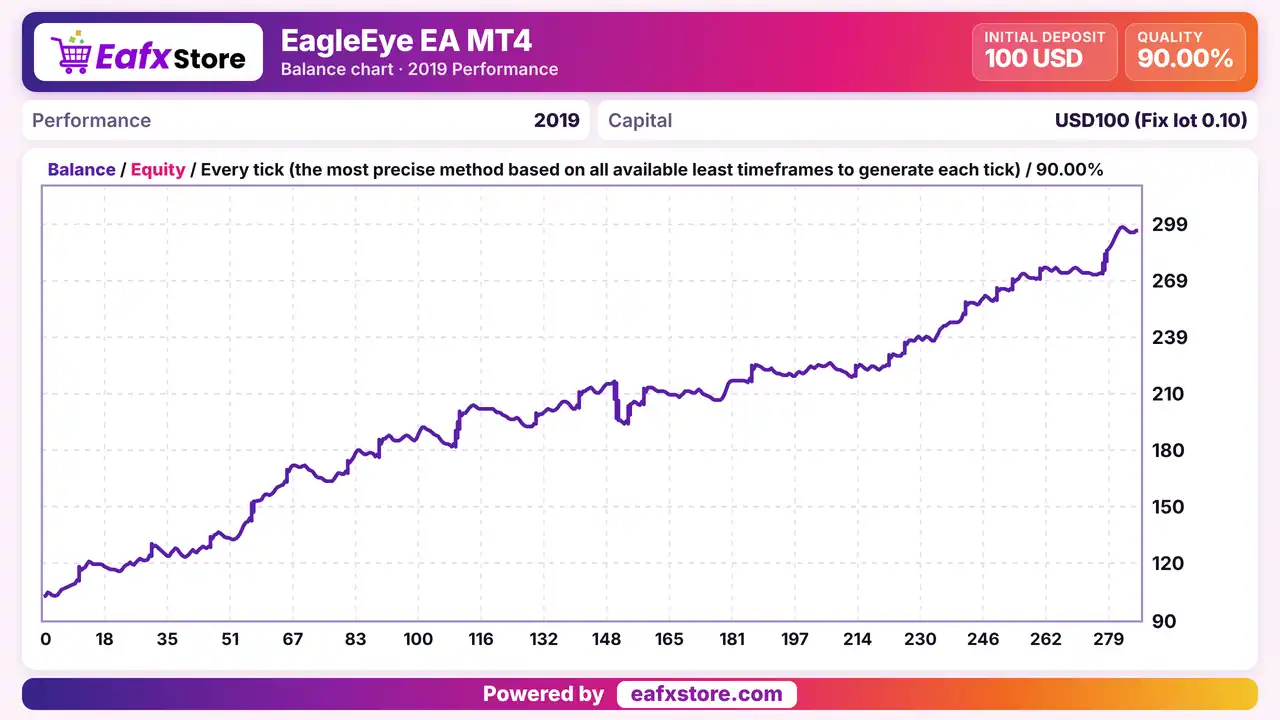
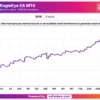
EagleEye EA was backtested using the H1 timeframe, achieving a net profit of $196.30 from an initial deposit of $100. The report records 285 trades and a profit factor of 1.89.
EagleEye EA MT4 Backtest Results
EagleEye EA Backtest Results
| Parameter | Results |
|---|---|
| Initial Deposit | $100 |
| Total Net Profit | $196.30 |
| Profit Factor | 1.89 |
| Total Trades | 285 |
| Maximal Drawdown | 11.36% |
Key Features of EagleEye EA MT4
Trend Follow Strategy
The EA follows the trend on the H1 chart, trading every day without fixed blackout times, according to the product description.
Hard Stop Loss on Each Position
Each trade carries a stop loss from the start, and it is described as not being changed, which keeps the loss limit simple.
Risk Based or Fixed Lots
A fixed lot or an automatic lot from a percentage of the deposit can be chosen, with minimum and maximum lot size limits.
Trailing Stop and Break-even
Trailing with its own step and a break-even option let traders protect open profit once a trade moves in their favor.
Maximum Orders Control
A limit on the number of orders keeps the EA from opening too many trades at once, which keeps the exposure easier to manage.
Strengths and Limitations
Strengths
🔹 Clear risk rules: a stop on each trade, a limit on orders and no martingale or grid methods give a simple risk framework.
🔹 Flexible money management: fixed lots and risk based lots with minimum and maximum limits suit accounts of different sizes.
🔹 Profit protection tools: trailing stop and break-even settings are available for traders who want to protect open gains.
🔹 Easy to set up: the product is described as easy to install, and the short parameter list reduces the chance of wrong settings.
Limitations
🔹 Rules not detailed: the product mentions an indicator and price action but does not name them, so the exact logic must be learned by testing.
🔹 Unclear stop wording: the text says stops do not change, yet trailing and break-even settings exist, so how these work together needs a demo check.
🔹 Unverified claims: statements about steady growth and little sensitivity to broker conditions are not backed by published reports.
🔹 No published performance: the product information includes no backtest or live report, so no returns or drawdown figures can be quoted here.
Who Should Use EagleEye EA MT4?
H1 Trend Traders
People who want a plain trend following robot for EURUSD, GBPUSD or other trending pairs on the hourly chart.
Cautious Account Owners
Traders who value a stop on every trade and no grid, martingale or hedge methods in their robot.
Small Account Testers
Users who start with a small deposit and will check each setting on a demo account before real use.
Not for Traders Who
Want a fully explained strategy, very fast trading or any guaranteed profit from an automated system.
Recommended Trading Conditions
Recommended settings and parameters to pay attention to from developers and experts:
| Features | Type |
|---|---|
| Trading platform | MetaTrader 4 (MT4) |
| Time frames | H1 |
| Currency pairs | EURUSD, GBPUSD |
| Minimum / Recommended deposit | $100+ |
| Minimum / Recommended leverage | 1:100+ |
| Account type | Any |
| Additional services | Unlock and Decompile |
| Recommended brokers | Exness Broker, Icmarkets Broker |
| Recommended VPS | MyfxVPS.com (Blue VPS, Golden VPS). Lowest Latency, 2 week Free Trial, 100% Free for 12-18 Months. |
Product Download Package?
The download package of the product suite includes:
✅ Experts: EagleEye EA.ex4
Final Verdict
EagleEye EA MT4 is a trend following robot for the H1 chart that uses an indicator and price action, puts a hard stop loss on every trade and offers fixed or risk based lots with trailing and break-even settings. It is described as avoiding grid, martingale and hedge methods, which suits cautious traders who start with a small deposit and want simple rules. The exact rules are not named, the stable growth claim is unverified and no results are published, so a demo test on a small size should come first.
🔢 EagleEye EA MT4 Settings Guide: Complete Inputs Explained
EagleEye EA MT4 is an automated trading Expert Advisor designed for the MetaTrader 4 platform. Its input settings focus on money management, position sizing, order execution, and trade management, including stop-loss protection, take-profit targets, trailing stops, break-even functionality, and order limits.
The supplied Inputs panel organizes the configuration into two main sections: Money Management and Order Management. Understanding these parameters helps traders adjust position sizes, manage potential losses, and configure trade exits according to their account requirements and trading objectives.
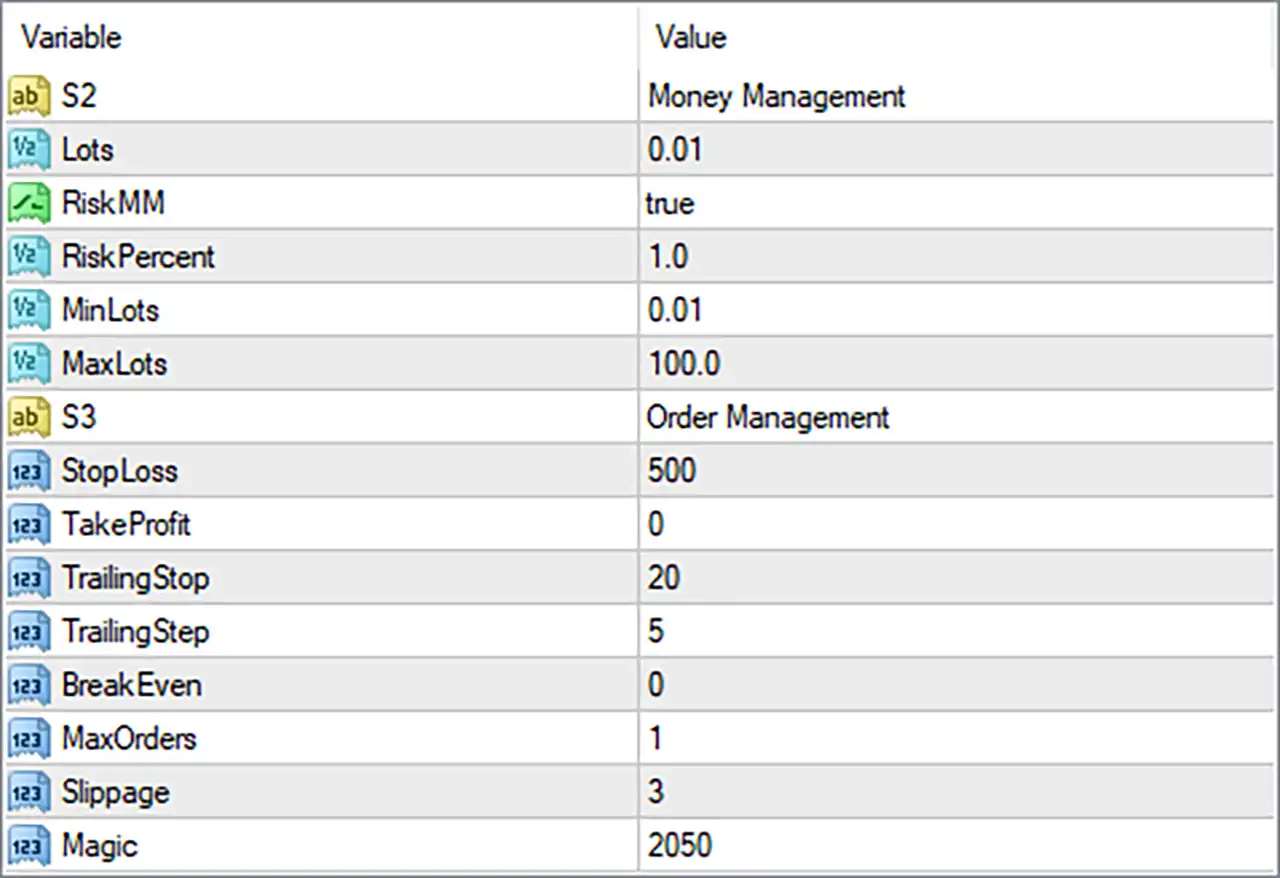
EagleEye EA MT4 Settings Panel
⚙️ Money Management Settings
🔹 Lots = 0.01: Sets the configured lot size to 0.01 lots. This value represents a micro-lot in many forex trading contexts, although the actual contract size and monetary exposure depend on the broker and trading instrument.
🔹 RiskMM = true: Enables the EA’s risk-based money management feature. When active, the robot may calculate position sizes according to its programmed risk management formula rather than relying exclusively on a fixed lot size.
🔹 RiskPercent = 1.0: Sets the risk percentage parameter to 1.0. If the EA uses this input to determine the percentage of account capital at risk per trade, it may represent a 1% risk setting. The actual calculation depends on the EA’s implementation and should be verified before live trading.
🔹 MinLots = 0.01: Sets the minimum permitted lot size in the EA’s position-sizing logic to 0.01 lots. This parameter may prevent calculated order volumes from falling below the configured minimum, subject to broker trading requirements.
🔹 MaxLots = 100.0: Sets the maximum lot size allowed by the EA’s lot-sizing configuration to 100.0 lots. This is a software parameter rather than a guarantee that the broker will accept an order of this size; broker-specific volume limits still apply.
⚙️ Order Management Settings
🔹 StopLoss = 500: Sets the stop-loss parameter to 500 units. If implemented as a conventional stop-loss distance, it defines the configured distance at which a trade may be closed to limit losses. The unit, such as points or pips, must be confirmed from the EA’s documentation or source code.
🔹 TakeProfit = 0: Sets the take-profit parameter to 0. In many Expert Advisors, a value of 0 disables the fixed take-profit target. Confirm the EA’s implementation to determine whether trades instead rely on trailing stops, other exit conditions, or alternative management rules.
🔹 TrailingStop = 20: Sets the trailing-stop parameter to 20 units. When trailing-stop management is active, this value may determine the distance maintained between the market price and the stop-loss. The exact unit and activation behavior depend on the EA’s programming.
🔹 TrailingStep = 5: Sets the trailing-stop adjustment step to 5 units. This may specify the minimum favorable price movement required before the EA updates the trailing stop, helping control how frequently the stop-loss level changes.
🔹 BreakEven = 0: Sets the break-even parameter to 0. Depending on the EA’s implementation, zero may disable automatic break-even movement or indicate that no additional break-even threshold has been specified. Verify the exact behavior before relying on this feature.
🔹 MaxOrders = 1: Limits the EA to a configured maximum of 1 order under its order-counting rules. This setting may restrict the number of simultaneous orders managed by the robot, although the precise scope—such as per symbol, per direction, or per Magic number—depends on the EA’s code.
🔹 Slippage = 3: Sets the permitted slippage parameter to 3 units during order execution. This controls the allowable difference between the requested and executed price if the EA applies the setting conventionally. The unit and broker-specific interpretation should be confirmed.
🔹 Magic = 2050: Assigns the trade identifier 2050 to orders managed by EagleEye EA MT4. This Magic Number helps the EA identify its own trades and distinguish them from manually opened positions or trades managed by other Expert Advisors.
🔢 Conclusion
The EagleEye EA MT4 settings provide essential controls for position sizing, risk management, and automated trade handling. The supplied configuration uses Lots = 0.01, RiskMM = true, RiskPercent = 1.0, StopLoss = 500, TrailingStop = 20, TrailingStep = 5, and MaxOrders = 1.
Several settings deserve particular attention. RiskMM = true enables the EA’s risk-based money management option, while TakeProfit = 0 may indicate that a fixed profit target is disabled. The trailing-stop configuration uses TrailingStop = 20 and TrailingStep = 5, while BreakEven = 0 may disable or alter break-even behavior depending on the implementation.
Before using EagleEye EA MT4 on a live account, confirm the units for StopLoss, TrailingStop, TrailingStep, and Slippage. Also verify how the EA calculates risk-based lot sizes and interprets MaxOrders. Backtesting and demo forward testing can help assess whether these settings suit your account size, broker conditions, and risk tolerance. No EA configuration guarantees profits or eliminates trading risk.
User Reviews
Only logged in customers who have purchased this product may leave a review.
❓ What is EagleEye EA MT4?
A trend following Expert Advisor for MetaTrader 4 that uses an indicator and price action on the H1 chart.
❓ Which timeframe does EagleEye EA MT4 use?
H1
❓ Which pairs does EagleEye EA MT4 trade?
EURUSD and GBPUSD are named, and other trending pairs are said to work with separate testing.
❓ Does EagleEye EA MT4 use a stop loss?
Yes. Every position has a hard stop loss from the start.
❓ Is EagleEye EA MT4 a grid or martingale EA?
The product states that no martingale, grid or hedge methods are used. A demo test helps confirm this before real money is used.
❓ How is lot size set in EagleEye EA MT4?
By a fixed lot or by an automatic calculation from a percentage of the deposit, with minimum and maximum lot limits.
❓ Does EagleEye EA MT4 have a trailing stop?
Yes. Trailing stop, trailing step and break-even settings are available.
❓ Can EagleEye EA MT4 limit the number of orders?
Yes. A maximum order setting limits how many trades can be open.
-
 Original price was: $4,999.00.$249.00Current price is: $249.00.
 -
 Original price was: $4,500.00.$249.00Current price is: $249.00.
 -
 Original price was: $4,999.00.$249.00Current price is: $249.00.
 -
 Original price was: $28,000.00.$249.00Current price is: $249.00.
-
 0Original price was: $290.00.$179.00Current price is: $179.00.
 -
 1Original price was: $500.00.$249.00Current price is: $249.00.
 -
 0Original price was: $199.00.$179.00Current price is: $179.00.
 -
 0Original price was: $430.00.$249.00Current price is: $249.00.
There are no reviews yet.