



USA Rules TradeBot MT4 (Latest version) - Unlimited

Subscriptions for Special Plan
- 30 EA package is more economical!
- Special package with 99%
- Download 1 EA/Day

Subscriptions for Premium Membership
- Download Unlimited in 1 Year
- Get 100% Discount
- Get free access to all

Subscriptions for Gold Membership
- 1 Year Membership
- Get 100% Discount
- Access EA+Indicator+Course
Frequently bought together 🎁
Add these products to enhance your purchase




Quick Overview
USA Rules TradeBot is an automated Expert Advisor (EA) for MetaTrader 4 that can be used on currencies, indices, metals, commodities, stocks and crypto. It enters in the direction of the trend using the directional indicators of the ADX, opens more trades with pending orders, and manages risk with a stop loss and trailing stop.
Best For:
✅ Trend followers on MetaTrader 4.
✅ Users who want a multi market EA.
✅ Traders who like pending order entries.
✅ Users who want email signal alerts.
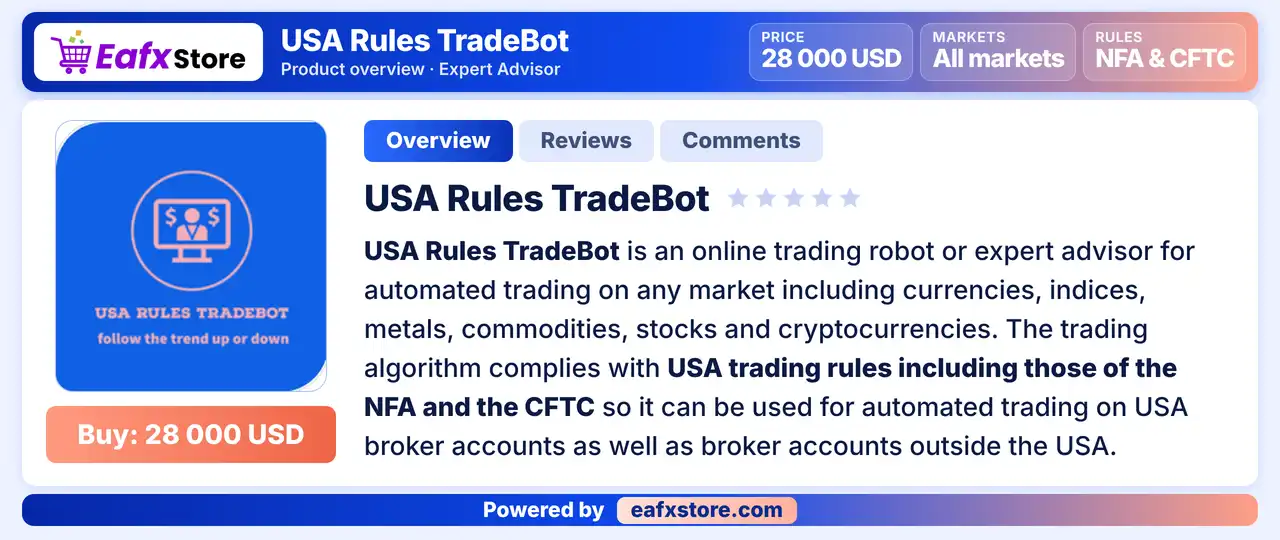
What is USA Rules TradeBot MT4?
USA Rules TradeBot is an Expert Advisor (EA) for MetaTrader 4. It trades with the trend using the directional indicators of the Average Directional Movement Index.
It opens more trades with pending orders and uses a stop loss and a trailing stop to manage the downside risk.
 Vendor Website: View here
Delivery time 24h-48h after payment.
Refund if not delivered.
You will receive the current version without any limitations (ID+Time).
USA Rules TradeBot MT4 Review
How Does USA Rules TradeBot MT4 Work?
Trend Entry
The first trade opens in the direction of the trend, read from the ADX directional indicators.
Pending Orders
More trades are added through pending orders that trigger as price follows the trend.
Exits
A stop loss, an optional take profit and a trailing stop close trades, and a trend change reverses positions.
Risk and Reward Limits
A risk percent stops trading after a chosen loss, and a reward percent closes all trades after a chosen gain.
Trading Strategy
Enter with the Trend
The first trade opens in the direction of the trend, which is read from the directional indicators of the Average Directional Movement Index.
Add Trades with Pending Orders
After the first entry, more trades follow the trend through pending orders that trigger as price moves in that direction.
Limit Risk and Reward
A risk setting stops trading after a chosen loss of the capital, and a reward setting closes all trades once a chosen gain is reached.
Exit with Stop and Trailing
A stop loss, an optional take profit and a trailing stop close trades, and the stop also reverses positions when the trend changes.
Move Pending Orders
An optional trailing entry shifts the pending orders up or down so they stay at a set distance from the current price.
Historical Trading Results Performance
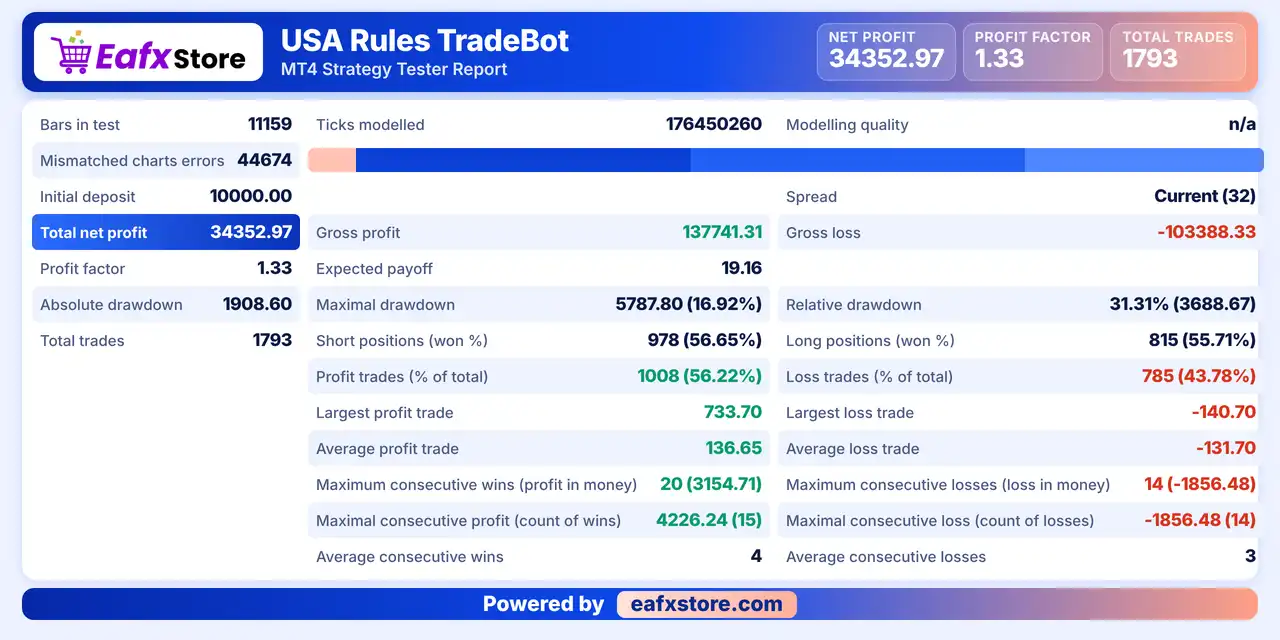
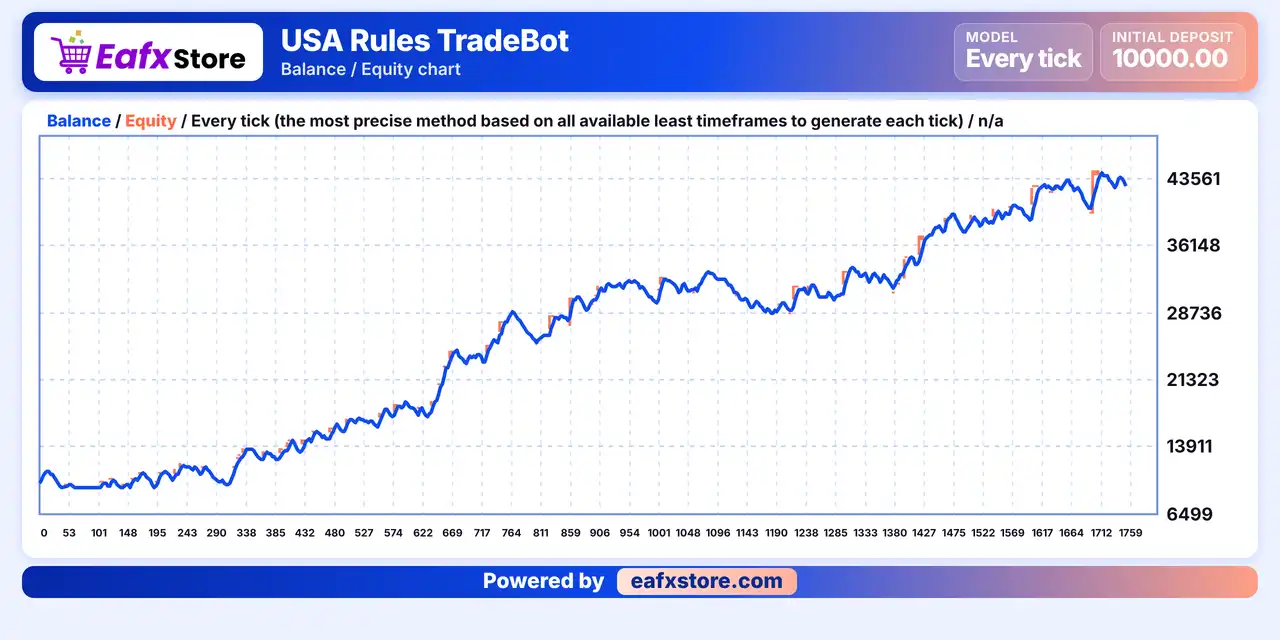
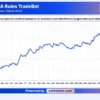
USA Rules TradeBot was backtested on a single trading symbol, recording a net profit of $34,352.97 from a $10,000 initial deposit. The report shows 1,793 trades and a profit factor of 1.33.
USA Rules TradeBot MT4 Backtest Results
USA Rules TradeBot Backtest Results
| Parameter | Results |
|---|---|
| Initial Deposit | $10,000 |
| Total Net Profit | $34,352.97 |
| Profit Factor | 1.33 |
| Total Trades | 1,793 |
| Winning Trades | 56.22% |
| Maximal Drawdown | 16.92% |
| Relative Drawdown | 31.31% |
Key Features of USA Rules TradeBot MT4
Directional Indicator Entries
Entries rely on the directional indicators of the ADX, which gives the EA a clear and widely known way to read trend direction.
Pending Order Trend Following
More trades are opened with pending orders in the direction of the trend, with a set interval between trades in fractional pips.
Stop Loss and Trailing Stop
A stop loss is used by default, and a trailing stop can follow profit, which mitigates downside risk as described by the product.
Reward and Risk Percent Limits
The EA can stop after a chosen loss percentage and close all trades after a chosen gain percentage to turn floating profit into cash.
Flexible Lot Sizing
A fixed lot size or a lot per amount of capital can be used, which lets traders adapt the volume to the size of the account.
Risk Management
The Default Risk Limit Is Very High
A large allowed loss means the account can fall far before the EA stops, so a lower value is wise.
Pending Orders Can Stack Trades
Adding positions in the trend direction raises exposure, and a sudden reversal can hit several trades at once.
A Stop Loss Can Still Slip
Gaps and fast moves can pass the stop-loss level, so the real loss can be larger than planned.
Targets May Not Be Reached
The take profit is off by default, and a take-profit may never be touched in a choppy market.
Who Should Use USA Rules TradeBot MT4?
Trend Following Traders
People who like ADX based entries and pending orders that follow the direction of the market.
Multi Market Users
Traders who want one EA to test on forex, metals, indices or crypto after adjusting the values.
Careful Testers
Users who will lower the risk setting and check each parameter on a demo account before using real money.
Not for Traders Who
Want fixed settings that fit every market, a proven track record or any guaranteed profit from an EA.
Recommended Trading Conditions
Recommended settings and parameters to pay attention to from developers and experts:
| Features | Type |
|---|---|
| Trading platform | MetaTrader 4 (MT4) |
| Time frames | Any |
| Currency pairs | Currencies, indices, metals, commodities, stocks and crypto |
| Minimum / Recommended deposit | $100+ |
| Minimum / Recommended leverage | Any |
| Account type | Any |
| Additional services | Unlock and Decompile |
| Recommended brokers | Exness Broker, Icmarkets Broker |
| Recommended VPS | MyfxVPS.com (Blue VPS, Golden VPS). Lowest Latency, 2 week Free Trial, 100% Free for 12-18 Months. |
Product Download Package?
The download package of the product suite includes:
 Experts: USA Rules TradeBot.ex4
 Reviewed by David Easton
Final Verdict
USA Rules TradeBot MT4 is a trend following robot that enters with the ADX directional indicators, adds trades through pending orders and manages risk with a stop loss, trailing stop and reward and risk limits. It can be tried on many markets once the values are adjusted for each market. The default risk limit is high, the rule compliance and test result claims are unverified and added trades can stack exposure, so a demo test with lower values on a small size should come before any live trading.
🔢 USA Rules TradeBot MT4 Settings Guide: Complete Inputs Explained
USA Rules TradeBot MT4 is an automated trading Expert Advisor (EA) designed for the MetaTrader 4 platform. Its input settings provide controls for trade identification, lot sizing, execution slippage, trading intervals, risk and reward percentages, stop-loss protection, take-profit targets, trailing stops, and trailing-entry functionality.
The EA includes both fixed-lot and fractional-K options for position sizing, along with configurable trade protection and entry-management features. Understanding each parameter is important for adjusting the robot to your account size, broker execution conditions, and risk tolerance. The following guide explains all 17 settings shown in the supplied Inputs panel, preserving their exact names and default values.
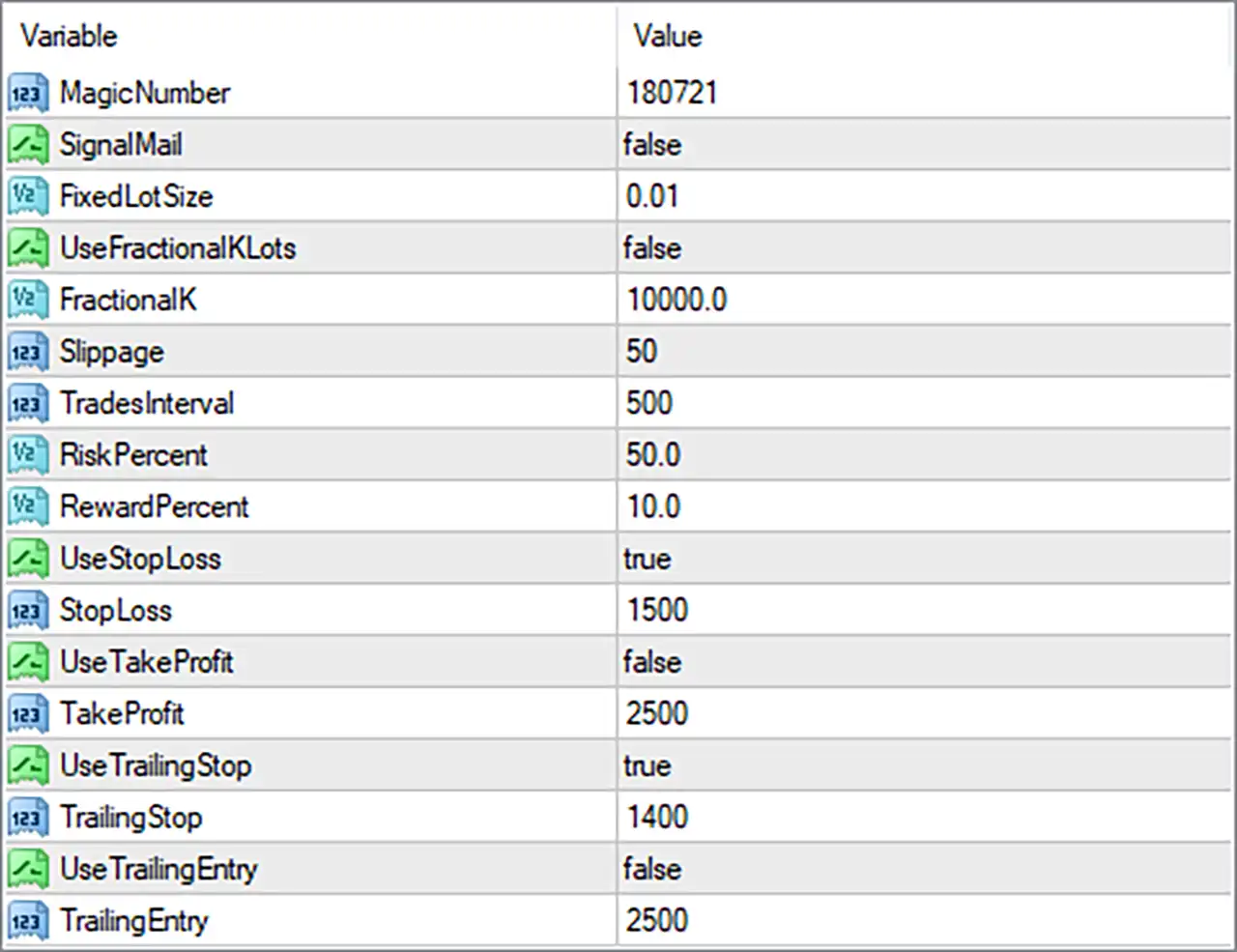
USA Rules TradeBot MT4 Settings Panel
⚙️ General Trading Settings
🔹 SignalMail = false: Disables the email notification feature. When this setting is enabled, the EA may send trading signals or notifications by email, depending on its implementation and the email configuration in MetaTrader 4.
🔹 Slippage = 50: Sets the permitted slippage parameter to 50 units when submitting or executing trades. The actual meaning depends on the EA’s order-execution code and broker quote conventions; verify whether the value is interpreted in points or another unit.
🔹 TradesInterval = 500: Sets the configured interval between trades to 500 units. This may control the minimum time or another interval condition between trade operations, but the exact unit and behavior must be confirmed from the EA’s documentation or source code.
⚙️ Money Management and Position Sizing
🔹 UseFractionalKLots = false: Disables the fractional-K lot-sizing method. With this option disabled, the EA should not use this particular method to calculate trading volume, although the precise interaction with FixedLotSize and RiskPercent depends on its programming.
🔹 FractionalK = 10000.0: Sets the fractional-K calculation parameter to 10000.0. This value is configured but the associated feature is disabled by UseFractionalKLots = false. Its exact formula and relationship to account equity, balance, or position volume require confirmation from the EA’s implementation.
🔹 RiskPercent = 50.0: Sets the risk-related percentage parameter to 50.0. If the EA interprets this as a percentage of account capital at risk, it would represent a very aggressive risk setting. However, the actual meaning may differ, so confirm the formula before trading and do not assume it automatically means 50% risk per trade.
🔹 RewardPercent = 10.0: Sets the reward-related percentage parameter to 10.0. This may be used in a profit-target or reward calculation, depending on the EA’s design. The exact relationship between RewardPercent and TakeProfit must be verified in the source code or documentation.
⚙️ Stop-Loss and Take-Profit Settings
🔹 StopLoss = 1500: Sets the stop-loss parameter to 1500 units. The Inputs panel does not specify whether these units represent points, pips, ticks, or another distance measurement, so verify the EA’s calculation and the broker’s instrument specifications before use.
🔹 UseTakeProfit = false: Disables the take-profit feature. Although a TakeProfit value is configured, the EA’s dedicated take-profit function is switched off under this setting, unless another internal exit mechanism uses the value independently.
🔹 TakeProfit = 2500: Sets the configured take-profit parameter to 2500 units. Because UseTakeProfit = false, this value may not control the standard take-profit exit while the feature remains disabled. Its unit and any alternative use depend on the EA’s implementation.
⚙️ Trailing Stop and Trailing Entry Settings
🔹 TrailingStop = 1400: Sets the trailing-stop parameter to 1400 units. This value may define the trailing distance or another trailing-stop threshold. Its exact meaning and measurement unit should be confirmed before enabling the EA on a live account.
🔹 UseTrailingEntry = false: Disables the trailing-entry feature. The EA will not use this particular entry mechanism while the option remains false, although other entry rules may continue operating normally.
🔹 TrailingEntry = 2500: Sets the trailing-entry parameter to 2500 units. This value is configured but the feature is disabled by UseTrailingEntry = false. Depending on the EA’s logic, it may define a distance or threshold used to adjust an entry price or trigger a pending entry when the feature is enabled.
🔢 Conclusion
The USA Rules TradeBot MT4 settings provide configurable controls for trade identification, execution, position sizing, risk-related calculations, stop-loss protection, profit targets, and automated trade management.
The supplied configuration uses FixedLotSize = 0.01, RiskPercent = 50.0, RewardPercent = 10.0, StopLoss = 1500, TakeProfit = 2500, and TrailingStop = 1400. The stop-loss and trailing-stop features are enabled, while the standard take-profit, fractional-K lot sizing, email notifications, and trailing-entry features are disabled.
Pay particular attention to RiskPercent = 50.0. If this represents the percentage of account capital risked per trade, the setting could expose the account to substantial losses. Confirm the EA’s actual risk calculation before using it. Also verify the units for Slippage = 50, TradesInterval = 500, StopLoss = 1500, TakeProfit = 2500, TrailingStop = 1400, and TrailingEntry = 2500.
Before live deployment, test the EA on historical data and a demo account, evaluate maximum drawdown, and ensure that its position sizing and order-management behavior match your risk tolerance. No EA settings can guarantee profitability or eliminate trading risk.
User Reviews
Only logged in customers who have purchased this product may leave a review.
❓ What is USA Rules TradeBot MT4?
An Expert Advisor for MetaTrader 4 that follows trends using the ADX directional indicators and adds trades with pending orders.
❓ Which markets can USA Rules TradeBot MT4 trade?
Currencies, indices, metals, commodities, stocks and cryptocurrencies, with settings adjusted to each market.
❓ How does USA Rules TradeBot MT4 enter trades?
In the direction of the trend, based on the directional indicators of the ADX, followed by more trades through pending orders.
❓ Does USA Rules TradeBot MT4 use a stop loss?
Yes. A stop loss and a trailing stop are on by default, and a take profit is optional.
❓ What happens when the trend changes in USA Rules TradeBot MT4?
The stop closes trades, and new trades can open in the opposite direction.
❓ Does USA Rules TradeBot MT4 comply with US trading rules?
The product states that it does. This claim should be checked with the broker before use on a US account.
❓ How is lot size set in USA Rules TradeBot MT4?
By a fixed lot size, or by a minimum lot for each amount of trading capital.
-
 Original price was: $4,999.00.$249.00Current price is: $249.00.
 -
 Original price was: $4,500.00.$249.00Current price is: $249.00.
 -
 Original price was: $4,999.00.$249.00Current price is: $249.00.
 -
 Original price was: $28,000.00.$249.00Current price is: $249.00.
-
 0Original price was: $290.00.$179.00Current price is: $179.00.
 -
 0Original price was: $500.00.$199.00Current price is: $199.00.
 -
 1Original price was: $699.00.$249.00Current price is: $249.00.
 -
 0Original price was: $430.00.$249.00Current price is: $249.00.
There are no reviews yet.