


🔢 EagleEye EA MT4 Settings Guide: Complete Inputs Explained
EagleEye EA MT4 is an automated trading Expert Advisor designed for the MetaTrader 4 platform. Its input settings focus on money management, position sizing, order execution, and trade management, including stop-loss protection, take-profit targets, trailing stops, break-even functionality, and order limits.
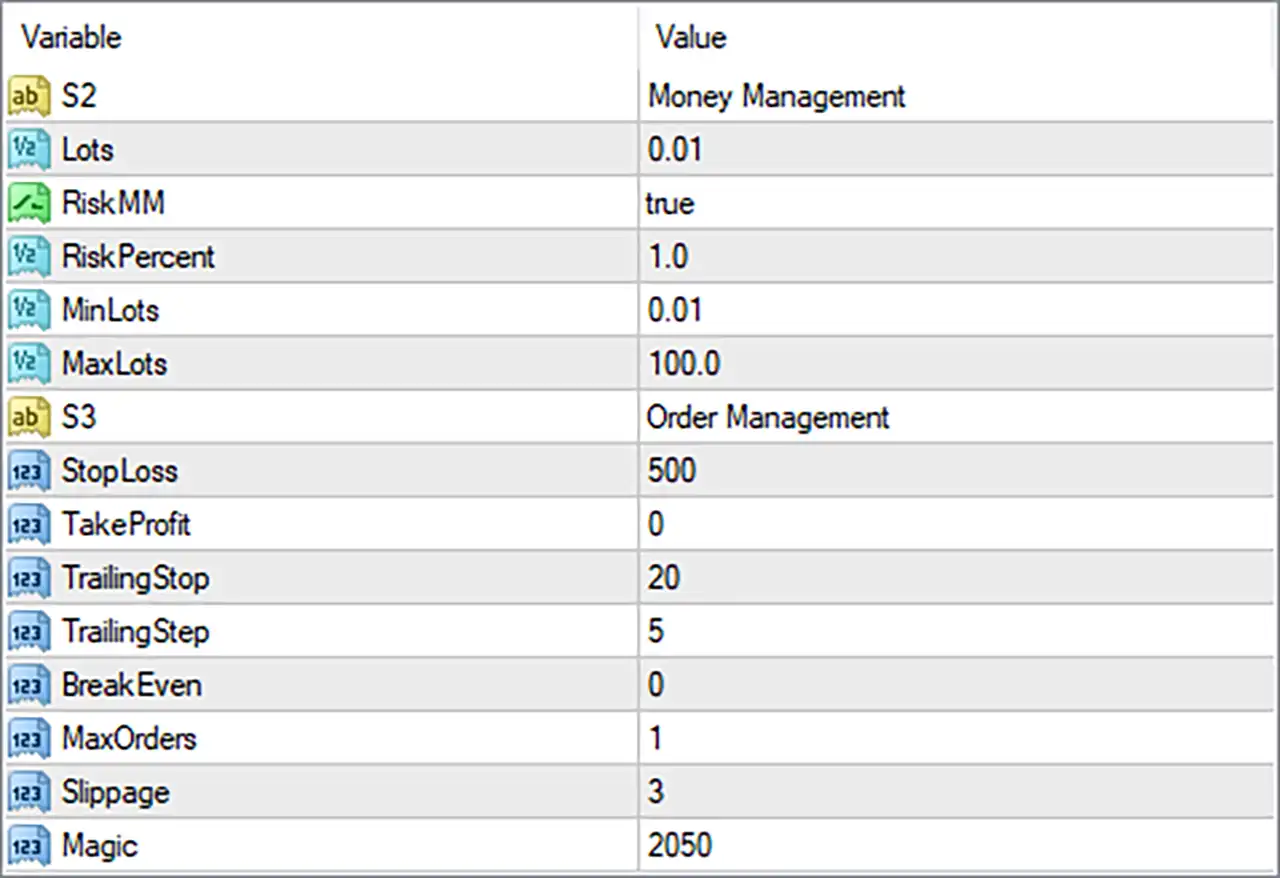
The supplied Inputs panel organizes the configuration into two main sections: Money Management and Order Management. Understanding these parameters helps traders adjust position sizes, manage potential losses, and configure trade exits according to their account requirements and trading objectives.
⚙️ Money Management Settings
🔹 Lots = 0.01: Sets the configured lot size to 0.01 lots. This value represents a micro-lot in many forex trading contexts, although the actual contract size and monetary exposure depend on the broker and trading instrument.
🔹 RiskMM = true: Enables the EA's risk-based money management feature. When active, the robot may calculate position sizes according to its programmed risk management formula rather than relying exclusively on a fixed lot size.
🔹 RiskPercent = 1.0: Sets the risk percentage parameter to 1.0. If the EA uses this input to determine the percentage of account capital at risk per trade, it may represent a 1% risk setting. The actual calculation depends on the EA's implementation and should be verified before live trading.
🔹 MinLots = 0.01: Sets the minimum permitted lot size in the EA's position-sizing logic to 0.01 lots. This parameter may prevent calculated order volumes from falling below the configured minimum, subject to broker trading requirements.
🔹 MaxLots = 100.0: Sets the maximum lot size allowed by the EA's lot-sizing configuration to 100.0 lots. This is a software parameter rather than a guarantee that the broker will accept an order of this size; broker-specific volume limits still apply.
⚙️ Order Management Settings
🔹 StopLoss = 500: Sets the stop-loss parameter to 500 units. If implemented as a conventional stop-loss distance, it defines the configured distance at which a trade may be closed to limit losses. The unit, such as points or pips, must be confirmed from the EA's documentation or source code.
🔹 TakeProfit = 0: Sets the take-profit parameter to 0. In many Expert Advisors, a value of 0 disables the fixed take-profit target. Confirm the EA's implementation to determine whether trades instead rely on trailing stops, other exit conditions, or alternative management rules.
🔹 TrailingStop = 20: Sets the trailing-stop parameter to 20 units. When trailing-stop management is active, this value may determine the distance maintained between the market price and the stop-loss. The exact unit and activation behavior depend on the EA's programming.
🔹 TrailingStep = 5: Sets the trailing-stop adjustment step to 5 units. This may specify the minimum favorable price movement required before the EA updates the trailing stop, helping control how frequently the stop-loss level changes.
🔹 BreakEven = 0: Sets the break-even parameter to 0. Depending on the EA's implementation, zero may disable automatic break-even movement or indicate that no additional break-even threshold has been specified. Verify the exact behavior before relying on this feature.
🔹 MaxOrders = 1: Limits the EA to a configured maximum of 1 order under its order-counting rules. This setting may restrict the number of simultaneous orders managed by the robot, although the precise scope—such as per symbol, per direction, or per Magic number—depends on the EA's code.
🔹 Slippage = 3: Sets the permitted slippage parameter to 3 units during order execution. This controls the allowable difference between the requested and executed price if the EA applies the setting conventionally. The unit and broker-specific interpretation should be confirmed.
🔹 Magic = 2050: Assigns the trade identifier 2050 to orders managed by EagleEye EA MT4. This Magic Number helps the EA identify its own trades and distinguish them from manually opened positions or trades managed by other Expert Advisors.
🔢 Conclusion
The EagleEye EA MT4 settings provide essential controls for position sizing, risk management, and automated trade handling. The supplied configuration uses Lots = 0.01, RiskMM = true, RiskPercent = 1.0, StopLoss = 500, TrailingStop = 20, TrailingStep = 5, and MaxOrders = 1.
Several settings deserve particular attention. RiskMM = true enables the EA's risk-based money management option, while TakeProfit = 0 may indicate that a fixed profit target is disabled. The trailing-stop configuration uses TrailingStop = 20 and TrailingStep = 5, while BreakEven = 0 may disable or alter break-even behavior depending on the implementation.
Before using EagleEye EA MT4 on a live account, confirm the units for StopLoss, TrailingStop, TrailingStep, and Slippage. Also verify how the EA calculates risk-based lot sizes and interprets MaxOrders. Backtesting and demo forward testing can help assess whether these settings suit your account size, broker conditions, and risk tolerance. No EA configuration guarantees profits or eliminates trading risk.


