






FxGold Marathon Breakout EA MT4 (Latest version) - Unlimited

Subscriptions for Special Plan
- 30 EA package is more economical!
- Special package with 99%
- Download 1 EA/Day

Subscriptions for Premium Membership
- Download Unlimited in 1 Year
- Get 100% Discount
- Get free access to all

Subscriptions for Gold Membership
- 1 Year Membership
- Get 100% Discount
- Access EA+Indicator+Course
Frequently bought together 🎁
Add these products to enhance your purchase




Quick Overview
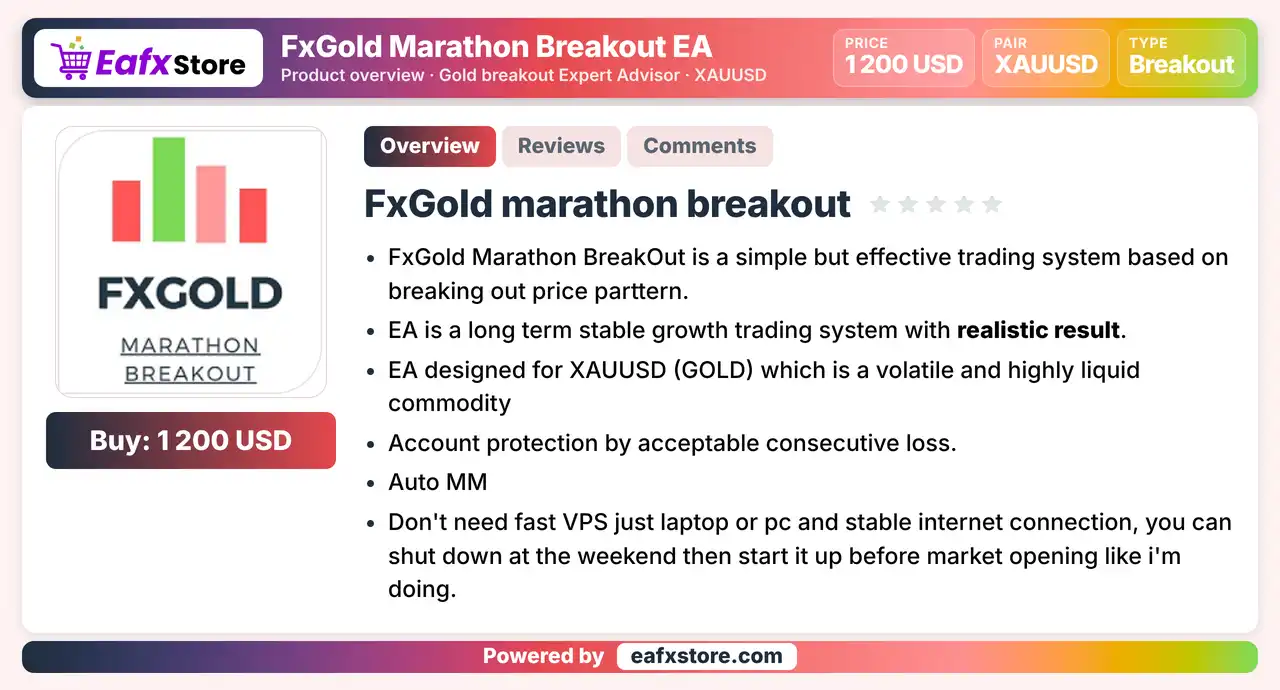
FxGold Marathon Breakout EA is a breakout Expert Advisor (EA) for MetaTrader 4 made for XAUUSD on the H1 chart. Every position carries a stop loss, a take profit and a trailing stop based on ATR volatility, so exits follow market conditions. Lot size follows the chosen risk per trade, and the EA stops after a set number of consecutive losses.
Best For:
✅ Gold traders who like breakout systems.
✅ Traders who accept long losing streaks.
✅ Users who want ATR based stops and targets.
✅ Traders with an ECN low spread broker.
✅ Users who prefer patient H1 trading.
What is FxGold Marathon Breakout EA MT4?
FxGold Marathon Breakout EA is an automated trading Expert Advisor (EA) developed for the MetaTrader 4 (MT4) platform, specifically designed to trade Gold (XAUUSD) using a breakout trading strategy. It identifies potential breakout opportunities in the gold market and executes trades automatically based on predefined trading rules.
Each trading position is protected by an individual Stop Loss (SL) and Take Profit (TP), while an ATR-based Trailing Stop dynamically adjusts protection according to market volatility. Additionally, FxGold Marathon Breakout EA features automatic money management to help manage trading capital and a consecutive loss protection mechanism that automatically stops trading after a predefined number of consecutive losing trades.
 Vendor Website: View here
Delivery time 24h-48h after payment.
Refund if not delivered.
You will receive the current version without any limitations (ID+Time).
FxGold Marathon Breakout EA MT4 Review
How Does FxGold Marathon Breakout EA MT4 Work?
Breakout Entries
The EA trades price breakouts on the H1 gold chart.
ATR Based Exits
Stop loss, take profit and trailing stop are all calculated from the ATR volatility indicator.
Loss Streak Stop
The EA stops working after a chosen number of consecutive losses.
Money Management
Position size follows the risk per trade chosen by the trader.
Trading Strategy
Trade Price Breakouts
The EA is described as a simple system built on a price breakout pattern, applied only to gold on the H1 chart.
Calculate Exits with ATR
The stop loss, take profit and trailing stop of every position come from the ATR volatility indicator, so they follow market conditions.
Aim for a Large Reward
The targets are meant to sit well above the stop distance, so the system can stay profitable even when many trades lose.
Stop After Consecutive Losses
The EA stops trading once the set number of losses in a row is reached, which acts as an account protection step.
Control Hours and Days
An operation window and a choice of trading days let the trader fit the EA to the broker and to the quiet hours of gold.
Historical Trading Results Performance
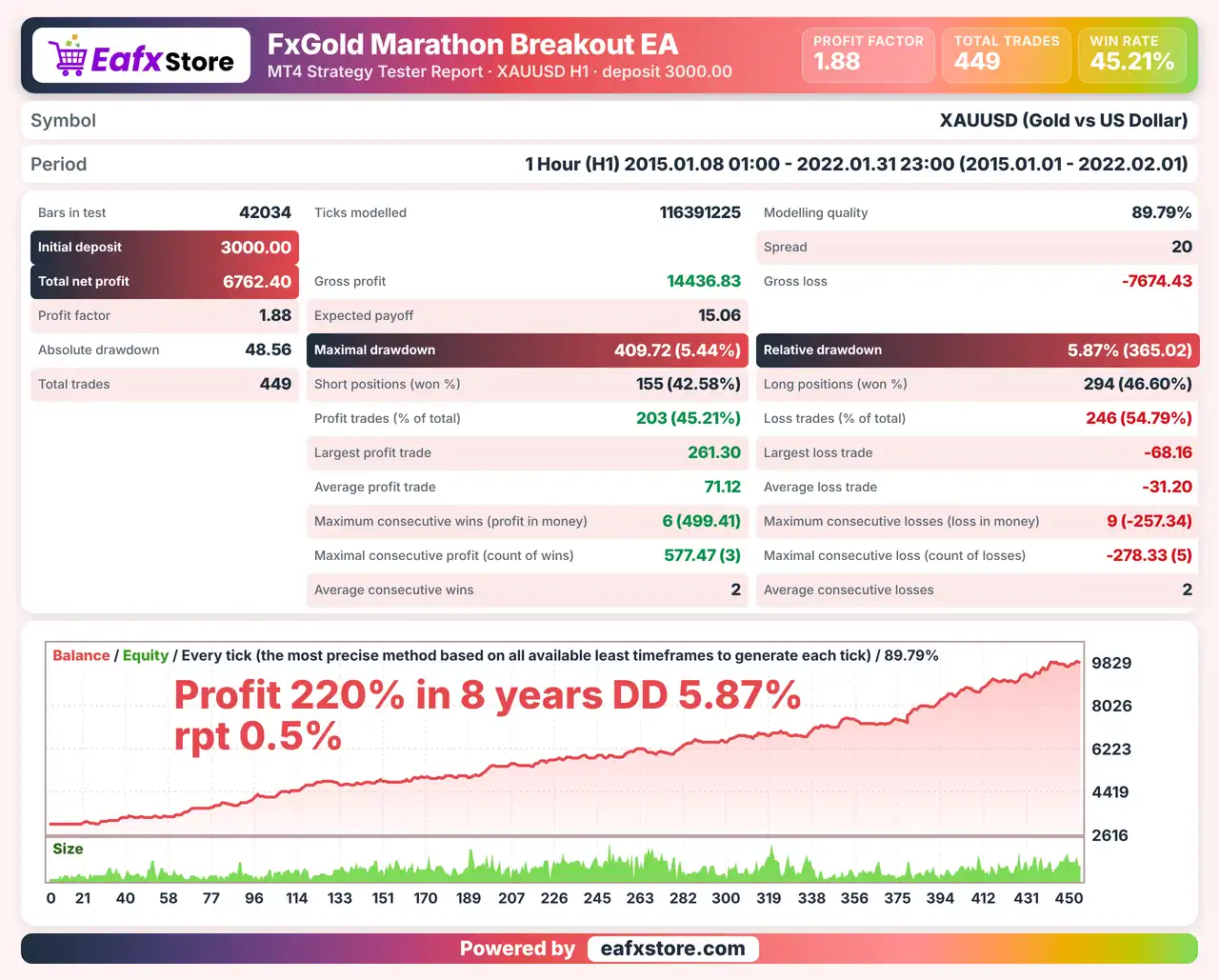
✅ The XAUUSD backtest was conducted on the H1 timeframe from January 8, 2015, to January 31, 2022, covering approximately 7 years of historical trading data.
FxGold Marathon Breakout EA Backtest Results
| Parameter | Results |
|---|---|
| Initial Deposit | $3,000 |
| Total Net Profit | $6,762.40 |
| Profit Factor | 1.88 |
| Maximum Drawdown | 5.44% |
| Relative Drawdown | 5.87% |
| Total Trades | 449 |
| Winning / Losing Trades | 45.21% / 54.79% |
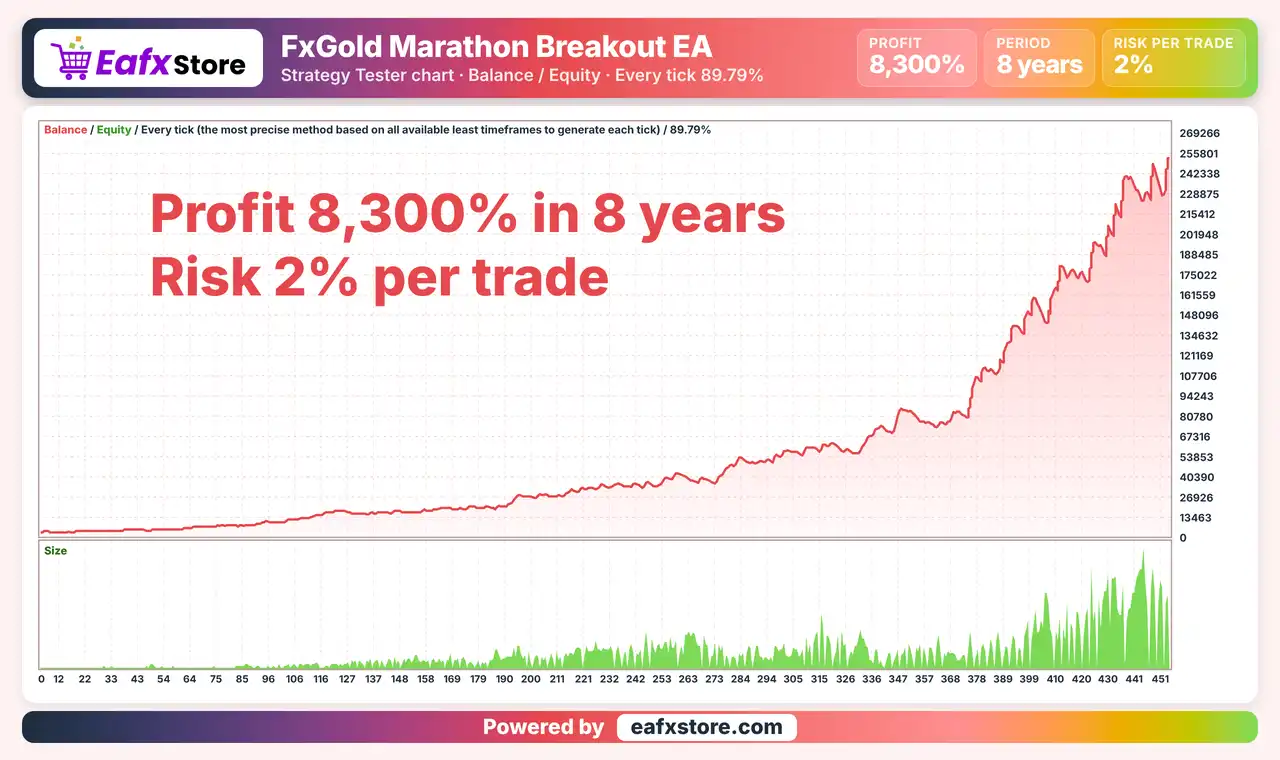
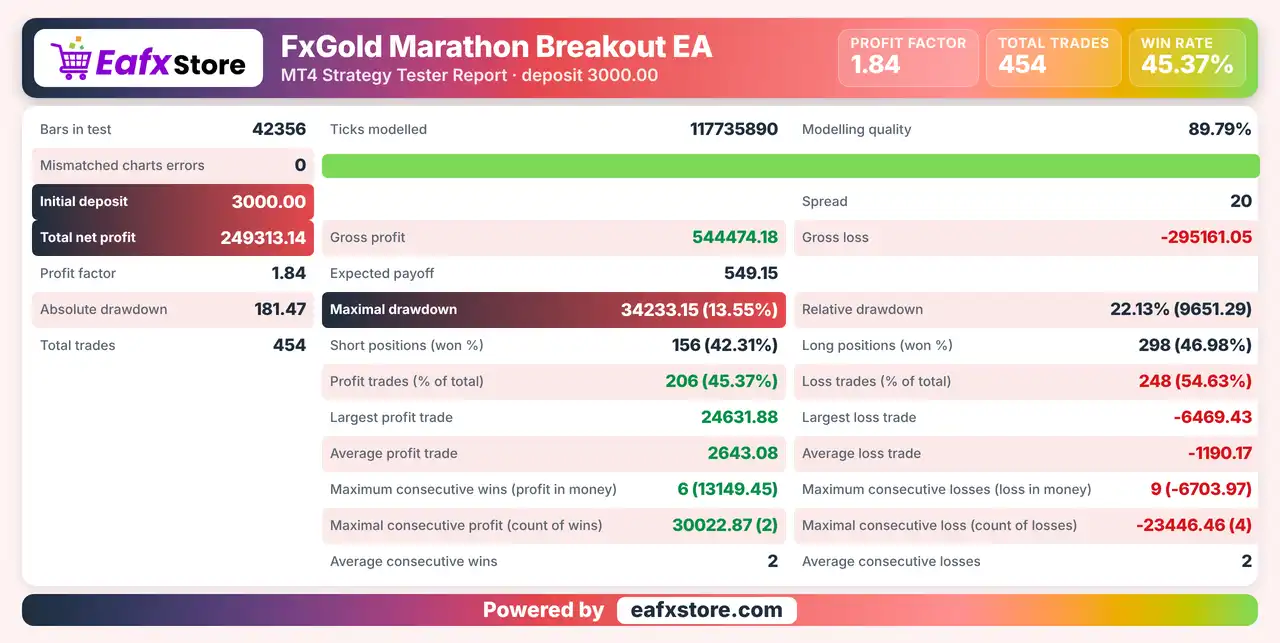
✅ FxGold Marathon Breakout EA was backtested on XAUUSD (Gold) across 42,556 historical bars, generating 454 trades with a profit factor of 1.84 and a total net profit of $26,213.14.
FxGold Marathon Breakout EA MT4 Backtest Results
| Parameter | Results |
|---|---|
| Initial Deposit | $3,000 |
| Total Net Profit | $26,213.14 |
| Profit Factor | 1.84 |
| Total Trades | 454 |
| Modeling Quality | 88.79% |
| Maximum Drawdown | 13.55% |
Key Features of FxGold Marathon Breakout EA
Gold Breakout Logic
The system looks for price breakouts on XAUUSD, a volatile and highly liquid market, using the H1 chart as the only supported timeframe.
ATR Based Exits
Stop loss, Take profit and Trailing stop are separate for long and short breakouts and are all measured in ATR, not in fixed distances.
Account Protection
The EA stops working after a chosen number of consecutive losses, which limits the damage during a bad run of trades for the account.
Automatic Money Management
Position size follows the risk per trade chosen by the trader, so the lot adapts to the account and to the stop distance.
Optional Loss Recovery
A recovery option can raise the size after a loss by a chosen factor, and it works only when the factor is above the neutral value.
Spread Filter
A maximum spread setting blocks new trades when the spread is too wide, which avoids poor entries at costly moments.
Risk Management
Losing Streaks Are Normal
The system is not a winner all the time, so a series of losses should be expected and the risk per trade kept low.
Loss Recovery Raises the Exposure
A recovery factor above neutral enlarges the next trade after a loss, so it should stay small or switched off.
The Stop Must Be Respected
Gold can gap or move fast, so the real loss can pass the stop-loss level during news or thin markets.
Targets Are Not Guaranteed
The system needs a take-profit well above the stop, but price may turn before the target is reached.
Costs Matter on Gold
A wide spread or slippage can ruin a breakout entry, so the spread filter and an ECN broker are important.
What Sets It Apart
Gold Focus
The EA is built for one instrument only, so its breakout rules are tuned to the volatility of XAUUSD and not to many markets.
Volatility Based Exits
Every exit is measured in ATR, which lets the stop and the target widen or narrow as the market changes.
Loss Streak Stop
The EA can switch itself off after a set number of losses in a row, which many breakout robots do not offer.
Honest Risk Message
The source says the system does not win all the time and that long losing streaks will appear in normal use.
Who Should Use FxGold Marathon Breakout EA MT4?
Patient Gold Traders
People who accept that a breakout system loses often and relies on a larger reward to turn profitable over time.
Traders with a Suitable Broker
Users who can open an ECN account with low spread and slippage and run the EA during market hours.
Careful Risk Takers
Traders who will keep the risk per trade low and test the settings on their own broker before real money.
Not for Traders Who
Want quick profits, cannot accept losing streaks or plan to raise the risk to speed up the account.
Recommended Trading Conditions
Recommended settings and parameters to pay attention to from developers and experts:
| Features | Type |
|---|---|
| Trading platform | MetaTrader 4 (MT4) |
| Time frames | H1 |
| Currency pairs | XAUUSD (GOLD) |
| Minimum / Recommended deposit | $300+ |
| Minimum / Recommended leverage | 1:30+ |
| Account type | Any |
| Additional services | Unlock and Decompile |
| Recommended brokers | Exness Broker, Icmarkets Broker |
| Recommended VPS | MyfxVPS.com (Blue VPS, Golden VPS). Lowest Latency, 2 week Free Trial, 100% Free for 12-18 Months. |
Product Download Package?
The download package of the product suite includes:
 Experts: FxGold Marathon Breakout.ex4
 Reviewed by David Easton
Final Verdict
FxGold Marathon Breakout EA is a simple breakout robot for gold on the H1 chart. Every trade has an ATR based stop loss, take profit and trailing stop, and the EA stops after a set number of consecutive losses. The source admits that losing streaks are frequent and that the system depends on a large reward to turn profitable, while its claims of stable growth have no published report behind them.
🔢 FxGold Marathon Breakout EA MT4 Settings Guide: Complete Inputs and Parameters Explained
FxGold Marathon Breakout EA MT4 is an automated trading Expert Advisor designed for the MetaTrader 4 platform. As its name suggests, the EA is configured around a breakout trading system, with adjustable risk management, loss recovery, ATR-based trade management, trailing stops, and trading-session controls.
Its settings allow traders to customize position risk, recovery sizing, maximum spread, consecutive-loss limits, take-profit and stop-loss distances, and permitted trading hours and weekdays. The EA also provides separate ATR multipliers for long and short breakout positions, allowing traders to configure trade management for both market directions.
This guide explains every parameter displayed in the FxGold Marathon Breakout EA MT4 input panel, preserving all original parameter names and numerical values.
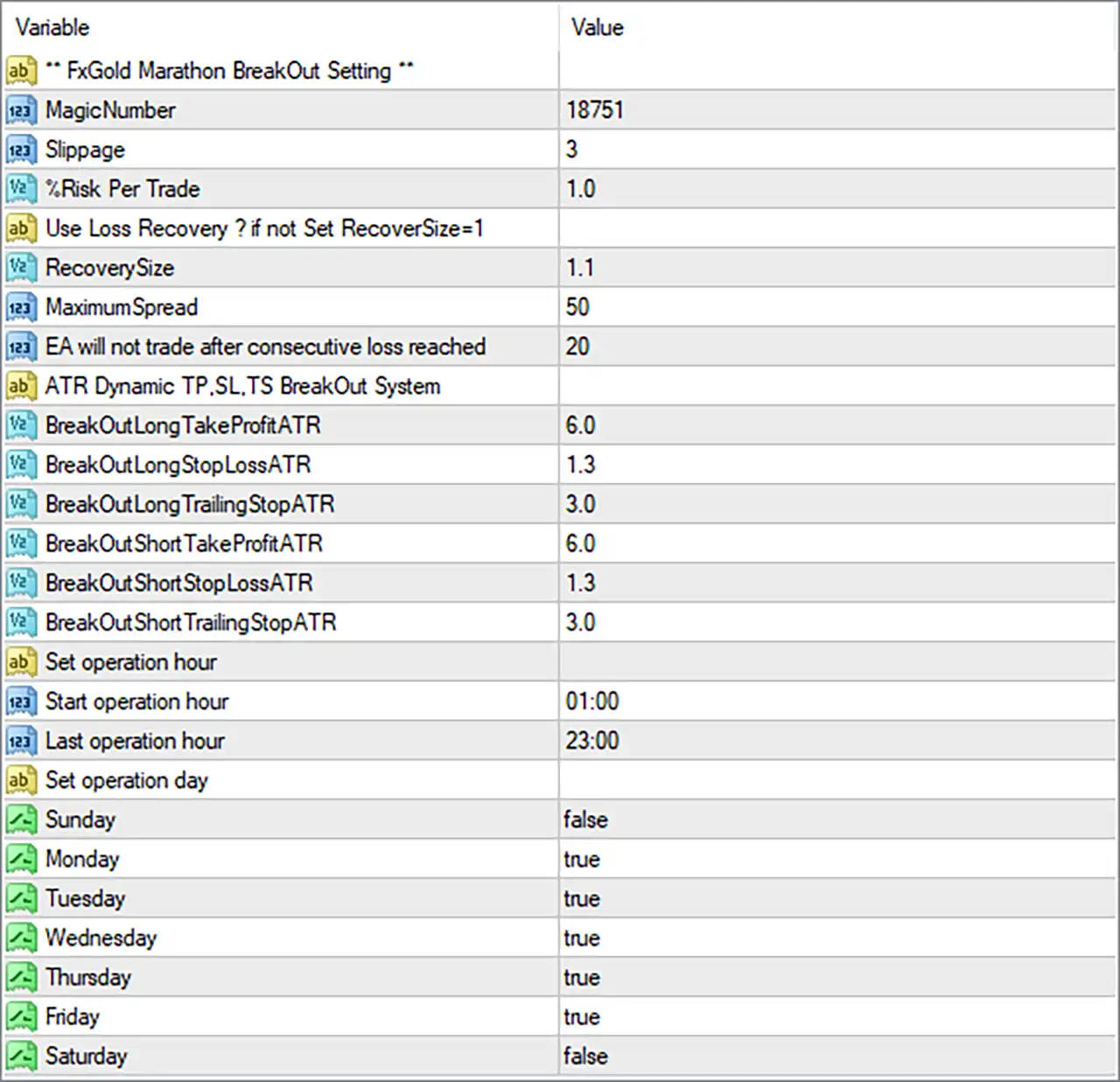
FxGold Marathon Breakout EA MT4 Settings Panel
⚙️ General Trading and Risk Management Settings
🔹 FxGold Marathon BreakOut Setting = Section Header: Identifies the main configuration section containing trade identification, execution conditions, risk management, recovery settings, and trading restrictions.
🔹 MagicNumber = 18751: Assigns the unique magic number 18751 to trades opened by FxGold Marathon Breakout EA MT4, helping distinguish its positions from manual trades and orders opened by other Expert Advisors.
🔹 Slippage = 3: Sets the permitted slippage parameter to 3, defining the configured tolerance between the requested execution price and the actual execution price, subject to broker and EA execution rules.
🔹 %Risk Per Trade = 1.0: Sets the configured risk per trade to 1.0%. This parameter is intended to control the amount of account capital exposed to each trade through the EA’s position-sizing calculation.
🔹 Use Loss Recovery ? if not Set RecoverSize=1 = Instruction: Provides a configuration note concerning the loss-recovery mechanism. If loss recovery is not used, the displayed instruction recommends setting RecoverySize to 1.
🔹 RecoverySize = 1.1: Sets the recovery-size multiplier to 1.1. If the EA uses this parameter for loss recovery, it may increase the position size or recovery allocation by a factor of 1.1 according to its internal calculation rules.
🔹 MaximumSpread = 50: Sets the maximum permitted spread to 50 points. The EA may prevent new trades when the current spread exceeds this threshold, helping avoid entries under unfavorable spread conditions.
🔹 EA will not trade after consecutive loss reached = 20: Sets the consecutive-loss threshold to 20. According to the parameter description, the EA will stop opening new trades after reaching 20 consecutive losses, providing an additional trading-control mechanism.
⚙️ ATR Dynamic Take Profit, Stop Loss and Trailing Stop Settings
🔹 ATR Dynamic TP, SL, TS BreakOut System = Section Header: Identifies the ATR-based breakout trade-management section, which contains separate take-profit, stop-loss, and trailing-stop multipliers for long and short positions.
Long Breakout Settings
🔹 BreakOutLongTakeProfitATR = 6.0: Sets the ATR multiplier for the take-profit target of long breakout trades to 6.0. This allows the EA to calculate the long-position profit target using an ATR-based distance, according to its internal strategy.
🔹 BreakOutLongStopLossATR = 1.3: Sets the ATR multiplier for the stop-loss distance of long breakout trades to 1.3. The EA uses this configured factor to determine the protective stop-loss distance relative to the Average True Range (ATR).
🔹 BreakOutLongTrailingStopATR = 3.0: Sets the ATR multiplier for the trailing stop of long breakout positions to 3.0. This parameter controls the ATR-based trailing distance used to manage profitable long trades as the market moves upward.
Short Breakout Settings
🔹 BreakOutShortTakeProfitATR = 6.0: Sets the ATR multiplier for the take-profit target of short breakout trades to 6.0. The EA uses this factor to calculate the intended profit-taking distance for short positions based on market volatility.
🔹 BreakOutShortStopLossATR = 1.3: Sets the ATR multiplier for the stop-loss distance of short breakout trades to 1.3. This parameter defines the volatility-based protective stop distance for positions opened in the short direction.
🔹 BreakOutShortTrailingStopATR = 3.0: Sets the ATR multiplier for the trailing stop of short breakout positions to 3.0. It controls the ATR-based trailing distance used to manage short trades as the market moves downward.
⚙️ Trading Hours Settings
🔹 Set operation hour = Section Header: Identifies the configuration section responsible for defining the permitted daily trading schedule.
🔹 Start operation hour = 01:00: Sets the beginning of the permitted trading period to 01:00, or 1:00 AM, according to the time reference used by the EA.
🔹 Last operation hour = 23:00: Sets the final permitted trading hour to 23:00, or 11:00 PM. Together with Start operation hour = 01:00, this defines a trading window extending from 01:00 to 23:00.
⚙️ Trading Days Settings
🔹 Set operation day = Section Header: Identifies the weekday configuration section, allowing traders to specify which days FxGold Marathon Breakout EA MT4 can operate.
🔹 Sunday = false: Disables trading on Sunday, preventing the EA from initiating its normal trading activity on this day according to the weekday filter.
🔹 Monday = true: Enables trading on Monday, allowing the EA to search for and execute valid breakout opportunities when its other trading conditions are satisfied.
🔹 Tuesday = true: Enables trading on Tuesday, permitting the EA to operate according to its breakout strategy and configured risk-management rules.
🔹 Wednesday = true: Enables trading on Wednesday, allowing the EA to identify and execute qualifying breakout signals during the permitted trading hours.
🔹 Thursday = true: Enables trading on Thursday, keeping this weekday available for automated breakout trading under the configured conditions.
🔹 Friday = true: Enables trading on Friday, allowing the EA to continue its trading operations subject to the configured session and risk restrictions.
🔹 Saturday = false: Disables trading on Saturday, preventing normal trading activity on this day through the weekday filter.
⚙️ Important Configuration Considerations
🔹 Risk Management: The %Risk Per Trade = 1.0 setting establishes a configured risk percentage of 1.0 per trade. Verify how the EA calculates position volume and whether this percentage represents the actual potential loss at the stop-loss level.
🔹 Loss Recovery: RecoverySize = 1.1 introduces a recovery multiplier into the configuration. Traders should understand how position sizes change after losing trades and evaluate the potential cumulative exposure before enabling loss recovery.
🔹 Consecutive Loss Protection: The consecutive-loss threshold is configured at 20. This provides a stopping condition, but 20 consecutive losses can represent substantial account damage, depending on the actual risk per trade and recovery calculations.
🔹 ATR-Based Trade Management: The long and short configurations use TakeProfitATR = 6.0, StopLossATR = 1.3, and TrailingStopATR = 3.0. These multipliers allow trade-management distances to adapt to market volatility rather than relying exclusively on fixed pip values.
🔹 Maximum Spread: MaximumSpread = 50 establishes a spread threshold of 50 points. Check your broker’s quote precision and the actual spread conditions of the instrument being traded, especially when trading Gold (XAUUSD).
🔹 Trading Schedule: The configured trading period runs from 01:00 to 23:00. Verify whether these times use broker server time and whether the EA handles the final operation hour inclusively.
🔹 Trading Days: Monday through Friday are enabled, while Sunday and Saturday are disabled. This configuration allows weekday trading while avoiding normal weekend trading activity.
🔢 Conclusion
FxGold Marathon Breakout EA MT4 offers configurable breakout trading and risk-management parameters, including automatic risk allocation, loss recovery, ATR-based take profit, stop loss, trailing stops, spread filtering, and trading-session restrictions.
The displayed configuration uses %Risk Per Trade = 1.0, RecoverySize = 1.1, MaximumSpread = 50, and a consecutive-loss threshold of 20. Its ATR-based trade management uses a take-profit multiplier of 6.0, a stop-loss multiplier of 1.3, and a trailing-stop multiplier of 3.0 for both long and short positions.
The EA is configured to trade from 01:00 to 23:00, Monday through Friday, with weekend trading disabled. Before using FxGold Marathon Breakout EA MT4 on a live account, traders should carefully evaluate the loss-recovery mechanism, actual stop-loss exposure, ATR calculations, and broker execution conditions. Proper backtesting and demo testing are recommended to determine whether the configuration is appropriate for the selected trading instrument and account size.
User Reviews
Only logged in customers who have purchased this product may leave a review.
-
 Original price was: $700.00.$249.00Current price is: $249.00.
 -
 Original price was: $1,500.00.$249.00Current price is: $249.00.
 -
 Original price was: $1,467.00.$249.00Current price is: $249.00.
 -
 Original price was: $799.00.$249.00Current price is: $249.00.
-
 0Original price was: $2,288.00.$249.00Current price is: $249.00.
 -
 3Original price was: $199.00.$159.00Current price is: $159.00.
 -
 1Original price was: $699.00.$249.00Current price is: $249.00.
 -
 0Original price was: $430.00.$249.00Current price is: $249.00.
There are no reviews yet.