





Shark Surfer EA MT4 (Latest version) - Unlimited

Subscriptions for Special Plan
- 30 EA package is more economical!
- Special package with 99%
- Download 1 EA/Day

Subscriptions for Premium Membership
- Download Unlimited in 1 Year
- Get 100% Discount
- Get free access to all

Subscriptions for Gold Membership
- 1 Year Membership
- Get 100% Discount
- Access EA+Indicator+Course
Frequently bought together 🎁
Add these products to enhance your purchase



Quick Overview
Shark Surfer EA is a trend following Expert Advisor (EA) for MetaTrader 4 that is recommended for the H1 chart. It looks for entries on an already formed trend, always sets a take profit and a stop loss, and can trade many popular currency pairs from one chart.
Best For:
✅ Trend following traders on the H1 chart.
✅ Users who want multi currency trading.
✅ Traders who prefer fixed take profit and stop loss.
✅ Users who want to avoid weekend gaps.
✅ Traders who like ready made set files.
What is Shark Surfer EA MT4?
Shark Surfer EA is an automated trading Expert Advisor (EA) designed for the MetaTrader 4 (MT4) platform. It uses a trend-following trading strategy and is recommended for the H1 (1-hour) timeframe to identify market trends and execute trading opportunities.
The EA automatically places both Take Profit (TP) and Stop Loss (SL) levels for every trade, supports trading multiple popular currency pairs from a single chart, and includes ready-to-use set files for convenient configuration.
⭐ Vendor Website: View here
⭐ Delivery time 24h-48h after payment.
⭐ Refund if not delivered.
⭐ You will receive the current version without any limitations (ID+Time).
Shark Surfer EA MT4 Review
Shark Surfer EA MT4 Trading Strategy
Follow an Established Trend
The EA applies a well known trend following approach and searches for entries only after a trend has already formed.
Use the Hourly Chart
The recommended trading period is H1, although the product says the EA can run on all symbols and timeframes.
Always Set Exits
Every deal gets a take profit and a stop loss, and the stop can be moved to breakeven once the trade has moved far enough.
Build a Trading Range
Price levels and a number of previous bars are used to build a range and to place the stop loss for each new trade.
Trade Many Pairs from One Chart
In automatic mode the EA is attached to one symbol and then analyzes the most popular pairs at the same time.
Key Features of Shark Surfer EA MT4
Multi Currency Automatic Mode
With the automatic option on, the EA can be attached to any open symbol and then analyzes the most popular pairs without extra charts.
Preoptimized Built In Settings
The settings from the set files are already included in the EA, which is said to be optimized on tick history data for the main pairs.
Set Files for Single Pairs
Separate set files are available for popular pairs, and they can be used when only chosen pairs or one single symbol will be traded.
Take Profit and Stop Loss
Every trade has both levels, and the ratio between target and stop is an input, so the reward to risk balance can be adjusted.
Breakeven Control
The stop loss can be moved to breakeven after the trade reaches a chosen share of its target, with a small extra margin added.
Historical Trading Results Performance
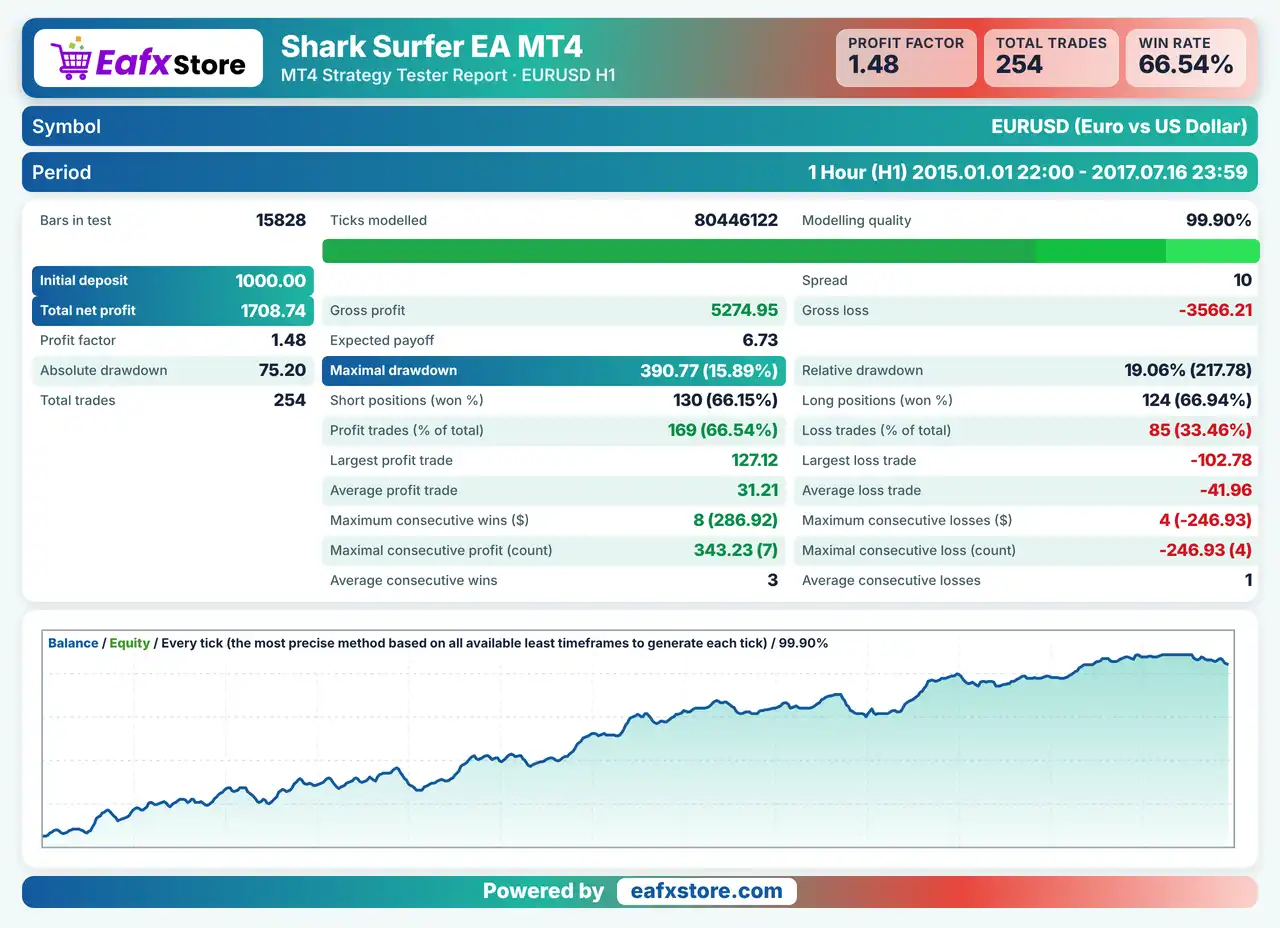
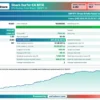
✅ Shark Surfer EA was backtested on the EURUSD pair using the H1 timeframe, from January 1, 2015, to July 16, 2017, covering approximately 2 years and 6 months of historical trading data.
Shark Surfer EA MT4 Backtest Results
| Parameter | Results |
|---|---|
| Initial Deposit | $1,000 |
| Total Net Profit | $1,708.74 |
| Profit Factor | 1.48 |
| Maximum Drawdown | 15.89% |
| Relative Drawdown | 19.06% |
| Total Trades | 254 |
| Win Rate | 66.54% |
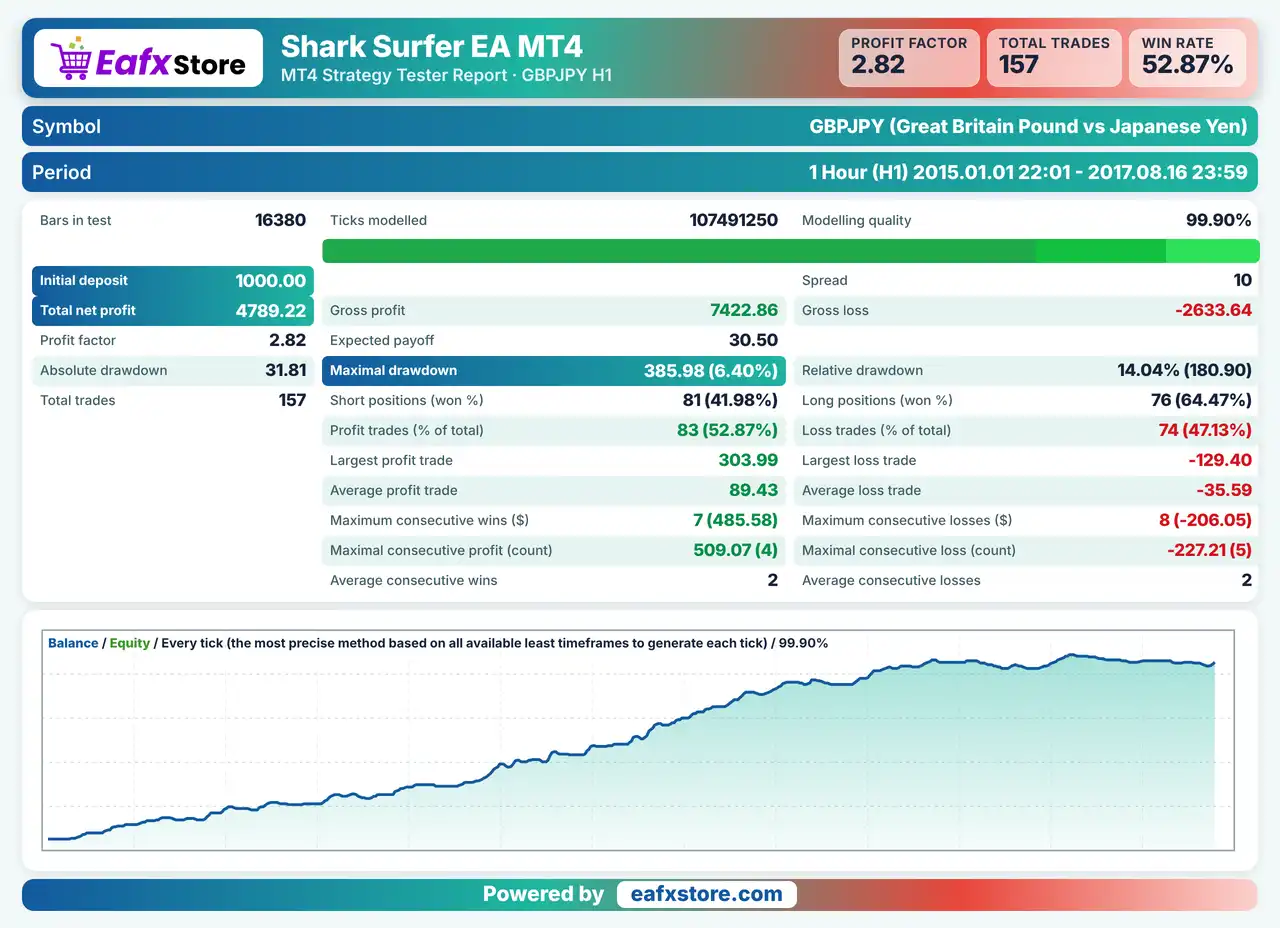
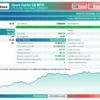
✅ Shark Surfer EA was backtested on the GBPJPY pair using the H1 timeframe, from January 1, 2015, to August 16, 2017, covering approximately 2 years and 7 months of historical trading data.
Shark Surfer EA Backtest Results
| Parameter | Results |
|---|---|
| Initial Deposit | $1,000 |
| Total Net Profit | $4,789.22 |
| Profit Factor | 2.82 |
| Maximum Drawdown | 6.40% |
| Relative Drawdown | 14.04% |
| Total Trades | 157 |
| Win Rate | 52.87% |
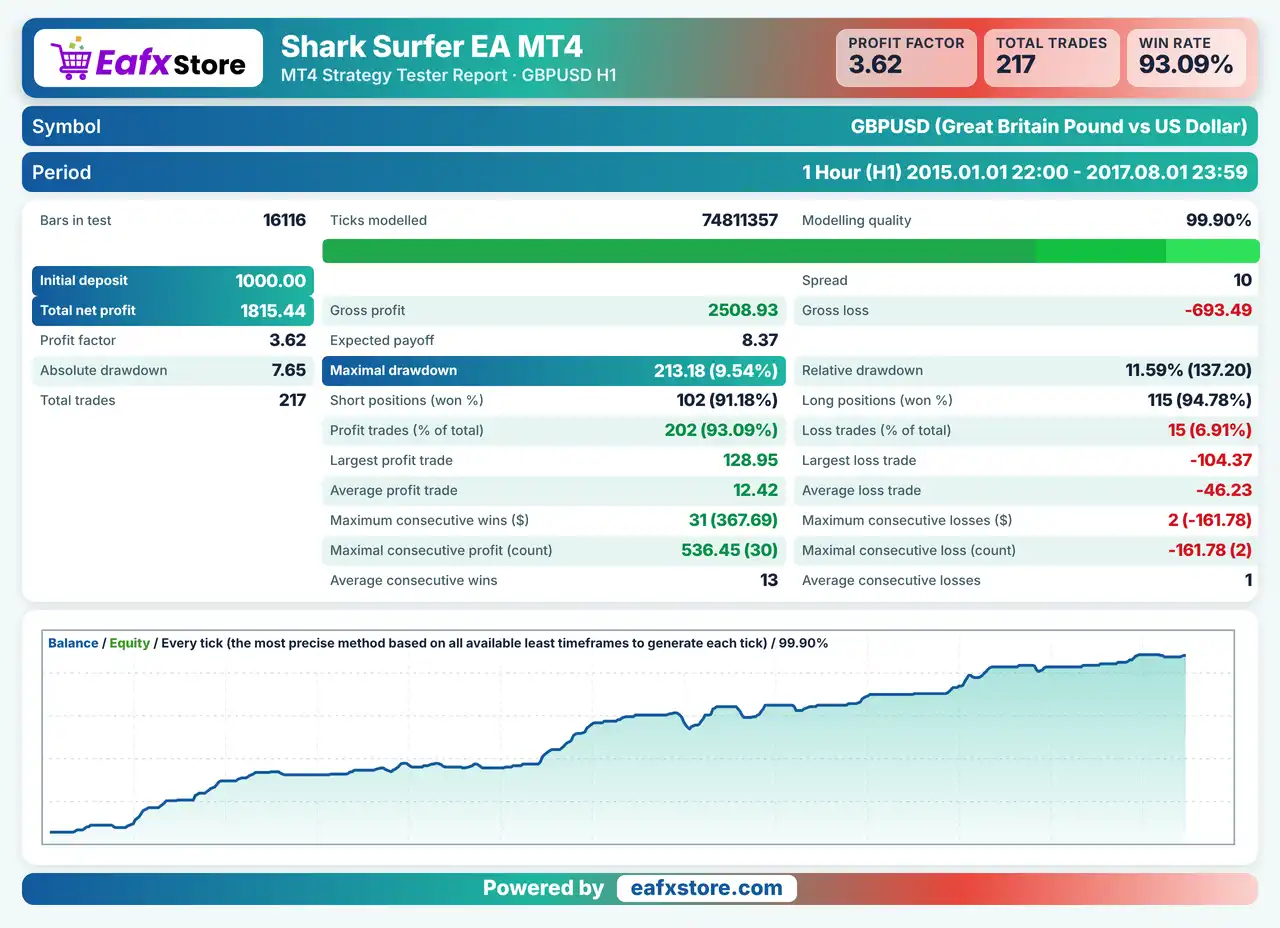
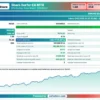
✅ Shark Surfer EA was backtested on the GBPUSD pair using the H1 timeframe, from January 1, 2015, to August 1, 2017, covering approximately 2 years and 7 months of historical trading data.
Shark Surfer EA MT4 Backtests Results
| Parameter | Results |
|---|---|
| Initial Deposit | $1,000 |
| Total Net Profit | $1,815.44 |
| Profit Factor | 3.62 |
| Maximum Drawdown | 9.54% |
| Relative Drawdown | 11.59% |
| Total Trades | 217 |
| Win Rate | 93.09% |
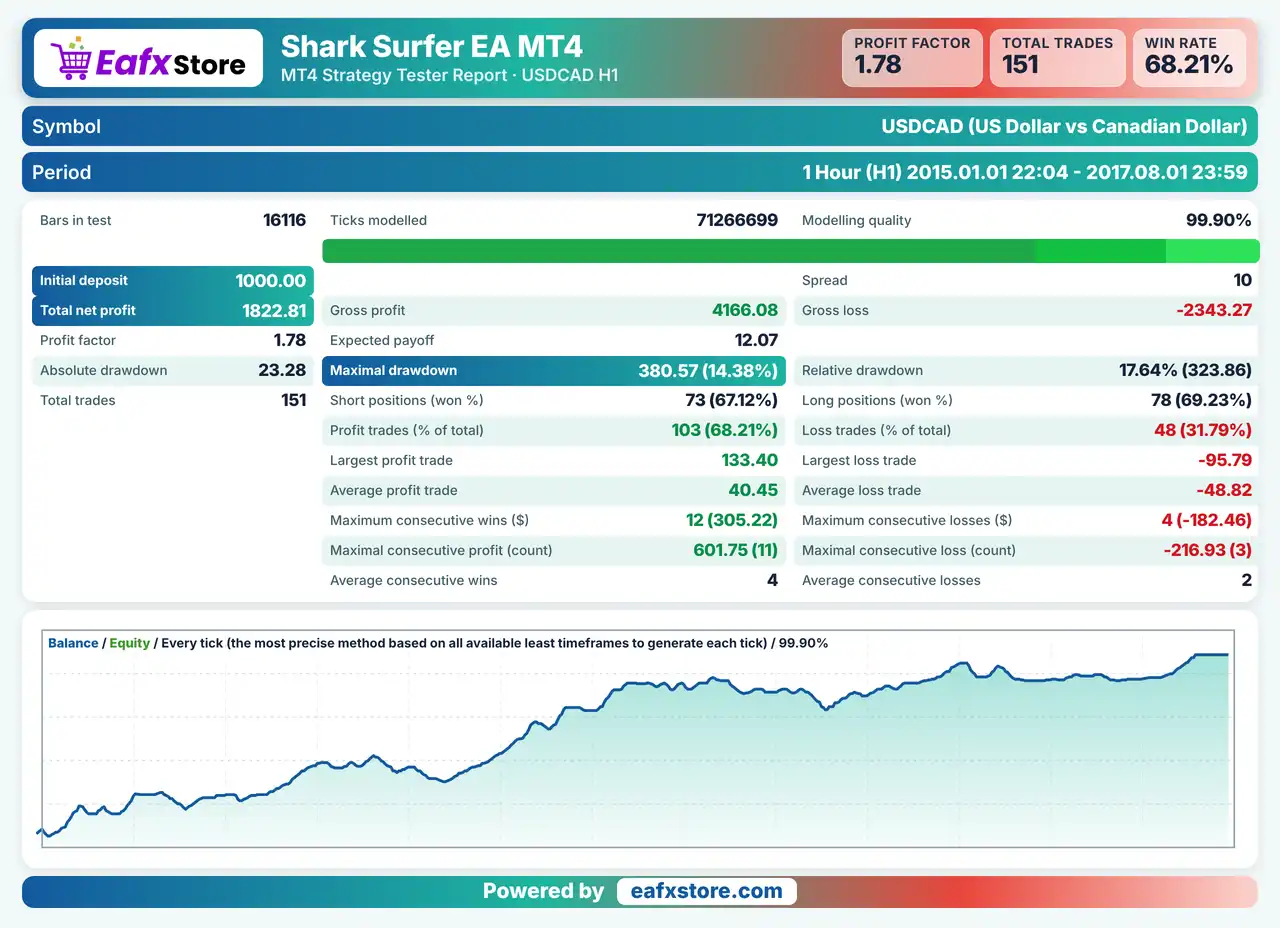
✅ Shark Surfer EA was backtested on the USDCAD pair using the H1 timeframe, from January 1, 2015, to August 1, 2017, covering approximately 2 years and 7 months of historical trading data.
Shark Surfer EA Backtests Results
| Parameter | Results |
|---|---|
| Initial Deposit | $1,000 |
| Total Net Profit | $1,822.81 |
| Profit Factor | 1.78 |
| Maximum Drawdown | 14.38% |
| Relative Drawdown | 17.64% |
| Total Trades | 151 |
| Win Rate | 68.21% |
Risk Management
Trends Can Fail
A trend following robot can enter late and then see the move reverse, so the stop-loss may be reached several times in a row.
Many Pairs Add Exposure
Trading several pairs at the same time can open many positions, and correlated pairs may lose together.
Targets Are Not Guaranteed
A fixed take-profit may never be reached if the trend stops early, so the ratio setting should be tested.
Optimization Has Limits
Settings tuned on past tick data may behave differently later, and unlisted pairs have no tuning at all.
What Sets It Apart
One Chart for Many Pairs
The automatic mode covers the most popular pairs from a single chart, which saves setup work.
Built in Preoptimized Settings
Traders do not need to load files for each pair in automatic mode, which is rare among similar robots.
Always Protected Trades
A take profit and a stop loss are set on every deal, so no position is left open without exit levels.
Weekend Gap Awareness
The Friday force close option is made to reduce Monday gap exposure, a point many robots do not address.
Strengths and Limitations
Strengths
🔹 Trend based logic: entries are searched on an already formed trend, which is a clear and widely known way to trade.
🔹 Multi currency convenience: many pairs can be watched from one chart, so there is no need to manage a separate chart for each one.
🔹 Flexible modes: automatic trading and single pair trading with set files are both available, so both styles of use are covered.
🔹 Useful controls: breakeven, ratio of target to stop and Friday close inputs give traders practical control over each deal.
Limitations
🔹 Wide claims are unclear: the product says it suits scalping and long term trading on all timeframes, yet it recommends only H1.
🔹 Tester limits apply: the automatic mode does not work in the strategy tester, so a multi pair test must be done pair by pair.
🔹 Unlisted pairs are untested: pairs outside the recommended list were not optimized, so the trader must do that work personally.
🔹 No results published: the source includes no backtest or live report, so no returns or drawdown figures can be quoted here.
Recommended Trading Conditions
Recommended settings and parameters to pay attention to from developers and experts:
| Features | Type |
|---|---|
| Trading platform | MetaTrader 4 (MT4) |
| Time frames | H1 |
| Currency pairs | EURUSD, GBPUSD, AUDUSD, NZDUSD, USDJPY, USDCHF, USDCAD, EURCHF, GBPJPY, EURGBP |
| Minimum / Recommended deposit | $100+ |
| Minimum / Recommended leverage | Any |
| Account type | Any |
| Additional services | Unlock and Decompile |
| Recommended brokers | Exness Broker, Icmarkets Broker |
| Recommended VPS | MyfxVPS.com (Blue VPS, Golden VPS). Lowest Latency, 2 week Free Trial, 100% Free for 12-18 Months. |
Product Download Package?
The download package of the product suite includes:
✅ Experts: Shark Surfer EA.ex4
➡️ Installation Guide: Click Here
➡️ Reviewed by David Easton
Final Verdict
Shark Surfer EA is a trend following robot with a recommended hourly chart, fixed take profit and stop loss on every deal, breakeven control and a Friday close option. Its automatic mode can cover many popular pairs from one chart, and set files support single pair use. The product also makes broad claims about all timeframes, offers no entry details beyond trend search and publishes no results, so a careful demo trial is the sensible first step before any real money is placed at risk.
User Reviews
Only logged in customers who have purchased this product may leave a review.
❓ What is Shark Surfer EA MT4?
A trend following Expert Advisor for MetaTrader 4 that can trade many popular currency pairs from one chart.
❓ Which timeframe suits Shark Surfer EA MT4?
H1 is the recommended period, although the product says it can run on all timeframes.
❓ Does Shark Surfer EA MT4 use stop loss and take profit?
Yes. It always sets both on every deal.
❓ Can Shark Surfer EA MT4 trade several pairs at once?
Yes. In automatic mode it analyzes the most popular pairs from one chart.
❓ Does the automatic mode work in the strategy tester?
No. For testing, the automatic option must be off and a set file should be used.
❓ Are set files included with Shark Surfer EA MT4?
Yes. Set files are available for the most popular currency pairs.
❓ Which pairs does Shark Surfer EA MT4 recommend?
EURUSD, GBPUSD, AUDUSD, NZDUSD, USDJPY, USDCHF, USDCAD, EURCHF, GBPJPY and EURGBP.
❓ Can Shark Surfer EA MT4 close trades before the weekend?
Yes. A Friday close option force closes all open trades at a chosen time.
❓ Does Shark Surfer EA MT4 move the stop to breakeven?
Yes. A breakeven level moves the stop loss once the trade reaches a chosen share of its target.
❓ Is Shark Surfer EA MT4 a grid or martingale EA?
The product information does not mention grid or martingale logic. It does include an input for the number of trades in one direction.
-
 Original price was: $500.00.$249.00Current price is: $249.00.
-
 Original price was: $888.00.$249.00Current price is: $249.00.
-
 Original price was: $439.00.$249.00Current price is: $249.00.
-
 Original price was: $9,999.00.$249.00Current price is: $249.00.
-
 0Original price was: $2,288.00.$249.00Current price is: $249.00.
-
 1Original price was: $500.00.$249.00Current price is: $249.00.
-
 3Original price was: $199.00.$159.00Current price is: $159.00.
-
 0Original price was: $199.00.$179.00Current price is: $179.00.
There are no reviews yet.