

Introduction
AlgoScalpPro MT4 is an automated trading Expert Advisor (EA) designed for the MetaTrader 4 platform, featuring configurable order execution, automated position sizing, pending order management, and advanced trade protection mechanisms.

The EA provides flexible money management through Auto Lot and Fixed Lot modes, allowing traders to adjust position sizes according to their preferred trading configuration. Its execution system includes BUY and SELL pending order controls, configurable entry price shifts, order splitting, and breakout level detection.
AlgoScalpPro MT4 also incorporates several trade management features, including Stop Loss adaptation during slippage, Break-Even functionality, Trailing Stop, and an optional Recovery Mode. Additionally, it provides spread monitoring, broker execution adjustments, and an economic news calendar filter to help manage trading conditions.
This guide explains all available input parameters, their default values, and their functions to help traders understand and configure AlgoScalpPro MT4.
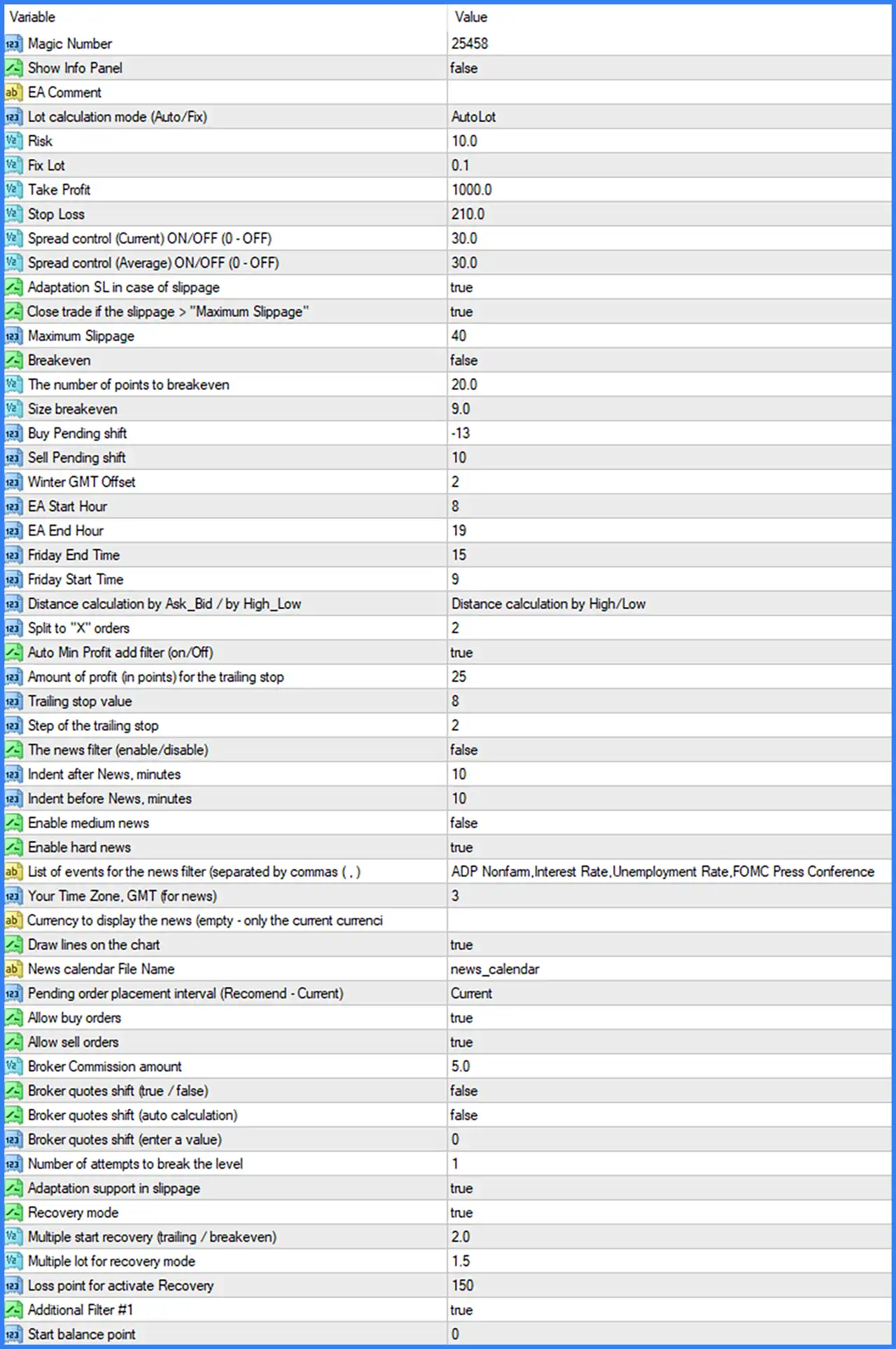
General Trading and Money Management Settings
🔹 Magic Number: 25458 – Assigns the unique Magic Number 25458 to trades opened by AlgoScalpPro MT4, allowing the EA to identify and manage its positions separately from manual trades and other Expert Advisors.
🔹 Show Info Panel: false – Disables the information panel on the chart. When enabled, the EA can display relevant trading information and system status directly on the MetaTrader 4 interface.
🔹 EA Comment: Blank – Defines the custom comment attached to orders opened by AlgoScalpPro MT4. The current field is empty, so no specific order comment is configured.
🔹 Lot calculation mode (Auto/Fix): AutoLot – Selects automatic lot calculation, allowing the EA to determine trading volume using its internal money management calculations instead of relying exclusively on a manually fixed lot size.
🔹 Risk: 10.0 – Sets the risk parameter to 10.0, providing the configured value used by the EA's automatic position-sizing system. Its exact percentage or monetary interpretation depends on the internal lot calculation algorithm.
🔹 Fix Lot: 0.1 – Sets the fixed trading volume to 0.1 lots, which can be used when the lot calculation mode is changed from AutoLot to a fixed lot configuration.
🔹 Take Profit: 1000.0 – Sets the main Take Profit parameter to 1000.0, defining the configured profit target used by the EA's trade management system.
🔹 Stop Loss: 210.0 – Sets the main Stop Loss parameter to 210.0, establishing the configured protective exit distance for managing unfavorable market movements.
Spread and Execution Protection Settings
🔹 Spread control (Current) ON/OFF (0 - OFF): 30.0 – Sets the current spread control threshold to 30.0, allowing the EA to restrict new trade entries when the live market spread exceeds the configured limit. A value of 0 disables this restriction.
🔹 Spread control (Average) ON/OFF (0 - OFF): 30.0 – Sets the average spread control threshold to 30.0, providing an additional spread monitoring condition based on average market spread rather than only the current spread.
🔹 Adaptation SL in case of slippage: true – Enables automatic Stop Loss adaptation when slippage occurs, allowing the EA to adjust its protective Stop Loss calculations according to execution price differences.
🔹 Close trade if the slippage > "Maximum Slippage": true – Enables automatic trade closure when detected slippage exceeds the configured Maximum Slippage threshold, helping manage positions affected by unfavorable execution conditions.
🔹 Maximum Slippage: 40 – Sets the maximum permitted slippage threshold to 40 points, defining the execution difference level used by the EA's slippage protection mechanism.
Break-Even and Pending Order Settings
🔹 Breakeven: false – Disables the Break-Even function. When enabled, the EA can adjust the Stop Loss toward the entry price after the configured activation conditions are satisfied.
🔹 The number of points to breakeven: 20.0 – Sets the required price movement to 20.0 points before the Break-Even mechanism can be activated when enabled.
🔹 Size breakeven: 9.0 – Sets the Break-Even adjustment value to 9.0, defining the configured offset or protection distance associated with the Break-Even mechanism.
🔹 Buy Pending shift: -13 – Sets the BUY pending order price adjustment to -13 points, controlling the entry price offset applied to BUY pending orders relative to the EA's calculated reference level.
🔹 Sell Pending shift: 10 – Sets the SELL pending order price adjustment to 10 points, controlling the entry price offset applied to SELL pending orders relative to the EA's calculated reference level.
Trading Schedule and Time Settings
🔹 Winter GMT Offset: 2 – Sets the winter GMT time offset to +2 hours, providing the time reference used by the EA for its winter trading schedule.
🔹 EA Start Hour: 8 – Sets the EA's daily trading start time to 08:00, defining when the system is permitted to begin its scheduled trading activity.
🔹 EA End Hour: 19 – Sets the EA's daily trading end time to 19:00, defining the end of its configured trading period.
🔹 Friday End Time: 15 – Sets the Friday trading end time to 15:00, allowing the EA to stop its trading activity earlier before the weekend.
🔹 Friday Start Time: 9 – Sets the Friday trading start time to 09:00, defining the beginning of the EA's permitted Friday trading window.
Entry Distance and Order Management Settings
🔹 Distance calculation by Ask_Bid / by High_Low: Distance calculation by High/Low – Selects High/Low-based distance calculation, meaning the EA uses market High and Low price information as its reference for calculating trading distances instead of relying exclusively on Ask and Bid prices.
🔹 Split to "X" orders: 2 – Sets the order splitting parameter to 2, allowing the EA to divide its calculated trading execution into 2 separate orders according to its internal order management logic.
🔹 Pending order placement interval (Recommend - Current): Current – Selects the Current interval mode for pending order placement, instructing the EA to use its current interval calculation rather than another available placement interval.
🔹 Allow buy orders: true – Enables BUY order execution, allowing AlgoScalpPro MT4 to place BUY orders when its trading conditions are satisfied.
🔹 Allow sell orders: true – Enables SELL order execution, allowing the EA to place SELL orders when its trading conditions are satisfied.
🔹 Number of attempts to break the level: 1 – Sets the number of attempts required or permitted for the EA's level-breaking logic to 1, controlling how the system evaluates breakout opportunities before proceeding with its trading operations.
Trailing Stop and Profit Management Settings
🔹 Auto Min Profit add filter (on/Off): true – Enables the automatic minimum profit filter, allowing the EA to apply an additional profit-related condition when managing its trailing stop functionality.
🔹 Amount of profit (in points) for the trailing stop: 25 – Sets the required profit threshold to 25 points before the configured trailing stop management becomes eligible for activation.
🔹 Trailing stop value: 8 – Sets the trailing stop distance to 8 points, defining the protective distance maintained by the EA when adjusting Stop Loss levels as the market moves favorably.
🔹 Step of the trailing stop: 2 – Sets the trailing stop adjustment step to 2 points, controlling the minimum incremental movement used when updating the trailing Stop Loss.
Economic News Filter Settings
🔹 The news filter (enable/disable): false – Disables the economic news filter. When enabled, the EA can use its news calendar information to apply trading restrictions around scheduled economic announcements.
🔹 Indent after News, minutes: 10 – Sets the post-news waiting interval to 10 minutes, defining how long the EA should wait after a relevant economic announcement before normal trading activity resumes when the news filter is enabled.
🔹 Indent before News, minutes: 10 – Sets the pre-news waiting interval to 10 minutes, defining how long before a scheduled announcement the EA should apply its news-related trading restriction.
🔹 Enable medium news: false – Disables filtering for medium-impact economic announcements, allowing the EA's news filtering configuration to focus on other selected impact categories when activated.
🔹 Enable hard news: true – Enables filtering for high-impact economic announcements, allowing the EA to recognize important market-moving news events when the news filter is active.
🔹 List of events for the news filter (separated by commas): ADP Nonfarm,Interest Rate,Unemployment Rate,FOMC Press Conference – Defines the economic news events monitored by the EA, including ADP Nonfarm employment data, interest rate announcements, unemployment rate releases, and FOMC press conferences.
🔹 Your Time Zone, GMT (for news): 3 – Sets the news calendar time-zone adjustment to GMT+3, allowing the EA to interpret scheduled economic announcements according to the configured time reference.
🔹 Currency to display the news (empty - only the current currency): Blank – Leaves the news currency selection empty, instructing the EA to display or consider news associated with the current trading symbol's currencies according to its internal filtering logic.
🔹 Draw lines on the chart: true – Enables the display of news-related vertical lines on the trading chart, helping traders visually identify scheduled economic announcements.
🔹 News calendar File Name: news_calendar – Specifies the news calendar file name as news_calendar, identifying the calendar data file used by the EA's economic news filtering system.
Broker and Execution Adjustment Settings
🔹 Broker Commission amount: 5.0 – Sets the broker commission parameter to 5.0, providing the commission value used by the EA's internal trading calculations or cost management system. The exact unit and calculation basis depend on the EA's implementation.
🔹 Broker quotes shift (true / false): false – Disables manual broker quote shifting, meaning the EA does not activate this specific quote adjustment option.
🔹 Broker quotes shift (auto calculation): false – Disables automatic broker quote shift calculation, so the EA does not automatically calculate an additional quote adjustment through this setting.
🔹 Broker quotes shift (enter a value): 0 – Sets the manual broker quote shift value to 0, meaning no additional numerical quote adjustment is configured.
🔹 Adaptation support in slippage: true – Enables additional slippage adaptation support, allowing the EA to account for execution price differences through its internal trade management mechanisms.
Recovery Mode Settings
🔹 Recovery mode: true – Enables the Recovery Mode functionality, allowing the EA to apply its configured recovery management logic when the specified loss conditions are reached.
🔹 Multiple start recovery (trailing / breakeven): 2.0 – Sets the recovery activation multiplier to 2.0, defining the configured multiplier associated with the recovery system's trailing stop or Break-Even activation conditions.
🔹 Multiple lot for recovery mode: 1.5 – Sets the recovery lot multiplier to 1.5, allowing the EA to adjust trading volume using a 1.5 multiplication factor when its recovery conditions are triggered.
🔹 Loss point for activate Recovery: 150 – Sets the recovery activation loss threshold to 150 points, defining the configured adverse price movement or loss condition required before Recovery Mode can become active.
Additional Filter Settings
🔹 Additional Filter #1: true – Enables the first additional trading filter, allowing the EA to apply an extra internal condition when evaluating trading opportunities. The exact filtering logic is not identified in the supplied Inputs screenshot.
🔹 Start balance point: 0 – Sets the starting balance reference parameter to 0, defining the initial value used by the EA's internal balance-related calculations. A value of 0 may represent an automatic, default, or disabled reference depending on the EA's implementation.
Conclusion
AlgoScalpPro MT4 provides a comprehensive set of automated trading controls, combining flexible lot calculation, pending order execution, spread monitoring, slippage adaptation, and recovery management.
The displayed configuration uses AutoLot mode with a Risk value of 10.0 and a backup fixed lot setting of 0.1. Its main trading targets are configured with a Take Profit of 1000.0 and a Stop Loss of 210.0. The EA also supports splitting execution into 2 orders and uses High/Low-based distance calculation.
For trade protection, the configuration enables Stop Loss adaptation during slippage, automatic trade closure when slippage exceeds 40 points, and Recovery Mode with a 1.5 lot multiplier. However, Break-Even is disabled, while the trailing stop system has a profit activation threshold of 25 points, a trailing distance of 8 points, and a step of 2 points.
The EA's trading schedule is configured from 08:00 to 19:00, with a separate Friday trading window from 09:00 to 15:00. Its economic news filter is currently disabled, although high-impact news filtering and several important economic event names are configured.
Overall, AlgoScalpPro MT4 offers extensive customization for automated order execution, trade protection, and recovery management. Traders should pay particular attention to the AutoLot risk setting, recovery multiplier, Stop Loss adaptation, and pending order placement parameters because these can significantly influence trading exposure and execution behavior.