




Indicement MT5 with SetFiles (Latest version) – GroupBuy
Select a variant to see availability.
Indicement MT5: Precision Breakout Trading for Indices
Indicement MT5 is the result of over 15 years of professional algorithmic trading experience, specifically designed for the index markets. Built with a sophisticated logic engine, this Expert Advisor (EA) employs a robust breakout trading strategy that capitalizes on key support and resistance levels with exceptional precision.
🔶 Vendor Website: View here
🔶 This is GroupBuy ==> How to Join
About the Author
This product is compiled by Wim Schrynemakers. This Malta author has more than +14 years of experience working on MQL5 with many famous products such as Indicement MT5, The Gold Reaper MT5, Bitcoin Scalp Pro MT5, Daytrade Pro Algo MT5, Advanced Scalper MT5 and others. Among them, Indicement MT5 is his best performing products.
Indicement MT5 Overview
Key Features of Indicement MT5
🔹 Multi-Index Trading Engine: Designed to trade US500, US30 and NAS100 from a single chart setup.
🔹 Advanced Risk Distribution System: Uses multiple internal strategies to diversify exposure.
🔹 Integrated Stop Loss and Trailing Protection: Every trade includes Stop Loss (SL), Take Profit (TP) and dynamic trailing logic.
🔹 Prop-Firm Compatible Risk Control: Includes drawdown protection and adjustable lot sizing methods.
🔹 Simple Automated Deployment: Install on one H1 chart and run all index strategies simultaneously.
What is the Indicement MT5 Trading Strategy?
🔹 Support and Resistance Breakout Model: Trades breakouts of key technical price levels.
🔹 Multi-Strategy Entry Confirmation: Combines several internal algorithms to validate trade signals.
🔹 Volatility-Based Trade Management: Adjusts entries and exits according to market movement.
🔹 Trend-Aligned Index Trading Logic: Focuses on directional momentum in major index markets.
🔹 Dynamic Profit Protection System: Uses trailing stops to secure gains during favorable moves.
Indicement MT5 Review
Indicement MT5 is a sophisticated multi-symbol trading robot designed for high-growth performance with controlled risk. This EA is optimized for advanced traders aiming to scale small accounts into large capital through high-frequency, algorithmic execution.
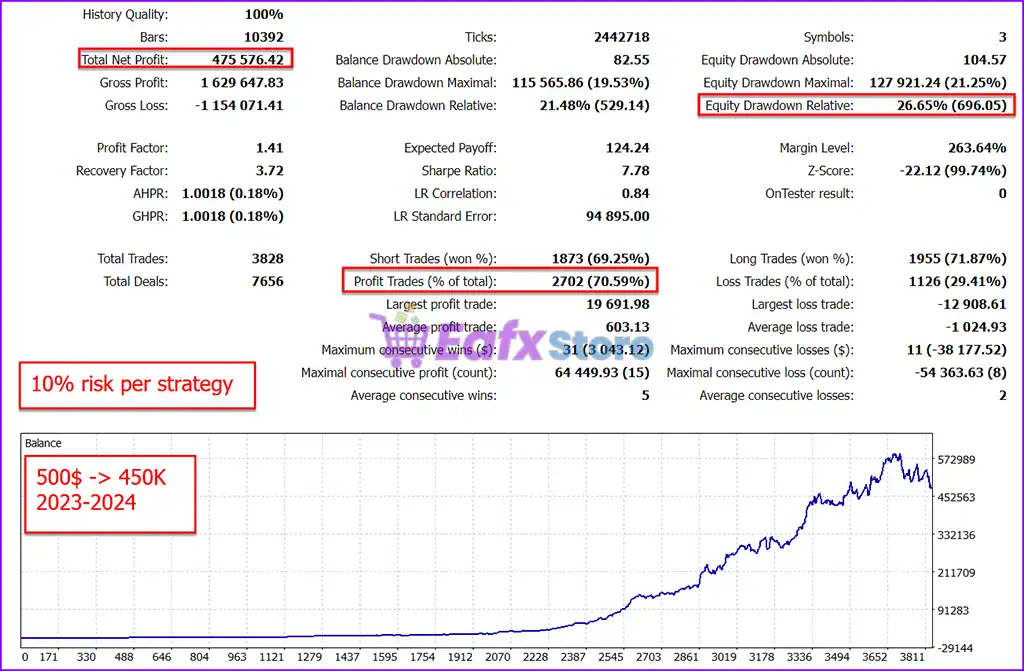
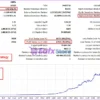
🔶 The test results from 2023 to 2024 reveal extraordinary performance from a modest $500 account.
✅ Initial Deposit: $500
✅ Total Net Profit: $475,576.42
✅ Maximum Drawdown: 19.53%
✅ Win Rate (% of total): 70.59%
Indicement MT5 Backtest Results
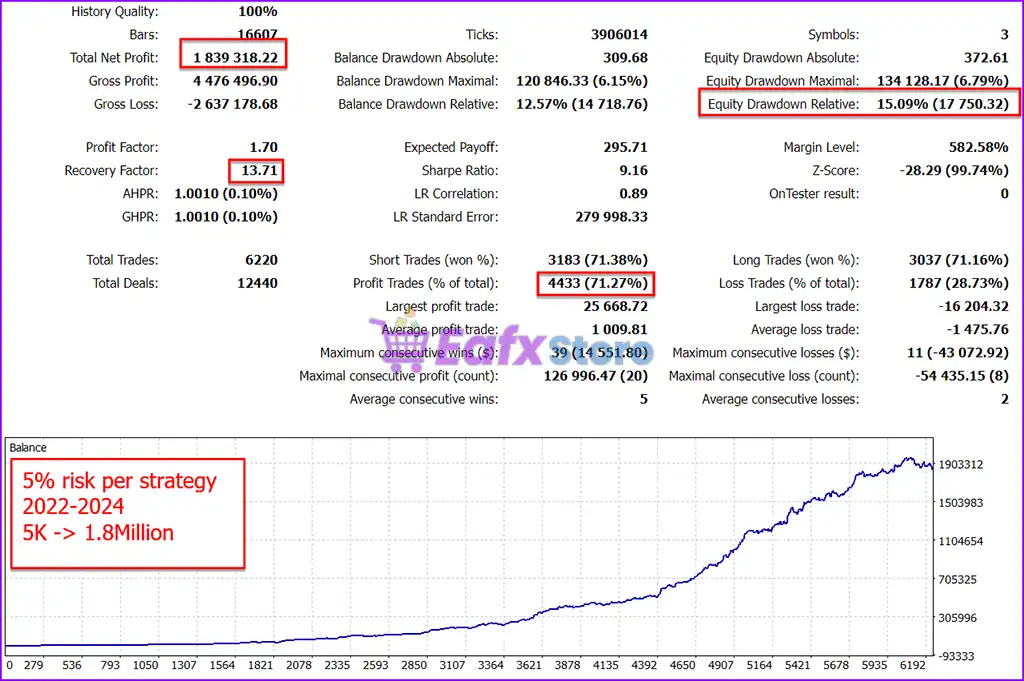
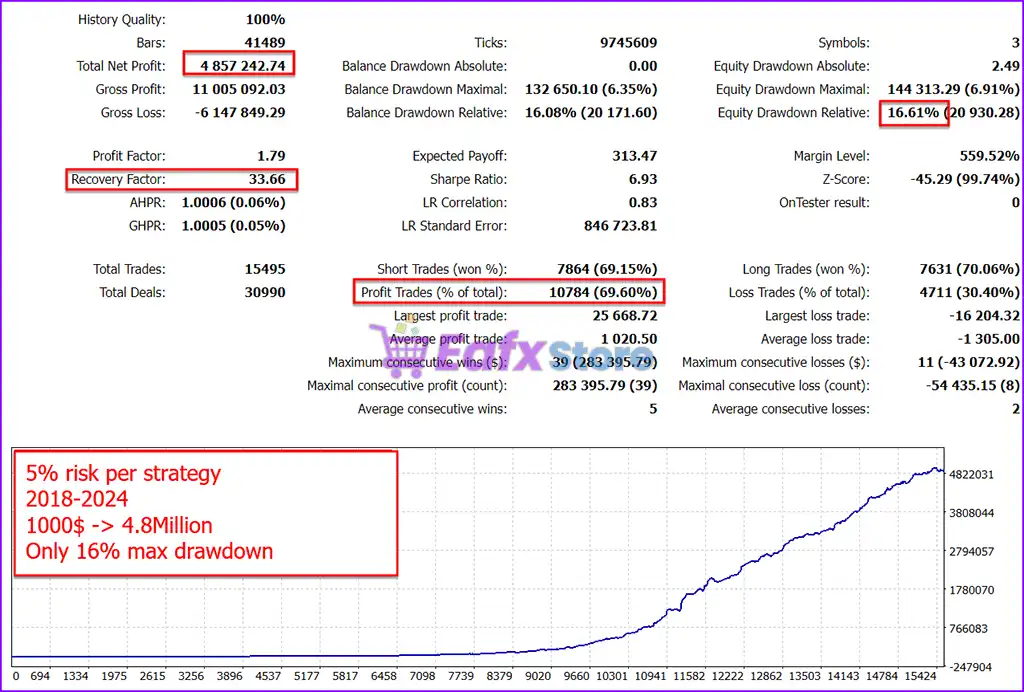
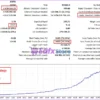
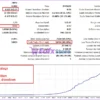
🔶 Backtested trading results over 6 years (2018 – 2024) with over 15,000 trades, showing the power of compounding strategies using only 5% risk per strategy.
✅ Initial Deposit: $1,000
✅ Total Net Profit: $4.85 Million
✅ Maximum Drawdown: 6.35%
✅ Win Rate (% of total): 69.60%
Indicement MT5 Backtests Results
Why use Indicement MT5?
🔹 Designed for Major Global Indices: Built specifically for US500, US30 and NAS100 markets.
🔹 Stable Long-Term Automated Trading: Focuses on controlled drawdowns and steady growth.
🔹 Adaptive Strategy Configuration: Allows flexible lot sizing and risk management adjustments.
🔹 Professional Risk Protection Tools: Includes daily drawdown limits and news event filters.
🔹 Marketplace-Ready Index Trading EA: Ideal for traders seeking structured automated solutions.
Is Indicement MT5 safe?
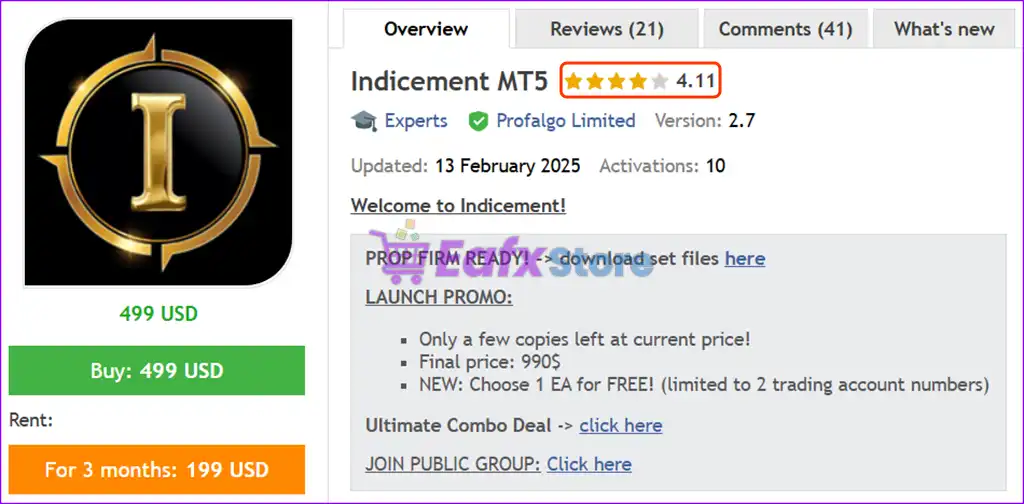
Indicement MT5 shows significant potential in providing stable and reliable profits, making it a reliable tool in the forex market. The advisor is highly appreciated by the MQL5 community in many aspects and has won the trust of users.
⭐⭐⭐⭐⭐ Andrii Soma (2025.01.27)
“I bought the Indicement EA on day one (September 7, 2024) and have been using it on a real account since then. This EA looks promising in the long run and is currently making me profitable.”
⭐⭐⭐⭐⭐ RehanRM (2025.01.13)
“This is one of my favorite EAs. Overall, the system is very reliable and shows great performance in the long term. This is an honest EA from an honest seller, so I highly recommend it.”
⭐⭐⭐⭐⭐ Gravity Tool (2024.12.28)
“It performed as expected in backtests, showing great long term potential. I also run his other products in my portfolio and have been profitable. Wim and his EAs are highly recommended.”
Recommended settings
Recommended settings and parameters to pay attention to from developers and experts:
| Features | Type |
|---|---|
| Trading platform | MetaTrader 5 (MT5) |
| Time frames | H1 (60 minute chart) |
| Currency pairs | US500, US30 and NAS100 indices |
| Minimum / Recommended deposit | $150 |
| Minimum / Recommended leverage | Any |
| Product type | Original version |
| Additional services | Unlock and Decompile |
| Recommended brokers | Exness Broker, Icmarkets Broker |
| Recommended VPS | MyfxVPS.com ( Blue VPS, Golden VPS). Lowest Latency, 2 week Free Trial, 100% Free for 12-18 Months. |
Product Download Package?
The download package of the product suite includes:
Experts
✅ Setting (If Any).docx
✅ Installation Guide.docx
SetFiles
✅ Indicement_extreme.set
✅ Indicement_extreme_low risk.set
✅ Indicement_high risk.set
✅ Indicement_low risk.set
✅ Indicement_medium risk.set
✅ Indicement_Prop firm set.set
➡️ Reviewed by David Easton
Conclusion
In short, Indicement MT5 is a high-performance, index-optimized Expert Advisor (EA) designed for traders who demand precision, scalability, and long-term profitability. Built on 15+ years of algorithmic trading experience, this EA leverages advanced breakout strategies and multi-strategy architecture to trade US500 (S&P 500), US30 (Dow Jones), and NAS100 (NASDAQ) with exceptional consistency.
🔢 Indicement MT5 Settings Guide
Indicement MT5 is a versatile automated trading Expert Advisor designed to support multi-market trading with a strong focus on US500, US30, and NAS100 strategies. Its extensive configuration panel provides traders with detailed control over trading direction, strategy activation, lot sizing, Prop Firm risk management, automatic GMT adjustment, news-event protection, trading hours, and symbol-specific execution.
With dedicated settings for NFP, Interest Rate, and CPI events, Indicement MT5 gives users considerable flexibility when adapting automated trading to different broker conditions and account objectives.
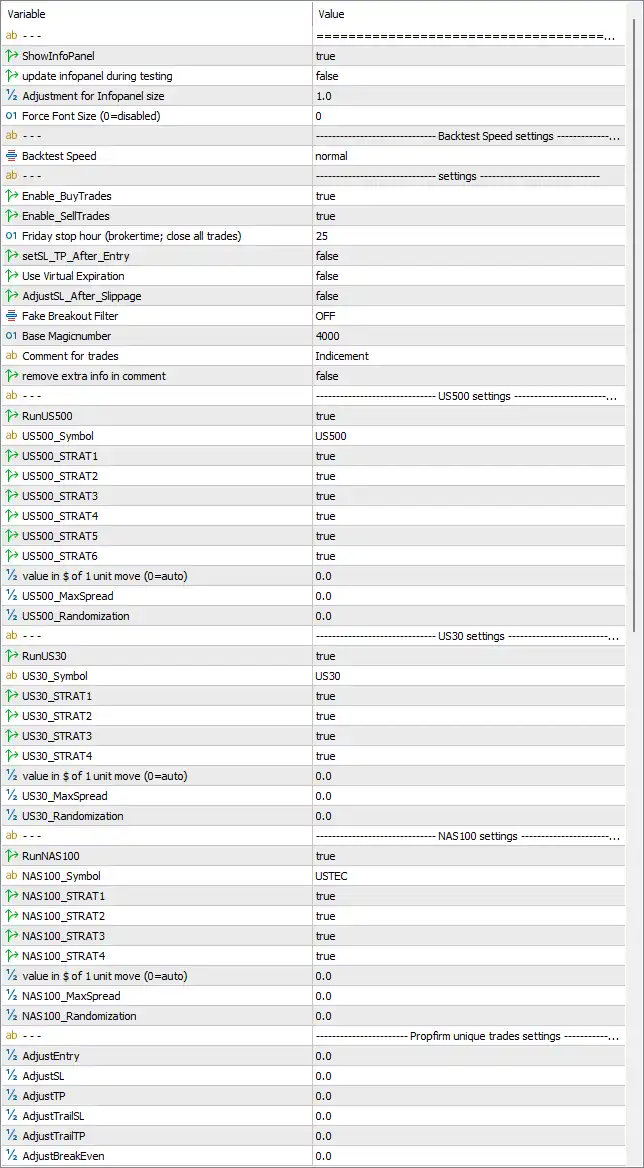
Indicement MT5 Settings Panel
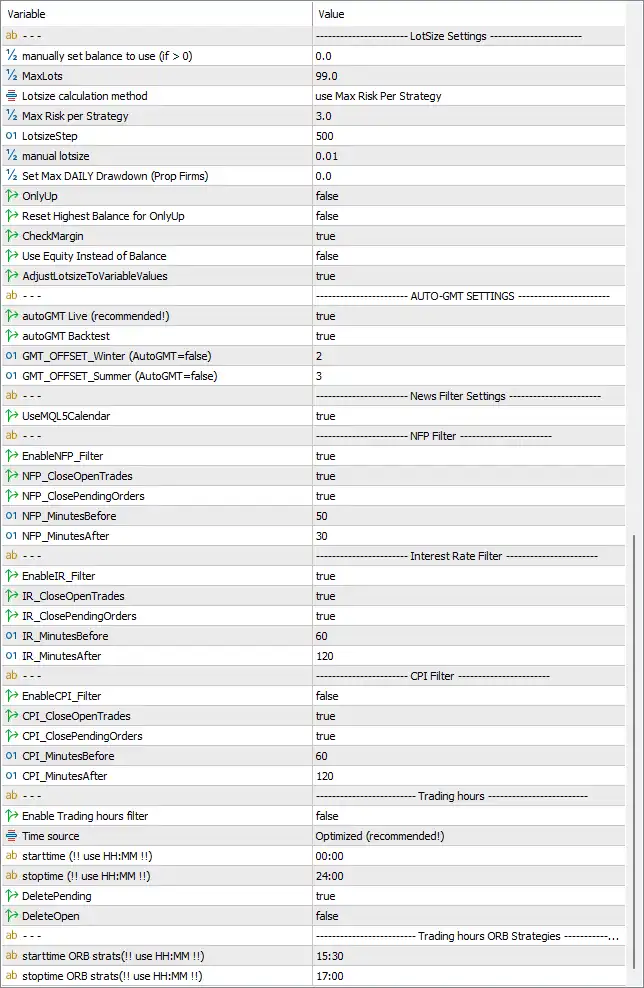
Indicement MT5 EA Settings Panel
🔢 Indicement MT5 EA Settings Explained
🔶 General & Backtest Settings
🔹 ShowInfoPanel: true — Enables the EA information panel, allowing important trading and system information to be displayed on the chart.
🔹 update infopanel during testing: false — Prevents the information panel from being continuously updated during backtesting when set to false.
🔹 Adjustment for Infopanel size: 1.0 — Sets the information-panel size adjustment to 1.0, representing the configured default scaling factor.
🔹 Force Font Size (0=disabled): 0 — Sets the forced font size to 0, which means this manual font-size override is disabled.
🔹 Backtest Speed: normal — Sets the backtesting speed mode to normal, allowing the EA to run simulations using the standard configured testing speed.
🔶 Main Trading Settings
🔹 Enable_BuyTrades: true — Enables Buy trades, allowing Indicement MT5 to open long positions when its trading strategies generate qualifying signals.
🔹 Enable_SellTrades: true — Enables Sell trades, allowing the EA to open short positions when its trading conditions are satisfied.
🔹 Friday stop hour (broker time; close all trades): 25 — Sets the Friday stop-hour parameter to 25, based on broker time, with the EA configured to close all trades at the specified Friday cutoff according to its internal time logic.
🔹 setSL_TP_After_Entry: false — Disables the option to apply Stop Loss and Take Profit after the trade entry has already been executed.
🔹 Use Virtual Expiration: false — Disables virtual expiration functionality, meaning virtual trade expiration is not active in the displayed configuration.
🔹 AdjustSL_After_Slippage: false — Disables automatic Stop Loss adjustment after execution slippage.
🔹 Fake Breakout Filter: OFF — The Fake Breakout Filter is set to OFF, meaning this additional breakout-filtering mechanism is disabled.
🔹 Base Magicnumber: 4000 — Sets the base Magic Number to 4000, which is used to identify and manage trades belonging to the EA.
🔹 Comment for trades: Indicement — Sets the trade comment to Indicement, making EA-generated positions easier to identify in the MT5 terminal.
🔹 remove extra info in comment: false — Keeps additional information in the trade comment because this option is set to false.
🔶 US500 Settings
🔹 RunUS500: true — Enables trading for the US500 market.
🔹 US500_Symbol: US500 — Defines US500 as the symbol used for the US500 strategy.
🔹 US500_STRAT1: true — Enables US500 Strategy 1.
🔹 US500_STRAT2: true — Enables US500 Strategy 2.
🔹 US500_STRAT3: true — Enables US500 Strategy 3.
🔹 US500_STRAT4: true — Enables US500 Strategy 4.
🔹 US500_STRAT5: true — Enables US500 Strategy 5.
🔹 US500_STRAT6: true — Enables US500 Strategy 6.
🔹 value in $ of 1 unit move (0=auto): 0.0 — Sets the dollar value of a one-unit price movement to 0.0, allowing the EA’s 0 = auto logic to determine the value automatically.
🔹 US500_MaxSpread: 0.0 — Sets the maximum US500 spread parameter to 0.0 according to the displayed configuration.
🔹 US500_Randomization: 0.0 — Sets US500 strategy randomization to 0.0, meaning no additional randomization factor is configured.
🔶 US30 Settings
🔹 RunUS30: true — Enables automated trading for the US30 market.
🔹 US30_Symbol: US30 — Defines US30 as the symbol used by the US30 trading module.
🔹 US30_STRAT1: true — Enables US30 Strategy 1.
🔹 US30_STRAT2: true — Enables US30 Strategy 2.
🔹 US30_STRAT3: true — Enables US30 Strategy 3.
🔹 US30_STRAT4: true — Enables US30 Strategy 4.
🔹 value in $ of 1 unit move (0=auto): 0.0 — Sets the dollar value of a one-unit US30 movement to 0.0, allowing automatic calculation when supported by the EA.
🔹 US30_MaxSpread: 0.0 — Sets the maximum US30 spread parameter to 0.0.
🔹 US30_Randomization: 0.0 — Sets US30 strategy randomization to 0.0.
🔶 NAS100 Settings
🔹 RunNAS100: true — Enables automated trading for the NAS100 market.
🔹 NAS100_Symbol: USTEC — Defines USTEC as the broker symbol used for the NAS100 strategy.
🔹 NAS100_STRAT1: true — Enables NAS100 Strategy 1.
🔹 NAS100_STRAT2: true — Enables NAS100 Strategy 2.
🔹 NAS100_STRAT3: true — Enables NAS100 Strategy 3.
🔹 NAS100_STRAT4: true — Enables NAS100 Strategy 4.
🔹 value in $ of 1 unit move (0=auto): 0.0 — Sets the dollar value of a one-unit NAS100 movement to 0.0, allowing automatic calculation according to the EA’s internal logic.
🔹 NAS100_MaxSpread: 0.0 — Sets the maximum NAS100 spread parameter to 0.0.
🔹 NAS100_Randomization: 0.0 — Sets NAS100 randomization to 0.0, leaving the displayed randomization adjustment disabled.
🔶 Prop Firm Unique Trades Settings
🔹 AdjustEntry: 0.0 — Sets the entry adjustment value to 0.0, meaning no additional entry adjustment is configured.
🔹 AdjustSL: 0.0 — Sets the Stop Loss adjustment value to 0.0.
🔹 AdjustTP: 0.0 — Sets the Take Profit adjustment value to 0.0.
🔹 AdjustTrailSL: 0.0 — Sets the trailing Stop Loss adjustment to 0.0.
🔹 AdjustTrailTP: 0.0 — Sets the trailing Take Profit adjustment to 0.0.
🔹 AdjustBreakEven: 0.0 — Sets the break-even adjustment value to 0.0.
🔶 Lot Size Settings
🔹 manually set balance to use (if > 0): 0.0 — Sets the manual balance reference to 0.0. Since the value is not greater than zero, the manual balance override is not activated.
🔹 MaxLots: 99.0 — Sets the maximum permitted lot size to 99.0 lots.
🔹 Lotsize calculation method: use Max Risk per Strategy — Configures the EA to calculate position size using the Max Risk per Strategy methodology.
🔹 Max Risk per Strategy: 3.0 — Sets the maximum risk per strategy to 3.0 according to the EA’s risk-calculation system.
🔹 LotsizeStep: 500 — Sets the lot-size calculation step/reference to 500.
🔹 manual lotsize: 0.01 — Sets the manually specified lot size to 0.01 lots.
🔹 Set max DAILY Drawdown (Prop Firms): 0.0 — Sets the maximum daily drawdown limit for Prop Firm protection to 0.0, meaning no positive daily drawdown threshold is configured in this field.
🔹 OnlyUp: false — Disables the OnlyUp functionality.
🔹 Reset Highest Balance for OnlyUp: false — Keeps the reset-highest-balance function disabled with a value of false.
🔹 CheckMargin: true — Enables margin checking before or during trade execution to help ensure sufficient available margin.
🔹 Use Equity Instead of Balance: false — Keeps equity-based sizing disabled, meaning the configured system does not use equity instead of balance for this calculation.
🔹 AdjustLotsizeToVariableValues: true — Enables adjustment of lot size according to the EA’s variable-value calculations.
🔶 AUTO-GMT Settings
🔹 autoGMT Live (recommended!): true — Enables automatic GMT adjustment for live trading. The setting is true and explicitly marked as recommended.
🔹 autoGMT Backtest: true — Enables automatic GMT adjustment during backtesting.
🔹 GMT_OFFSET_Winter (AutoGMT=false): 2 — Sets the manual winter GMT offset to 2 hours when AutoGMT is disabled.
🔹 GMT_OFFSET_Summer (AutoGMT=false): 3 — Sets the manual summer GMT offset to 3 hours when AutoGMT is disabled.
🔶 News Filter Settings
🔹 UseMQL5Calendar: true — Enables the MQL5 economic calendar for news-event detection.
🔶 NFP Filter
🔹 EnableNFP_Filter: true — Enables the Non-Farm Payroll (NFP) news filter.
🔹 NFP_CloseOpenTrades: true — Enables closing of open trades around NFP events according to the EA’s NFP protection logic.
🔹 NFP_ClosePendingOrders: true — Enables the closing of pending orders around NFP events.
🔹 NFP_MinutesBefore: 50 — Sets the NFP protection period to 50 minutes before the relevant NFP event.
🔹 NFP_MinutesAfter: 30 — Sets the NFP protection period to 30 minutes after the relevant NFP event.
🔶 Interest Rate Filter
🔹 EnableIR_Filter: true — Enables the Interest Rate news-event filter.
🔹 IR_CloseOpenTrades: true — Enables closing of open positions around relevant Interest Rate events.
🔹 IR_ClosePendingOrders: true — Enables closing of pending orders around relevant Interest Rate events.
🔹 IR_MinutesBefore: 60 — Sets the Interest Rate protection period to 60 minutes before the event.
🔹 IR_MinutesAfter: 120 — Sets the Interest Rate protection period to 120 minutes after the event.
🔶 CPI Filter
🔹 EnableCPI_Filter: false — Disables the CPI news filter because the parameter is set to false.
🔹 CPI_CloseOpenTrades: true — Enables closing of open trades around CPI events if the CPI filter is activated.
🔹 CPI_ClosePendingOrders: true — Enables closing of pending orders around CPI events if the CPI filter is activated.
🔹 CPI_MinutesBefore: 60 — Sets the configured CPI protection period to 60 minutes before the event.
🔹 CPI_MinutesAfter: 120 — Sets the configured CPI protection period to 120 minutes after the event.
🔶 Trading Hours
🔹 Enable Trading hours filter: false — Disables the general trading-hours filter, allowing the EA to operate without applying this specific time restriction.
🔹 Time source: Optimized (recommended!) — Uses the Optimized time-source mode, which is explicitly marked as recommended.
🔹 starttime (!! use HH:MM !!): 00:00 — Sets the configured general trading start time to 00:00.
🔹 stoptime (!! use HH:MM !!): 24:00 — Sets the configured general trading stop time to 24:00, representing the end of the full-day time range.
🔹 DeletePending: true — Enables deletion of pending orders according to the configured trading-hours logic.
🔹 DeleteOpen: false — Disables automatic deletion of open positions under the trading-hours filter.
🔶 Trading Hours for ORB Strategies
🔹 starttime ORB strats(!! use HH:MM !!): 15:30 — Sets the ORB strategy trading start time to 15:30.
🔹 stoptime ORB strats(!! use HH:MM !!): 17:00 — Sets the ORB strategy trading stop time to 17:00.
🔶 Key Configuration Highlights
🔹 Multi-Market Trading: Indicement MT5 is configured to run US500, US30, and NAS100 modules simultaneously.
🔹 US500 Strategies: All 6 US500 strategies are enabled with US500_STRAT1 through US500_STRAT6 = true.
🔹 US30 Strategies: All 4 US30 strategies are enabled with US30_STRAT1 through US30_STRAT4 = true.
🔹 NAS100 Strategies: All 4 NAS100 strategies are enabled with NAS100_STRAT1 through NAS100_STRAT4 = true.
🔹 Risk-Based Lot Sizing: The EA uses Max Risk per Strategy as its lot-size calculation method with Max Risk per Strategy = 3.0.
🔹 Maximum Position Size: The configured maximum lot size is 99.0 lots, while the manual lot size is 0.01.
🔹 Prop Firm Controls: A dedicated Set max DAILY Drawdown (Prop Firms) parameter is available, currently configured at 0.0.
🔹 Margin Protection: CheckMargin = true, enabling margin checks as part of the trading process.
🔹 GMT Automation: Both autoGMT Live = true and autoGMT Backtest = true are enabled, with manual offsets of 2 for winter and 3 for summer.
🔹 NFP Protection: NFP filtering is enabled with 50 minutes before and 30 minutes after protection.
🔹 Interest Rate Protection: Interest Rate filtering is enabled with 60 minutes before and 120 minutes after protection.
🔹 CPI Protection: The CPI filter itself is disabled, although its configured protection values remain 60 minutes before and 120 minutes after.
🔹 Trading Hours: The general trading-hours filter is disabled, with a configured range of 00:00–24:00.
🔹 ORB Trading Window: ORB strategies are configured to operate between 15:30 and 17:00.
🔢 Conclusion
Indicement MT5 offers a highly configurable automated trading environment with dedicated strategy modules for US500, US30, and NAS100. The EA combines multi-strategy execution with risk-based lot sizing, margin checking, Prop Firm controls, automatic GMT adjustment, news-event filters, spread settings, and ORB-specific trading hours.
The displayed configuration enables Buy and Sell trades, runs all 6 US500 strategies, all 4 US30 strategies, and all 4 NAS100 strategies, while using Max Risk per Strategy with a configured risk value of 3.0. The EA also includes significant event protection for NFP and Interest Rate announcements, while the CPI filter is currently disabled.
For traders considering Indicement MT5 for live or Prop Firm environments, the most important parameters to review are the Max Risk per Strategy = 3.0, MaxLots = 99.0, LotsizeStep = 500, manual lotsize = 0.01, daily drawdown = 0.0, news-filter timing, and strategy activation settings. These should be tested carefully under the intended broker’s execution conditions before moving from backtesting or demo trading to a live account.
🔢 FAQs
❓ What markets does Indicement MT5 support in the displayed configuration?
The EA is configured for US500, US30, and NAS100, using US500, US30, and USTEC as the corresponding symbols.
❓ How many strategies are enabled for Indicement MT5?
The displayed settings enable 6 US500 strategies, 4 US30 strategies, and 4 NAS100 strategies, for a total of 14 enabled strategy modules.
❓ What is the lot-sizing method used by Indicement MT5?
The configured Lotsize calculation method is use Max Risk per Strategy, with Max Risk per Strategy = 3.0. The maximum lot size is 99.0, while the manual lot size is 0.01.
❓ Does Indicement MT5 have protection against major economic news?
Yes. The EA uses the MQL5 Calendar, with NFP and Interest Rate filters enabled. NFP protection is configured for 50 minutes before and 30 minutes after, while Interest Rate protection uses 60 minutes before and 120 minutes after.
❓ What are the ORB strategy trading hours?
The ORB strategies are configured to operate from 15:30 to 17:00. The general trading-hours filter is currently disabled, while the ORB-specific schedule remains separately configured.
User Reviews
Only logged in customers who have purchased this product may leave a review.
1. What instruments does Indicement MT5 trade?
Indicement MT5 is designed to trade major U.S. indices, specifically US500 (S&P 500), US30 (Dow Jones), and NAS100 (Nasdaq). These are among the most liquid and volatile indices, ideal for breakout strategies.
2. Is Indicement MT5 suitable for beginners or small accounts?
Yes. You can start trading with a minimum deposit of $150 using conservative risk settings. The EA is beginner-friendly while offering deep customization for advanced traders.
3. Does Indicement MT5 use martingale or grid strategies?
No. Indicement MT5 does not use martingale or grid techniques. It is built with strict risk management principles, using Stop Loss (SL), Take Profit (TP), and trailing logic to protect your capital.
4. Is this EA optimized for proprietary trading firm rules?
Yes. Indicement MT5 includes features like daily drawdown control, entry/exit randomization, and NFP filters, making it compliant with most Prop Firm evaluation and trading requirements.
5. How many strategies are running inside the EA?
Indicement MT5 uses a multi-strategy architecture. It runs multiple internal breakout-based strategies per index to diversify risk and enhance trading consistency.
6. Can I use this EA with any broker?
Yes. The EA has been stress-tested across multiple brokers and server feeds. However, Exness and HTFX are recommended for optimal execution quality and spreads.
7. What timeframe should I attach the EA to?
You can run the EA on the H1 timeframe, but thanks to its built-in logic, the actual chart timeframe doesn't affect performance — it operates independently of visual charts.
8. How does Indicement MT5 handle high-impact news like NFP?
The EA includes an auto GMT detection system and news filters, including NFP protection, which pause or adjust trading behavior around high-volatility events.
9. Is the performance verified or backtested?
Yes. Indicement MT5 has been backtested from 2018 to 2024, showing consistent performance with high win rates (around 70%), low drawdowns, and impressive compounding returns. Live user reviews also confirm that real results closely align with these tests.
10. How do I manage risk with this EA?
You can control risk using fixed lot sizes, maximum risk per strategy, or step-based scaling. Additionally, the EA automatically adapts lot sizes based on your account balance and drawdown preferences.
-
 Price range: $70.00 through $599.00
 -
 Price range: $89.00 through $599.00
 -
 Price range: $89.00 through $599.00
 -
 Price range: $89.00 through $599.00
-
 2
2 -
 4
4 -
 3
3 -
 3Price range: $89.00 through $599.00
There are no reviews yet.