
Cosmos Orion EA MT5
Cosmos Orion EACosmos Orion EA Live SignalCosmos Orion EA Backtest ResultsCosmos Orion EA MT5 Backtest ResultsCosmos Orion EA MT5 Review
MT5XAUUSD (Gold) · H2Updated 16 Oct 2026

Cosmos Orion EA MT5 v2.1 with SetFiles (Unlimited)

Cosmos Orion MT5 is a gold EA that trades confirmed three point structure breakouts on H2 with pending orders, trailing stop and built-in filters.

Buy now — $69Add to cart
Download link right after paymentUnlimited accounts, no licence lockSet files includedFree updates to new versions
Pay with USDT · BTC · ETHBinance Pay
Not sure it fits your broker or account?Ask on Telegram
Check before you buy

Will it work for me?

Trading platform
MetaTrader 5 (MT5)
Time frames
H2
Currency pairs
XAUUSD (Gold)
Minimum / Recommended deposit
$200+
Minimum / Recommended leverage
Any
Account type
Hedging, Netting, ECN, Raw account
Additional services
Unlock and Decompile
Recommended brokers
Exness Broker, Icmarkets Broker
Recommended VPS
MyfxVPS.com (Blue VPS, Golden VPS). Lowest Latency, 2 week Free Trial, 100% Free for 12-18 Months.
What you get

In the download

COMCosmos Orion EA MT5 by eafxstore.com
Optimize Settings

Recommended settings for Cosmos Orion EA MT5 v2.1

🔢 Cosmos Orion EA MT5: Complete Settings Guide and Configuration Explained

Cosmos Orion EA is an automated trading system designed for Gold markets, with configurable entry controls, risk-based position sizing, broker-time synchronization, and visual market-structure tools. Its settings include a Gold-symbol restriction, spread filtering, a configurable strictness value, custom risk options, and a Magic Number for trade identification. The EA also provides a chart status panel and animated structure visuals to help traders monitor potential entry levels and market conditions.

The following guide explains every visible input parameter, including the original values, Boolean settings, RGB color values, and numerical limits.
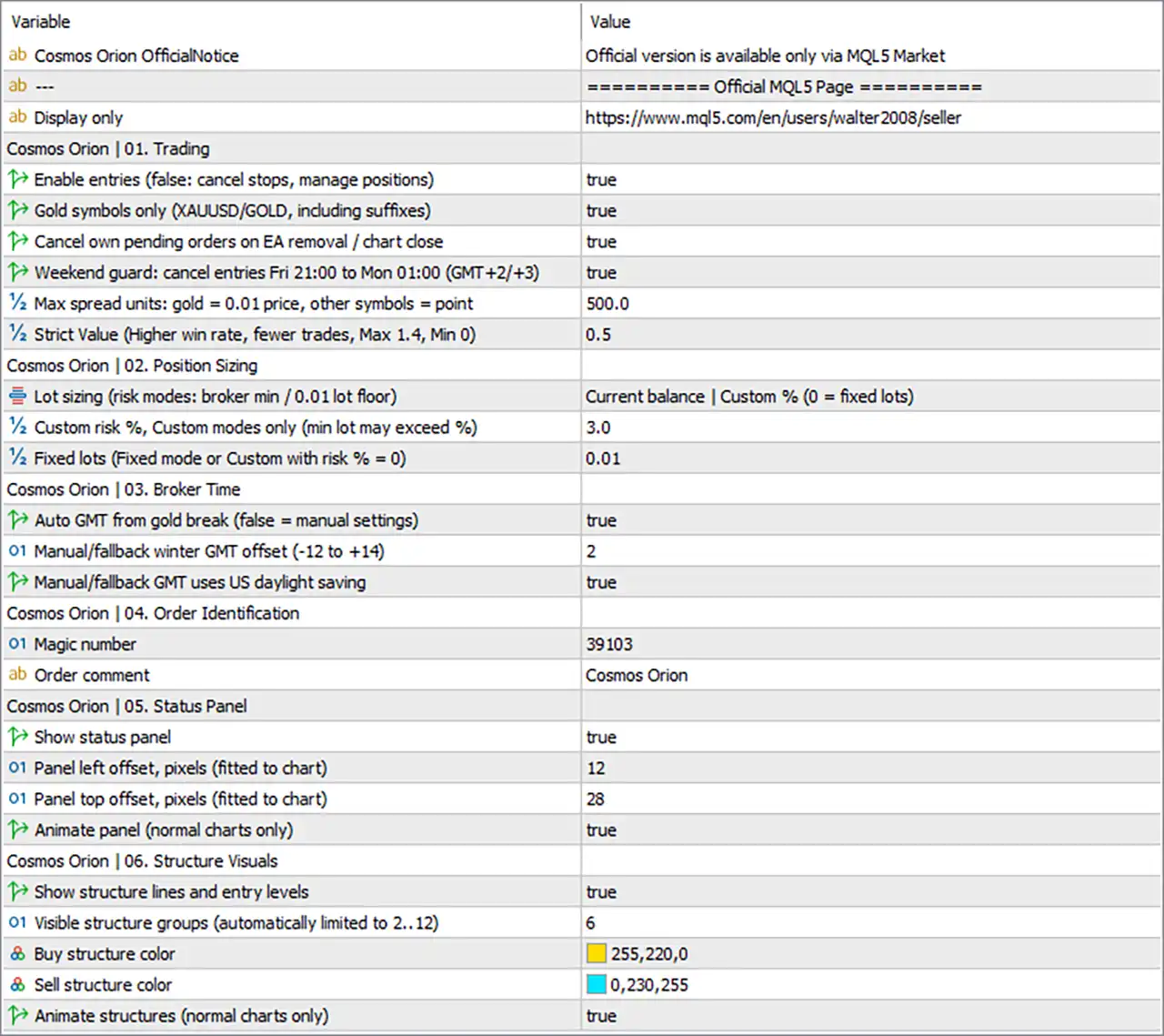
Cosmos Orion EA MT5 Settings Panel

⚙️ Trading Settings

🔹 Enable entries (false: cancel stops, manage positions) = true — Enables new trade entries. When set to true, the EA is permitted to place new entry orders when its conditions are met. The label indicates that setting it to false cancels pending stop orders while continuing to manage existing positions, which can help stop new exposure without necessarily abandoning open trades.

🔹 Gold symbols only (XAUUSD/GOLD, including suffixes) = true — Restricts trading to recognized Gold symbols such as XAUUSD or GOLD, including broker-specific suffixes. This helps prevent the EA from operating on unintended instruments when attached to a chart with a different symbol.

🔹 Cancel own pending orders on EA removal / chart close = true — Enables cancellation of the EA’s own pending orders when the EA is removed or the chart is closed, according to the label. This can help prevent unattended entry orders from remaining active after the EA is no longer running on that chart.

🔹 Weekend guard: cancel entries Fri 21:00 to Mon 01:00 (GMT +2/+3) = true — Enables a weekend-entry protection window from Friday at 21:00 to Monday at 01:00, using the specified GMT +2/+3 time convention. This is intended to prevent new pending entries during the weekend transition, when gaps and reduced liquidity can increase execution risk.

🔹 Max spread units: gold = 0.01 price, other symbols = point = 500.0 — Sets the maximum spread threshold to 500.0 in the units described by the label. For Gold, the spread unit is a 0.01 price increment; for other symbols, the unit is a broker point. The EA’s exact spread conversion should be checked against the symbol specification before using this threshold.

🔹 Strict Value (Higher win rate, fewer trades, Max 1.4, Min 0) = 0.5 — Sets the strategy strictness parameter to 0.5, within the stated range of 0 to 1.4. The label suggests that higher values make entry conditions more selective, potentially reducing trade frequency while seeking stronger setups. This does not guarantee a higher win rate or improved profitability.

⚙️ Position Sizing

🔹 Lot sizing (risk modes: broker min / 0.01 lot floor) = Current balance | Custom % (0 = fixed lots) — Selects the position-sizing mode labeled Current balance | Custom % (0 = fixed lots). This mode indicates that lot sizing is related to the account balance and a custom risk percentage, while a custom risk value of 0 selects fixed lots. The exact lot calculation depends on the EA’s internal formula.

🔹 Custom risk %, Custom modes only (min lot may exceed %) = 3.0 — Sets the custom risk parameter to 3.0, generally interpreted as 3% in a percentage-based mode. The label warns that the broker’s minimum lot size may result in exposure exceeding the intended percentage, so actual risk should be verified for the chosen symbol and account balance.

🔹 Fixed lots (Fixed mode or Custom with risk % = 0) = 0.01 — Sets the fixed trade volume to 0.01 lots. This value is used when the fixed-lot mode is selected or when the custom risk percentage is set to 0, according to the input description.

⚙️ Broker Time Settings

🔹 Auto GMT from gold break (false = manual settings) = true — Enables automatic GMT determination using the Gold-break reference described by the parameter name. When set to true, the EA is intended to determine the applicable broker-time offset automatically rather than relying solely on manual fallback values.

🔹 Manual/fallback winter GMT offset (-12 to +14) = 2 — Sets the manual or fallback winter GMT offset to 2 hours. This value is relevant when automatic GMT detection is disabled or when the EA uses its fallback time configuration.

🔹 Manual/fallback GMT uses US daylight saving = true — Enables the use of the US daylight-saving-time schedule for manual or fallback GMT handling. This can help the EA account for seasonal clock changes when applying time-dependent rules, although the result depends on the broker’s server-time convention.

⚙️ Order Identification

🔹 Magic number = 39103 — Assigns the Magic Number 39103 to the EA’s orders. This identifier helps distinguish Cosmos Orion positions and pending orders from trades opened by other Expert Advisors or manually, depending on how the EA manages order ownership.

🔹 Order comment = Cosmos Orion — Sets the order comment to Cosmos Orion. This text may appear in the trading terminal’s order or position information, making the EA’s trades easier to identify during monitoring and analysis.

⚙️ Status Panel Settings

🔹 Show status panel = true — Enables the on-chart status panel. This allows the EA to display its status or related information directly on the chart, depending on the panel’s implemented features.

🔹 Panel left offset, pixels (fitted to chart) = 12 — Sets the panel’s horizontal offset to 12 pixels. This controls its positioning relative to the chart’s left-side reference point and can help prevent overlap with other chart elements.

🔹 Panel top offset, pixels (fitted to chart) = 28 — Sets the panel’s vertical offset to 28 pixels. This positions the panel relative to the top of the chart and can be adjusted to improve readability or avoid covering important price information.

🔹 Animate panel (normal charts only) = true — Enables panel animation on normal charts. This affects the panel’s visual presentation rather than directly changing trade entries, stop placement, or lot sizing.

⚙️ Market Structure Visual Settings

🔹 Show structure lines and entry levels = true — Enables the display of market-structure lines and entry levels on the chart. These visual elements can help traders inspect the EA’s structure analysis and identify where potential entries may be considered.

🔹 Visible structure groups (automatically limited to 2..12) = 6 — Sets the number of visible market-structure groups to 6. The parameter is automatically constrained to a minimum of 2 and a maximum of 12, according to the label. Increasing the number may display more structure information, while reducing it can create a cleaner chart.

🔹 Buy structure color = 255,220,0 — Sets the Buy structure color using RGB values 255, 220, 0, which corresponds to a bright yellow shade. This color is used to distinguish the relevant bullish structure or buy-side visual elements from other chart annotations.

🔹 Sell structure color = 0,230,255 — Sets the Sell structure color using RGB values 0, 230, 255, which corresponds to a bright cyan shade. This provides a contrasting color for the relevant bearish structure or sell-side visual elements.

🔹 Animate structures (normal charts only) = true — Enables animation for market-structure visuals on normal charts. This changes how structure elements are displayed and animated, but does not by itself establish that the EA’s trading signals or execution rules are different.

🔢 Conclusion

The displayed Cosmos Orion EA MT5 configuration enables new entries and restricts trading to recognized Gold symbols, including XAUUSD and GOLD suffix variants. Its weekend guard is active from Friday 21:00 to Monday 01:00 under the specified GMT +2/+3 convention, and the maximum spread threshold is 500.0 using the input’s Gold-specific and non-Gold-specific units.

The selected position-sizing mode is Current balance | Custom %, with Custom risk = 3.0 and fixed volume 0.01 lots available as the alternative configuration. Automatic GMT detection is enabled, with a fallback winter offset of 2 and US daylight-saving handling enabled. The EA uses Magic Number 39103 and the order comment Cosmos Orion.

The status panel and market-structure visuals are enabled. The panel offsets are 12 pixels from the left and 28 pixels from the top, while 6 structure groups are visible. Buy structures use RGB 255,220,0, and sell structures use RGB 0,230,255.

Before live deployment, confirm how the EA calculates the custom risk percentage, handles broker minimum lots, interprets Gold spread units, and synchronizes GMT during seasonal clock changes. Backtesting and demo testing can help verify that the selected settings behave as intended under the broker’s actual trading conditions.

Full review

Quick Overview

Cosmos Orion MT5 is an automated trading robot for gold that trades confirmed three point price structures on the H2 timeframe. It places pending stop orders near the newest pivot, so a trade opens only after a real breakout. Exit management, trading filters, automatic broker time detection and several position sizing modes are included.

Best For:

✅ Gold traders who prefer breakout entries.

✅ Users who want structure based pending orders.

✅ Traders who need trailing stop and partial profit.

✅ Users who want news and weekend filters.

✅ Traders who run a VPS on a hedging account.

What is Cosmos Orion EA MT5?

Cosmos Orion MT5 is an Expert Advisor (EA) built for gold. It trades confirmed three point price structures on the H2 timeframe.

It does not predict the market. It waits for a structure to form, enters only on a breakout, and manages every order with defined exits.

⭐ Vendor Website: View here

⭐ Join Our Channel Telegram

How Does Cosmos Orion MT5 Work?

Three Point Structure Detection

The EA detects three pivot structures on the H2 timeframe, and every pivot is confirmed on closed bars only.

Signals are always calculated on H2, so the chart timeframe does not matter.

Breakout Entries

When a structure qualifies, the EA places a Buy Stop or Sell Stop near the newest pivot.

If there is no breakout, there is no trade, and expired or invalidated orders are removed.

Exit Management

Each pending order carries a stop loss and take profit.

Break-even, a Trailing stop and a partial take profit then manage the open trade, with distances based on a percentage of the gold price.

Protection Filters

Profit lock, a weekend guard, a macro window guard, a volatility filter, a spread limit and a margin pre-check decide when the EA may open new trades.

Verified Live Signal Performance

Cosmos Orion EA shows a live account performance on Tickmill-Live with 1:500 leverage, recording 39% growth since 2026 and $780.86 profit from a $2,000 initial deposit. The exact trading symbol and test duration are not displayed.

Cosmos Orion EA Live Signal
Parameter Result
Trading Symbol XAUUSD
Growth Since 2026 39%
Initial Deposit $2,000
Current Equity $2,780.86
Total Profit $780.86
Profit Trades 72%
Maximum Drawdown 5.5%

Historical Trading Results Performance

✅ The backtest report shows a net profit of $257,500.50 from a $2,000 initial deposit, with a profit factor of 6.94 and 99% history quality. The trading symbol and test duration are not displayed.

Cosmos Orion EA MT5 Backtest Results

Cosmos Orion EA MT5 Backtest Results
Parameter Results
Initial Deposit $2,000
Total Net Profit $257,500.50
Profit Factor 6.94
Total Trades 400
Winning Trades 82.00%
Maximum Equity Drawdown 4.10%
History Quality 99%

✅ The backtest records a net profit of $2,632.87 from a $200 initial deposit, achieving a 5.27 profit factor across 400 trades. The trading symbol and testing period are not shown.

Cosmos Orion EA Backtest Results

Cosmos Orion EA Backtest Results
Parameter Results
Initial Deposit $200
Total Net Profit $2,632.87
Profit Factor 5.27
Total Trades 400
Winning Trades 82.00%
Maximum Equity Drawdown 2.44%
History Quality 99%

Cosmos Orion MT5 Trading Strategy

🔹 Confirm the structure: pivots are confirmed on closed bars only, and signals are always calculated on H2, so the chart timeframe does not change the results.

🔹 Place a pending order: when a three point structure qualifies, the EA places a Buy Stop or a Sell Stop near the newest pivot and enters only when price breaks out.

🔹 Remove stale orders: expired or invalidated pending orders are deleted automatically, so when no breakout happens, no trade is opened at all.

🔹 Attach the exits: every pending order is sent with a stop loss and a take profit, and the exit distances scale as a percentage of the current gold price.

🔹 Manage the open trade: break-even, a trailing stop and a partial take profit move the stop and bank part of the gain while the rest of the trade keeps running.

Key Features of Cosmos Orion MT5

Three Point Structure Detection

The EA looks for confirmed three pivot structures on closed bars, which avoids reacting to a pivot that can still change while a candle is open.

H2 Signal Calculation

Signals are always calculated on the H2 timeframe, so changing the chart timeframe does not change the signals or the results of the EA.

Pending Breakout Orders

A Buy Stop or Sell Stop is placed near the newest pivot, and a trade opens only after price confirms the breakout with a real move.

Percentage Based Exit Distances

Stop loss, take profit and trailing distances follow a percentage of the current gold price, so no new tuning is needed when price levels change.

Break-Even, Trailing and Partial Take Profit

The stop moves beyond entry after minimum progress, trails as profit grows, and a partial close locks in part of the gain while the rest runs.

Profit Lock and Weekend Guard

New entries pause after consecutive winning trades until the next server day, and pending orders are removed before the Friday close and resume on Monday.

Macro Window and Volatility Filters

New entries pause around major US data releases, and no new trade opens when volatility is too low or too high for the structure logic.

Spread Limit and Margin Pre-Check

A maximum spread limit and a margin check with a safety reserve are applied before an order is sent, which helps avoid poor fills and margin problems.

Automatic Broker Time Detection

The EA detects the broker GMT offset and daylight saving time from the daily gold trading break, with a manual fallback when detection is not possible.

Flexible Position Sizing

Several risk levels, balance based or initial balance sizing, a fixed lot mode and a custom risk percentage mode fit different account sizes and plans.

Risk Management

🔹 Breakout fills can slip: a Buy Stop or Sell Stop triggers when price moves fast, so slippage and wide spread can give a worse fill than planned, especially around news. The spread limit helps but cannot remove this.

🔹 Author claims need checking: the author states that the EA uses no grid, no martingale and no averaging down, and that every order has a hard stop loss. These claims should be verified on a demo account. A guide to stop-loss placement explains why this matters.

🔹 Minimum lot can raise risk: on a small account, the broker minimum lot can carry more risk than the chosen percentage, so the real risk per trade may be higher than the selected risk level.

🔹 Balance based sizing compounds losses too: the position grows with the account, so after a winning run a losing trade costs more money than before. Initial balance sizing avoids this growth.

🔹 Exits can cut winners: break-even and trailing can close a trade at entry just before the move continues, and a partial close reduces the remaining position. A guide to take-profit methods shows how targets relate to risk.

What Sets It Apart

🔹 Structure based entries: the EA waits for a confirmed three point structure and a breakout, so it does not guess a direction before the market shows it.

🔹 Scale free exits: exit distances follow a percentage of the gold price, which keeps the logic consistent when gold trades at very different price levels.

🔹 Several protection layers: profit lock, a weekend guard, a macro window guard, a volatility filter and a spread limit work together inside one EA.

🔹 Automatic broker time handling: the EA finds the broker time offset by itself, which removes a common source of setup errors with time based filters.

Strengths and Limitations

Strengths

🔹 Clear and checkable logic: every entry follows a visible structure on the chart, and the panel and drawings make each decision easy to review.

🔹 Pending order discipline: with no breakout there is no trade, and unused or invalid orders are cleaned up automatically by the EA.

🔹 Rich exit toolkit: break-even, trailing and partial take profit give control over how a winning trade is handled after entry.

🔹 Low maintenance setup: percentage based distances and automatic time detection reduce the manual tuning needed over time.

Limitations

🔹 Gold only: the EA is designed for XAUUSD or GOLD, so it cannot be used as a general purpose system on other symbols.

🔹 Hedging accounts only: netting accounts are not supported, so some brokers and account types cannot run the EA at all.

🔹 Can stay idle: because trades open only after a confirmed breakout, quiet periods and filtered periods can pass with no trades.

🔹 No published performance: the product information includes no backtest or live report, so no returns or drawdown figures can be quoted here.

Who Should Use Cosmos Orion MT5?

🔹 Gold breakout traders: people who like structure based entries and want pending orders handled automatically by a robot.

🔹 Filter minded traders: users who want news windows, weekend guards and a spread limit applied without manual work.

🔹 VPS users on hedging accounts: traders who already run a low spread hedging account and a 24 hour server for gold.

🔹 Not for traders who: use netting accounts, want other symbols, or expect a guaranteed profit from an automated system.

Recommended Trading Conditions

For the best performance, the developer recommends:

FeaturesType
Trading platformMetaTrader 5 (MT5)
Time framesH2
Currency pairsXAUUSD (Gold)
Minimum / Recommended deposit$200+
Minimum / Recommended leverageAny
Account typeHedging, Netting, ECN, Raw account
Additional servicesUnlock and Decompile
Recommended brokersExness Broker, Icmarkets Broker
Recommended VPSMyfxVPS.com (Blue VPS, Golden VPS). Lowest Latency, 2 week Free Trial, 100% Free for 12-18 Months.

Product Download Package?

The download package of the product suite includes:

Experts

✅ Cosmos Orion_2.1_fix.ex5

SetFiles

✅ Gold_Risk 1%.set

✅ Gold_Risk 2%.set

✅ Gold_Fixed Lot_Low Risk.set

➡️ Reviewed by David Easton

Final Verdict

Cosmos Orion MT5 is a gold breakout EA that waits for a confirmed three point structure on H2, places pending orders only after a real breakout, and manages each trade with break-even, a trailing stop, partial take profit and several protection filters. It suits gold traders on a hedging account who want rule based entries and a VPS setup. No results are published and the author's no grid and no martingale claims need checking, so a demo trial is the right first step before live trading.

Questions about Cosmos Orion EA MT5 v2.1

❓ What is Cosmos Orion MT5?

An automated gold trading robot that trades confirmed three point price structures on the H2 timeframe using pending breakout orders.

❓ How does Cosmos Orion MT5 find trades?

It detects three pivot structures on closed H2 bars. When a structure qualifies, it places a Buy Stop or Sell Stop near the newest pivot.

❓ Does the chart timeframe change Cosmos Orion MT5 results?

No. Signals are always calculated on H2, so the chart timeframe does not change the results.

❓ What happens when there is no breakout in Cosmos Orion MT5?

No trade is opened, and expired or invalidated pending orders are removed automatically.

❓ What account type does Cosmos Orion MT5 need?

A hedging account is required, and netting accounts are not supported. A low spread ECN or RAW account with a VPS is recommended.

❓ What exit tools does Cosmos Orion MT5 include?

A stop loss and take profit on every order, break-even, a trailing stop and a partial take profit.

❓ What protection filters does Cosmos Orion MT5 include?

Profit lock, a weekend guard, a macro window guard around major US data releases, a volatility filter, a spread limit and a margin pre-check.

❓ How does Cosmos Orion MT5 handle broker time?

It detects the broker GMT offset and daylight saving time from the daily gold break, with a manual fallback when detection is not possible.

❓ How is the position size set in Cosmos Orion MT5?

Through several risk levels, balance based or initial balance sizing, a fixed lot mode or a custom risk percentage.

❓ Is Cosmos Orion MT5 free from grid and martingale?

The author states that it uses no grid, no martingale and no averaging down. A demo test helps confirm this before real money is used.

❓ Does Cosmos Orion MT5 guarantee profits?

No. Automated trading can produce profits and losses, and past results do not guarantee future results.

Other products traders compare

$69
Instant download
Buy now