


🔢 Onyx Liquidity Xau EA MT5 – Complete Inputs & Settings Guide
Onyx Liquidity Xau EA MT5 is a Gold-focused Expert Advisor designed around liquidity-based market analysis, price-action confirmation, volatility filtering, and structured risk management. Its Inputs combine fixed or percentage-based position sizing with daily-loss protection, margin controls, trailing stop and break-even management. The strategy also includes liquidity sweep detection, Fair Value Gap (FVG), Order Block, RSI divergence, Supply & Demand, Bollinger Band, and candlestick-pattern filters to refine potential XAUUSD trading opportunities.
🔢 Risk Management & Position Sizing
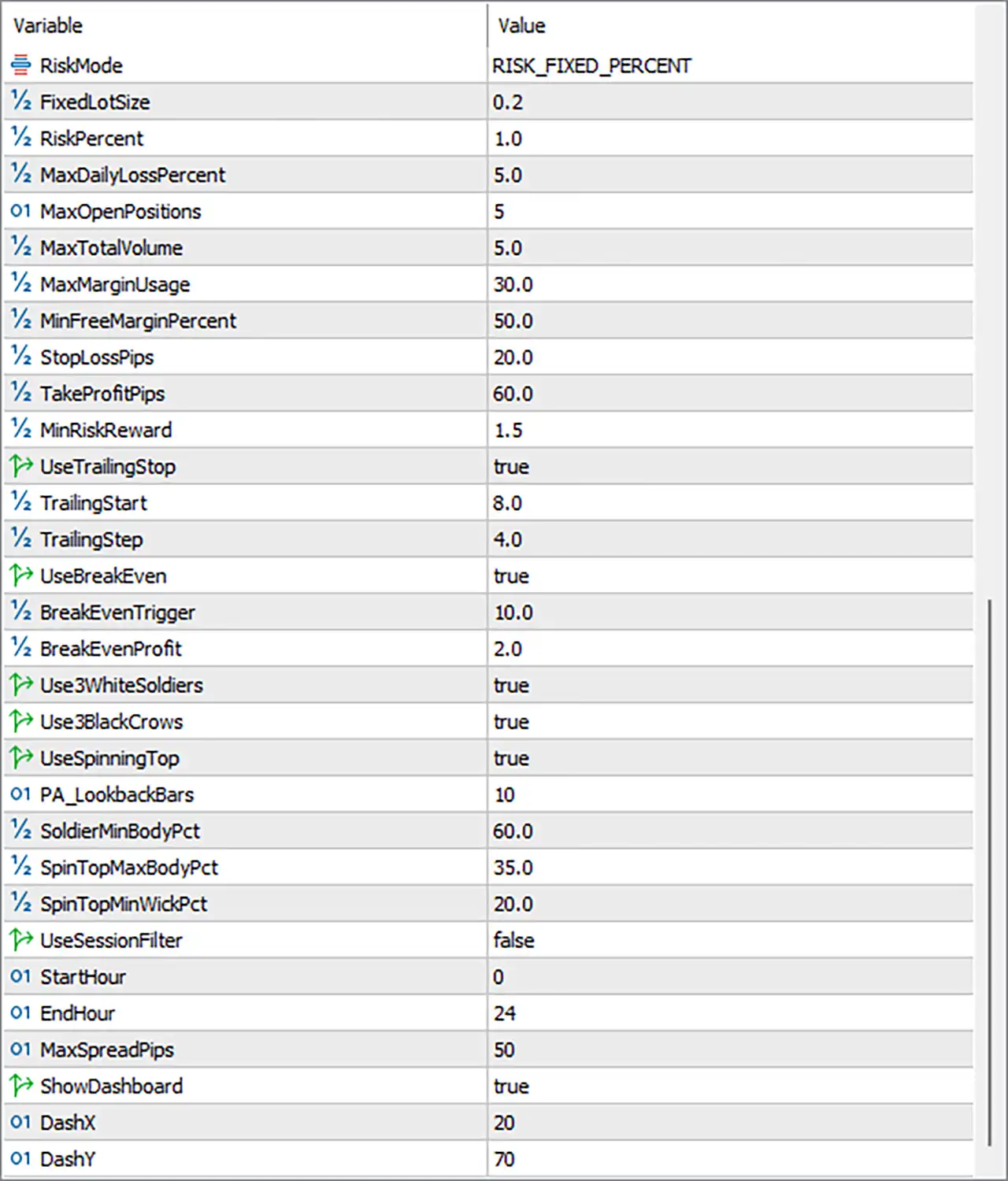
🔹 RiskMode = RISK_FIXED_PERCENT — Selects the risk calculation mode, with the current configuration using percentage-based position sizing.
🔹 FixedLotSize = 0.2 — Defines the fixed lot size used when the EA operates with a fixed-lot sizing mode.
🔹 RiskPercent = 1.0 — Sets the target account risk percentage used for automatic position-size calculation.
🔹 MaxDailyLossPercent = 5.0 — Limits the maximum daily account loss to 5.0% before additional trading is restricted.
🔹 MaxOpenPositions = 5 — Allows a maximum of 5 simultaneously open positions managed by the EA.
🔹 MaxTotalVolume = 5.0 — Sets the maximum combined trading volume to 5.0 lots.
🔹 MaxMarginUsage = 30.0 — Limits maximum margin usage to 30.0%, helping control overall account exposure.
🔹 MinFreeMarginPercent = 50.0 — Requires at least 50.0% free margin before the EA can continue opening trades.
🔢 Stop Loss, Take Profit & Trade Management
🔹 StopLossPips = 20.0 — Sets the default Stop Loss distance to 20.0 pips according to the EA's internal pip calculation.
🔹 TakeProfitPips = 60.0 — Sets the default Take Profit distance to 60.0 pips.
🔹 MinRiskReward = 1.5 — Requires a minimum Risk-to-Reward ratio of 1.5 for qualifying trade setups.
🔹 UseTrailingStop = true — Enables the trailing-stop mechanism for active positions.
🔹 TrailingStart = 8.0 — Activates trailing-stop management after the trade reaches 8.0 pips of profit.
🔹 TrailingStep = 4.0 — Sets the trailing adjustment step to 4.0 pips.
🔹 UseBreakEven = true — Enables automatic break-even management after the defined trigger condition is reached.
🔹 BreakEvenTrigger = 10.0 — Moves the trade toward break-even after reaching 10.0 pips of profit.
🔹 BreakEvenProfit = 2.0 — Locks approximately 2.0 pips of profit when the break-even function is activated.
🔢 Candlestick Confirmation
🔹 Use3WhiteSoldiers = true — Enables detection of the Three White Soldiers bullish candlestick pattern as a potential confirmation signal.
🔹 Use3BlackCrows = true — Enables detection of the Three Black Crows bearish candlestick pattern.
🔹 UseSpinningTop = true — Enables Spinning Top candle analysis as part of the entry-confirmation logic.
🔹 PA_LookbackBars = 10 — Examines the previous 10 candles for price-action confirmation and pattern context.
🔹 SoldierMinBodyPct = 60.0 — Requires the relevant Three White Soldiers/Three Black Crows candle body to meet a minimum 60.0% body condition.
🔹 SpinTopMaxBodyPct = 35.0 — Defines 35.0% as the maximum body percentage for identifying a Spinning Top.
🔹 SpinTopMinWickPct = 20.0 — Requires a minimum wick percentage of 20.0% for Spinning Top recognition.
🔢 Trading Session & Spread Filter
🔹 UseSessionFilter = false — Disables the trading-session restriction in the current configuration.
🔹 StartHour = 0 — Defines the trading start hour as 0 when the session filter is enabled.
🔹 EndHour = 24 — Defines the trading end hour as 24 when the session filter is enabled.
🔹 MaxSpreadPips = 50 — Prevents new trades when the detected spread exceeds 50 pips according to the EA's internal spread calculation.
🔢 Dashboard
🔹 ShowDashboard = true — Enables the on-chart dashboard for displaying EA and trading information.
🔹 DashX = 20 — Sets the dashboard horizontal chart position to 20.
🔹 DashY = 70 — Sets the dashboard vertical chart position to 70.
🔢 TURBO Mode
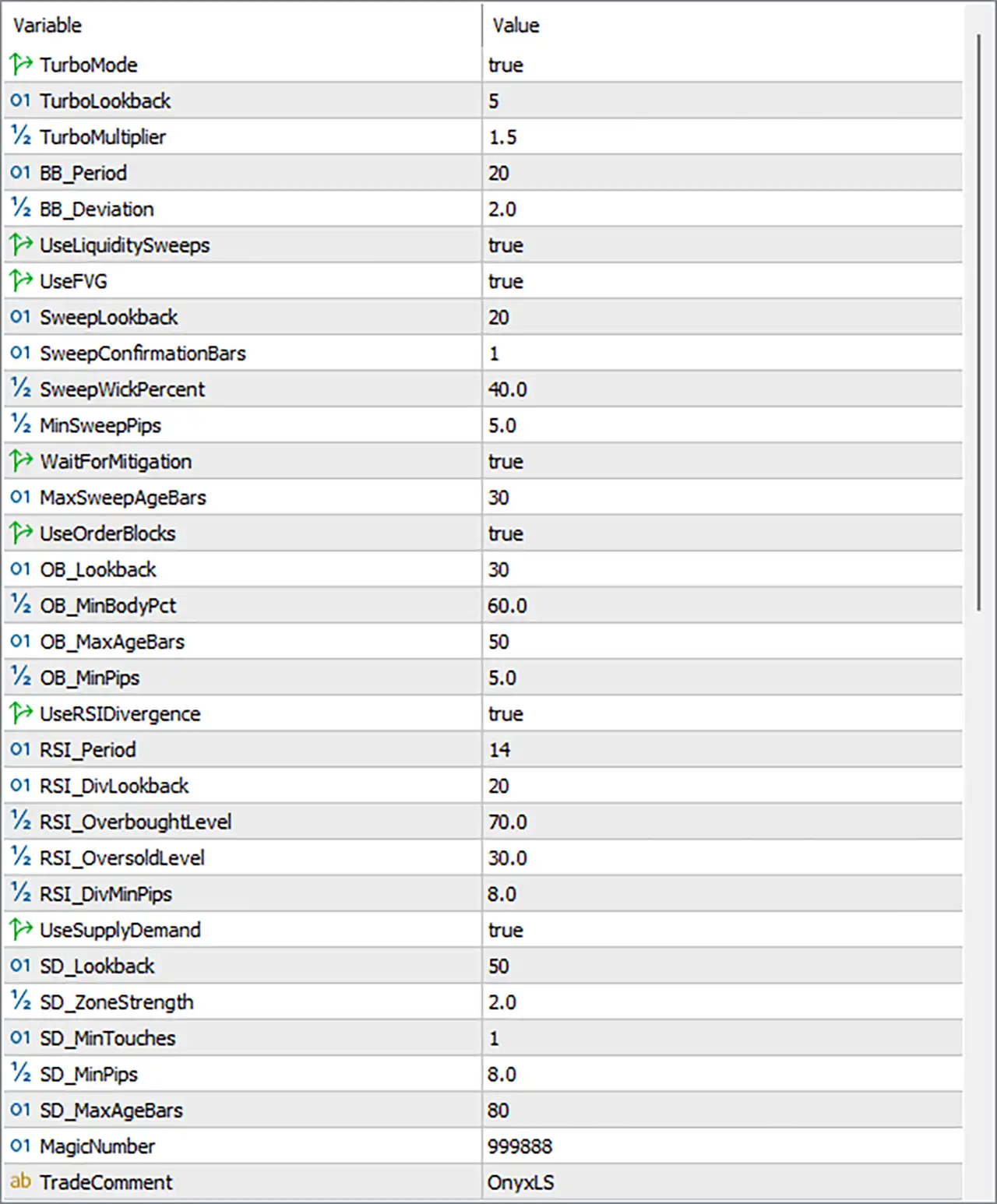
🔹 TurboMode = true — Enables the optional TURBO trading mode, allowing the EA to operate with its more aggressive trading configuration.
🔹 TurboLookback = 5 — Uses a lookback period of 5 bars for TURBO-related market analysis.
🔹 TurboMultiplier = 1.5 — Applies a 1.5 multiplier to the relevant TURBO calculation.
🔢 Bollinger Bands
🔹 BB_Period = 20 — Sets the Bollinger Bands calculation period to 20 bars.
🔹 BB_Deviation = 2.0 — Sets the Bollinger Bands standard-deviation parameter to 2.0.
🔢 Liquidity Sweep Detection
🔹 UseLiquiditySweeps = true — Enables liquidity-sweep detection as part of the trade-entry analysis.
🔹 UseFVG = true — Enables Fair Value Gap (FVG) analysis for additional market-structure confirmation.
🔹 SweepLookback = 20 — Searches up to 20 bars backward for relevant liquidity-sweep structures.
🔹 SweepConfirmationBars = 1 — Requires 1 confirmation bar after the detected sweep.
🔹 SweepWickPercent = 40.0 — Sets 40.0% as the wick-percentage threshold used in sweep detection.
🔹 MinSweepPips = 5.0 — Requires a minimum liquidity-sweep movement of 5.0 pips.
🔹 WaitForMitigation = true — Requires the EA to wait for the relevant liquidity area to undergo mitigation before proceeding with the corresponding setup.
🔢 Fair Value Gap Management
🔹 MaxSweepAgeBars = 30 — Limits the usable age of a detected sweep to 30 bars.
🔹 UseOrderBlocks = true — Enables Order Block detection and filtering.
🔹 OB_Lookback = 30 — Searches the previous 30 bars for relevant Order Block structures.
🔹 OB_MinBodyPct = 60.0 — Requires a minimum candle-body percentage of 60.0% for qualifying Order Block conditions.
🔹 OB_MaxAgeBars = 50 — Allows Order Blocks to remain valid for up to 50 bars.
🔹 OB_MinPips = 5.0 — Requires an Order Block structure to meet a minimum size of 5.0 pips.
🔢 RSI Divergence
🔹 UseRSIDivergence = true — Enables RSI divergence analysis as an additional confirmation filter.
🔹 RSI_Period = 14 — Sets the RSI calculation period to 14.
🔹 RSI_DivLookback = 20 — Searches the previous 20 bars for potential RSI divergence formations.
🔹 RSI_OverboughtLevel = 70.0 — Defines 70.0 as the RSI overbought threshold.
🔹 RSI_OversoldLevel = 30.0 — Defines 30.0 as the RSI oversold threshold.
🔹 RSI_DivMinPips = 8.0 — Requires a minimum price difference of 8.0 pips for the divergence condition.
🔢 Supply & Demand
🔹 UseSupplyDemand = true — Enables Supply and Demand zone analysis as part of the trade-filtering process.
🔹 SD_Lookback = 50 — Searches the previous 50 bars for Supply and Demand structures.
🔹 SD_ZoneStrength = 2.0 — Sets the required Supply/Demand zone strength parameter to 2.0.
🔹 SD_MinTouches = 1 — Requires at least 1 touch for the relevant Supply/Demand zone condition.
🔹 SD_MinPips = 8.0 — Requires a minimum Supply/Demand zone size of 8.0 pips.
🔹 SD_MaxAgeBars = 80 — Allows Supply/Demand zones to remain eligible for up to 80 bars.
🔢 EA Identification
🔹 MagicNumber = 999888 — Assigns the unique EA identifier 999888 to distinguish its trades from other Expert Advisors or manual positions.
🔹 TradeComment = OnyxLS — Adds the trade comment OnyxLS to positions and orders generated by the EA.
🔢 Recommended Configuration Overview
🔹 Trading Instrument — The input architecture is particularly suited to Gold/XAUUSD liquidity-based trading, with multiple filters designed to analyze short-term price behavior.
🔹 Risk Profile — The current setup uses RiskMode = RISK_FIXED_PERCENT and RiskPercent = 1.0, providing a relatively controlled percentage-based sizing framework.
🔹 Protection Framework — MaxDailyLossPercent = 5.0, MaxOpenPositions = 5, MaxTotalVolume = 5.0, MaxMarginUsage = 30.0, and MinFreeMarginPercent = 50.0 provide multiple exposure controls.
🔹 Entry Confirmation — Liquidity sweeps, FVGs, Order Blocks, RSI divergence, Supply/Demand, Bollinger Bands, and candlestick patterns can work together to filter potential entries.
🔹 Trade Management — Stop Loss 20.0, Take Profit 60.0, minimum Risk-to-Reward 1.5, trailing start 8.0, trailing step 4.0, and break-even settings provide layered exit management.
🔹 Aggressive Mode — TurboMode = true with TurboMultiplier = 1.5 indicates that the current configuration has the optional TURBO functionality enabled.
🔢 Conclusion
Onyx Liquidity Xau EA MT5 provides a highly configurable trading architecture centered on liquidity analysis, technical confluence, and automated risk management. The combination of liquidity sweeps, FVG, Order Blocks, RSI divergence, Supply/Demand zones, Bollinger Bands, and candlestick confirmation gives the EA multiple layers for evaluating potential XAUUSD setups.
The risk framework is equally detailed, with percentage-based sizing, maximum daily loss, position limits, volume restrictions, margin protection, trailing stop, and break-even controls. With RiskPercent = 1.0, MaxDailyLossPercent = 5.0, and MinRiskReward = 1.5, the supplied configuration emphasizes structured trade selection and account-level protection while retaining the flexibility of the TURBO mode.


