


🔢 Queens Gambit MT4 Settings Guide: Complete Input Parameters Explained
Queens Gambit MT4 is an automated trading Expert Advisor (EA) for MetaTrader 4 with configurable trend-entry limits, trailing-stop management, fixed Stop Loss and Take Profit levels, and compound trading options. Its input parameters allow traders to control execution conditions, manage multiple buy and sell positions, and adjust trade volume according to the selected money-management approach.
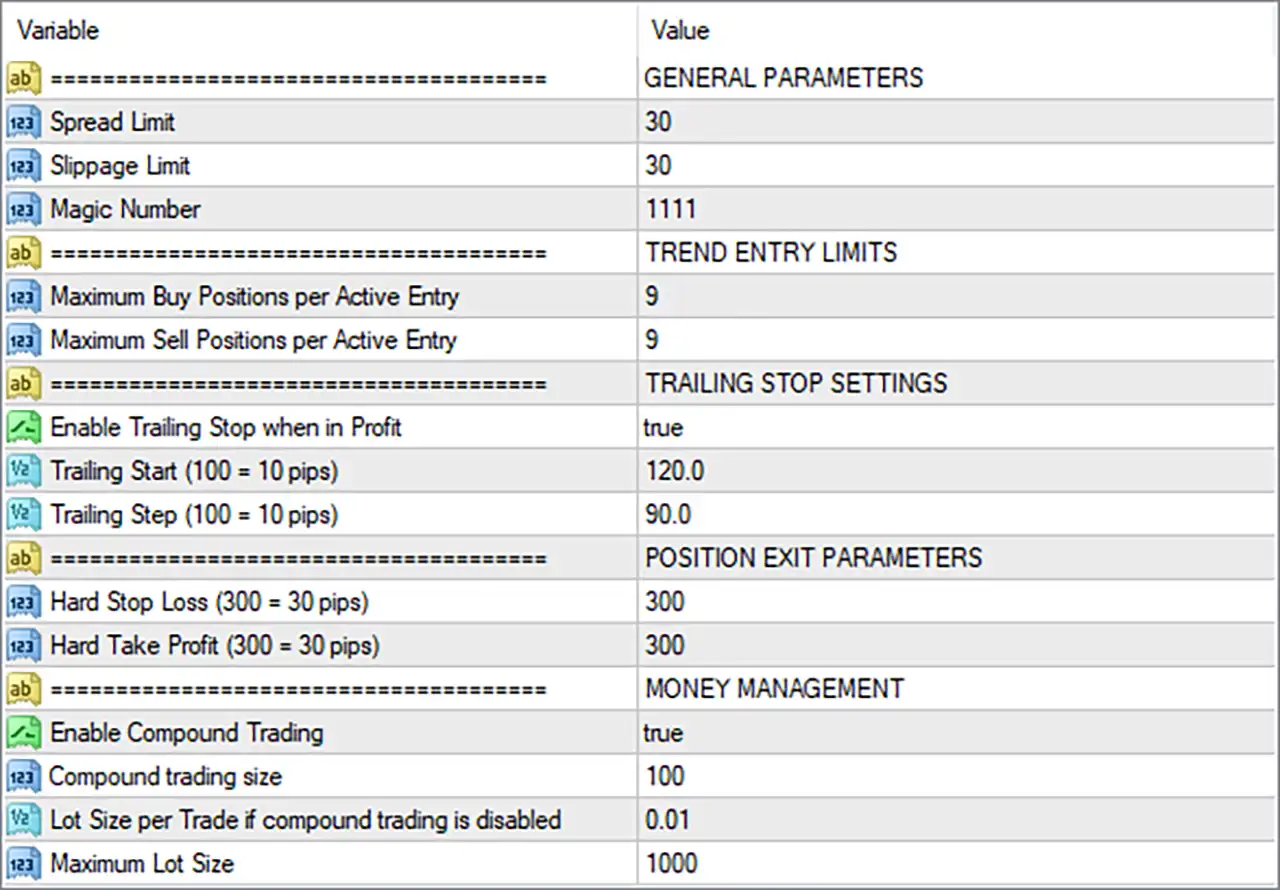
The current configuration enables compound trading and profit-based trailing stops, sets a maximum of 9 buy positions and 9 sell positions per active entry, and uses a hard Stop Loss and Take Profit of 300 points each. Understanding every input is important when configuring Queens Gambit MT4 for different account sizes, brokers, and market conditions.
🔢 General Parameters
🔹 GENERAL PARAMETERS = Section Heading: Identifies the general execution and trade-identification settings; this heading does not have an independent numerical value.
🔹 Spread Limit = 30: Sets the maximum permitted spread to 30 platform points or the EA's defined spread units; new entries may be restricted when the spread exceeds this threshold.
🔹 Slippage Limit = 30: Sets the permitted execution slippage to 30 points according to the EA's internal logic, helping control how far the fill price may differ from the requested price.
🔹 Magic Number = 1111: Assigns the identifier 1111 to trades opened by Queens Gambit MT4, helping the EA distinguish its own positions from manual trades and orders opened by other robots.
🔢 Trend Entry Limits
🔹 TREND ENTRY LIMITS = Section Heading: Groups the parameters that control the maximum number of buy and sell positions permitted for an active entry signal.
🔹 Maximum Buy Positions per Active Entry = 9: Allows up to 9 buy positions for an active entry according to the EA's entry-counting logic, potentially permitting multiple trades in the same direction.
🔹 Maximum Sell Positions per Active Entry = 9: Allows up to 9 sell positions for an active entry according to the EA's entry-counting logic, potentially permitting multiple trades in the same direction.
🔢 Trailing Stop Settings
🔹 TRAILING STOP SETTINGS = Section Heading: Identifies the inputs used to manage protective stops as a trade moves into profit.
🔹 Enable Trailing Stop when in Profit = true: Enables the trailing-stop feature, allowing the EA to adjust protective stops as positions become profitable, subject to the configured start and step values.
🔹 Trailing Start (100 = 10 pips) = 120.0: Activates trailing-stop management after the trade reaches the configured threshold of 120.0, equivalent to 12 pips under the conversion specified in the input label.
🔹 Trailing Step (100 = 10 pips) = 90.0: Sets the trailing adjustment step to 90.0, equivalent to 9 pips under the stated conversion, defining the price movement used for trailing-stop updates.
🔢 Position Exit Parameters
🔹 POSITION EXIT PARAMETERS = Section Heading: Groups the fixed protective exit settings used to define the trade's Stop Loss and Take Profit.
🔹 Hard Stop Loss (300 = 30 pips) = 300: Sets the hard Stop Loss to 300 points, equivalent to 30 pips under the conversion shown in the parameter label, to limit losses when the stop is triggered.
🔹 Hard Take Profit (300 = 30 pips) = 300: Sets the hard Take Profit to 300 points, equivalent to 30 pips under the stated conversion, defining the target distance for closing a trade at the specified profit level.
🔢 Money Management
🔹 MONEY MANAGEMENT = Section Heading: Groups the settings that determine whether trade size uses compound trading or a fixed lot size.
🔹 Enable Compound Trading = true: Enables compound trading, meaning the EA can calculate position volume using its compound-trading sizing logic instead of relying solely on the fixed-lot fallback setting.
🔹 Compound trading size = 100: Sets the compound-trading size parameter to 100; the exact meaning—such as a balance-based sizing unit, percentage, or other calculation input—depends on the EA's implementation and should be verified before live trading.
🔹 Lot Size per Trade if compound trading is disabled = 0.01: Defines the fallback lot size as 0.01 lots when compound trading is disabled, providing a small fixed-volume setting for that operating mode.
🔹 Maximum Lot Size = 1000: Sets the configured maximum lot-size parameter to 1000, intended as an upper volume limit within the EA's sizing logic; the actual maximum executable volume may be restricted by the broker, symbol, or platform.


