


🔢 Alchemist Trader EA MT4 Settings Guide: Complete Input Parameters Explained
Alchemist Trader EA is an automated trading Expert Advisor for MetaTrader 4 with configurable market filters, trading modes, position management, and profit-related parameters. Its inputs include options for identifying Forex, Gold, Silver, energy, and cryptocurrency or stock markets, alongside settings that may control moving-average calculations, order execution, pending orders, and additional trade entries.
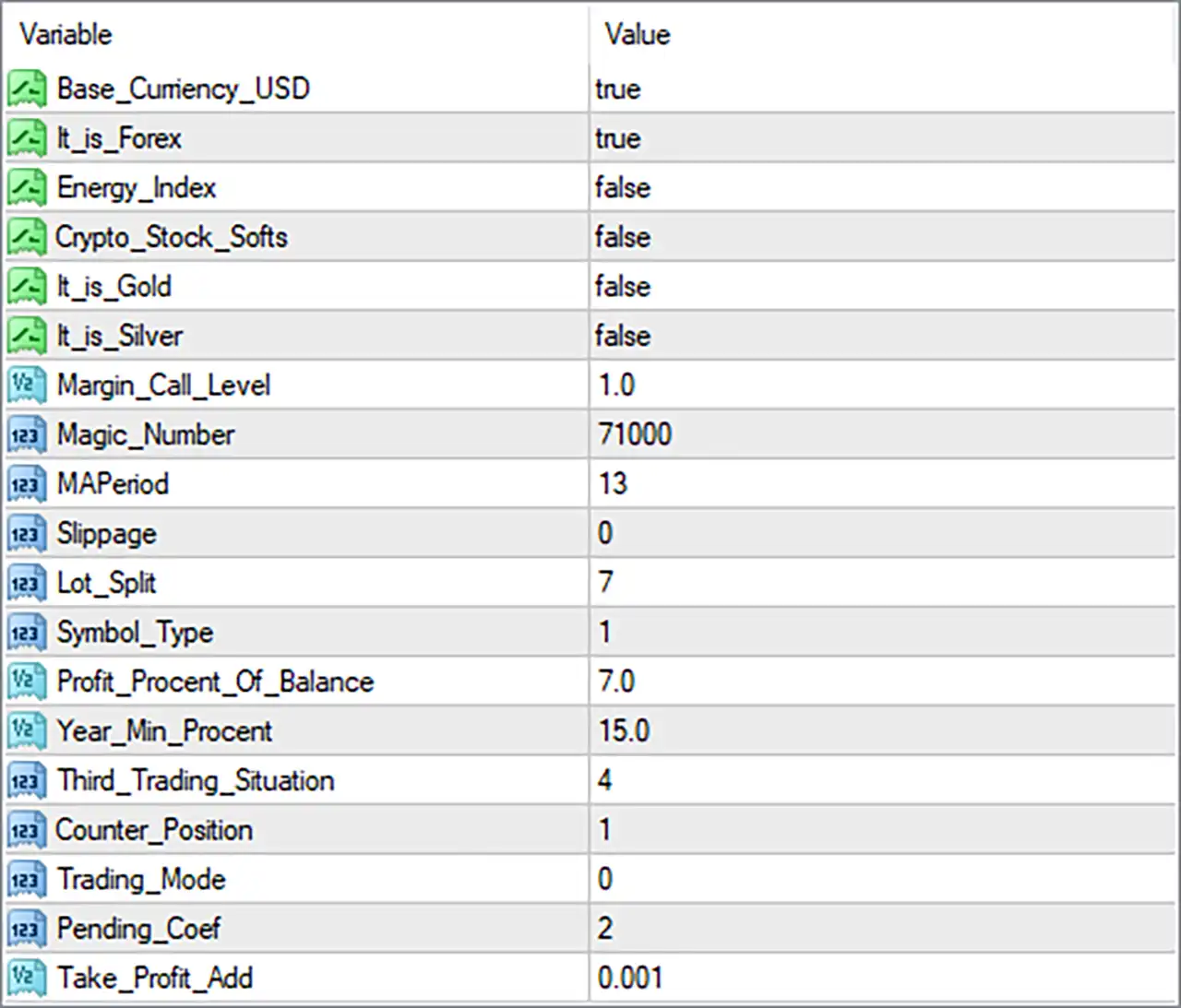
The current configuration enables the USD account-base option and Forex mode, while the Gold, Silver, energy, and crypto-stock options are disabled. Other notable settings include MAPeriod = 13, Lot_Split = 7, Profit_Procent_Of_Balance = 7.0, and Magic_Number = 71000. Understanding every input helps traders evaluate the EA's configuration before testing it under different market conditions.
⚙️ Currency and Market-Type Settings
🔹 Base_Currency_USD = true: Enables the USD base-currency option, indicating that the EA is configured to use USD-related account or calculation logic where supported by its implementation.
🔹 It_is_Forex = true: Enables the Forex market classification, suggesting that the EA is configured for currency-pair trading.
🔹 Energy_Index = false: Disables the energy-index market option, which may prevent the EA from applying its energy-related trading logic.
🔹 Crypto_Stock_Softs = false: Disables the category associated with cryptocurrency, stocks, and potentially soft commodities; the precise instruments covered depend on the EA's internal symbol-classification rules.
🔹 It_is_Gold = false: Disables the Gold market classification, indicating that the current configuration is not explicitly set to use its Gold-specific logic.
🔹 It_is_Silver = false: Disables the Silver market classification, indicating that Silver-specific trading logic is not selected.
⚙️ Account Protection and Trade Identification
🔹 Margin_Call_Level = 1.0: Sets the margin-call-related parameter to 1.0; its exact meaning, scale, and effect on trading depend on the EA's implementation, so this value should not be assumed to represent a universal 1% margin threshold.
🔹 Magic_Number = 71000: Assigns the EA's trade identifier as 71000, helping distinguish its orders from trades opened by other Expert Advisors when trade management uses magic numbers correctly.
🔹 Slippage = 0: Sets the slippage parameter to 0, indicating that no slippage tolerance is configured through this input; actual execution behavior also depends on the broker, platform, and EA's order-submission logic.
⚙️ Indicator and Lot Management Settings
🔹 MAPeriod = 13: Sets the moving-average period to 13, defining the lookback length if the EA uses a moving average to evaluate market direction or generate trading signals.
🔹 Lot_Split = 7: Sets the lot-splitting parameter to 7, which may control how a position or trading volume is divided into smaller parts or orders; the exact behavior depends on the EA's implementation.
🔹 Symbol_Type = 1: Selects symbol type 1, which likely represents one of the EA's predefined instrument categories; the exact mapping of 1 to a specific market must be verified from the EA's available options or documentation.
⚙️ Profit and Performance Targets
🔹 Profit_Procent_Of_Balance = 7.0: Sets the profit-related balance percentage to 7.0, potentially defining a target or calculation factor based on account balance; it should not automatically be interpreted as a guaranteed 7% return.
🔹 Year_Min_Procent = 15.0: Sets the minimum yearly percentage parameter to 15.0, which may represent a target or threshold used by the EA's performance or trading logic; its precise function depends on the implementation and does not guarantee a 15% annual return.
🔹 Take_Profit_Add = 0.001: Sets an additional Take Profit adjustment value of 0.001, potentially adding a small price increment to a profit target or basket-level calculation. The actual effect depends on the symbol's price precision and how the EA applies this value.
⚙️ Trading Mode and Order Management
🔹 Third_Trading_Situation = 4: Sets the third trading-situation parameter to 4, selecting a numeric option within the EA's internal trading logic; the specific scenario represented by this value cannot be determined from the input name alone.
🔹 Counter_Position = 1: Sets the counter-position parameter to 1, potentially controlling counter-trades, opposing positions, or position counting; its exact meaning should be confirmed before changing it.
🔹 Trading_Mode = 0: Selects trading mode 0, which represents one of the EA's predefined operating modes. The precise behavior of mode 0 depends on the EA's internal mode definitions.
🔹 Pending_Coef = 2: Sets the pending-order coefficient to 2, potentially acting as a multiplier or factor for pending-order calculations, such as entry distance or order placement logic. The exact formula depends on the EA's programming.
🔢 Conclusion
The Alchemist Trader EA MT4 settings cover market classification, trade identification, indicator configuration, lot management, profit-related parameters, and order execution.
🔹 Market selection: Base_Currency_USD = true and It_is_Forex = true, while Energy_Index, Crypto_Stock_Softs, It_is_Gold, and It_is_Silver are all set to false.
🔹 Indicator and lot settings: MAPeriod = 13 and Lot_Split = 7 define the configured indicator period and lot-splitting parameter.
🔹 Profit-related values: Profit_Procent_Of_Balance = 7.0, Year_Min_Procent = 15.0, and Take_Profit_Add = 0.001 establish the configured percentage-related and Take Profit adjustment values.
🔹 Execution and identification: Magic_Number = 71000 and Slippage = 0 control the configured trade identifier and slippage tolerance.
Some parameters use numeric codes or names whose exact behavior cannot be established from the input panel alone. Before live trading, verify the meaning of Symbol_Type = 1, Trading_Mode = 0, Third_Trading_Situation = 4, and the lot-splitting and profit-calculation formulas. Backtesting and demo trading are recommended because the listed settings do not guarantee profitability.


