


🔢 Flip Bot MT4 – Complete Settings & Parameters Guide
Flip Bot is an automated forex trading Expert Advisor (EA) designed for MetaTrader 4 traders who want to combine Martingale recovery, RSI filtering, Moving Average trend analysis, ATR volatility control and risk management into a single trading system.
The EA includes advanced features such as trailing stop protection, daily drawdown limits, trading session filters, and automatic profit targeting to help traders optimize trading performance while managing risk effectively.

🔢 Flip Bot MT4 Settings Explained
Below are the details of the parameters in the advisor’s trading system settings table:
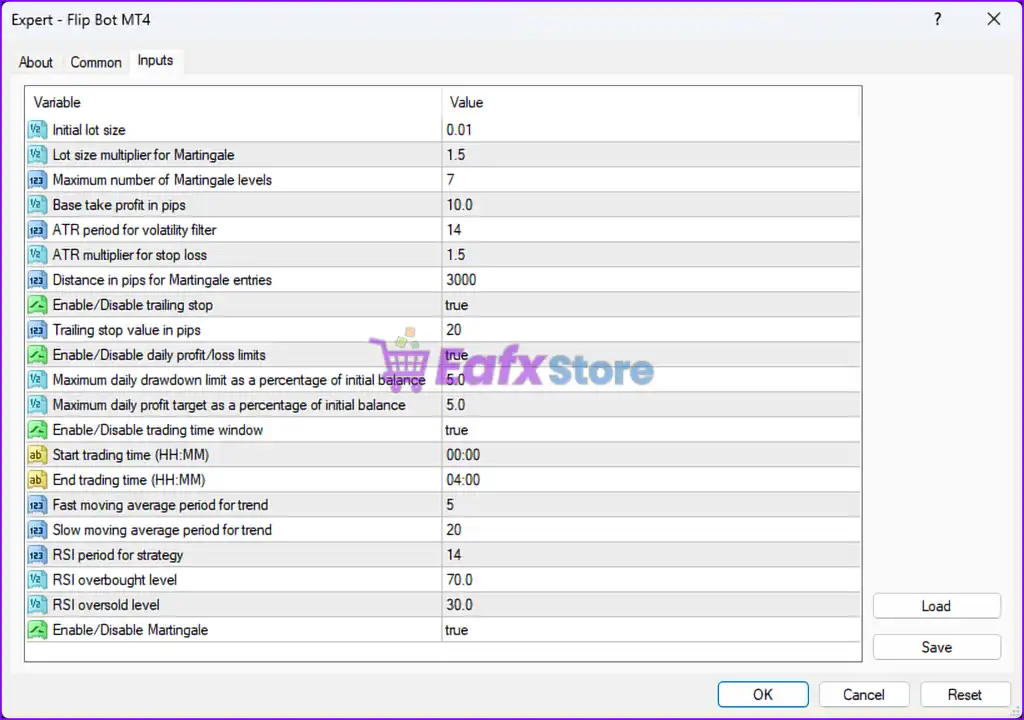
🔹 Initial lot size = 0.01 — Defines the starting trade volume for the first order opened by Flip Bot.
🔹 Lot size multiplier for Martingale = 1.5 — Multiplies the lot size by 1.5 after each Martingale recovery trade.
🔹 Maximum number of Martingale levels = 7 — Sets the maximum Martingale recovery sequence to 7 levels.
🔹 Base take profit in pips = 10.0 — Default Take Profit target for each trade is 10.0 pips.
🔹 ATR period for volatility filter = 14 — Uses a 14-period ATR indicator to measure market volatility.
🔹 ATR multiplier for stop loss = 1.5 — Multiplies ATR values by 1.5 to calculate dynamic Stop Loss distance.
🔹 Distance in pips for Martingale entries = 3000 — Minimum pip distance between Martingale recovery entries is 3000 points/pips.
🔹 Enable/Disable trailing stop = true — Activates the trailing stop feature for dynamic profit protection.
🔹 Trailing stop value in pips = 20 — Sets the trailing stop distance to 20 pips.
🔹 Enable/Disable daily profit/loss limits = true — Enables daily equity protection and profit target controls.
🔹 Maximum daily drawdown limit as a percentage of initial balance = 5.0 — Stops trading when account drawdown reaches 5.0% of the initial balance.
🔹 Maximum daily profit target as a percentage of initial balance = 5.0 — Stops trading after achieving 5.0% daily profit growth.
🔹 Enable/Disable trading time window = true — Restricts trading activity to a specific time session.
🔹 Start trading time (HH:MM) = 00:00 — Trading session starts at 00:00 server time.
🔹 End trading time (HH:MM) = 04:00 — Trading session ends at 04:00 server time.
🔹 Fast moving average period for trend = 5 — Uses a 5-period moving average for fast trend detection.
🔹 Slow moving average period for trend = 20 — Uses a 20-period moving average for long-term trend filtering.
🔹 RSI period for strategy = 14 — RSI indicator uses a 14-period calculation.
🔹 RSI overbought level = 70.0 — Market is considered overbought when RSI reaches 70.0.
🔹 RSI oversold level = 30.0 — Market is considered oversold when RSI falls to 30.0.
🔹 Enable/Disable Martingale = true — Enables the Martingale recovery strategy for trade management.
🔢 Conclusion
Flip Bot MT4 is a feature-rich automated trading EA that combines Martingale recovery logic, ATR-based volatility filtering, RSI momentum analysis, moving average trend confirmation and advanced equity protection tools.
With configurable trading sessions, trailing stop management, and daily drawdown controls, Flip Bot provides traders with a flexible and structured environment for automated forex trading on MetaTrader 4.
🔢 FAQs
❓ What is Flip Bot MT4?
Flip Bot MT4 is an automated MetaTrader 4 Expert Advisor that uses Martingale, RSI, ATR, and moving average trading strategies.
❓ Does Flip Bot MT4 use Martingale trading?
Yes, the EA includes a Martingale recovery system with a multiplier of 1.5 and up to 7 levels.
❓ Can Flip Bot MT4 control daily losses?
Yes, the EA includes a maximum daily drawdown protection set to 5.0%.
❓ What indicators are used in Flip Bot MT4?
Flip Bot MT4 uses ATR, RSI, and Moving Average indicators for market analysis and trade filtering.
❓ Does Flip Bot MT4 support trailing stop protection?
Yes, the EA includes an enabled trailing stop feature with a trailing distance of 20 pips.


