


🔢 Gold Liquidity EA MT5 Settings Explained – Complete Configuration Guide
Gold Liquidity EA is an automated Expert Advisor developed for traders who want to capture Gold (XAUUSD) liquidity movements using a combination of grid management, Bollinger Bands, moving average trend filtering, recovery options and trading session controls.
The EA provides flexible money management, daily profit and loss limits, and customizable technical filters, allowing traders to adapt the strategy to different market conditions while maintaining disciplined risk management.

🔢 Gold Liquidity EA MT5 Settings
Below are the details of the parameters in the advisor’s trading system settings table:
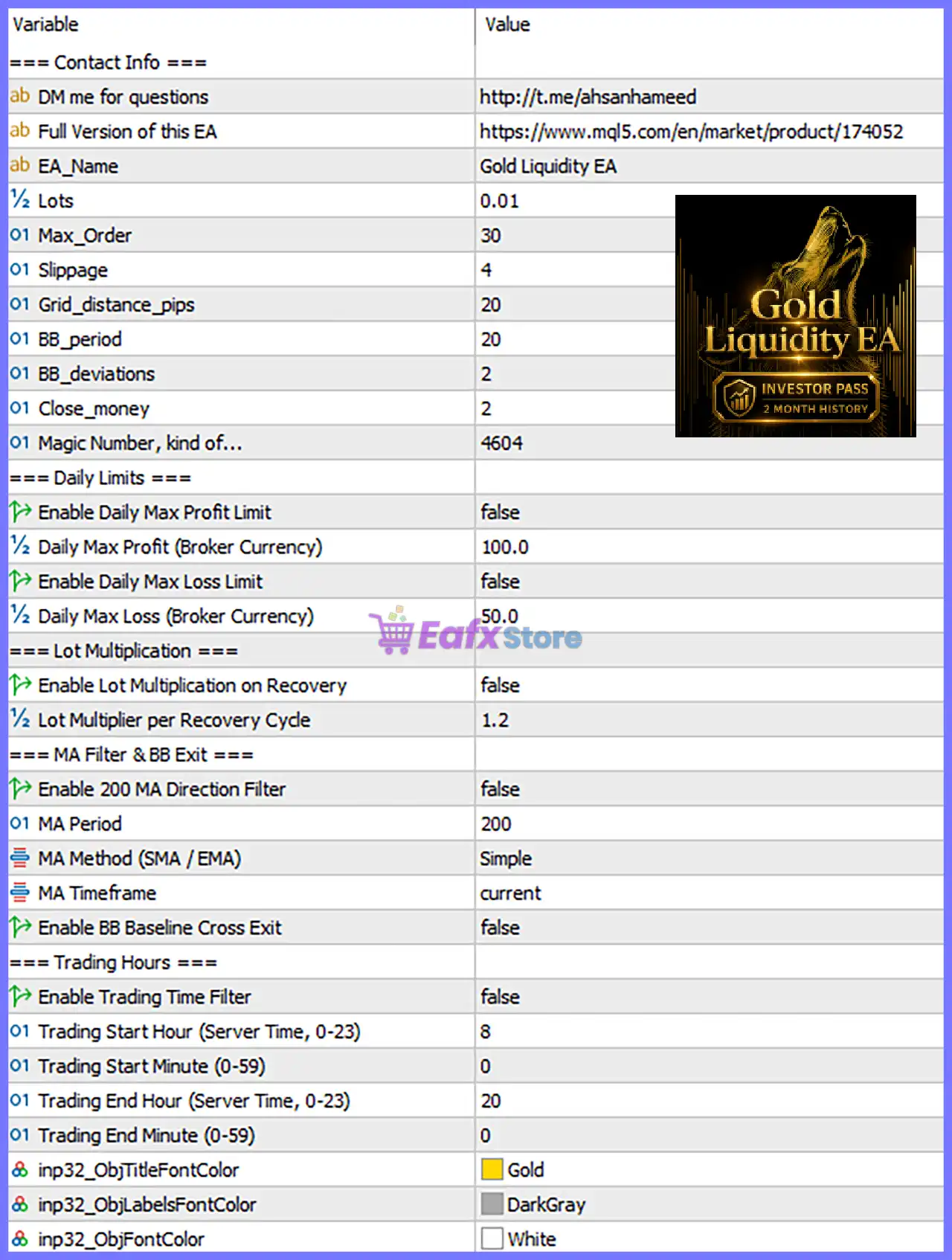
🔶 General Settings
🔹 EA_Name = Gold Liquidity EA – Defines the Expert Advisor name displayed on the chart and trading interface.
🔹 Lots = 0.01 – Sets the default fixed trading volume to 0.01 lots for every new position.
🔹 Max_Order = 30 – Limits the maximum number of simultaneously opened orders to 30.
🔹 Slippage = 4 – Allows a maximum execution slippage of 4 points during order placement.
🔹 Grid_distance_pips = 20 – Sets the spacing between grid positions to 20 pips.
🔹 BB_period = 20 – Configures the Bollinger Bands calculation period to 20, controlling market volatility analysis.
🔹 BB_deviations = 2 – Uses a Bollinger Bands deviation of 2, which is the standard setting for volatility envelopes.
🔹 Close_money = 2 – Closes trades or baskets once the predefined profit target of 2 (account currency) is achieved.
🔹 Magic Number = 4604 – Assigns the unique trade identifier 4604 so the EA only manages its own positions.
🔶 Daily Limits
🔹 Enable Daily Max Profit Limit = false – Disables the daily profit cap, allowing trading to continue after reaching daily gains.
🔹 Daily Max Profit (Broker Currency) = 100.0 – Sets the daily profit limit to 100.0 broker currency units when enabled.
🔹 Enable Daily Max Loss Limit = false – Disables the daily loss protection feature.
🔹 Daily Max Loss (Broker Currency) = 50.0 – Defines the maximum daily loss as 50.0 broker currency units when enabled.
🔶 Lot Multiplication
🔹 Enable Lot Multiplication on Recovery = false – Disables automatic lot multiplication during recovery cycles.
🔹 Lot Multiplier per Recovery Cycle = 1.2 – Increases the lot size by a factor of 1.2 for each recovery cycle when enabled.
🔶 MA Filter & Bollinger Band Exit
🔹 Enable 200 MA Direction Filter = false – Disables the 200-period Moving Average trend filter.
🔹 MA Period = 200 – Sets the Moving Average calculation period to 200.
🔹 MA Method (SMA / EMA) = Simple – Uses a Simple Moving Average (SMA) instead of an EMA.
🔹 MA Timeframe = current – Calculates the Moving Average using the current chart timeframe.
🔹 Enable BB Baseline Cross Exit = false – Disables automatic trade exits when price crosses the Bollinger Bands baseline.
🔶 Trading Hours
🔹 Enable Trading Time Filter = false – Disables trading session restrictions so the EA can trade continuously.
🔹 Trading Start Hour (Server Time, 0–23) = 8 – Specifies the trading session start hour as 08:00 server time when enabled.
🔹 Trading Start Minute (0–59) = 0 – Sets the trading session to begin at 00 minutes past the hour.
🔹 Trading End Hour (Server Time, 0–23) = 20 – Defines the trading session end at 20:00 server time.
🔹 Trading End Minute (0–59) = 0 – Ends the trading session at 00 minutes past the hour.
🔶 Dashboard Appearance
🔹 inp32_ObjTitleFontColor = Gold – Sets the dashboard title text color to Gold.
🔹 inp32_ObjLabelsFontColor = DarkGray – Displays dashboard labels using the DarkGray font color.
🔹 inp32_ObjFontColor = White – Displays dashboard values and information using the White font color.
🔢 Conclusion
Gold Liquidity V2 is a feature-rich automated trading system that combines grid trading, Bollinger Bands analysis, moving average trend filtering, and flexible money management into one configurable package.
Traders can control position sizing, recovery behavior, daily profit and loss limits, trading hours, and visual dashboard settings.
With its extensive customization options, the EA can be optimized for different account sizes and market environments while maintaining structured risk management.
🔢 FAQs
❓ What strategy does Gold Liquidity EA MT5 use?
The EA combines grid trading, Bollinger Bands, liquidity-based entries, and optional Moving Average trend filtering to automate Gold trading.
❓ Can I change the lot size?
Yes. The default 0.01 lot setting can be adjusted according to your account size and preferred risk level.
❓ What is the purpose of the Grid Distance setting?
The Grid_distance_pips = 20 parameter controls the spacing between consecutive grid positions to manage trade distribution.
❓ How do the daily profit and loss limits work?
When enabled, the EA can stop opening new trades after reaching the configured Daily Max Profit (100.0) or Daily Max Loss (50.0) thresholds.
❓ Can I limit trading to specific hours?
Yes. By enabling the Trading Time Filter, you can restrict the EA to trade only between 08:00 and 20:00 server time, helping avoid unfavorable market sessions.



