


🔢 Helios Gold AI MT5 Settings Guide – Complete Parameter Explanation
Helios Gold AI is a professional Expert Advisor designed for automated Gold (XAUUSD) trading with multiple built-in trading engines, intelligent risk management, AI filters, recovery options and advanced time/news protection.
Every parameter allows traders to customize execution according to their trading style, account size, and risk tolerance. The following guide explains every available setting shown in the configuration panels.
🔢 Installation Panel Parameters
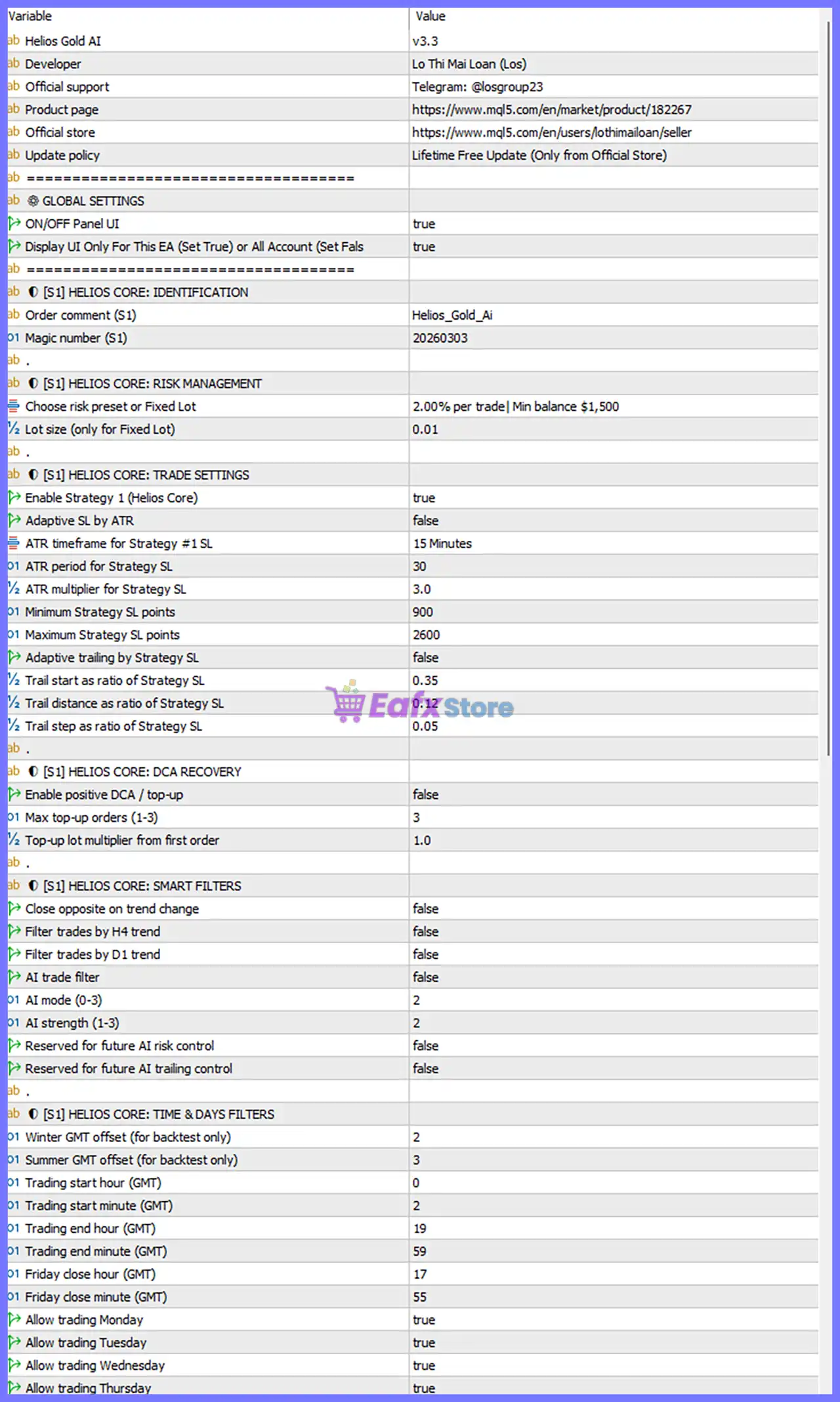
Below are the details of the parameters in the advisor’s trading system settings table:
🔶 Global Settings
🔹 Helios Gold AI = v3.3 – Current EA version installed.
🔹 Developer = Lo Thi Mai Loan (Los) – EA developer information.
🔹 Official Support = Telegram: @losgroup23 – Official customer support channel.
🔹 Product Page – Official MQL5 marketplace page.
🔹 Official Store – Official seller profile.
🔹 Update Policy = Lifetime Free Update (Only from Official Store) – Free lifetime updates for official customers.
🔹 ON/OFF Panel UI = true – Enables the graphical control panel on the chart.
🔹 Display UI Only For This EA (Set True) or All Account (Set False) = true – Displays the control panel only for this EA instance.
🔶 Helios Core: Identification
🔹 Order Comment (S1) = Helios_Gold_Ai – Custom trade comment attached to every Strategy 1 order.
🔹 Magic Number (S1) = 20260303 – Unique identifier used to distinguish Strategy 1 trades.
🔶 Helios Core: Risk Management
🔹 Choose Risk Preset or Fixed Lot = 2.00% per trade | Min balance $1,500 – Uses dynamic risk management with 2% account risk per trade, recommended for balances above $1,500.
🔹 Lot Size (Only for Fixed Lot) = 0.01 – Fixed trading volume when Fixed Lot mode is selected.
🔶 Helios Core: Trade Settings
🔹 Enable Strategy 1 (Helios Core) = true – Activates the primary Helios Core trading strategy.
🔹 Adaptive SL by ATR = false – Disables ATR-based automatic Stop Loss calculation.
🔹 ATR Timeframe for Strategy #1 SL = 15 Minutes – ATR is calculated using the M15 timeframe.
🔹 ATR Period for Strategy SL = 30 – Uses a 30-period ATR calculation.
🔹 ATR Multiplier for Strategy SL = 3.0 – Stop Loss equals 3 × ATR when Adaptive SL is enabled.
🔹 Minimum Strategy SL Points = 900 – Minimum Stop Loss distance allowed.
🔹 Maximum Strategy SL Points = 2600 – Maximum Stop Loss distance allowed.
🔹 Adaptive Trailing by Strategy SL = false – Disables adaptive trailing stop management.
🔹 Trail Start as Ratio of Strategy SL = 0.35 – Trailing begins after price reaches 35% of the Stop Loss distance.
🔹 Trail Distance as Ratio of Strategy SL = 0.12 – Trailing distance equals 12% of the Stop Loss.
🔹 Trail Step as Ratio of Strategy SL = 0.05 – Trailing Stop updates every 5% of the Stop Loss distance.
🔶 Helios Core: DCA Recovery
🔹 Enable Positive DCA / Top-Up = false – Disables additional recovery entries.
🔹 Max Top-Up Orders (1–3) = 3 – Allows up to three additional recovery orders.
🔹 Top-Up Lot Multiplier from First Order = 1.0 – Recovery orders use the same lot size as the initial trade.
🔶 Helios Core: Smart Filters
🔹 Close Opposite on Trend Change = false – Opposite positions are not closed automatically after trend reversal.
🔹 Filter Trades by H4 Trend = false – H4 trend confirmation is disabled.
🔹 Filter Trades by D1 Trend = false – Daily trend confirmation is disabled.
🔹 AI Trade Filter = false – AI-based trade filtering is disabled.
🔹 AI Mode (0–3) = 2 – Uses AI operating mode level 2.
🔹 AI Strength (1–3) = 2 – AI filtering sensitivity is set to level 2.
🔹 Reserved for Future AI Risk Control = false – Future feature currently disabled.
🔹 Reserved for Future AI Trailing Control = false – Future feature currently disabled.
🔶 Helios Core: Time & Days Filters
🔹 Winter GMT Offset (For Backtest Only) = 2 – GMT offset during winter backtesting.
🔹 Summer GMT Offset (For Backtest Only) = 3 – GMT offset during summer backtesting.
🔹 Trading Start Hour (GMT) = 0 – Trading begins at 00:00 GMT.
🔹 Trading Start Minute (GMT) = 2 – Trading starts at minute 02.
🔹 Trading End Hour (GMT) = 19 – Trading stops at 19:00 GMT.
🔹 Trading End Minute (GMT) = 59 – Trading ends at minute 59.
🔹 Friday Close Hour (GMT) = 17 – Friday trading closes at 17:00 GMT.
🔹 Friday Close Minute (GMT) = 55 – Friday trading closes at minute 55.
🔹 Allow Trading Monday = true – Monday trading is enabled.
🔹 Allow Trading Tuesday = true – Tuesday trading is enabled.
🔹 Allow Trading Wednesday = true – Wednesday trading is enabled.
🔹 Allow Trading Thursday = true – Thursday trading is enabled.
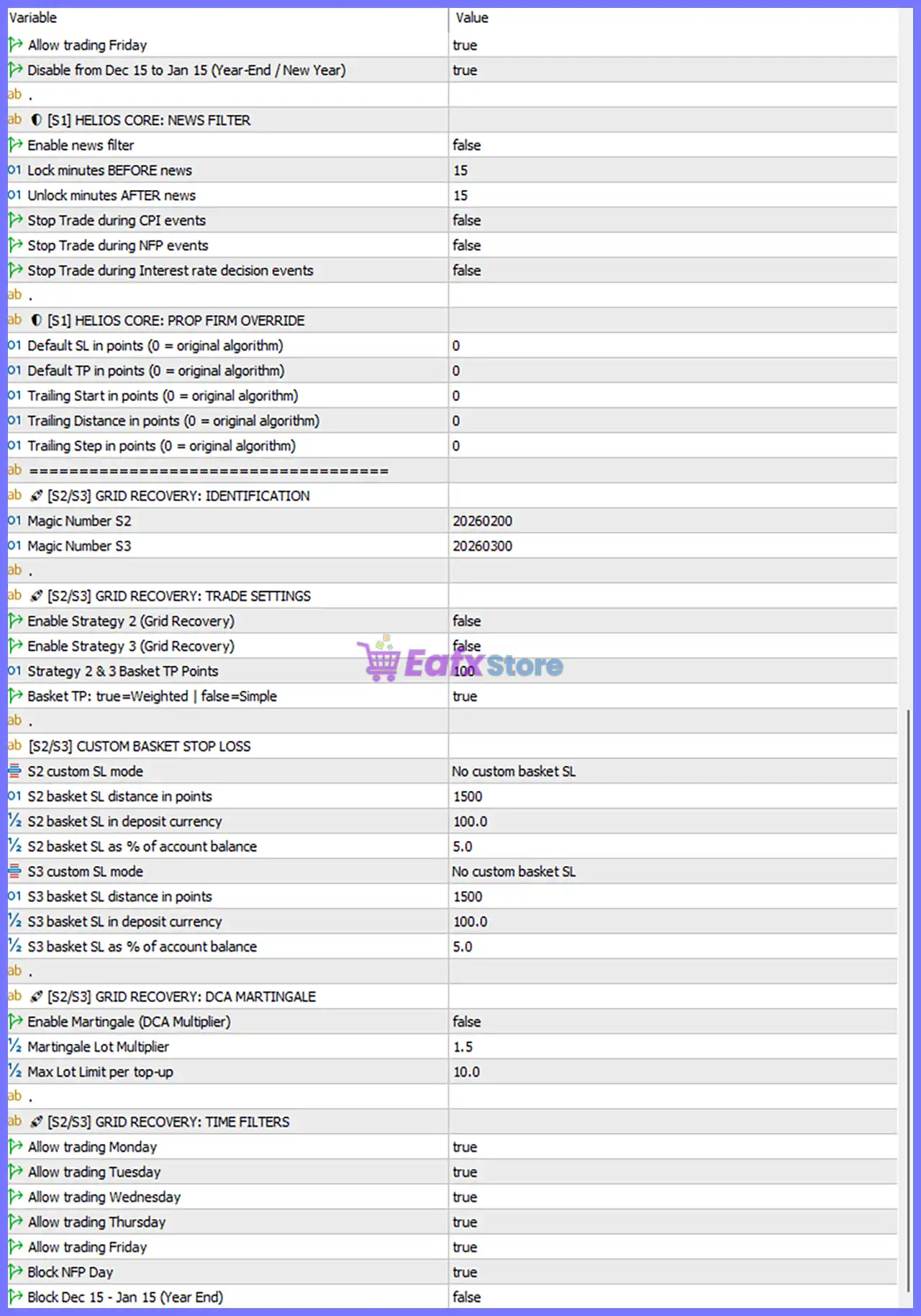
🔹 Allow Trading Friday = true – Friday trading is enabled.
🔹 Disable From Dec 15 to Jan 15 (Year-End / New Year) = true – Trading is automatically disabled between December 15 and January 15.
🔶 Helios Core: News Filter
🔹 Enable News Filter = false – Economic news protection is disabled.
🔹 Lock Minutes BEFORE News = 15 – Stops opening trades 15 minutes before high-impact news.
🔹 Unlock Minutes AFTER News = 15 – Resumes trading 15 minutes after news.
🔹 Stop Trade During CPI Events = false – CPI protection disabled.
🔹 Stop Trade During NFP Events = false – NFP protection disabled.
🔹 Stop Trade During Interest Rate Decision Events = false – Interest rate news protection disabled.
🔶 Helios Core: Prop Firm Override
🔹 Default SL in Points (0 = Original Algorithm) = 0 – Uses the EA's built-in Stop Loss calculation.
🔹 Default TP in Points (0 = Original Algorithm) = 0 – Uses the EA's built-in Take Profit calculation.
🔹 Trailing Start in Points (0 = Original Algorithm) = 0 – Uses the original trailing start logic.
🔹 Trailing Distance in Points (0 = Original Algorithm) = 0 – Uses the original trailing distance.
🔹 Trailing Step in Points (0 = Original Algorithm) = 0 – Uses the original trailing step.
🔶 Grid Recovery: Identification
🔹 Magic Number S2 = 20260200 – Unique identifier for Strategy 2.
🔹 Magic Number S3 = 20260300 – Unique identifier for Strategy 3.
🔶 Grid Recovery: Trade Settings
🔹 Enable Strategy 2 (Grid Recovery) = false – Strategy 2 is disabled.
🔹 Enable Strategy 3 (Grid Recovery) = false – Strategy 3 is disabled.
🔹 Strategy 2 & 3 Basket TP Points = 100 – Basket Take Profit target equals 100 points.
🔹 Basket TP: true = Weighted | false = Simple = true – Uses weighted-average basket Take Profit.
🔶 Custom Basket Stop Loss
🔹 S2 Custom SL Mode = No Custom Basket SL – Uses default basket Stop Loss logic.
🔹 S2 Basket SL Distance in Points = 1500 – Basket Stop Loss distance for Strategy 2.
🔹 S2 Basket SL in Deposit Currency = 100.0 – Basket Stop Loss equals $100.
🔹 S2 Basket SL as % of Account Balance = 5.0 – Basket Stop Loss equals 5% of account balance.
🔹 S3 Custom SL Mode = No Custom Basket SL – Uses default basket Stop Loss logic.
🔹 S3 Basket SL Distance in Points = 1500 – Basket Stop Loss distance for Strategy 3.
🔹 S3 Basket SL in Deposit Currency = 100.0 – Basket Stop Loss equals $100.
🔹 S3 Basket SL as % of Account Balance = 5.0 – Basket Stop Loss equals 5% of account balance.
🔶 Grid Recovery: DCA Martingale
🔹 Enable Martingale (DCA Multiplier) = false – Martingale is disabled.
🔹 Martingale Lot Multiplier = 1.5 – Lot size multiplier if Martingale is enabled.
🔹 Max Lot Limit per Top-Up = 10.0 – Maximum lot size allowed for recovery orders.
🔶 Grid Recovery: Time Filters
🔹 Allow Trading Monday = true – Grid Recovery can trade on Monday.
🔹 Allow Trading Tuesday = true – Grid Recovery can trade on Tuesday.
🔹 Allow Trading Wednesday = true – Grid Recovery can trade on Wednesday.
🔹 Allow Trading Thursday = true – Grid Recovery can trade on Thursday.
🔹 Allow Trading Friday = true – Grid Recovery can trade on Friday.
🔹 Block NFP Day = true – Grid Recovery is disabled during NFP trading day.
🔹 Block Dec 15 – Jan 15 (Year End) = false – Grid Recovery remains active during the year-end period.
🔢 Conclusion
Helios Gold AI MT5 provides an extensive collection of professional trading parameters that allow traders to fine-tune every aspect of automated Gold trading.
From intelligent risk management and ATR-based Stop Loss calculations to AI filters, DCA recovery, Grid Recovery, Prop Firm overrides, trading schedules, and economic news protection, the EA offers exceptional flexibility.
Whether you prefer conservative trading with only the Helios Core strategy or plan to activate advanced recovery modules, these settings help optimize performance while maintaining full control over risk and execution.
🔢 FAQs
❓ What is the recommended minimum balance for Helios Gold AI MT5?
The current risk preset recommends a minimum account balance of $1,500 when using 2.00% risk per trade.
❓ Does Helios Gold AI MT5 use Martingale by default?
No. Martingale is disabled (false) in the default settings, making the EA operate without Martingale unless manually enabled.
❓ Can I enable only the Helios Core strategy?
Yes. The default configuration enables Strategy 1 (Helios Core) while Strategy 2 and Strategy 3 (Grid Recovery) remain disabled.
❓ Does the EA support economic news filtering?
Yes. The EA includes filters for CPI, NFP, and Interest Rate events, along with configurable lock and unlock times before and after news releases.
❓ Is Helios Gold AI MT5 suitable for Prop Firm trading?
Yes. The EA includes a dedicated Prop Firm Override section, allowing traders to customize Stop Loss, Take Profit, and trailing parameters while preserving the original trading algorithm when values remain at 0.


