





NeonGamer EA MT5 with SetFiles (Latest version) – GroupBuy
Select a variant to see availability.
Quick Verdict
NeonGamer EA is a modern Gold Grid Expert Advisor (EA) built for traders who want the recovery power of grid trading without blindly averaging into losing positions. Using multiple trend, momentum, volatility, and news filters, it opens trades only under favorable market conditions while integrating advanced risk management for greater long-term stability.
Best For
✅ XAUUSD (Gold) traders
✅ Experienced grid trading enthusiasts
✅ MT5 users seeking intelligent automation
✅ Traders who value trend-filtered entries
✅ Medium to large trading accounts
Overall Rating
⭐⭐⭐⭐⭐ 9.4 / 10
| Category | Score |
|---|---|
| Trading Strategy | 9.5/10 |
| Risk Management | 9.4/10 |
| Live Performance | 9.3/10 |
| Automation | 9.5/10 |
| Ease of Use | 9.2/10 |
| Value for Money | 9.3/10 |
What is NeonGamer EA?
NeonGamer EA is a fully automated MetaTrader 5 Expert Advisor developed specifically for Gold (XAUUSD) trading on the M15 timeframe. Unlike traditional grid robots that continuously average losing positions, NeonGamer only enters the market after multiple technical confirmations, making its grid system considerably more selective.
The EA combines adaptive ATR-based grid spacing, trend confirmation through multi-timeframe EMA alignment, ADX strength filtering, volume analysis, spread protection and built-in news avoidance. Together with automatic lot sizing and daily drawdown protection, NeonGamer EA aims to deliver controlled growth while minimizing unnecessary exposure during unfavorable market conditions.
 Vendor Website: View here
This is GroupBuy ==> How to Join
About the Developer
NeonGamer EA was developed by Jorge Luiz Guimaraes De Araujo Dias, an experienced MQL5 developer specializing in automated Gold trading systems.
Some of the developer’s popular Expert Advisors include:
⭐ NeonGamer EA
⭐ CatFather EA MT5
The developer is known for combining trend filters, intelligent money management, and user-friendly interfaces into fully automated trading systems.
How Does NeonGamer EA Work?
Multi-Layer Entry Confirmation
Before opening its first trade, NeonGamer verifies EMA alignment across multiple timeframes, confirms trend strength using ADX, checks tick volume, validates ATR volatility, and ensures acceptable spread conditions.
Trend-Following Grid Logic
If price temporarily moves against the initial position, additional entries are placed using ATR-based adaptive spacing, allowing the grid distance to expand or contract according to current market volatility.
Basket Profit Management
Rather than closing positions individually, the EA monitors the combined average entry price and closes the complete basket once the predefined profit target is reached.
Economic News Protection
A built-in news filter pauses trading before and after high-impact USD events while optionally blocking new grid orders during volatile periods.
Automatic Risk Control
Daily drawdown monitoring, flexible lot sizing, and broker-specific optimization help reduce unnecessary trading risks.
Key Features of NeonGamer EA
Intelligent Trend-Filtered Grid
Combines grid recovery with seven independent market filters to improve entry quality.
Adaptive ATR Grid
Grid spacing automatically adjusts to changing market volatility instead of relying on fixed distances.
Flexible Money Management
Supports both fixed lot sizing and automatic balance-based lot calculation.
Built-in News Filter
Pauses trading around major economic events and prevents new grid orders during high-impact news.
Professional Trading Dashboard
Displays balance, equity, floating profit, spread, positions, win rate, and account statistics directly on the trading chart.
Custom Visual Interface
Automatically applies the Neon chart template with EMA overlays and customizable information panels.
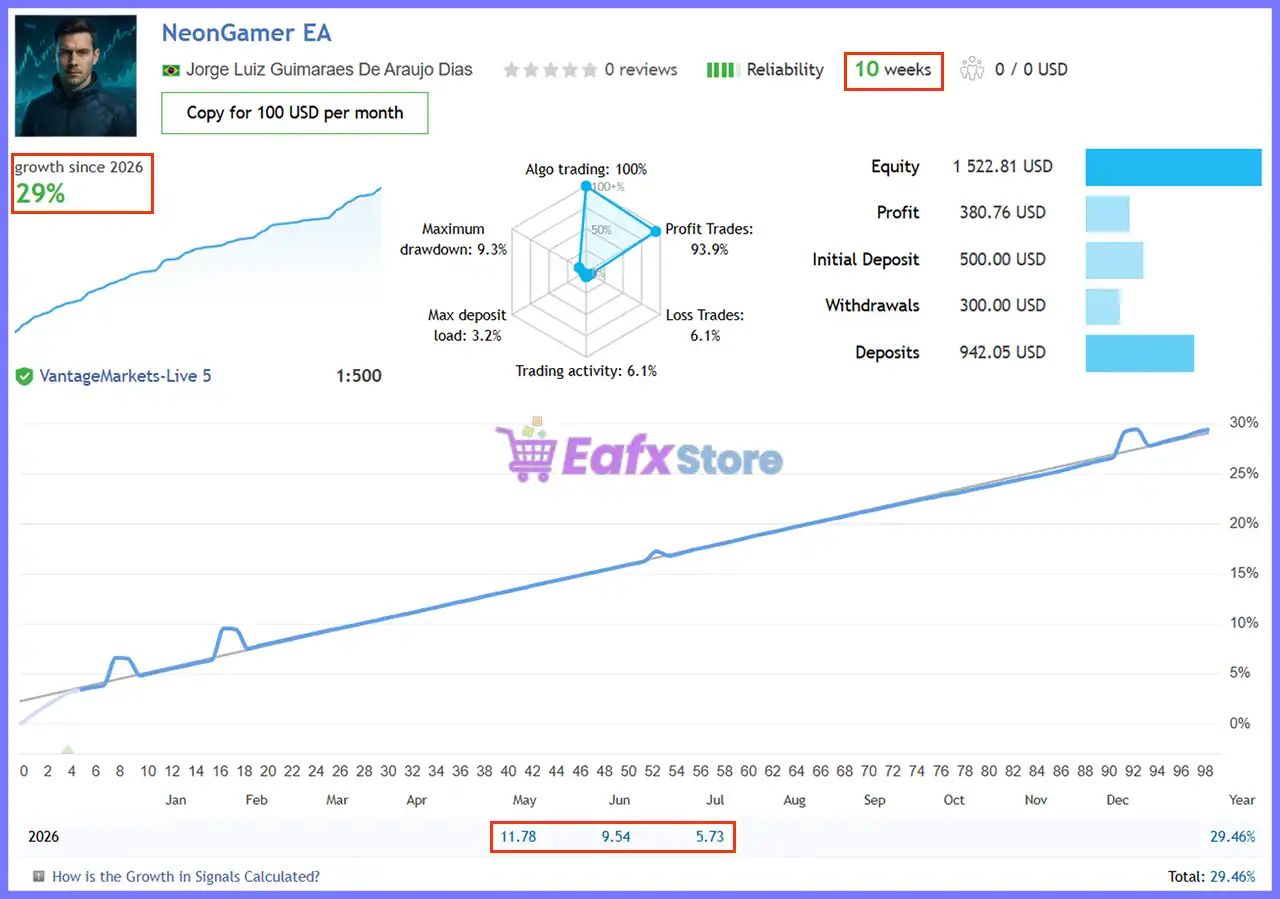
Verified Live Signal Performance
The verified live signal demonstrates steady account growth with relatively controlled drawdown for a trend-filtered grid strategy.
NeonGamer EA Live Signal
| Metric | Live Result |
|---|---|
| Growth | 29.46% |
| Signal Age | 10 Weeks |
| Initial Deposit | $500 |
| Current Equity | $1,522.81 |
| Net Profit | $380.76 |
| Profit Trades | 93.9% |
| Maximum Drawdown | 9.3% |
| Algo Trading | 100% |
| Deposit Load | 3.2% |
Performance Analysis
The live account has produced 29.46% growth over ten weeks while maintaining a 93.9% winning trade ratio and only 9.3% maximum drawdown.
The combination of high profitability, relatively low deposit load, and disciplined equity growth suggests that NeonGamer EA focuses on selective trade entries rather than aggressive averaging.
Historical Trading Results Performance
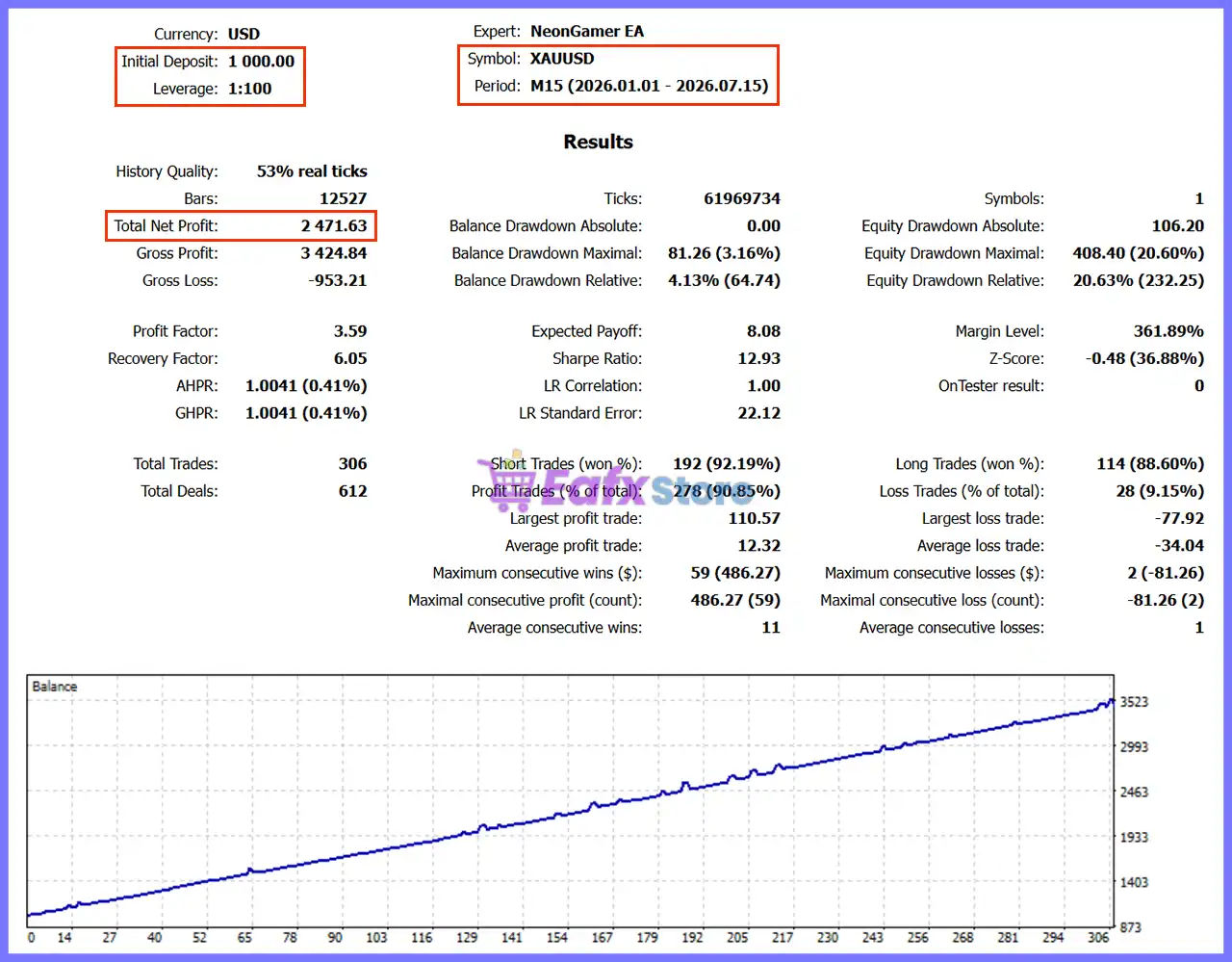
Historical testing was conducted on XAUUSD M15 between January and July 2026.
NeonGamer EA Backtest Results
| Metric | Result |
|---|---|
| Initial Deposit | $1,000 |
| Total Net Profit | $2,471.63 |
| Profit Factor | 3.59 |
| Recovery Factor | 6.05 |
| Total Trades | 306 |
| Winning Trades | 90.85% |
| Relative Drawdown | 4.13% |
| Expected Payoff | 8.08 |
| History Quality | 53% Real Ticks |
Performance Analysis
Backtest results demonstrate a stable trading profile with more than 90% profitable trades, a Profit Factor of 3.59, and a relatively low 4.13% balance drawdown.
The steadily rising equity curve indicates consistent profitability throughout the tested period.
What Real Users Are Saying (User Reviews)
Customer feedback highlights both the EA’s trading quality and the developer’s responsive support.
⭐⭐⭐⭐⭐ Thompsonalmeida (2026.06.03)
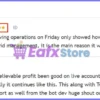
“A well-structured grid. The idea of removing operations on Friday only showed how much the developer cares about their clients. It has my 5 stars. Let’s not forget that in grid management, it is the main reason it works. I recommend it.”
⭐⭐⭐⭐⭐ Ksaim (2026.05.20)
“First 3 days using this new bot looks unbelievable profit been good on live account since starting Monday and backtest looks to show the bot has really good potential hopefully it continues like this.”
User reviews of NeonGamer EA
Why NeonGamer EA Stands Out
Trend-Filtered Grid Trading
Unlike traditional grid robots, NeonGamer only opens positions after multiple technical confirmations, reducing unnecessary entries.
Adaptive ATR Recovery
Grid spacing automatically responds to changing market volatility for more flexible recovery management.
Seven Independent Entry Filters
EMA alignment, ADX, ATR, volume, candle confirmation, spread control, and news filtering work together before every trade.
Built-in Capital Protection
Includes daily drawdown limits, automatic shutdown, spread protection and configurable lot sizing.
Professional User Experience
Offers a modern Neon dashboard, automatic chart template, and customizable trading interface for convenient monitoring.
Risk Management Features
Daily Drawdown Protection
Automatically pauses trading after reaching the configured daily loss limit and can optionally close all open positions.
Flexible Lot Management
Supports both fixed lots and automatic balance-based position sizing for better account scalability.
High-Impact News Filter
Suspends trading before and after major economic announcements while blocking additional grid entries.
Spread Protection
Prevents new trades from opening during unfavorable spread conditions, helping improve execution quality.
Broker-Specific Optimization
Includes broker profiles and customizable settings to improve stability across different MT5 trading environments.
Recommended Trading Conditions
For the best performance, the developer recommends:
| Features | Type |
|---|---|
| Trading platform | MetaTrader 5 (MT5) |
| Time frames | M15 (15 minute chart) |
| Currency pairs | XAUUSD (Gold) |
| Minimum / Recommended deposit | $1,000+ |
| Minimum / Recommended leverage | 1:100+ |
| Account type | ECN / Raw Spread |
| Additional services | Unlock and Decompile |
| Recommended brokers | Exness Broker, Icmarkets Broker |
| Recommended VPS | MyfxVPS.com ( Blue VPS, Golden VPS). Lowest Latency, 2 week Free Trial, 100% Free for 12-18 Months. |
Product Download Package?
The download package of the product suite includes:
Experts
 Setting (If Any).docx
Installation Guide.docx
SetFiles
NeonGamer_FixedLot.set
NeonGamer_AutoLot.set
 Reviewed by David Easton
Weaknesses and Risk Warnings
Although NeonGamer EA applies intelligent filters before entering the market, it still uses a grid-based recovery system, which carries inherent trading risks.
🔹 Grid trading can experience extended floating drawdowns during strong one-directional market trends.
🔹 Conservative risk settings are strongly recommended, especially for smaller accounts.
🔹 Live performance and historical backtests do not guarantee future profitability.
🔹 Execution quality may vary depending on broker spreads, slippage, and trading conditions.
🔹 Traders should thoroughly test the EA on a demo account before deploying it on a live account.
Who Should Use NeonGamer EA?
NeonGamer EA is ideal for
🔹 Traders specializing in XAUUSD.
🔹 Investors seeking a smarter grid trading approach.
🔹 MT5 users wanting advanced automation.
🔹 Traders who appreciate strong trend filtering before entries.
🔹 Medium and large accounts using ECN or Raw Spread brokers.
It may not be suitable for
🔹 Traders who avoid grid-based strategies entirely.
🔹 Small accounts with limited capital.
🔹 Investors looking for multi-symbol trading.
Final Verdict
NeonGamer EA delivers a sophisticated approach to automated Gold trading by combining the recovery capabilities of grid trading with strict trend, momentum, volatility and news filters. Rather than averaging into every market move, it focuses on selective entries supported by adaptive ATR spacing and multiple layers of risk protection.
With verified live performance, strong historical backtests, flexible money management, and positive user feedback, NeonGamer EA stands out as an attractive choice for MT5 traders seeking a disciplined, trend-aware Grid Expert Advisor for XAUUSD.
🔢 NeonGamer EA Settings Guide
NeonGamer EA is a fully automated Expert Advisor designed for MetaTrader 5 that combines intelligent money management, daily drawdown protection, high-impact news filtering, and a customizable trading interface.
Built for disciplined trading, NeonGamer EA helps traders manage risk through configurable lot sizing, economic event protection, and visual chart enhancements while maintaining consistent automated execution.
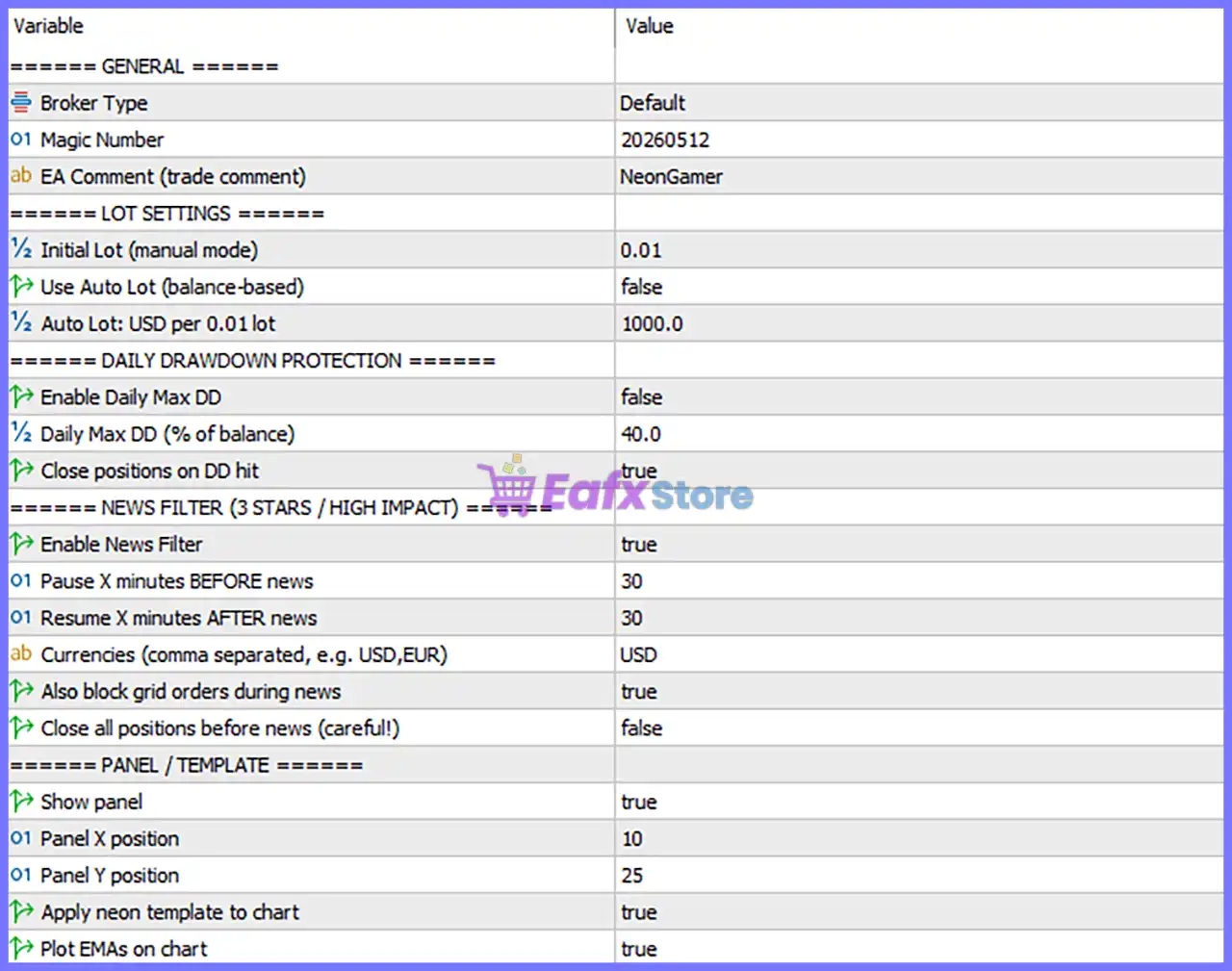
NeonGamer EA MT5 Settings Panel
🔢 General Settings
🔹 Broker Type = Default – Uses the default broker configuration optimized for standard MetaTrader 5 trading environments.
🔹 Magic Number = 20260512 – Assigns the unique Magic Number 20260512 to identify all trades opened by NeonGamer EA.
🔹 EA Comment (trade comment) = NeonGamer – Attaches the trade comment “NeonGamer” to every position opened by the EA.
🔢 Lot Settings
🔹 Initial Lot (manual mode) = 0.01 – Sets the initial fixed trading volume to 0.01 lots when manual lot sizing is used.
🔹 Use Auto Lot (balance-based) = false – Disables automatic lot calculation based on account balance and uses the manual lot size instead.
🔹 Auto Lot: USD per 0.01 Lot = 1000.0 – Defines 1000.0 USD of account balance for every 0.01 lot when Auto Lot mode is enabled.
🔢 Daily Drawdown Protection
🔹 Enable Daily Max DD = false – Disables the daily maximum drawdown protection feature.
🔹 Daily Max DD (% of balance) = 40.0 – Sets the daily drawdown threshold to 40.0% of the account balance when Daily Max DD protection is enabled.
🔹 Close Positions on DD Hit = true – Automatically closes all open positions if the configured daily drawdown limit is reached.
🔢 News Filter (3 Stars / High Impact)
🔹 Enable News Filter = true – Activates the built-in economic news filter to reduce trading during major market events.
🔹 Pause X Minutes BEFORE News = 30 – Stops opening new trades 30 minutes before scheduled high-impact news releases.
🔹 Resume X Minutes AFTER News = 30 – Resumes trading 30 minutes after the news event has ended.
🔹 Currencies (comma separated, e.g. USD, EUR) = USD – Monitors USD economic news events only.
🔹 Also Block Grid Orders During News = true – Prevents new grid orders from being placed during the news protection period.
🔹 Close All Positions Before News (careful!) = false – Keeps existing trades open before news instead of closing them automatically.
🔢 Panel & Template
🔹 Show Panel = true – Displays the NeonGamer EA information panel directly on the trading chart.
🔹 Panel X Position = 10 – Positions the panel 10 pixels from the horizontal chart edge.
🔹 Panel Y Position = 25 – Positions the panel 25 pixels from the vertical chart edge.
🔹 Apply Neon Template to Chart = true – Automatically applies the predefined Neon visual template to the trading chart.
🔹 Plot EMAs on Chart = true – Displays Exponential Moving Average (EMA) indicators directly on the chart for additional market visualization.
🔢 Risk Level
🔹 Fix Lot – Uses a constant lot size for every trade regardless of account balance, providing stable and predictable position sizing.
🔹 Safe – Applies conservative money management with reduced exposure to minimize drawdown and protect trading capital.
🔹 Balanced – Provides a balanced combination of growth potential and risk control, making it suitable for most traders.
🔹 Aggressive – Increases trading volume and account exposure to maximize potential returns while accepting significantly higher risk.
🔢 Conclusion
NeonGamer EA offers a well-balanced combination of automated money management, daily drawdown protection, economic news filtering and user-friendly chart visualization.
With configurable lot sizing, intelligent news handling, and customizable panel settings, the EA provides traders with the flexibility to adapt to different account sizes and trading styles. Properly configuring these parameters can improve execution quality, enhance capital protection, and support long-term automated trading performance.
🔢 FAQs
❓ What does the Auto Lot setting control?
When enabled, Auto Lot automatically calculates the trading volume based on account balance using the configured 1000.0 USD per 0.01 lot ratio.
❓ How does the Daily Drawdown Protection work?
If activated, the EA monitors the daily account drawdown and closes all open positions once the configured drawdown percentage is reached.
❓ Why is the News Filter enabled by default?
The News Filter helps avoid trading during major USD high-impact news events, reducing the risk of excessive volatility and unexpected price spikes.
❓ Can NeonGamer EA automatically close trades before news releases?
Yes. The EA includes the Close All Positions Before News option, although it is set to false by default.
❓ What is the purpose of plotting EMAs on the chart?
Displaying EMAs provides additional visual confirmation of market trends, helping traders monitor the EA’s trading environment more effectively without affecting automated execution.
User Reviews
Only logged in customers who have purchased this product may leave a review.
❓ What market and timeframe is NeonGamer EA designed for?
NeonGamer EA is developed exclusively for XAUUSD on the M15 timeframe, using intelligent trend filters and adaptive Grid logic for Gold trading.
❓ How does NeonGamer EA decide when to open a trade?
NeonGamer EA confirms EMA alignment, ADX strength, ATR range, tick volume, spread, and candle momentum before opening its first market position.
❓ Does NeonGamer EA use a traditional Grid strategy?
No. NeonGamer EA uses a trend-following Grid with adaptive ATR-based spacing, avoiding blind averaging and reducing unnecessary trading exposure.
❓ How does NeonGamer EA protect trading capital?
NeonGamer EA includes a configurable daily drawdown limit, spread protection, trading session filters, and optional emergency position closure.
❓ Can NeonGamer EA calculate lot sizes automatically?
Yes. NeonGamer EA supports both Fixed Lot and Auto Lot modes, automatically adjusting position sizes according to your account balance if desired.
❓ What happens if the market moves against NeonGamer EA?
NeonGamer EA adds recovery trades using ATR-based spacing, then closes the complete basket automatically once the overall profit target is achieved.
❓ Which brokers are recommended for NeonGamer EA?
NeonGamer EA performs best on ECN or Raw accounts from brokers such as Exness, IC Markets, Pepperstone, Vantage, VT Markets, and Fusion Markets.
❓ Is a VPS recommended for NeonGamer EA?
Yes. NeonGamer EA is strongly recommended to run on a VPS for uninterrupted execution, stable connectivity, and reliable automated trading performance.
❓ What information does the NeonGamer EA dashboard display?
NeonGamer EA features a live dashboard showing balance, equity, profit, open positions, spread, win rate, and other important trading statistics.
❓ Who is NeonGamer EA suitable for?
NeonGamer EA is ideal for traders seeking a smarter Grid system with strict entry filters, adaptive recovery logic, and disciplined automated risk management.
-
 Original price was: $500.00.$89.00Current price is: $89.00.
 -
 Original price was: $1,499.00.$199.00Current price is: $199.00.
 -
 Original price was: $3,999.00.$299.00Current price is: $299.00.
 -
 Price range: $60.00 through $599.00
-
 2
2 -
 3
3 -
 5Price range: $89.00 through $599.00
 -
 0Price range: $89.00 through $599.00
There are no reviews yet.