


🔢 Golden Needle EA MT5 Settings Guide
Golden Needle EA is a fully automated MetaTrader 5 Expert Advisor designed to provide flexible trade management with dynamic position sizing, adaptive Stop Loss and Take Profit, news filtering, spread control, trading schedule customization and multiple risk protection features.
The EA allows traders to fine-tune every aspect of order execution while maintaining disciplined money management and account safety.
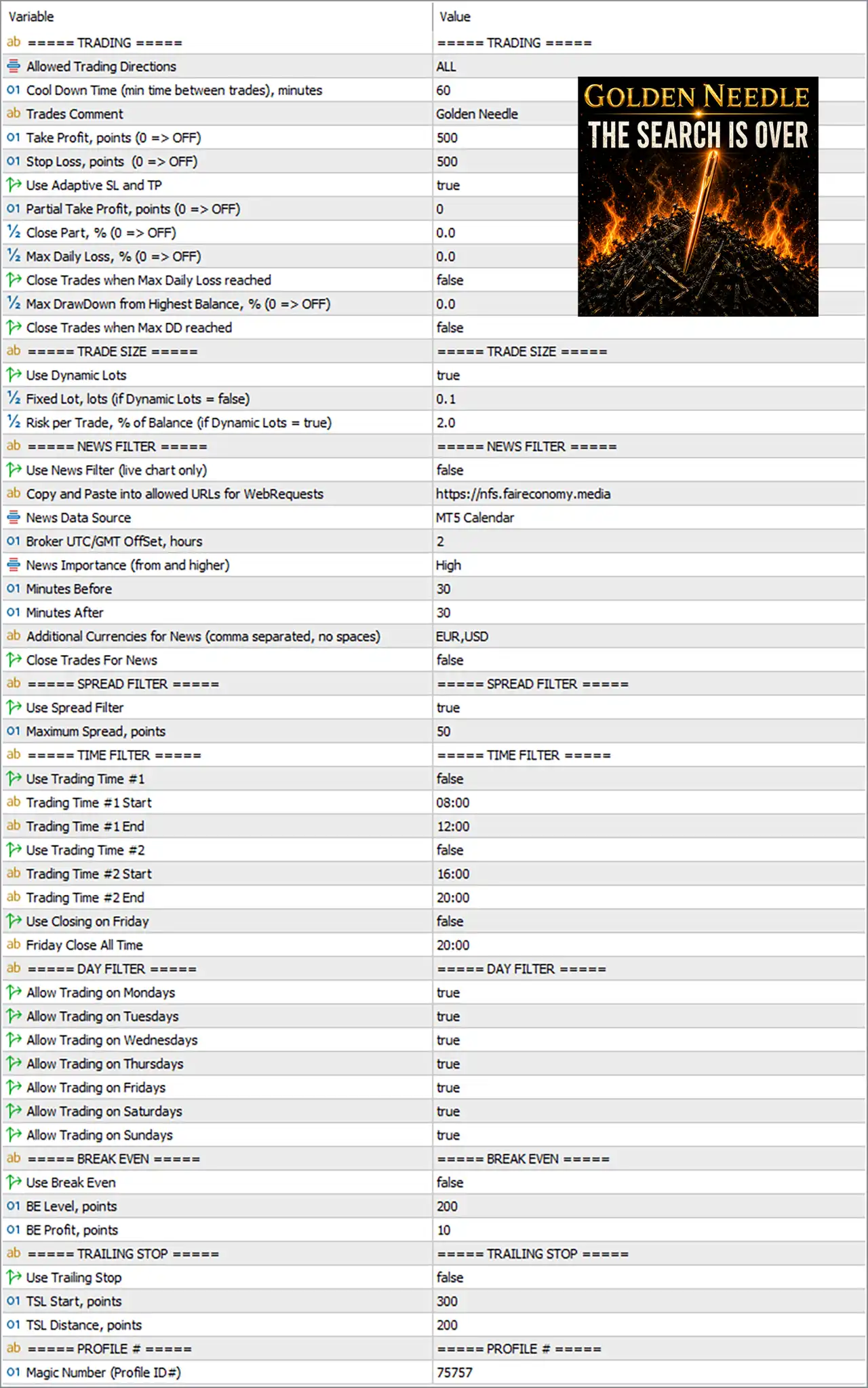
🔢 Golden Needle EA MT5 Settings Explained
Trading Settings
🔹 Allowed Trading Directions = ALL – Allows the EA to open both Buy and Sell positions.
🔹 Cool Down Time (min time between trades), minutes = 60 – Waits 60 minutes before opening another trade.
🔹 Trades Comment = GoldenNeedle – Adds the comment "GoldenNeedle" to all executed trades.
🔹 Take Profit, points (0 => OFF) = 500 – Sets a fixed Take Profit target of 500 points.
🔹 Stop Loss, points (0 => OFF) = 500 – Sets a fixed Stop Loss distance of 500 points.
🔹 Use Adaptive SL and TP = true – Enables adaptive Stop Loss and Take Profit calculations based on market conditions.
🔹 Partial Take Profit, points (0 => OFF) = 0 – Disables partial Take Profit.
🔹 Close Part, % (0 => OFF) = 0.0 – No percentage of the position is partially closed.
🔹 Max Daily Loss, % (0 => OFF) = 0.0 – Daily loss limit is disabled.
🔹 Close Trades when Max Daily Loss reached = false – Does not automatically close positions after a daily loss threshold.
🔹 Max DrawDown from Highest Balance, % (0 => OFF) = 0.0 – Maximum drawdown protection is disabled.
🔹 Close Trades when Max DD reached = false – Does not close all trades when drawdown reaches the configured limit.
Trade Size Settings
🔹 Use Dynamic Lots = true – Enables automatic lot sizing based on account risk.
🔹 Fixed Lot, lots (if Dynamic Lots = false) = 0.1 – Uses 0.10 lots only when Dynamic Lots is disabled.
🔹 Risk per Trade, % of Balance (if Dynamic Lots = true) = 2.0 – Risks 2.0% of the account balance per trade.
News Filter
🔹 Use News Filter (live chart only) = false – Disables the built-in economic news filter.
🔹 Copy and Paste into allowed URLs for WebRequests = https://nfs.faireconomy.media – Approved URL used to retrieve live economic calendar data.
🔹 News Data Source = MT5 Calendar – Uses the MetaTrader 5 Economic Calendar.
🔹 Broker UTC/GMT Offset, hours = 2 – Sets broker time offset to GMT+2.
🔹 News Importance (from and higher) = High – Filters only High Impact economic news.
🔹 Minutes Before = 30 – Starts applying the news filter 30 minutes before an event.
🔹 Minutes After = 30 – Continues filtering for 30 minutes after the event.
🔹 Additional Currencies for News (comma separated, no spaces) = EUR,USD – Monitors news related to EUR and USD.
🔹 Close Trades For News = false – Existing positions remain open during news events.
Spread Filter
🔹 Use Spread Filter = true – Prevents new trades when spreads become too wide.
🔹 Maximum Spread, points = 50 – Maximum permitted spread is 50 points.
Time Filter
🔹 Use Trading Time #1 = false – Trading Session #1 is disabled.
🔹 Trading Time #1 Start = 08:00 – Session #1 would begin at 08:00 if enabled.
🔹 Trading Time #1 End = 12:00 – Session #1 would end at 12:00.
🔹 Use Trading Time #2 = false – Trading Session #2 is disabled.
🔹 Trading Time #2 Start = 16:00 – Session #2 would begin at 16:00 if enabled.
🔹 Trading Time #2 End = 20:00 – Session #2 would end at 20:00.
🔹 Use Closing on Friday = false – Friday auto-close feature is disabled.
🔹 Friday Close All Time = 20:00 – Would close all positions at 20:00 Friday if enabled.
Day Filter
🔹 Allow Trading on Mondays = true – Trading is permitted on Monday.
🔹 Allow Trading on Tuesdays = true – Trading is permitted on Tuesday.
🔹 Allow Trading on Wednesdays = true – Trading is permitted on Wednesday.
🔹 Allow Trading on Thursdays = true – Trading is permitted on Thursday.
🔹 Allow Trading on Fridays = true – Trading is permitted on Friday.
🔹 Allow Trading on Saturdays = true – Trading is permitted on Saturday.
🔹 Allow Trading on Sundays = true – Trading is permitted on Sunday.
Break Even
🔹 Use Break Even = false – Break-even protection is disabled.
🔹 BE Level, points = 200 – Would move Stop Loss to break-even after 200 points if enabled.
🔹 BE Profit, points = 10 – Locks in 10 points of profit once break-even activates.
Trailing Stop
🔹 Use Trailing Stop = false – Trailing Stop management is disabled.
🔹 TSL Start, points = 300 – Trailing Stop would activate after 300 points of profit.
🔹 TSL Distance, points = 200 – Maintains a trailing distance of 200 points.
Profile Settings
🔹 Magic Number (Profile ID#) = 75757 – Unique Magic Number used to identify and manage the EA's positions.
🔢 Conclusion
Golden Needle EA MT5 provides a balanced combination of automated trading, adaptive risk management, dynamic lot sizing, spread filtering, news awareness, and flexible trading schedules. With configurable Stop Loss, Take Profit, Break-even, and Trailing Stop features, traders can tailor the EA to match conservative or aggressive trading styles while maintaining full control over account protection.
🔢 FAQs
❓ What does Dynamic Lots do in Golden Needle EA MT5?
Dynamic Lots automatically calculates the trading volume based on the selected account risk percentage.
❓ Can I use a fixed lot size instead of Dynamic Lots?
Yes. Disable Use Dynamic Lots and the EA will use the configured Fixed Lot value.
❓ Does Golden Needle EA MT5 include an economic news filter?
Yes. The EA supports the MT5 Economic Calendar and can filter High Impact news events, although it is disabled by default.
❓ How does the Spread Filter work?
The EA blocks new trade entries whenever the current spread exceeds the configured maximum of 50 points.
❓ Can I restrict trading to specific hours or days?
Yes. Golden Needle EA MT5 includes configurable time sessions and weekday filters, allowing complete control over when the EA is allowed to trade.



