


Titan X Pro EA MT5 (Latest version) - Unlimited

Subscriptions for Special Plan
- 30 EA package is more economical!
- Special package with 99%
- Download 1 EA/Day

Subscriptions for Premium Membership
- Download Unlimited in 1 Year
- Get 100% Discount
- Get free access to all

Subscriptions for Gold Membership
- 1 Year Membership
- Get 100% Discount
- Access EA+Indicator+Course
Frequently bought together 🎁
Add these products to enhance your purchase
Quick Verdict
Titan X Pro EA is a fully automated Expert Advisor (EA) built for XAUUSD, BTCUSD, and ETHUSD, combining intelligent risk management, ATR-based trailing stops, live news filtering, and advanced equity protection. Designed for traders who value automation and disciplined execution, it delivers consistent performance while requiring minimal manual configuration.
Best For
✅ Gold (XAUUSD) traders
✅ Crypto traders (BTCUSD & ETHUSD)
✅ Prop Firm traders
✅ Beginners seeking automated trading
✅ Traders looking for advanced risk management
✅ VPS users running 24/5 automated strategies
Overall Rating
9.7/10 ⭐⭐⭐⭐⭐
What is Titan X Pro EA MT5?
Titan X Pro EA MT5 is a professional automated Expert Advisor developed exclusively for MetaTrader 5, supporting XAUUSD, BTCUSD and ETHUSD. Instead of requiring constant optimization and manual intervention, the EA manages the complete trading cycle automatically—from market analysis and order execution to trade management and exit.
The system combines intelligent money management, ATR-based trailing stops, live economic news filtering, trading session control, spread protection, equity management, and customizable risk settings into one integrated solution.
 Vendor Website: View here
Delivery time 24h-48h after payment.
Refund if not delivered.
You will receive the current version without any limitations (ID+Time).
About the Developer
Titan X Pro EA MT5 was developed by Sahib Ul Ahsan, an active MetaTrader developer offering a growing portfolio of automated trading solutions focused on Gold, cryptocurrencies, and professional money management. Other Expert Advisors:
⭐ Titan X Pro EA
⭐ Prop Engine MT5
⭐ Aurum Shield EA
The developer has published 39 products on the MQL5 marketplace and continues to expand the product lineup with automated trading systems for different market conditions.
How Does Titan X Pro EA MT5 Work?
Intelligent Market Analysis
The EA continuously evaluates market conditions before executing trades on supported symbols.
Single Trade Logic
By default, Titan X Pro opens only one active position per trading signal, reducing unnecessary market exposure.
ATR-Based Trade Management
For cryptocurrency trading, the EA dynamically adjusts trailing stops using the Average True Range (ATR), allowing positions to adapt to changing volatility.
Automatic Risk Control
Every trade is protected using predefined Stop Loss (SL), Take Profit (TP) and configurable risk percentages.
Live News Protection
The integrated economic calendar blocks trading before and after major high-impact news releases.
Session Filtering
Users can define when the EA is allowed to trade by enabling:
🔹 London Session
🔹 New York Session
while excluding lower-liquidity market sessions.
Key Features of Titan X Pro EA
Fully Automated Trading
No manual trade management is required after installation.
Supports Multiple Assets
Optimized for:
🔹 XAUUSD
🔹 BTCUSD
🔹 ETHUSD
Intelligent Risk Management
Flexible controls for:
🔹 Stop Loss
🔹 Take Profit
🔹 Position sizing
🔹 Equity protection
ATR Trailing Stop
Automatically locks in profits according to current market volatility.
Dynamic News Filter
Blocks trading around high-impact economic announcements.
Trading Session Control
Trades only during selected market sessions.
Professional Dashboard
Displays:
🔹 Daily profit
🔹 Running P/L
🔹 Spread
🔹 Current lot size
🔹 Total positions
🔹 Trading status
Equity Protection
Optional daily profit and equity loss management help preserve trading capital.
Historical Trading Results Performance
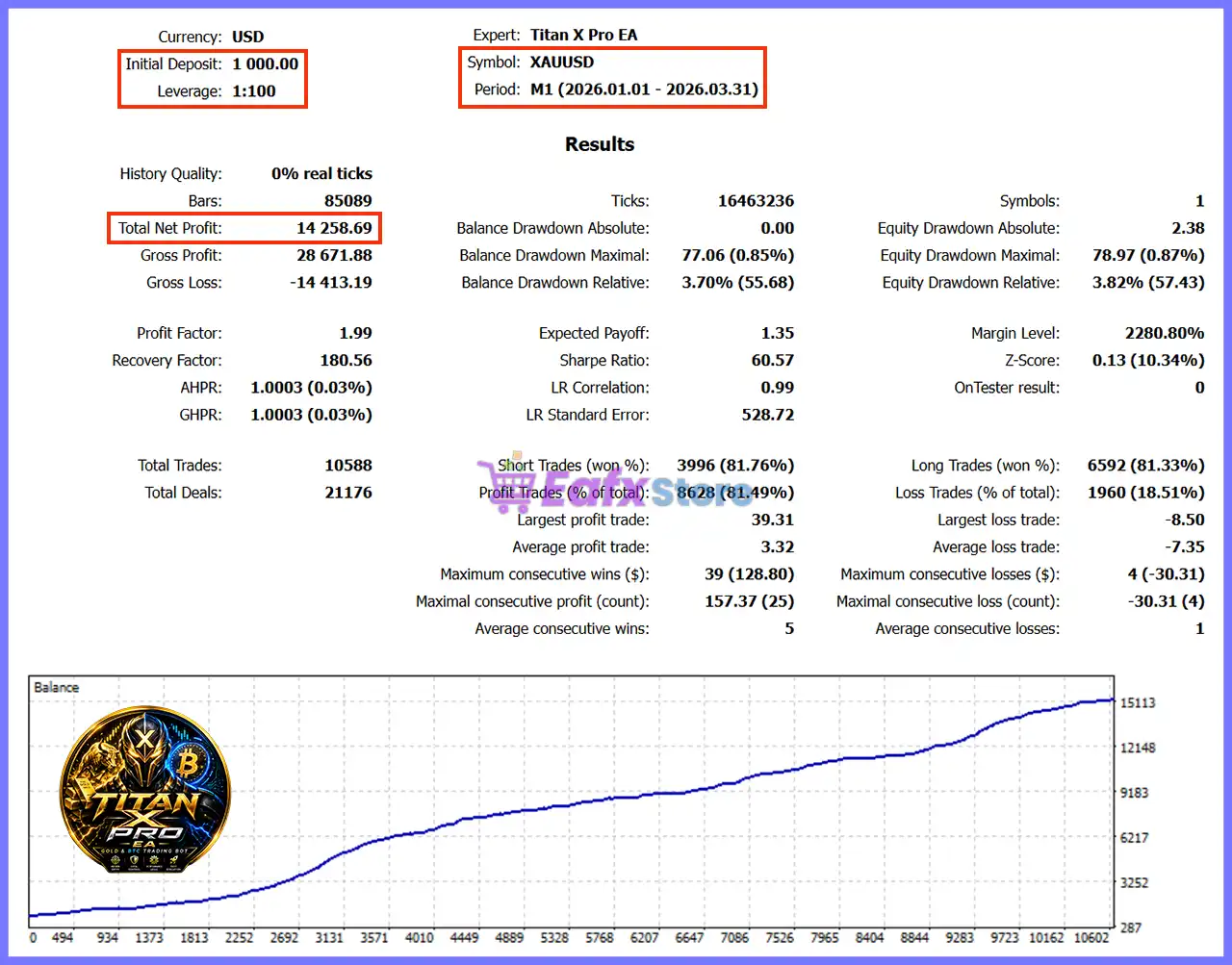
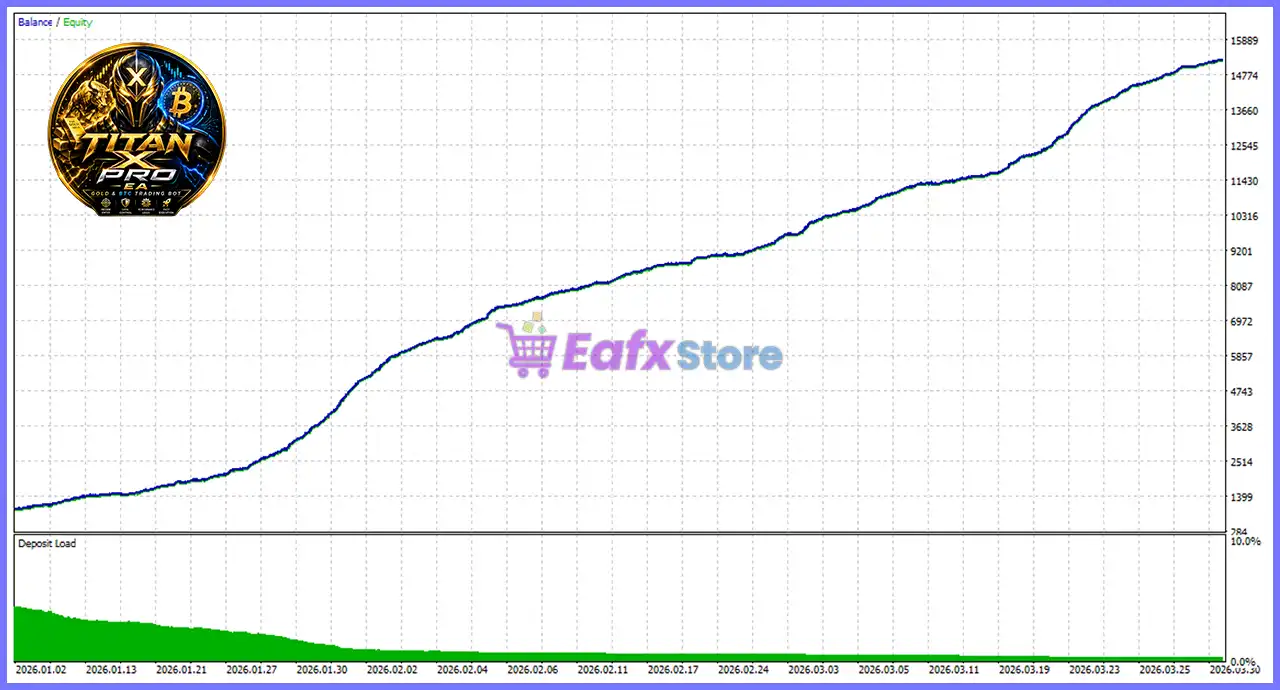
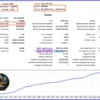
Backtest #1 (Initial Deposit: $1,000)
Titan X Pro EA MT5 Backtest Results
| Metric | Result |
|---|---|
| Initial Deposit | $1,000 |
| Total Net Profit | $14,258.69 |
| Profit Factor | 1.99 |
| Recovery Factor | 180.56 |
| Winning Trades | 81.49% |
| Total Trades | 10,588 |
| Relative Drawdown | 3.82% |
| Maximum Winning Streak | 39 Trades |
| Trading Period | Jan 2026 – Mar 2026 |
Performance Analysis
This backtest demonstrates consistent profitability over more than 10,500 trades, maintaining an impressive 81.49% win rate while keeping relative drawdown below 4%.
The combination of disciplined trade management and low drawdown suggests the EA prioritizes steady account growth over aggressive risk-taking.
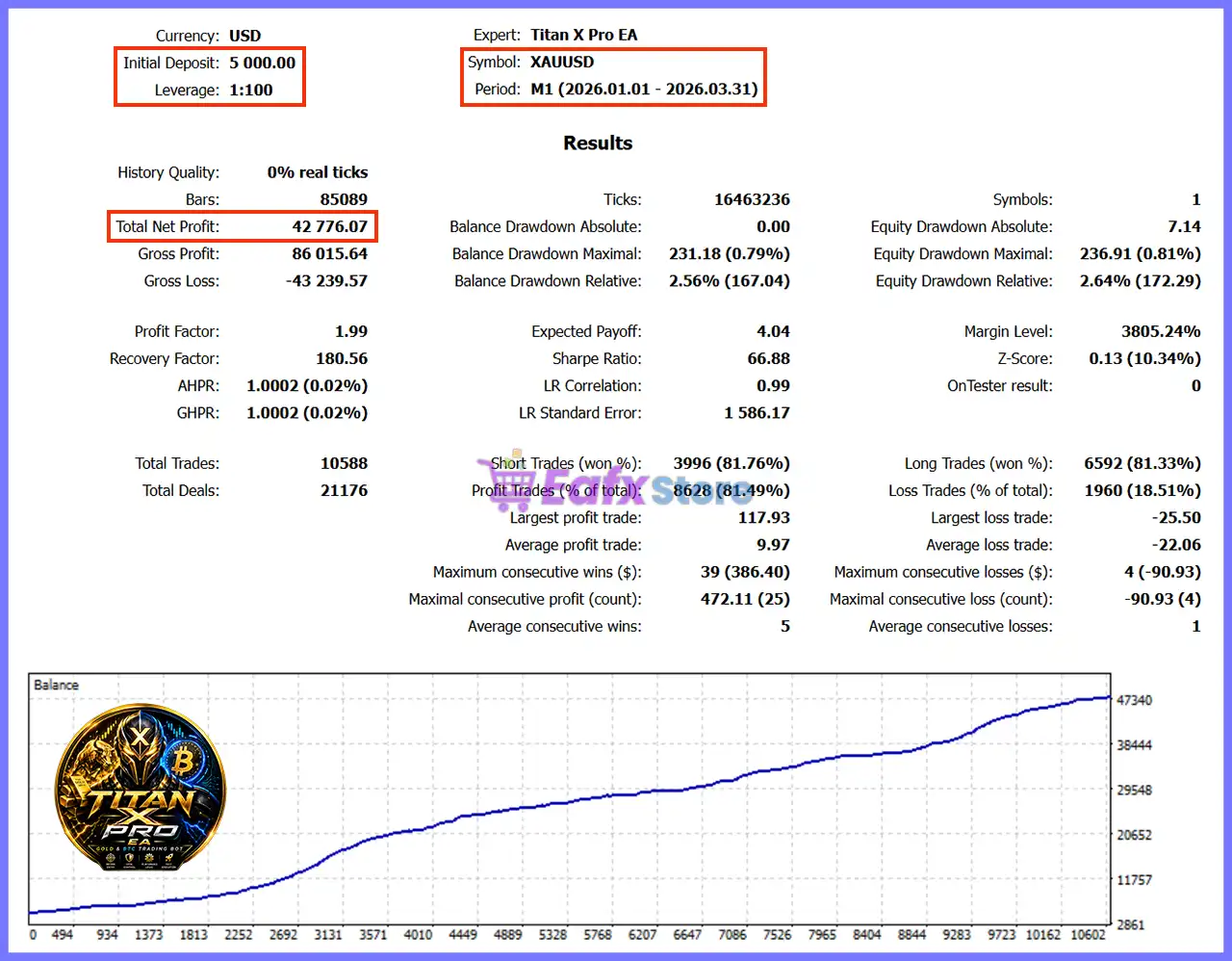
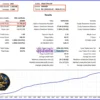
Backtest #2 (Initial Deposit: $5,000)
Titan X Pro EA Backtest Results
| Metric | Result |
|---|---|
| Initial Deposit | $5,000 |
| Total Net Profit | $42,776.07 |
| Profit Factor | 1.99 |
| Recovery Factor | 180.56 |
| Winning Trades | 81.49% |
| Total Trades | 10,588 |
| Relative Drawdown | 2.64% |
| Maximum Winning Streak | 39 Trades |
| Trading Period | Jan 2026 – Mar 2026 |
Performance Analysis
The second backtest confirms excellent scalability, producing over $42,000 in net profit while maintaining the same high win rate and an even lower relative drawdown of 2.64%.
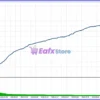
The stable equity curve indicates that the strategy scales efficiently with larger account balances while preserving disciplined risk control.
Why Titan X Pro EA MT5 Stands Out
Minimal User Configuration
The EA requires very little setup. Users mainly configure:
🔹 Risk level
🔹 Lot size
🔹 News handling
🔹 Equity protection
The algorithm manages everything else automatically.
Multi-Asset Flexibility
Supports both precious metals and cryptocurrencies within one trading system.
Professional News Protection
Automatically avoids high-impact news periods using a dynamic calendar.
Advanced Trailing Technology
Uses ATR-based trailing for cryptocurrency markets while maintaining point-based trailing for Gold.
Excellent Capital Protection
Multiple layers of risk management reduce unnecessary account exposure.
Clean Professional Dashboard
Real-time monitoring provides complete visibility of trading activity without overwhelming the user.
Risk Management Features
Fixed Maximum Risk per Trade
Limits risk to 1% per trade by default.
Stop Loss Protection
Every position is opened with a predefined Stop Loss.
ATR-Based Trailing
Protects profits as volatility changes.
News Filter
Automatically pauses trading around major economic events.
Spread Protection
Can prevent entries during periods of excessive spreads.
Equity Protection
Optional controls for:
🔹 Daily Profit Target
🔹 Maximum Daily Equity Loss
Friday Closing Protection
Optionally closes trades before the weekend to reduce gap risk.
Session Filters
Trades only during preferred market hours.
Recommended Trading Conditions
For optimal performance, the developer recommends:
| Features | Type |
|---|---|
| Trading platform | MetaTrader 5 (MT5) |
| Time frames | M1 (1 minute chart) |
| Currency pairs | XAUUSD, BTCUSD, ETHUSD |
| Minimum / Recommended deposit | $1,000+ |
| Minimum / Recommended leverage | 1:100+ |
| Type of account | ECN or Raw-spread |
| Additional services | Unlock and Decompile |
| Recommended brokers | Exness Broker, Icmarkets Broker |
| Recommended VPS | MyfxVPS.com ( Blue VPS, Golden VPS). Lowest Latency, 2 week Free Trial, 100% Free for 12-18 Months. |
Product Download Package?
The download package of the product suite includes:
Experts
 Titan X Pro EA.ex5
SetFiles
Titan X Pro_Gold_Risk2%.set
Titan X Pro_Gold_Minlot_0.01.set
 Reviewed by David Easton
Weaknesses and Risk Warnings
🔹 Optimized primarily for XAUUSD, BTCUSD and ETHUSD rather than a wide range of markets.
🔹 High-frequency trading performance depends heavily on broker execution quality and low spreads.
🔹 ATR trailing may perform differently during periods of extreme market volatility.
🔹 Historical backtests use simulated market data and should not be interpreted as guaranteed future results.
🔹 Although extensive protection features are included, no Expert Advisor can eliminate trading risk entirely.
Who Should Use Titan X Pro EA MT5?
Titan X Pro EA MT5 is an excellent choice for:
🔹 Gold traders seeking automated execution.
🔹 Cryptocurrency traders.
🔹 Prop Firm participants.
🔹 Beginners wanting minimal setup.
🔹 Experienced traders requiring advanced risk controls.
🔹 Traders using VPS environments.
🔹 Investors seeking disciplined long-term automated trading.
Final Verdict
Titan X Pro EA MT5 is a modern, multi-asset Expert Advisor designed to simplify automated trading while maintaining professional-grade risk management. With intelligent trade execution, ATR-based trailing stops, integrated news protection, session filters, and flexible equity management, it provides a comprehensive solution for traders who value consistency over speculation.
The published historical results demonstrate strong statistical performance, including an 81.49% winning rate, low relative drawdown, and more than 10,500 completed trades, reflecting a disciplined trading methodology. Combined with its beginner-friendly setup, support for XAUUSD, BTCUSD, and ETHUSD, and highly configurable risk controls, Titan X Pro EA is a compelling option for traders looking to automate their trading while maintaining strict control over capital preservation and execution quality.
🔢 Titan X Pro EA MT5 Settings Guide
Titan X Pro EA is a professional automated trading Expert Advisor for MetaTrader 5 that combines intelligent risk management, ATR-based trailing stops, live news filtering, trading session control, equity protection and flexible position management.
The EA is designed to help traders maintain disciplined execution while protecting capital through configurable stop loss, take profit, spread filters, news avoidance and time-based trading restrictions.
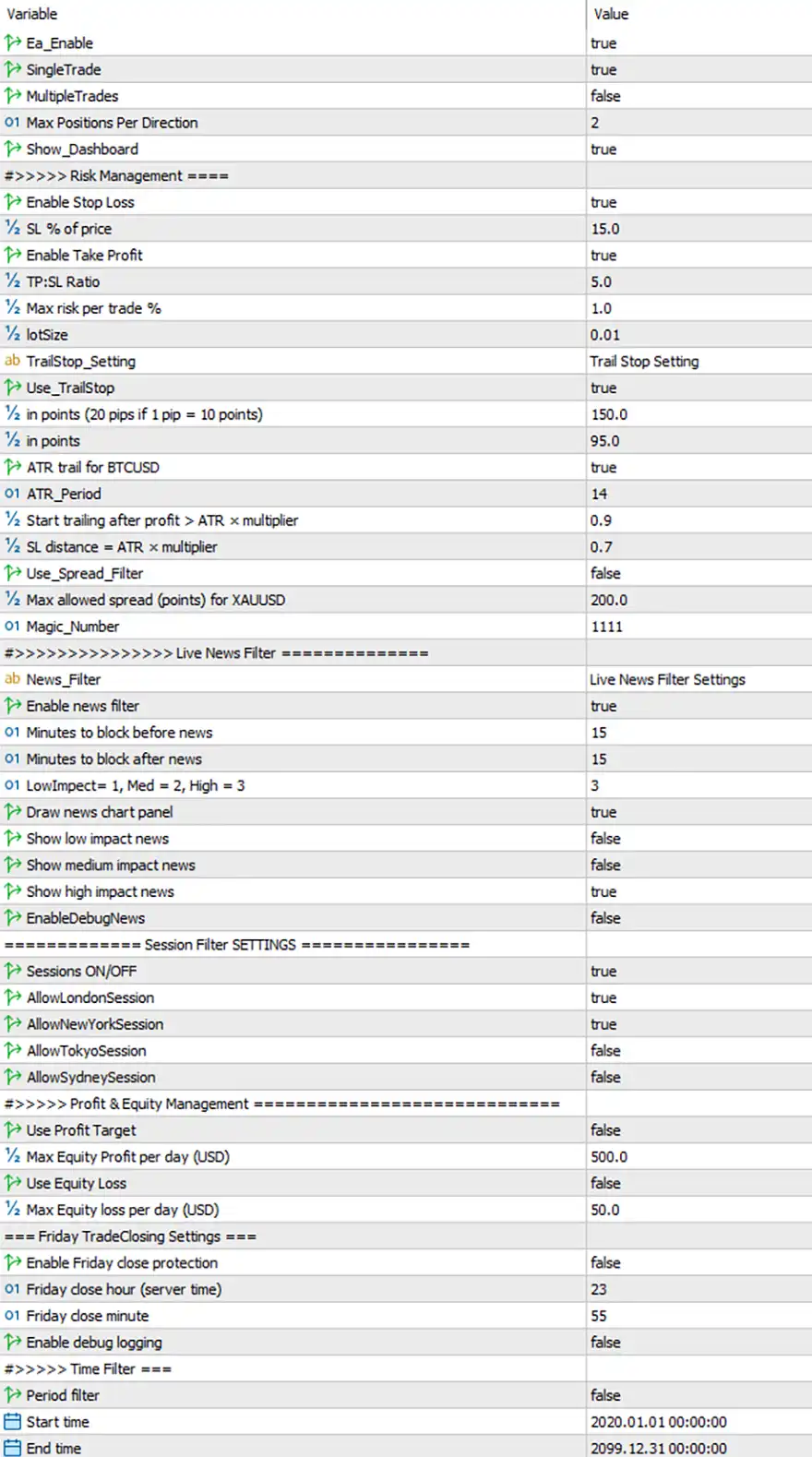
Titan X Pro EA MT5 Settings Panel
🔢 Titan X Pro EA MT5 Settings Explained
🔶 General Settings
🔹 Ea_Enable = true – Enables the Expert Advisor and allows automated trading.
🔹 SingleTrade = true – Allows only one active trade at a time for each trading signal.
🔹 MultipleTrades = false – Disables opening multiple simultaneous positions.
🔹 Max Positions Per Direction = 2 – Limits the maximum number of Buy or Sell positions to 2 per direction.
🔹 Show_Dashboard = true – Displays the on-chart dashboard with EA information and trading statistics.
🔶 Risk Management
🔹 Enable Stop Loss = true – Enables Stop Loss protection for every trade.
🔹 SL % of price = 15.0 – Sets the Stop Loss distance to 15.0% of the current market price.
🔹 Enable Take Profit = true – Enables automatic Take Profit for all positions.
🔹 TP:SL Ratio = 5.0 – Uses a 5.0 : 1 Reward-to-Risk ratio between Take Profit and Stop Loss.
🔹 Max risk per trade % = 1.0 – Limits the maximum account risk to 1.0% per trade.
🔹 lotSize = 0.01 – Uses a fixed trading volume of 0.01 lot.
🔶 Trailing Stop Settings
🔹 TrailStop_Setting = Trail Stop Setting – Opens the Trailing Stop configuration section.
🔹 Use_TrailStop = true – Enables automatic Trailing Stop management.
🔹 in points (20 pips if 1 pip = 10 points) = 150.0 – Starts the trailing mechanism after 150.0 points.
🔹 in points = 95.0 – Maintains the trailing Stop Loss at a distance of 95.0 points.
🔹 ATR trail for BTCUSD = true – Uses ATR-based trailing logic for BTCUSD trading.
🔹 ATR_Period = 14 – Calculates the Average True Range using 14 periods.
🔹 Start trailing after profit > ATR × multiplier = 0.9 – Activates trailing once profit exceeds ATR × 0.9.
🔹 SL distance = ATR × multiplier = 0.7 – Calculates the Stop Loss distance as ATR × 0.7.
🔶 Spread Filter
🔹 Use_Spread_Filter = false – Disables spread filtering.
🔹 Max allowed spread (points) for XAUUSD = 200.0 – Sets the maximum spread limit to 200.0 points when the spread filter is enabled.
🔹 Magic_Number = 1111 – Assigns the unique identifier 1111 to all EA trades.
🔶 Live News Filter Settings
🔹 News_Filter = Live News Filter Settings – Opens the News Filter configuration section.
🔹 Enable news filter = true – Enables automatic news event filtering.
🔹 Minutes to block before news = 15 – Stops opening trades 15 minutes before important news.
🔹 Minutes to block after news = 15 – Resumes trading 15 minutes after news events.
🔹 Low/Impect = 1, Med = 2, High = 3 = 3 – Filters only High Impact (Level 3) news events.
🔹 Draw news chart panel = true – Displays the economic news panel directly on the trading chart.
🔹 Show low impact news = false – Hides Low Impact news events.
🔹 Show medium impact news = false – Hides Medium Impact news events.
🔹 Show high impact news = true – Displays High Impact news events.
🔹 EnableDebugNews = false – Disables debugging information for the News Filter.
🔶 Session Filter Settings
🔹 Sessions ON/OFF = true – Enables trading session filtering.
🔹 AllowLondonSession = true – Allows trading during the London session.
🔹 AllowNewYorkSession = true – Allows trading during the New York session.
🔹 AllowTokyoSession = false – Disables trading during the Tokyo session.
🔹 AllowSydneySession = false – Disables trading during the Sydney session.
🔶 Profit & Equity Management
🔹 Use Profit Target = false – Disables the daily profit target restriction.
🔹 Max Equity Profit per day (USD) = 500.0 – Sets the maximum daily profit target to 500.0 USD if enabled.
🔹 Use Equity Loss = false – Disables daily equity loss protection.
🔹 Max Equity loss per day (USD) = 50.0 – Sets the maximum daily equity loss limit to 50.0 USD if enabled.
🔶 Friday Trade Closing Settings
🔹 Enable Friday close protection = false – Disables automatic Friday position closing.
🔹 Friday close hour (server time) = 23 – Specifies 23:00 server time as the Friday closing hour.
🔹 Friday close minute = 55 – Specifies 23:55 as the Friday closing minute.
🔹 Enable debug logging = false – Disables debug log recording.
🔶 Time Filter
🔹 Period filter = false – Disables the custom trading period filter.
🔹 Start time = 2020.01.01 00:00:00 – Defines the beginning of the allowed trading period.
🔹 End time = 2099.12.31 00:00:00 – Defines the ending date of the allowed trading period.
🔢 Conclusion
Titan X Pro EA MT5 offers a comprehensive trading environment by combining intelligent position management, strict risk controls, ATR-based trailing stops, live economic news protection, trading session filters, and optional equity management. With highly configurable settings for stop loss, take profit, trade timing, and capital protection, the EA provides traders with a flexible framework suitable for both conservative and active trading strategies.
🔢 FAQs
❓ What is the default risk per trade in Titan X Pro EA MT5?
The default maximum risk is 1.0% per trade, with a default fixed lot size of 0.01.
❓ Does Titan X Pro EA MT5 include a News Filter?
Yes. The EA includes a built-in Live News Filter that blocks trading 15 minutes before and after High Impact news by default.
❓ Can Titan X Pro EA MT5 trade during all market sessions?
No. The default configuration enables the London and New York sessions, while the Tokyo and Sydney sessions are disabled.
❓ Does the EA support ATR-based Trailing Stops?
Yes. Titan X Pro EA MT5 uses an ATR Period of 14 with configurable activation and Stop Loss multipliers for dynamic trade management.
❓ Can I limit the number of open positions?
Yes. The EA limits trading to 2 positions per direction by default, helping maintain disciplined exposure and controlled risk.
User Reviews
Only logged in customers who have purchased this product may leave a review.
❓ What markets can Titan X Pro EA MT5 trade?
Titan X Pro EA MT5 is designed for XAUUSD, BTCUSD, and ETHUSD, providing fully automated trading with adaptive execution and integrated risk management.
❓ Does Titan X Pro EA MT5 require constant manual monitoring?
No. Titan X Pro EA MT5 manages the complete trading process automatically, from market analysis to order execution and position management.
❓ Can I customize the risk settings in Titan X Pro EA MT5?
Yes. Titan X Pro EA MT5 allows you to configure risk level, lot size, trailing options, equity protection, and profit control to match your strategy.
❓ Does Titan X Pro EA MT5 include a news filter?
Yes. Titan X Pro EA MT5 features a customizable news filter that blocks trading before and after high-impact events to reduce unnecessary market risk.
❓ How does Titan X Pro EA MT5 manage position sizing?
Titan X Pro EA MT5 automatically calculates lot size based on account balance and selected risk, while also supporting fixed-lot trading when preferred.
❓ Does Titan X Pro EA MT5 protect against high spreads?
Yes. Titan X Pro EA MT5 checks current spread before opening trades and blocks new entries when trading costs become abnormally high.
❓ What information is displayed on the Titan X Pro EA MT5 dashboard?
Titan X Pro EA MT5 displays account balance, daily profit, running PnL, spread, lot size, trade type, loss count, and total open positions in real time.
❓ What are the recommended settings for Titan X Pro EA MT5?
Titan X Pro EA MT5 is recommended for XAUUSD, BTCUSD, and ETHUSD on the M1 timeframe with a low-spread account and a VPS for stable execution.
❓ Is Titan X Pro EA MT5 easy to install and use?
Yes. Titan X Pro EA MT5 requires only basic setup, including selecting a symbol, choosing a risk profile, enabling Algo Trading, and letting the EA run.
-
 Original price was: $2,000.00.$199.00Current price is: $199.00.
 -
 Original price was: $30,000.00.$599.00Current price is: $599.00.
 -
 Original price was: $3,750.00.$599.00Current price is: $599.00.
 -
 Original price was: $30,000.00.$599.00Current price is: $599.00.
-
 1Original price was: $500.00.$249.00Current price is: $249.00.
 -
 0Original price was: $199.00.$179.00Current price is: $179.00.
 -
 0Original price was: $778.00.$249.00Current price is: $249.00.
 -
 1Original price was: $699.00.$249.00Current price is: $249.00.
There are no reviews yet.