


🔢 AI Prop Runner Gold EA Settings Guide
AI Prop Runner Gold EA is an advanced MetaTrader Expert Advisor designed for professional XAUUSD trading with AI-assisted decision making, dynamic risk management, Bollinger Bands breakout and pullback strategies, trend filters, recovery management, profit protection, and Prop Firm-friendly controls.
The EA combines artificial intelligence with classic technical analysis to optimize entries while maintaining strict capital preservation and flexible trading management.

🔢 AI Prop Runner Gold EA Settings Explained
🔄 AI Brain Parameters
🔹 Enable neural network filtering = true – Enables the AI neural network to filter trading signals before execution.
🔹 AI threshold for Buy = 0.7 – Sets the minimum AI confidence score of 0.7 required for Buy trades.
🔹 AI threshold for Sell = 0.8 – Sets the minimum AI confidence score of 0.8 required for Sell trades.
🔹 AI threshold for Buy (Breakout) = 0.7 – Requires an AI confidence level of 0.7 for Breakout Buy entries.
🔹 AI threshold for Sell (Breakout) = 0.7 – Requires an AI confidence level of 0.7 for Breakout Sell entries.
🔹 HTF for SMC & Levels = 15 Minutes – Uses the 15 Minutes timeframe for Smart Money Concepts and key level analysis.
🔹 ADX Period = 14 – Calculates the ADX indicator using 14 periods.
🔹 AI Confidence Lot Sizing (scale lot by probability) = false – Disables AI-based lot scaling according to prediction confidence.
🔹 Min lot multiplier at threshold (0.3–1.0) = 0.5 – Uses a minimum lot multiplier of 0.5 when AI confidence reaches the threshold.
🔹 RT: Block RT if AI probability below threshold = true – Blocks Recovery Trades when AI confidence falls below the required threshold.
🔹 RT: Scale lot by AI confidence = true – Adjusts Recovery Trade lot sizes based on AI confidence.
🔹 RT: Min lot factor (0.3–0.8) = 0.5 – Sets the minimum Recovery Trade lot factor to 0.5.
🔄 General Settings
🔹 Magic Number (Pullback M1) = 601217041 – Unique identifier for Pullback strategy trades.
🔹 Magic Number (Breakout M1) = 601217042 – Unique identifier for Breakout strategy trades.
🔹 Force Market Order On Slippage = false – Prevents forced market execution when slippage occurs.
🔹 Slippage = 5.0 – Allows a maximum slippage of 5.0 points.
🔹 Distance ATR (Pullback) = 1.0 – Uses ATR × 1.0 to calculate Pullback entry distance.
🔹 Distance ATR (Breakout) = 1.0 – Uses ATR × 1.0 to calculate Breakout entry distance.
🔹 ATR Period for distances = 14 – Uses 14 periods for ATR distance calculations.
🔹 Timeframe (attach to M1 chart for XAUUSD) = 1 Minute – The EA should be attached to the M1 chart.
🔹 Clear Series (True - clear, False - continue current) = true – Clears previous trading series when starting.
🔄 Risk Management
🔹 Risk management mode = Risk as a percentage of balance – Calculates position size using account balance percentage.
🔹 Risk percent per trade = 0.5 – Risks 0.5% of account balance per trade.
🔹 Fixed risk amount = 25.0 – Fixed monetary risk value of 25.0 when fixed-risk mode is used.
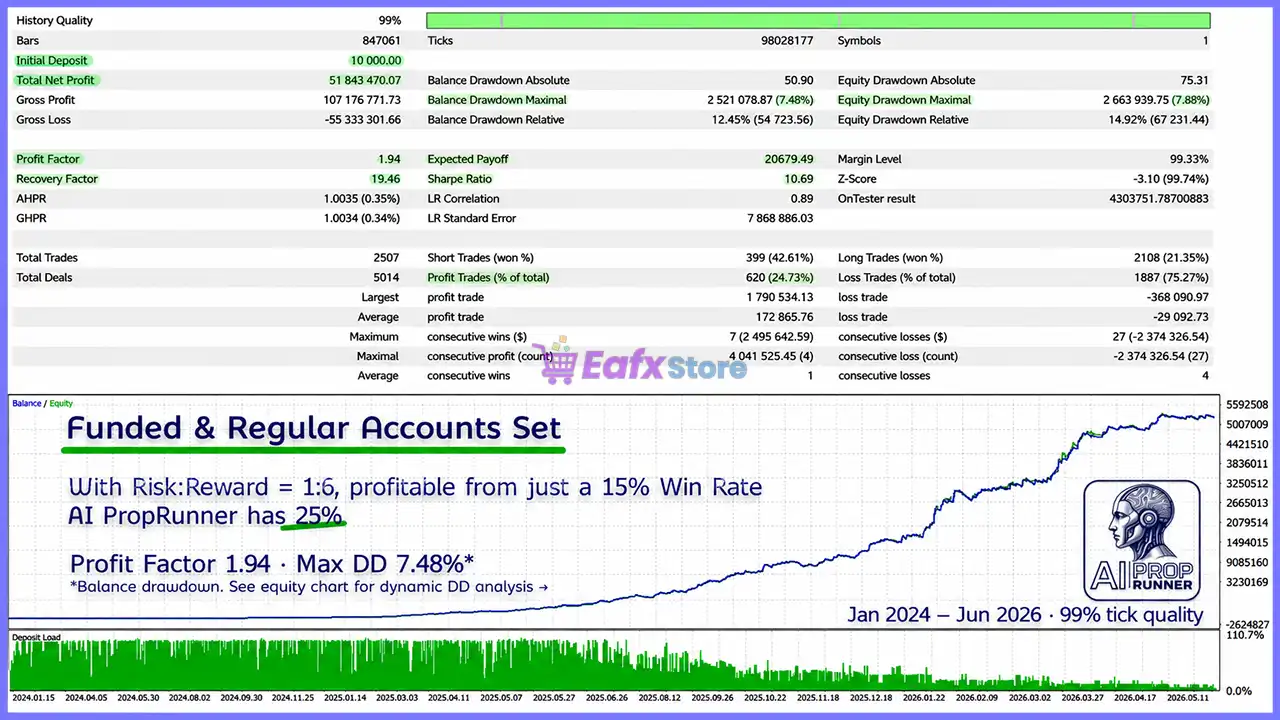
🔹 Risk/Reward (Pullback) = 6.0 – Uses a 1:6 Risk-to-Reward ratio for Pullback trades.
🔹 Risk/Reward (Breakout) = 6.0 – Uses a 1:6 Risk-to-Reward ratio for Breakout trades.
🔹 NT trades: soft exit at X% of SL risk (0/100 = disabled) = 100.0 – Performs a soft exit when 100% of Stop Loss risk is reached.
🔹 NT mode without Take Profit (off by default) = false – Keeps Take Profit enabled.
🔄 Dynamic Risk Management
🔹 Enable Dynamic Risk Modes = true – Activates automatic dynamic risk adjustment.
🔹 Risk multiplier: Normal (x base risk) = 1.0 – Uses the standard base risk multiplier.
🔹 Risk multiplier: Aggressive (x base risk, after cushion) = 1.5 – Increases risk to 1.5× under aggressive conditions.
🔹 Risk multiplier: Defensive (x base risk, in DD zone) = 0.5 – Reduces risk to 50% during drawdown periods.
🔹 Profit% to unlock Aggressive = 5.0 – Enables Aggressive mode after 5.0% account growth.
🔹 DD% from initial deposit -> Defensive = 3.0 – Switches to Defensive mode after 3.0% drawdown.
🔹 DD% from initial deposit -> STOP + close all = 10.0 – Stops trading and closes all positions after 10.0% drawdown.
🔹 Profit target % from initial deposit (0 = off) = 0.0 – Profit target is disabled.
🔄 Recovery Trades (RT)
🔹 Enable Recovery Trades = false – Recovery Trade system is disabled.
🔹 RT trades: soft exit at X% of SL risk = 100.0 – Recovery Trades use a soft exit at 100% Stop Loss exposure.
🔹 Max Recovery Coefficient = 5.0 – Maximum Recovery coefficient is 5.0.
🔹 Min Loss for using Recovery Coefficient = 1.0 – Recovery scaling begins after a loss of 1.0.
🔹 Max R/R for Recovery Trades = 6.0 – Recovery Trades use a maximum Risk-to-Reward ratio of 6.0.
🔹 Recovery Trades Volume Step = 0.1 – Recovery lot increment equals 0.1 lot.
🔄 Stop Loss Management
🔹 SL Mode New Trades = Without SL management – Uses the default Stop Loss for new trades.
🔹 SL Mode Recovery Trades = Without SL management – Uses default Stop Loss handling for Recovery Trades.
🔄 Signal Source
🔹 Signal Source Mode = Bollinger Bands Stop (Trend follower) – Uses Bollinger Bands Stop as the primary signal generator.
🔹 Pullback Zone (coeff. x ATR) = 1.0 – Pullback entry zone equals ATR × 1.0.
🔹 Entry Logic Mode = Both (Pullback + Breakout simultaneously) – Enables both Pullback and Breakout strategies.
🔹 NT Shared Limit = false – Strategies maintain separate trading limits.
🔹 Strategy Logic Mode (Ignored in PULLBACK) = Trade WITH trend (Classic: Breakout of StdBB / Fractals) – Breakout strategy trades only in the trend direction.
🔄 Bollinger Bands Stop Parameters
🔹 [PB BBS] Length (Pullback strategy) = 26 – Bollinger Bands Stop period for Pullback trades.
🔹 [PB BBS] Deviation = 1.0 – Standard deviation for Pullback strategy.
🔹 [BRK BBS] Length (Breakout strategy) = 26 – Bollinger Bands Stop period for Breakout trades.
🔹 [BRK BBS] Deviation = 1.0 – Standard deviation for Breakout strategy.
🔄 EMA Pair Filter
🔹 UseEMA = false – EMA filter is disabled.
🔹 TF_EMA = 4 Hours – EMA calculations use the H4 timeframe.
🔹 EMA_Fast = 20 – Fast EMA period.
🔹 EMA_Slow = 50 – Slow EMA period.
🔹 EMA_ATR_Period = 14 – ATR period used with EMA normalization.
🔹 EMA_MinSpreadATR_Enter = 0.2 – Minimum ATR spread required for entry.
🔹 EMA_MinSpreadATR_Exit = 0.15 – Minimum ATR spread for exits.
🔹 EMA_MinSlopeATR_Enter = 0.05 – Minimum EMA slope for entries.
🔹 EMA_MinSlopeATR_Exit = 0.03 – Minimum EMA slope for exits.
🔹 EMA_wSpread = 0.6 – Weight assigned to spread analysis.
🔹 EMA_wSlope = 0.4 – Weight assigned to EMA slope.
🔄 Bollinger Bands Filter
🔹 UseBB = false – Additional Bollinger Bands filter is disabled.
🔹 TF_BB = 1 Hour – Bollinger Bands are calculated on the H1 timeframe.
🔹 BB_Period = 20 – Bollinger Bands period.
🔹 BB_Dev = 2.0 – Standard deviation multiplier.
🔹 BB_ATR_Period = 14 – ATR period for Bollinger calculations.
🔹 <= hard_flat = 1.0 – Flat market threshold.
🔹 >= impulse/trend mode = 1.8 – Strong trend threshold.
🔄 Information Panel
🔹 show panel = true – Displays the information panel.
🔹 panel location (screen corner) = Panel_RB – Shows the panel in the lower-right corner.
🔹 font size (px) = 9 – Uses a 9-pixel font.
🔹 line spacing (px) = 14 – Sets line spacing to 14 pixels.
🔹 X-indent = 6 – Horizontal margin.
🔹 Y-indent = 8 – Vertical margin.
🔹 InfoPanel_ShowHeader = true – Shows the panel header.
🔹 InfoPanel_ShowSeries = false – Hides series information.
🔹 InfoPanel_ShowBaselines = true – Displays baseline data.
🔹 InfoPanel_ShowPaths = true – Displays AI decision paths.
🔹 InfoPanel_ShowFractals = true – Shows fractal information.
🔹 InfoPanel_ShowFilter = true – Displays filter status.
🔹 Trading windows / lunch / news / weekly close = true – Shows session timing information.
🔹 daily goals/limits = true – Displays daily trading objectives.
🔹 ALLOWED/BLOCKED + reason = true – Shows whether trading is allowed and explains why.
🔹 Dynamic Risk mode & DD info = true – Displays Dynamic Risk and Drawdown status.
🔹 AI Brain activity & last signal = true – Shows AI activity and latest signal.
🔹 Show AI Model Names in Panel = false – Hides AI model names.
🔹 logo zone (px) = 120 – Allocates 120 pixels for the logo.
🔄 Fractals
🔹 Bars to confirm a fractal (0 = immediate) = 2 – Confirms fractals after 2 bars.
🔹 Smart Fractals mode = false – Smart Fractals are disabled.
🔹 StopsGuard: skip pending order if price too close to market = true – Prevents pending orders from being placed too close to market price.
🔹 StopsGuard: extra buffer beyond stops level = 2 – Adds a 2-point safety buffer.
🔄 Time Management
🔹 TimeManagementMode = The robot does NOT edit/open new trades, leaving those already running – Controls how the EA behaves outside trading hours.
🔹 Trading start hour = 0 – Trading starts at 00:00.
🔹 Trading start minute = 0 – Trading begins at minute 00.
🔹 Trading end hour = 24 – Trading ends at 24:00.
🔹 Trading end minute = 0 – Trading ends at minute 00.
🔄 Lunch Break
🔹 Lunch break mode = Ignore the lunch break – Lunch break filtering is disabled.
🔹 Lunch break start hour = 12 – Lunch period starts at 12:00.
🔹 Lunch break start minute = 0 – Lunch starts at minute 00.
🔹 Lunch break end hour = 13 – Lunch period ends at 13:00.
🔹 Lunch break end minute = 0 – Lunch ends at minute 00.
🔄 News Mode
🔹 news is ignored by default = Ignore news breaks completely – Ignores news restrictions.
🔹 Number of news breaks per day = 1 – Supports one scheduled news pause.
🔹 Time of the first news pause = 15:30 – News pause begins at 15:30.
🔹 Second news pause time (if required) – Optional additional news pause.
🔹 Third news pause time (if required) – Optional third news pause.
🔹 Fourth news pause time (if required) – Optional fourth news pause.
🔹 Delay for news breaks = 5 – Uses a 5-minute delay before and after news.
🔄 Profit / Loss Limits
🔹 DailyBaselineCalc = basis = max (old basis, current value) – Uses the highest baseline value for calculations.
🔹 If false, the daily loss limit is ignored = false – Daily loss limits remain active.
🔹 If false, the daily profit target is ignored = false – Daily profit targets remain active.
🔹 Selecting a basis for daily control = UseEquity – Uses account Equity.
🔹 Daily Loss Limit Mode = PercentLoss – Daily loss is measured as a percentage.
🔹 Daily Loss Limit = 2.5 – Maximum daily loss is 2.5%.
🔹 Daily Profit Target Mode = PercentProfit – Daily profit target uses percentages.
🔹 Daily Profit Target = 2.5 – Daily target equals 2.5%.
🔄 Weekly Closing Window
🔹 Enable Weekly Close Window = true – Enables automatic weekend closing.
🔹 Weekly window entry range = 300 – Uses a 300-second entry window before weekly close.
🔄 Trend Filters
🔹 Trend Filter Mode (Global) = filtering is disabled – Global trend filtering is disabled.
🔹 Use indicator (single filter) = SINGLE_ADX – Uses the ADX indicator when enabled.
🔹 TrendAggProfile = "anchor" (senior TF) + veto from other modules – Defines the trend aggregation profile.
🔹 Use as anchor veto indicator = ANCHOR_ADX – Uses ADX as the anchor filter.
🔹 Trend enforcement mode = no additional enforcement; trend filter only blocks new orders – Trend filter only prevents new entries.
🔹 confirmation of state change = 2 – Requires 2 consecutive bars.
🔹 minimum gap between the leader and the aggregator = 0.15 – Sets a 0.15 minimum agreement gap.
🔹 don't Short in Up = true – Blocks Sell trades in uptrends.
🔹 don't Long in Down = true – Blocks Buy trades in downtrends.
🔹 require the sequence Up→Flat→Down (and back) = true – Requires proper trend transitions.
🔹 In Flat: minimum offset beyond the fractal = 0.5 – Requires a 0.5 ATR breakout beyond the fractal.
🔄 ADX Filter
🔹 UseADX = false – ADX filtering is disabled.
🔹 TF_ADX = 1 Hour – ADX uses the H1 timeframe.
🔹 ADX_Period = 14 – Uses 14 periods.
🔹 ADX_Low = 18.0 – Lower ADX threshold.
🔹 ADX_High = 25.0 – Upper ADX threshold.
🔹 ADX_HardFlatBelow = 14.0 – Defines a hard flat market below 14.0.
🔹 strong trend threshold (ADX) = 22.0 – Strong trend begins at 22.0.
🔹 trend maintenance threshold = 15.0 – Keeps trend active above 15.0.
🔹 hard flat (very low ADX) = 10.0 – Very flat market threshold.
🔹 min. dominance |+DI − -DI| for trend = 7.0 – Minimum directional movement difference required to confirm a trend.
🔢 Conclusion
AI Prop Runner Gold EA combines artificial intelligence, dynamic risk management, Bollinger Bands strategies, fractal analysis, ATR-based calculations, trend filtering, and advanced account protection into a comprehensive trading framework. With configurable AI confidence thresholds, adaptive risk modes, professional information panels, time management, and profit protection, it provides a robust solution for traders seeking disciplined, automated Gold trading with Prop Firm compatibility.
🔢 FAQs
❓ What trading strategies does AI Prop Runner Gold EA support?
The EA supports both Pullback and Breakout strategies simultaneously using Bollinger Bands Stop and AI-assisted filtering.
❓ Can AI Prop Runner Gold EA automatically adjust trading risk?
Yes. It includes Dynamic Risk Management that automatically switches between Normal, Aggressive, and Defensive risk profiles based on profit and drawdown.
❓ Does the EA use Artificial Intelligence for trade filtering?
Yes. The built-in neural network evaluates Buy, Sell, and Breakout opportunities using configurable AI confidence thresholds.
❓ Is the EA suitable for Prop Firm trading?
Yes. Its strict daily loss controls, equity protection, dynamic risk adjustments, and weekly closing functions make it well suited for Prop Firm environments.
❓ Can I disable technical filters such as EMA, ADX, or Bollinger Bands?
Yes. The EMA, ADX, and additional Bollinger Bands filters can all be individually enabled or disabled to match your preferred trading approach.



