


🔢 Icaro EA MT4 Settings Guide: Complete Inputs and Parameters Explained
Icaro EA MT4 is an automated trading Expert Advisor designed for the MetaTrader 4 platform. Its input configuration provides essential trade-management parameters, including position sizing, take-profit targets, stop-loss settings, and a minimum trading interval.
With a straightforward configuration panel, Icaro EA MT4 allows traders to adjust trading volume and exit conditions according to their account size, trading preferences, and risk management requirements.
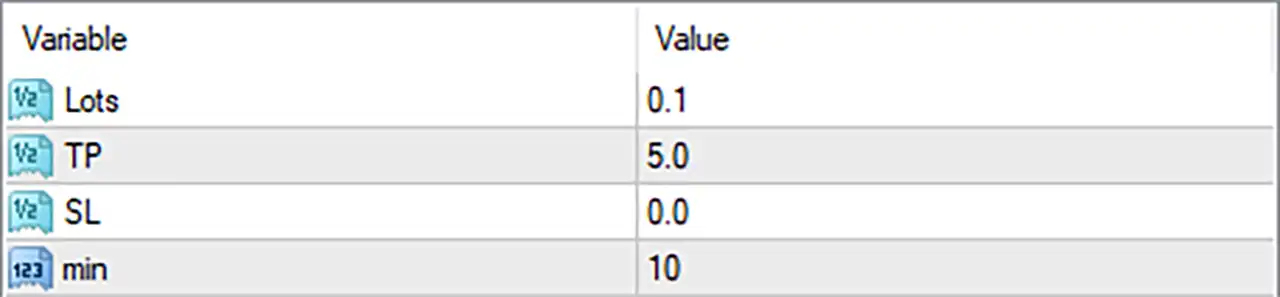
This guide explains all 4 parameters displayed in the Icaro EA MT4 settings panel, preserving their original names and exact default values.
⚙️ Lot Size and Position Management
🔹 Lots = 0.1: Sets the trading volume to 0.1 lots. This determines the configured position size used when Icaro EA MT4 opens a trade.
⚙️ Take Profit and Stop Loss Settings
🔹 TP = 5.0: Sets the take-profit parameter to 5.0. This defines the configured profit target for closing a trade when the market reaches the specified level. The exact measurement unit, such as pips or points, depends on the EA's internal implementation.
🔹 SL = 0.0: Sets the stop-loss parameter to 0.0. This indicates that no numerical fixed stop-loss distance is configured through this input. Traders should verify whether the EA uses alternative exit or protective mechanisms.
⚙️ Trading Interval Settings
🔹 min = 10: Sets the minimum interval parameter to 10. This may control the minimum waiting time or spacing between trading operations, depending on the EA's internal logic. Verify whether the value represents minutes, points, or another measurement unit.
⚙️ Important Configuration Considerations
🔹 Position Sizing: Lots = 0.1 establishes the configured trading volume. Traders should ensure that this position size is appropriate for their account balance, leverage, and risk tolerance.
🔹 Take-Profit Management: TP = 5.0 defines the configured profit target. Confirm the measurement unit and whether the EA applies this target to individual trades or another level of trade management.
🔹 Stop-Loss Protection: SL = 0.0 indicates that the fixed stop-loss input is not configured with a positive distance. Consider the potential exposure of open positions and verify whether other protective exit mechanisms are available.
🔹 Trading Interval: min = 10 provides a configurable minimum interval. Understanding how this parameter affects trade frequency can help traders evaluate the EA's execution behavior.
🔹 Broker Compatibility: Check the broker's minimum lot size, volume increments, spread, and execution conditions to ensure that the configured 0.1-lot position size is supported.
🔢 Conclusion
Icaro EA MT4 provides a simple trading configuration with four main parameters covering position sizing, profit targets, stop-loss management, and trading intervals.
The displayed settings use Lots = 0.1, TP = 5.0, SL = 0.0, and min = 10. These inputs allow traders to configure the EA's basic trade volume and exit-management conditions.
Before running Icaro EA MT4 on a live account, traders should verify the units used by TP and min, understand the implications of setting SL = 0.0, and confirm that the 0.1-lot position size is appropriate for their account. Backtesting and demo trading are recommended to evaluate the EA's behavior under different market conditions.


