




Eazy Trader EA MT4 (Latest version) - Unlimited

Subscriptions for Special Plan
- 30 EA package is more economical!
- Special package with 99%
- Download 1 EA/Day

Subscriptions for Premium Membership
- Download Unlimited in 1 Year
- Get 100% Discount
- Get free access to all

Subscriptions for Gold Membership
- 1 Year Membership
- Get 100% Discount
- Access EA+Indicator+Course
Frequently bought together 🎁
Add these products to enhance your purchase




Quick Overview
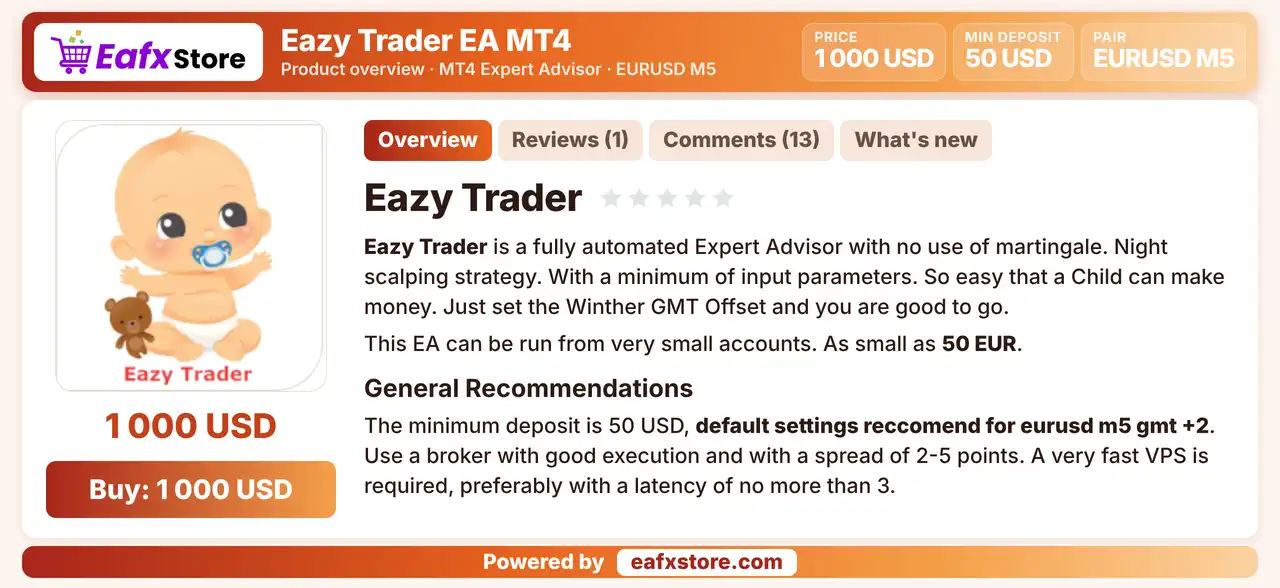
Eazy Trader EA is a fully automated night scalping Expert Advisor (EA) for MetaTrader 4, set by default for EURUSD on the M5 chart. It is described as working without martingale and with a minimum of input parameters.
Best For:
✅ Night scalpers who trade EURUSD on M5.
✅ Traders who want very few inputs.
✅ Users who start with small accounts.
✅ Traders with a fast and low spread broker.
✅ Users who plan regular profit withdrawals.
What is Eazy Trader EA MT4?
Eazy Trader EA MT4 is an automated Expert Advisor (EA) designed for the MetaTrader 4 (MT4) trading platform. It uses a night scalping strategy and is configured by default to trade the EURUSD currency pair on the M5 (5-minute) timeframe, targeting trading opportunities during quieter market sessions.
Eazy Trader EA features a simple and easy-to-configure settings panel with a minimal number of input parameters, including automatic lot sizing, Take Profit (TP), Stop Loss (SL), profit lock, trailing stop, and GMT offset adjustment. These built-in risk management and trade management options allow traders to customize the EA’s behavior according to their trading preferences and broker time settings.
⭐ Vendor Website: View here
⭐ Delivery time 24h-48h after payment.
⭐ Refund if not delivered.
⭐ You will receive the current version without any limitations (ID+Time).
Eazy Trader EA MT4 Review
Eazy Trader EA MT4 Trading Strategy
Scalp at Night
The EA is described as a night scalping system, so it trades during the quiet hours of the market on the M5 chart.
Use a Small Target and a Wide Stop
The default take profit is small while the stop loss is far wider, which means many small wins and rare large losses.
Lock and Trail Profit
A profit lock and a trailing stop can be switched on, so gains on an open trade can be protected as price moves in favor.
Size Lots from the Account
An auto lot option calculates the volume for every set amount on the account, while a fixed lot can be used instead.
Align Time with the Broker
A winter GMT offset and a daylight saving switch let the EA match the broker server time for its night trading window.
Historical Trading Results Performance
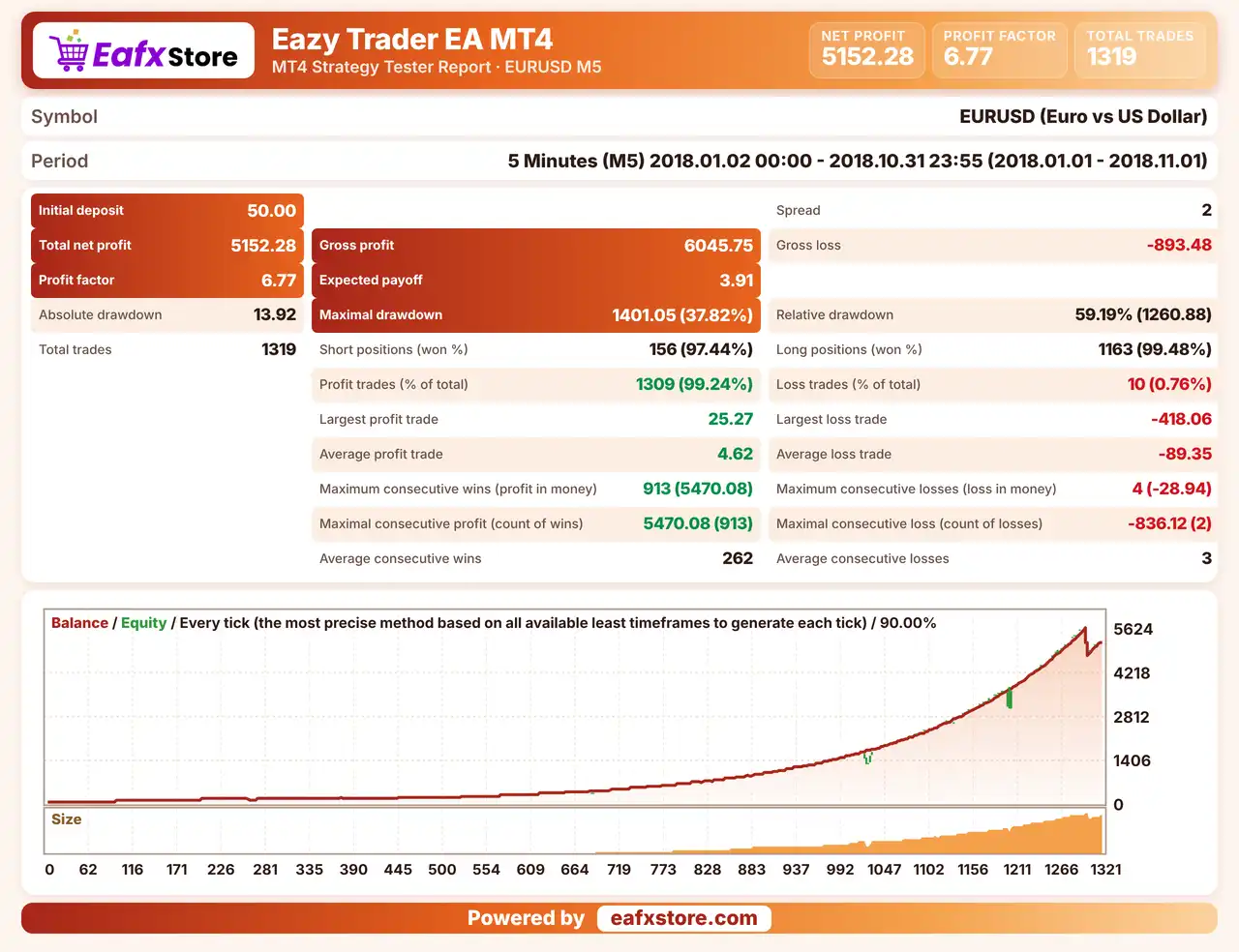
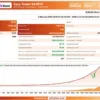
✅ Eazy Trader EA was backtested on EURUSD using the M5 timeframe from January 2 to October 31, 2018, covering approximately 10 months of historical data and generating 1,319 trades with a 99.24% win rate.
Eazy Trader EA Backtest Results
| Parameter | Backtest Results |
|---|---|
| Initial Deposit | $50 |
| Total Net Profit | $5,152.28 |
| Profit Factor | 6.77 |
| Total Trades | 1,319 |
| Winning Trades | 99.24% |
| Maximum Drawdown | 37.82% |
| Modeling Quality | 90% |
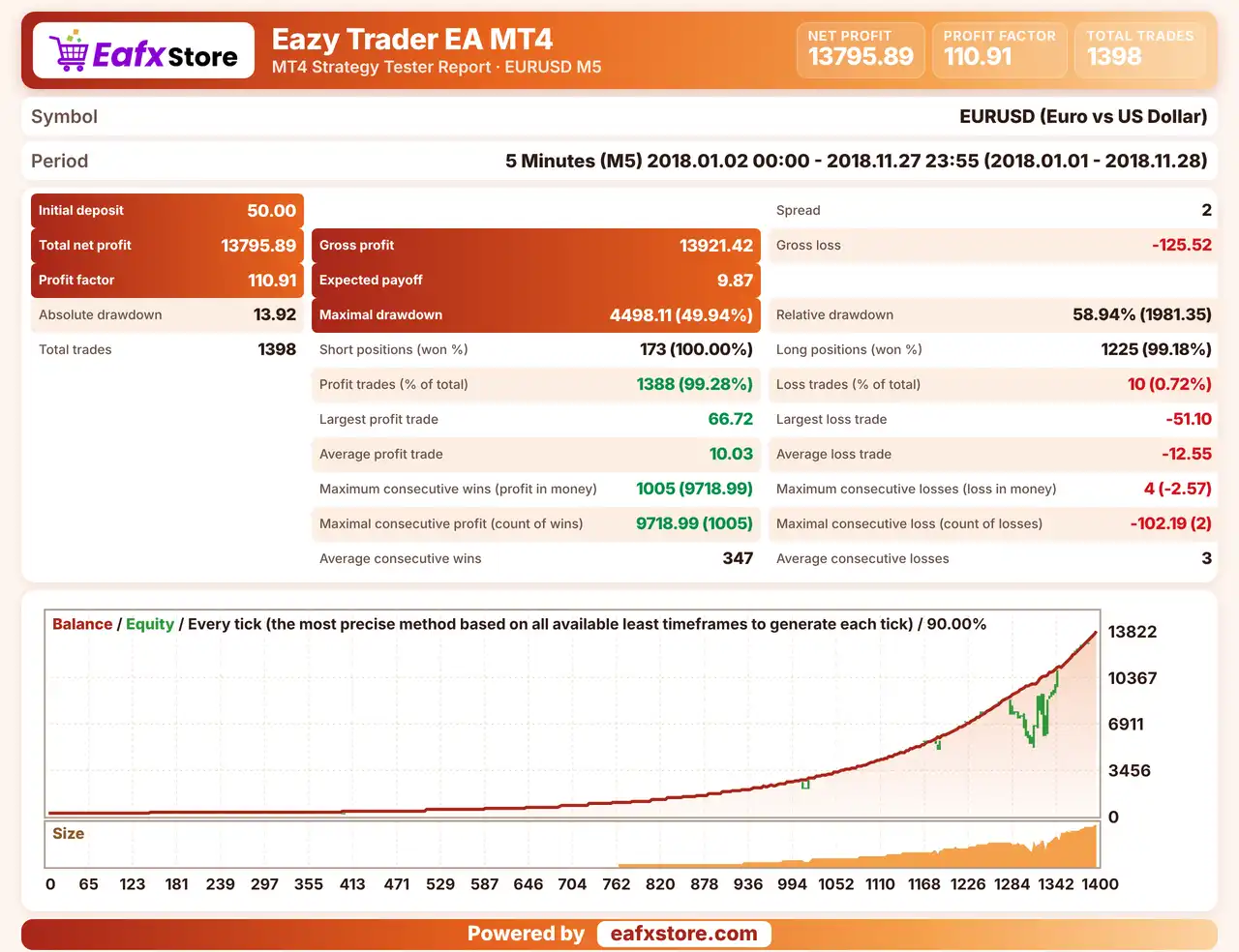
✅ Eazy Trader EA was backtested on EURUSD using the M5 timeframe from January 2 to November 27, 2018, covering nearly 11 months of historical trading data and generating 1,398 trades.
Eazy Trader EA MT4 Backtest Results
| Parameter | Backtest Results |
|---|---|
| Initial Deposit | $50 |
| Total Net Profit | $13,795.89 |
| Profit Factor | 110.91 |
| Total Trades | 1,398 |
| Winning Trades | 99.28% |
| Maximum Drawdown | 49.94% |
| Modeling Quality | 90% |
Key Features of Eazy Trader EA MT4
Night Scalping Strategy
The EA trades in the quiet night session on EURUSD, where spreads are low and moves are small, which is the basis of its scalping approach.
Minimum of Inputs
Only a few inputs need attention, so the setup is quick, with the GMT offset being the main item to adjust for the broker.
Auto Lot Calculation
The volume can be calculated for every set amount on the account, so the lot grows with the balance without manual changes.
Fixed Lot Option
A fixed lot can be used instead of the auto lot option, which gives a trader direct control over the size of every single position.
Take Profit and Stop Loss
Both levels are real orders set in points, so every trade has a defined target and a defined loss limit from the very start.
Profit Lock and Trailing Stop
Two protection options can be switched on, which help to keep gains once a trade moves in the expected direction for a while.
GMT and Daylight Saving Settings
A winter offset and a summer time switch align the EA with the server clock, which matters a lot for a night trading system.
Risk Management
One Loss Can Be Large
The wide stop-loss compared with the small target means a single losing trade can wipe out many small wins.
Small Targets Need Low Costs
A short take-profit leaves little room for spread and slippage, so a poor broker can ruin results.
Wrong Time Settings Break the Logic
A wrong GMT offset or daylight saving switch can move trading into busy hours that the EA was not made for.
Auto Lot Raises the Exposure
The lot grows with the balance, so a bigger account also means a bigger loss in a bad period.
Strengths and Limitations
Strengths
🔹 Simple setup: a few inputs and one default symbol make installation quick, with little room for configuration mistakes.
🔹 Low capital entry: the product says a small account can run the EA, which suits traders who want to test with limited funds.
🔹 Protection options: profit lock and trailing stop can both be switched on to help protect gains on trades that are open.
🔹 Clear drawdown message: the product states that drawdown will happen and advises regular withdrawals, which is a realistic view.
Limitations
🔹 Wide stop, small target: the stop loss is far wider than the take profit, so one loss can erase the gain of many winning trades.
🔹 Drawdowns are expected: the product itself warns of larger losses a few times a year, which may be hard for a small account.
🔹 Strict execution needs: the product asks for a tight spread broker and a very fast hosted server, which not every trader has.
🔹 No results published: the source includes no backtest or live report, so no returns or drawdown figures can be quoted.
Recommended Trading Conditions
Recommended settings and parameters to pay attention to from developers and experts:
| Features | Type |
|---|---|
| Trading platform | MetaTrader 4 (MT4) |
| Time frames | M5 |
| Currency pairs | EURUSD |
| Minimum / Recommended deposit | $50+ |
| Minimum / Recommended leverage | Any |
| Account type | Any |
| Additional services | Unlock and Decompile |
| Recommended brokers | Exness Broker, Icmarkets Broker |
| Recommended VPS | MyfxVPS.com (Blue VPS, Golden VPS). Lowest Latency, 2 week Free Trial, 100% Free for 12-18 Months. |
Product Download Package?
The download package of the product suite includes:
✅ Experts: Eazy Trader.ex4
Final Verdict
Eazy Trader EA MT4 is a night scalping robot for EURUSD on the M5 chart with very few inputs, auto lot, a profit lock and a trailing stop. The product says it avoids martingale and runs on a very small account, but its stop loss is far wider than its target, it warns of several bigger losses each year and it publishes no results. A tight spread broker, a correct time offset, regular withdrawals and a demo test are the sensible start before any live trading begins with real money.
🔢 Eazy Trader EA MT4 Settings Guide: Complete Inputs and Parameters Explained
Eazy Trader EA MT4 is an automated trading Expert Advisor designed for the MetaTrader 4 platform. Its configuration focuses on automated lot calculation, fixed trading volume, take-profit and stop-loss management, profit locking, and trailing-stop protection.
The EA provides adjustable position sizing based on account capital, allowing traders to configure their preferred trading volume and trade-management conditions. It also includes GMT offset and daylight saving time settings to help align its operation with the broker’s trading server time.
This guide explains all 9 parameters displayed in the Eazy Trader EA MT4 input panel, preserving their original names and exact default values.
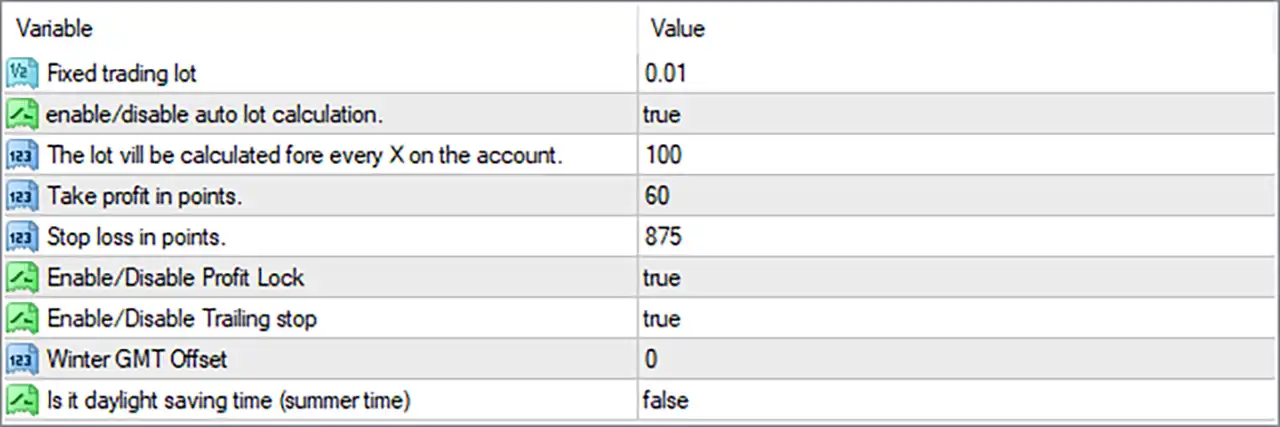
Eazy Trader EA MT4 Settings Panel
⚙️ Lot Size and Money Management Settings
🔹 Fixed trading lot = 0.01: Sets the fixed trading volume to 0.01 lots. This determines the default lot size used when fixed-volume trading is applied instead of automatic lot calculation.
🔹 enable/disable auto lot calculation. = true: Enables automatic lot calculation. When set to true, Eazy Trader EA MT4 can calculate trading volume automatically according to the account capital and the configured lot calculation parameter.
🔹 The lot will be calculated fore every X on the account. = 100: Sets the account-based lot calculation reference to 100. This parameter determines the capital interval used by the EA when calculating automatic trading volume. Its exact relationship with the resulting lot size should be verified through the EA’s internal calculation rules.
⚙️ Take Profit and Stop Loss Settings
🔹 Take profit in points. = 60: Sets the take-profit target to 60 points. This determines the configured favorable price movement required for the EA to close a trade at its profit target.
🔹 Stop loss in points. = 875: Sets the stop-loss distance to 875 points. This defines the configured adverse price movement at which the EA may close a position to limit potential losses.
⚙️ Profit Protection and Trailing Stop Settings
🔹 Enable/Disable Profit Lock = true: Enables the profit-locking feature. This allows the EA to use its internal profit-protection mechanism to help preserve accumulated gains when a trade moves favorably.
🔹 Enable/Disable Trailing stop = true: Enables trailing-stop management. When active, the EA can dynamically adjust stop-loss levels as the market moves in a favorable direction, helping protect open-position profits.
⚙️ GMT and Daylight Saving Time Settings
🔹 Winter GMT Offset = 0: Sets the winter GMT offset to 0, indicating GMT+0 as the configured winter-time reference. This parameter helps synchronize the EA’s time calculations with the broker’s server time during winter.
🔹 Is it daylight saving time (summer time) = false: Disables daylight saving time adjustment. The EA therefore uses the configured winter GMT offset rather than applying a summer-time adjustment through this setting.
⚙️ Important Configuration Considerations
🔹 Automatic Lot Calculation: With enable/disable auto lot calculation. = true and the account calculation reference set to 100, the EA is configured to calculate trading volume automatically. Monitor actual order sizes to understand how account capital affects position sizing.
🔹 Fixed Lot Size: Fixed trading lot = 0.01 provides a small default volume for fixed-lot trading. Check whether this parameter is used when automatic lot calculation is disabled.
🔹 Take-Profit and Stop-Loss Ratio: The configured take profit is 60 points, while the stop loss is 875 points. This creates a relatively wide stop-loss distance compared with the take-profit target, so traders should carefully evaluate the resulting risk-to-reward profile.
🔹 Profit Lock and Trailing Stop: Both Enable/Disable Profit Lock and Enable/Disable Trailing stop are set to true. These features provide additional profit-management mechanisms, although their exact activation conditions depend on the EA’s internal programming.
🔹 Broker Time Synchronization: Winter GMT Offset = 0 and daylight saving time = false should be checked against the broker’s server time to ensure that the EA applies the intended time reference.
🔹 Point Calculation: Take profit in points. = 60 and Stop loss in points. = 875 should be interpreted according to the broker’s symbol digits and point size, particularly when trading instruments with different quote precision.
🔢 Conclusion
Eazy Trader EA MT4 provides a straightforward configuration system combining automatic lot calculation, fixed position sizing, take-profit and stop-loss management, profit locking, and trailing-stop functionality.
Its default settings enable automatic lot calculation, with Fixed trading lot = 0.01 and an account calculation reference of 100. The EA uses a take-profit target of 60 points and a stop-loss distance of 875 points, while both profit locking and trailing-stop management are enabled.
The time configuration uses Winter GMT Offset = 0 with daylight saving time disabled. Traders should verify the automatic lot calculation formula, evaluate the risk-to-reward relationship, and confirm broker time synchronization before using Eazy Trader EA MT4 on a live account.
Backtesting and demo trading are recommended to understand the EA’s position sizing, exit behavior, and profit-protection mechanisms under different market conditions.
User Reviews
Only logged in customers who have purchased this product may leave a review.
❓ What is Eazy Trader EA MT4?
A fully automated night scalping Expert Advisor for MetaTrader 4 with a minimum of input parameters.
❓ Which symbol does Eazy Trader EA MT4 use?
EURUSD by default.
❓ Which timeframe does Eazy Trader EA MT4 use?
M5
❓ Does Eazy Trader EA MT4 use martingale?
The product describes it as working without martingale, which should be confirmed in a demo test.
❓ Does Eazy Trader EA MT4 use a stop loss?
Yes. It has a real stop loss and take profit, plus an optional profit lock and trailing stop.
❓ How is lot size set in Eazy Trader EA MT4?
It can use an auto lot calculation based on the account balance, or a fixed lot.
❓ What account size does Eazy Trader EA MT4 need?
The product says it can run from a very small account, with a minimum deposit of 50 USD.
❓ What setting must be changed in Eazy Trader EA MT4?
The winter GMT offset, and the daylight saving switch in summer.
❓ Which broker suits Eazy Trader EA MT4?
A broker with good execution and a tight spread, with high leverage, and a fast hosted server.
❓ Will Eazy Trader EA MT4 have losing periods?
Yes. The product warns of drawdown and several bigger losses each year.
-
 Original price was: $2,620.00.$249.00Current price is: $249.00.
 -
 Original price was: $1,000.00.$249.00Current price is: $249.00.
 -
 Original price was: $1,100.00.$249.00Current price is: $249.00.
 -
 Original price was: $1,299.00.$249.00Current price is: $249.00.
-
 0Original price was: $2,288.00.$249.00Current price is: $249.00.
 -
 0Original price was: $290.00.$179.00Current price is: $179.00.
 -
 0Original price was: $500.00.$199.00Current price is: $199.00.
 -
 1Original price was: $1,299.00.$249.00Current price is: $249.00.
There are no reviews yet.