



🔢 GOLD 2 Forex Stability EA MT4 Settings Guide: Complete Inputs and Parameters Explained
GOLD 2 Forex Stability EA MT4 is an automated trading Expert Advisor designed for the MetaTrader 4 platform. Its configuration is based on the Relative Strength Index (RSI), with adjustable trading timeframes, momentum thresholds, position sizing, trade spacing, and take-profit management.
The EA provides configurable RSI buy and sell levels, an initial lot size, a lot multiplier, and execution controls. These parameters allow traders to customize trading signals and position management according to their preferred strategy and account conditions.
⚙️ RSI Indicator Settings
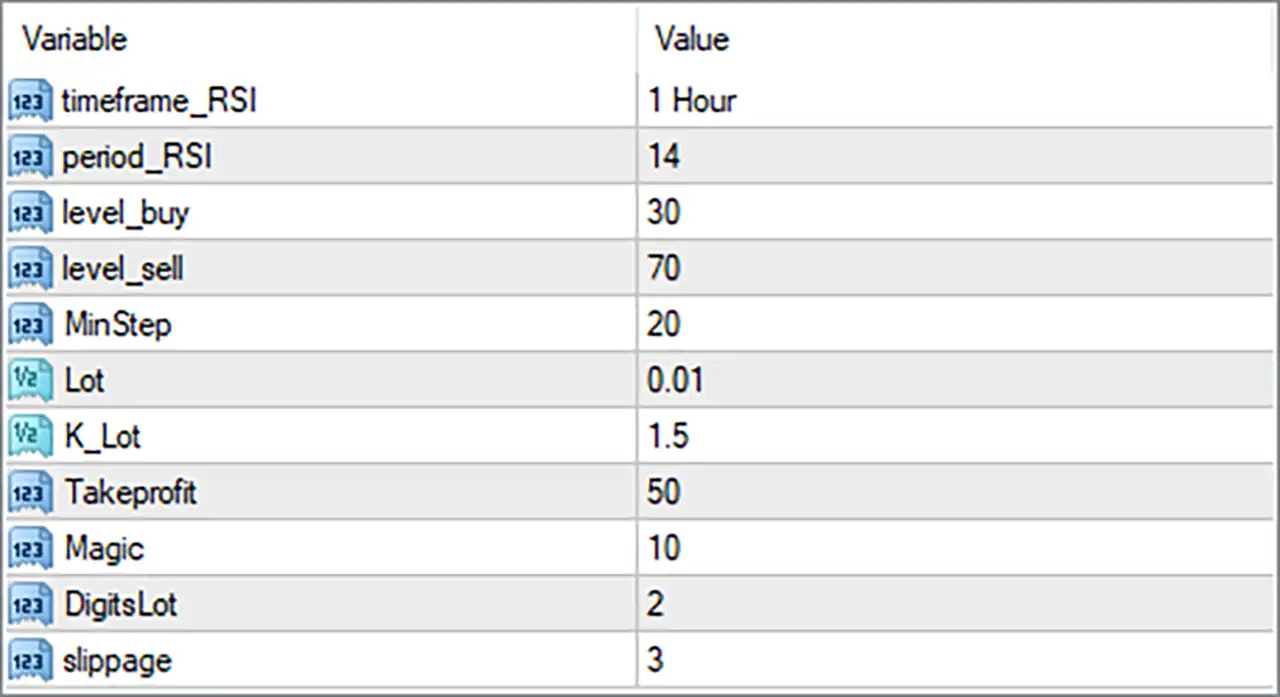
🔹 timeframe_RSI = 1 Hour: Sets the RSI indicator timeframe to 1 Hour (H1). The EA uses hourly RSI data to evaluate market momentum and identify potential trading opportunities, independently of the chart timeframe if supported by its implementation.
🔹 period_RSI = 14: Sets the RSI calculation period to 14. This determines the number of price periods used by the Relative Strength Index to measure the strength and speed of recent price movements.
🔹 level_buy = 30: Sets the RSI buy reference level to 30. This is the conventional oversold threshold, helping identify potential buying opportunities when market momentum indicates that selling pressure may be weakening.
🔹 level_sell = 70: Sets the RSI sell reference level to 70. This is the conventional overbought threshold, helping identify potential selling opportunities when market momentum indicates that buying pressure may be weakening.
⚙️ Trading Distance and Position Management
🔹 MinStep = 20: Sets the minimum trading step to 20. This parameter may determine the minimum price distance between successive trading entries or positions, helping regulate trade spacing according to the EA's internal strategy.
🔹 Lot = 0.01: Sets the initial trading volume to 0.01 lots. This determines the configured starting position size when GOLD 2 Forex Stability EA MT4 opens a new trade.
🔹 K_Lot = 1.5: Sets the lot multiplier to 1.5. If progressive position sizing is used, subsequent positions may increase their volume by a factor of 1.5 relative to the previous position, depending on the EA's internal money management logic.
⚙️ Take Profit and Trade Identification Settings
🔹 Takeprofit = 50: Sets the configured take-profit target to 50. This defines the intended profit-taking distance or target used by the EA. The exact measurement unit, such as pips or points, should be verified through the EA's documentation.
🔹 Magic = 10: Assigns the magic number 10 to trades managed by GOLD 2 Forex Stability EA MT4. This identifier helps distinguish the EA's orders from manually opened positions and trades belonging to other Expert Advisors.
⚙️ Lot Precision and Execution Settings
🔹 DigitsLot = 2: Sets the lot-size precision to 2 decimal places. This controls the configured decimal precision when handling trading volumes, subject to the broker's minimum lot size and permitted volume increments.
🔹 slippage = 3: Sets the permitted slippage parameter to 3. This defines the configured tolerance between the requested order price and the actual execution price, depending on the EA's order-management logic and broker execution conditions.
⚙️ Important Configuration Considerations
🔹 RSI Timeframe: With timeframe_RSI = 1 Hour and period_RSI = 14, the EA evaluates market momentum using hourly RSI calculations. This can provide a different signal perspective from lower-timeframe charts.
🔹 Buy and Sell Levels: The level_buy = 30 and level_sell = 70 settings establish conventional RSI oversold and overbought thresholds. Verify whether the EA triggers entries when RSI crosses these levels or uses additional confirmation conditions.
🔹 Lot Multiplier and Risk Exposure: Lot = 0.01 and K_Lot = 1.5 define the starting volume and configured lot multiplier. If the EA increases position sizes after successive entries or losses, total exposure can grow significantly.
🔹 Minimum Trading Distance: MinStep = 20 should be evaluated according to the EA's distance calculation and the broker's quote precision. Understanding this parameter helps determine how closely successive positions can be opened.
🔹 Take-Profit Management: Takeprofit = 50 establishes the configured profit target. Confirm whether this value represents pips, points, or another measurement unit and whether it applies to individual trades or a group of positions.
🔹 Order Execution: slippage = 3 and DigitsLot = 2 should be checked against the broker's execution conditions, minimum volume, and permitted lot-size increments to ensure compatible order placement.
🔢 Conclusion
GOLD 2 Forex Stability EA MT4 provides a configurable trading framework centered on RSI-based signals, adjustable position sizing, minimum trading distance, and take-profit management.
The displayed configuration uses an H1 RSI timeframe with a 14-period calculation, a buy level of 30, and a sell level of 70. Position sizing starts at 0.01 lots with a K_Lot multiplier of 1.5, while MinStep = 20 and Takeprofit = 50 define additional trading and profit-management parameters.
Before deploying GOLD 2 Forex Stability EA MT4 on a live account, traders should carefully evaluate the lot multiplier, verify the units used by MinStep and Takeprofit, and test the RSI entry conditions under different market conditions. Backtesting and demo trading are recommended to understand the EA's behavior and manage potential trading risks.


