


🔢 Swing Price Action Trader EA MT4 Settings Guide: Complete Inputs and Parameters Explained
Swing Price Action Trader EA MT4 is an automated trading Expert Advisor designed for the MetaTrader 4 platform. Its configuration combines swing trading analysis, momentum indicators, moving averages, MACD, ATR-based volatility measurement, and multi-level take-profit management.
The EA provides adjustable money management, risk controls, stop-loss and take-profit settings, trailing-stop functionality, trading-session filters, and notification options. It also includes Strength X and Strength Y signal configurations to customize market analysis and potential trading opportunities.
⚙️ Strength Y Settings
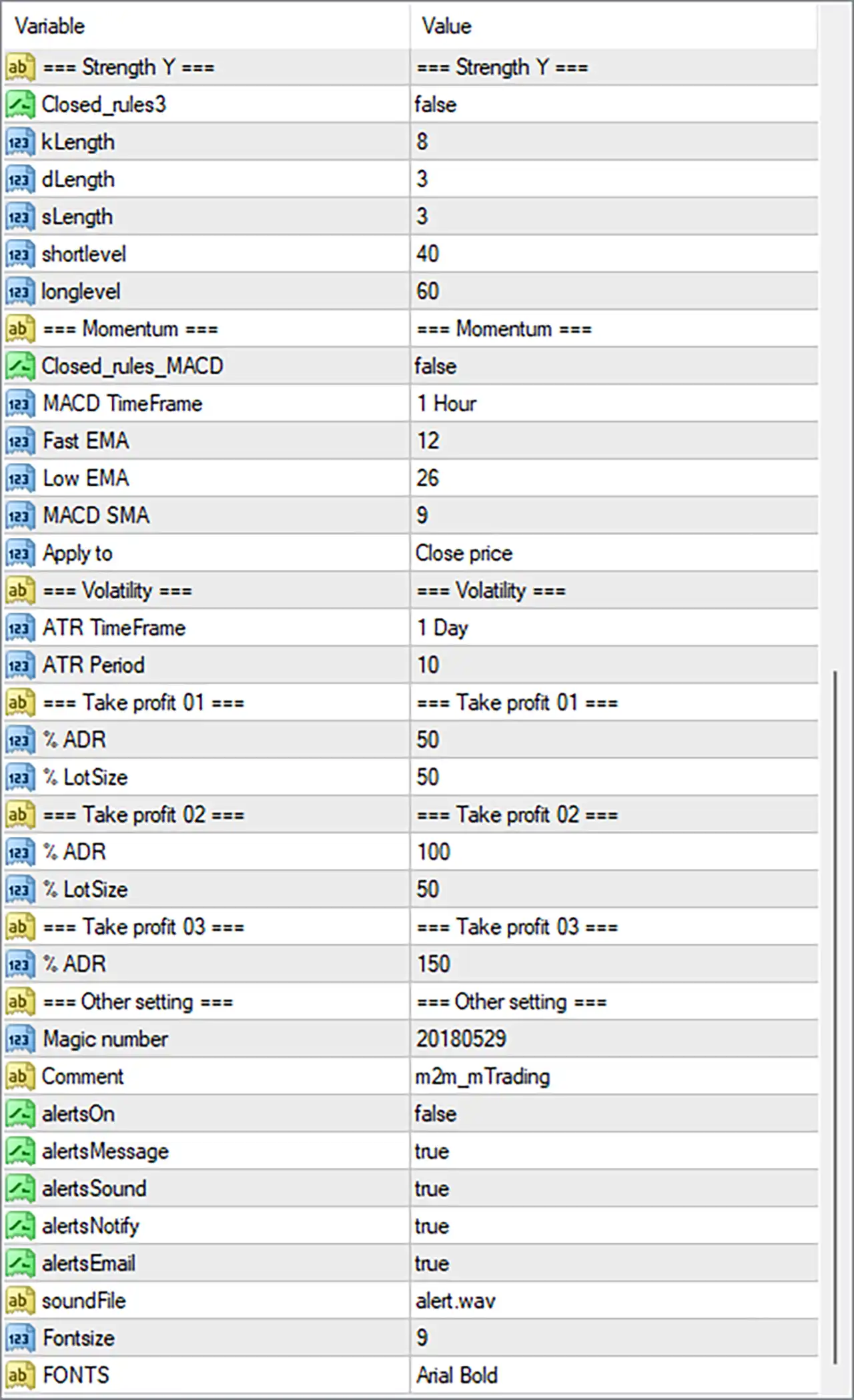
🔹 Closed_rules3 = false: Disables the third closed-rules condition, allowing the EA to operate without applying this particular rule restriction.
🔹 kLength = 8: Sets the K calculation period to 8, defining the number of periods used for the K component of the Strength Y indicator.
🔹 dLength = 3: Sets the D calculation period to 3, defining the smoothing period used for the D component of the Strength Y indicator.
🔹 sLength = 3: Sets the smoothing length to 3, controlling the smoothing applied to the indicator's calculations.
🔹 shortlevel = 40: Sets the lower reference level to 40, providing a threshold for identifying potential short-side or weaker market conditions.
🔹 longlevel = 60: Sets the upper reference level to 60, providing a threshold for identifying potential long-side or stronger market conditions.
⚙️ Momentum Settings
🔹 Closed_rules_MACD = false: Disables the specific closed-rules condition associated with MACD, allowing the EA to operate without this additional MACD rule restriction.
🔹 MACD TimeFrame = 1 Hour: Sets the MACD indicator timeframe to 1 Hour (H1), allowing the EA to analyze hourly momentum and identify potential market direction.
🔹 Fast EMA = 12: Sets the MACD fast exponential moving average period to 12, determining the shorter-term price calculation used to measure momentum.
🔹 Low EMA = 26: Sets the slower MACD moving average period to 26, providing the longer-term reference used in the MACD calculation. The original input name is retained as displayed.
🔹 MACD SMA = 9: Sets the MACD signal smoothing period to 9, controlling the smoothing of the MACD signal line to help evaluate momentum changes.
🔹 Apply to = Close price: Uses closing prices as the applied price for the MACD calculation, ensuring that the indicator references candle closing-price data.
⚙️ Volatility Settings
🔹 ATR TimeFrame = 1 Day: Sets the Average True Range (ATR) timeframe to 1 Day (D1), allowing the EA to evaluate daily market volatility rather than relying exclusively on lower-timeframe price movements.
🔹 ATR Period = 10: Sets the ATR calculation period to 10, determining the number of periods used to measure average market volatility and support volatility-based trade management.
⚙️ Take Profit 01 Settings
🔹 % ADR = 50: Sets the first take-profit target to 50% of the Average Daily Range (ADR), defining the configured distance for the initial profit-taking level relative to daily market range.
🔹 % LotSize = 50: Sets the lot-size percentage for Take Profit 01 to 50%, potentially allocating or closing 50% of the position volume at the first profit target, depending on the EA's internal trade-management logic.
⚙️ Take Profit 02 Settings
🔹 % ADR = 100: Sets the second take-profit target to 100% of the Average Daily Range (ADR), establishing a profit target based on the full configured daily range.
🔹 % LotSize = 50: Sets the lot-size percentage for Take Profit 02 to 50%, configuring the volume allocation associated with the second take-profit level.
⚙️ Take Profit 03 Settings
🔹 % ADR = 150: Sets the third take-profit target to 150% of the Average Daily Range (ADR), allowing the EA to define an extended profit target beyond the standard daily range.
⚙️ Other Settings
🔹 Magic number = 20180529: Assigns the magic number 20180529 to trades managed by Swing Price Action Trader EA MT4, helping distinguish its orders from manually opened positions and trades belonging to other Expert Advisors.
🔹 Comment = m2m_mTrading: Sets the trade comment to m2m_mTrading, providing an identification label that may appear in the order comments within the MetaTrader 4 terminal.
🔹 alertsOn = false: Disables the main alert system, meaning the EA's alert functionality is switched off even though individual notification options are configured as true.
🔹 alertsMessage = true: Enables message-based alerts within the alert configuration, allowing the EA to generate notification messages when the main alert system is activated.
🔹 alertsSound = true: Enables sound notifications, allowing the EA to play an alert sound when supported alert conditions are triggered and the main alert system is active.
🔹 alertsNotify = true: Enables push-notification functionality, configuring the EA to send notifications through MetaTrader's notification system when properly configured.
🔹 alertsEmail = true: Enables email notifications within the alert configuration, allowing the EA to send trading alerts through the configured email service when supported.
🔹 soundFile = alert.wav: Specifies alert.wav as the sound file used for audible notifications when sound alerts are activated.
🔹 FontSize = 9: Sets the information-panel or chart-display font size to 9, controlling the size of text displayed by the EA.
🔹 FONTS = Arial Bold: Selects Arial Bold as the display font, providing a bold text style for the EA's chart information and interface elements.
⚙️ Telegram and Automated Trading Settings
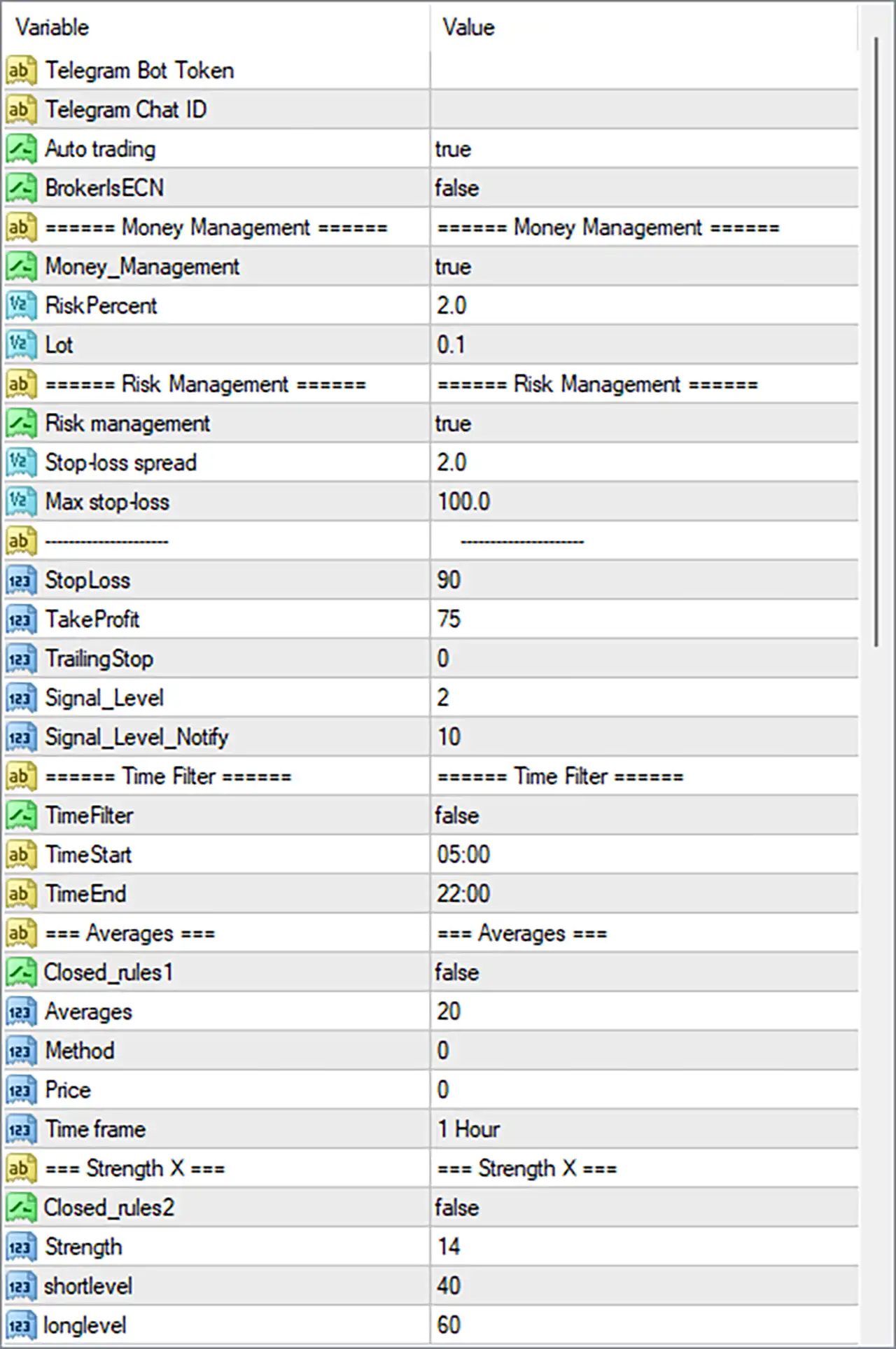
🔹 Telegram Bot Token = Blank: Provides the input field for the Telegram bot authentication token. The field is empty in the supplied configuration, so a bot token has not been entered.
🔹 Telegram Chat ID = Blank: Provides the input field for the destination Telegram chat identifier. The field is empty, so a Telegram notification destination has not been configured.
🔹 Auto trading = true: Enables the EA's automated trading functionality, allowing it to execute trading operations according to its programmed entry and management conditions.
🔹 BrokersECN = false: Disables the ECN broker-specific operating mode, indicating that the EA is not configured to use this particular execution setting.
⚙️ Money Management Settings
🔹 Money_Management = true: Enables the money management feature, allowing the EA to use its configured risk-based position-sizing mechanism rather than relying exclusively on a fixed lot size.
🔹 RiskPercent = 2.0: Sets the risk percentage parameter to 2.0, establishing the configured risk reference used by the EA's money management system when calculating trading volume.
🔹 Lot = 0.1: Sets the fixed lot-size reference to 0.1 lots, providing the configured trading volume for fixed-lot operation or whenever the EA's internal position-sizing rules use this parameter.
⚙️ Risk Management Settings
🔹 Risk management = true: Enables the dedicated risk management system, allowing the EA to apply its configured protective controls when managing trading positions.
🔹 Stop-loss spread = 2.0: Sets the stop-loss spread parameter to 2.0, configuring a spread-related factor used by the EA when calculating or adjusting stop-loss protection.
🔹 Max stop-loss = 100.0: Sets the maximum stop-loss parameter to 100.0, establishing the configured upper limit for the EA's stop-loss calculation or distance.
🔹 StopLoss = 90: Sets the stop-loss value to 90, defining the configured protective stop-loss distance for trades managed by the EA.
🔹 TakeProfit = 75: Sets the standard take-profit value to 75, establishing the configured profit-taking distance for positions managed by the EA.
🔹 TrailingStop = 0: Sets the trailing-stop parameter to 0, indicating that no positive trailing-stop distance is configured through this input.
🔹 Signal_Level = 2: Sets the trading signal level to 2, defining the configured signal threshold or confirmation level used by the EA's internal entry logic.
🔹 Signal_Level_Notify = 10: Sets the notification signal level to 10, configuring the threshold associated with signal-related notification or alert management.
⚙️ Trading Time Filter Settings
🔹 TimeFilter = false: Disables the trading time filter, meaning the EA is not restricted to the configured start and end times through this particular filter.
🔹 TimeStart = 05:00: Sets the configured trading start time to 05:00, defining the beginning of the permitted trading window when the time filter is enabled.
🔹 TimeEnd = 22:00: Sets the configured trading end time to 22:00, defining the end of the permitted trading window when the time filter is enabled.
⚙️ Averages Settings
🔹 Closed_rules1 = false: Disables the first closed-rules condition associated with the averages configuration, allowing the EA to operate without this particular additional restriction.
🔹 Averages = 20: Sets the moving average calculation period to 20, determining the number of price periods used to calculate the average and evaluate market direction.
🔹 Method = 0: Sets the moving average method enumeration to 0, selecting the first predefined calculation method supported by the EA. The exact method name should be confirmed from the developer's parameter documentation.
🔹 Price = 0: Sets the applied-price enumeration to 0, selecting the first predefined price source supported by the EA for moving average calculations.
🔹 Time frame = 1 Hour: Sets the moving average analysis timeframe to 1 Hour (H1), allowing the EA to use hourly average-price data when evaluating market direction.
⚙️ Strength X Settings
🔹 Closed_rules2 = false: Disables the second closed-rules condition associated with Strength X, allowing the EA to operate without this additional rule restriction.
🔹 Strength = 14: Sets the Strength indicator calculation period or reference value to 14, determining the configured sensitivity of this market-strength measurement.
🔹 shortlevel = 40: Sets the lower Strength X reference level to 40, providing a threshold for identifying potential short-side or weaker market conditions.
🔹 longlevel = 60: Sets the upper Strength X reference level to 60, providing a threshold for identifying potential long-side or stronger market conditions.
⚙️ Important Configuration Considerations
🔹 Money Management and Risk Exposure: Money_Management = true and Risk management = true enable the EA's money management and risk-control features. RiskPercent = 2.0 and Lot = 0.1 should be evaluated together to understand how the EA calculates actual position sizes.
🔹 Multiple Take-Profit Levels: The EA provides three ADR-based targets at 50%, 100%, and 150%. Take Profit 01 and Take Profit 02 each have a % LotSize allocation of 50, while Take Profit 03 has no separate lot-size percentage displayed in the supplied inputs.
🔹 ATR-Based Volatility Analysis: ATR TimeFrame = 1 Day and ATR Period = 10 configure daily volatility analysis using a 10-period calculation. This provides a higher-timeframe volatility reference for the EA's internal strategy.
🔹 Momentum Confirmation: MACD TimeFrame = 1 Hour, Fast EMA = 12, Low EMA = 26, and MACD SMA = 9 establish the configured momentum indicator parameters for evaluating market direction.
🔹 Strength X and Strength Y Signals: Both strength configurations use reference levels of 40 and 60. Strength X uses Strength = 14, while Strength Y uses kLength = 8, dLength = 3, and sLength = 3.
🔹 Stop-Loss and Take-Profit Protection: StopLoss = 90, TakeProfit = 75, and Max stop-loss = 100.0 should be reviewed together to understand the EA's exit rules and protective limits.
🔹 Trailing-Stop Configuration: TrailingStop = 0 means that the dedicated trailing-stop parameter is not configured with a positive distance. Do not assume that other profit-management mechanisms automatically replace it.
🔹 Telegram Notifications: Telegram Bot Token and Telegram Chat ID are blank. These fields need to be configured if Telegram notifications are required and supported by the EA.
🔹 Alert Configuration: alertsOn = false disables the main alert system, even though alertsMessage, alertsSound, alertsNotify, and alertsEmail are all set to true. The main alert switch should be reviewed if notifications are expected.
🔹 Trading Session: TimeFilter = false means the configured 05:00-22:00 trading window is currently inactive as a time restriction. Enable the filter if you want the EA to follow this schedule.
🔢 Conclusion
Swing Price Action Trader EA MT4 provides a comprehensive automated trading configuration combining momentum analysis, market-strength indicators, moving averages, ATR-based volatility measurement, and multi-level ADR take-profit management.
Its default configuration uses MACD settings of 12, 26, and 9 on the H1 timeframe, while the ATR indicator uses a 10-period calculation on the daily timeframe. Strength X is configured with a value of 14, and Strength Y uses K, D, and smoothing lengths of 8, 3, and 3, respectively.
For position management, the EA enables money management and risk management, with RiskPercent = 2.0 and Lot = 0.1. It also provides three ADR-based profit targets at 50%, 100%, and 150%, together with StopLoss = 90 and TakeProfit = 75.
Before deploying Swing Price Action Trader EA MT4 on a live account, traders should carefully review the risk percentage, lot-size calculation, stop-loss configuration, ADR-based profit allocation, and notification settings. Backtesting and demo trading are recommended to understand the EA's behavior and evaluate its risk exposure under different market conditions.


