


Kabuto Golden Balls EA MT5: Complete Settings Guide and Lot Management Explained
Kabuto Golden Balls EA is an automated trading Expert Advisor with configurable lot management, account-type selection, spread filtering, and historical analysis settings. Its inputs include a smart money-management mode identified as LOT_TYPE_SMART_MM_MarkIV, a standard account configuration, minimum lot-size controls, and a maximum spread threshold.
Understanding these settings helps traders assess how the EA identifies its trades, determines position sizes, and filters trading conditions. The following guide explains every visible input while preserving the original parameter names, values, date, and configuration labels.
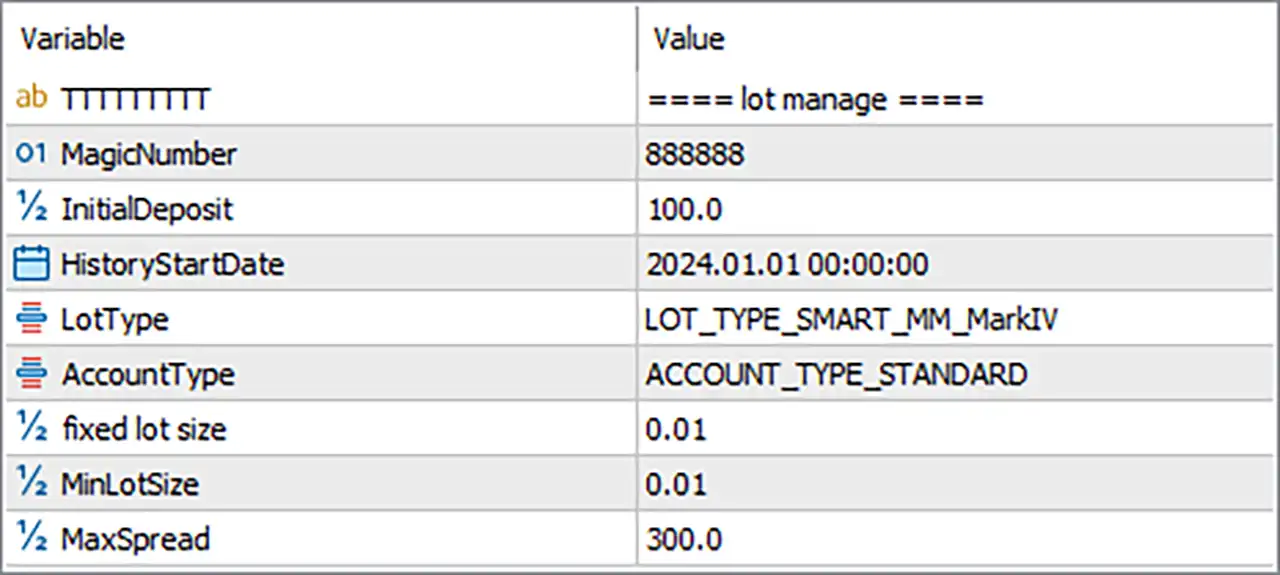
🔹 TTTTTTTTT = ===== lot manage ===== — This is a section heading identifying the lot-management configuration. It organizes the related inputs and does not appear to control trading behavior directly.
🔹 MagicNumber = 888888 — Assigns the Magic Number 888888 to trades managed by Kabuto Golden Balls EA MT5. This identifier helps distinguish the EA’s trades from those opened by other Expert Advisors or manually, provided the EA uses Magic Numbers consistently when managing orders.
🔹 InitialDeposit = 100.0 — Sets the initial-deposit reference value to 100.0. This may be used by the EA’s money-management calculations or historical performance logic. The intended currency and whether the value represents a reference balance or a backtesting deposit should be confirmed from the EA’s implementation.
🔹 HistoryStartDate = 2024.01.01 00:00:00 — Sets the historical start date to January 1, 2024, at 00:00:00. This parameter may define the beginning of the historical period used for analysis, tracking, or internal calculations. Its exact effect depends on how the EA processes historical data.
🔹 LotType = LOT_TYPE_SMART_MM_MarkIV — Selects the smart money-management mode identified as LOT_TYPE_SMART_MM_MarkIV. This indicates that the EA uses a specific smart lot-sizing method rather than necessarily relying only on a fixed volume. The exact algorithm, including whether lot sizes change according to balance, equity, or trading history, is not specified by the input name alone.
🔹 AccountType = ACCOUNT_TYPE_STANDARD — Selects the standard account configuration. This setting may determine how the EA interprets account-specific conditions or adjusts its money-management behavior. Confirm that this mode matches the broker account being used.
🔹 fixed lot size = 0.01 — Sets the fixed lot-size parameter to 0.01 lots. This value may be used if the EA’s selected money-management mode relies on a fixed volume or falls back to fixed-lot sizing. Since LOT_TYPE_SMART_MM_MarkIV is selected, confirm whether this input is active in the current mode.
🔹 MinLotSize = 0.01 — Sets the minimum permitted lot size to 0.01 lots. This establishes the configured lower limit for position volume, subject to the broker’s own minimum-lot and volume-step requirements. The EA may need to adjust its calculated volume if the broker uses different constraints.
🔹 MaxSpread = 300.0 — Sets the maximum spread threshold to 300.0. If the EA implements this as a spread filter, it may restrict new entries when the current spread exceeds the configured value. The actual price difference represented by 300.0 depends on whether the EA measures spread in points, ticks, or another unit and on the broker’s symbol specifications.


