
Professor Moriarty EA MT5
Professor Moriarty EAProfessor Moriarty EA MT5 Backtest ResultsProfessor Moriarty EA Backtest ResultsProfessor Moriarty MT5 Backtest ResultsProfessor Moriarty EA MT5 ResultsProfessor Moriarty EA MT5 Review
MT5GBPUSD, EURUSD, USDJPY, USDCAD, EURGBP · M1Updated 21 Oct 2026

Professor Moriarty EA MT5 (Latest version) - Unlimited

Professor Moriarty EA MT5 trades quick corrective moves between related pairs on M1, with a stop loss and take profit on every position.

Buy now — $599Add to cart
Download link right after paymentUnlimited accounts, no licence lockInstall guide includedFree updates to new versions
Pay with Visa · MastercardUSDT · BTC · ETHBinance Pay
Not sure it fits your broker or account?Ask a question
Check before you buy

Will it work for me?

Trading platform
Time frames
M1
Currency pairs
GBPUSD, EURUSD, USDJPY, USDCAD, EURGBP
Minimum / Recommended deposit
$100+
Minimum / Recommended leverage
Any
Account type
Any
Additional services
Recommended brokers
What you get

In the download

FILEProfessor Moriarty EA
Optimize Settings

Recommended settings for Professor Moriarty EA MT5

🔢 Professor Moriarty EA MT5: Complete Settings Guide and Configuration Explained

Professor Moriarty EA MT5 is an automated trading Expert Advisor with configurable trading sensitivity, risk management, take-profit and stop-loss levels, trailing-stop controls, trading-hour restrictions, and execution filters. Its settings allow traders to adjust the maximum number of orders, control position sizing, define when trailing protection begins, and restrict trading to a specified time window.

The configuration also includes slippage and spread limits, order comments, and a Magic Number for trade identification. This guide explains every parameter displayed in the settings panel, preserving the original names and numerical values. Where units or internal calculations are not specified, the explanations distinguish the visible configuration from behavior that requires verification.
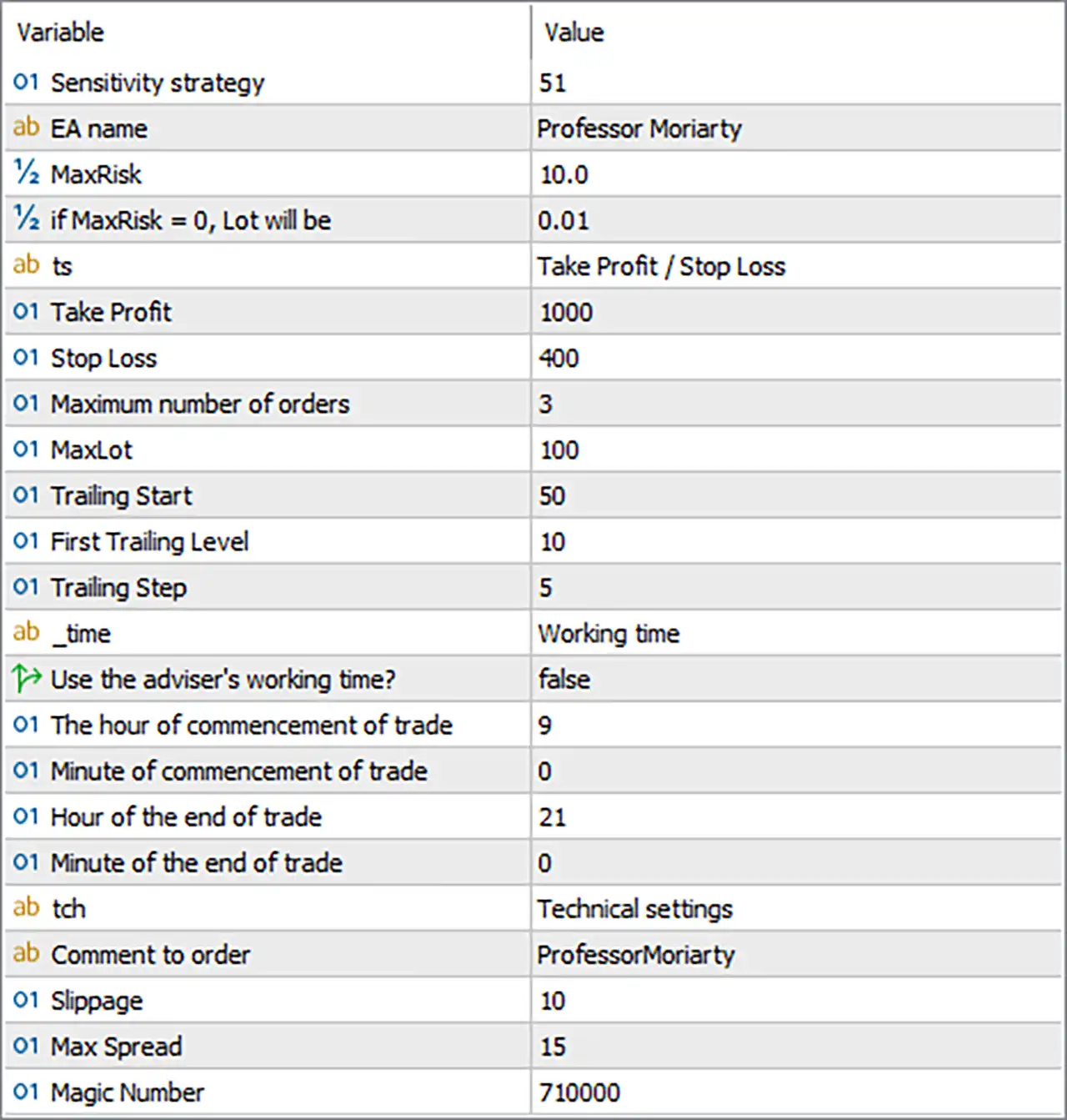
Professor Moriarty EA MT5 Settings Panel

⚙️ Strategy and Risk Management Settings

🔹 Sensitivity strategy = 51 — Sets the strategy sensitivity parameter to 51. This value may influence how the EA identifies trading signals or responds to market movements. The exact effect of increasing or decreasing sensitivity depends on the EA’s internal strategy.

🔹 EA name = Professor Moriarty — Sets the EA name label to Professor Moriarty. This is a descriptive identifier for the Expert Advisor and does not necessarily affect its trading logic.

🔹 MaxRisk = 10.0 — Sets the maximum-risk parameter to 10.0. Depending on the EA’s implementation, this may represent a risk percentage or another risk-management threshold. Confirm the unit and whether it applies per trade, across all open positions, or to another calculation before live trading.

🔹 if MaxRisk = 0, Lot will be = 0.01 — Defines the fallback lot size as 0.01 when MaxRisk is set to 0. With the current MaxRisk = 10.0, this fallback condition is not selected according to the label.

⚙️ Take Profit and Stop Loss Settings

🔹 ts = Take Profit / Stop Loss — Identifies the take-profit and stop-loss settings section. This is a descriptive label rather than a separate numerical trading parameter.

🔹 Take Profit = 1000 — Sets the take-profit parameter to 1000. This defines the configured profit target or target distance according to the EA’s implementation. The unit is not specified, so verify whether the value represents points, pips, or another measurement.

🔹 Stop Loss = 400 — Sets the stop-loss parameter to 400. This configures the intended protective loss threshold or stop distance. Confirm the unit and whether it applies to each order individually before relying on it as a risk limit.

🔹 Maximum number of orders = 3 — Limits the configured number of orders to 3. The exact scope may refer to open trades, active orders, or orders managed by a specific strategy component, depending on the EA’s logic.

🔹 MaxLot = 100 — Sets the maximum-lot parameter to 100. This is a very large potential volume ceiling if interpreted as standard lots. Verify whether the EA treats this as a literal lot limit, a scaled value, or another internal cap. The broker’s volume restrictions and account risk should be considered before using this setting.

⚙️ Trailing Stop Settings

🔹 Trailing Start = 50 — Sets the trailing-stop activation threshold to 50 units. Once the EA’s qualifying profit or price-movement condition reaches this threshold, trailing management may begin. The unit and precise activation rule should be confirmed.

🔹 First Trailing Level = 10 — Sets the first trailing level to 10. This may define the initial stop adjustment or first stage of the trailing-stop mechanism after activation. Its exact relationship to Trailing Start depends on the EA’s implementation.

🔹 Trailing Step = 5 — Sets the trailing-stop adjustment step to 5 units. Depending on the EA’s logic, the stop may be updated when price moves by the specified increment or when the next trailing level is reached. Confirm the unit before live use.

⚙️ Trading Time Settings

🔹 _time = Working time — Identifies the working-time configuration section. This is a descriptive label rather than a separate trading-time value.

🔹 Use the adviser's working time? = false — Disables the EA’s built-in or predefined working-time schedule through this option. The manual trading hours below are therefore the relevant configured schedule if the EA uses this switch as described.

🔹 The hour of commencement of trade = 9 — Sets the trading start hour to 9, meaning 09:00 under a 24-hour clock when interpreted as broker or EA time.

🔹 Minute of commencement of trade = 0 — Sets the trading start minute to 0, making the configured start time 09:00.

🔹 Hour of the end of trade = 21 — Sets the trading end hour to 21, meaning 21:00 under a 24-hour clock.

🔹 Minute of the end of trade = 0 — Sets the trading end minute to 0, making the configured end time 21:00.

The resulting manual trading window is 09:00–21:00, assuming the EA uses the hour and minute inputs together and follows the same time zone as the displayed settings.

⚙️ Technical and Execution Settings

🔹 tch = Technical settings — Identifies the technical-settings section. This is a descriptive label rather than an independent execution parameter.

🔹 Comment to order = ProfessorMoriarty — Sets the order comment to ProfessorMoriarty. This text may appear in the order details and trade history, helping distinguish trades associated with this EA.

🔹 Slippage = 10 — Sets the slippage parameter to 10. This typically specifies the permitted price deviation during order execution, often measured in points in MT5. Confirm the EA’s unit and how the broker handles execution deviations.

🔹 Max Spread = 15 — Sets the maximum spread threshold to 15. If the EA applies this as an entry filter, it may prevent new trades when the current spread exceeds the configured value. The actual price difference represented by 15 depends on the instrument’s quotation format and the EA’s spread calculation.

🔹 Magic Number = 710000 — Assigns the Magic Number 710000 to trades managed by Professor Moriarty EA MT5. This identifier helps distinguish the EA’s trades from positions opened by other Expert Advisors or manually, provided the order-management logic uses Magic Numbers consistently.

🔢 Conclusion

The current Professor Moriarty EA MT5 configuration uses a strategy sensitivity of 51, a maximum-risk parameter of 10.0, a take-profit value of 1000, and a stop-loss value of 400. The maximum number of orders is 3, the maximum-lot parameter is 100, and trailing-stop management is configured with a start threshold of 50, a first trailing level of 10, and a step of 5.

The manual trading window is configured from 09:00 to 21:00, with the adviser’s predefined working-time option disabled. The execution settings include slippage of 10, a maximum spread of 15, and Magic Number 710000.

Before deploying these settings on a live account, verify the units used by the take-profit, stop-loss, trailing, slippage, and spread parameters. Particular attention should be given to MaxRisk = 10.0 and MaxLot = 100, because their actual meaning and interaction determine the EA’s potential exposure. Backtesting and demo trading are recommended to establish how the EA behaves with the intended broker and instrument.

Full review

Quick Overview

Professor Moriarty EA MT5 is a scalping robot for the M1 chart that looks for quick corrective movements between related currency pairs or metals. When prices of related instruments diverge, it studies the likely direction on the working instrument and opens a trade. Every position has a stop loss and a take profit, and a trailing stop is included.

Best For:

✅ Forex traders who scalp on the M1 chart.

✅ Users who want a stop loss on each position.

✅ Traders who like correction based entries.

✅ Users who want a trading time window.

What is Professor Moriarty EA MT5?

Professor Moriarty EA MT5 is an Expert Advisor (EA) for forex scalping on the M1 chart. The basis of the strategy is the identification of quick corrective movements between the crosses of a working currency pair or metal. At the moment of a price difference between instruments, the adviser analyzes the possible direction of the working instrument and starts to trade.

⭐ Vendor Website: View here

⭐ Join Our Channel Telegram

⭐ Delivery time 24h-48h after payment.

⭐ Refund if not delivered.

⭐ You will receive the current version without any limitations (ID+Time).

Professor Moriarty EA MT5 Review

How Does Professor Moriarty EA MT5 Work?

Correction Logic

The EA reacts to price differences between related instruments and trades the expected corrective movement on the working instrument.

Exit Rules

Each position has a Stop Loss (SL), Take Profit (TP) and a Trailing stop can follow the price once the trade is in profit.

Position Control

A maximum number of orders, a maximum lot, a maximum spread and a slippage limit control when and how much the EA trades.

Time Window

The trader can set the hours and minutes during which the EA is allowed to work.

Trading Strategy

Compare Related Instruments

The EA watches price differences between related currency pairs or metals, because a gap can be followed by a quick corrective move.

Judge the Likely Direction

When such a difference appears, the EA analyzes the possible direction of the working instrument and then starts to trade.

Use a Stop Loss and Take Profit

Every position is opened with both levels, which gives each trade a defined loss limit and a defined profit target.

Track Positions

A position tracking algorithm is said to control the balance between profit and loss, and a trailing stop can protect open gains.

Limit the Activity

The settings allow a maximum number of positions, a maximum lot, a maximum spread and a trading time window to control when the EA works.

Historical Trading Results Performance

✅ Professor Moriarty EA was tested on 1 trading symbol with 99% history quality. The backtest generated a net profit of $14,882.63 from an initial deposit of $10,000, with 88 trades.

Professor Moriarty EA Backtest Results

Professor Moriarty EA Backtest Results
Parameter Results
Initial Deposit $10,000
Total Net Profit $14,882.63
Profit Factor 5.01
Maximum Equity Drawdown 6.01%
Total Trades 88
Winning Trades 69.32%
Losing Trades 30.68%

✅ Professor Moriarty EA was backtested on 1 trading symbol with 100% history quality. The test generated a net profit of $48,349.73 from an initial deposit of $10,000, achieving a profit factor of 6.63 across 118 trades.

Professor Moriarty EA MT5 Backtest Results

Professor Moriarty EA MT5 Backtest Results
Parameter Results
Initial Deposit $10,000
Total Net Profit $48,349.73
Profit Factor 6.63
Maximum Equity Drawdown 5.14%
Total Trades 118
Winning Trades 63.56%
Losing Trades 36.44%

✅ Professor Moriarty EA was backtested on 1 trading symbol with 99% history quality. The test generated a net profit of $2,319,241.58 from an initial deposit of $10,000, achieving a profit factor of 7.06 across 708 trades.

Professor Moriarty MT5 Backtest Results

Professor Moriarty MT5 Backtest Results
Parameter Results
Initial Deposit $10,000
Total Net Profit $2,319,241.58
Profit Factor 7.06
Maximum Equity Drawdown 8.56%
Total Trades 708
Winning Trades 65.68%
Losing Trades 34.32%

Key Features of Professor Moriarty EA MT5

Correction Based Entries

The EA looks for quick corrective movements that follow price differences between related instruments, which makes it a short term scalping strategy.

Stop Loss and Take Profit

Each position carries a stop loss and a take profit, so no trade is left without a defined exit, and risk is tied to each order separately.

Position Tracking Algorithm

A tracking algorithm is described that controls the superiority of profit over loss, although the exact method is not explained in the product text.

Adjustable Sensitivity

A sensitivity setting changes how easily the strategy reacts to price differences, which allows the trader to make it more or less active.

Risk Based Lot Calculation

A risk value can be used to calculate the trading lot, and a fixed lot is used when the risk value is set to zero, with a limit for the maximum lot.

Trailing Stop Controls

A trailing start, a first trailing level and a trailing step control how the stop follows the price once the trade is in profit.

Plan the Risk First

The risk management guide helps with choosing a lot size and a loss limit that suit the account.

Risk Management

Spread Hurts Scalping

On the M1 chart, a wide spread or slow execution can turn a good trade into a loss, so a low spread account is needed.

Stop Loss Can Slip

A fast move can close a trade beyond its stop-loss, so the real loss may be bigger than planned.

Pairs Can Lose Together

The listed pairs share currencies, so one strong move in the dollar or the euro can hurt many trades at once.

Corrections Can Fail

A price gap does not always close, and a trend can keep going against the trade, so the take-profit may never be reached.

What Sets It Apart

Related Pair Logic

The strategy is based on price differences between related instruments, which is different from a single indicator or a single chart pattern.

Stop Loss on Every Position

Each position has a stop loss and a take profit, which avoids the open ended exposure of many scalpers.

Tracking Algorithm

A position tracking method is intended to control the balance between profit and loss over time, not just per trade.

Fine Control Settings

Sensitivity, lot limits, spread limits and time windows allow the trader to shape the behavior without changing the core logic.

Strengths and Limitations

Strengths

🔹 Defined exits: each position has a stop loss and a take profit, which is a safer structure than systems that depend on a recovery grid.

🔹 Spread protection: a maximum spread and slippage control block poor trading conditions, which matters a great deal for scalping.

🔹 Time control: a working time window allows the trader to run the EA only during sessions that suit the strategy.

🔹 Clear settings list: every input is explained in the product text, which makes it easier to understand what each setting changes.

Limitations

🔹 Short term sensitivity: an M1 strategy depends on spread, latency and execution, so results can differ a lot from one broker to another.

🔹 Platform confusion: the product text mentions both MT4 and MT5, which makes it unclear which version is described and needs checking.

🔹 Limited explanation: the exact logic of the correction analysis and the tracking algorithm is not explained, so it is hard to judge the strategy.

🔹 No published performance: the product information includes no backtest or live report, so no returns or drawdown figures can be quoted here.

Product Download Package?

The download package of the product suite includes:

✅ Experts: Professor Moriarty.ex5

➡️ Reviewed by David Easton

Final Verdict

Professor Moriarty EA MT5 is an M1 scalping robot that trades quick corrective moves between related currency pairs and metals, with a stop loss and a take profit on every position. It suits forex scalpers who understand spread and latency and can run it on a remote server. The strategy details are limited, the platform information is unclear and no verified results are published, so a careful demo test with a small lot and a low spread account should come before any live trading.

Questions about Professor Moriarty EA MT5 (Latest version) - Unlimited

❓ What is Professor Moriarty EA MT5?

A scalping Expert Advisor for the M1 chart that trades quick corrective movements between related currency pairs or metals.

❓ How does Professor Moriarty EA MT5 find trades?

It watches price differences between related instruments and analyzes the likely direction of the working instrument before it opens a trade.

❓ Which pairs does Professor Moriarty EA MT5 recommend?

GBPUSD, EURUSD, USDJPY, USDCAD and EURGBP on the M1 chart.

❓ Does Professor Moriarty EA MT5 use a stop loss?

Yes. Each position has a stop loss and a take profit.

❓ Is Professor Moriarty EA MT5 a grid or martingale EA?

Dangerous trading methods are said not to be used and no grid or martingale is described. A demo test helps confirm this.

❓ How does Professor Moriarty EA MT5 calculate the lot?

A risk value can be used to calculate the lot, and a fixed lot is used when the risk value is zero, with a limit on the maximum lot.

❓ Does Professor Moriarty EA MT5 have a time filter?

Yes. The trader can set the start and end hour and minute of the working time.

❓ Does Professor Moriarty EA MT5 use a trailing stop?

Yes. It includes a trailing start, a first trailing level and a trailing step.

Other products traders compare

$599
Instant download
Buy now