


🔢 VnDragon EA MT4 Settings Guide: Complete Inputs Explained
VnDragon EA MT4 is an automated trading Expert Advisor designed for the MetaTrader 4 platform. Its configuration panel provides controls for lot sizing, risk management, take-profit and stop-loss levels, trailing orders, order expiration, spread filtering, multiple-order trading, and time-based trading restrictions.
The EA also includes parameters such as ExtDepth, ExtDeviation, and ExtBackstep, which may be related to indicator-based price analysis, as well as break-even management to help protect open positions. Traders can customize these inputs to control trade volume, execution conditions, and position management according to their trading preferences.
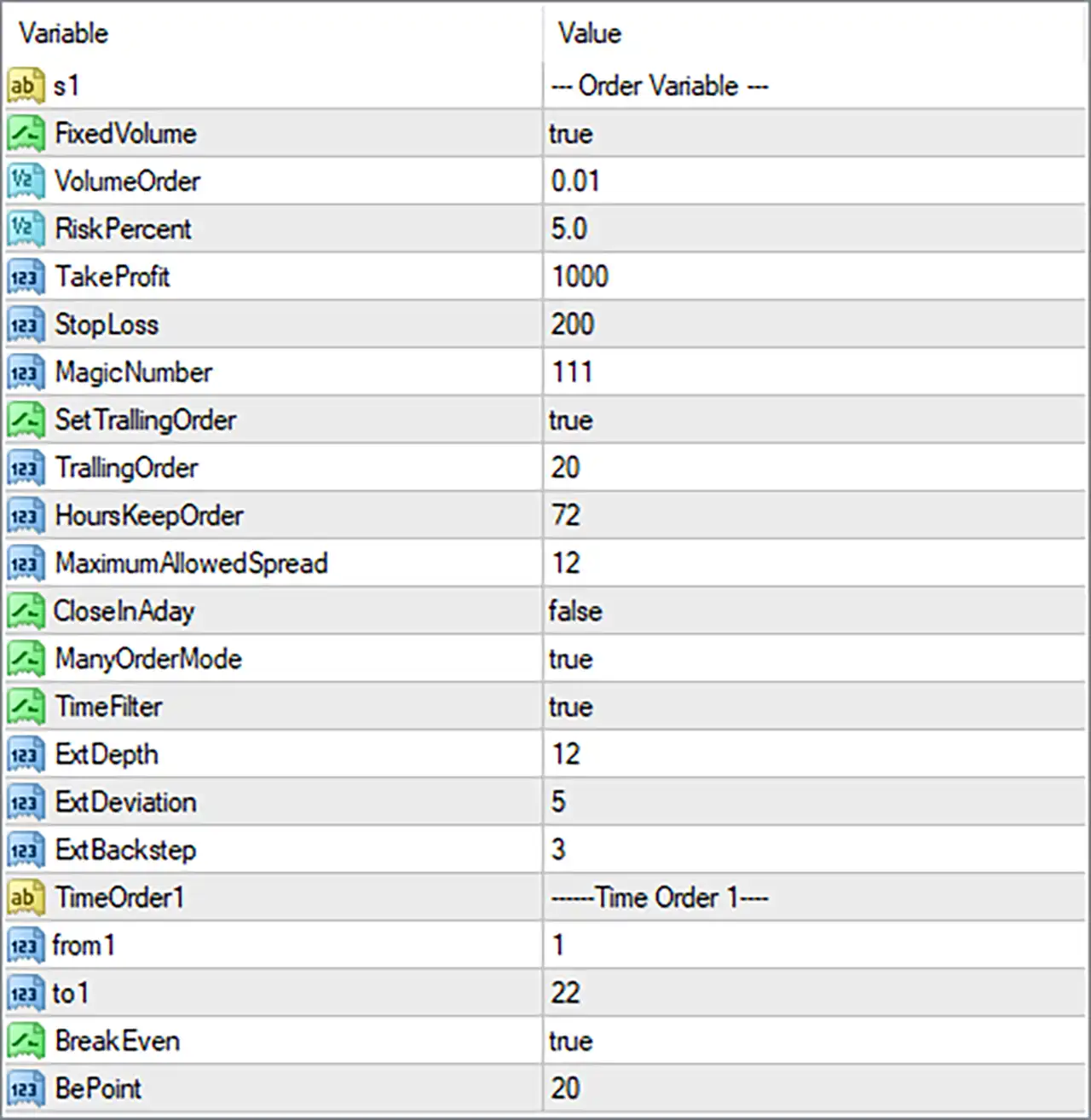
This guide explains all 22 entries shown in the VnDragon EA Inputs panel, preserving their exact parameter names and default values.
⚙️ Basic Order Settings
🔹 FixedVolume = true: Enables fixed-volume trading. When active, the EA is configured to use the predefined lot size specified by VolumeOrder rather than relying exclusively on percentage-based position sizing.
🔹 VolumeOrder = 0.01: Sets the fixed trading volume to 0.01 lots. This is commonly known as a micro-lot in forex trading, although actual contract size and monetary exposure depend on the broker and trading instrument.
🔹 RiskPercent = 5.0: Sets the risk-related parameter to 5.0. If the EA interprets this value as a percentage of account capital, it may represent 5% risk per trade. However, FixedVolume = true means fixed-lot sizing is selected, so verify how the EA prioritizes these two settings.
🔹 TakeProfit = 1000: Sets the configured take-profit distance to 1000 units. This determines the intended profit target if the EA applies the parameter as a conventional take-profit level. The exact unit, such as points or pips, should be confirmed from the EA's documentation.
🔹 StopLoss = 200: Sets the configured stop-loss distance to 200 units. This defines the intended loss-limiting level for a trade if implemented as a conventional stop loss. Its actual distance depends on the instrument's point size and the EA's calculation.
🔹 MagicNumber = 111: Assigns the trade identifier 111 to positions managed by VnDragon EA MT4. This helps the EA distinguish its own trades from manually opened positions and trades managed by other Expert Advisors.
⚙️ Trailing Order and Trade Management
🔹 TrailingOrder = 20: Sets the trailing-order parameter to 20 units. This may represent the trailing distance or another adjustment threshold used by the EA to manage open positions. Confirm the exact unit and calculation method before live trading.
🔹 HoursKeepOrder = 72: Sets the configured order-retention period to 72 hours. This may determine how long an order or position is maintained before the EA applies its expiration or management rules. The exact behavior depends on the EA's implementation.
🔹 MaximumAllowedSpread = 12: Sets the maximum permitted spread threshold to 12 units. If implemented as a conventional spread filter, the EA may prevent new trades when the current spread exceeds this limit. Confirm whether the value is measured in points or another unit.
🔹 CloseInAday = false: Disables the daily trade-closing feature. The EA will not use this particular setting to close positions at a daily boundary while the value remains false, although other exit conditions may still close trades.
🔹 ManyOrderMode = true: Enables multiple-order trading mode. This allows the EA to manage or open multiple orders when its programmed trading conditions are satisfied, rather than restricting its operation to a single-order approach.
⚙️ Indicator and Trading Filter Settings
🔹 ExtDepth = 12: Sets the ExtDepth parameter to 12. This may control the depth or number of bars considered by an external indicator or price-analysis component. If it belongs to a ZigZag-style indicator, it generally influences how far back the algorithm examines price movements when identifying significant highs and lows.
🔹 ExtDeviation = 5: Sets the ExtDeviation parameter to 5. This may define a minimum price deviation required for identifying relevant market turning points. Its precise unit and calculation depend on the indicator or algorithm used by the EA.
🔹 ExtBackstep = 3: Sets the ExtBackstep parameter to 3. If these Ext parameters belong to a ZigZag-style calculation, Backstep controls the minimum bar separation used when processing potential turning points. The exact interpretation should be confirmed from the EA's indicator implementation.
⚙️ Time Order Settings
🔹 from1 = 1: Sets the starting value of the first trading-time window to 1. Depending on the EA's implementation, this may represent the starting hour or another time-related unit.
🔹 to1 = 22: Sets the ending value of the first trading-time window to 22. If interpreted as trading hours, this represents an end time of 22:00. Combined with from1 = 1, it may define a trading window from 01:00 to 22:00, subject to the EA's time-zone and scheduling logic.
⚙️ Break-Even Settings
🔹 BePoint = 20: Sets the break-even parameter to 20 points. This may define the profit threshold or price distance required before the EA activates its break-even logic. The exact activation condition depends on the EA's internal programming.
🔢 Conclusion
The VnDragon EA MT4 settings provide configurable controls for fixed-lot trading, risk management, order execution, trailing orders, spread filtering, multiple-order operation, time restrictions, indicator parameters, and break-even protection.
The supplied configuration uses FixedVolume = true, VolumeOrder = 0.01, RiskPercent = 5.0, TakeProfit = 1000, StopLoss = 200, and MagicNumber = 111. It also enables SetTrailingOrder = true, ManyOrderMode = true, TimeFilter = true, and BreakEven = true.
Several settings deserve particular attention. RiskPercent = 5.0 may represent relatively aggressive risk if interpreted as 5% per trade. Meanwhile, ManyOrderMode = true allows multiple-order trading, which can increase overall exposure. The combination of TakeProfit = 1000, StopLoss = 200, and TrailingOrder = 20 should also be evaluated using the correct instrument-specific units.
Before deploying VnDragon EA MT4 on a live account, verify the lot-sizing priority, stop-loss and take-profit units, maximum order behavior, spread calculation, and trading-time configuration. Backtesting and demo forward testing can help evaluate the strategy's performance and potential drawdown under different market conditions. No EA configuration guarantees profits or eliminates trading risk.


