




Oceania Algo EA MT4 (Latest version) - Unlimited

Subscriptions for Special Plan
- 30 EA package is more economical!
- Special package with 99%
- Download 1 EA/Day

Subscriptions for Premium Membership
- Download Unlimited in 1 Year
- Get 100% Discount
- Get free access to all

Subscriptions for Gold Membership
- 1 Year Membership
- Get 100% Discount
- Access EA+Indicator+Course
Frequently bought together 🎁
Add these products to enhance your purchase



Quick Overview
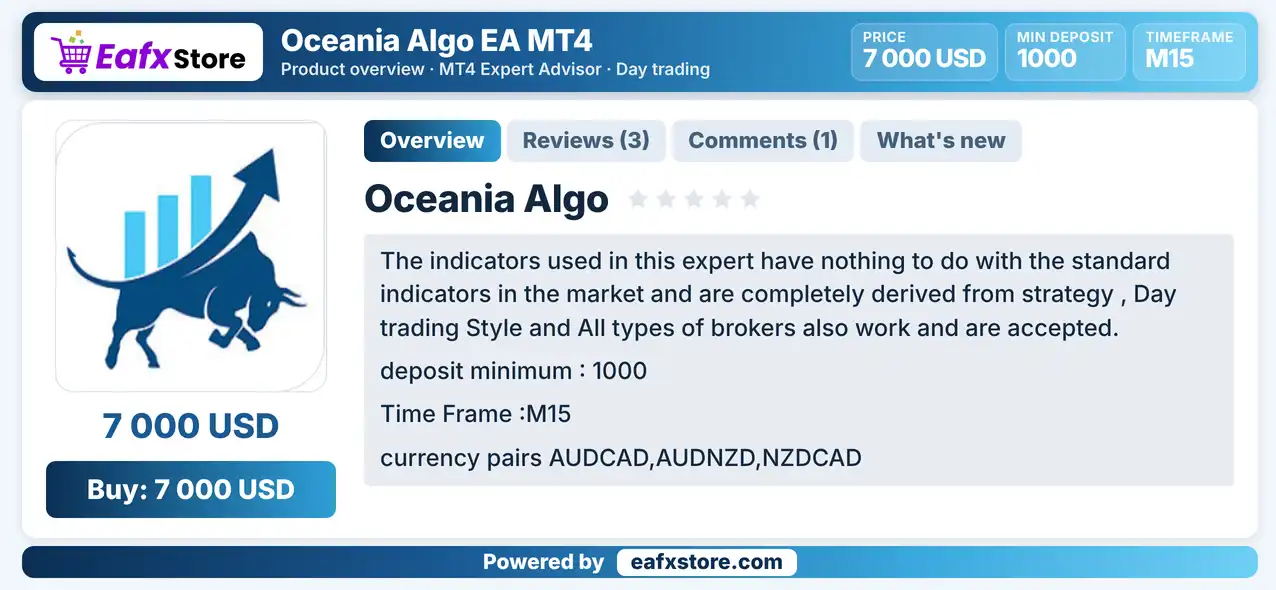
Oceania Algo EA is an automated day trading Expert Advisor (EA) for MetaTrader 4, recommended for AUDCAD, AUDNZD and NZDCAD on the M15 chart. It uses its own indicators together with an RSI component, a recovery mode, grid levels and an automatic news filter.
Best For:
✅ Day traders who use the M15 chart.
✅ Traders of AUDCAD, AUDNZD and NZDCAD.
✅ Users who want an automatic news filter.
✅ Traders who accept recovery and Grid logic.
✅ Users who plan copy trading with an ECN account.
What is Oceania Algo EA MT4?
Oceania Algo EA is an automated trading system designed for the MetaTrader 4 platform. It specializes in day trading the AUDCAD, AUDNZD, and NZDCAD currency pairs using the M15 timeframe to identify potential trading opportunities.
The EA combines custom technical indicators with an integrated RSI component to analyze market conditions and generate trading signals. It also features a recovery mode, grid-based trading levels, equity-based money management, and an automatic news filter to help manage trading activity during changing market conditions.
⭐ Vendor Website: View here
⭐ Delivery time 24h-48h after payment.
⭐ Refund if not delivered.
⭐ You will receive the current version without any limitations (ID+Time).
Oceania Algo EA MT4 Review
Oceania Algo EA MT4 Trading Strategy
Trade Oceania Pairs on M15
The EA is made for AUDCAD, AUDNZD and NZDCAD, which share the Australian, New Zealand or Canadian dollar.
Use Custom Indicators
The product says its indicators are unrelated to standard market indicators, though the source does not explain how they work.
Add an RSI Component
An RSI signal read on the M15 chart works with buy and sell thresholds, as one part of the signal logic.
Use Recovery and Grid Logic
A recovery mode and grid levels can add positions after a loss, which raises exposure in a long adverse move.
Avoid News Windows
An automatic news filter pauses trading around events for the chosen currencies, with a window before and after each event.
Key Features of Oceania Algo EA MT4
Day Trading Style
The product says the EA is a day trading system and not a scalper or a high frequency robot, so trades are fewer and last longer.
Custom Indicator Set
Several strategy components use indicators that are said to differ from standard ones, which gives the EA its own signal logic.
Recovery Mode
A recovery option can change trading after losses to win back drawdown, but it raises the size and the risk of later positions.
Grid Levels
Grid settings can add positions at set levels, which helps average the entry price but also grows the total exposure.
RSI Based Signals
An RSI read on the M15 chart, with buy and sell thresholds, forms one part of the signal and works on other chart timeframes too.
Historical Trading Results Performance
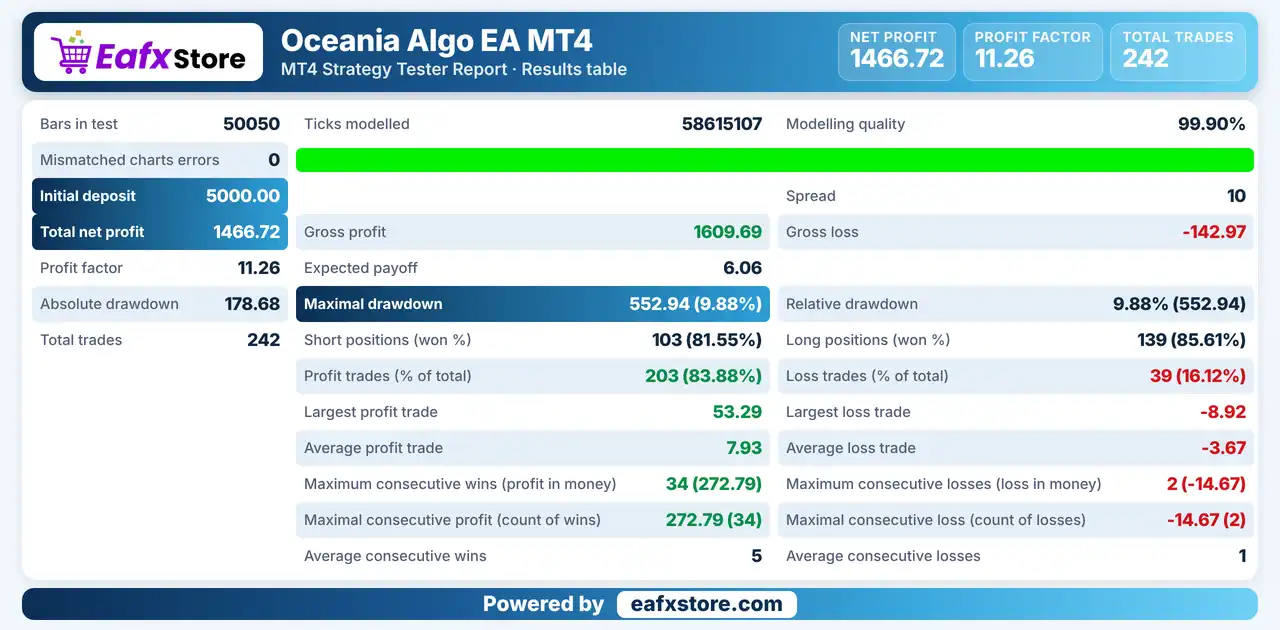
Oceania Algo EA achieved a net profit of $1,466.72 with a profit factor of 11.26 across 242 trades.
Oceania Algo EA MT4 Backtest Results
| Parameter | Results |
|---|---|
| Initial Deposit | $5,000 |
| Total Net Profit | $1,466.72 |
| Profit Factor | 11.26 |
| Maximum Drawdown | 9.88% |
| Total Trades | 242 |
| Winning Trades | 83.88% |
| Losing Trades | 16.12% |
Risk Management
Recovery Can Deepen Losses
Adding positions after a loss enlarges the exposure, so a long trend against the EA can create a large drawdown.
Grid Levels Add Up
Every grid level adds to the open exposure, and a strong move can fill many levels before price turns.
Stops Can Be Passed
Gaps and fast moves can go beyond the stop-loss level, so the real loss can exceed the planned one.
Targets Are Not Certain
Price may reverse before it reaches a take-profit level, and news outside the filter can still move the market.
Higher Risk Values Are Dangerous
The product suggests raising the risk for better results, but this also raises the possible loss in a bad period.
What Sets It Apart
Not a Scalper
The product states the EA is neither a scalper nor a high frequency system, which sets it apart from many robots.
Currency Matched News Filter
The news filter follows the currencies of the traded pairs, so only relevant events pause trading.
Copy Trading Use
The product says it can be used for copy trading, so signals can be followed by other accounts.
Default Settings for All Pairs
The same default values are said to work on every listed pair, which simplifies the first setup.
Recommended Trading Conditions
Recommended settings and parameters to pay attention to from developers and experts:
| Features | Type |
|---|---|
| Trading platform | MetaTrader 4 (MT4) |
| Time frames | M15 |
| Currency pairs | AUDCAD, AUDNZD, NZDCAD |
| Minimum / Recommended deposit | $1,000+ |
| Minimum / Recommended leverage | Any |
| Account type | ECN |
| Additional services | Unlock and Decompile |
| Recommended brokers | Exness Broker, Icmarkets Broker |
| Recommended VPS | MyfxVPS.com (Blue VPS, Golden VPS). Lowest Latency, 2 week Free Trial, 100% Free for 12-18 Months. |
Product Download Package?
The download package of the product suite includes:
✅ Experts: Oceania Algo.ex4
Final Verdict
Oceania Algo EA is a day trading robot for AUDCAD, AUDNZD and NZDCAD on the M15 chart that mixes custom indicators, an RSI component, a recovery mode, grid levels and an automatic news filter. The news filter and the equity based sizing are useful, but recovery and grid logic raise exposure after losses, the indicators are not explained and no results are published. A larger ECN account, a modest risk value and a long demo trial are the sensible start before any live trading.
🔢 Oceania Algo EA MT4 – Complete Settings Guide
Oceania Algo EA MT4 is an automated trading Expert Advisor designed for MetaTrader 4, featuring configurable money management, multi-stage trading conditions, RSI-based signal parameters, grid-level settings, and an integrated economic news filter. Its settings allow traders to adjust position sizing, risk allocation, trading signal sensitivity, and news-event protection according to their trading preferences. Understanding each input parameter is important for configuring Oceania Algo EA MT4 correctly and managing trading exposure.
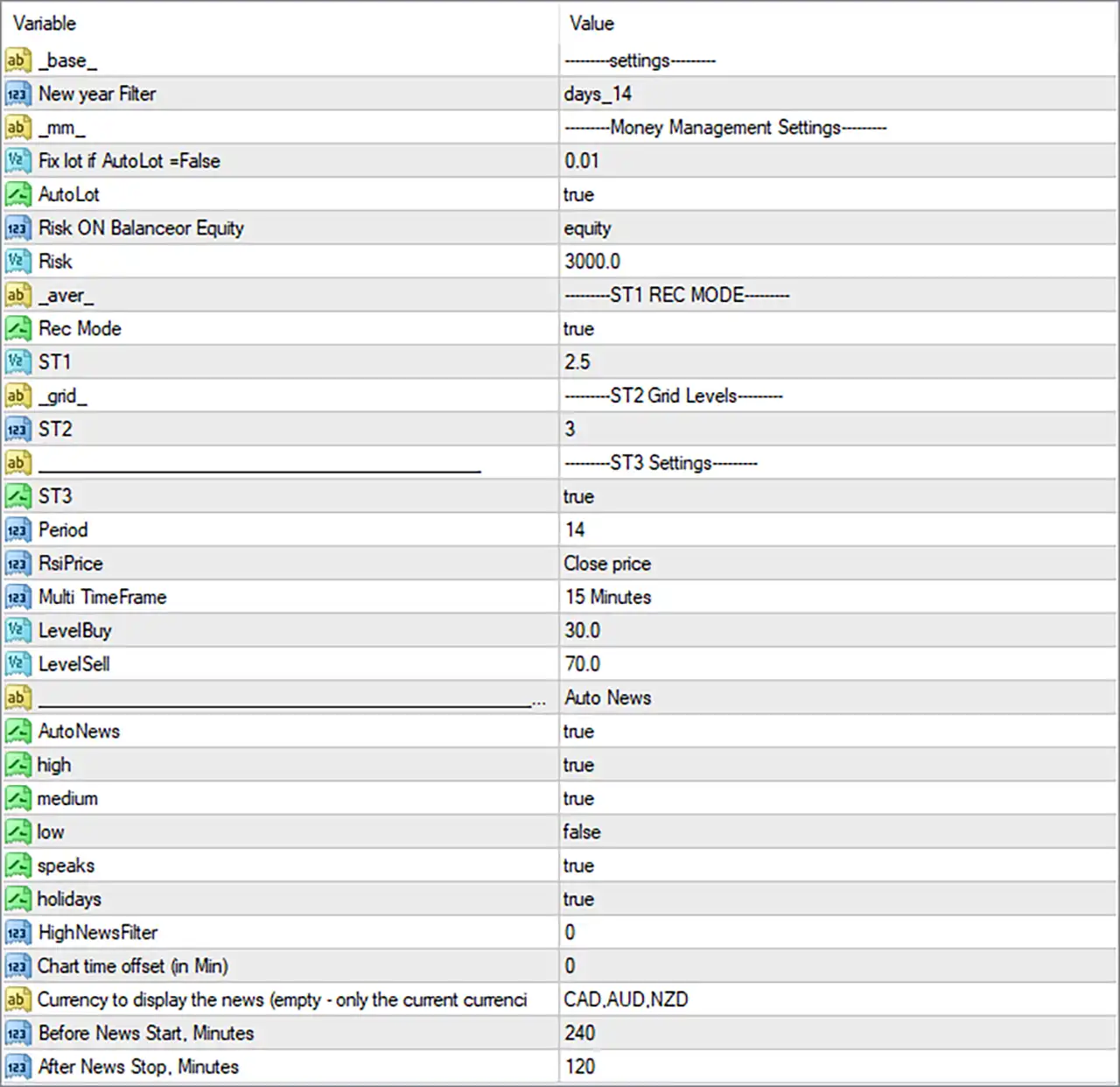
Oceania Algo EA MT4 Settings Panel
⚙️ General Settings
🔹 base = ——–settings——–: This is a section separator used to organize the EA’s general configuration parameters. It does not represent an independent trading setting.
🔹 New year Filter = days_14: Defines a New Year-related filtering option with a 14-day setting. The exact start and end dates depend on how this filter is implemented internally by the EA.
⚙️ Money Management Settings
🔹 mm = ——–Money Management Settings——–: This section groups the parameters responsible for position sizing and account risk management.
🔹 Fix lot if AutoLot =False = 0.01: Sets the fixed trading lot size to 0.01 when the AutoLot function is disabled. This determines the default position size instead of automatic lot calculation.
🔹 AutoLot = true: Enables automatic lot sizing, allowing the EA to calculate trading volume according to its money management configuration rather than relying on the fixed lot setting.
🔹 Risk ON Balanceor Equity = equity: Selects Equity as the account reference for risk calculations. This means the EA uses account equity rather than balance when applying its risk management logic.
🔹 Risk = 3000.0: Sets the numerical risk parameter to 3000.0. Its exact interpretation, including whether it represents a monetary amount, calculation base, or another risk-sizing input, depends on the EA’s internal implementation.
⚙️ ST1 Recovery Mode Settings
🔹 aver = ——–ST1 REC MODE——–: This section contains the configuration for ST1 recovery mode, which controls the first-stage recovery-related trading parameter.
🔹 Rec Mode = true: Enables Recovery Mode, allowing the EA to activate its configured recovery mechanism when the relevant trading conditions are met.
🔹 ST1 = 2.5: Sets the ST1 parameter to 2.5. This value controls the first-stage recovery setting, although its precise calculation and effect on trading volume depend on the EA’s internal algorithm.
⚙️ ST2 Grid Levels Settings
🔹 grid = ——–ST2 Grid Levels——–: This section organizes the grid-level configuration used by the EA.
🔹 ST2 = 3: Sets the ST2 grid-level parameter to 3, defining the configured number of levels for this stage of the trading system.
⚙️ ST3 Technical Indicator Settings
🔹 ST3 = true: Enables the ST3 trading component, allowing the EA to use its third-stage signal configuration.
🔹 Period = 14: Sets the indicator calculation period to 14. This is a commonly used RSI period for measuring recent price momentum and identifying potential overbought or oversold conditions.
🔹 RsiPrice = Close price: Uses the closing price as the input source for RSI calculations, ensuring that the indicator evaluates completed price values.
🔹 Multi TimeFrame = 15 Minutes: Sets the multi-timeframe indicator reference to 15 minutes (M15). This allows the EA to use indicator information associated with the 15-minute timeframe.
🔹 LevelBuy = 30.0: Sets the RSI buy threshold to 30.0. RSI readings around or below this level are commonly interpreted as oversold conditions and may contribute to identifying potential buying opportunities.
🔹 LevelSell = 70.0: Sets the RSI sell threshold to 70.0. RSI readings around or above this level are commonly interpreted as overbought conditions and may contribute to identifying potential selling opportunities.
⚙️ Automatic News Filter Settings
🔹 AutoNews = true: Enables the automatic economic news filter, allowing the EA to apply its configured news-related trading restrictions.
🔹 high = true: Enables filtering for high-impact economic news events, helping the EA account for potentially significant market volatility.
🔹 medium = true: Enables filtering for medium-impact economic news events, allowing the EA to consider additional scheduled announcements that may influence currency movements.
🔹 low = false: Disables filtering for low-impact economic news events, meaning these events are not included in the selected news-impact filtering configuration.
🔹 speaks = true: Enables the news-calendar category for speeches, helping the EA account for scheduled speeches that may affect financial markets.
🔹 holidays = true: Enables holiday-related calendar filtering, allowing the EA to recognize relevant market holidays when applying its news-calendar logic.
🔹 HighNewsFilter = 0: Sets the HighNewsFilter parameter to 0. This is a numerical news-filter configuration whose exact operational meaning depends on the EA’s internal coding.
🔹 Chart time offset (in Min) = 0: Sets the chart time adjustment to 0 minutes. No additional manual time offset is applied to the news-calendar display or its configured time reference.
🔹 Currency to display the news (empty – only the current currency) = CAD,AUD,NZD: Specifies CAD, AUD, and NZD as the currencies selected for economic news display. This allows the news filter to focus on announcements associated with the Canadian Dollar, Australian Dollar, and New Zealand Dollar.
🔹 Before News Start, Minutes = 240: Sets the pre-news filtering period to 240 minutes, equivalent to 4 hours before a scheduled news event. This defines the configured advance window for news-related trading restrictions.
🔹 After News Stop, Minutes = 120: Sets the post-news filtering period to 120 minutes, equivalent to 2 hours after the scheduled news event. This defines how long the configured news-related restriction may remain active after an event.
🔢 Conclusion
Oceania Algo EA MT4 combines automatic money management, recovery-mode parameters, grid-level configuration, RSI-based trading inputs, and an integrated economic news filter. Its current configuration enables AutoLot, Recovery Mode, ST3, and automatic news filtering, while using a 14-period RSI with 30.0 and 70.0 signal levels on the 15-minute timeframe.
The news filter is configured to consider high- and medium-impact events, speeches, and holidays, with a 240-minute pre-news window and a 120-minute post-news window. Traders should carefully evaluate the recovery and grid-related parameters, particularly their potential impact on drawdown and overall account exposure, before using the EA on a live account.
User Reviews
Only logged in customers who have purchased this product may leave a review.
❓ What is Oceania Algo EA MT4?
An automated day trading Expert Advisor for MetaTrader 4 made for AUDCAD, AUDNZD and NZDCAD on the M15 chart.
❓ Which pairs does Oceania Algo EA MT4 trade?
AUDCAD, AUDNZD and NZDCAD.
❓ Which timeframe does Oceania Algo EA MT4 use?
M15
❓ What account does Oceania Algo EA MT4 need?
An ECN account. The product says it works with all broker types.
❓ What deposit does Oceania Algo EA MT4 recommend?
A minimum deposit of 1000 USD is listed, and 3000 USD is suggested.
❓ Does Oceania Algo EA MT4 use a grid?
Yes. It has grid level settings and a recovery mode, which can raise exposure.
❓ Is Oceania Algo EA MT4 a scalper?
No. The product states it is not a scalper and not a high frequency system.
❓ Does Oceania Algo EA MT4 have a news filter?
Yes. An automatic news filter pauses trading around events for the chosen currencies.
❓ Can Oceania Algo EA MT4 be used for copy trading?
The product says it can be used for copy trading so other accounts can follow its signals.
❓ Can Oceania Algo EA MT4 trade several pairs?
Yes. It can work on several pairs at the same time.
❓ Should Oceania Algo EA MT4 be tested on demo first?
Yes. A demo trial with realistic spreads helps confirm the recovery, the grid and the news filter before real money is used.
-
 Original price was: $30,000.00.$249.00Current price is: $249.00.
 -
 Original price was: $5,000.00.$249.00Current price is: $249.00.
 -
 Original price was: $7,000.00.$249.00Current price is: $249.00.
 -
 Original price was: $1,399.00.$249.00Current price is: $249.00.
-
 4Original price was: $499.00.$249.00Current price is: $249.00.
 -
 0Original price was: $2,288.00.$249.00Current price is: $249.00.
 -
 0Original price was: $500.00.$199.00Current price is: $199.00.
 -
 1Original price was: $699.00.$249.00Current price is: $249.00.
There are no reviews yet.