


🔢 Trends Radar EA MT4 Settings Guide: Complete Inputs Explained
Trends Radar EA MT4 is an automated trading Expert Advisor designed for the MetaTrader 4 platform. Its configuration panel provides several controls for trade execution, risk-based position sizing, order limits, profit targets, loss protection, trailing-stop management, and signal detection.
The EA includes dedicated settings for trend signal analysis, entry slope angles, deviation factors, signal corridor width, and step correction. It also provides configurable protections and trading execution parameters to help traders customize its behavior according to their account conditions and trading preferences.
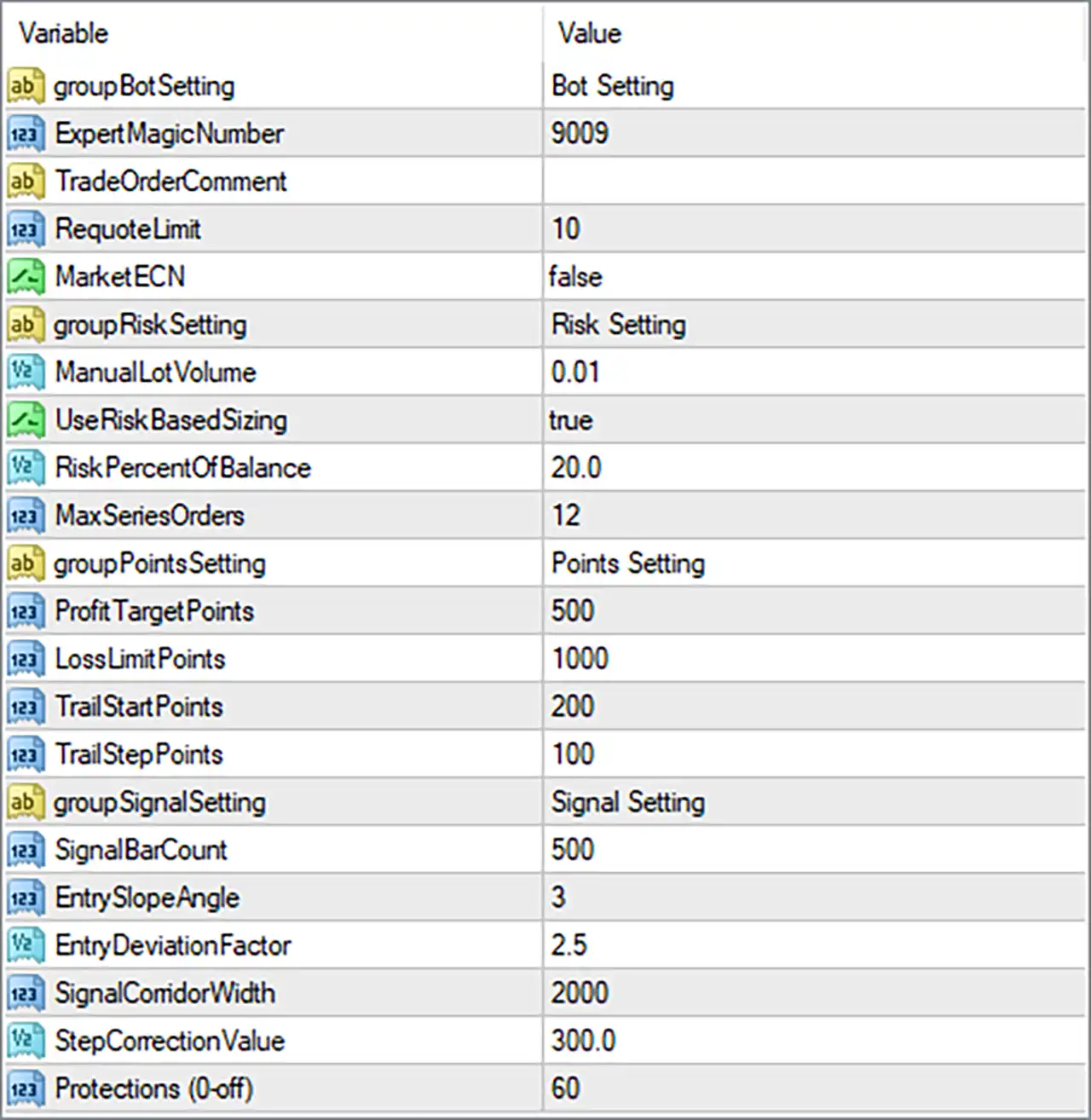
Understanding these inputs is essential for configuring position sizes, managing potential drawdown, and adjusting the EA's signal sensitivity. This guide explains all 19 parameters and section headings shown in the supplied Trends Radar EA MT4 Inputs panel, preserving their original names and default values.
⚙️ Bot Settings
🔹 ExpertMagicNumber = 9009: Assigns the unique trade identifier 9009 to positions managed by Trends Radar EA MT4. This Magic Number helps the EA distinguish its trades from manually opened positions and trades managed by other Expert Advisors.
🔹 TradeOrderComment = (blank): Defines the comment attached to orders opened by the EA. The supplied value is blank, meaning no specific trade comment has been configured through this parameter.
🔹 RequoteLimit = 10: Sets the requote limit to 10. This parameter may control the maximum number of requote attempts or the EA's tolerance for requote conditions during order execution. Its exact behavior depends on the EA's internal execution logic.
🔹 MarketECN = false: Disables the Market ECN execution mode. The EA will use its alternative order-execution procedure rather than the specific ECN execution method associated with this option. Traders should verify compatibility with their broker's execution model.
⚙️ Risk Settings and Money Management
🔹 ManualLotVolume = 0.01: Sets the manually specified trading volume to 0.01 lots. This value may be used when manual or fixed-volume sizing is selected, depending on the EA's money management logic.
🔹 UseRiskBasedSizing = true: Enables risk-based position sizing. When active, the EA can calculate trading volume according to its programmed risk management formula rather than relying exclusively on the manually specified lot size.
🔹 RiskPercentOfBalance = 20.0: Sets the risk-related percentage to 20.0% of account balance. If the EA interprets this value as the percentage of balance allocated to risk, it represents a very aggressive setting with potentially substantial account exposure. The actual calculation and whether this represents risk per trade or per series must be verified before live trading.
🔹 MaxSeriesOrders = 12: Sets the maximum number of orders allowed within a trading series to 12. This parameter may limit how many positions the EA can open as part of the same trading sequence, helping control order accumulation according to its programmed rules.
⚙️ Points Settings and Trade Management
🔹 ProfitTargetPoints = 500: Sets the configured profit target to 500 points. If implemented as a conventional points-based target, this value determines the intended favorable price movement before the EA applies its profit-taking logic.
🔹 LossLimitPoints = 1000: Sets the configured loss limit to 1000 points. This parameter may define the maximum permitted adverse price movement before the EA activates its loss-control or exit logic, depending on its implementation.
🔹 TrailStartPoints = 200: Sets the trailing activation threshold to 200 points. This may specify how far a position must move into profit before the EA begins applying its trailing management rules.
🔹 TrailStepPoints = 100: Sets the trailing adjustment step to 100 points. This may determine the minimum favorable price movement required before the EA updates its trailing level, helping control how frequently protective levels are adjusted.
⚙️ Signal Settings
🔹 SignalBarCount = 500: Sets the signal calculation or analysis window to 500 bars. This parameter may determine how many historical candles the EA examines when calculating its trading signals or trend conditions.
🔹 EntrySlopeAngle = 3: Sets the entry slope angle parameter to 3. This may define the minimum slope or directional threshold required for a qualifying trend signal, helping the EA evaluate the strength or direction of market movement.
🔹 EntryDeviationFactor = 2.5: Sets the entry deviation factor to 2.5. This parameter may control how far price can deviate from a calculated signal reference before an entry condition is accepted or rejected. Its exact formula depends on the EA's signal algorithm.
🔹 SignalComidorWidth = 2000: Sets the signal corridor width to 2000 units. This parameter may define the width of the price corridor used by the EA to evaluate market movement, trend boundaries, or entry conditions. The original spelling, SignalComidorWidth, is preserved exactly as displayed.
🔹 StepCorrectionValue = 300.0: Sets the step correction parameter to 300.0. This may control an adjustment value used by the EA's signal or price-step calculation, helping modify its trading levels according to the programmed strategy.
🔹 Protections (0-off) = 60: Sets the protection parameter to 60. The description indicates that 0 disables this feature, meaning the current value of 60 activates or configures a protection threshold. Its exact function, measurement unit, and relationship to the EA's other risk controls should be confirmed from the developer's documentation.
🔢 Conclusion
The Trends Radar EA MT4 settings provide controls for trade execution, money management, order limits, points-based trade management, trend signal detection, and trading protection.
The supplied configuration uses ExpertMagicNumber = 9009, RequoteLimit = 10, ManualLotVolume = 0.01, UseRiskBasedSizing = true, RiskPercentOfBalance = 20.0, and MaxSeriesOrders = 12. Its points-based settings include ProfitTargetPoints = 500, LossLimitPoints = 1000, TrailStartPoints = 200, and TrailStepPoints = 100.
The signal configuration uses SignalBarCount = 500, EntrySlopeAngle = 3, EntryDeviationFactor = 2.5, SignalComidorWidth = 2000, and StepCorrectionValue = 300.0.
Pay particular attention to RiskPercentOfBalance = 20.0 and MaxSeriesOrders = 12. If the 20.0 value represents the actual capital risk per trade or trading series, it could expose the account to substantial losses, especially when multiple orders accumulate. Traders should verify the risk calculation and total exposure before enabling the EA on a live account.
It is also important to confirm the units used by the points-based settings and the exact behavior of Protections = 60. Backtesting and demo forward testing can help evaluate the EA's signal sensitivity, order accumulation, and drawdown under different market conditions. No EA configuration guarantees profits or eliminates trading risk.


