TwisterPro Scalper Robot Settings Guide – Complete Parameter Explanation
TwisterPro Scalper Robot is a precision-focused automated trading Expert Advisor designed for traders seeking fast market execution, intelligent risk management and consistent scalping performance.
The EA includes configurable money management, broker compatibility, proprietary execution modes, Prop Firm options, visual trading panels, and holiday protection, allowing traders to tailor the system to various account types and trading objectives.
TwisterPro Scalper Robot Settings Explained
Below are the details of the parameters in the advisor’s trading system settings table:
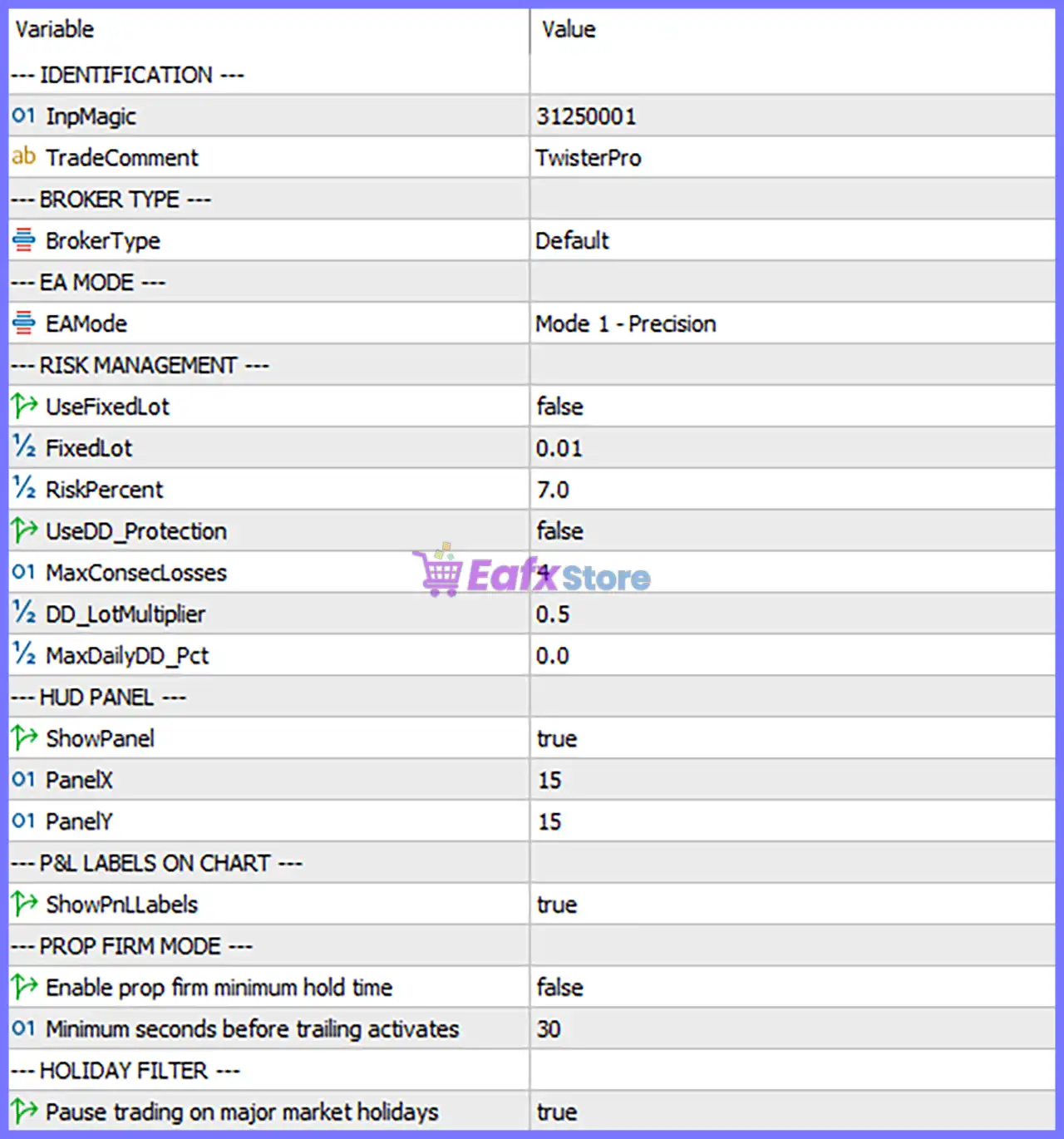
Identification Settings
🔹 InpMagic: 31250001 – Sets the unique Magic Number (31250001) used by TwisterPro Scalper Robot to identify and manage its own trades independently from other Expert Advisors or manual positions.
🔹 TradeComment: TwisterPro – Adds the trade comment "TwisterPro" to every order for easy identification in the trading terminal and account history.
Broker Type Settings
🔹 BrokerType: Default – Configures the EA to operate using the Default broker profile, ensuring standard execution behavior for most Forex brokers.
EA Mode
🔹 EAMode: Mode 1 - Precision – Activates Mode 1 - Precision, which is optimized for highly accurate trade entries and controlled scalping execution.
Risk Management
🔹 UseFixedLot: false – Disables fixed lot trading, allowing the EA to calculate position sizes using percentage-based risk management.
🔹 FixedLot: 0.01 – Defines the fixed trading volume as 0.01 lots, which is only used if UseFixedLot is enabled.
🔹 RiskPercent: 7.0 – Risks 7.0% of the account balance per trade when dynamic risk management is active.
🔹 UseDD_Protection: false – Drawdown protection is currently disabled, allowing the EA to continue trading without automatic drawdown restrictions.
🔹 MaxClosedLosses: 4 – Allows a maximum of 4 consecutive closed losing trades before triggering the EA's internal protection logic.
🔹 DD_LotMultiplier: 0.5 – Applies a 0.5 lot multiplier during drawdown management when the corresponding protection feature is enabled.
🔹 MaxDailyDD_Pct: 0.0 – Daily drawdown protection is disabled because the value is set to 0.0%.
HUD Panel Settings
🔹 ShowPanel: true – Displays the on-chart information panel showing the EA's trading status and important statistics.
🔹 PanelX: 15 – Positions the information panel 15 pixels horizontally from the chart reference point.
🔹 PanelY: 15 – Positions the information panel 15 pixels vertically from the chart reference point.
Profit & Loss Labels
🔹 ShowPnLLabels: true – Displays real-time Profit & Loss labels directly on the trading chart for improved trade monitoring.
Prop Firm Mode
🔹 Enable prop firm minimum hold time: false – Prop Firm minimum holding time restriction is disabled, allowing trades to close according to the EA's trading logic.
🔹 Minimum seconds before trailing activates: 30 – The Trailing Stop function becomes active 30 seconds after a position has been opened.
Holiday Filter
🔹 Pause trading on major market holidays: true – Automatically suspends trading during major financial market holidays to help reduce risk caused by low liquidity and unpredictable market conditions.
Conclusion
TwisterPro Scalper Robot provides a streamlined yet powerful configuration panel focused on precision scalping, intelligent money management and trading safety.
With configurable risk percentage, precision execution mode, integrated chart panel, Prop Firm compatibility options, and automatic holiday protection, the EA offers traders a flexible solution for optimizing automated scalping performance across different brokers and account types.
Properly configuring these settings allows users to balance profitability, execution quality, and risk control according to their individual trading goals.
FAQs
❓ What is the purpose of the Magic Number (31250001)?
The Magic Number uniquely identifies trades opened by TwisterPro Scalper Robot, preventing conflicts with manual trades or other Expert Advisors.
❓ Does TwisterPro Scalper Robot use fixed lot sizing by default?
No. UseFixedLot = false, so the EA uses RiskPercent (7.0%) for dynamic position sizing instead of the fixed lot value.
❓ What does "Mode 1 - Precision" mean?
It is the EA's precision trading mode, designed to focus on accurate trade entries and disciplined scalping execution under favorable market conditions.
❓ Can I use TwisterPro Scalper Robot with Prop Firm accounts?
Yes. The EA includes a Prop Firm Mode section, allowing traders to configure minimum holding time behavior and other settings when required by prop firm rules.
❓ Why is the Holiday Filter enabled?
The Holiday Filter automatically pauses trading during major market holidays to avoid periods of reduced liquidity, wider spreads, and irregular price movements, helping improve overall trading stability.