
Omega Currency Power Indicator MT5
Omega Currency Power IndicatorOmega Currency Power – Trading RulesOmega Currency Power Indicator ReviewOmega Currency Power Review TradingOmega Currency Power MT5 Review Trading
Updated 27 Sept 2026

Omega Currency Power Indicator MT5

Omega Currency Power is an MT5 currency analysis indicator designed to measure the relative strength of individual currencies and support various trading styles.

Buy now — $25Add to cart
Download link right after paymentLifetime licenceInstall guide includedFree updates to new versions
Pay with Visa · MastercardUSDT · BTC · ETHBinance Pay
Not sure it fits your broker or account?Ask a question
Optimize Settings

Recommended settings for Omega Currency Power Indicator MT5

Omega Currency Power – Installation & Inputs Guide
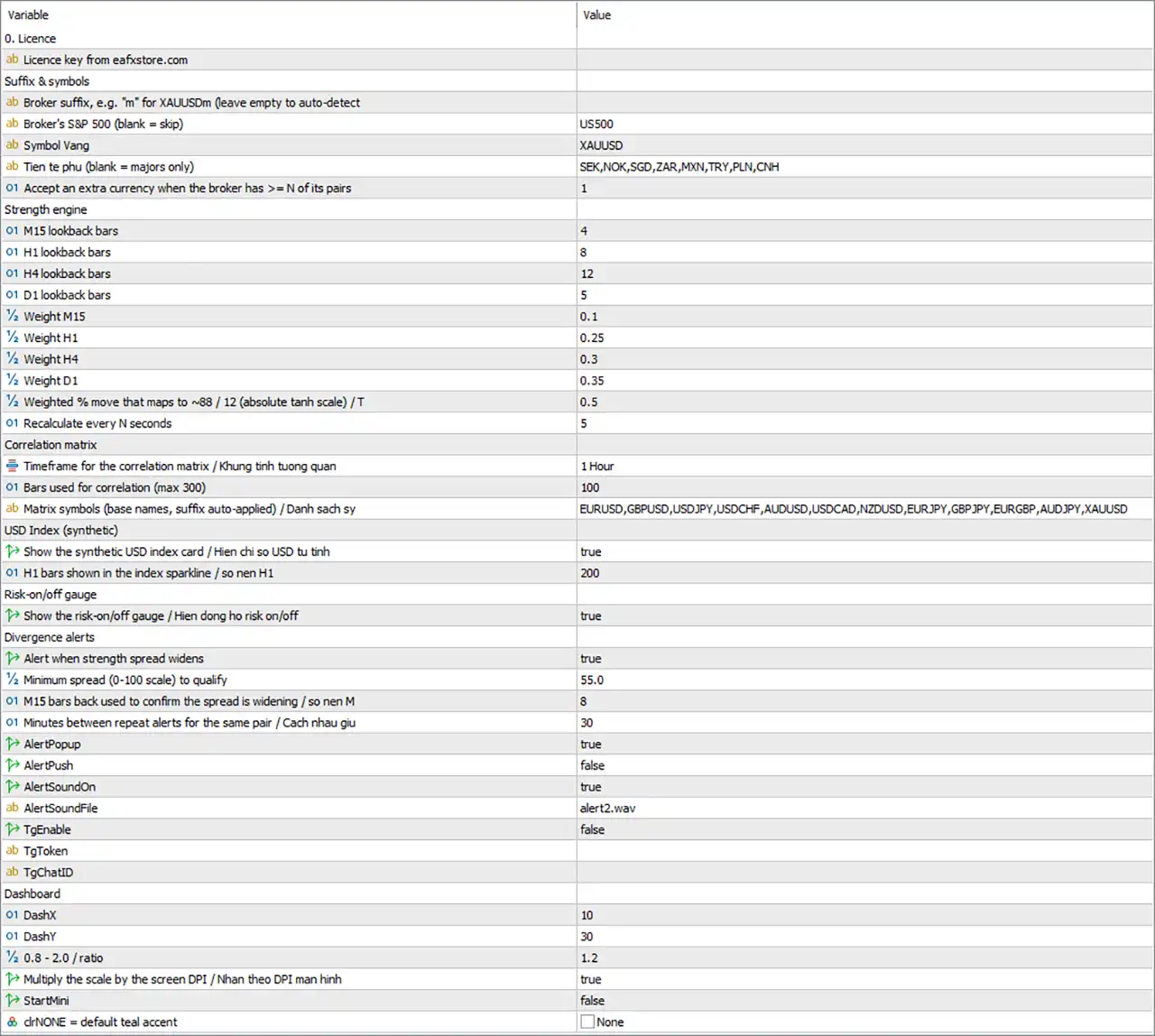
Omega Currency Power Indicator MT5 Settings Panel

⚙️ Installing the indicator in MetaTrader 5

🔹 Step 1 – Copy the file. In MT5 choose File → Open Data Folder. Open the MQL5Indicators folder and copy OmegaCurrencyPower_v1.0.ex5 (or .mq5) into it.

🔹 Step 2 – Compile (if using .mq5). Open the .mq5 file in MetaEditor (F4 in MT5) and press Compile (F7). The Errors window must show 0 errors.

🔹 Step 3 – Refresh the Navigator. Back in MT5, in the Navigator window (Ctrl+N) right-click Indicators → Refresh.

🔹 Step 4 – Allow DLLs. Go to Tools → Options → Expert Advisors and tick Allow DLL imports. The indicator uses a Windows DLL (wininet) for the licence check and Telegram; without this step it will not run.

🔹 Step 5 – Attach to a chart. Open any chart (EURUSD H1 recommended) and drag OmegaCurrencyPower_v1.0 from the Navigator onto it. One chart is enough.

🔹 Step 6 – Dependencies tab. In the settings dialog, on the Dependencies (or Common) tab, tick Allow DLL imports for this indicator.

🔹 Step 7 – Enter the licence. Switch to the Inputs tab, paste your licence key into InpLicenseKey, adjust other parameters if needed (see section B) and press OK.

🔹 Step 8 – Wait for data. On the first run MT5 must download history for many pairs on M1, M15, H1, H4 and D1. During the first 1–3 minutes some values may read 0 or 50; after a few cycles the dashboard fills in.

Tip: To change parameters after attaching: press Ctrl+I on the chart → select Omega Currency Power → Properties. To keep a configuration for later, press Save in the Inputs tab to store a .set file, and Load to restore it.

⚙️ Detailed explanation of the Inputs

The parameters in the Inputs tab are split into 8 groups, in the same order MT5 shows them. The Default column is the value after a fresh install. The last column explains what each field does and how to adjust it.

🔢 Licence

🔹 InpLicenseKey (default: empty): The licence key purchased from eafxstore.com. Paste the whole string; extra spaces and lower case are handled automatically. If left empty the indicator shows Please enter your licence key and does not run. The key is bound to your trading account number.

🔢 Suffix & symbols

This group tells the indicator your broker's symbol names and which currencies to scan.

🔹 SymbolSuffix (default: empty): Your broker's symbol suffix, e.g. m for EURUSDm, .pro for EURUSD.pro. Leave empty to auto-detect. Only type it by hand if detection is wrong (see the scan: line in the Experts tab).

🔹 IndexSymbol (default: US500): Your broker's S&P 500 symbol name (could be SPX500, US500Cash, SP500…), without suffix. Used by the risk-on/off gauge. Leave empty if your broker has none; the gauge then relies on AUD, JPY and gold only.

🔹 GoldSymbol (default: XAUUSD): Gold symbol name (without suffix). Used by the risk-on/off gauge. Change it if your broker uses a different name, e.g. GOLD.

🔹 ExtraCurrencies (default: SEK,NOK,SGD,ZAR,MXN,TRY,PLN,CNH): List of extra currencies as 3-letter codes, separated by commas. Up to 8 can be added (16 in total). Leave empty for the 8 majors only. Keep SEK so the USD index can use the full DXY formula.

🔹 MinPairsPerCur (default: 1): An extra currency is added only when the broker quotes at least N of its pairs against the 8 majors. 1 = a USD pair is enough. Raise to 2–3 to exclude currencies your broker quotes in only one pair (less reliable score).

🔢 Strength engine

The most important group: it decides how each currency's 0–100 strength score is computed.

🔹 TF1Bars (default: 4): Number of M15 bars used to measure the % change (4 bars ≈ the last hour).

🔹 TF2Bars (default: 8): Number of H1 bars (8 bars ≈ 8 hours).

🔹 TF3Bars (default: 12): Number of H4 bars (12 bars ≈ 2 days).

🔹 TF4Bars (default: 5): Number of D1 bars (5 bars ≈ one trading week).

🔹 W_M15 (default: 0.10): Weight of M15 in the composite score. Raise it for short-term trading.

🔹 W_H1 (default: 0.25): Weight of H1.

🔹 W_H4 (default: 0.30): Weight of H4.

🔹 W_D1 (default: 0.35): Weight of D1. Raise it for swing trading. The four weights do not need to add up to 1; the indicator normalises by their sum.

🔹 StrengthScale (default: 0.5): The (weighted) % change that maps to about 88 points (or 12 when falling). Lower (0.3) makes the scale more sensitive: scores move away from 50 faster and alerts are more frequent. Higher (0.8) makes it slower: only large moves push scores far from 50.

🔹 RefreshSec (default: 5): Seconds between recalculations and redraws. 3–5 s for scalping/intraday; 10–30 s on a slower PC or with many indicators running.

🔢 Correlation matrix

Configures the correlation matrix on the CORR tab.

🔹 CorrTF (default: H1): Timeframe used for correlation. M15 for short-term, H4/D1 for long-term.

🔹 CorrBars (default: 100): Number of bars used (max 300). Fewer bars reflect recent relationships but fluctuate more; more bars are more stable. At least 20 valid bars are needed.

🔹 CorrSymbols (default: EURUSD,GBPUSD,USDJPY,USDCHF,AUDUSD,USDCAD,NZDUSD,EURJPY,GBPJPY,EURGBP,AUDJPY,XAUUSD): List of up to 12 symbols (without suffix, it is added automatically), separated by commas. Include the pairs you trade most to check for overlapping risk. You can add indices or oil if your broker has them.

🔢 USD Index (synthetic)

🔹 ShowUsdIndex (default: true): Show the synthetic USD index card on the USD/RISK tab. The USD INDEX card on the STRENGTH tab is always shown.

🔹 UsdIndexBars (default: 200): Number of H1 bars drawn on the USD index line chart (200 bars ≈ 8 trading days). The % change on the card is measured from the first bar of this window.

🔢 Risk-on/off gauge

🔹 ShowRiskGauge (default: true): Show the risk-on/off gauge on the USD/RISK tab. The RISK card on the STRENGTH tab is always shown.

🔢 Divergence alerts

Controls when, and through which channels, the indicator sends strength divergence alerts.

🔹 AlertOn (default: true): Turns all divergence alerts on or off. When off, the recent signals list is not updated either.

🔹 DivergenceMin (default: 55): Minimum spread (0–100 scale) between the strongest and weakest currency before an alert is considered. Example: GBP 80 and JPY 22 give a spread of 58, which qualifies. Raise to 60–70 for only very clear signals.

🔹 DivergenceBars (default: 8): Number of M15 bars to look back to confirm the spread is widening (8 bars = 2 hours). The current spread must exceed the spread of the same two currencies at that time.

🔹 AlertCooldownMin (default: 30): Minimum minutes before alerting again for the same strong–weak pair, to avoid repeated alerts.

🔹 AlertPopup (default: true): Show the MT5 Alert window.

🔹 AlertPush (default: false): Send push notifications to the MT5 mobile app. Requires your MetaQuotes ID in Tools → Options → Notifications.

🔹 AlertSoundOn (default: true): Play a sound when an alert fires.

🔹 AlertSoundFile (default: alert2.wav): Sound file name in the MT5 Sounds folder.

🔹 TgEnable (default: false): Enable sending alerts to Telegram.

🔹 TgToken (default: empty): Your Telegram bot token, obtained from @BotFather (format 123456:ABC-…).

🔹 TgChatID (default: empty): The chat ID that receives messages: your personal ID (via @userinfobot) or a group/channel ID (usually starting with -100). The bot must be a member of that group/channel.

🔢 Dashboard

Position, size and colours of the dashboard.

🔹 DashX (default: 10): Distance (pixels) from the left edge of the chart to the dashboard at start-up.

🔹 DashY (default: 30): Distance (pixels) from the top edge of the chart. You can drag the dashboard with the mouse after attaching; the dragged position is not saved on reload.

🔹 DashScale (default: 1.2): Zoom factor, limited to 0.8–2.0.

🔹 AutoDPI (default: true): Also multiply by screen DPI (2K/4K screens with 150–200% Windows scaling). Turn off if the dashboard is too large.

🔹 StartMini (default: false): Start collapsed (title bar only). Press the + button to expand.

🔹 ThemeAccent (default: clrNONE): Interface accent colour. clrNONE keeps the default purple; pick another colour to tell terminals apart if you run several.

⚙️ Setting up Telegram step by step

🔹 Step 1. Open Telegram, find @BotFather, send /newbot and name your bot. BotFather returns a token; paste it into TgToken.

🔹 Step 2. Send any message to your new bot (so the bot is allowed to message you back).

🔹 Step 3. Find @userinfobot to get your ID and paste it into TgChatID. For a group/channel, add the bot to it and use the group ID.

🔹 Step 4. Set TgEnable = true and press OK.

Step 5. Press the TELEGRAM button at the bottom of the dashboard to send a test message. A Telegram OK toast means it worked.

⚙️ Troubleshooting

🔹 The indicator is removed immediately and the chart shows Please tick “Allow DLL imports”: DLLs are not allowed. Enable them in Tools → Options → Expert Advisors and on the Dependencies tab when attaching the indicator.

🔹 Shows Please enter your licence key: The InpLicenseKey field is empty.

🔹 Shows Cannot reach the licence server: The licence server cannot be reached. Check your internet connection and firewall. If a previous check succeeded, the indicator keeps running during the grace period.

🔹 Shows System clock check failed: The computer clock was set backwards. Set Windows time to sync automatically.

🔹 The dashboard shows only a few currencies or pairs: The suffix was detected incorrectly or the broker lacks pairs. Check the CSCM_scan: line in the Experts tab; enter SymbolSuffix by hand if needed.

🔹 Many cells read 0 or scores stay at 50: MT5 has not finished downloading history. Wait a few minutes or open those pairs' charts once.

🔹 Too many alerts: Raise DivergenceMin or StrengthScale, and raise AlertCooldownMin.

🔹 Never any alerts: Lower DivergenceMin (e.g. 45) or StrengthScale (0.3); check that AlertOn = true.

🔹 Risk gauge missing the index: IndexSymbol has the wrong name. Find the correct name in Market Watch (Ctrl+U → Symbols).

🔹 The USD index shows excl. SEK: Your broker has no USDSEK. The value is about 10% below the real DXY, but the trend and % change are still correct.

🔹 The dashboard is too big or too small: Adjust DashScale or turn off AutoDPI.

Remember: Attach the indicator to one chart only. Every pair is scanned automatically; attaching it to several charts only wastes resources and produces duplicate alerts.
Full review

Quick Verdict

Omega Currency Power Indicator is a multi-timeframe currency strength dashboard for MetaTrader 5 that scans available currency pairs, identifies strong and weak currencies, measures divergence, correlation and market risk, and helps traders select pairs with clearer directional momentum.

Best For

✅ Forex scalping and short-term currency strength analysis.

✅ Intraday traders seeking strong and weak currency pairs.

✅ Swing traders analyzing multi-timeframe market momentum.

✅ Traders who need automatic pair selection and divergence alerts.

✅ Traders combining currency strength with their own entry strategy.

Overall Rating

9.0/10 ⭐⭐⭐⭐⭐


What is Omega Currency Power Indicator?

Omega Currency Power Indicator is a MetaTrader 5 currency analysis indicator designed to measure the relative strength of individual currencies rather than analyzing only one Forex pair at a time.

For example, when EURUSD rises, the movement may come from a stronger EUR, a weaker USD, or a combination of both. Omega Currency Power separates these two components by scanning the currency pairs available through the broker and combining the results into an individual strength score for each currency.

The indicator focuses on eight major currencies:

🔹 USD

🔹 EUR

🔹 GBP

🔹 JPY

🔹 CHF

🔹 AUD

🔹 CAD

🔹 NZD

It can also include up to eight additional currencies, with SEK, NOK, SGD, ZAR, MXN, TRY, PLN and CNH available by default.

Omega Currency Power can automatically scan up to 128 currency pairs, depending on the symbols offered by the broker. The system uses a weighted combination of M15, H1, H4 and D1 data to create a broader view of currency momentum.

🔶 Join Our Channel Telegram


How Does Omega Currency Power Indicator Work?

Omega Currency Power operates through repeated analysis cycles. By default, the indicator recalculates its data every 5 seconds, then redraws the dashboard with the latest information.

Automatic Currency Pair Detection

One of the practical features is automatic broker symbol detection.

The indicator searches the broker's available symbols and detects suffixes such as:

🔹 EURUSDm

🔹 EURUSD.pro

It then checks currency combinations in both directions and keeps pairs that have live prices. Additional currencies are included only when enough qualifying pairs are available against the eight major currencies.

This reduces the need for manually entering symbol lists.

Multi-Timeframe Currency Strength

The core strength engine measures percentage price changes across multiple timeframes.

For every currency pair, the indicator calculates the percentage change against a selected number of historical bars. The movement is then assigned positively to the base currency and negatively to the quote currency.

For example, if EURUSD rises by 0.4% on H1, EUR receives positive strength while USD receives negative strength.

The final currency strength is displayed on a 0–100 scale:

🔹 50 – Neutral or unchanged

🔹 Above 50 – Currency strengthening

🔹 Below 50 – Currency weakening

The default timeframe weighting is:

🔹 M15: 0.10

🔹 H1: 0.25

🔹 H4: 0.30

🔹 D1: 0.35

This weighting gives greater influence to higher timeframes and helps reduce the effect of short-term market fluctuations.

Strength Divergence Detection

The indicator continuously compares the strongest and weakest currencies.

An alert is generated only when four conditions are satisfied:

🔹 The strength spread reaches the minimum divergence level.

🔹 The spread is wider than it was in the historical comparison period.

🔹 The alert cooldown requirement has passed.

🔹 The broker provides the currency pair represented by the strongest and weakest currencies.

For example, if GBP is strongest and JPY is weakest, the system can identify BUY GBPJPY as the suggested direction.


Omega Currency Power – Trading Rules

Develop a simple and easy-to-follow trading strategy based on the Omega Currency Power indicator shown on the chart.

BUY Entry

🔹 Use the green upward arrow as the primary BUY signal.

🔹 When a green arrow appears at a cycle low or pullback area, prepare for a BUY trade.

🔹 Prefer BUY signals when MAMA/FAMA = UP and ITrend/Trigger = UP.

🔹 Avoid entering when the market is already strongly overbought.

🔹 Enter BUY after the signal is confirmed by a bullish candle close.

🔹 Place Stop Loss below the most recent swing low.

🔹 Set Take Profit at the next relevant resistance/cycle high or use a 1:1.5–1:2 Risk/Reward ratio.

SELL Entry

🔹 Use the red downward arrow as the primary SELL signal.

🔹 When a red/orange arrow appears at a cycle high or pullback area, prepare for a SELL trade.

🔹 Prefer SELL signals when MAMA/FAMA = DOWN and ITrend/Trigger = DOWN.

🔹 Avoid entering when the market is already strongly oversold.

🔹 Enter SELL after the signal is confirmed by a bearish candle close.

🔹 Place Stop Loss above the most recent swing high.

🔹 Set Take Profit at the next relevant support/cycle low or use a 1:1.5–1:2 Risk/Reward ratio.

Simple Trading Logic

Green Arrow → BUY

Red/Orange Arrow → SELL

The arrows are the main entry signals, while MAMA/FAMA, ITrend/Trigger, and Fisher are used as confirmation filters.

The strategy should remain simple, avoid excessive conditions, and provide clear BUY and SELL signals suitable for automated trading.

Omega Currency Power MT5 Review Trading

Key Features of Omega Currency Power Indicator

Multi-Timeframe Currency Strength

Analyzes M15, H1, H4 and D1 data to identify strong and weak currencies across different market conditions.

Automatic Pair Scanner

Scans available broker pairs automatically and identifies currency combinations with the largest strength difference.

Smart Currency Picker

Ranks the top currency pairs by strength gap and indicates whether the current bias favors a BUY or SELL direction.

Strength Divergence Alerts

Detects when the gap between the strongest and weakest currencies is large and widening, then generates a directional alert.

Correlation Matrix

Measures relationships between currency pairs to help traders recognize highly correlated positions and reduce duplicated market exposure.

USD Index & Risk Gauge

Combines a synthetic USD index with a RISK-ON/RISK-OFF gauge to provide broader market context before trading.

Multi-Channel Notifications

Sends trading alerts through popup, sound, mobile push notifications and Telegram, helping traders stay informed without watching the chart continuously.


Omega Currency Power Indicator Review

Omega Currency Power is designed more as a market analysis and trade-selection tool than a conventional automated trading system.

Its primary purpose is to answer an important question before entering a Forex trade:

Which currency is currently strong, and which currency is currently weak?

Instead of looking at EURUSD, GBPUSD or USDJPY individually, the indicator creates a broader currency-strength picture by analyzing multiple pairs simultaneously.

This approach can help traders avoid situations where a technical setup appears attractive but the underlying currency relationship is moving against the intended direction.

The documentation specifically recommends using Omega Currency Power as a direction filter and pair selector, rather than treating it as a standalone entry system. Traders can use the indicator to select the currency pair and direction, then apply their preferred technical entry method such as support/resistance, candlestick patterns or pullbacks.

Omega Currency Power Indicator Review

Omega Currency Power Indicator Review

Dashboard Usability

The floating dashboard brings several forms of market information together in one location:

🔹 Currency strength

🔹 Currency ranking

🔹 Strength heatmap

🔹 Strong/weak spread

🔹 Correlation

🔹 USD index

🔹 Risk sentiment

🔹 Recent divergence signals

🔹 Recommended currency pairs

The dashboard can also be dragged, collapsed and automatically scaled for different screen DPI settings.


Why Omega Currency Power Stands Out

Strong Currency vs Weak Currency Analysis

Rather than focusing exclusively on an individual pair, Omega Currency Power evaluates the underlying currencies.

This provides traders with additional context when deciding which Forex pairs deserve attention.

One Dashboard Instead of Multiple Tools

Currency strength, correlation, USD analysis and risk sentiment are brought together inside one dashboard, reducing the need to switch between several separate analytical tools.

Historical Divergence Confirmation

The divergence engine does not rely only on the current strength difference.

It also checks whether the spread is widening compared with historical data before generating an alert.

Broker-Independent Symbol Detection

The indicator automatically detects broker suffixes and available currency pairs, making configuration easier across different broker environments.

Useful for Different Trading Styles

The documentation provides configurations for:

🔹 Scalping: M5–M15

🔹 Intraday: Default configuration

🔹 Swing trading: H4–D1

The recommended settings adjust timeframe bars, weights, strength sensitivity, refresh frequency, correlation settings and divergence thresholds according to the trading style.


Risk Management Features

Omega Currency Power is not a money-management EA, but it includes several analytical functions that can help traders manage market exposure.

Correlation-Based Exposure Analysis

The correlation matrix can help traders identify positions that are highly related.

For example, simultaneously holding several USD-related positions may create more concentrated exposure than expected.

The correlation analysis provides additional information when reviewing a multi-position portfolio.

Risk-On / Risk-Off Context

The market sentiment gauge provides additional context around risk appetite.

A RISK-ON environment may indicate stronger demand for risk-sensitive currencies, while a RISK-OFF reading highlights stronger defensive characteristics in the measured components.

Alert Cooldown

The AlertCooldownMin parameter limits repeated alerts for the same currency pair.

This can help reduce unnecessary signal repetition during persistent market conditions.

Important Trading Risk

Currency strength is based on historical price movement and cannot guarantee future direction.

Major economic announcements can also reverse market conditions quickly.

The product documentation recommends using a stop loss and only trading with capital that can be afforded to lose.


Trading Style Recommended Timeframe Suggested Currency Pairs Market Condition
Scalping M5–M15 EURUSD, GBPUSD, USDJPY, GBPJPY Strong short-term currency divergence
Intraday M15–H1 EURUSD, GBPUSD, EURJPY, AUDJPY Clear and consistent currency strength
Trend Trading H1–H4 EURUSD, GBPUSD, USDJPY, AUDUSD Sustained directional momentum
Swing Trading H4–D1 EURUSD, GBPUSD, USDJPY, AUDJPY Strong multi-timeframe trend
Momentum Trading M15–H4 GBPJPY, EURJPY, AUDJPY Widening strength gap between currencies
USD Trading M15–D1 EURUSD, GBPUSD, USDJPY, USDCHF Clear USD strength or weakness
Risk-On Trading M15–D1 AUDJPY, NZDJPY, AUDUSD Strong risk-on market conditions
Risk-Off Trading M15–D1 USDJPY, CHFJPY, EURCHF Defensive or risk-off market conditions

General Setup Recommendations

The indicator is designed to be attached to one chart only, because it scans the available currency pairs automatically.

For example, a trader can attach it to EURUSD H1 while the dashboard analyzes the broader currency market.

It is also recommended to make relevant symbols available in Market Watch so the platform can download the required M1, M15, H1, H4 and D1 historical data.


Who Should Use Omega Currency Power Indicator?

Forex Scalpers

Scalpers can use the currency strength dashboard to identify stronger and weaker currencies before looking for short-term entries.

Intraday Traders

Intraday traders can benefit from the weighted M15, H1, H4 and D1 strength analysis to distinguish broader momentum from temporary price fluctuations.

Swing Traders

Swing traders can place greater emphasis on H4 and D1 strength through the recommended swing configuration.

Traders Managing Multiple Positions

The correlation matrix can provide useful information when several positions are open simultaneously, particularly when multiple trades involve related currencies.

Traders Who Already Have an Entry Strategy

Omega Currency Power is particularly suitable for traders who already use their own technical entry methodology.

The documentation recommends using it as a direction filter and pair selector, then timing entries with another method.


Final Verdict

Omega Currency Power Indicator provides a comprehensive currency-strength analysis environment for MetaTrader 5 by combining multi-timeframe strength calculations, automatic pair scanning, divergence detection, correlation analysis, a synthetic USD index, risk-on/risk-off analysis and an automated pair-selection dashboard.

Its biggest practical advantage is the ability to bring these different market perspectives together in one interface. Instead of analyzing every Forex pair independently, traders can first identify the strongest and weakest currencies, evaluate the strength gap, check correlation and market risk, and then prioritize the pairs that meet their criteria.

The indicator is best viewed as a market direction filter and currency pair selector, rather than a standalone trading system. When combined with a disciplined entry method, stop-loss management and appropriate position sizing, Omega Currency Power can become a useful component of a structured Forex trading workflow.

Questions about Omega Currency Power Indicator MT5

❓ What does Omega Currency Power Indicator measure?

Omega Currency Power Indicator measures the relative strength of individual currencies by scanning available currency pairs and combining their movements into a strength score.

❓ How does Omega Currency Power Indicator identify strong and weak currencies?

Omega Currency Power Indicator calculates currency strength across multiple timeframes, then ranks currencies from strongest to weakest to highlight differences in market momentum.

❓ Can Omega Currency Power Indicator suggest which currency pair to trade?

Yes. Omega Currency Power Indicator includes a Picker tab that ranks pairs by strength gap and indicates a potential Buy or Sell direction based on the stronger and weaker currencies.

❓ Does Omega Currency Power Indicator provide trading alerts?

Yes. Omega Currency Power Indicator can send popup, sound, MT5 push, and Telegram alerts when the required currency-strength divergence conditions are met.

❓ What timeframes does Omega Currency Power Indicator analyze?

Omega Currency Power Indicator uses M15, H1, H4, and D1 data with weighted calculations to provide a broader view of currency strength and market trends.

❓ Can Omega Currency Power Indicator help manage portfolio correlation risk?

Yes. Omega Currency Power Indicator includes a correlation matrix that helps identify currency pairs moving similarly, allowing traders to recognize potentially overlapping market exposure.

❓ Does Omega Currency Power Indicator include USD and market risk analysis?

Yes. Omega Currency Power Indicator provides a self-computed USD index together with a Risk-On/Risk-Off gauge based on currencies, gold, and an equity-index component.

❓ Can Omega Currency Power Indicator work with different brokers?

Yes. Omega Currency Power Indicator automatically detects broker symbol suffixes and scans the currency pairs actually available from the broker, reducing the need for manual symbol configuration.

❓ Is Omega Currency Power Indicator a complete standalone trading system?

No. Omega Currency Power Indicator is designed primarily as a direction filter and pair selector. The guide recommends combining it with your own entry and money-management method.

❓ What do I need to use Omega Currency Power Indicator?

Omega Currency Power Indicator requires MetaTrader 5, a valid license key from eafxstore.com, and enabled DLL imports. It can then display its dashboard directly on the chart.

Other products traders compare

From $25
Instant download
Choose option