Omega Divergence Sniper Indicator MT5
Omega Divergence Sniper IndicatorOmega Divergence Sniper Indicator ReviewsOmega Divergence Sniper Indicator ReviewOmega Divergence Sniper Indicator MT5 ReviewsOmega Divergence Sniper Indicator MT5 Review
Updated 27 Sept 2026

Omega Divergence Sniper Indicator MT5

Omega Divergence Sniper is an indicator that detects regular and hidden divergences between price and five different types of oscillators: RSI, MACD, OBV, CVD and MFI.

Buy now — $25Add to cart
Download link right after paymentLifetime licenceInstall guide includedFree updates to new versions
Pay with Visa · MastercardUSDT · BTC · ETHBinance Pay
Not sure it fits your broker or account?Ask a question
Optimize Settings

Recommended settings for Omega Divergence Sniper Indicator MT5

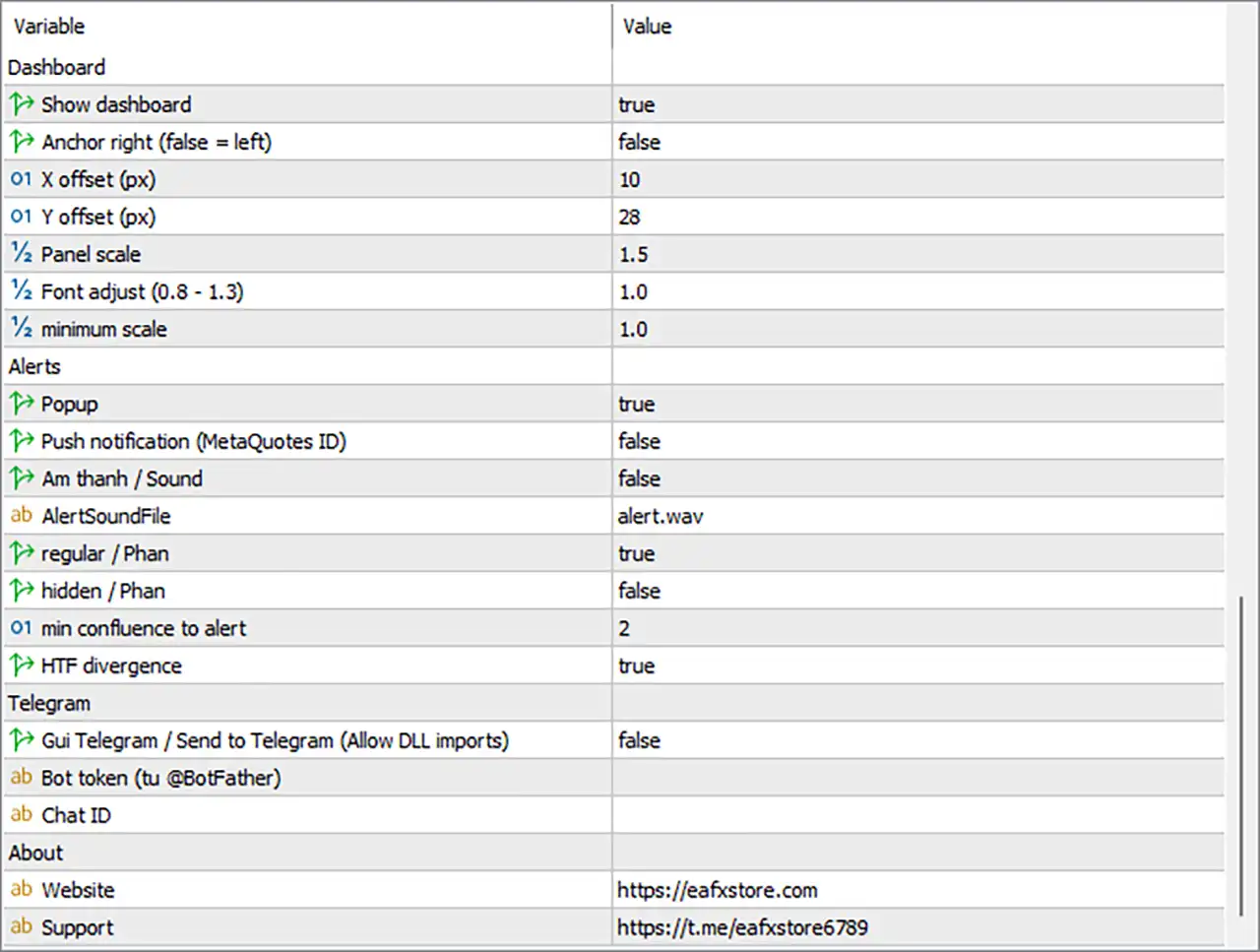
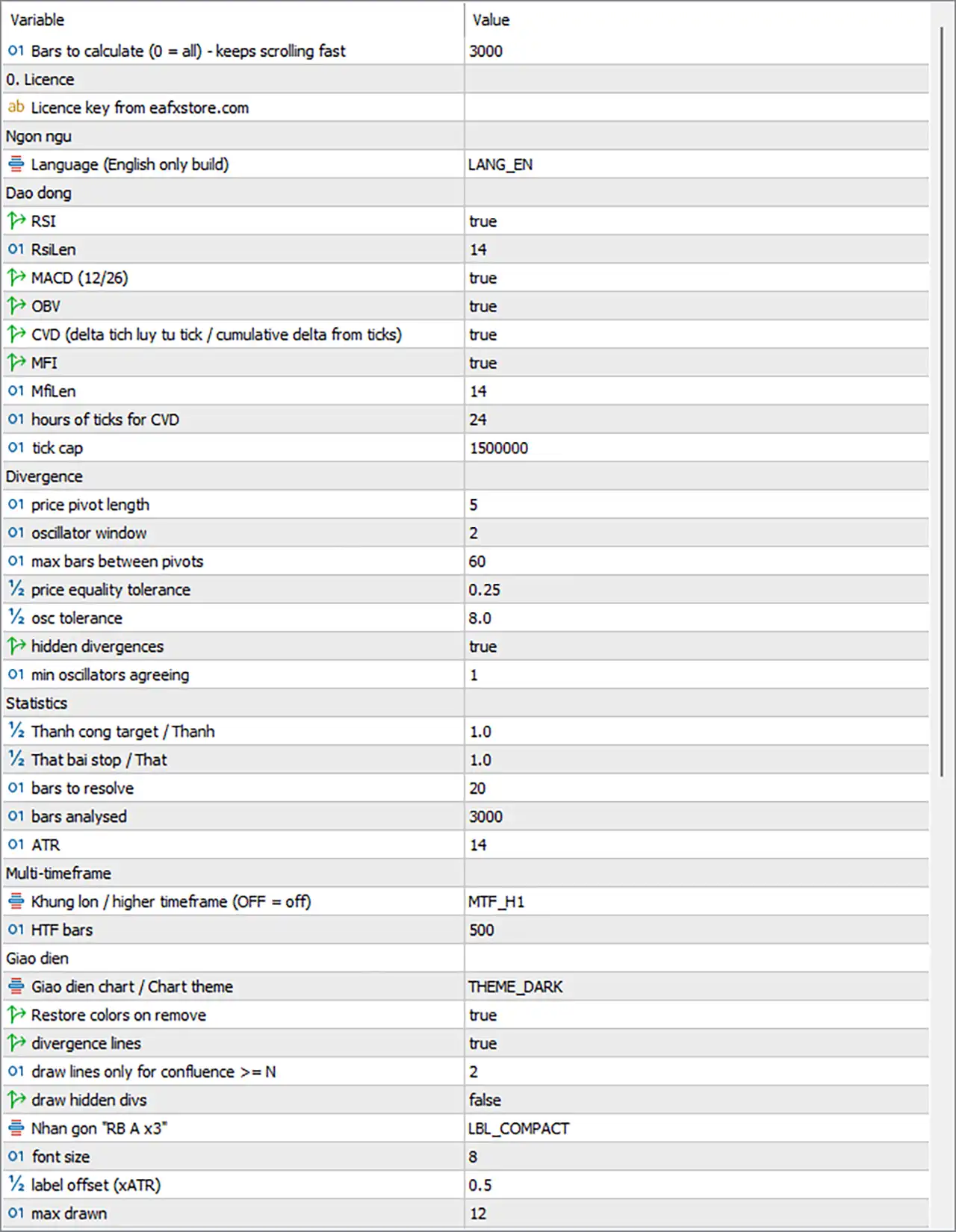
Omega Divergence Sniper - Inputs Settings Guide
Omega Divergence Sniper Indicator MT5 Settings Panel
Omega Divergence Sniper Indicator Settings Panel

Omega Divergence Sniper Indicator Settings Panel

🔢 Installation

🔹 In MetaTrader 5, open File > Open Data Folder, then go to MQL5Indicators.

🔹 Copy the indicator file (OmegaDivergenceSniper_v1.0.ex5, or the .mq5 source) into that folder.

🔹 Back in MetaTrader 5, right-click Indicators in the Navigator window and choose Refresh (or restart the terminal). If you copied the .mq5 file, open it in MetaEditor and press Compile first.

🔹 Enable DLL imports: Tools > Options > Expert Advisors > Allow DLL imports. This is required for the licence check, Telegram alerts and the WEB / TELEGRAM buttons.

🔹 Drag Omega Divergence Sniper from the Navigator onto a chart. On the Common tab, make sure Allow DLL imports is ticked as well.

🔹 On the Inputs tab, enter your licence key in InpLicenseKey, adjust other settings as needed, and click OK.

Note: If the licence cannot be verified, the indicator does not load and the reason is printed in the chart's top-left corner and in the Experts tab (for example, a missing key or DLL imports not being allowed).

The following sections explain every input in the order it appears on the Inputs tab.

🔢 General

🔹 MaxBarsCalc (default: 3000) - Number of most recent bars calculated when the indicator loads. 0 = all available bars. Smaller values load faster and keep chart scrolling smooth; larger values give more history for statistics.

🔢 0. Licence

🔹 InpLicenseKey (default: empty) - Your licence key from eafxstore.com. Spaces are trimmed and letters are converted to upper case automatically. The key is verified when the indicator starts and re-checked every 30 minutes; it is also re-checked immediately if you switch trading account.

If the licence server is temporarily unreachable, the indicator can keep running from the last successful check for a limited grace period (72 hours by default). Keep your computer clock correct - a clock set back in time disables the grace period.

🔢 Language

🔹 Lang (default: LANG_EN) - Interface language. This build is English only, so this setting has no effect.

🔢 Oscillators

Choose which oscillators take part in divergence detection. Disabling an oscillator removes it from confluence counts, statistics and the dashboard (it is shown as "(off)").

🔹 UseRSI (default: true) - Enable RSI divergence detection.

🔹 RsiLen (default: 14) - RSI period (Wilder smoothing). Lower = faster and more sensitive; higher = smoother with fewer divergences.

🔹 UseMACD (default: true) - Enable MACD divergence detection. Uses the MACD line with fixed periods 12 and 26 (not adjustable).

🔹 UseOBV (default: true) - Enable On-Balance Volume divergence detection (based on tick volume).

🔹 UseCVD (default: true) - Enable Cumulative Volume Delta divergence detection. CVD is built from real ticks for recent bars and estimated from OHLC and tick volume for older bars (dashboard shows * when estimated).

🔹 UseMFI (default: true) - Enable Money Flow Index divergence detection.

🔹 MfiLen (default: 14) - MFI period in bars.

🔹 TickHours (default: 24) - How many hours of tick history to load for CVD. Bars older than this use the estimated delta. Larger values give more accurate CVD over more bars but take longer to load and use more memory.

🔹 MaxTicks (default: 1500000) - Maximum number of ticks kept in memory. If more ticks are loaded, only the most recent are kept. Lower it (e.g. 500000) on a VPS or when running many charts.

🔢 Divergence

These inputs control how swings are found and what counts as a divergence.

🔹 PivLen (default: 5) - Number of bars on each side needed to confirm a swing high or low. A signal appears PivLen bars after the swing. Lower = earlier but more (and noisier) signals; higher = fewer, more significant swings. Also the minimum distance between the two swings being compared.

🔹 PivWindow (default: 2) - The oscillator's extreme is searched within ±PivWindow bars of each price swing, because oscillators often peak one or two bars before or after price.

🔹 MaxPivotGap (default: 60) - Maximum number of bars between the two swings that are compared. Swings further apart are ignored.

🔹 TolPriceATR (default: 0.25) - Price tolerance in ATR units. Two swings within 0.25 x ATR are treated as equal (double bottom/top, class B). A new extreme must exceed this distance to count as a lower low or higher high.

🔹 TolOscPct (default: 8) - Oscillator tolerance as a percentage of the oscillator's range over the last 100 bars. Differences smaller than this are treated as equal (class C).

🔹 ShowHidden (default: true) - Detect hidden (trend-continuation) divergences. When false, only regular divergences are detected.

🔹 MinConfluence (default: 1) - Minimum number of oscillators that must agree for a divergence to be recorded at all. Keeping it at 1 gives the statistics the most samples; use MinDrawConf and AlertMinConf to filter what you see and receive.

Class reference

🔹 A - Price: New extreme (lower low / higher high); Oscillator: Fails to confirm

🔹 B - Price: Equal (within TolPriceATR); Oscillator: Fails to confirm

🔹 C - Price: New extreme; Oscillator: Equal (within TolOscPct)

🔹 H (hidden) - Price: Higher low / lower high; Oscillator: Lower low / higher high

🔢 Statistics

Every divergence is followed forward from the close of its confirmation bar to measure whether it worked.

🔹 TargetATR (default: 1.0) - Success target: the move in the signal's direction, in ATR units, that must be reached first.

🔹 StopATR (default: 1.0) - Failure level: the move against the signal, in ATR units. If target and stop are both touched in the same bar, the result is counted as a failure.

🔹 StatBars (default: 20) - Bars allowed for the target or stop to be reached. After that the signal is a timeout and is excluded from win rates.

🔹 MaxHistory (default: 3000) - Number of recent bars in which divergences are detected and evaluated. Should normally be less than or equal to MaxBarsCalc.

🔹 AtrLen (default: 14) - ATR period. ATR is used for price tolerance, targets/stops, arrow and label offsets.

🔢 Multi-timeframe

🔹 MtfPeriod (default: MTF_H1) - Higher timeframe to scan: OFF, M30, H1, H4 or D1. It must be higher than the chart timeframe, otherwise the HTF scan is skipped. The latest bullish and bearish HTF divergences are drawn as dash-dot lines (blue / orange).

🔹 MtfBars (default: 500) - Number of higher-timeframe bars analysed (at least 60 are needed). The HTF scan runs once per new HTF bar. HTF CVD always uses the estimated delta.

🔢 Display

🔹 Theme (default: THEME_DARK) - Chart colour theme: NONE (keep your colours), DARK, MIDNIGHT or LIGHT. Applies background, grid, candle, bid/ask colours and switches the chart to candles.

🔹 RestoreTheme (default: true) - Restore your original chart colours when the indicator is removed.

🔹 ShowLines (default: true) - Draw lines connecting the two price swings of each divergence. Solid = regular, dashed = hidden; thicker for confluence x3 or more.

🔹 MinDrawConf (default: 2) - Lines and labels are drawn only for divergences with at least this confluence. Weaker signals still get an arrow, which keeps the chart clean.

🔹 DrawHidden (default: false) - Draw hidden divergences (arrows, lines and labels). They are still detected and counted in statistics when false.

🔹 LabelStyle (default: LBL_COMPACT) - NONE - no labels; COMPACT - short label such as "RB·A x3"; FULL - adds oscillator names, e.g. "RSI+MACD RB·A x2". Hover for the full description.

🔹 LabelFont (default: 8) - Font size of the chart labels.

🔹 LabelOffsetATR (default: 0.5) - Distance of labels from the swing price, in ATR units, so they do not overlap the candles.

🔹 MaxDraw (default: 12) - Maximum number of recent divergences drawn with lines/labels. Older ones are removed from the chart.

🔢 Dashboard

🔹 ShowDash (default: true) - Show or hide the dashboard panel.

🔹 DashRight (default: false) - Anchor the panel to the right side of the chart (false = left).

🔹 DashX (default: 10) - Horizontal distance in pixels from the chosen side.

🔹 DashY (default: 28) - Vertical distance in pixels from the top.

🔹 DashScale (default: 1.5) - Panel size multiplier. It is reduced automatically if the panel would not fit the chart height or would take more than 45% of the chart width.

🔹 DashFontAdj (default: 1.0) - Fine-tunes text size inside the panel (recommended 0.8 - 1.3).

🔹 DashMinScale (default: 1.0) - Smallest scale the automatic fitting may use (never below 0.55). Lower it if the panel is cut off on a small chart.

Tip: You can drag the panel by its header. The dragged position is saved for that chart and then overrides DashX, DashY and DashRight. To return to the input position, delete the global variables starting with OMDIVE_DASH in Tools > Global Variables (F3).

🔢 Alerts

Alerts are triggered only for signals confirmed on new live bars, never for historical signals found when the indicator loads.

🔹 AlertPopup (default: true) - Show a MetaTrader popup alert.

🔹 AlertPush (default: false) - Send a push notification to the MetaTrader mobile app. Requires your MetaQuotes ID in Tools > Options > Notifications.

🔹 AlertSoundOn (default: false) - Play a sound file on each alert.

🔹 AlertSoundFile (default: alert.wav) - Sound file to play; it must be in the terminal's Sounds folder.

🔹 AlertRegular (default: true) - Alert on regular divergences.

🔹 AlertHiddenD (default: false) - Alert on hidden divergences.

🔹 AlertMinConf (default: 2) - Minimum confluence for chart-timeframe alerts. Set 3 to be alerted only on the strongest signals.

🔹 AlertMtf (default: true) - Alert when a new higher-timeframe divergence appears (not filtered by AlertMinConf).

🔢 Telegram

🔹 TgEnable (default: false) - Send every alert to Telegram as well. Requires Allow DLL imports. When enabled, a TEST TG button appears on the dashboard footer.

🔹 TgToken (default: empty) - Your bot token from @BotFather, e.g. "123456789:AA...".

🔹 TgChatID (default: empty) - The chat, group or channel ID that should receive messages.

How to set up Telegram alerts

🔹 In Telegram, open @BotFather, send /newbot, follow the steps and copy the bot token.

🔹 Open a chat with your new bot and send it any message (for a group, add the bot to the group; for a channel, add it as an administrator).

🔹 Get your chat ID, for example by messaging @userinfobot, or by opening https://api.telegram.org/bot<TOKEN>/getUpdates in a browser and reading the "chat":{"id":...} value.

🔹 Enter the token and chat ID in the indicator inputs and set TgEnable = true.

🔹 Click TEST TG on the dashboard. A confirmation popup tells you whether the test message was sent; if not, check the Experts tab for details.

🔢 About

🔹 AboutWeb (default: https://eafxstore.com) - Address opened by the WEB button on the dashboard.

🔹 AboutTelegram (default: https://t.me/eafxstore6789) - Address opened by the TELEGRAM button on the dashboard (support channel).

🔢 Troubleshooting

🔹 Indicator does not load; message "Please enter your licence key": Enter the key in InpLicenseKey.

🔹 Message about Allow DLL imports: Enable it in Tools > Options > Expert Advisors and on the indicator's Common tab.

🔹 "Cannot reach the licence server": Check your internet connection and firewall. The indicator can continue on the grace period if it was verified recently.

🔹 "System clock check failed": Set your computer date and time correctly (automatic time sync recommended).

🔹 CVD value shows "*": Tick history is not available for that bar; delta is estimated. Increase TickHours or wait for the tick cache to load.

🔹 No HTF information: MtfPeriod is OFF or not higher than the chart timeframe; choose a higher one.

🔹 Too many or too few signals: Adjust PivLen, MaxPivotGap and the tolerances; use MinDrawConf to reduce drawn signals.

🔹 Telegram test fails: Check token, chat ID, that you messaged the bot first, and Allow DLL imports; see the Experts tab.

🔹 Chart loads slowly / high memory: Lower MaxBarsCalc, MaxHistory, MaxTicks or TickHours.
Full review

Quick Verdict

Omega Divergence Sniper Indicator MT5 is a structured divergence-analysis tool that scans RSI, MACD, OBV, CVD and MFI together. It grades signals by quality and confluence, tracks historical outcomes, adds higher-timeframe confirmation and delivers alerts for stronger setups.

Best For

✅ Traders looking for regular and hidden divergence signals.

✅ Forex, Gold, indices, crypto and stock market analysis.

✅ Traders who want multi-oscillator confirmation.

✅ Intraday and swing traders using higher-timeframe confirmation.

✅ Traders who prefer measurable statistics over subjective divergence analysis.

Overall Rating

9.0/10 ⭐⭐⭐⭐⭐


What is Omega Divergence Sniper Indicator MT5?

Omega Divergence Sniper is a MetaTrader 5 technical indicator designed to detect regular and hidden divergences between price and five different oscillators: RSI, MACD, OBV, CVD and MFI. Instead of requiring traders to compare multiple indicators manually, the system analyzes them together and assigns each detected divergence a quality class and confluence level.

The indicator goes beyond simply drawing divergence signals on the chart. It follows each confirmed signal forward and records whether price reaches an ATR-based target or stop first. The results are organized by oscillator, divergence type and quality class, giving traders a statistical view of how different divergence signals have performed on the selected symbol and timeframe.

⭐ Join Our Channel Telegram


How Does Omega Divergence Sniper Indicator MT5 Work?

The easiest way to understand Omega Divergence Sniper is to think of it as a filtering process. It starts with price and oscillator data, finds meaningful swing points, checks for divergence, looks for confirmation from the other oscillators and then scores the result.

Five Oscillators Working Together

The indicator calculates RSI, MACD, OBV, CVD and MFI internally. This is useful because the trader does not need to load five separate indicators just to look for divergence.

CVD is particularly interesting here. Where available, the indicator uses tick information to estimate buying and selling pressure. On older bars or when the required tick data is unavailable, it uses the documented estimation method instead.

Finding the Swing Points

Before calling something a divergence, the indicator needs a confirmed swing high or swing low.

With the default PivLen = 5, the swing has to remain an extreme for five bars on each side before it is confirmed. This is important because the indicator does not treat an unfinished swing as a completed signal.

Regular and Hidden Divergence

Once the swings are confirmed, the indicator compares price with oscillator behavior.

A typical regular bullish divergence occurs when price makes a lower low while the oscillator makes a higher low. A regular bearish divergence works in the opposite direction.

Hidden divergence is handled differently. It looks for situations such as a higher low in price combined with a lower low in the oscillator, which can point toward trend continuation rather than an outright reversal.

Confluence Makes the Difference

This is one of the parts I find most useful about the system.

If only RSI shows a divergence, the signal receives x1 confluence. If RSI, MACD and CVD all point to the same divergence, it becomes x3.

The idea is simple: the more oscillators agreeing at the same price swings, the more confirmation the setup has.

Historical Results Are Included

After a divergence is confirmed, the indicator follows what happens next. If price reaches the ATR-based target first, the signal is recorded as a success. If the stop is reached first, it is recorded as a failure. Signals that reach neither level within the defined period are treated as timeouts and excluded from the win-rate calculation.


Key Features of Omega Divergence Sniper Indicator MT5

Five-Oscillator Divergence Engine

Detects regular and hidden divergences using RSI, MACD, OBV, CVD and MFI within one integrated analysis system.

Quality and Confluence Grading

Every divergence receives a Class A, B, C or H grade together with x1–x5 confluence to help identify stronger confirmations.

Tick-Based CVD Analysis

Uses cumulative volume delta from available real tick data to add buying and selling pressure information alongside traditional price-based oscillators.

Built-In Signal Statistics

Tracks divergence outcomes using ATR-based targets and stops, then displays win rates by oscillator, divergence type and signal class.

Higher-Timeframe Confirmation

Scans M30, H1, H4 or D1 and projects the latest higher-timeframe divergence onto the active chart for broader market confirmation.

Divergence Score Dashboard

Combines recent divergences, quality, confluence, historical performance and HTF information into a 0–100 directional score.

Non-Repainting Divergence Signals

Signals are confirmed only after swing points are closed on both sides, helping keep historical divergence locations stable for review.


Omega Divergence Sniper Indicator – Trading Rules

BUY Entry

🔹 Use the green upward arrow as the primary BUY signal.

🔹 When a green arrow appears near a market low or after a downward move, prepare for a BUY entry.

🔹 Prefer BUY trades when the Regular Bullish Divergence signal is confirmed with a positive Divergence Score.

🔹 Wait for the bullish candle to close before entering the trade.

🔹 Place Stop Loss below the recent swing low and set Take Profit at the next resistance area or use a suitable Risk/Reward ratio.

SELL Entry

🔹 Use the red downward arrow as the primary SELL signal.

🔹 When an orange/red arrow appears near a market high or after an upward move, prepare for a SELL entry.

🔹 Prefer SELL trades when a Bearish Divergence signal is confirmed.

🔹 Wait for the bearish candle to close before entering the trade.

🔹 Place Stop Loss above the recent swing high and set Take Profit at the next support area or use a suitable Risk/Reward ratio.

Omega Divergence Sniper Indicator MT5 Reviews

Omega Divergence Sniper Indicator MT5 Review

Traditional divergence trading often requires traders to inspect several oscillators manually and decide whether a divergence is strong enough to consider. Omega Divergence Sniper automates much of this comparison by scanning five oscillators simultaneously and showing how many of them confirm the same divergence.

Objective Divergence Analysis

The indicator applies the same divergence definitions consistently instead of relying entirely on visual interpretation. This can make the analysis easier to standardize across different charts and markets.

Signal Performance Tracking

One of the more distinctive features is the built-in statistical tracking. Rather than only showing historical divergence markers, the indicator follows each signal and records whether the predefined target or stop was reached first.

This allows traders to examine performance by:

🔹 Oscillator

🔹 Regular bullish divergence

🔹 Regular bearish divergence

🔹 Hidden bullish divergence

🔹 Hidden bearish divergence

🔹 Class A

🔹 Class B

🔹 Class C

The system also identifies the Most Reliable Oscillator once sufficient samples are available.

Clean Dashboard

The dashboard provides information about the latest divergence, Divergence Score, recent bullish and bearish divergences, HTF divergence, oscillator performance, success statistics and recent events.

It can also be moved and anchored to the left or right side of the chart.

Omega Divergence Sniper Indicator Reviews

Omega Divergence Sniper Indicator Reviews
Omega Divergence Sniper Indicator Review

Omega Divergence Sniper Indicator Review

Why Omega Divergence Sniper Indicator MT5 Stands Out

Multi-Oscillator Confirmation

Rather than relying on RSI divergence alone, the indicator evaluates five separate oscillators.

This creates a broader confirmation framework for divergence-based analysis.

Regular and Hidden Divergence

The indicator supports both regular divergence and hidden divergence.

Regular divergence can highlight potential momentum disagreement and reversal areas, while hidden divergence is classified as a potential trend-continuation signal.

Confluence-Based Filtering

The x1–x5 confluence system makes it easier to distinguish a single-oscillator divergence from a setup confirmed by several oscillators.

Focus on Type A and B signals that feature a confluence of two or more factors (x2), and ideally, those that also align with a divergence signal on a higher timeframe.

Evidence-Based Signal Review

The built-in statistics allow traders to evaluate how different divergence types and oscillators have performed on the selected market rather than relying exclusively on visual assumptions.

No-Repainting Design

The indicator does not use the still-forming candle for divergence signals.

A divergence is confirmed only after the relevant swing point has closed on both sides.


Risk Management Features

Omega Divergence Sniper is an analytical indicator rather than an automated money-management EA, but several functions provide useful risk-control information.

ATR-Based Target and Stop Tracking

The statistical engine uses ATR-based target and stop levels to classify historical divergence outcomes.

This provides a consistent framework for evaluating whether a signal reached its target or stop first.

Confluence Filtering

Traders can increase the minimum confluence required for drawn signals or alerts.

This can help focus attention on divergences confirmed by multiple oscillators.

Higher-Timeframe Alignment

The HTF engine helps traders compare the current-chart divergence with a higher-timeframe divergence.

The dashboard reports whether the two directions are aligned.

Statistical Filtering

After enough samples are collected, the dashboard can identify oscillator performance.

It is recommended to consider disabling oscillators that consistently show a win rate below 45% after at least 10 data samples have been collected for the selected asset pair and timeframe.

Alert Filtering

Separate settings are available for regular, hidden and HTF divergence alerts, together with a minimum confluence filter.

Alerts are triggered only on new live bars rather than historical signals when the indicator is loaded.


The product guide recommends M5–M15 for scalping, M15–H1 for intraday trading and H4 for swing trading.

Trading Style Recommended Timeframe Suggested Markets Recommended Approach
Scalping M5–M15 Forex, Gold, Indices, Crypto Focus on Class A/B divergences with stronger confluence
Intraday M15–H1 EURUSD, GBPUSD, USDJPY, XAUUSD Use divergence with H4 higher-timeframe confirmation
Swing Trading H4 Forex, Gold, Indices Combine Class A/B divergence with D1 confirmation
Reversal Trading M15–H4 Forex, Gold, Indices Focus on regular bullish/bearish divergence
Trend Continuation M15–H4 Major Forex pairs, Gold Look for hidden bullish/bearish divergence aligned with the trend
High-Quality Alerts M15–H1 Major Forex pairs, XAUUSD Consider AlertMinConf 3 for higher-confluence setups

Weaknesses and Risk Warnings

Divergence Is Not a Guaranteed Entry Signal

A divergence identifies disagreement between price and momentum, but it does not guarantee an immediate reversal or continuation.

The product documentation specifically recommends combining divergence with market structure, support/resistance and proper risk management.

CVD Accuracy Depends on Tick Data

CVD uses real tick information when available.

On Forex markets, brokers commonly provide tick volume rather than exchange-style trade flags, so the CVD calculation may rely on the documented tick-based estimation method.

Higher-Timeframe Data Requires Proper Configuration

The selected HTF period must be higher than the active chart timeframe.

Otherwise, the higher-timeframe scan is skipped automatically.

More Filters Can Mean Fewer Signals

Using high confluence requirements and strict quality filtering can reduce the number of visible or alerted signals.

This is useful for filtering but may also mean that traders receive fewer opportunities.


Who Should Use Omega Divergence Sniper Indicator MT5?

Forex Traders

Forex traders can use the indicator to analyze regular and hidden divergences across major currency pairs and multiple timeframes.

Gold Traders

The multi-oscillator divergence engine and ATR-based calculations can be applied to XAUUSD, with the recommended intraday configurations providing a starting point for M15–H1 analysis.

Scalpers

Scalpers can use M5–M15 settings to identify shorter-term divergence opportunities and configure higher confluence requirements for alerts.

Swing Traders

Swing traders can use H4 charts together with D1 higher-timeframe confirmation to identify broader divergence and potential trend-continuation conditions.

Technical Traders

Traders who already use market structure, support/resistance and momentum analysis can integrate Omega Divergence Sniper as an additional confirmation layer rather than relying on divergence alone.

Traders Who Prefer Statistical Analysis

The built-in performance tables make the indicator particularly useful for traders who want to examine historical behavior by oscillator, divergence type and signal class.


Product Download Package?

The download package of the product suite includes:

✅ Indicator: OmegaDivergenceSniper_v1.0 (License).ex5

✅ READ_ME_FIRST.txt

✅ OmegaDivergenceSniper_UserGuide_v1.0.pdf

✅ Omega_Divergence_Sniper_Inputs_Guide.pdf

✅ Omega_Divergence_Sniper_Product_Guide.pdf

➡️ Reviewed by David Easton


Final Verdict

Omega Divergence Sniper Indicator MT5 is a comprehensive divergence-analysis tool built around five oscillators: RSI, MACD, OBV, CVD and MFI. Its combination of regular and hidden divergence detection, Class A/B/C/H grading, x1–x5 confluence, historical signal statistics and higher-timeframe analysis gives traders a structured way to evaluate divergence setups.

The standout feature is the combination of signal detection and measurable performance tracking. Instead of simply showing that a divergence exists, the indicator also records how different signal types have performed and presents that information through its dashboard.

For traders who want to make divergence analysis more systematic, Omega Divergence Sniper provides a strong analytical framework. However, it should be used as a confirmation and decision-support tool, not as a standalone guarantee of profitable trades. Combining divergence with market structure, support/resistance and disciplined risk management remains essential.

Questions about Omega Divergence Sniper Indicator MT5

❓ What does Omega Divergence Sniper Indicator MT5 detect?

Omega Divergence Sniper Indicator MT5 detects regular and hidden bullish or bearish divergences across RSI, MACD, OBV, CVD, and MFI.

❓ How does Omega Divergence Sniper Indicator MT5 measure divergence quality?

Omega Divergence Sniper Indicator MT5 grades regular signals as Class A, B, or C and hidden signals as H, while also showing oscillator confluence from x1 to x5.

❓ Does Omega Divergence Sniper Indicator MT5 support multiple oscillators?

Yes. Omega Divergence Sniper Indicator MT5 internally calculates RSI, MACD, OBV, CVD, and MFI, allowing multiple divergence signals to be analyzed together.

❓ Does Omega Divergence Sniper Indicator MT5 repaint signals?

No. Omega Divergence Sniper Indicator MT5 confirms divergence only after the swing point has closed on both sides, so confirmed signals do not repaint.

❓ Can Omega Divergence Sniper Indicator MT5 show signal statistics?

Yes. Omega Divergence Sniper Indicator MT5 tracks signal outcomes and displays win rates by oscillator, divergence type, and quality class using ATR-based targets and stops.

❓ Does Omega Divergence Sniper Indicator MT5 provide multi-timeframe analysis?

Yes. Omega Divergence Sniper Indicator MT5 scans a higher timeframe and projects the latest bullish or bearish divergence onto the current chart for additional confirmation.

❓ What is the Divergence Score in Omega Divergence Sniper Indicator MT5?

Omega Divergence Sniper Indicator MT5 generates a 0–100 Divergence Score using recent signals, quality classes, confluence, measured results, and higher-timeframe divergence.

❓ Can Omega Divergence Sniper Indicator MT5 send trading alerts?

Yes. Omega Divergence Sniper Indicator MT5 supports popup, push notification, sound, and Telegram alerts, with separate filters for regular, hidden, and HTF signals.

❓ Is Omega Divergence Sniper Indicator MT5 suitable for different trading styles?

Yes. Omega Divergence Sniper Indicator MT5 provides recommended configurations for scalping, intraday, and swing trading across different chart timeframes.

❓ Can Omega Divergence Sniper Indicator MT5 be used as a standalone entry system?

Omega Divergence Sniper Indicator MT5 is designed as an analytical tool. Divergence should be combined with market structure, support/resistance, and proper risk management.

Other products traders compare

From $25
Instant download
Choose option