



Omega VWAP Anchor Indicator MT5
Omega VWAP Anchor shows where fair value is on your chart: session, weekly, monthly and anchored VWAP with sigma bands that mark when price is stretched. Volume-confirmed crosses, reversion statistics and a VWAP Score dashboard help you decide when to follow the trend and when to expect a pullback to VWAP.
Frequently bought together 🎁
Add these products to enhance your purchase


Quick Overview
Omega VWAP Anchor Indicator MT5 shows where fair value is, so you stop buying highs and selling lows far away from it. It draws VWAP lines with sigma bands, marks when price is stretched, and tells you whether the trend behind VWAP is rising, falling or flat.
Best for:
✅ Intraday traders who use VWAP as their main reference line.
✅ Traders who buy pullbacks in a trend and want a clear “fair price” to wait for.
✅ Mean-reversion traders who fade stretched moves back to average price.
✅ News traders who want the average price since a big release.
What Is Omega VWAP Anchor?
Omega VWAP Anchor is a VWAP indicator MT5 traders use to see the average price weighted by volume, the same reference many institutions use. VWAP (Volume Weighted Average Price) is simply the average price everyone paid, with high-volume bars counting more. Developed by EA FX Store for MetaTrader 5, it combines session, weekly, monthly and anchored VWAP on one chart, and it is part of our Indicator collection. It does not open trades.
Key Features of Omega VWAP Anchor Indicator MT5
Session, weekly and monthly VWAP
The session VWAP resets each day at the hour you choose, while dashed weekly and monthly VWAP lines show the bigger picture. The session line turns green when it rises, red when it falls and gold when it is flat.
Volume-weighted sigma bands
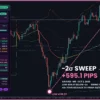
Bands at ±1 and ±2 sigma show how far price has moved from VWAP (sigma = the usual distance from the average). Price at +2 sigma or more reads PREMIUM, at -2 sigma or less DISCOUNT.
Anchored VWAP with seven anchor modes
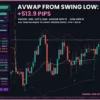
An anchored VWAP starts from a point that matters: the latest swing, the last swing high or low, the week or month open, the last high-impact news, or a gold line you drag yourself. It has its own ±1 sigma band.
Volume-confirmed VWAP crosses
An arrow appears only when a bar closes across the session VWAP on volume at least 1.3x its recent average, which filters out weak, noisy crosses.
Reversion statistics and VWAP Score
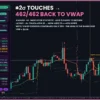
The dashboard counts how often band touches returned to VWAP on your own chart, and how many crosses kept going. A VWAP Score from 0 to 100 sums up position, slope and stretch: BULLISH, NEUTRAL or BEARISH.
Alerts and Telegram
Get a pop-up, push, sound or Telegram message on volume-confirmed crosses, band touches and anchored VWAP crosses.
Omega VWAP Anchor Indicator MT5 Review
How Does Omega VWAP Anchor Work?
🔹 Average price: each bar’s typical price, (High + Low + Close) / 3, is weighted by its volume and added to the VWAP.
🔹 Bands: the volume-weighted spread of prices around VWAP builds the sigma bands.
🔹 Slope: VWAP’s change per bar, measured in ATR (how far price usually moves in one bar), decides RISING, FALLING or FLAT.
🔹 Anchor: the anchored VWAP restarts from the chosen swing, period open, news event or manual point.
🔹 Closed bars: signals and statistics use closed bars only, so finished values do not change.
How to Trade with Omega VWAP Anchor Indicator MT5
Two classic VWAP ideas are trend pullbacks and fading extremes. Use the steps below as a starting point and test them on a demo account first.
BUY setup
🔹 Step 1: the dashboard shows ABOVE SESSION VWAP and the slope reads RISING (green VWAP line).
🔹 Step 2: wait for a pullback to the session VWAP or the -1 sigma band; the Suggestion line reads “Rising VWAP & price above: buy pullbacks to VWAP”.
🔹 Step 3: buy when a bar closes back above VWAP, ideally with a green volume-confirmed cross arrow.
🔹 Take Profit: the +1 sigma band first, then +2 sigma. See our take profit guide.
🔹 Stop Loss: below the -1 sigma band or the anchored VWAP. More in how to set a stop loss.
SELL setup
🔹 Step 1: the dashboard shows BELOW SESSION VWAP and the slope reads FALLING (red VWAP line).
🔹 Step 2: wait for a rally to the session VWAP or the +1 sigma band.
🔹 Step 3: sell when a bar closes back below VWAP, ideally with a red volume-confirmed cross arrow.
🔹 Take Profit: -1 sigma first, then -2 sigma.
🔹 Stop Loss: above the +1 sigma band or the anchored VWAP.
🔹 Skip the trade: when the VWAP is FLAT and price is near it (AT VWAP), or when the session, weekly and monthly VWAP point in different directions. On flat days, the dashboard suggests fading the outer bands instead.
Omega VWAP Anchor MT5 Review
Omega VWAP Anchor Indicator Review
What Makes It Different
🔹 Four VWAPs in one: no need to stack separate session, weekly, monthly and anchored VWAP tools.
🔹 News-aware anchor: it can anchor itself to the last high-impact event from the MT5 economic calendar.
🔹 Evidence, not opinion: the statistics show how VWAP actually behaved on the symbol you trade.
🔹 Plain-language guidance: the Suggestion line turns the readings into a simple next step.
Recommended Trading Conditions
| Trading style | Timeframe | Focus |
|---|---|---|
| Scalping / intraday | M5 – M30 | Session VWAP, sigma bands, volume-confirmed crosses |
| Day trading | M15 – H1 | Session plus weekly VWAP and the swing anchor |
| Swing | H1 – H4 | Weekly, monthly and week/month-open anchored VWAP |
The indicator runs on MetaTrader 5 with any symbol, including Forex, gold, indices, crypto and stocks; it uses real volume when your broker provides it and tick volume otherwise, over the last 3000 bars by default.
Limitations and Risk Warnings
🔹 Session hour matters: the session VWAP resets at server time, so set the session hour to match your broker and your market.
🔹 Swing anchors appear late: a swing is confirmed 10 bars after it forms, then the anchored VWAP is drawn back from the swing.
🔹 Tick volume on Forex: most Forex brokers only provide tick volume, which approximates real traded volume.
🔹 Statistics are history: reversion and cross numbers describe past behaviour on your chart, not a guaranteed result.
🔹 Risk first: always use a stop loss and sensible position size. Read our risk management tips.
Who Should Use Omega VWAP Anchor Indicator MT5?
🔹 Intraday and scalping traders: trade around a clear daily fair-value line; see more scalping tools for MT5.
🔹 Trend traders: buy or sell pullbacks to a rising or falling VWAP.
🔹 Mean-reversion traders: fade price at the outer bands when VWAP is flat.
🔹 News traders: follow the average price since the latest high-impact release.
🔹 Not the right tool if: you want automatic trading or ready-made buy/sell signals on every bar.
Download Package
✅ Indicator: OmegaVWAPAnchor_v1.0.ex5
✅ Product Guide: Omega_VWAP_Anchor_Product_Guide.pdf
✅ Inputs Guide: Omega_VWAP_Anchor_Inputs_Guide.pdf
Final Verdict
Omega VWAP Anchor puts session, weekly, monthly and anchored VWAP, sigma bands and volume-confirmed crosses on one chart. You always know where fair value is, how far price has stretched and which way the VWAP trend is pointing.
Pick your licence above, join our Telegram channel for updates, and explore more volume and volatility tools for MT5.
Installation
🔹 Step 1: in MetaTrader 5, open File > Open Data Folder and copy the .ex5 file into MQL5Indicators.
🔹 Step 2: go to Tools > Options > Expert Advisors and tick “Allow DLL imports” (needed for the licence check, Telegram and the dashboard buttons).
🔹 Step 3: refresh the Navigator, then drag Omega VWAP Anchor onto a chart.
🔹 Step 4: paste your licence key into InpLicenseKey and press OK. If something is wrong, the reason appears in the top-left corner of the chart.
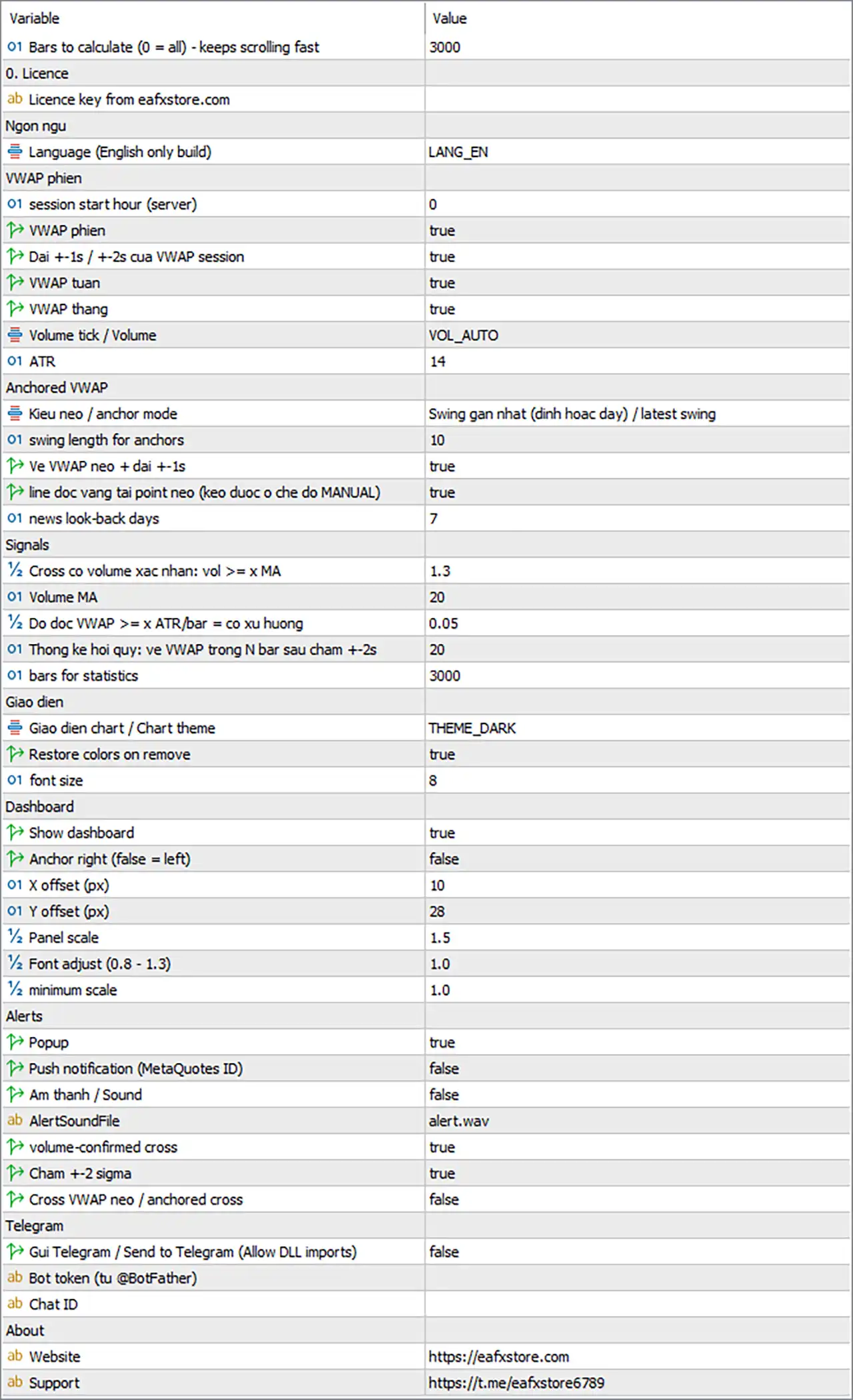
Omega VWAP Anchor Indicator MT5 Settings Panel
General and Licence
| Input | Default | What it does |
|---|---|---|
| MaxBarsCalc | 3000 | Bars the indicator calculates; fewer bars load faster (0 = all) |
| InpLicenseKey | (empty) | Your licence key from eafxstore.com |
| Lang | LANG_EN | Display language; this version is English only |
Session VWAP
| Input | Default | What it does |
|---|---|---|
| SessionStartHour | 0 | Server hour when the session VWAP resets each day |
| ShowSession | true | Shows the session VWAP line |
| ShowBands | true | Shows the ±1 and ±2 sigma bands |
| ShowWeekly | true | Shows the weekly VWAP |
| ShowMonthly | true | Shows the monthly VWAP |
| VolSource | VOL_AUTO | Real volume when available, otherwise tick volume; VOL_TICK always uses tick volume |
| AtrLen | 14 | ATR period used to measure the VWAP slope |
Set SessionStartHour to your market’s open in broker server time, for example the London or New York open.
Anchored VWAP
| Input | Default | What it does |
|---|---|---|
| AnchorMode | Latest swing | Where the anchored VWAP starts: swing low, swing high, latest swing, week start, month start, last high-impact news or manual |
| PivLen | 10 | Bars on each side that confirm a swing for the swing anchors |
| ShowAnchored | true | Shows the anchored VWAP and its ±1 sigma band |
| ShowAnchorLine | true | Shows the gold vertical anchor line (drag it in manual mode) |
| NewsLookDays | 7 | How many days back the news anchor looks for high-impact events |
Signals
| Input | Default | What it does |
|---|---|---|
| VolConfirmX | 1.3 | Volume needed for a confirmed cross, as a multiple of the average |
| VolMA | 20 | Bars in the volume average |
| SlopeATR | 0.05 | VWAP slope per bar (in ATR) needed for RISING or FALLING |
| RevBars | 20 | Bars allowed for a band touch to return to VWAP |
| MaxHistory | 3000 | Bars used for the statistics |
Raise VolConfirmX to 1.5-2.0 if you want fewer, stronger cross arrows.
Display
| Input | Default | What it does |
|---|---|---|
| Theme | Dark Pro | Chart colours: Keep chart colors, Dark Pro, Midnight Blue or Light Clean |
| RestoreTheme | true | Puts your own chart colours back when you remove the indicator |
| LabelFont | 8 | Size of the anchor label |
Dashboard
| Input | Default | What it does |
|---|---|---|
| ShowDash | true | Shows the dashboard panel |
| DashRight | false | Places the panel on the right side instead of the left |
| DashX / DashY | 10 / 28 | Panel distance from the chart edge, in pixels |
| DashScale | 1.5 | Panel size; it shrinks on small charts |
| DashFontAdj | 1.0 | Text size inside the panel (0.8-1.3) |
| DashMinScale | 1.0 | Smallest panel size allowed |
On a small screen, lower DashMinScale to about 0.6 so the panel can shrink. You can also drag the panel by its header.
Alerts
| Input | Default | What it does |
|---|---|---|
| AlertPopup | true | Pop-up window in MetaTrader |
| AlertPush | false | Notification to the MetaTrader mobile app |
| AlertSoundOn | false | Plays a sound |
| AlertSoundFile | alert.wav | Sound file used |
| AlertCross | true | Alerts on volume-confirmed VWAP crosses |
| AlertBand | true | Alerts when price touches +2 or -2 sigma |
| AlertAnchor | false | Alerts when price crosses the anchored VWAP |
Telegram
| Input | Default | What it does |
|---|---|---|
| TgEnable | false | Sends every alert to Telegram |
| TgToken | (empty) | Your bot token from @BotFather |
| TgChatID | (empty) | The chat, group or channel that receives the alerts |
Telegram setup
🔹 Step 1: open @BotFather in Telegram, create a bot and copy its token.
🔹 Step 2: start a chat with your bot (or add it to your group) and send it any message.
🔹 Step 3: get your chat ID, for example with @userinfobot.
🔹 Step 4: paste the token and chat ID, set TgEnable to true and press TEST TG on the dashboard.
User Reviews
Only logged in customers who have purchased this product may leave a review.
❓ What does Omega VWAP Anchor Indicator MT5 do?
It plots session, weekly, monthly and anchored VWAP with sigma bands on your chart. It also marks volume-confirmed VWAP crosses and sums everything up in a dashboard with a VWAP Score.
❓ Does Omega VWAP Anchor Indicator give BUY or SELL signals?
No. It shows fair value, how stretched price is and which way VWAP is sloping. The cross arrows and the Suggestion line support your decision, but you choose the entry.
❓ What do PREMIUM and DISCOUNT mean in Omega VWAP Anchor?
PREMIUM means price is at least 2 sigma above the session VWAP, so it is expensive versus the day's average. DISCOUNT means at least 2 sigma below, so it is cheap versus the average.
❓ Does Omega VWAP Anchor Indicator repaint?
Closed-bar values, arrows and statistics do not change; only the live bar moves with each tick. Swing anchors are confirmed a few bars after the swing, and the anchored VWAP is then drawn from the swing bar.
❓ What anchor points can Omega VWAP Anchor use?
The latest swing, the last swing high or low, the week or month open, the last high-impact news from the MT5 economic calendar, or a manual point you set by dragging the gold line.
❓ Is there an MT4 version of Omega VWAP Anchor Indicator?
No. Omega VWAP Anchor is built for MetaTrader 5 only.
❓ Which markets and timeframes does Omega VWAP Anchor work on?
Any symbol in MetaTrader 5, including Forex, gold, indices, crypto and stocks. The session VWAP is made for intraday charts; weekly, monthly and anchored VWAP also suit H1 to H4.
❓ What session start time does Omega VWAP Anchor use?
It uses your broker's server time, with the session starting at midnight by default. Change SessionStartHour if you want the VWAP to reset at another session open.
❓ How many accounts can I use with one Omega VWAP Anchor Indicator licence?
One. Each licence key works on one trading account, and new versions are free while your licence is active.
❓ Can I run Omega VWAP Anchor Indicator on a VPS?
Yes. It runs on any Windows VPS with MetaTrader 5 and an internet connection. Keep the terminal open so alerts and Telegram messages keep arriving.
❓ Why does Omega VWAP Anchor need "Allow DLL imports"?
It uses DLL calls for the licence check, Telegram messages and the WEB / TELEGRAM buttons. Without it, the indicator will not start.
-
 Original price was: $30,000.00.$599.00Current price is: $599.00.
 -
 Original price was: $3,750.00.$599.00Current price is: $599.00.
 -
 Original price was: $30,000.00.$599.00Current price is: $599.00.
 -
 Original price was: $999.00.$89.00Current price is: $89.00.
-
 0Price range: $25.00 through $100.00
 -
 0Price range: $25.00 through $100.00
 -
 0Price range: $25.00 through $100.00
 -
 0Price range: $25.00 through $100.00
There are no reviews yet.