



0
SHOPPING CART
Instant Digital Delivery
Get your EA software delivered instantly to your email after purchase.
Instant Activation
Your EA will be activated immediately after purchase. No waiting time!
All-Inclusive Pricing
No hidden fees—what you see is what you pay.

P S Technical Tradingbot MT5 (Latest version) – GroupBuy

P S Technical Tradingbot is a robot built for trading with EURUSD. Real trading profit performance has been verified by real accounts.

Price range: $89.00 through $599.00
In stock

Select a variant to see availability.

Quick Verdict

P S Technical Tradingbot MT5 is a reliable trend-following Expert Advisor (EA) that combines ADX trend strength with Parabolic SAR confirmation to reduce false entries. Featuring automated money management, fixed Stop Loss and Take Profit, and continuous 24/5 execution, it is well suited for traders seeking a simple yet disciplined MT5 trading solution.

Best For

✅ Trend-following Forex traders

✅ Beginners seeking automated trading

✅ Swing and intraday traders

✅ EUR/USD M15 traders

✅ Low-latency VPS users

✅ Traders preferring indicator-based strategies

Overall Rating

⭐⭐⭐⭐⭐ 8.8/10

Category Score
Trading Strategy 9.0/10
Automation 9.1/10
Risk Management 8.7/10
Backtest Performance 8.6/10
Ease of Use 8.9/10
Overall Value 8.8/10

What is P S Technical Tradingbot MT5?

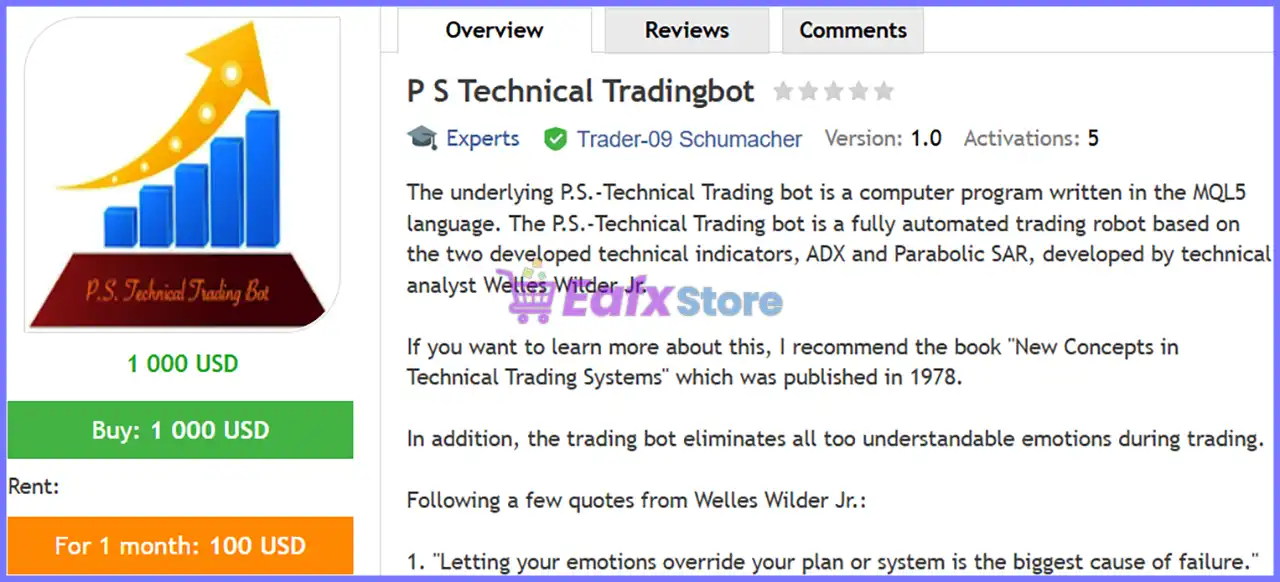
P S Technical Tradingbot MT5 is a fully automated Expert Advisor developed for MetaTrader 5 using the classic trend-following methodology created by Welles Wilder Jr., the inventor of both the ADX and Parabolic SAR indicators.

The EA analyzes market strength through the Average Directional Index (ADX) and confirms trade direction using Parabolic SAR, opening Buy or Sell positions only when both indicators agree. By combining two proven technical indicators, the system aims to filter weak market conditions and reduce false trading signals.

Unlike discretionary trading, the robot continuously monitors the market 24 hours a day, executes trades automatically, and applies predefined Stop Loss and Take Profit levels while eliminating emotional decision-making.

🔶 Vendor Website: View here

🔶Join Our Channel Telegram

🔶This is GroupBuy ==> How to Join

P S Technical Tradingbot MT5 Review

P S Technical Tradingbot MT5 Review


How Does P S Technical Tradingbot MT5 Work?

Dual Indicator Confirmation

The EA only opens trades when two independent technical conditions are satisfied:

🔹 ADX confirms sufficient trend strength.

🔹 Parabolic SAR confirms market direction.

Both conditions must align before a position is opened.

ADX Trend Detection

The Average Directional Index measures the strength of the current trend.

When the ADX value exceeds the configured threshold (default 22), the EA considers the market strong enough for trading.

DI+ and DI− Crossovers

The robot monitors crossings between the DI+ and DI− lines.

🔹 DI+ crossing above DI− suggests bullish momentum.

🔹 DI− crossing above DI+ indicates bearish momentum.

Parabolic SAR Confirmation

Before executing a trade, the EA checks the Parabolic SAR position.

🔹 SAR below price confirms Buy setups.

🔹 SAR above price confirms Sell setups.

This additional confirmation helps filter out sideways market conditions.

Fully Automated Trade Management

Once a trade is opened, the EA automatically manages:

🔹 Position sizing

🔹 Stop Loss (SL)

🔹 Take Profit (TP)

🔹 Trade identification

🔹 Order execution

No manual intervention is required.


Key Features of P S Technical Tradingbot MT5

ADX-Based Trend Trading

The EA trades only when sufficient trend strength is detected, reducing unnecessary entries during ranging markets.

Parabolic SAR Confirmation

Every trade requires confirmation from the Parabolic SAR indicator, helping improve entry accuracy.

Adjustable ADX Threshold

Users can modify the minimum ADX value required before new positions are opened.

Flexible Money Management

Lot sizes can be customized according to account size and personal risk tolerance.

Independent Buy & Sell Parameters

Separate Stop Loss, Take Profit, and trade comments are available for both Buy and Sell positions.

Automatic 24/5 Trading

The EA continuously monitors the market and executes trades automatically throughout the trading week.

Magic Number Protection

A customizable Magic Number allows the EA to manage only its own positions, avoiding conflicts with other Expert Advisors.


Backtest Trading Results Performance

The developer provides historical testing results based on high-quality real tick data.

P S Technical Tradingbot MT5 Backtest Results

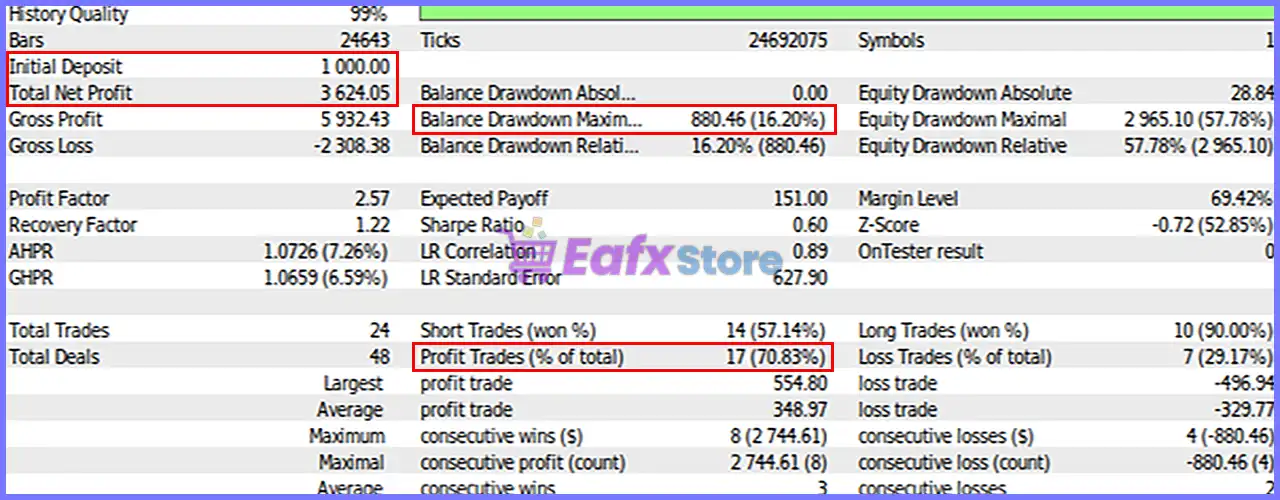
P S Technical Tradingbot MT5 Backtest Results

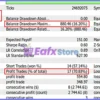
Overall Backtest Summary

Metric Result
Initial Deposit $1,000
Total Net Profit $3,624.05
Profit Trades 70.83%
Maximum Balance Drawdown 16.20%
Profit Factor 2.57
Total Trades 24
Modeling Quality 99% Real Ticks

Performance Analysis

P S Technical Tradingbot Backtest Results

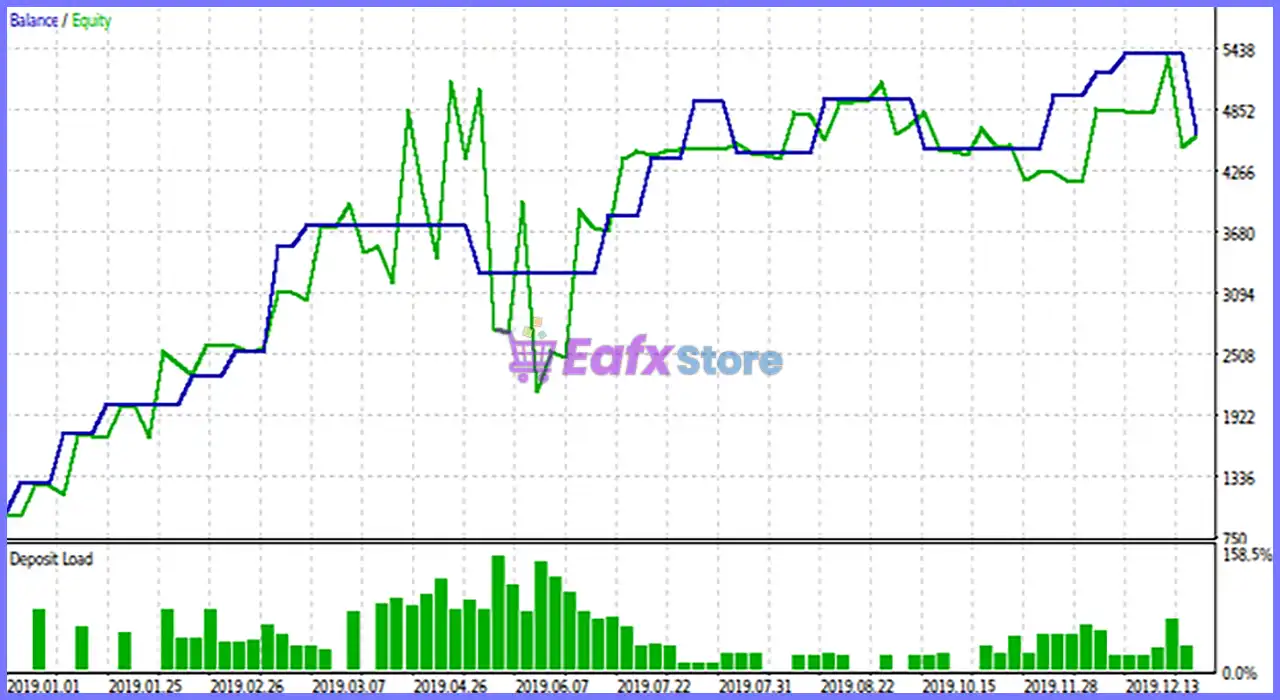
P S Technical Tradingbot Backtest Results

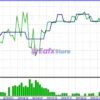
Starting with a $1,000 balance, the EA generated $3,624.05 in net profit while maintaining a 70.83% winning rate. A Profit Factor of 2.57 indicates that gross profits significantly exceeded gross losses, demonstrating efficient trade selection. The maximum balance drawdown of 16.20% reflects moderate risk, making the strategy suitable for traders comfortable with trend-following systems that prioritize larger winning moves over high trade frequency.

Historical backtests are valuable for evaluating strategy behavior but do not guarantee future live performance. Real trading results may vary depending on spreads, execution speed, broker conditions, and changing market environments.


Why P S Technical Tradingbot MT5 Stands Out

Built on Classic Technical Analysis

Instead of using proprietary “black-box” algorithms, the EA relies on two of the most respected indicators developed by Welles Wilder Jr.

Dual Confirmation Strategy

Requiring both ADX and Parabolic SAR confirmation helps improve trade quality and reduce false entries.

Beginner Friendly

The settings are simple and intuitive while still offering sufficient flexibility for experienced traders.

Emotion-Free Trading

The EA removes emotional decision-making, ensuring every trade follows predefined technical rules.

Optimized for EUR/USD M15

The developer specifically optimized the strategy for EUR/USD on the M15 timeframe using high-quality real tick data.


Risk Management Features

P S Technical Tradingbot MT5 includes several built-in protections:

🔹 Adjustable ADX trend threshold

🔹 Configurable lot size

🔹 Fixed Stop Loss

🔹 Fixed Take Profit

🔹 Independent Buy/Sell settings

🔹 Automatic money management

🔹 Magic Number identification

🔹 Fully automated trade execution

These features help maintain disciplined risk control while allowing traders to customize the strategy according to their account size and objectives.


Recommended Trading Conditions

For the best performance, the developer recommends the following setup:

FeaturesType
Trading platformMetaTrader 5 (MT5)
Time framesM15 (15 minute chart)
Currency pairsEURUSD
Minimum / Recommended deposit$1,000+
Minimum / Recommended leverageAny
Type of accountAny
Additional servicesUnlock and Decompile
Recommended brokersExness Broker, Icmarkets Broker
Recommended VPSMyfxVPS.com ( Blue VPS, Golden VPS). Lowest Latency, 2 week Free Trial, 100% Free for 12-18 Months.

Product Download Package?

The download package of the product suite includes:

✅ Setting (If Any).docx
✅ Installation Guide.docx

➡️ Reviewed by David Easton


Weaknesses and Risk Warnings

Although the EA provides a structured trend-following strategy, traders should be aware of several limitations.

Best in Trending Markets

Performance may decline during prolonged sideways or low-volatility conditions where trend-following systems generally struggle.

VPS Recommended

To achieve optimal execution, VPS latency should remain below 15 milliseconds.

Moderate Drawdown

Historical testing recorded a maximum balance drawdown of approximately 16%, meaning temporary equity declines should be expected.

Historical Performance Is Not Predictive

Backtests provide useful insights into historical behavior but cannot guarantee identical results under future live market conditions.


Who Should Use P S Technical Tradingbot MT5?

This Expert Advisor is ideal for:

🔹 Forex trend traders.

🔹 Beginners entering algorithmic trading.

🔹 Traders seeking emotion-free execution.

🔹 EUR/USD M15 traders.

🔹 Users preferring classic technical indicators.

🔹 Investors looking for simple automated systems.

It may be less suitable for:

🔹 Scalpers seeking very high trade frequency.

🔹 Traders using high-latency brokers.

🔹 Investors expecting guaranteed profits.

🔹 Traders who frequently intervene manually.


Final Verdict

P S Technical Tradingbot MT5 is a well-structured trend-following Expert Advisor that successfully combines the proven analytical strength of ADX and Parabolic SAR into a fully automated MetaTrader 5 trading solution. Rather than relying on overly complex algorithms, it follows a disciplined technical methodology rooted in classic market analysis, making it both transparent and easy to understand.

Its configurable ADX threshold, automated money management, fixed Stop Loss and Take Profit levels, and dual-indicator confirmation provide a balanced approach to risk and opportunity. For traders seeking an automated system that emphasizes trend quality over excessive trade frequency—particularly on EUR/USD M15—P S Technical Tradingbot MT5 offers a dependable and straightforward solution backed by solid historical testing and proven technical principles.

P S Technical Tradingbot MT5 Settings Explained – Complete Configuration Guide

P S Technical Tradingbot is an automated Expert Advisor for MetaTrader 5 that utilizes the Average Directional Index (ADX) to identify market trends and execute buy or sell trades based on predefined conditions.

The EA allows traders to customize trend strength thresholds, position size, Take Profit, Stop Loss, trade comments, and Magic Number settings, making it suitable for both beginner and experienced algorithmic traders seeking disciplined and trend-based automated trading.

P S Technical Tradingbot MT5 Settings

P S Technical Tradingbot MT5 Settings


P S Technical Tradingbot MT5 Settings

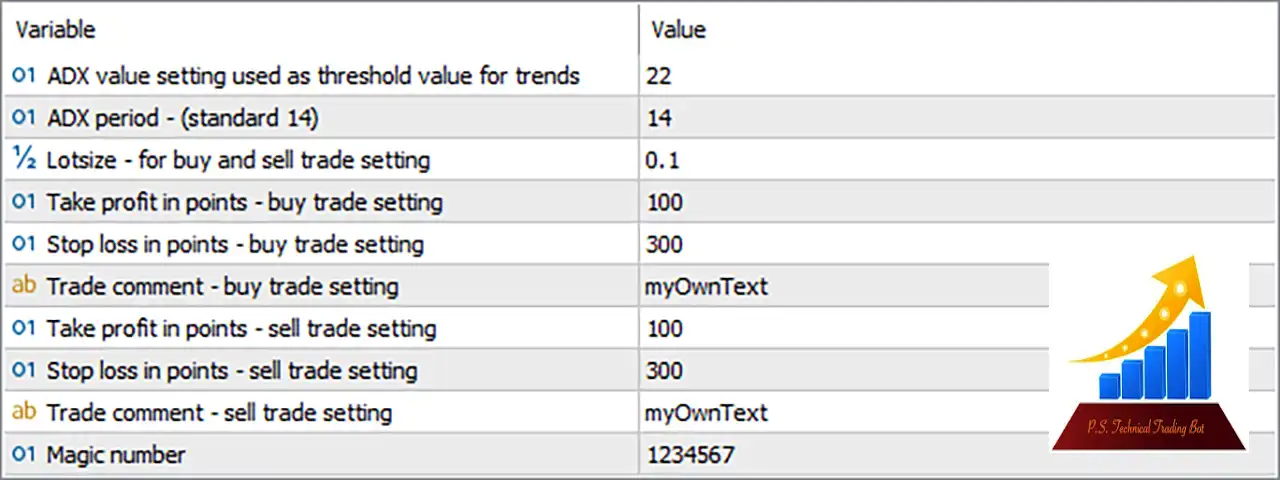
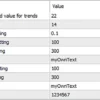
Below are the details of the parameters in the advisor’s trading system settings table:

P S Technical Tradingbot MT5 Settings Panel

P S Technical Tradingbot MT5 Settings Panel

🔹 ADX value setting used as threshold value for trends = 22 – Sets the ADX trend strength threshold to 22, allowing the EA to execute trades only when market momentum reaches or exceeds this value.

🔹 ADX period (standard 14) = 14 – Defines the ADX calculation period as 14, which is the standard setting for measuring trend strength.

🔹 Lotsize – for buy and sell trade setting = 0.1 – Sets the trading volume to 0.1 lots for both buy and sell orders.

🔹 Take profit in points – buy trade setting = 100 – Sets the Take Profit target for buy trades to 100 points, automatically closing profitable positions at the specified level.

🔹 Stop loss in points – buy trade setting = 300 – Sets the Stop Loss for buy trades to 300 points, limiting potential losses on long positions.

🔹 Trade comment – buy trade setting = myOwnText – Assigns the custom comment “myOwnText” to all buy orders for easy identification in the trading history.

🔹 Take profit in points – sell trade setting = 100 – Sets the Take Profit target for sell trades to 100 points, locking in profits automatically when the target is reached.

🔹 Stop loss in points – sell trade setting = 300 – Defines the Stop Loss distance for sell trades as 300 points, helping protect the account from excessive losses.

🔹 Trade comment – sell trade setting = myOwnText – Applies the custom trade comment “myOwnText” to all sell positions opened by the EA.

🔹 Magic number = 1234567 – Assigns the unique identifier 1234567 to all trades opened by the EA, allowing it to distinguish its positions from other Expert Advisors or manual trades.


Conclusion

P S Technical Tradingbot MT5 offers a straightforward yet effective configuration focused on ADX trend analysis and disciplined risk management. With customizable ADX thresholds, standardized position sizing, fixed Stop Loss and Take Profit levels, personalized trade comments, and Magic Number identification, the EA provides traders with a simple framework for automated trend-following strategies on MetaTrader 5. Proper optimization of these parameters can help improve consistency while maintaining controlled trading risk.


FAQs

What does the ADX threshold value control in P S Technical Tradingbot MT5?

The ADX threshold (22) determines the minimum trend strength required before the EA is allowed to open new trades.

Why is the ADX period set to 14?

A period of 14 is the industry-standard setting for the ADX indicator, providing a balanced measurement of trend strength without being overly sensitive.

Can I change the trading lot size?

Yes. The Lotsize parameter can be adjusted from the default 0.1 lots to match your account balance and preferred risk level.

What is the purpose of the Magic Number?

The Magic Number (1234567) uniquely identifies the EA’s trades, allowing it to manage only its own positions without interfering with other Expert Advisors.

Can I customize the Take Profit and Stop Loss values?

Yes. Both Take Profit (100 points) and Stop Loss (300 points) settings for buy and sell trades are fully configurable to suit different market conditions and trading strategies.

User Reviews

0.0 out of 5
0
0
0
0
0
Write a review

There are no reviews yet.

Only logged in customers who have purchased this product may leave a review.

❓ What is P S Technical Tradingbot MT5 designed for?

P S Technical Tradingbot MT5 is a fully automated trading system that uses ADX and Parabolic SAR indicators to identify trend-based Forex trading opportunities.

❓ Which indicators does P S Technical Tradingbot MT5 use?

P S Technical Tradingbot MT5 combines ADX to measure trend strength and Parabolic SAR to confirm trade direction before opening positions.

❓ What timeframe is recommended for P S Technical Tradingbot MT5?

P S Technical Tradingbot MT5 is optimized for the EURUSD M15 chart, where its trend-following strategy delivers the most reliable trading signals.

❓ How does P S Technical Tradingbot MT5 generate trading signals?

P S Technical Tradingbot MT5 opens trades only when ADX trend conditions and Parabolic SAR confirmations align, helping reduce false market signals.

❓ Can I customize the settings in P S Technical Tradingbot MT5?

Yes. P S Technical Tradingbot MT5 allows you to adjust ADX settings, lot size, Stop Loss, Take Profit, and Magic Number to fit your strategy.

❓ Does P S Technical Tradingbot MT5 include automated money management?

Yes. P S Technical Tradingbot MT5 features automatic money management, reducing manual intervention after the initial trading setup is completed.

❓ Is P S Technical Tradingbot MT5 suitable for beginners?

Yes. P S Technical Tradingbot MT5 is designed for both beginners and experienced traders, offering fully automated execution with simple configuration.

❓ What minimum deposit is recommended for P S Technical Tradingbot MT5?

P S Technical Tradingbot MT5 does not require a large account, and a starting balance of around €1,000 or less is generally considered sufficient.

❓ How does P S Technical Tradingbot MT5 help remove emotional trading?

P S Technical Tradingbot MT5 follows predefined technical rules, automatically executing trades without emotional decisions or manual intervention.

Worldwide Instant Access
Download your EA software from anywhere in the world.
Reliable & Tested
Each EA is thoroughly tested and optimized for best performance.
Recently Viewed
  • Price range: $89.00 through $599.00
  • Price range: $89.00 through $599.00
  • Price range: $89.00 through $599.00
  • Price range: $89.00 through $599.00
Related Items
  • 4
    $370.00
  • 0
    $180.00
  • 2
    $330.00
  • 2
    $220.00
Want Unlimited Access to EA Bots, Indicators & Exclusive Trading Tools?

Start today, get instant access to all EA bots!

Download Unlimited - Exclusive Updates - Save More

The company’s mission

We are an organization offering affordable Forex trading tools for educational purposes. Achieve the greatest benefits with minimal investment at eafxstore.com.
  • Telegram
  • Email
  • Youtube
  • Facebook

Policy

DCMA REPORT
Privacy Policy
Refund policy

Help

About US
Contact
Copyright 2023 ©EAFXSTORE.COM
EA FX Store
Logo
Shopping cart