






RTX CHIPERCORE EA MT5 v3.0 with SetFiles (Unlimited)

Subscriptions for Special Plan
- 30 EA package is more economical!
- Special package with 99%
- Download 1 EA/Day

Subscriptions for Premium Membership
- Download Unlimited in 1 Year
- Get 100% Discount
- Get free access to all

Subscriptions for Gold Membership
- 1 Year Membership
- Get 100% Discount
- Access EA+Indicator+Course
Frequently bought together 🎁
Add these products to enhance your purchase




Quick Verdict
RTX CHIPERCORE EA is a feature-rich automated trading system for MetaTrader 5 that combines EMA trend filtering, RSI confirmation, Trend Area entries, pyramiding, Martingale recovery and advanced basket management. Designed for traders seeking flexible automation and configurable risk controls, it provides a comprehensive framework for disciplined XAUUSD trading under various market conditions.
Best For
✅ XAUUSD traders
✅ MetaTrader 5 users
✅ Traders comfortable with Martingale strategies
✅ High-leverage trading accounts
✅ Investors seeking advanced trade management
✅ Traders who prefer fully automated execution
Overall Rating
8.9/10 ⭐⭐⭐⭐⭐
What is RTX CHIPERCORE EA?
RTX CHIPERCORE EA is a professional MetaTrader 5 Expert Advisor (EA) developed for automated Gold (XAUUSD) trading. The EA combines multiple trading technologies into one intelligent execution engine, including EMA trend filtering, RSI confirmation, Trend Area entries, pyramiding, Martingale recovery, Group Break-Even and trailing stop management.
Rather than relying on a single entry technique, RTX CHIPERCORE integrates several independent modules that continuously monitor market conditions while dynamically managing open positions. It also includes leverage verification, spread filtering, trading session controls, and account protection features to help traders adapt the EA to different brokers and risk preferences.

RTX CHIPERCORE EA Review
How Does RTX CHIPERCORE EA Work?
Trend Identification
The EA begins by determining the dominant market direction using a 200-period Exponential Moving Average (EMA).
This long-term trend filter helps reduce trades against the prevailing market direction.
Trend Area Entry Logic
RTX CHIPERCORE uses its proprietary Trend Area algorithm to identify favorable entry zones instead of opening positions randomly.
RSI confirmation can further validate trade opportunities or allow controlled counter-trend entries when configured.
Pyramiding Winning Trades
When an open position moves into profit, the EA can automatically add new positions every 30 pips, allowing traders to maximize gains during strong trends without increasing lot sizes aggressively.
Martingale Recovery
If price moves against an open position, the EA can activate its configurable Martingale recovery system, opening additional recovery trades every 35 pips using predefined lot multipliers.
This approach aims to reduce the average entry price and facilitate basket recovery.
Basket Management
Rather than managing trades individually, RTX CHIPERCORE can treat multiple positions as a single basket through:
🔹 Group Break-Even
🔹 Basket profit locking
🔹 Group Trailing Stop
🔹 Automatic profit protection
Key Features of RTX CHIPERCORE EA
Advanced Trend Following
Employs a 200 EMA to align trades with the broader market trend.
RSI Market Confirmation
Uses RSI filtering with configurable overbought and oversold levels for improved entry quality.
Intelligent Trend Area Entries
Designed to identify higher-probability trading zones rather than chasing every market movement.
Pyramiding Strategy
Adds new positions during profitable trends without increasing the lot multiplier.
Configurable Martingale Recovery
Includes multi-stage Martingale settings with adjustable distances, multipliers and maximum recovery levels.
Group Break-Even
Automatically secures basket profits once predefined profit thresholds are achieved.
Group Trailing Stop
Locks in additional profits as winning baskets continue moving favorably.
Trading Session Filter
Supports optional server-time trading schedules.
Spread Protection
Blocks new entries whenever spreads exceed predefined limits.
Leverage Verification
Requires minimum leverage before allowing new positions.
Capital Protection
Includes account-level Cut Loss protection to limit catastrophic losses.
Historical Trading Results Performance
Trading Activity Overview
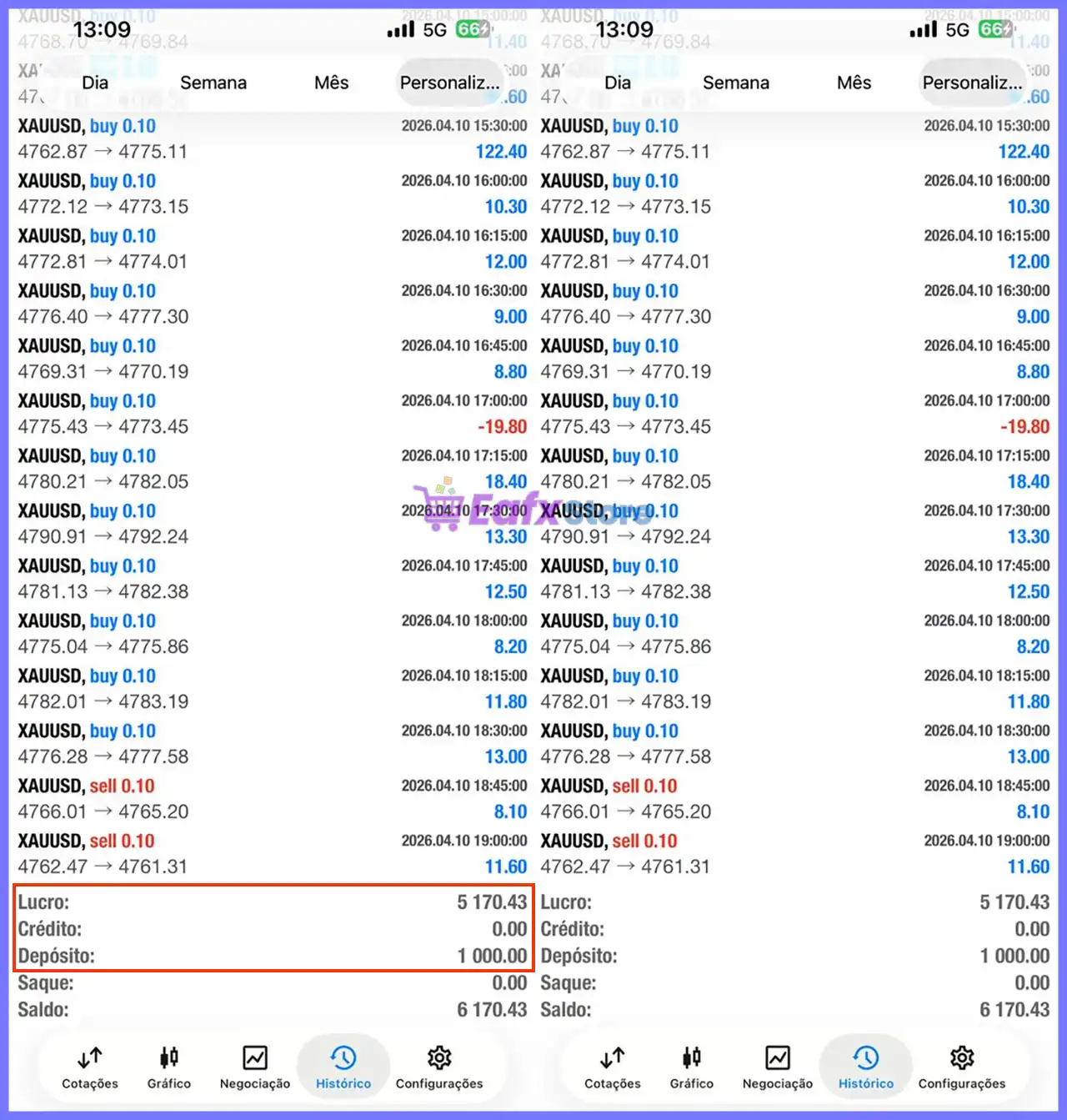
The shared trading history demonstrates active automated execution with a large number of short-duration XAUUSD trades using 0.10 lot positions.
RTX CHIPERCORE EA Trading Results
Trading Statistics
| Metric | Value |
|---|---|
| Initial Deposit | $1,000 |
| Final Balance | $6,170.43 |
| Net Profit | $5,170.43 |
| Trading Instrument | XAUUSD |
| Typical Lot Size | 0.10 Lots |
| Trading Style | Short-Term Automated Trading |
Performance Analysis
The trading history reflects a strategy focused on capturing multiple smaller price movements throughout the session. Most trades closed with modest but consistent gains, while losing trades were limited and relatively infrequent.
The increase from $1,000 to $6,170.43 highlights the EA’s ability to generate substantial returns under the tested configuration.
However, as the system incorporates Martingale recovery, actual results can vary significantly depending on broker conditions, leverage, market volatility, and individual risk settings.
Why RTX CHIPERCORE EA Stands Out
Combines Multiple Trading Technologies
Instead of relying on one strategy, RTX CHIPERCORE integrates:
🔹 Trend Following
🔹 RSI Confirmation
🔹 Trend Area Entries
🔹 Pyramiding
🔹 Martingale Recovery
🔹 Basket Management
Highly Configurable
Nearly every aspect of the EA can be customized, including:
🔹 Trading sessions
🔹 Spread limits
🔹 Leverage requirements
🔹 Recovery logic
🔹 Risk settings
🔹 Break-Even levels
🔹 Trailing Stop behavior
Comprehensive Basket Management
Its Group Break-Even and Group Trailing Stop systems provide advanced multi-position management rarely found in simpler Expert Advisors.
Risk Management Features
RTX CHIPERCORE includes numerous protection mechanisms, such as:
🔹 Fixed initial lot sizing
🔹 Spread filter
🔹 Leverage verification
🔹 Trading session filter
🔹 Cut Loss protection
🔹 Group Break-Even
🔹 Group Trailing Stop
🔹 RSI confirmation
🔹 EMA trend filtering
🔹 Adjustable Martingale parameters
🔹 Pyramiding controls
🔹 Configurable maximum recovery levels
Although the EA incorporates several safety features, users should recognize that enabling Martingale significantly increases exposure during prolonged adverse market movements.
Recommended Trading Conditions
For the best performance, the developer recommends:
| Features | Type |
|---|---|
| Trading platform | MetaTrader 5 (MT5) |
| Time frames | M1, M5 |
| Currency pairs | XAUUSD (Gold) |
| Minimum / Recommended deposit | $1,000 |
| Minimum / Recommended leverage | 1:50+ |
| Account type | NoDLL |
| Product type | Original version |
| Additional services | Unlock and Decompile |
| Recommended brokers | Exness Broker, Icmarkets Broker |
| Recommended VPS | MyfxVPS.com ( Blue VPS, Golden VPS). Lowest Latency, 2 week Free Trial, 100% Free for 12-18 Months. |
Product Download Package?
The download package of the product suite includes:
Experts
 RTX-CHIPERCORE EA v3.0.ex5
SetFiles
Gold_Mode Trend.set
Gold_Mode Crossover.set
 Reviewed by David Easton
Weaknesses and Risk Warnings
While RTX CHIPERCORE offers an extensive feature set, traders should carefully consider the following:
🔹 The EA uses Martingale recovery, which can substantially increase position exposure during losing streaks.
🔹 Very high leverage is recommended in the current configuration, making broker selection critical.
🔹 Aggressive recovery settings may result in larger drawdowns during prolonged market trends.
🔹 Pyramiding and Martingale operating simultaneously can amplify overall portfolio risk.
🔹 Historical performance should be viewed as reference only and does not guarantee future results.
🔹 Users should thoroughly test the EA on a demo account before deploying it on live capital.
Who Should Use RTX CHIPERCORE EA?
RTX CHIPERCORE is best suited for:
🔹 Experienced MetaTrader 5 traders
🔹 XAUUSD specialists
🔹 Traders familiar with Martingale recovery systems
🔹 Investors seeking highly configurable automation
🔹 Traders comfortable with basket management strategies
🔹 Users operating high-leverage trading accounts
🔹 Traders who actively monitor automated systems and optimize risk settings
It may be less suitable for conservative investors who prefer non-Martingale strategies or minimal drawdown approaches.
Final Verdict
RTX CHIPERCORE EA is a comprehensive automated trading solution for XAUUSD that combines trend-following logic, RSI confirmation, pyramiding, Martingale recovery, and advanced basket management into a single Expert Advisor. Its extensive customization options allow traders to fine-tune execution, risk exposure, and trade management according to different broker environments and personal preferences.
The inclusion of EMA trend filtering, Group Break-Even, Group Trailing Stop, leverage verification, spread protection, and account-level Cut Loss controls makes it considerably more sophisticated than many basic Gold trading robots. While its historical trading results demonstrate strong profit potential, traders should remain aware that Martingale-based recovery strategies inherently carry higher risk during sustained adverse market conditions.
🔢 RTX CHIPERCORE EA MT5 Settings Guide – Complete Parameter Explanation
RTX CHIPERCORE EA is a professional MetaTrader 5 Expert Advisor that combines trend-following entries, EMA filtering, RSI confirmation, pyramiding, martingale recovery, group break-even management and trailing stop protection.
The EA also includes advanced trading session filters, leverage verification, spread control, and capital protection features, allowing traders to customize automated trading according to different market conditions and risk preferences.
RTX CHIPERCORE EA MT5 Settings
🔢 Installation Panel Parameters
Below are the details of the parameters in the advisor’s trading system settings table:
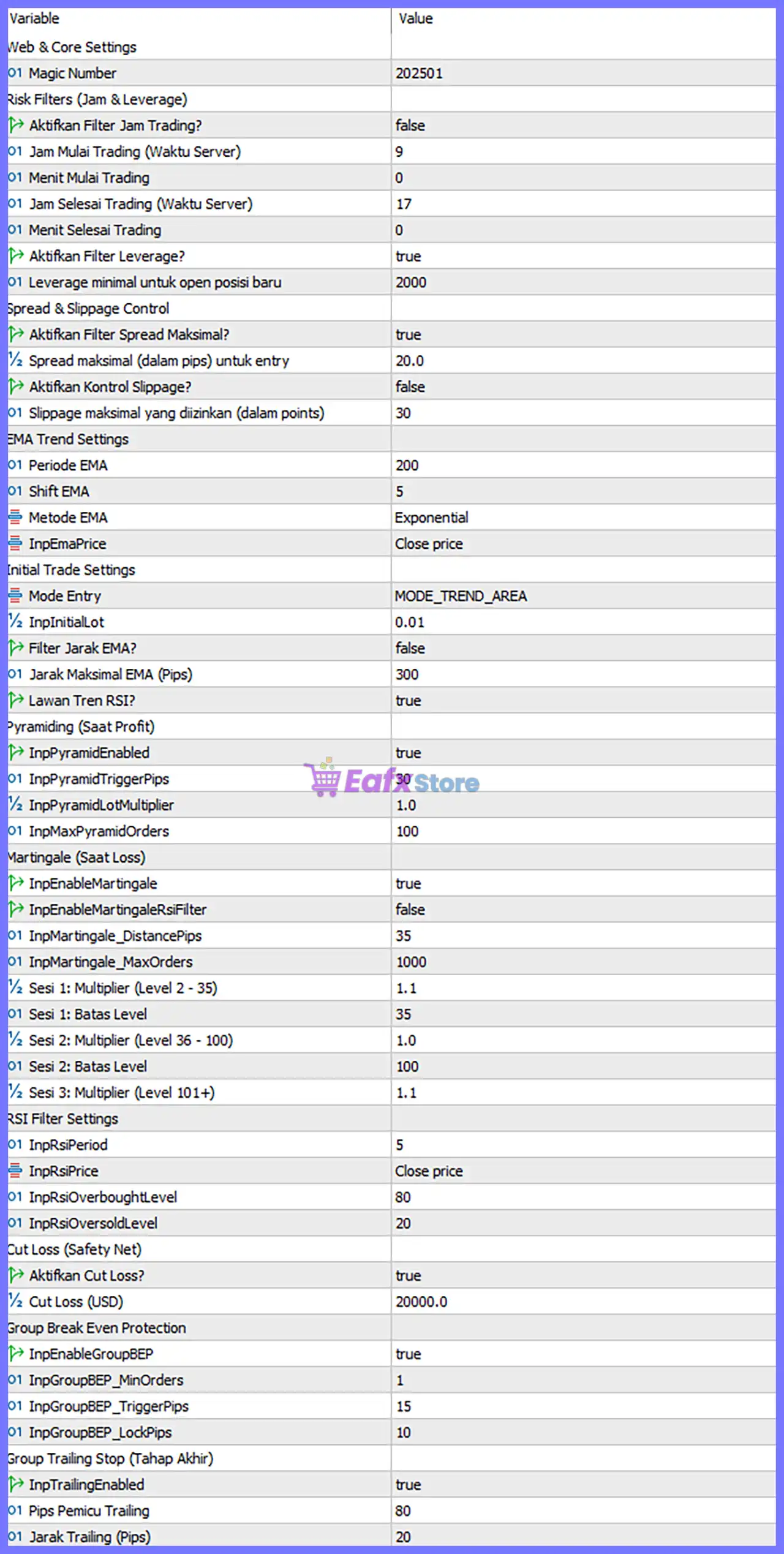
RTX CHIPERCORE EA MT5 Settings Panel
🔄 Web & Core Settings
🔹 Magic Number = 202501 – Assigns the unique Magic Number 202501 to identify all trades opened by RTX CHIPERCORE EA MT5.
🔄 Risk Filters (Trading Time & Leverage)
🔹 Aktifkan Filter Jam Trading? = false – Disables the trading time filter, allowing the EA to trade regardless of the configured trading hours.
🔹 Jam Mulai Trading (Waktu Server) = 9 – Sets the optional trading start time to 09:00 server time.
🔹 Menit Mulai Trading = 0 – Trading starts at 00 minutes past the configured start hour.
🔹 Jam Selesai Trading (Waktu Server) = 17 – Sets the optional trading end time to 17:00 server time.
🔹 Menit Selesai Trading = 0 – Trading ends at 00 minutes past the configured end hour.
🔹 Aktifkan Filter Leverage? = true – Enables minimum leverage verification before opening new positions.
🔹 Leverage minimal untuk open posisi baru = 2000 – Requires a minimum account leverage of 1:2000 before allowing new trades.
🔄 Spread & Slippage Control
🔹 Aktifkan Filter Spread Maksimal? = true – Enables maximum spread protection before trade execution.
🔹 Spread maksimal (dalam pips) untuk entry = 20.0 – Blocks new entries whenever the spread exceeds 20.0 pips.
🔹 Aktifkan Kontrol Slippage? = false – Disables slippage control during order execution.
🔹 Slippage maksimal yang diizinkan (dalam points) = 30 – Sets the maximum allowable slippage to 30 points if slippage control is enabled.
🔄 EMA Trend Settings
🔹 Periode EMA = 200 – Uses a 200-period Exponential Moving Average as the primary trend filter.
🔹 Shift EMA = 5 – Applies an EMA shift of 5 bars.
🔹 Metode EMA = Exponential – Uses the Exponential Moving Average (EMA) calculation method.
🔹 InpEmaPrice = Close price – Calculates the EMA using the Close Price of each candle.
🔄 Initial Trade Settings
🔹 Mode Entry = MODE_TREND_AREA – Uses the Trend Area entry algorithm for identifying trading opportunities.
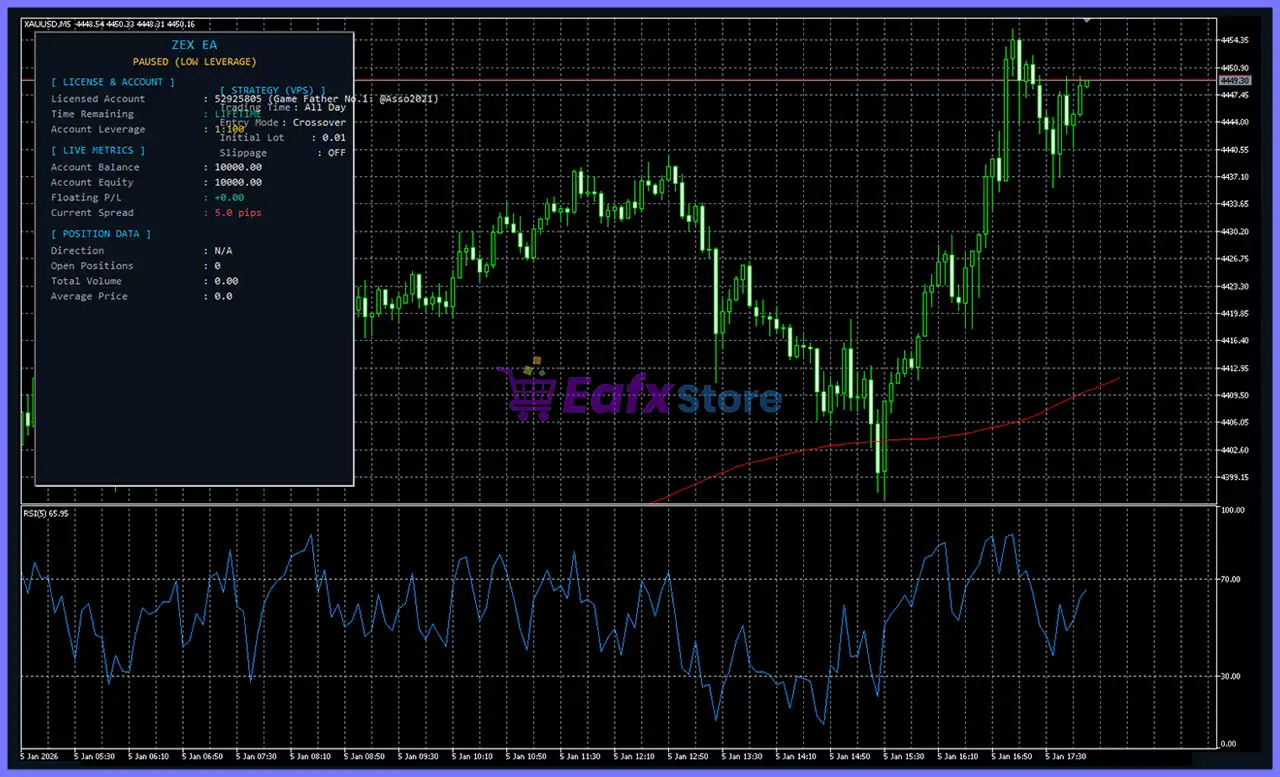
🔹 InpInitialLot = 0.01 – Sets the initial trading volume to 0.01 lots.
🔹 Filter Jarak EMA? = false – Disables the maximum distance filter between market price and the EMA.
🔹 Jarak Maksimal EMA (Pips) = 300 – Defines the maximum EMA distance as 300 pips if the filter is enabled.
🔹 Lawan Tren RSI? = true – Allows RSI-based counter-trend trading signals.
🔄 Pyramiding (Profit Scaling)
🔹 InpPyramidEnabled = true – Enables pyramiding to add new positions as profitable trades develop.
🔹 InpPyramidTriggerPips = 30 – Opens additional positions after every 30 pips of favorable movement.
🔹 InpPyramidLotMultiplier = 1.0 – Uses the same lot size (1.0x) for each pyramiding position.
🔹 InpMaxPyramidOrders = 100 – Allows up to 100 pyramiding positions.
🔄 Martingale (Loss Recovery)
🔹 InpEnableMartingale = true – Enables the Martingale recovery strategy.
🔹 InpEnableMartingaleRsiFilter = false – Disables RSI confirmation during Martingale recovery.
🔹 InpMartingale_DistancePips = 35 – Opens the next Martingale position every 35 pips.
🔹 InpMartingale_MaxOrders = 1000 – Allows a maximum of 1000 Martingale orders.
🔹 Sesi 1: Multiplier (Level 2 – 35) = 1.1 – Uses a 1.1x lot multiplier for Martingale Levels 2–35.
🔹 Sesi 1: Batas Level = 35 – Defines Level 35 as the upper limit of Session 1.
🔹 Sesi 2: Multiplier (Level 36 – 100) = 1.0 – Uses a 1.0x lot multiplier for Levels 36–100.
🔹 Sesi 2: Batas Level = 100 – Defines Level 100 as the upper limit of Session 2.
🔹 Sesi 3: Multiplier (Level 101+) = 1.1 – Uses a 1.1x multiplier for all Martingale levels above 101.
🔄 RSI Filter Settings
🔹 InpRsiPeriod = 5 – Uses a 5-period RSI indicator.
🔹 InpRsiPrice = Close price – Calculates RSI using the Close Price.
🔹 InpRsiOverboughtLevel = 80 – Sets the RSI Overbought level to 80.
🔹 InpRsiOversoldLevel = 20 – Sets the RSI Oversold level to 20.
🔄 Cut Loss (Safety Net)
🔹 Aktifkan Cut Loss? = true – Enables the account-level Cut Loss protection.
🔹 Cut Loss (USD) = 20000.0 – Closes trades if cumulative losses reach 20,000.0 USD.
🔄 Group Break-Even Protection
🔹 InpEnableGroupBEP = true – Enables Group Break-Even management for multiple positions.
🔹 InpGroupBEP_MinOrders = 1 – Activates Group Break-Even with at least 1 open order.
🔹 InpGroupBEP_TriggerPips = 15 – Activates Break-Even after 15 pips of profit.
🔹 InpGroupBEP_LockPips = 10 – Locks 10 pips of profit when Break-Even is triggered.
🔄 Group Trailing Stop (Final Stage)
🔹 InpTrailingEnabled = true – Enables Group Trailing Stop management.
🔹 Pips Pemicu Trailing = 80 – Starts trailing after 80 pips of profit.
🔹 Jarak Trailing (Pips) = 20 – Maintains a trailing distance of 20 pips.
🔄 Risk Level
🔹 Fix Lot – Uses a constant lot size for every trade regardless of account balance, ensuring consistent position sizing.
🔹 Safe – Applies conservative trading exposure with smaller position sizes to prioritize capital preservation.
🔹 Balanced – Uses moderate risk settings that balance steady account growth with controlled drawdowns, making it suitable for most traders.
🔹 Aggressive – Increases market exposure through larger position sizes to maximize potential returns while accepting significantly higher trading risk.
🔢 Conclusion
RTX CHIPERCORE EA MT5 is a highly configurable automated trading system that integrates EMA trend filtering, RSI confirmation, pyramiding, Martingale recovery, group Break-Even management and advanced trailing stop protection.
Combined with leverage verification, spread control, and comprehensive account safety features, the EA provides traders with a flexible framework for adapting automated strategies to various market environments. Proper configuration of every parameter helps improve trade consistency, optimize risk management, and support long-term automated trading performance.
🔢 FAQs
❓ What trading strategy does RTX CHIPERCORE EA MT5 use?
The EA combines EMA trend-following, RSI filtering, Trend Area entries, Pyramiding, and Martingale recovery to manage trades under different market conditions.
❓ Can the EA calculate lot sizes automatically?
The current configuration starts with InpInitialLot = 0.01. Traders can customize the lot size according to their preferred money management strategy.
❓ What is the purpose of the Group Break-Even feature?
Group Break-Even automatically protects profits across multiple open positions by moving the overall basket to Break-Even after reaching the configured profit threshold.
❓ How does the Martingale system work?
When InpEnableMartingale = true, the EA opens additional recovery trades every 35 pips, using configurable lot multipliers and maximum order limits.
❓ Does RTX CHIPERCORE EA MT5 include account protection?
Yes. The EA includes Cut Loss Protection, Spread Filtering, Minimum Leverage Verification, Group Break-Even, and Group Trailing Stop features to help manage trading risk and protect account capital.
User Reviews
Only logged in customers who have purchased this product may leave a review.
❓ What trading strategy does RTX CHIPERCORE MT5 use?
RTX CHIPERCORE MT5 combines EMA trend filtering, RSI confirmation, Trend Area entries, pyramiding, and Martingale recovery for automated trading.
❓ Does RTX CHIPERCORE MT5 use Martingale trading?
Yes. RTX CHIPERCORE MT5 includes a configurable Martingale recovery system with adjustable distance, lot multipliers, and maximum recovery orders.
❓ Can RTX CHIPERCORE MT5 increase profits with pyramiding?
Yes. RTX CHIPERCORE MT5 supports pyramiding by adding new positions after favorable price movement while maintaining configurable lot sizing rules.
❓ How does RTX CHIPERCORE MT5 protect trading capital?
RTX CHIPERCORE MT5 provides Cut Loss protection, spread filtering, leverage verification, Group Break-Even, and Trailing Stop to reduce trading risk.
❓ Can I customize the trading sessions in RTX CHIPERCORE MT5?
Yes. RTX CHIPERCORE MT5 allows traders to define trading hours, server time schedules, and optional trading session filters for automated execution.
❓ Does RTX CHIPERCORE MT5 include EMA and RSI filters?
Yes. RTX CHIPERCORE MT5 uses a 200-period EMA and a configurable RSI filter to improve trade selection and identify higher-quality market entries.
❓ How does the Group Break-Even feature work in RTX CHIPERCORE MT5?
RTX CHIPERCORE MT5 automatically moves multiple open positions to Break-Even after reaching the configured profit target, helping secure gains.
❓ Does RTX CHIPERCORE MT5 support Trailing Stop management?
Yes. RTX CHIPERCORE MT5 includes a Group Trailing Stop that activates after a predefined profit level to protect profits as trends continue.
❓ Can I adjust the risk level in RTX CHIPERCORE MT5?
Yes. RTX CHIPERCORE MT5 supports Fix Lot, Safe, Balanced, and Aggressive risk profiles, allowing flexible money management for different accounts.
🔥 Get This EA for FREE with Our Membership! 🚀🚀
Unlock access to this EA, premium Indicators, and exclusive trading tools completely FREE with any of our Membership Plans! Thousands of traders already benefit from our VIP library—join them and level up your trading instantly. Choose Your Membership:
- SPECIAL – 1 Month Membership
- GOLD – 1 Year Membership
- PREMIUM – 1 Year Membership
-
 Original price was: $439.00.$249.00Current price is: $249.00.
 -
 Original price was: $9,999.00.$249.00Current price is: $249.00.
 -
 Original price was: $30,000.00.$249.00Current price is: $249.00.
 -
 Original price was: $30,000.00.$249.00Current price is: $249.00.
-
 0Original price was: $500.00.$69.00Current price is: $69.00.
 -
 10Original price was: $2,100.00.$69.00Current price is: $69.00.
 -
 3Original price was: $999.00.$69.00Current price is: $69.00.
 -
 2Original price was: $3,500.00.$59.00Current price is: $59.00.
There are no reviews yet.