




Syntex Neckxus EA MT4 v3.60 (Platform build 1471+)

Subscriptions for Special Plan
- 30 EA package is more economical!
- Special package with 99%
- Download 1 EA/Day

Subscriptions for Premium Membership
- Download Unlimited in 1 Year
- Get 100% Discount
- Get free access to all

Subscriptions for Gold Membership
- 1 Year Membership
- Get 100% Discount
- Access EA+Indicator+Course
Frequently bought together 🎁
Add these products to enhance your purchase



What is Syntex Neckxus EA MT4?
Syntex Neckxus EA is a next-generation grid trading Expert Advisor (EA) designed for MetaTrader 4, combining intelligent risk control, adaptive market entry, and powerful news filtering to deliver a robust and safer trading experience. With advanced logic powered by smart grid algorithms and flexible indicator-based entries, it offers traders a high level of customization and control.
🔶 Vender Website: View here
Key Features of Syntex Neckxus EA for MT4
🔹 Adaptive Smart Grid Technology: Uses volatility-based Grid spacing for balanced trade execution.
🔹 Advanced News Filter Protection: Avoids high-impact events to reduce unstable market exposure.
🔹 Dynamic Money Management System: Automatically adjusts lot sizing for controlled risk handling.
🔹 Multi-Indicator Entry Confirmation: Supports MA, RSI, MACD, CCI and Bollinger Bands trade filters.
🔹 Integrated Trailing Stop Logic: Protects profits dynamically while reducing unnecessary drawdown.
🔹 Flexible Trade Limitation Controls: Restricts maximum trades to improve account stability levels.
What is the Syntex Neckxus EA MT4 Trading Strategy?
🔹 Adaptive Grid Trading Structure: Uses intelligent spacing logic to manage changing market volatility.
🔹 Moving Average Entry Confirmation: Filters trend direction through distance-based MA conditions.
🔹 Multi-Timeframe RSI Analysis: Detects momentum shifts and adjusts trade positioning dynamically.
🔹 Volatility-Based Smart Grid Logic: Expands or contracts grid placement using market conditions.
🔹 News-Aware Automated Trading: Reduces exposure during major economic releases and events.
🔹 Break-Even and Trailing Management: Locks profits automatically while limiting downside pressure.
Syntex Neckxus EA MT4 Review
Syntex Neckxus EA is a high-performance Expert Advisor (EA) designed for MetaTrader 4 (MT4), optimized for consistency, minimal drawdown and high-profit potential.
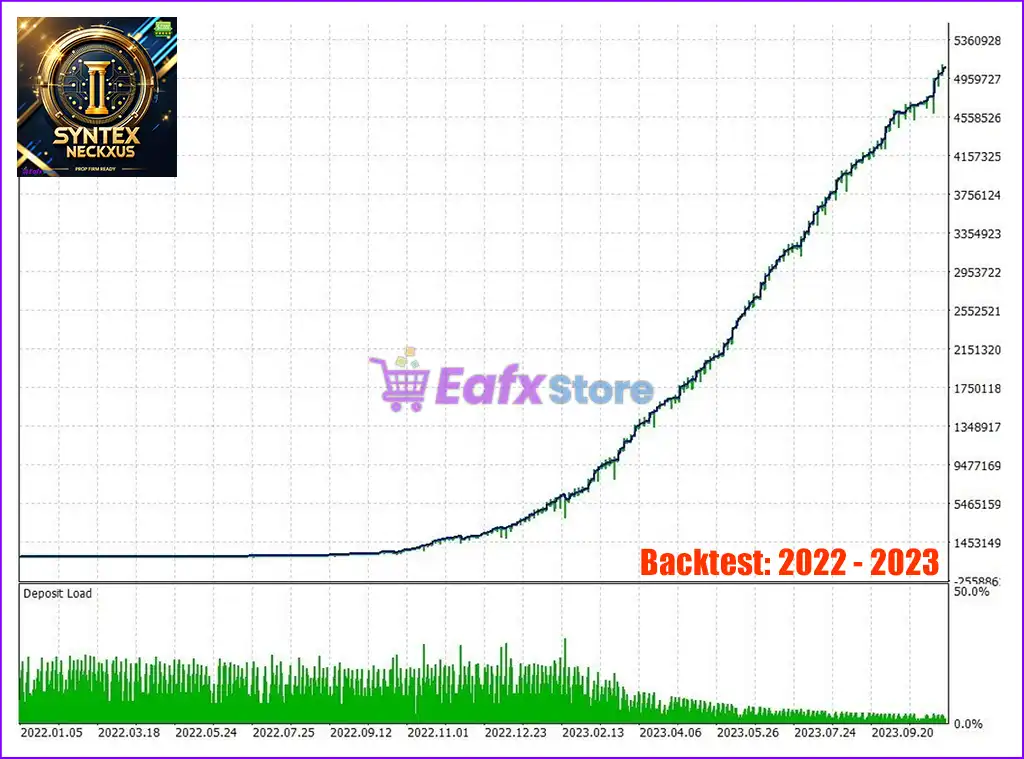
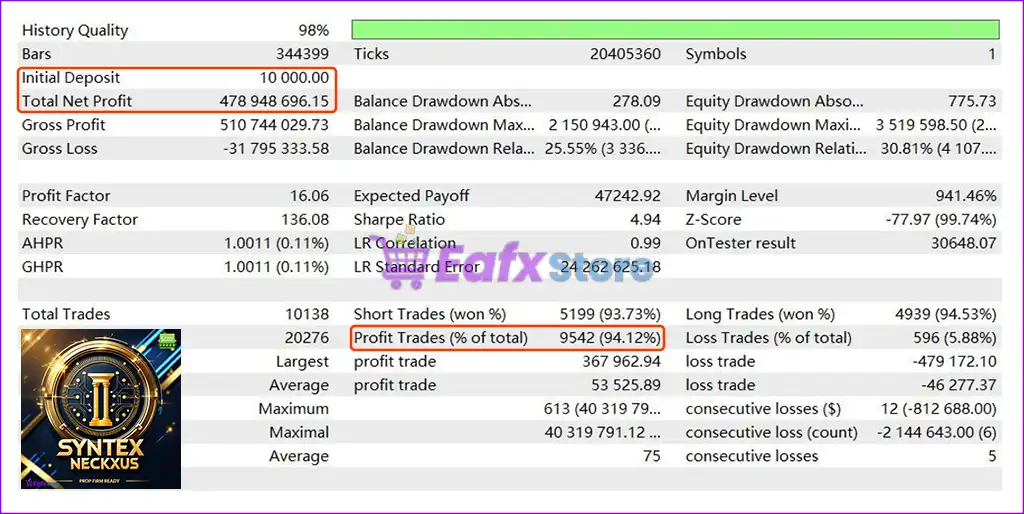
Below are its comprehensive backtest metrics:
✅ Initial Deposit: $10,000
✅ Total Net Profit: $478.95 million
✅ Maximum Drawdown: 21.51%
✅ Win Rate (Profit Trades): 94.12%
Syntex Neckxus EA MT4 MT4 Backtest Trading Results
Syntex Neckxus EA MT4 Backtest Trading Results
Why Choose and Use Syntex Neckxus EA?
🔹 Stable Automated Forex Trading Solution: Designed for controlled execution across volatile conditions.
🔹 Advanced Risk Management Features: Combines trade caps, trailing stops and equity protection.
🔹 Flexible Indicator-Based Customization: Allows traders to optimize entries for different strategies.
🔹 Improved Market Adaptability System: Smart grid adjustments respond efficiently to price behavior.
🔹 Professional Trade Protection Tools: Includes spread control, news filtering and break-even logic.
🔹 Marketplace-Ready Trading Automation: Suitable for disciplined traders seeking resilient EA systems.
Trading Specifications
Recommended settings and parameters to pay attention to from developers and experts:
| Features | Type |
|---|---|
| Trading platform | MetaTrader 4 (MT4) |
| Time frames | M5, M15, M30, H1 |
| Currency pairs | Any |
| Minimum / Recommended deposit | $100 |
| Minimum / Recommended leverage | Any |
| Product type | NoDLL / Fix |
| Additional services | Unlock and Decompile |
| Recommended brokers | Exness Broker, Icmarkets Broker |
| Recommended VPS | MyfxVPS.com (Blue VPS, Golden VPS). Lowest Latency, 2 week Free Trial, 100% Free for 12-18 Months. |
➡️ Reviewed by David Easton
Product Download Package?
The download package of the product suite includes:
✅ Experts: Syntex Neckxus EA v3.60_fix.ex4
Conclusion
In short, Syntex Neckxus EA stands out as a cutting-edge grid trading solution for traders seeking both flexibility and safety in volatile markets. Powered by a dynamic grid algorithm, adaptive technical filters, and an advanced news filter system, it offers a smart approach to managing trades with precision. Unlike traditional martingale bots, Syntex Neckxus EA incorporates intelligent drawdown controls, break-even logic, and auto lot scaling to protect your capital while optimizing profit potential.
🔢 Syntex Neckxus EA MT4 – Complete Settings & Input Parameters Guide
Syntex Neckxus EA MT4 is a sophisticated automated Forex trading Expert Advisor (EA) for MetaTrader 4 that combines grid trading, smart exit management, RSI filtering, MACD confirmation, Bollinger Bands strategies and advanced money management tools.
Designed for flexible market conditions, the EA offers customizable entry filters, smart grid systems, news filtering, and drawdown protection features for traders seeking automated portfolio control.
Syntex Neckxus EA MT4 Settings
🔢 Syntex Neckxus EA MT4 Settings Explained
Below are the details of the parameters in the advisor’s trading system settings table:
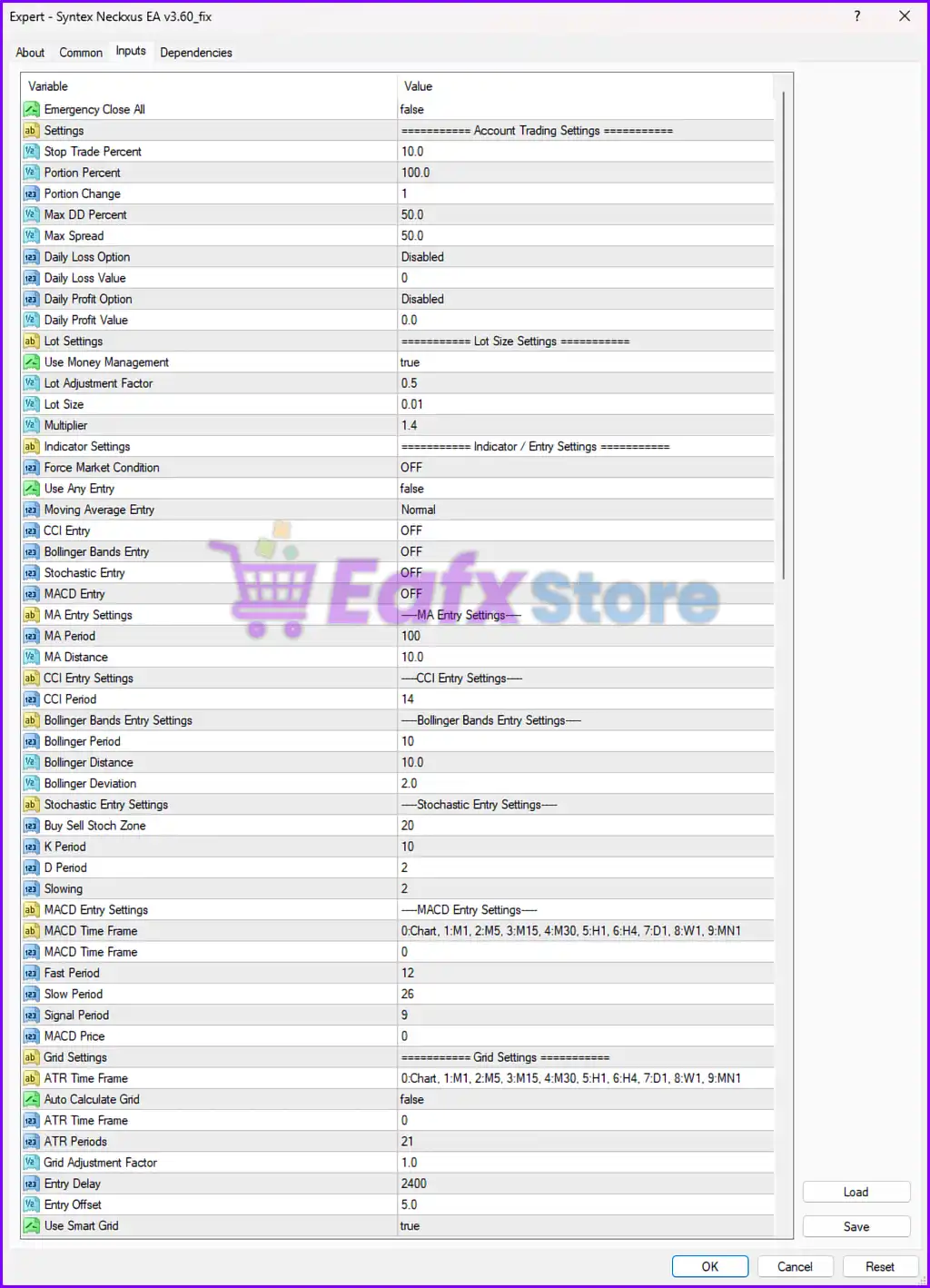
Syntex Neckxus EA MT4 Settings Panel
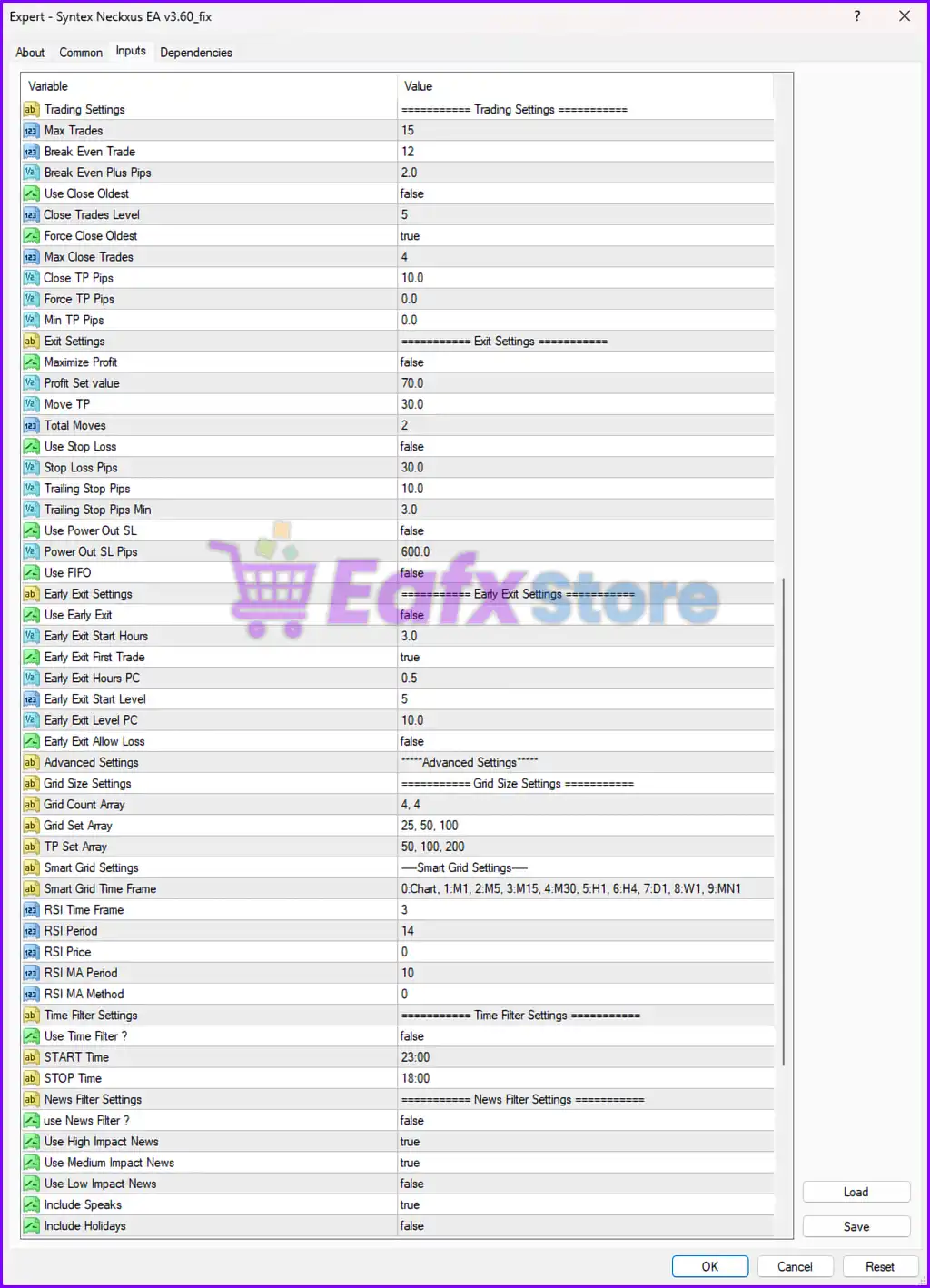
Syntex Neckxus EA Settings Panel
🔶 Trading Settings
🔹 Max Trades = 15: Sets the maximum number of simultaneously opened trades to 15.
🔹 Break Even Trade = 12: Activates break-even functionality after 12 trades.
🔹 Break Even Plus Pips = 2.0: Adds an extra 2.0 pips profit buffer when break-even is triggered.
🔹 Use Close Oldest = false: Disables automatic closing of the oldest trade.
🔹 Close Trades Level = 5: Defines the trade level threshold for closing positions at 5.
🔹 Force Close Oldest = true: Enables forced closure of the oldest trade when conditions are met.
🔹 Max Close Trades = 4: Limits the number of trades that can be closed simultaneously to 4.
🔹 Close TP Pips = 10.0: Sets close take profit distance to 10.0 pips.
🔹 Force TP Pips = 0.0: Disables forced take profit because value is 0.0.
🔹 Min TP Pips = 0.0: Minimum take profit value is disabled with 0.0.
🔶 Exit Settings
🔹 Maximize Profit = false: Disables aggressive profit maximization mode.
🔹 Profit Set value = 70.0: Sets the target profit value to 70.0.
🔹 Move TP = 30.0: Moves take profit dynamically by 30.0 pips.
🔹 Total Moves = 2: Allows take profit adjustments up to 2 times.
🔹 Use Stop Loss = false: Disables fixed stop loss protection.
🔹 Stop Loss Pips = 30.0: Defines stop loss distance at 30.0 pips.
🔹 Trailing Stop Pips = 10.0: Sets trailing stop distance to 10.0 pips.
🔹 Trailing Stop Pips Min = 3.0: Minimum trailing stop value is 3.0 pips.
🔹 Use Power Out SL = false: Disables emergency power-out stop loss mode.
🔹 Power Out SL Pips = 600.0: Emergency stop loss level set to 600.0 pips.
🔹 Use FIFO = false: FIFO trading rules are disabled.
🔶 Early Exit Settings
🔹 Use Early Exit = false: Disables early trade exit functionality.
🔹 Early Exit Start Hours = 3.0: Early exit monitoring begins after 3.0 hours.
🔹 Early Exit First Trade = true: Applies early exit logic to the first trade.
🔹 Early Exit Hours PC = 0.5: Uses 0.5 hour percentage calculation for early exit timing.
🔹 Early Exit Start Level = 5: Starts early exit logic from level 5.
🔹 Early Exit Level PC = 10.0: Uses 10.0% level percentage for early exits.
🔹 Early Exit Allow Loss = false: Prevents early exit from closing trades at a loss.
🔶 Grid Size Settings
🔹 Grid Count Array = 4, 4: Defines the grid count structure as 4, 4.
🔹 Grid Set Array = 25, 50, 100: Configures grid spacing levels to 25, 50, and 100.
🔹 TP Set Array = 50, 100, 200: Defines take profit levels as 50, 100, and 200.
🔶 Smart Grid Settings
🔹 Smart Grid Time Frame = 0:Chart, 1:M1, 2:M5, 3:M15, 4:M30, 5:H1, 6:H4, 7:D1, 8:W1, 9:MN1: Lists available timeframes for smart grid calculations.
🔹 RSI Time Frame = 3: Uses RSI on timeframe mode 3.
🔹 RSI Period = 14: RSI calculation period is set to 14.
🔹 RSI Price = 0: RSI uses price mode 0.
🔹 RSI MA Period = 10: RSI moving average smoothing period set to 10.
🔹 RSI MA Method = 0: Uses MA method 0 for RSI smoothing.
🔶 Time Filter Settings
🔹 Use Time Filter ? = false: Disables trading session time filtering.
🔹 START Time = 23:00: Configures trading start time at 23:00.
🔹 STOP Time = 18:00: Configures trading stop time at 18:00.
🔶 News Filter Settings
🔹 use News Filter ? = false: Disables automatic news filtering.
🔹 Use High Impact News = true: Enables high-impact news event detection.
🔹 Use Medium Impact News = true: Enables medium-impact news event filtering.
🔹 Use Low Impact News = false: Disables low-impact news filtering.
🔹 Include Speaks = true: Includes speeches and official talks in the news filter.
🔹 Include Holidays = false: Ignores market holidays in the news filter.
🔶 Account Trading Settings
🔹 Emergency Close All = false: Disables emergency close-all positions feature.
🔹 Stop Trade Percent = 10.0: Stops trading when loss reaches 10.0%.
🔹 Portion Percent = 100.0: Uses 100.0% account allocation.
🔹 Portion Change = 1: Portion adjustment value is set to 1.
🔹 Max DD Percent = 50.0: Maximum allowed drawdown is 50.0%.
🔹 Max Spread = 50.0: Maximum allowable spread is 50.0.
🔹 Daily Loss Option = Disabled: Daily loss protection is disabled.
🔹 Daily Loss Value = 0: Daily loss limit value is 0.
🔹 Daily Profit Option = Disabled: Daily profit target is disabled.
🔹 Daily Profit Value = 0.0: Daily profit value is 0.0.
🔶 Lot Size Settings
🔹 Use Money Management = true: Enables automatic money management.
🔹 Lot Adjustment Factor = 0.5: Adjusts lot scaling by factor 0.5.
🔹 Lot Size = 0.01: Default starting lot size is 0.01.
🔹 Multiplier = 1.4: Uses a lot multiplier of 1.4.
🔶 Indicator & Entry Settings
🔹 Force Market Condition = OFF: No forced market condition is applied.
🔹 Use Any Entry = false: Requires strategy confirmation before entering trades.
🔹 Moving Average Entry = Normal: Uses standard moving average entry logic.
🔹 CCI Entry = OFF: Commodity Channel Index entry filter is disabled.
🔹 Bollinger Bands Entry = OFF: Bollinger Bands entry filter is disabled.
🔹 Stochastic Entry = OFF: Stochastic entry filter is disabled.
🔹 MACD Entry = OFF: MACD entry filter is disabled.
🔶 MA Entry Settings
🔹 MA Period = 100: Moving Average period is set to 100.
🔹 MA Distance = 10.0: Entry distance from MA is 10.0.
🔶 CCI Entry Settings
🔹 CCI Period = 14: Commodity Channel Index period set to 14.
🔶 Bollinger Bands Entry Settings
🔹 Bollinger Period = 10: Bollinger Bands period is 10.
🔹 Bollinger Distance = 10.0: Bollinger entry distance is 10.0.
🔹 Bollinger Deviation = 2.0: Bollinger Bands deviation value is 2.0.
🔶 Stochastic Entry Settings
🔹 Buy Sell Stoch Zone = 20: Defines stochastic buy/sell zone at 20.
🔹 K Period = 10: Stochastic K period is 10.
🔹 D Period = 2: Stochastic D period is 2.
🔹 Slowing = 2: Stochastic slowing factor is 2.
🔶 MACD Entry Settings
🔹 MACD Time Frame = 0:Chart, 1:M1, 2:M5, 3:M15, 4:M30, 5:H1, 6:H4, 7:D1, 8:W1, 9:MN1: Lists available MACD timeframes.
🔹 MACD Time Frame = 0: Uses current chart timeframe for MACD.
🔹 Fast Period = 12: MACD fast EMA period is 12.
🔹 Slow Period = 26: MACD slow EMA period is 26.
🔹 Signal Period = 9: MACD signal smoothing period is 9.
🔹 MACD Price = 0: Uses price mode 0 for MACD calculations.
🔶 Grid Settings
🔹 ATR Time Frame = 0:Chart, 1:M1, 2:M5, 3:M15, 4:M30, 5:H1, 6:H4, 7:D1, 8:W1, 9:MN1: Available ATR timeframes for grid calculations.
🔹 Auto Calculate Grid = false: Disables automatic ATR grid calculation.
🔹 ATR Time Frame = 0: Uses current chart timeframe for ATR.
🔹 ATR Periods = 21: ATR indicator period is 21.
🔹 Grid Adjustment Factor = 1.0: Grid adjustment multiplier is 1.0.
🔹 Entry Delay = 2400: Delays new trade entries by 2400.
🔹 Entry Offset = 5.0: Entry offset value is 5.0.
🔹 Use Smart Grid = true: Enables adaptive smart grid functionality.
🔢 Conclusion
Syntex Neckxus EA MT4 is an advanced multi-strategy Forex Expert Advisor that combines grid systems, smart exits, news filtering, indicator-based entries, and money management into one powerful automated trading solution. With extensive customization options for RSI, MACD, Bollinger Bands, Stochastic indicators, and adaptive grid trading, the EA is suitable for traders seeking flexible and intelligent automation on MetaTrader 4.
🔢 FAQs
❓ What is Syntex Neckxus EA MT4?
Syntex Neckxus EA MT4 is an automated Forex trading robot featuring smart grid trading, indicator filters, and advanced money management tools.
❓ Does Syntex Neckxus EA MT4 support grid trading?
Yes, the EA includes customizable grid spacing, TP arrays, and smart grid functionality.
❓ Can I enable news filtering in Syntex Neckxus EA MT4?
Yes, the EA supports filtering for high, medium, and low impact news events.
❓ What indicators are available in Syntex Neckxus EA MT4?
The EA supports RSI, MACD, Moving Average, CCI, Bollinger Bands, and Stochastic indicators.
❓ Does Syntex Neckxus EA MT4 include money management features?
Yes, it includes automatic lot sizing, drawdown protection, spread control, and risk percentage settings.
User Reviews
Only logged in customers who have purchased this product may leave a review.
1. What is Syntex Neckxus EA and how does it work?
Syntex Neckxus EA is a smart grid-based trading robot for MetaTrader 4 that combines adaptive entry logic, news filtering, and dynamic lot management to provide a safer and more customizable trading experience.
2. Is this EA safe compared to other grid or martingale systems?
Yes. While it uses a grid system, Syntex Neckxus EA is designed with strict risk controls, drawdown protection, and exit safety features, making it much safer than traditional martingale bots.
3. What trading instruments and timeframes does it support?
It’s compatible with any currency pair and optimized for M5, M15, M30, and H1 timeframes. This flexibility makes it adaptable to different trading styles and market conditions.
4. How does the EA manage risk and prevent large drawdowns?
The EA uses a combination of:
Max Drawdown Limits (50%)
Stop Trade Percent (10%)
Portion-Based Balance Usage
Break-Even and Trailing Stop Features
These controls help limit exposure and protect capital during volatility.
5. Does Syntex Neckxus EA trade during news events?
No. It includes an advanced news filter that blocks trading during medium/high-impact news events and central bank speeches, reducing exposure to unpredictable price spikes.
6. Can I customize the trading logic or entry strategies?
Yes. Traders can configure:
RSI/ATR filters
Moving Average entry logic
Grid spacing and lot scaling
Time filters and early exit conditions
This allows you to tailor the EA to your trading preferences and market outlook.
7. What is the minimum deposit and leverage required?
The minimum recommended deposit is $100, and the EA can work with any leverage, though higher leverage may be beneficial for grid spacing and margin flexibility.
8. How profitable is the EA according to backtests?
Backtests using a $10,000 starting balance show:
✅ Total Net Profit: $478.95 million
✅ Win Rate: 94.12%
⚠️ Max Equity Drawdown: 35.20%
These results highlight its strong profit potential when used responsibly with appropriate settings.
🔥 Get This EA for FREE with Our Membership! 🚀🚀
Unlock access to this EA, premium Indicators, and exclusive trading tools completely FREE with any of our Membership Plans! Thousands of traders already benefit from our VIP library—join them and level up your trading instantly. Choose Your Membership:
- SPECIAL – 1 Month Membership
- GOLD – 1 Year Membership
- PREMIUM – 1 Year Membership
-
 Price range: $89.00 through $599.00
 -
 Price range: $89.00 through $599.00
 -
 Price range: $70.00 through $599.00
 -
 Price range: $65.00 through $599.00
-
 10Original price was: $499.00.$69.00Current price is: $69.00.
 -
 1Original price was: $599.00.$59.00Current price is: $59.00.
 -
 1Original price was: $599.00.$59.00Current price is: $59.00.
 -
 3Original price was: $499.00.$59.00Current price is: $59.00.
There are no reviews yet.