
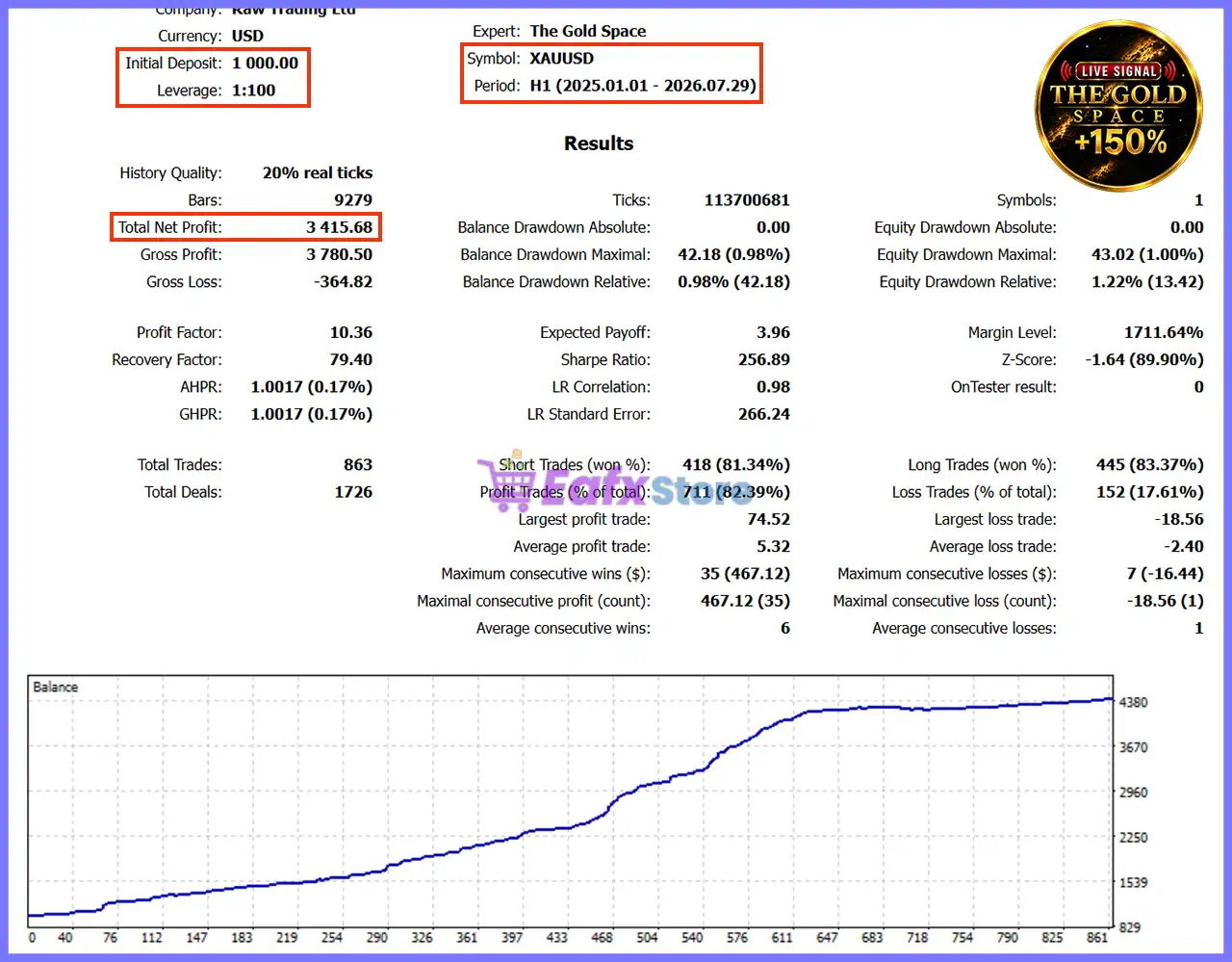
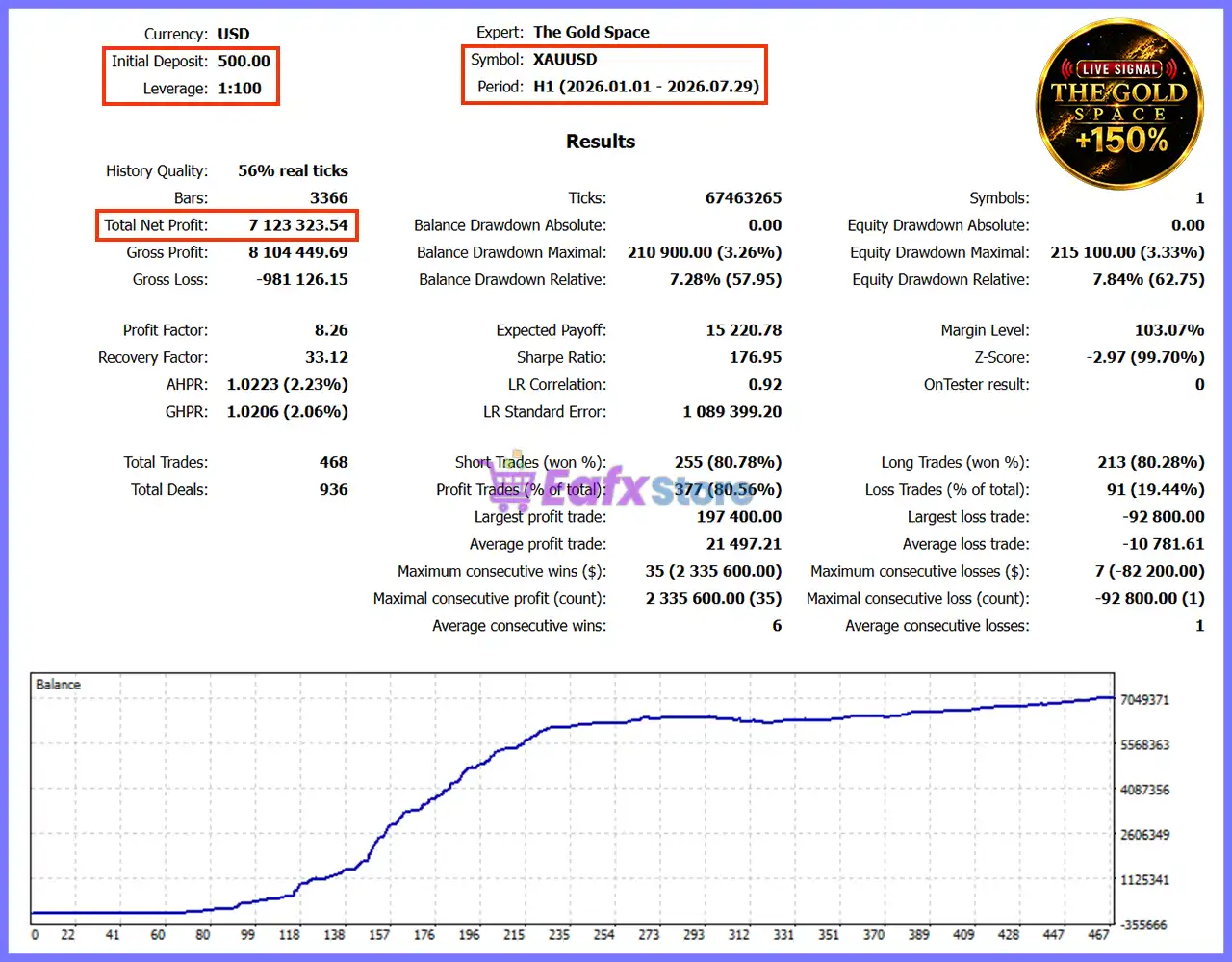
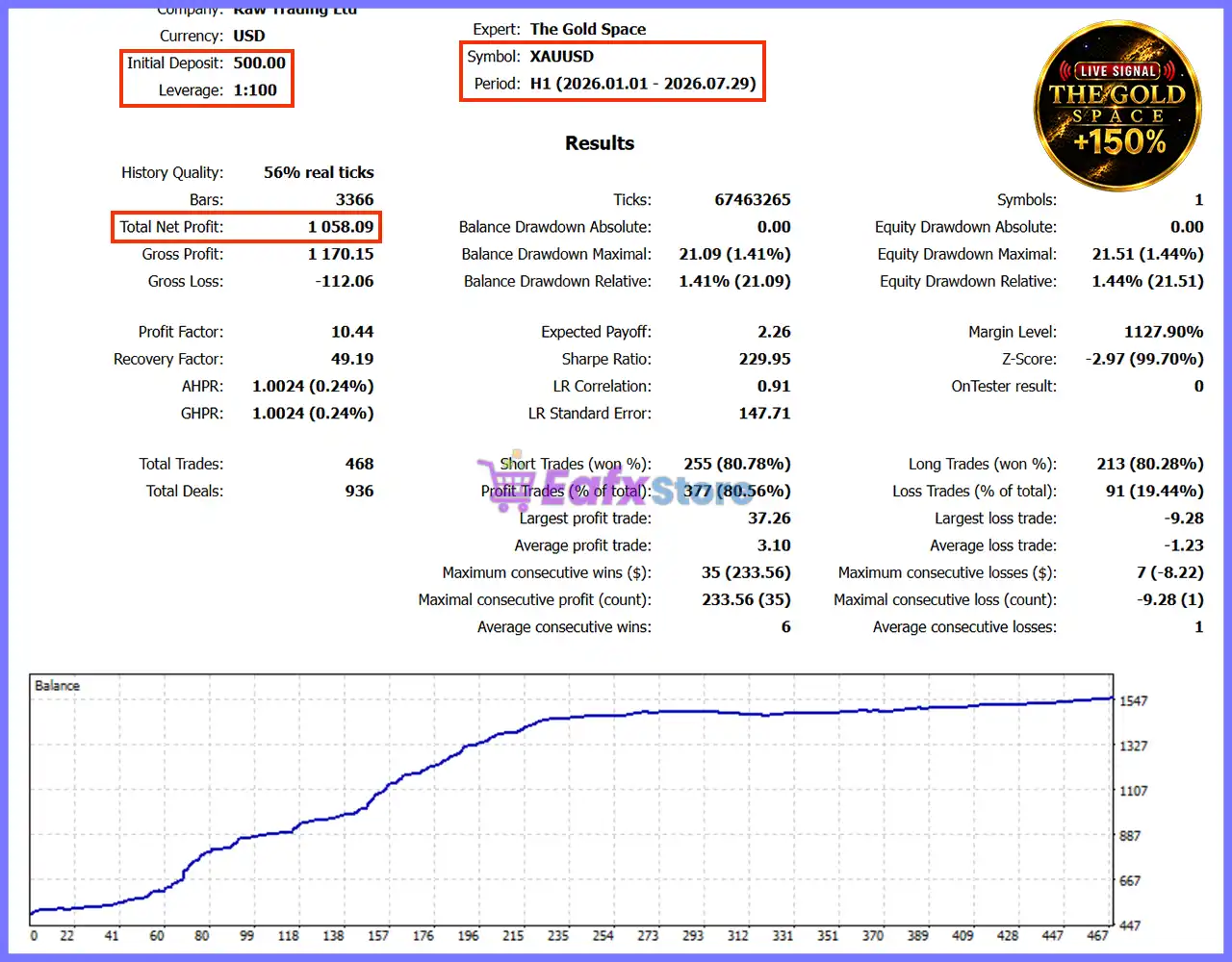
🔢 The Gold Space EA MT5 Settings Guide
The Gold Space EA is an advanced automated trading system designed specifically for XAUUSD traders who require precise range-based entries, integrated news protection, holiday filtering, adaptive risk management and intelligent trade execution.
The Expert Advisor offers extensive customization options, allowing traders to optimize trading sessions, money management, spread control, fast trailing, and visual chart settings while maintaining disciplined risk control across various market conditions.
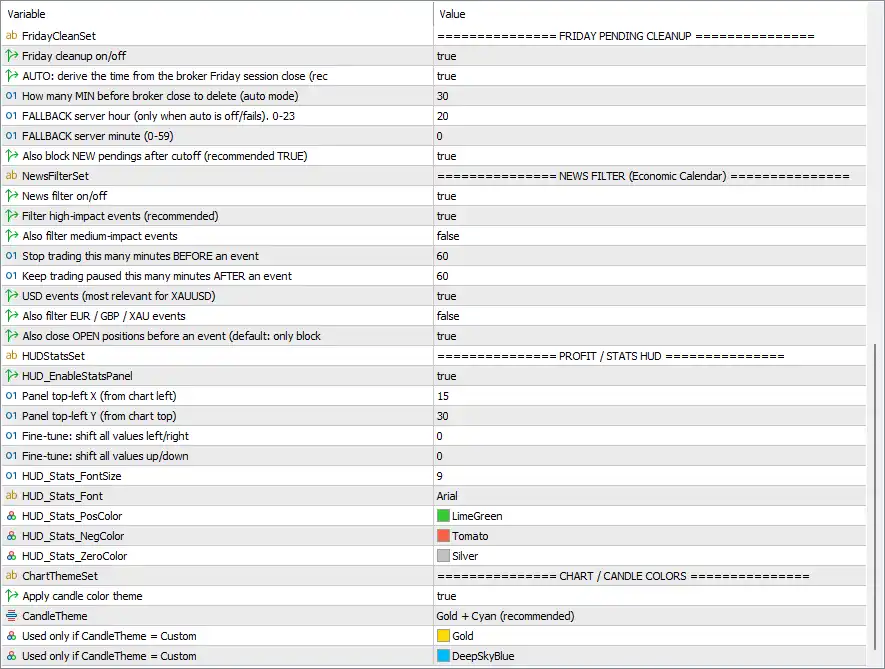
🔢 The Gold Space EA MT5 Settings Explained
🔶 Friday Pending Cleanup
🔹 Friday cleanup on/off = true – Enables automatic Friday pending order cleanup before the market closes.
🔹 AUTO: derive the time from the broker Friday session close = true – Automatically detects the broker's Friday closing time instead of using manual settings.
🔹 How many MIN before broker close to delete (auto mode) = 30 – Deletes pending orders 30 minutes before the broker closes on Friday.
🔹 FALLBACK server hour (only when auto is off/fails), 0-23 = 20 – Uses 20:00 server time as the backup Friday closing hour if automatic detection fails.
🔹 FALLBACK server minute (0-59) = 0 – Uses 00 minutes as the fallback closing minute.
🔹 Also block NEW pendings after cutoff (recommended TRUE) = true – Prevents new pending orders from being placed after the Friday cutoff time.
🔶 News Filter (Economic Calendar)
🔹 News filter on/off = true – Enables the built-in economic news filter.
🔹 Filter high-impact events (recommended) = true – Blocks trading around high-impact economic news releases.
🔹 Also filter medium-impact events = false – Medium-impact news events are ignored.
🔹 Stop trading this many minutes BEFORE an event = 60 – Stops opening new trades 60 minutes before a scheduled news event.
🔹 Keep trading paused this many minutes AFTER an event = 60 – Waits 60 minutes after the event before resuming trading.
🔹 USD events (most relevant for XAUUSD) = true – Filters important USD economic events affecting Gold.
🔹 Also filter EUR / GBP / XAU events = false – EUR, GBP, and XAU-related events are not included in filtering.
🔹 Also close OPEN positions before an event (default: only block) = true – Closes existing positions before major news instead of only blocking new entries.
🔶 Profit / Statistics HUD
🔹 HUD_EnableStatsPanel = true – Displays the performance statistics panel on the chart.
🔹 Panel top-left X (from chart left) = 15 – Positions the HUD 15 pixels from the left edge.
🔹 Panel top-left Y (from chart top) = 30 – Positions the HUD 30 pixels from the top edge.
🔹 Fine-tune: shift all values left/right = 0 – No horizontal adjustment is applied.
🔹 Fine-tune: shift all values up/down = 0 – No vertical adjustment is applied.
🔹 HUD_Stats_FontSize = 9 – Uses font size 9 for the statistics panel.
🔹 HUD_Stats_Font = Arial – Displays statistics using the Arial font.
🔹 HUD_Stats_PosColor = LimeGreen – Shows profitable values in LimeGreen.
🔹 HUD_Stats_NegColor = Tomato – Shows losing values in Tomato.
🔹 HUD_Stats_ZeroColor = Silver – Displays neutral values in Silver.
🔶 Chart / Candle Colors
🔹 Apply candle color theme = true – Enables the predefined candle color theme.
🔹 CandleTheme = Gold + Cyan (recommended) – Uses the recommended Gold + Cyan chart appearance.
🔹 Used only if CandleTheme = Custom = Gold – Uses Gold as the bullish candle color when Custom mode is selected.
🔹 Used only if CandleTheme = Custom = DeepSkyBlue – Uses DeepSkyBlue as the bearish candle color when Custom mode is selected.
🔶 Holiday Filter
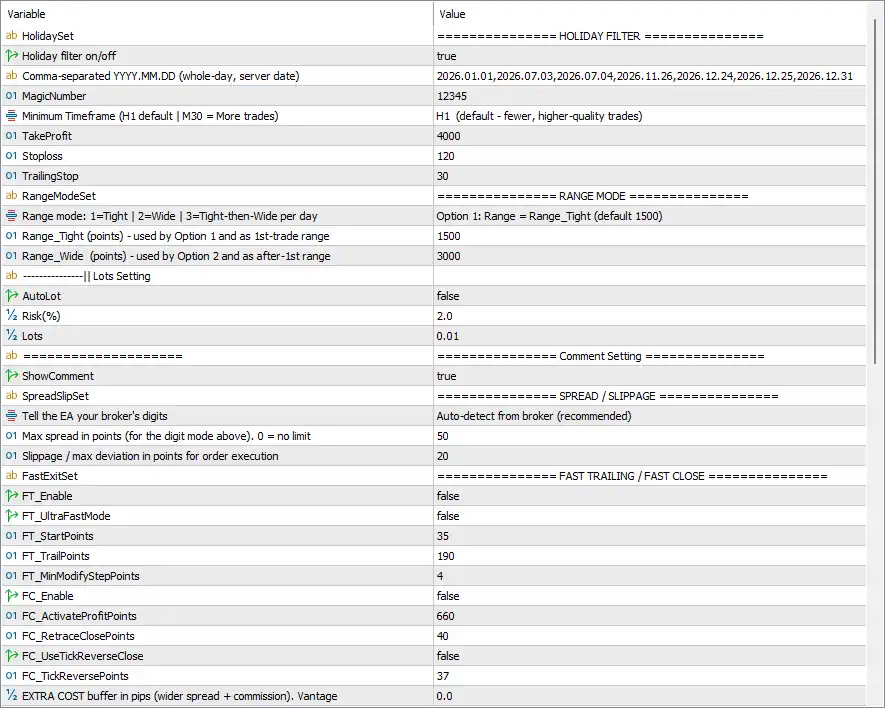
🔹 Holiday filter on/off = true – Enables automatic holiday trading restrictions.
🔹 Comma-separated YYYY.MM.DD (whole-day, server date) = 2026.01.01, 2026.07.03, 2026.07.04, 2026.11.26, 2026.12.24, 2026.12.25, 2026.12.31 – Specifies the holidays during which trading is disabled.
🔶 General Trading Settings
🔹 MagicNumber = 12345 – Assigns the unique identifier 12345 to all trades opened by this EA.
🔹 Minimum Timeframe (H1 default | M30 = More trades) = H1 (default - fewer, higher-quality trades) – Uses the H1 timeframe by default for fewer but higher-quality trading opportunities.
🔹 TakeProfit = 4000 – Sets the Take Profit target to 4000 points.
🔹 Stoploss = 120 – Limits each trade to a maximum loss of 120 points.
🔹 TrailingStop = 30 – Moves the Stop Loss by 30 points as the trade becomes profitable.
🔶 Range Mode
🔹 Range mode: 1=Tight | 2=Wide | 3=Tight-then-Wide per day = Option 1: Range = Range_Tight (default 1500) – Uses the Tight Range trading model.
🔹 Range_Tight (points) = 1500 – Sets the first trading range to 1500 points.
🔹 Range_Wide (points) = 3000 – Sets the wide trading range to 3000 points.
🔶 Lots Settings
🔹 AutoLot = false – Disables automatic lot calculation.
🔹 Risk(%) = 2.0 – Defines a 2.0% risk when AutoLot is enabled.
🔹 Lots = 0.01 – Uses a fixed trading volume of 0.01 lots.
🔶 Comment Setting
🔹 ShowComment = true – Displays EA status information directly on the chart.
🔶 Spread / Slippage
🔹 Tell the EA your broker's digits = Auto-detect from broker (recommended) – Automatically detects the broker's quote precision.
🔹 Max spread in points (for the digit mode above). 0 = no limit = 50 – Blocks entries when spread exceeds 50 points.
🔹 Slippage / max deviation in points for order execution = 20 – Allows up to 20 points of slippage during execution.
🔶 Fast Trailing / Fast Close
🔹 FT_Enable = false – Disables the Fast Trailing feature.
🔹 FT_UltraFastMode = false – Keeps Ultra Fast trailing disabled.
🔹 FT_StartPoints = 35 – Fast Trailing would activate after 35 points of profit.
🔹 FT_TrailPoints = 190 – Uses 190 points as the trailing distance.
🔹 FT_MinModifyStepPoints = 4 – Updates the Stop Loss only after a 4-point movement.
🔹 FC_Enable = false – Disables the Fast Close engine.
🔹 FC_ActivateProfitPoints = 660 – Fast Close would activate after 660 profit points.
🔹 FC_RetraceClosePoints = 40 – Closes trades after a 40-point retracement.
🔹 FC_UseTickReverseClose = false – Tick reversal exit is disabled.
🔹 FC_TickReversePoints = 37 – Uses 37 points as the tick reversal threshold if enabled.
🔹 EXTRA COST buffer in pips (wider spread + commission), Vantage = 0.0 – Adds 0.0 pips of extra execution cost buffer.
🔢 Conclusion
The Gold Space EA MT5 provides a comprehensive trading environment that combines intelligent range-based execution, advanced news filtering, holiday protection, flexible money management and precision trade handling.
With configurable trailing systems, spread protection, visual HUD customization, and automatic Friday cleanup, the EA offers traders a professional framework for trading XAUUSD while maintaining strong risk management and execution discipline.
🔢 FAQs
❓ What timeframe is recommended for The Gold Space EA MT5?
The default recommendation is H1, which produces fewer but generally higher-quality trading opportunities compared to M30.
❓ Does The Gold Space EA MT5 include a built-in news filter?
Yes. The EA includes an integrated economic calendar filter capable of blocking trading around major USD news events and optionally closing existing positions before announcements.
❓ Can the EA automatically calculate lot sizes?
Yes. AutoLot is available, although it is disabled (false) by default. When enabled, it uses the configured Risk (%) value.
❓ What is the purpose of the Friday Pending Cleanup feature?
It automatically removes pending orders before the market closes on Friday and can also prevent new pending orders from being placed after the cutoff time to reduce weekend gap risk.
❓ Can I customize the chart appearance and statistics panel?
Yes. The EA allows full customization of the on-chart statistics HUD, fonts, colors, panel position, and candle color themes to suit your preferred trading workspace.



