

🔢 Scalp Master MT5 Settings Guide
Scalp Master MT5 is a fully automated Expert Advisor developed for fast and precise scalping across multiple asset classes, including Forex, Gold, Cryptocurrencies and Indices.
The EA features flexible money management, built-in news filtering, RSI and Moving Average market filters, customizable trading sessions, and asset-specific take profit and stop loss configurations. These settings allow traders to optimize performance while maintaining effective risk management under different market conditions.
🔢 Scalp Master MT5 Settings Explained
🔶 Trading Profiles
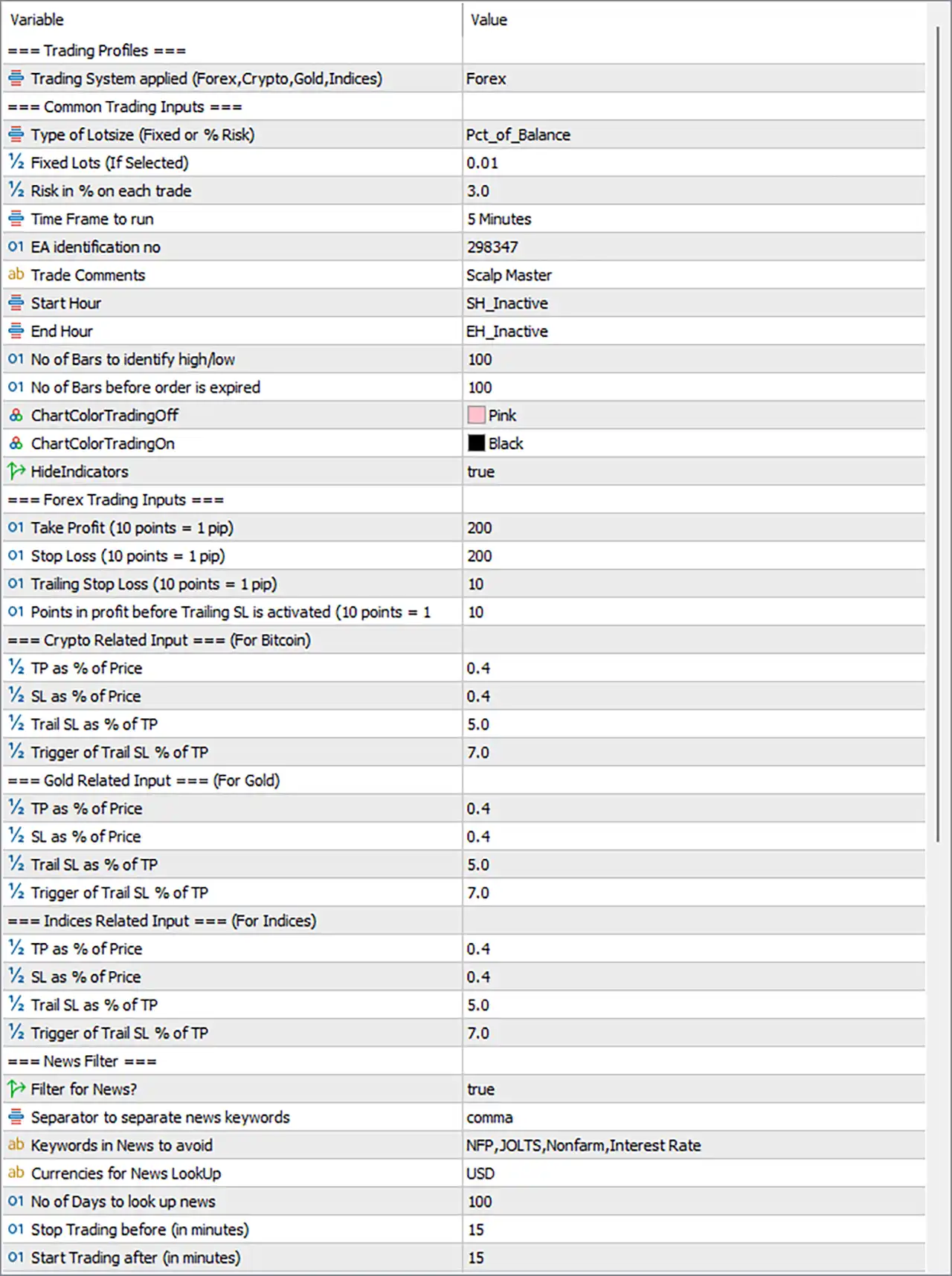
🔹 Trading System applied (Forex, Crypto, Gold, Indices) = Forex – Selects the trading profile; the current configuration is optimized for Forex markets.
🔶 Common Trading Inputs
🔹 Type of Lotsize (Fixed or % Risk) = Pct_of_Balance – Uses percentage of account balance for dynamic position sizing instead of a fixed lot.
🔹 Fixed Lots (If Selected) = 0.01 – Sets the fixed trading volume to 0.01 lots when Fixed Lot mode is enabled.
🔹 Risk in % on each trade = 3.0 – Risks 3.0% of the account balance on every trade when percentage risk mode is active.
🔹 Time Frame to run = 5 Minutes – Configures the EA to operate on the M5 timeframe.
🔹 EA identification no = 298347 – Assigns the unique Magic Number 298347 to distinguish the EA's trades.
🔹 Trade Comments = Scalp Master – Adds "Scalp Master" as the trade comment for all executed orders.
🔹 Start Hour = SH_Inactive – Trading start hour filter is currently inactive.
🔹 End Hour = EH_Inactive – Trading end hour filter is currently inactive.
🔹 No of Bars to identify high/low = 100 – Uses the previous 100 bars to determine swing highs and lows.
🔹 No of Bars before order is expired = 100 – Pending orders expire after 100 bars if not triggered.
🔹 ChartColorTradingOff = Pink – Displays a Pink chart color when trading is disabled.
🔹 ChartColorTradingOn = Black – Displays a Black chart color while trading is active.
🔹 HideIndicators = true – Hides indicator objects from the trading chart.
🔶 Forex Trading Inputs
🔹 Take Profit (10 points = 1 pip) = 200 – Sets the Forex Take Profit to 200 points (20 pips).
🔹 Stop Loss (10 points = 1 pip) = 200 – Sets the Forex Stop Loss to 200 points (20 pips).
🔹 Trailing Stop Loss (10 points = 1 pip) = 10 – Moves the Stop Loss by 10 points (1 pip) once trailing begins.
🔹 Points in profit before Trailing SL is activated (10 points = 1 pip) = 10 – Activates trailing after the trade reaches 10 points (1 pip) in profit.
🔶 Crypto Related Input (For Bitcoin)
🔹 TP as % of Price = 0.4 – Sets the cryptocurrency Take Profit to 0.4% of market price.
🔹 SL as % of Price = 0.4 – Sets the cryptocurrency Stop Loss to 0.4% of market price.
🔹 Trail SL as % of TP = 5.0 – Uses a trailing stop equal to 5.0% of the Take Profit distance.
🔹 Trigger of Trail SL % of TP = 7.0 – Activates trailing once 7.0% of the TP target has been achieved.
🔶 Gold Related Input (For Gold)
🔹 TP as % of Price = 0.4 – Sets Gold Take Profit at 0.4% of current market price.
🔹 SL as % of Price = 0.4 – Sets Gold Stop Loss at 0.4% of current market price.
🔹 Trail SL as % of TP = 5.0 – Trails the Stop Loss by 5.0% of the TP distance.
🔹 Trigger of Trail SL % of TP = 7.0 – Starts trailing after 7.0% of the TP target is reached.
🔶 Indices Related Input (For Indices)
🔹 TP as % of Price = 0.4 – Uses 0.4% of price as the Take Profit target for indices.
🔹 SL as % of Price = 0.4 – Uses 0.4% of price as the Stop Loss level for indices.
🔹 Trail SL as % of TP = 5.0 – Sets the trailing stop distance to 5.0% of the Take Profit.
🔹 Trigger of Trail SL % of TP = 7.0 – Activates trailing after 7.0% progress toward TP.
🔶 News Filter
🔹 Filter for News = true – Enables the built-in economic news filter.
🔹 Separator to separate news keywords = comma – Uses commas to separate multiple news keywords.
🔹 Keywords in News to avoid = NFP,JOLTS,Nonfarm,Interest Rate – Blocks trading during important events containing these keywords.
🔹 Currencies for News LookUp = USD – Monitors USD economic news events.
🔹 No of Days to look up news = 100 – Retrieves scheduled news for the next 100 days.
🔹 Stop Trading before (in minutes) = 15 – Stops opening new trades 15 minutes before scheduled news.
🔹 Start Trading after (in minutes) = 15 – Resumes trading 15 minutes after the news release.
🔶 RSI Filter
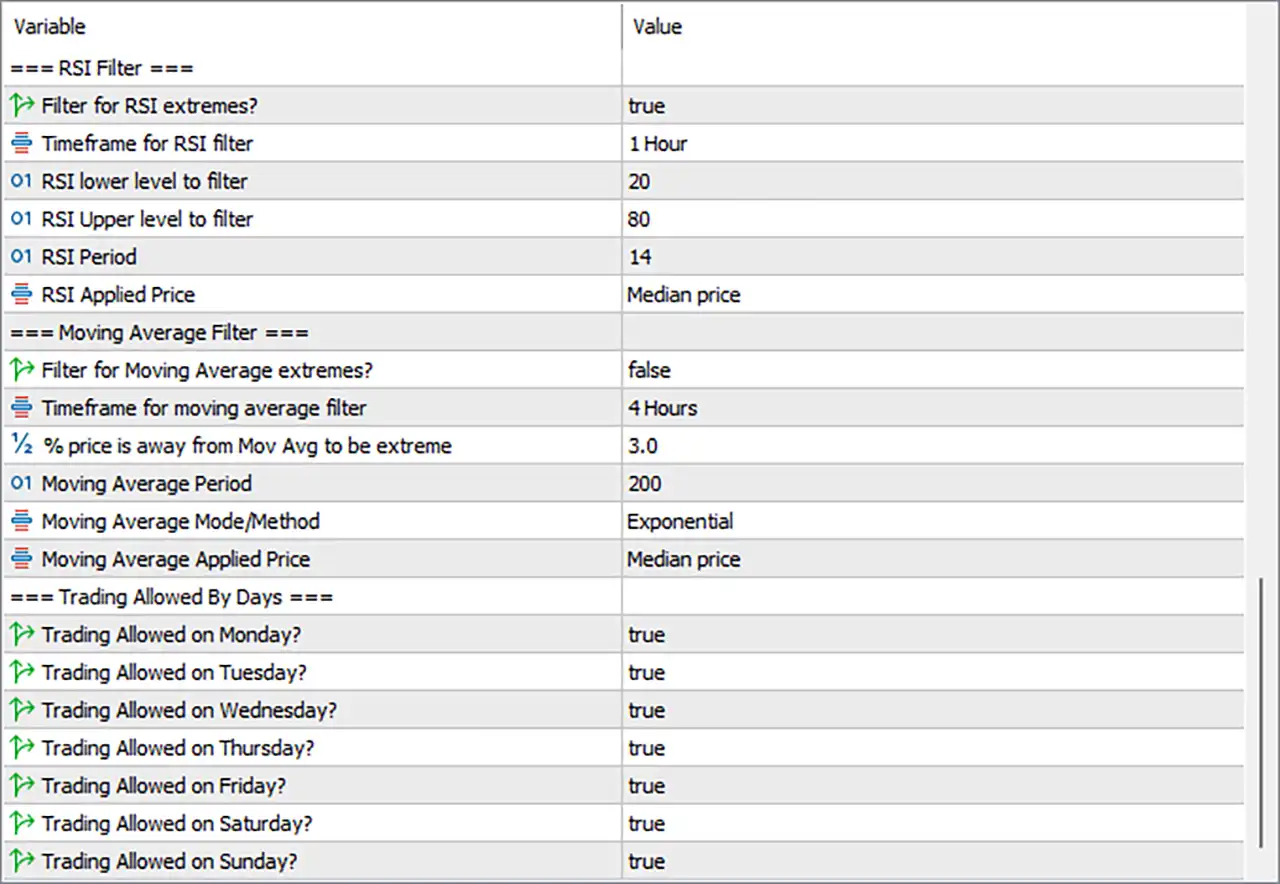
🔹 Filter for RSI extremes? = true – Enables RSI overbought and oversold filtering.
🔹 Timeframe for RSI filter = 1 Hour – Calculates RSI using the H1 timeframe.
🔹 RSI lower level to filter = 20 – Treats RSI values below 20 as oversold.
🔹 RSI Upper level to filter = 80 – Treats RSI values above 80 as overbought.
🔹 RSI Period = 14 – Uses the standard 14-period RSI calculation.
🔹 RSI Applied Price = Median price – Calculates RSI from the Median Price.
🔶 Moving Average Filter
🔹 Filter for Moving Average extremes? = false – Disables Moving Average extreme filtering.
🔹 Timeframe for moving average filter = 4 Hours – Uses the H4 timeframe for Moving Average calculations.
🔹 % price is away from Mov Avg to be extreme = 3.0 – Defines an extreme market condition when price is 3.0% away from the Moving Average.
🔹 Moving Average Period = 200 – Uses a 200-period Moving Average.
🔹 Moving Average Mode/Method = Exponential – Applies an Exponential Moving Average (EMA).
🔹 Moving Average Applied Price = Median price – Calculates the EMA from the Median Price.
🔶 Trading Allowed By Days
🔹 Trading Allowed on Monday? = true – Enables trading on Monday.
🔹 Trading Allowed on Tuesday? = true – Enables trading on Tuesday.
🔹 Trading Allowed on Wednesday? = true – Enables trading on Wednesday.
🔹 Trading Allowed on Thursday? = true – Enables trading on Thursday.
🔹 Trading Allowed on Friday? = true – Enables trading on Friday.
🔹 Trading Allowed on Saturday? = true – Enables trading on Saturday.
🔹 Trading Allowed on Sunday? = true – Enables trading on Sunday.
🔢 Conclusion
Scalp Master MT5 provides a comprehensive set of professional trading parameters for Forex, Gold, Cryptocurrency, and Indices trading. Its flexible percentage-based money management, dedicated asset-specific TP/SL settings, intelligent news filter, RSI confirmation, Moving Average analysis, and customizable trading schedule allow traders to fine-tune the EA according to their preferred risk profile and market conditions.
🔢 FAQs
❓ What markets can Scalp Master MT5 trade?
Scalp Master MT5 supports Forex, Gold, Cryptocurrencies (such as Bitcoin), and Indices through dedicated trading profiles.
❓ How does the percentage risk mode work?
When Pct_of_Balance is selected, the EA automatically calculates the lot size based on the selected 3.0% risk per trade.
❓ Why is the news filter important?
The built-in news filter helps avoid trading during major economic events such as NFP, JOLTS, Nonfarm Payrolls, and Interest Rate announcements, reducing exposure to extreme volatility.
❓ What is the purpose of the RSI filter?
The RSI filter blocks trades during extreme overbought or oversold conditions using RSI 14, with thresholds set at 20 and 80 on the H1 timeframe.
❓ Can I customize trading days and sessions?
Yes. Scalp Master MT5 allows you to enable or disable trading for each day of the week, making it easy to match your preferred trading schedule and broker conditions.



