
TPC Bot MT5 – Complete Settings & Input Parameters Guide
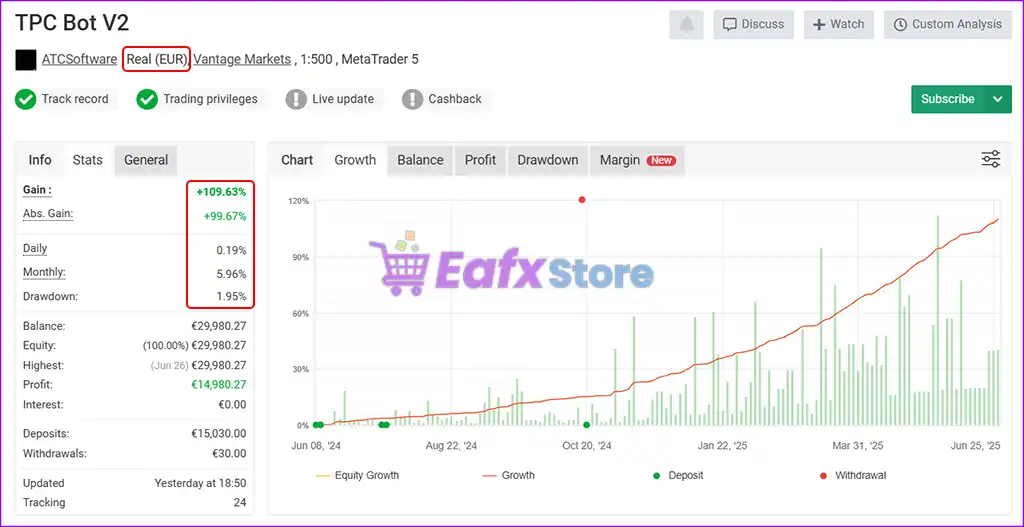
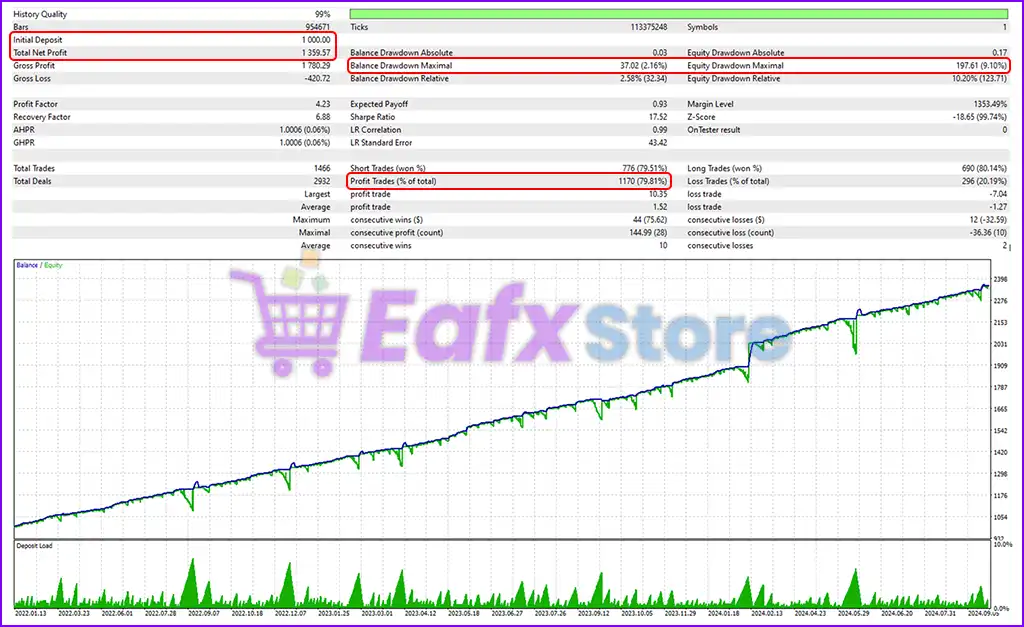
TPC Bot MT5 is an advanced automated trading robot designed for MetaTrader 5 traders who want flexible grid trading, intelligent risk management, indicator-based filtering and customizable notification systems.
The EA supports Moving Average, RSI, ZigZag, and Hilo filters while also offering grid sequence control, volatility protection, equity stop management and daily target automation.
Its modular setup makes it suitable for scalping, grid trading, and multi-strategy Forex trading.
TPC Bot MT5 Settings
TPC Bot MT5 Settings Explained
Below are the details of the parameters in the advisor’s trading system settings table:
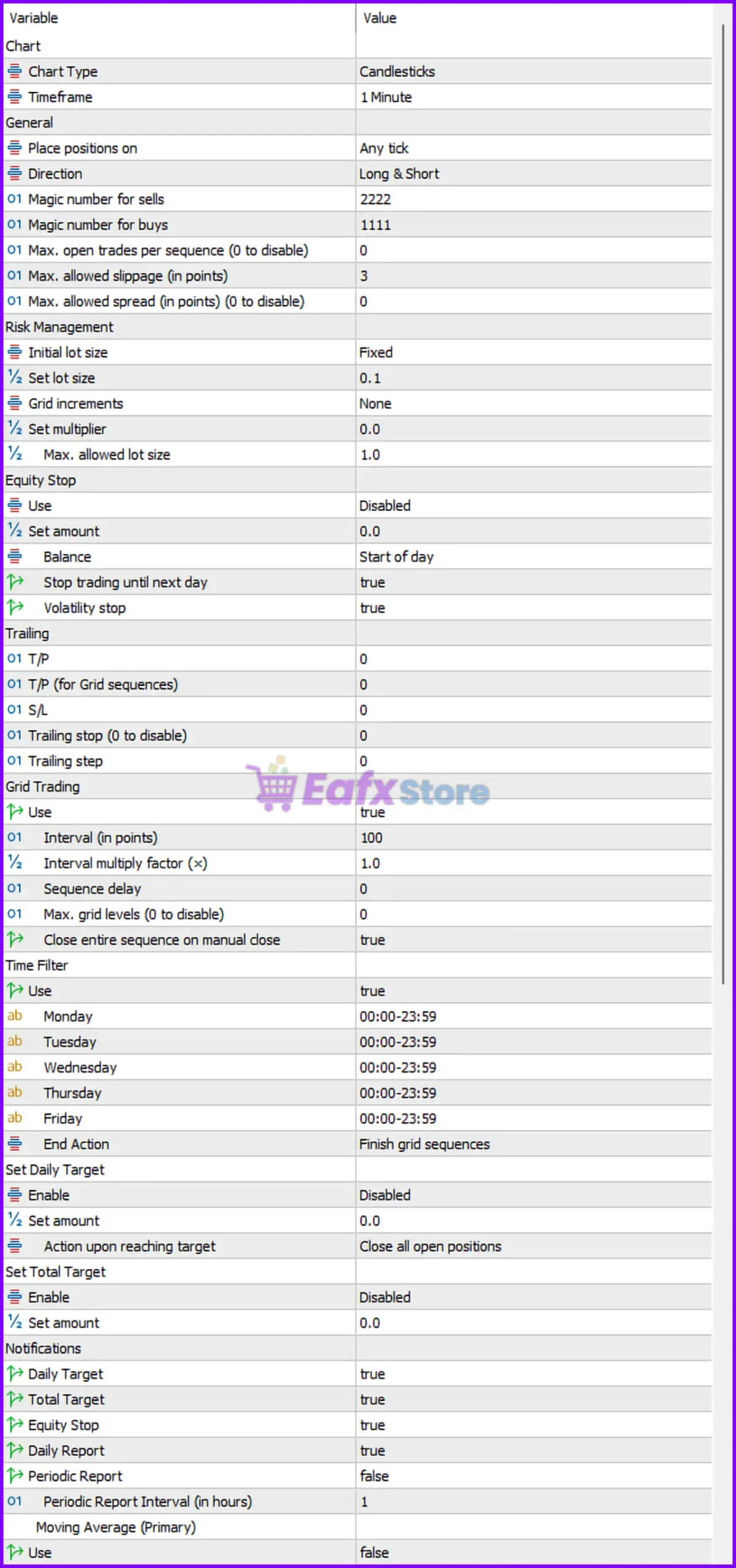
TPC Bot MT5 Setting Panel
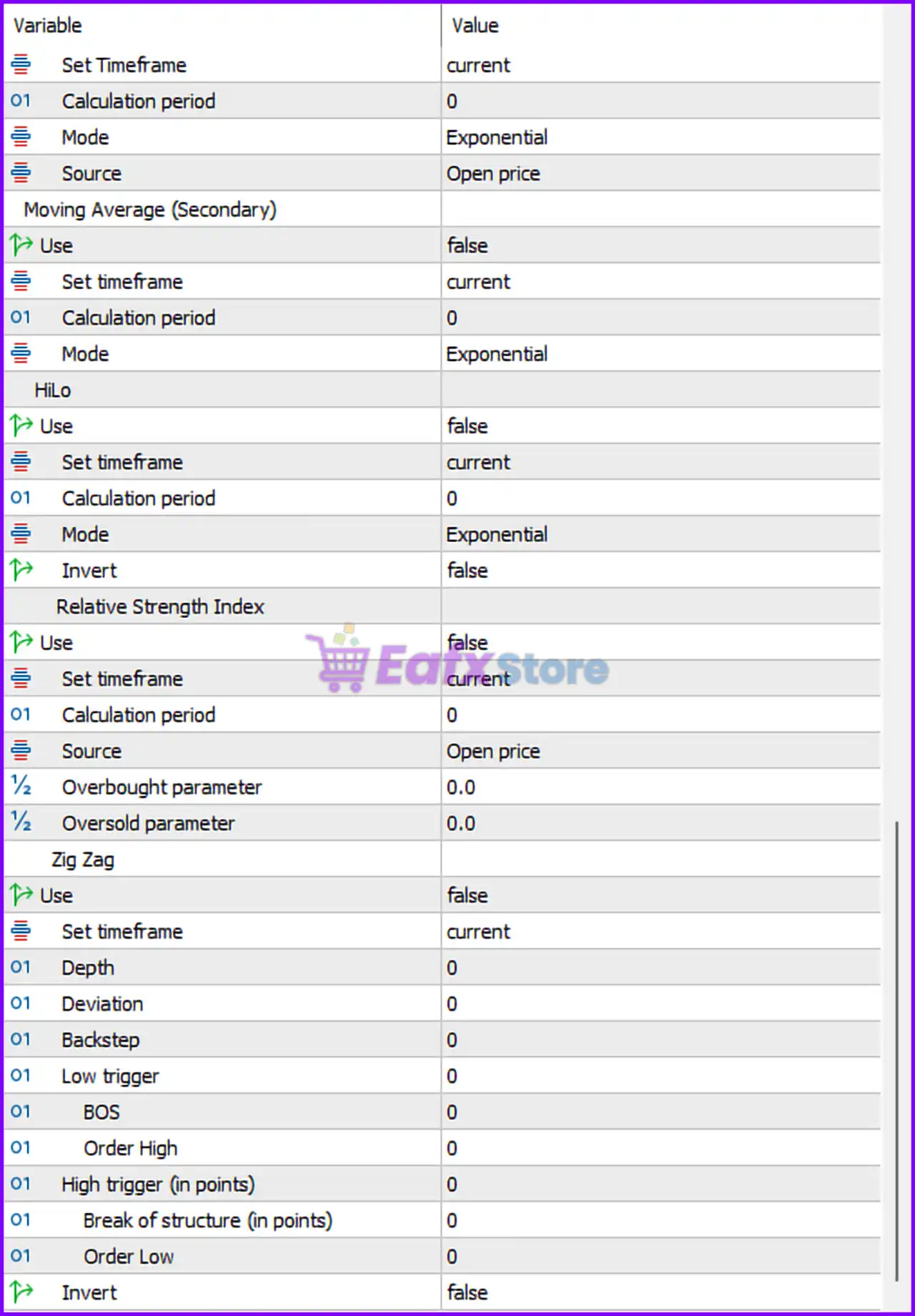
TPC Bot MT5 EA Setting Panel
Chart Settings
🔹 Chart Type = Candlesticks: Uses Candlesticks as the chart visualization method.
🔹 Timeframe = 1 Minute: The EA operates on the 1 Minute (M1) timeframe.
General Trading Settings
🔹 Place positions on = Any tick: Opens and manages trades on every market tick update.
🔹 Direction = Long & Short: Allows both buy and sell trading operations.
🔹 Magic number for sells = 2222: Unique identifier 2222 assigned to sell trades.
🔹 Magic number for buys = 1111: Unique identifier 1111 assigned to buy trades.
🔹 Max. open trades per sequence (0 to disable) = 0: 0 disables the maximum trade limit per sequence.
🔹 Max. allowed slippage (in points) = 3: Maximum acceptable slippage is 3 points.
🔹 Max. allowed spread (in points) (0 to disable) = 0: 0 disables spread limitation.
Risk Management Settings
🔹 Initial lot size = Fixed: Uses a fixed lot sizing method.
🔹 Set lot size = 0.1: Default fixed lot size is 0.1.
🔹 Grid increments = None: No lot increment scaling is applied.
🔹 Set multiplier = 0.0: Multiplier value is set to 0.0.
🔹 Max. allowed lot size = 1.0: Maximum trade lot size allowed is 1.0.
Equity Stop Settings
🔹 Use = Disabled: Equity stop protection is currently disabled.
🔹 Set amount = 0.0: Equity stop amount is set to 0.0.
🔹 Balance = Start of day: Uses start-of-day balance for equity calculations.
🔹 Stop trading until next day = true: Stops trading after equity stop conditions until the next trading day.
🔹 Volatility stop = true: Enables volatility-based trade protection.
Trailing & Profit Settings
🔹 T/P = 0: Standard Take Profit is disabled with value 0.
🔹 T/P (for Grid sequences) = 0: Grid sequence Take Profit is disabled.
🔹 S/L = 0: Standard Stop Loss is disabled.
🔹 Trailing stop (0 to disable) = 0: Trailing Stop is disabled.
🔹 Trailing step = 0: Trailing step value is 0.
Grid Trading Settings
🔹 Use = true: Enables grid trading functionality.
🔹 Interval (in points) = 100: Distance between grid orders is 100 points.
🔹 Interval multiply factor (×) = 1.0: Grid interval multiplier is 1.0.
🔹 Sequence delay = 0: No delay between trade sequences.
🔹 Max. grid levels (0 to disable) = 0: Unlimited grid levels because value is 0.
🔹 Close entire sequence on manual close = true: Closes the full grid sequence if one trade is manually closed.
Time Filter Settings
🔹 Use = true: Enables time-based trading filter.
🔹 Monday = 00:00-23:59: Trading allowed all day Monday.
🔹 Tuesday = 00:00-23:59: Trading allowed all day Tuesday.
🔹 Wednesday = 00:00-23:59: Trading allowed all day Wednesday.
🔹 Thursday = 00:00-23:59: Trading allowed all day Thursday.
🔹 Friday = 00:00-23:59: Trading allowed all day Friday.
🔹 End Action = Finish grid sequences: Completes active grid sequences when trading session ends.
Daily Target Settings
🔹 Enable = Disabled: Daily target system is disabled.
🔹 Set amount = 0.0: Daily target amount is 0.0.
🔹 Action upon reaching target = Close all open positions: Closes all trades when target is reached.
Total Target Settings
🔹 Enable = Disabled: Total target feature is disabled.
🔹 Set amount = 0.0: Total target amount is 0.0.
Notification Settings
🔹 Daily Target = true: Enables daily target notifications.
🔹 Total Target = true: Enables total target notifications.
🔹 Equity Stop = true: Enables equity stop notifications.
🔹 Daily Report = true: Sends daily trading reports.
🔹 Periodic Report = false: Periodic reports are disabled.
🔹 Periodic Report Interval (in hours) = 1: Report interval configured at 1 hour.
Moving Average (Primary) Settings
🔹 Use = false: Primary Moving Average filter is disabled.
🔹 Set Timeframe = current: Uses the current chart timeframe.
🔹 Calculation period = 0: MA calculation period is 0.
🔹 Mode = Exponential: Uses Exponential Moving Average (EMA) mode.
🔹 Source = Open price: EMA uses the Open price.
Moving Average (Secondary) Settings
🔹 Use = false: Secondary Moving Average filter is disabled.
🔹 Set timeframe = current: Uses current timeframe.
🔹 Calculation period = 0: Secondary MA period is 0.
🔹 Mode = Exponential: Uses EMA calculation method.
Hilo Indicator Settings
🔹 Use = false: Hilo filter is disabled.
🔹 Set timeframe = current: Uses current timeframe.
🔹 Calculation period = 0: Hilo calculation period is 0.
🔹 Mode = Exponential: Uses exponential mode.
🔹 Invert = false: Hilo logic inversion is disabled.
Relative Strength Index (RSI) Settings
🔹 Use = false: RSI filter is disabled.
🔹 Set timeframe = current: Uses current timeframe.
🔹 Calculation period = 0: RSI period is 0.
🔹 Source = Open price: RSI uses the Open price.
🔹 Overbought parameter = 0.0: Overbought level is 0.0.
🔹 Oversold parameter = 0.0: Oversold level is 0.0.
Zig Zag Indicator Settings
🔹 Use = false: Zig Zag filter is disabled.
🔹 Set timeframe = current: Uses current timeframe.
🔹 Depth = 0: Zig Zag depth is 0.
🔹 Deviation = 0: Zig Zag deviation is 0.
🔹 Backstep = 0: Zig Zag backstep is 0.
🔹 Low trigger = 0: Low trigger value is 0.
🔹 BOS = 0: Break of Structure value is 0.
🔹 Order High = 0: High order level is 0.
🔹 High trigger (in points) = 0: High trigger distance is 0 points.
🔹 Break of structure (in points) = 0: Break of Structure distance is 0 points.
🔹 Order Low = 0: Low order level is 0.
🔹 Invert = false: Zig Zag inversion is disabled.
Conclusion
TPC Bot MT5 is a highly configurable MetaTrader 5 Expert Advisor that combines grid trading, indicator filtering, risk management, equity protection and advanced notification systems.
With support for Moving Averages, RSI, Zig Zag, Hilo indicators, and flexible grid logic, the EA provides traders with a professional framework for automated Forex trading strategies.