




Bitcoin Scalp Pro MT4 Settings Explained
Bitcoin Scalp Pro is a cryptocurrency scalping Expert Advisor (EA) designed for MetaTrader 4 traders who want automated Bitcoin trading with advanced spread filters, pending order management, breakeven protection and flexible lot sizing controls.
The EA includes customizable trading sessions, virtual stop-loss features, and optimized trade exit management, making it suitable for both aggressive and conservative crypto trading strategies.

Bitcoin Scalp Pro MT4 Full Settings Explanation
Below are the details of the parameters in the advisor’s trading system settings table:
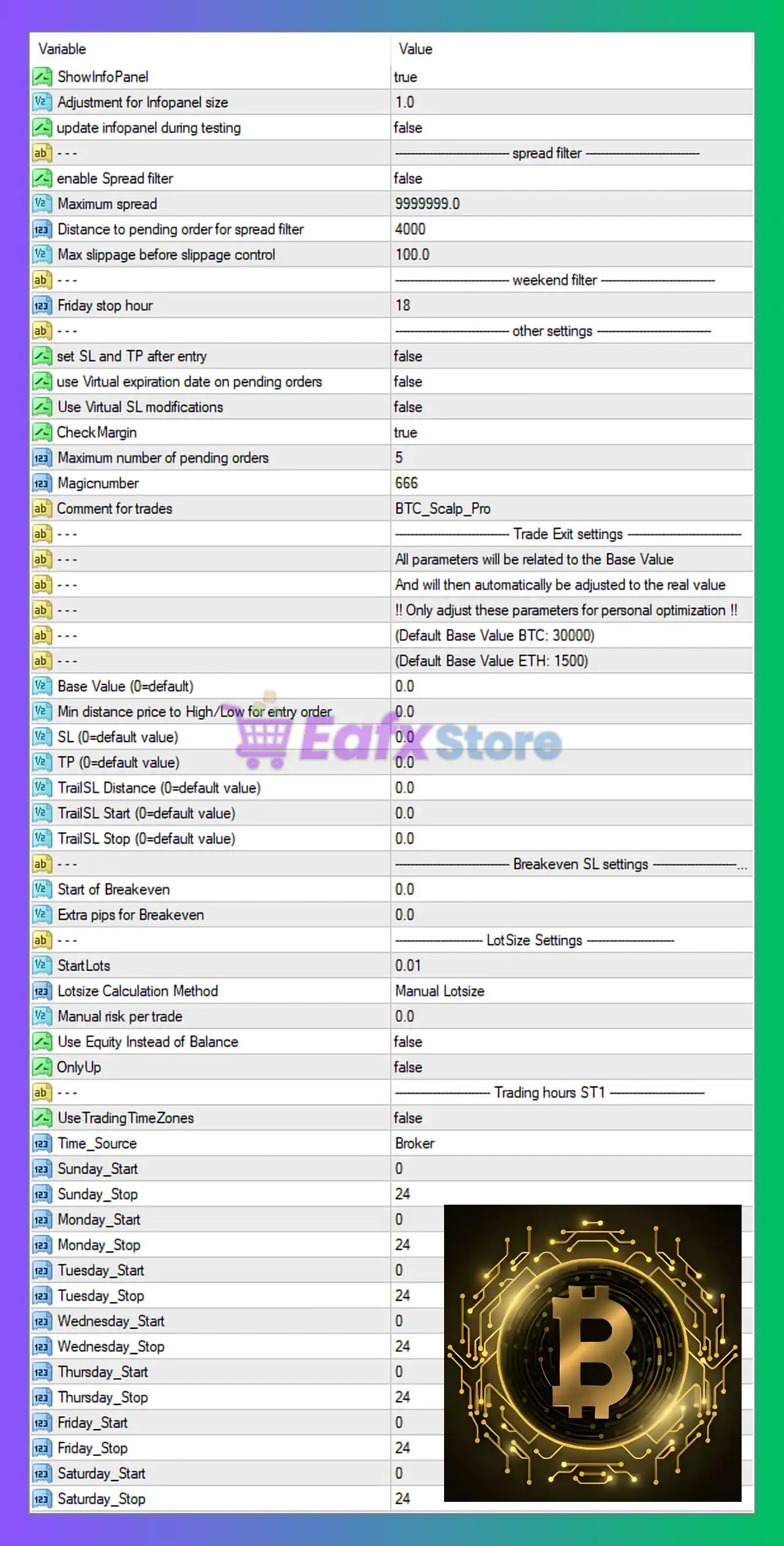
Info Panel Settings
🔹 ShowInfoPanel = true: Enables the on-chart information panel display.
🔹 Adjustment for Infopanel size = 1.0: Controls the scaling size of the information panel using value 1.0.
🔹 update infopanel during testing = false: Disables live information panel updates during strategy tester operations.
Spread Filter Settings
🔹 enable Spread filter = false: Spread filtering system is disabled.
🔹 Maximum spread = 9999999.0: Maximum allowed spread value is set to 9999999.0.
🔹 Distance to pending order for spread filter = 4000: Spread filter checks pending order distance at 4000 points.
🔹 Max slippage before slippage control = 100.0: Maximum slippage threshold before activating slippage protection is 100.0.
Weekend Filter Settings
🔹 Friday stop hour = 18: Trading activity stops on Friday at server hour 18.
Other Settings
🔹 set SL and TP after entry = false: Stop Loss (SL) and Take Profit (TP) are not modified after trade entry.
🔹 use Virtual expiration date on pending orders = false: Virtual expiration for pending orders is disabled.
🔹 Use Virtual SL modifications = false: Virtual Stop Loss modification system is disabled.
🔹 CheckMargin = true: EA verifies available margin before opening trades.
🔹 Maximum number of pending orders = 5: Limits the EA to a maximum of 5 pending orders.
🔹 Magicnumber = 666: Unique Magic Number identifier for EA trades is 666.
🔹 Comment for trades = BTC_Scalp_Pro: Trade comment label is set to BTC_Scalp_Pro.
Trade Exit Settings
🔹 All parameters will be related to the Base Value: Exit management parameters scale according to Base Value settings.
🔹 And will then automatically be adjusted to the real value: EA dynamically adjusts internal values to actual market conditions.
🔹 Only adjust these parameters for personal optimization: Parameters are intended mainly for advanced optimization.
🔹 (Default Base Value BTC: 30000): Suggested BTC base value reference is 30000.
🔹 (Default Base Value ETH: 1500): Suggested ETH base value reference is 1500.
🔹 Base Value (0=default) = 0.0: Uses automatic default Base Value calculation.
🔹 Min distance price to High/Low for entry order = 0.0: Minimum distance from market highs/lows for entry orders is disabled.
🔹 SL (0=default value) = 0.0: Stop Loss uses default internal EA settings.
🔹 TP (0=default value) = 0.0: Take Profit uses default internal EA settings.
🔹 TrailSL Distance (0=default value) = 0.0: Trailing Stop distance uses default configuration.
🔹 TrailSL Start (0=default value) = 0.0: Trailing Stop activation uses default settings.
🔹 TrailSL Stop (0=default value) = 0.0: Trailing Stop stop-level uses default internal value.
Breakeven SL Settings
🔹 Start of Breakeven = 0.0: Breakeven activation point is disabled.
🔹 Extra pips for Breakeven = 0.0: Additional profit pips added to breakeven are disabled.
Lot Size Settings
🔹 StartLots = 0.01: Initial trading lot size is 0.01.
🔹 Lotsize Calculation Method = Manual Lotsize: EA uses manual lot sizing mode.
🔹 Manual risk per trade = 0.0: Manual risk percentage per trade is disabled.
🔹 Use Equity Instead of Balance = false: EA calculates lots based on account balance instead of equity.
🔹 OnlyUp = false: Lot increase restriction mode is disabled.
Trading Hours ST1 Settings
🔹 UseTradingTimeZones = false: Trading session filtering is disabled.
🔹 Time_Source = Broker: EA uses broker server time for scheduling.
🔹 Sunday_Start = 0: Sunday trading begins at hour 0.
🔹 Sunday_Stop = 24: Sunday trading ends at hour 24.
🔹 Monday_Start = 0: Monday trading begins at hour 0.
🔹 Monday_Stop = 24: Monday trading ends at hour 24.
🔹 Tuesday_Start = 0: Tuesday trading begins at hour 0.
🔹 Tuesday_Stop = 24: Tuesday trading ends at hour 24.
🔹 Wednesday_Start = 0: Wednesday trading begins at hour 0.
🔹 Wednesday_Stop = 24: Wednesday trading ends at hour 24.
🔹 Thursday_Start = 0: Thursday trading begins at hour 0.
🔹 Thursday_Stop = 24: Thursday trading ends at hour 24.
🔹 Friday_Start = 0: Friday trading begins at hour 0.
🔹 Friday_Stop = 24: Friday trading ends at hour 24.
🔹 Saturday_Start = 0: Saturday trading begins at hour 0.
🔹 Saturday_Stop = 24: Saturday trading ends at hour 24.
Conclusion
Bitcoin Scalp Pro MT4 is a highly customizable cryptocurrency scalping EA designed for Bitcoin and digital asset traders who need precise control over pending orders, spread management, trading sessions and trade exits.
With features such as virtual SL handling, breakeven controls, margin checks, and dynamic Base Value optimization, the EA provides flexibility for both manual optimization and automated crypto trading environments.
FAQs
❓ What is Bitcoin Scalp Pro MT4?
Bitcoin Scalp Pro MT4 is an automated cryptocurrency scalping Expert Advisor for MetaTrader 4 focused on Bitcoin trading.
❓ Does Bitcoin Scalp Pro MT4 support spread filtering?
Yes, the EA includes a customizable spread filter system, although it is disabled in the provided settings.
❓ Can I customize trading hours in Bitcoin Scalp Pro MT4?
Yes, the EA allows detailed daily trading session configuration for every weekday.
❓ What is the purpose of the Base Value setting?
The Base Value helps the EA automatically scale trade exit parameters according to BTC or ETH market prices.
❓ Does Bitcoin Scalp Pro MT4 include breakeven functionality?
Yes, the EA includes configurable breakeven Stop Loss settings for trade protection.




