




Hedging Pro Ultimate MT5 + Sets (Latest version) - Unlimited

Subscriptions for Special Plan
- 30 EA package is more economical!
- Special package with 99%
- Download 1 EA/Day

Subscriptions for Premium Membership
- Download Unlimited in 1 Year
- Get 100% Discount
- Get free access to all

Subscriptions for Gold Membership
- 1 Year Membership
- Get 100% Discount
- Access EA+Indicator+Course
Frequently bought together 🎁
Add these products to enhance your purchase




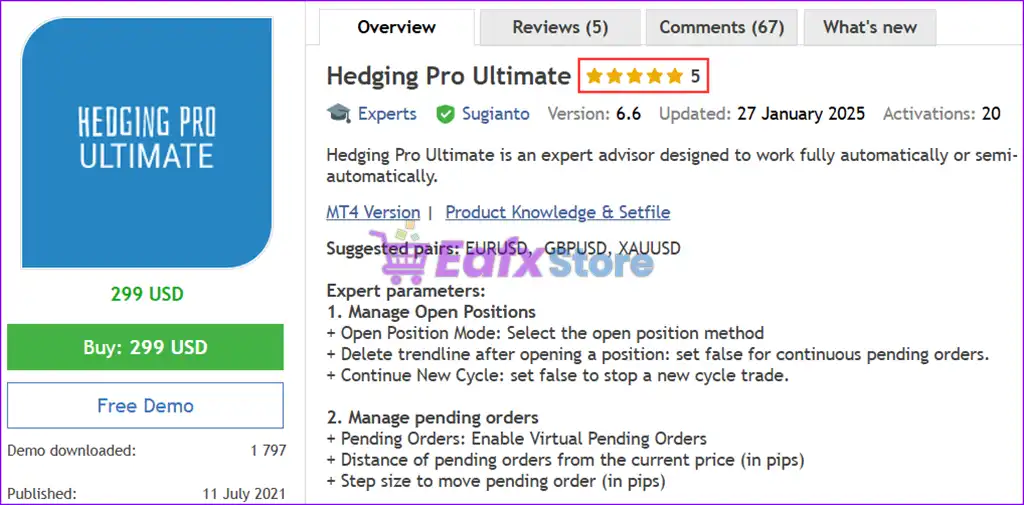
What is Hedging Pro Ultimate MT5?
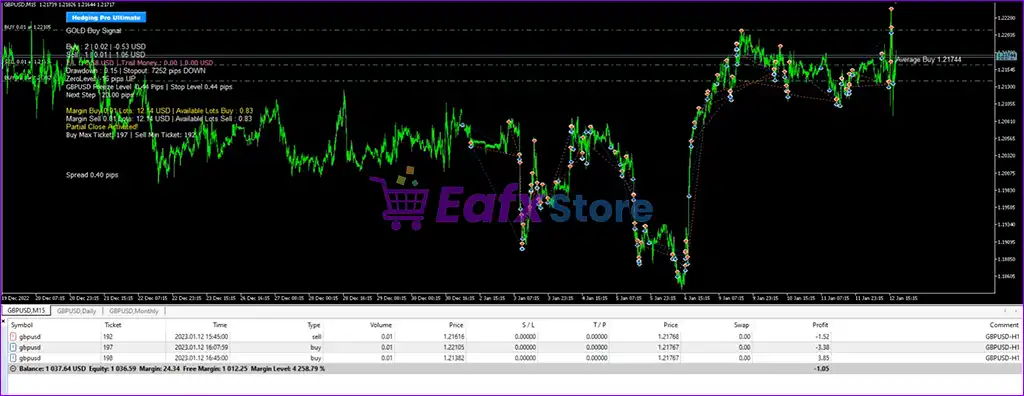
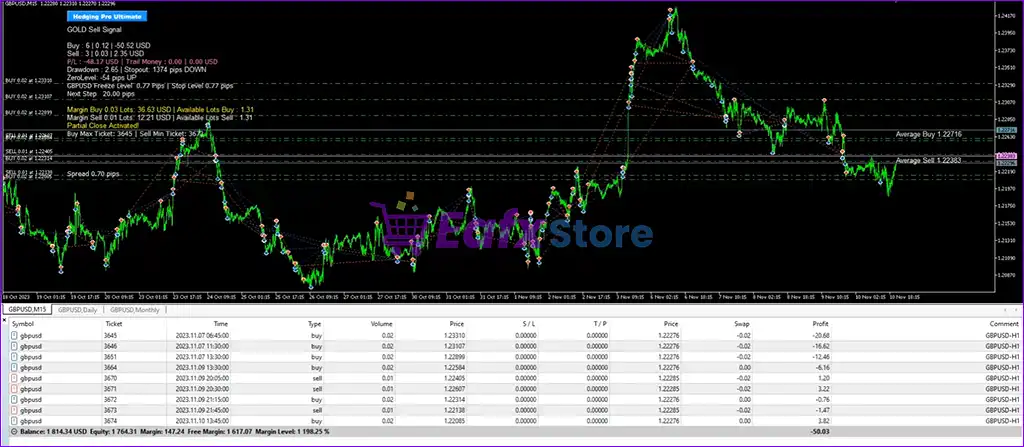
Hedging Pro Ultimate is a powerful Expert Advisor (EA) designed for fully automatic or semi-automatic trading on the MetaTrader 5 (MT5) platform. It incorporates advanced hedging strategies, grid trading, drawdown management, and customizable risk control settings to maximize profits while minimizing losses.
 Vendor Wedsite: View here
About the Author
This product is compiled by Sugianto. This author has more than +12 years of experience working on MQL5 with many famous products such as Hedging Pro Ultimate MT5, Hedging Pro Ultimate MT4, Gold Hype MT5 and other advisors. Among them, Hedging Pro Ultimate MT5 is his best performing products.
Delivery time 24h-48h after payment.
Refund if not delivered.
You will receive the current version without any limitations (ID+Time).
Key Features of Hedging Pro Ultimate for MT5
🔹 Automated & Semi-Automated Trading: Seamlessly switch between fully automated and manual control for maximum flexibility.
🔹 Advanced Money Management: Includes AutoLot calculation based on account balance and customizable lot sizes.
🔹 Comprehensive Grid System: Offers various Grid strategies with adjustable step size, expanding coefficient, and maximum trade limits.
🔹 Precise Hedging (Lock) Functionality: Hedging based on drawdown, money, or pips for effective risk management.
🔹 Profit & Loss Management: Set daily profit targets, cut loss levels and trailing stop features.
🔹 Active Risk Management: Use Stop Loss (SL) and Take Profit (TP) orders that can be customized according to user preferences.
Key Benefits
🔹 Maximize Profit Potential: Advanced algorithms and strategies designed for profitable trading.
🔹 Minimize Risk: Robust money management and drawdown control features.
🔹 Save Time & Effort: Automated trading frees up your time for other activities.
🔹 Improve Trading Accuracy: Eliminate emotional decision-making and execute precise trades.
🔹 Gain Market Insights: Backtest and optimize strategies to understand market dynamics better.
🔹 Consistent Performance: Automated trading ensures consistent execution of your chosen strategy.
Hedging Pro Ultimate MT5 Review
Hedging Pro Ultimate primarily employs a grid-based trading strategy, coupled with hedging and money management techniques. It’s designed to capitalize on market fluctuations and potentially profit from both upward and downward price movements. The EA supports trading on suggested pairs like EURUSD, GBPUSD, and XAUUSD.
Hedging Pro Ultimate MT5 Reviews
Hedging Pro Ultimate MT5 Review
User Reviews
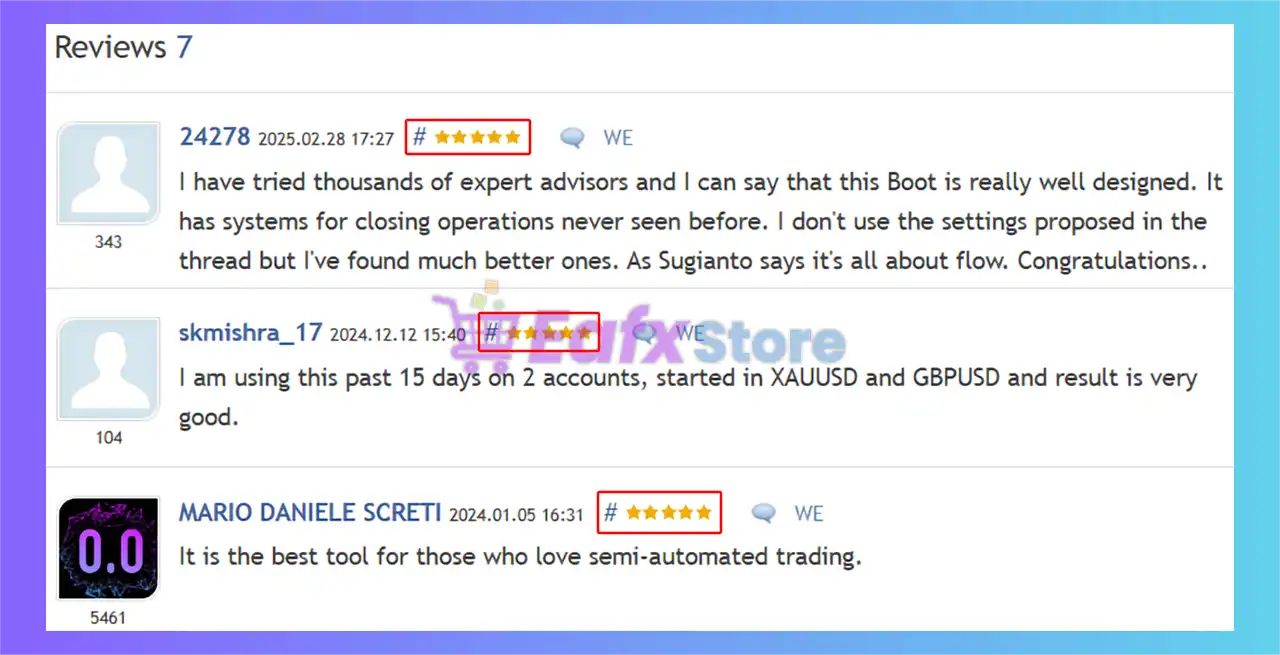
Hedging Pro Ultimate EA showcases exceptional potential in generating consistent and reliable profits, positioning itself as a valuable tool in the forex market. Highly acclaimed by the MQL5 community for its performance and stability, this expert advisor has earned the trust of traders worldwide.
⭐⭐⭐⭐⭐ Skmishra (2024.12.12): “I am using this past 15 days on 2 accounts, started in XAUUSD and GBPUSD and result is very good.”
⭐⭐⭐⭐⭐ MARIO DANIELE (2024.01.05): “It is the best tool for those who love semi-automated trading.”
⭐⭐⭐⭐⭐ Sven Markus (2023.02.03): “Very successful EA and safe for the invested capital. I have been running in real money account for 4 months with a consistently good win. Acts every day.”
Hedging Pro Ultimate MT5 is rated 5 stars by users
Trading Specifications
Recommended settings and parameters to pay attention to from developers and experts:
| Features | Type |
|---|---|
| Trading platform | MetaTrader 5 (MT5) |
| Time frames | Any |
| Currency pairs | EURUSD, GBPUSD, XAUUSD (Gold) |
| Minimum / Recommended deposit | $1,000 |
| Minimum / Recommended leverage | 1:100 |
| Product type | Original version |
| Additional services | Unlock and Decompile |
| Recommended brokers | Exness Broker, Icmarkets Broker |
| Recommended VPS | MyfxVPS.com ( Blue VPS, Golden VPS). Lowest Latency, 2 week Free Trial, 100% Free for 12-18 Months. |
Product Download Package?
The download package of the product suite includes:
Experts
✅ Hedging Pro Ultimate.ex5
SetFiles
✅ HPU_EURUSD_GBPUSD_M15.set
✅ HPU GBPUSD H1 Golden Wave.set
✅ HPU EURUSD H1 GOLDEN WAVE.set
✅ HPU XAUUSD H1 Golden Wave Strategy.set
➡️ Reviewed by David Easton
Conclusion
In short, Hedging Pro Ultimate is a feature-rich EA that provides traders with a high degree of control over their trading. Its grid-based system, combined with robust money management and hedging capabilities, aims to navigate market volatility and potentially generate profits. Understanding each of these features is crucial for effectively utilizing this EA. Remember that Forex trading involves risk, and past performance is not indicative of future results. Thorough testing and careful configuration are essential.
🔢 Hedging Pro Ultimate MT5 Settings Explained – Complete Parameter Guide
Hedging Pro Ultimate EA is a comprehensive MetaTrader 5 Expert Advisor designed for hedge and grid trading with advanced money management, martingale controls, pending order strategies, partial close management, trailing systems, news filtering and flexible session scheduling.
It provides traders with extensive customization options for controlling risk, optimizing entries, and automating trade management across various market conditions.
Hedging Pro Ultimate EA MT5 Settings
🔢 Hedging Pro Ultimate MT5 Parameters Explained
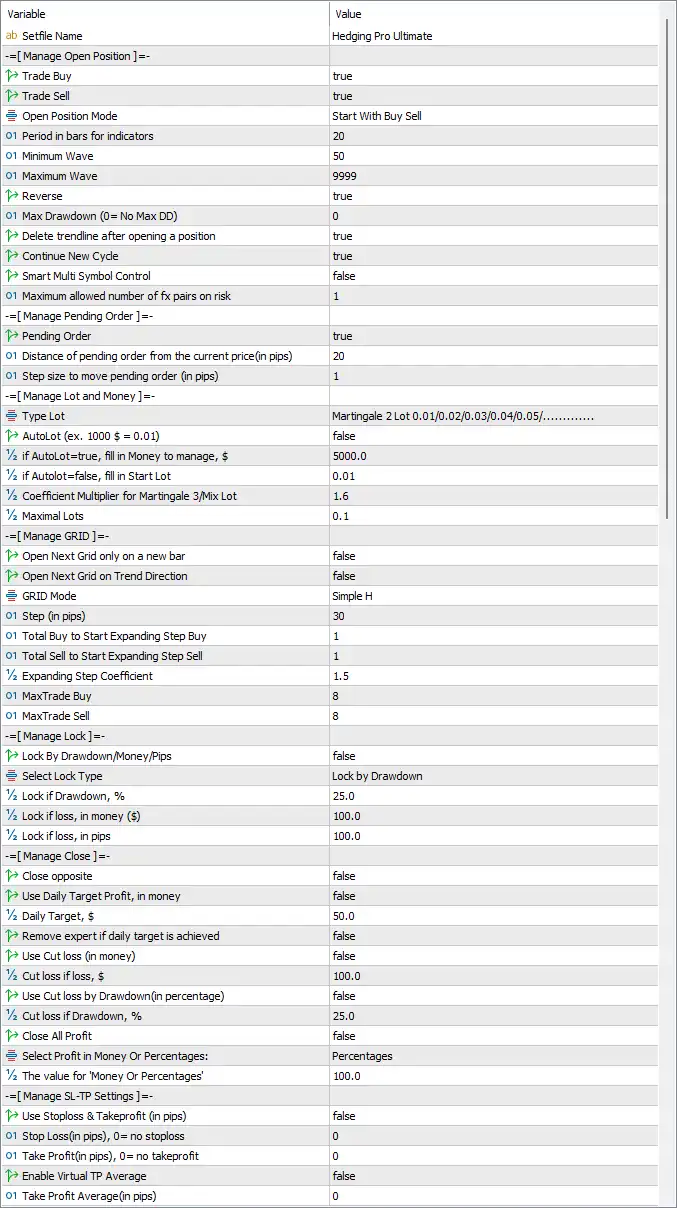
Hedging Pro Ultimate EA MT5 Settings Panel
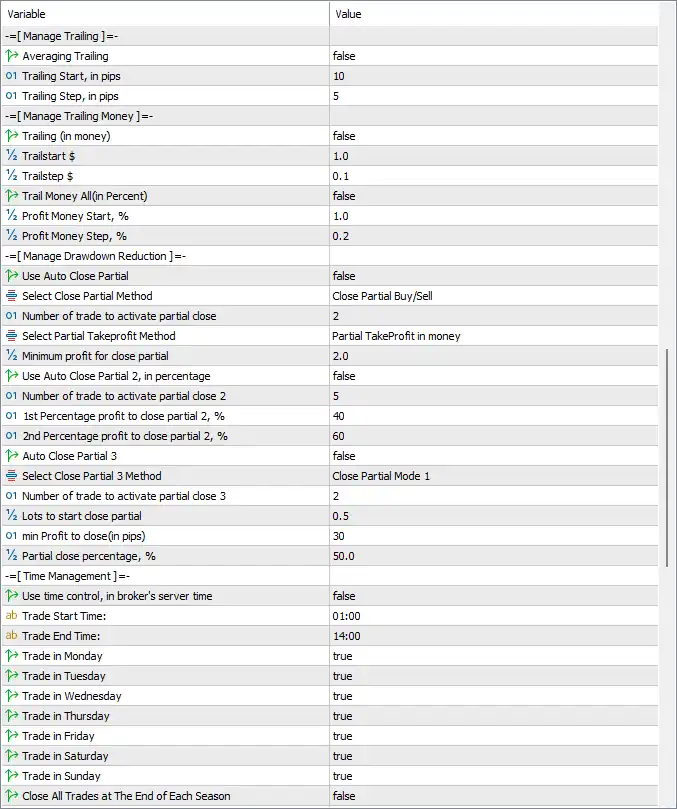
Hedging Pro Ultimate EA Settings Panel
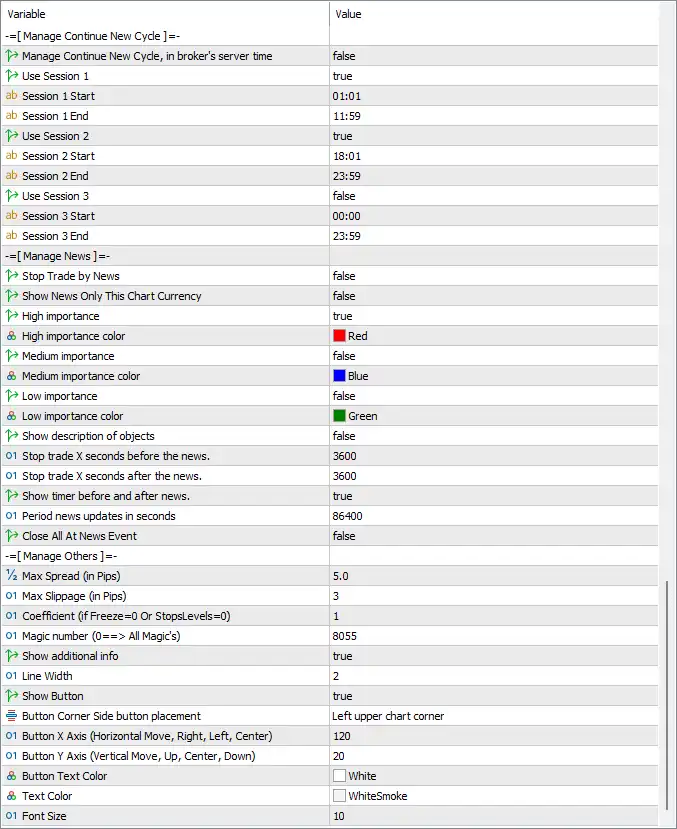
Hedging Pro Ultimate MT5 Settings Panel
🔶 Open Position Settings
🔹 Trade Buy = true – Enables the EA to open Buy positions.
🔹 Trade Sell = true – Enables the EA to open Sell positions.
🔹 Open Position Mode = Start With Buy Sell – Starts trading by allowing both Buy and Sell positions.
🔹 Period in bars for indicators = 20 – Uses the last 20 bars for indicator calculations.
🔹 Minimum Wave = 50 – Defines the minimum market wave size required before opening trades.
🔹 Maximum Wave = 9999 – Sets the maximum wave size accepted for trading.
🔹 Reverse = true – Enables reverse trading logic.
🔹 Max Drawdown (0 = No Max DD) = 0 – Disables maximum drawdown limitation.
🔹 Delete trendline after opening a position = true – Removes trendlines automatically after a trade is opened.
🔹 Continue New Cycle = true – Starts a new trading cycle automatically after completing the previous one.
🔹 Smart Multi Symbol Control = false – Disables automatic multi-symbol management.
🔹 Maximum allowed number of FX pairs on risk = 1 – Limits simultaneous risk exposure to 1 currency pair.
🔶 Pending Order Settings
🔹 Pending Order = true – Enables pending order trading.
🔹 Distance of pending order from the current price (in pips) = 20 – Places pending orders 20 pips away from the current market price.
🔹 Step size to move pending order (in pips) = 1 – Adjusts pending orders in 1-pip increments.
🔶 Lot Size & Money Management
🔹 Type Lot = Martingale 2 Lot 0.01/0.02/0.03/0.04/0.05/… – Uses the predefined Martingale lot progression model.
🔹 AutoLot = false – Disables automatic lot size calculation.
🔹 If AutoLot=true, fill in Money to manage = $5000.0 – Uses $5000.0 as the balance reference if AutoLot is enabled.
🔹 If AutoLot=false, fill in Start Lot = 0.01 – Starts trading with 0.01 lots.
🔹 Coefficient Multiplier for Martingale 3/Mix Lot = 1.6 – Uses a 1.6 multiplier for Martingale lot progression.
🔹 Maximal Lots = 0.1 – Limits the maximum position size to 0.1 lots.
🔶 Grid Management
🔹 Open Next Grid only on a new bar = false – Allows new grid orders without waiting for a new candle.
🔹 Open Next Grid on Trend Direction = false – Does not require trend confirmation before opening new grid positions.
🔹 GRID Mode = Simple H – Uses the Simple H grid algorithm.
🔹 Step (in pips) = 30 – Places each new grid level 30 pips apart.
🔹 Total Buy to Start Expanding Step Buy = 1 – Begins expanding Buy grid spacing after 1 Buy trade.
🔹 Total Sell to Start Expanding Step Sell = 1 – Begins expanding Sell grid spacing after 1 Sell trade.
🔹 Expanding Step Coefficient = 1.5 – Multiplies grid spacing by 1.5 during expansion.
🔹 MaxTrade Buy = 8 – Allows up to 8 Buy trades.
🔹 MaxTrade Sell = 8 – Allows up to 8 Sell trades.
🔶 Lock Management
🔹 Lock By Drawdown/Money/Pips = false – Disables automatic trade locking.
🔹 Select Lock Type = Lock by Drawdown – Uses drawdown as the lock trigger when enabled.
🔹 Lock if Drawdown, % = 25.0 – Locks positions when drawdown reaches 25.0%.
🔹 Lock if loss, in money ($) = 100.0 – Locks trades after $100.0 floating loss.
🔹 Lock if loss, in pips = 100.0 – Locks trades after 100.0 pips of loss.
🔶 Close Management
🔹 Close opposite = false – Does not close opposite-direction trades automatically.
🔹 Use Daily Target Profit, in money = false – Disables daily profit target control.
🔹 Daily Target, $ = 50.0 – Daily profit target is $50.0 when enabled.
🔹 Remove expert if daily target is achieved = false – Keeps the EA running after reaching the daily target.
🔹 Use Cut loss (in money) = false – Disables money-based stop loss.
🔹 Cut loss if loss, $ = 100.0 – Cuts losses at $100.0 when enabled.
🔹 Use Cut loss by Drawdown (in percentage) = false – Disables percentage drawdown stop.
🔹 Cut loss if Drawdown, % = 25.0 – Uses 25.0% drawdown threshold when enabled.
🔹 Close All Profit = false – Does not automatically close all profitable positions.
🔹 Select Profit in Money Or Percentages = Percentages – Measures profit targets as percentages.
🔹 The value for “Percentages” = 100.0 – Uses 100.0% as the percentage target.
🔶 Stop Loss & Take Profit
🔹 Use Stoploss & Takeprofit (in pips) = false – Disables fixed Stop Loss and Take Profit.
🔹 Stop Loss (in pips), 0 = no stoploss = 0 – No Stop Loss is applied.
🔹 Take Profit (in pips), 0 = no takeprofit = 0 – No Take Profit is applied.
🔹 Enable Virtual TP Average = false – Disables virtual average Take Profit.
🔹 Take Profit Average (in pips) = 0 – Average Take Profit is disabled.
🔶 Trailing Stop
🔹 Averaging Trailing = false – Disables averaging-based trailing.
🔹 Trailing Start, in pips = 10 – Starts trailing after 10 pips of profit.
🔹 Trailing Step, in pips = 5 – Updates the trailing stop every 5 pips.
🔶 Money Trailing
🔹 Trailing (in money) = false – Disables money-based trailing.
🔹 Trailstart $ = 1.0 – Starts trailing after $1.0 profit.
🔹 Trailstep $ = 0.1 – Updates trailing every $0.1.
🔹 Trail Money All (in Percent) = false – Disables percentage-based money trailing.
🔹 Profit Money Start, % = 1.0 – Starts percentage trailing after 1.0% profit.
🔹 Profit Money Step, % = 0.2 – Updates trailing every 0.2%.
🔶 Drawdown Reduction
🔹 Use Auto Close Partial = false – Disables automatic partial closing.
🔹 Select Close Partial Method = Close Partial Buy/Sell – Uses Buy/Sell partial closing logic.
🔹 Number of trade to activate partial close = 2 – Partial closing activates after 2 trades.
🔹 Select Partial Takeprofit Method = Partial TakeProfit in money – Uses money-based partial Take Profit.
🔹 Minimum profit for close partial = 2.0 – Requires 2.0 profit before partial close.
🔹 Use Auto Close Partial 2, in percentage = false – Disables percentage-based partial close.
🔹 Number of trade to activate partial close 2 = 5 – Activates after 5 trades.
🔹 1st Percentage profit to close partial 2, % = 40 – First partial close occurs at 40%.
🔹 2nd Percentage profit to close partial 2, % = 60 – Second partial close occurs at 60%.
🔹 Auto Close Partial 3 = false – Disables the third partial closing method.
🔹 Select Close Partial 3 Method = Close Partial Mode 1 – Uses Close Partial Mode 1.
🔹 Number of trade to activate partial close 3 = 2 – Activates after 2 trades.
🔹 Lots to start close partial = 0.5 – Starts partial closing when total lots reach 0.5.
🔹 Min Profit to close (in pips) = 30 – Requires at least 30 pips before closing partially.
🔹 Partial close percentage, % = 50.0 – Closes 50.0% of the position.
🔶 Time Management
🔹 Use time control, in broker’s server time = false – Disables broker-time scheduling.
🔹 Trade Start Time = 01:00 – Trading starts at 01:00.
🔹 Trade End Time = 14:00 – Trading ends at 14:00.
🔹 Trade in Monday = true – Enables Monday trading.
🔹 Trade in Tuesday = true – Enables Tuesday trading.
🔹 Trade in Wednesday = true – Enables Wednesday trading.
🔹 Trade in Thursday = true – Enables Thursday trading.
🔹 Trade in Friday = true – Enables Friday trading.
🔹 Trade in Saturday = true – Enables Saturday trading.
🔹 Trade in Sunday = true – Enables Sunday trading.
🔹 Close All Trades at The End of Each Season = false – Keeps trades open after each trading season.
🔶 Session Management
🔹 Manage Continue New Cycle, in broker’s server time = false – Disables session-based new cycle management.
🔹 Use Session 1 = true – Enables Session 1.
🔹 Session 1 Start = 01:01 – Session 1 begins at 01:01.
🔹 Session 1 End = 11:59 – Session 1 ends at 11:59.
🔹 Use Session 2 = true – Enables Session 2.
🔹 Session 2 Start = 18:01 – Session 2 begins at 18:01.
🔹 Session 2 End = 23:59 – Session 2 ends at 23:59.
🔹 Use Session 3 = false – Disables Session 3.
🔹 Session 3 Start = 00:00 – Session 3 start time.
🔹 Session 3 End = 23:59 – Session 3 end time.
🔶 News Management
🔹 Stop Trade by News = false – News trading protection is disabled.
🔹 Show News Only This Chart Currency = false – Displays news for all currencies.
🔹 High importance = true – Shows High-impact news.
🔹 High importance color = Red – High-impact events are displayed in Red.
🔹 Medium importance = false – Medium-impact news is disabled.
🔹 Medium importance color = Blue – Medium-impact events use Blue.
🔹 Low importance = false – Low-impact news is disabled.
🔹 Low importance color = Green – Low-impact events use Green.
🔹 Show description of objects = false – Hides news descriptions.
🔹 Stop trade X seconds before the news = 3600 – Stops trading 3600 seconds (60 minutes) before news.
🔹 Stop trade X seconds after the news = 3600 – Resumes trading 3600 seconds (60 minutes) after news.
🔹 Show timer before and after news = true – Displays a countdown timer around news events.
🔹 Period news updates in seconds = 86400 – Updates economic news every 86400 seconds (24 hours).
🔹 Close All At News Event = false – Does not close open trades during news.
🔶 Other Settings
🔹 Max Spread (In Pips) = 5.0 – Maximum allowed spread is 5.0 pips.
🔹 Max Slippage (In Pips) = 3 – Maximum permitted slippage is 3 pips.
🔹 Coefficient (if Freeze=0 Or StopsLevels=0) = 1 – Uses coefficient 1 for broker compatibility.
🔹 Magic number (0==> All Magic’s) = 8055 – Uses Magic Number 8055.
🔹 Show additional info = true – Displays extra information on the chart.
🔹 Line Width = 2 – Sets chart object line width to 2.
🔹 Show Button = true – Displays the EA control button.
🔹 Button Corner Side button placement = Left upper chart corner – Places the control button in the upper-left corner.
🔹 Button X Axis (Horizontal Move, Right, Left, Center) = 120 – Horizontal button offset is 120.
🔹 Button Y Axis (Vertical Move, Up, Center, Down) = 20 – Vertical button offset is 20.
🔹 Button Text Color = White – Button text is displayed in White.
🔹 Text Color = WhiteSmoke – General interface text uses WhiteSmoke.
🔹 Font Size = 10 – Interface font size is 10.
🔢 Conclusion
Hedging Pro Ultimate MT5 is a highly configurable Expert Advisor built for traders who use hedging, grid trading, and Martingale-based strategies. With advanced controls for sessions, pending orders, trailing stops, drawdown reduction, partial profit taking, money management, and news filtering, it offers exceptional flexibility for adapting automated trading to different market environments and individual risk preferences.
🔢 FAQs
❓ Does Hedging Pro Ultimate MT5 support both Buy and Sell trading?
Yes. By default, both Trade Buy and Trade Sell are enabled, allowing simultaneous long and short trading.
❓ Can Hedging Pro Ultimate MT5 use Martingale money management?
Yes. The EA includes a configurable Martingale lot progression with a 1.6 coefficient multiplier and customizable maximum lot size.
❓ Does the EA include grid trading features?
Yes. It offers a built-in grid system with adjustable grid spacing, expansion coefficients, and separate Buy/Sell trade limits.
❓ Can I restrict trading to specific sessions?
Yes. The EA supports up to three configurable trading sessions with independent start and end times.
❓ Does Hedging Pro Ultimate MT5 provide partial profit management?
Yes. It supports multiple partial close methods, money-based and percentage-based profit targets, and customizable partial closing rules for effective drawdown reduction.
User Reviews
Only logged in customers who have purchased this product may leave a review.
1. What is Hedging Pro Ultimate MT5?
Hedging Pro Ultimate MT5 is an automated trading system designed for MetaTrader 5 (MT5). It uses hedging, grid trading, and advanced risk management to maximize profits while minimizing losses.
2. How does the hedging strategy work in this EA?
The EA employs a precise hedging (lock) mechanism, which allows traders to hedge positions based on drawdown, money, or pips. This helps mitigate risks and protect capital during market fluctuations.
3. Can I use this EA for fully automated trading?
Yes, Hedging Pro Ultimate MT5 supports fully automated trading, but it also offers semi-automated control, allowing traders to manually intervene when necessary.
4. Which currency pairs are recommended for trading?
The EA is optimized for trading EURUSD, GBPUSD, and XAUUSD (Gold), but it may work with other pairs based on user preferences.
5. What is the minimum deposit required to use this EA?
The minimum recommended deposit is $1,000, with a suggested leverage of 1:100 for optimal performance.
6. How does the EA manage drawdowns?
Hedging Pro Ultimate includes an automatic drawdown control feature, which reduces risk by partially closing trades and adjusting positions to minimize losses.
7. Does the EA offer customizable trading settings?
Yes, traders can adjust grid step size, lot sizes, Stop Loss (SL), Take Profit (TP), daily profit targets, and volatility filters to match their trading style.
8. Is backtesting available for this EA?
Yes, Hedging Pro Ultimate supports backtesting, allowing traders to optimize settings and test strategies before deploying them on a live account.
-
 Original price was: $30,000.00.$599.00Current price is: $599.00.
 -
 Original price was: $3,750.00.$599.00Current price is: $599.00.
 -
 Original price was: $30,000.00.$599.00Current price is: $599.00.
 -
 Original price was: $999.00.$89.00Current price is: $89.00.
-
 4Original price was: $499.00.$249.00Current price is: $249.00.
 -
 0Original price was: $1,299.00.$249.00Current price is: $249.00.
 -
 3Original price was: $199.00.$159.00Current price is: $159.00.
 -
 0Original price was: $199.00.$179.00Current price is: $179.00.
There are no reviews yet.