



0
SHOPPING CART
Instant Digital Delivery
Get your EA software delivered instantly to your email after purchase.
Instant Activation
Your EA will be activated immediately after purchase. No waiting time!
All-Inclusive Pricing
No hidden fees—what you see is what you pay.

ChronomaX EA MT5 (Latest version) – GroupBuy

ChronomaX EA is an automated trading expert advisor for EURUSD. Profit performance on real accounts has been verified by MyFxBook.

Price range: $89.00 through $599.00
In stock

Select a variant to see availability.

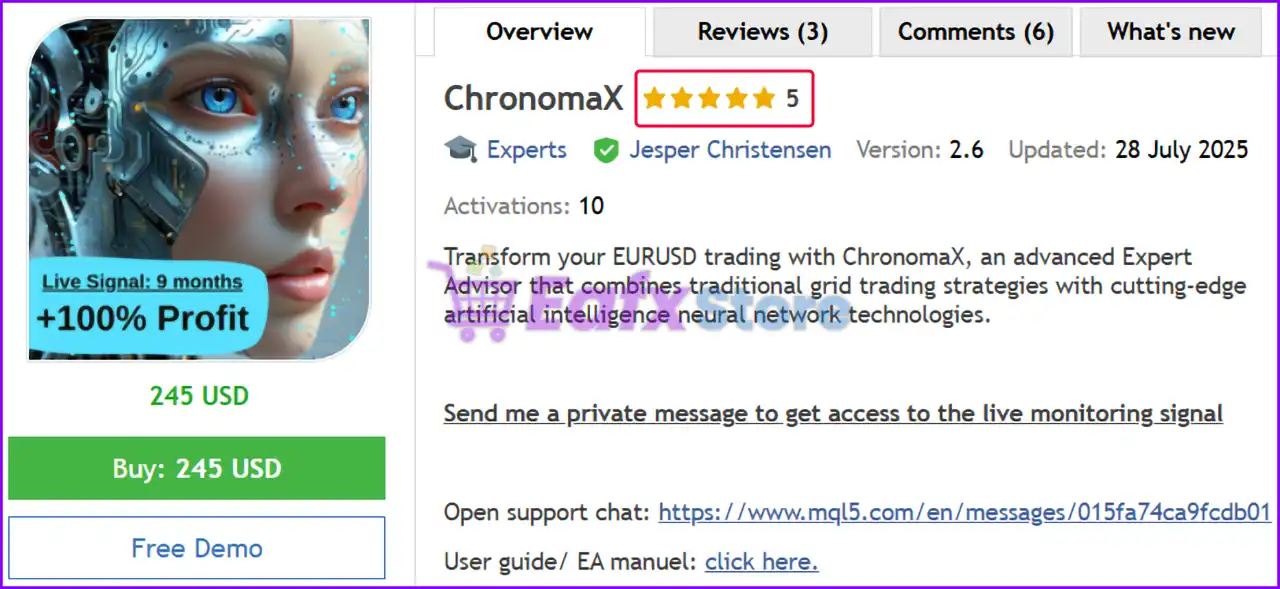
ChronomaX EA MT5: Smart Grid Trading with AI for EURUSD

ChronomaX EA is an advanced Expert Advisor (EA) that transforms EURUSD trading by combining traditional grid strategies with advanced artificial intelligence and neural networks. The advisor features a proprietary adaptive algorithm that optimizes lot sizes and spacing between grid positions based on real-time market volatility.

➡️ Vendor Website: View here
➡️ This is GroupBuy ==> How to Join

About the Author

This product is compiled by Jesper Christensen. This author has more than +6 years of experience working on MQL5 with many famous products such as ChronomaX, Golden Retirement MT5, Early Retirement MT5, Gold Matrix MT5 and other advisors. Among them, ChronomaX is his best performing products.

➡️ Join Our Channel Telegram

ChronomaX EA MT5 Overview

ChronomaX EA MT5 Overview

Key Features of ChronomaX EA for MT5

🔹 AI-powered Grid Management: Combines grid trading with a proprietary adaptive AI algorithm, optimizing lot sizes and order spacing based on market conditions and volatility.
🔹 Smart Order Entry: The EA analyzes multiple factors to determine the optimal time to add new grid positions, minimizing risk when the market is facing adverse conditions.
🔹 Advanced Risk Management: Advanced position sizing algorithms to prevent excessive risk, built-in protection against extreme market events.
🔹 Volatility Detection and News Filtering: Advanced volatility detection to avoid volatile market conditions and manage risk during high-impact economic events.

Additional Features

🔹 Specially optimized for EURUSD: The EA is meticulously designed and optimized for proprietary trading, taking advantage of unique characteristics.
🔹 Correlation Analysis: Monitors the total account exposure across all trading pairs and prevents over-risking when trading multiple symbols.
🔹 Compatibility and Accessibility: The EA is compatible with cent accounts, allowing traders with a minimum deposit of just $1,000 to access it.

ChronomaX EA MT5 Review

ChronomaX EA Myfxbook Results

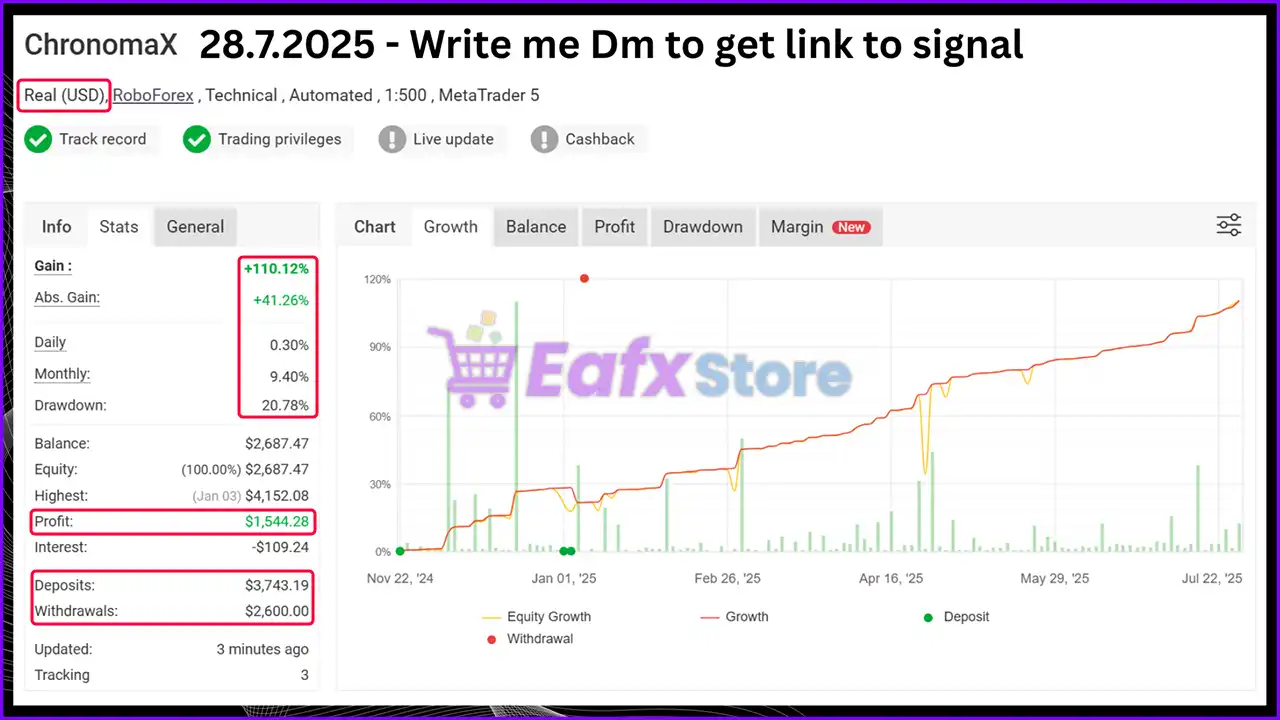
The ChronomaX EA is running on a verified real USD account with MyFxBook under a 1:500 leverage on the MetaTrader 5 platform. The account shows impressive growth and consistent profitability over time, highlighting the EA’s ability to deliver stable results in live market conditions. Key Performance Metrics:

Total Gain: +110.12%
Average Daily Growth: 0.30%
Average Monthly Growth: 9.40%
Maximum Drawdown: 20.78%

ChronomaX EA Myfxbook Results

ChronomaX EA Myfxbook Results

ChronomaX EA Live Signal Results

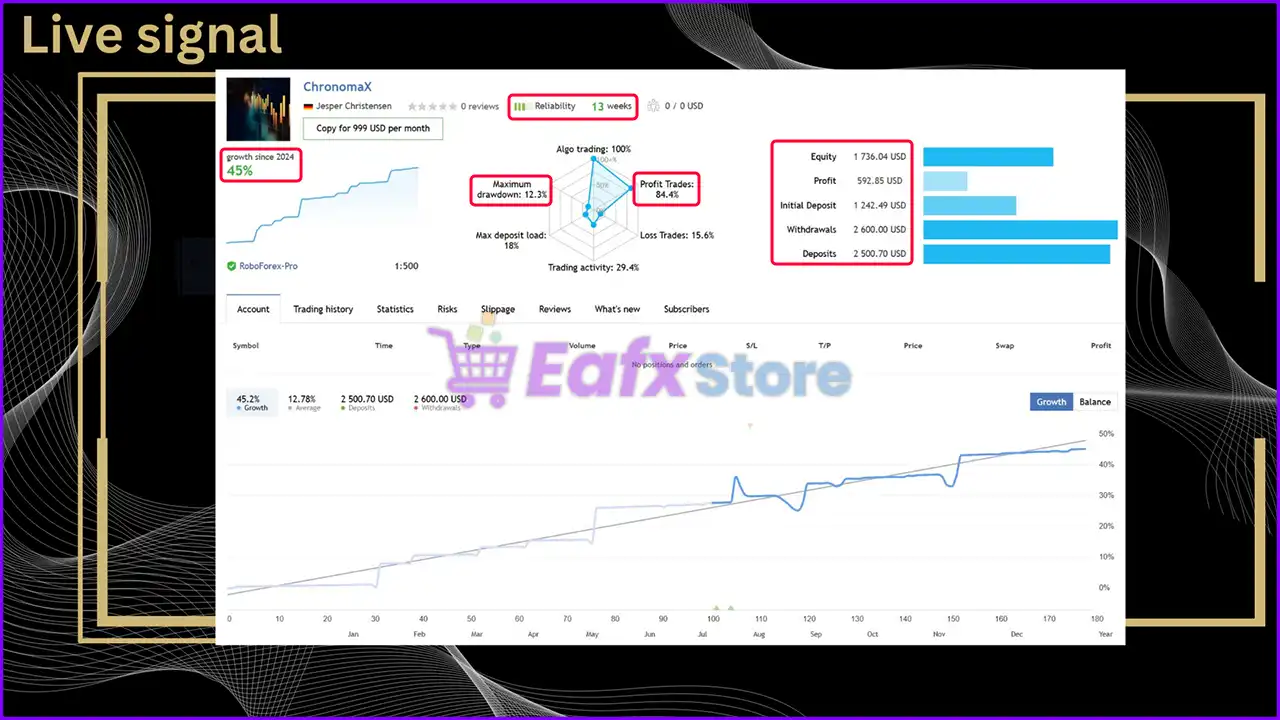
ChronomaX Expert Advisor is designed for long-term growth and stable performance. Impressive performance on real accounts shows the potential and safety of this advisor.

Total trading time: 13 weeks
Total growth: +45.2%
Win rate: 84.4%
Maximum drawdown: 12.3%

ChronomaX EA Live Results

ChronomaX EA Live Results

ChronomaX EA Backtest Results

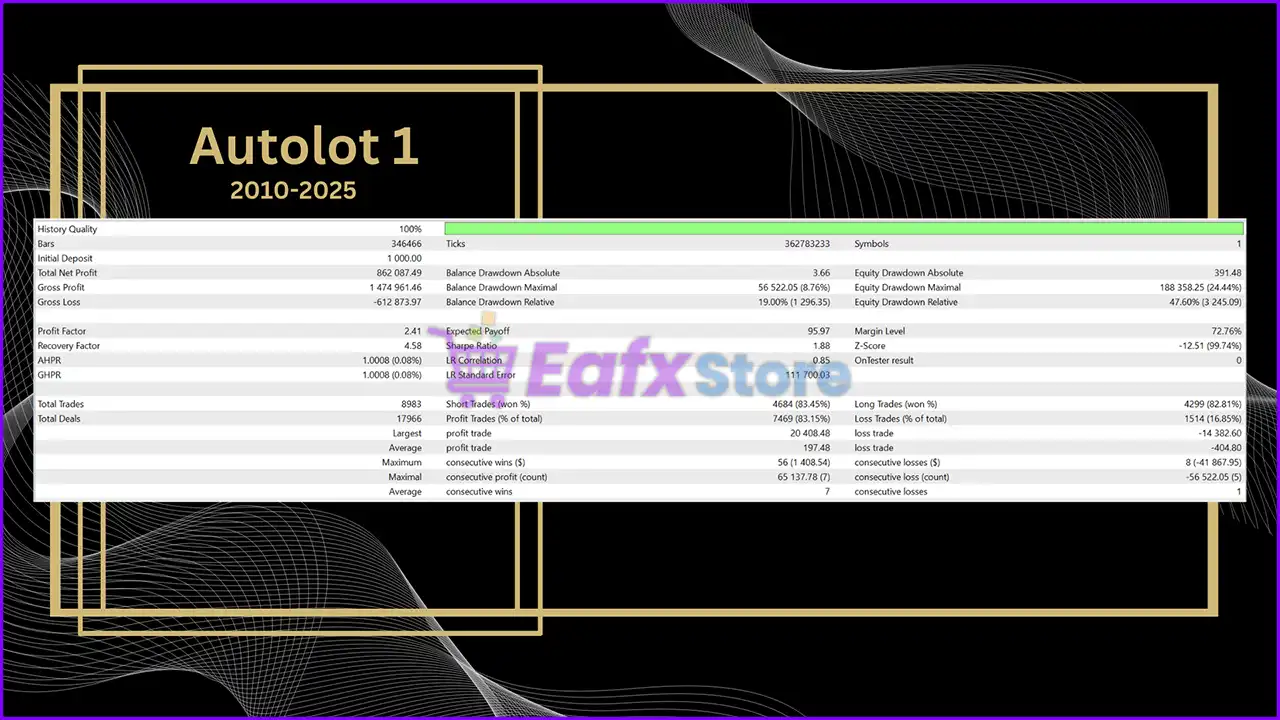
🔶 The ChronomaX EA was backtested over a 15-year period (2010–2025) using Autolot 1 risk settings. This configuration balances profitability and moderate risk exposure, aiming for consistent equity growth.

Initial Deposit: $10,000
Total Net Profit: $862,087.49
Win Rate: 83.45%
Maximum Drawdown: 8.76%

ChronomaX EA MT5 Backtest Results

ChronomaX EA MT5 Backtest Results

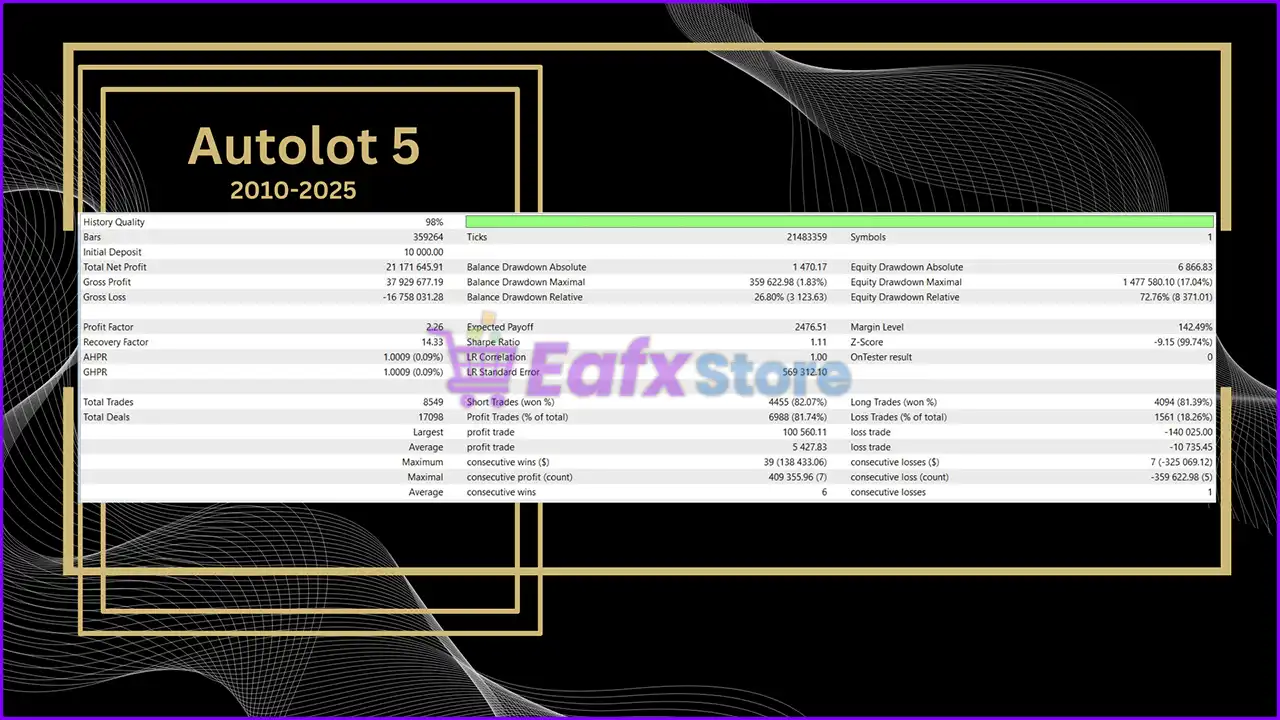
🔶 The ChronomaX was tested over a 15-year historical period using Autolot 5 settings — a high-risk, high-reward configuration designed to maximize returns at the cost of higher drawdowns.

Initial Deposit: $10,000
Total Net Profit: $21,171,645.91
Win Rate: 81.74%
Maximum Drawdown: 1.83%

ChronomaX EA Backtest Results

ChronomaX EA Backtest Results

Why choose ChronomaX EA?

🔹 Adaptive and Dynamic Trading: The integration of AI and machine learning allows the EA to adapt its strategy in real-time, providing a dynamic and resilient trading system.
🔹 Enhanced Risk Control: Advanced features like the volatility detection system and correlation analysis provide a high level of safety and protection against unexpected market turbulence.
🔹 Optimized for EURUSD: By focusing on a single pair, the EA can deliver more precise and effective results than a generic system, making it ideal for specialized trading.
🔹 Professional-Grade Automation: It offers a fully automated, hands-off solution with professional-grade risk management, making it suitable for both novice and experienced traders.

User Reviews and Feedback

ChronomaX EA shows significant potential in providing stable and reliable profits, making it a reliable tool in the Forex market. The advisor is highly appreciated by the MQL5 community in many aspects and has won the trust of users.

⭐⭐⭐⭐⭐ Philipp Hermann (2025.07.25)

“This is one of the rare reliable grid bots on the mql market. Top notch entries and grid management strategy. This is what I wanted to see and searched for all the time.”

⭐⭐⭐⭐⭐ Rainer Korell (2025.02.13)

“Obviously very good Expert Advisor, which has a 90% success rate with a calculable drawdown after a 2-month live period. Very good advice is also available promptly. So far top marks.”

⭐⭐⭐⭐⭐ Dieter Kilian (2025.02.04)

“This is a very advanced EA with a clever risk and trade management. I am running it for 3 weeks meanwhile on a live account. The trades are consistent with the live signal and backtests. This is one of the very few grid bots I am going to use over a long term.”

Trading Specifications

Recommended settings and parameters to pay attention to from developers and experts:

FeaturesType
Trading platformMetaTrader 5 (MT5)
Time framesAny
Currency pairsEURUSD
Minimum / Recommended deposit$1,000 ($10 deposit with cent account)
Minimum / Recommended leverage1:500
Account typeAny
Additional servicesUnlock and Decompile
Recommended brokersExness Broker, Icmarkets Broker
Recommended VPSMyfxVPS.com (Blue VPS, Golden VPS). Lowest Latency, 2 week Free Trial, 100% Free for 12-18 Months.

➡️ Reviewed by David Easton

Product Download Package?

The download package of the product suite includes:

✅ Setting (If Any).docx
✅ Installation Guide.docx

Conclusion

In short, ChronomaX EA is a next-generation AI-powered trading solution that combines advanced grid management with proprietary adaptive algorithms to deliver consistent, long-term profitability. Specifically optimized for EURUSD, it leverages smart order entry, volatility detection, and correlation analysis to ensure precision trading while maintaining strict risk control. By avoiding reckless strategies and integrating dynamic lot sizing, the EA adapts seamlessly to changing market conditions, making it equally suitable for both conservative and aggressive traders.

ChronomaX EA MT5 Settings Guide

ChronomaX EA is an advanced fully automated Expert Advisor for MetaTrader 5 that combines intelligent money management, adaptive lot scaling, ATR-based position sizing, grid trading, economic news filtering, time scheduling, drawdown protection and prop firm compatibility.

With extensive risk controls and highly configurable trading parameters, ChronomaX EA MT5 allows traders to optimize performance while maintaining disciplined capital management.


ChronomaX EA MT5 Settings Explained

General Inputs

🔹 Enable spread filter? = false – Disables the spread filter, allowing trading regardless of current spread.

🔹 Max spread in points for entry = 40.0 – Maximum allowed spread is 40.0 points when the spread filter is enabled.

🔹 EA comment = ChronomaX – Adds the comment “ChronomaX” to every trade opened by the EA.

🔹 Hide Entry Model Comments = false – Displays entry model comments on trades.

🔹 EA magic number = 24857545 – Unique Magic Number used to identify all positions opened by this EA.

🔹 Allow buy positions = true – Allows the EA to open Buy orders.

🔹 Allow sell positions = true – Allows the EA to open Sell orders.

🔹 Allow Hedging (set to false to comply with FIFO requirements) = true – Enables hedging by allowing simultaneous Buy and Sell positions.

🔹 Set file used = ChronomaX Default – Loads the default parameter configuration.


Debug Print Settings

🔹 Time frame for printing debug = 1 Hour – Debug information is generated using the H1 timeframe.

🔹 Show array debug prints = false – Disables array debugging output.

🔹 Show ATR calculation debug prints = false – Disables ATR calculation logs.

🔹 Show lot multiplier ATR debug prints = false – Disables ATR-based lot multiplier logs.

🔹 Show TP calculation debug prints = false – Disables Take Profit calculation logs.

🔹 Show grid debug prints in journal = false – Disables Grid journal logging.

🔹 Show Stop Loss Debug Prints = false – Disables Stop Loss debugging.

🔹 Show Price Action debug prints = false – Disables price action debug messages.

🔹 Show emergency stop out debug prints in journal = false – Disables emergency stop-out logs.

🔹 Print currency checks in journal? = false – Disables currency validation logs.

🔹 Print new entry attempts in journal? = false – Disables entry attempt logging.


Money Management

🔹 Maximum positions per currency in same direction across account = 1 – Limits exposure to one position per currency pair and direction.

🔹 Close grid on opposite signal? = false – Keeps existing grids active even after an opposite signal appears.


AutoLot Recommendations

🔹 Auto lot 0.25 = Low Risk (7–15% p.a.) – minimum balance 5k – Suggested setting for conservative trading.

🔹 Auto lot 0.5 = Moderate Risk (10–25% p.a.) – minimum balance 2.5k – Balanced risk profile.

🔹 Auto lot 1 = High Risk (50–100% p.a.) – minimum balance 1k – Aggressive growth configuration.

🔹 Auto lot 1.5 = Aggressive Risk (80–120% p.a.) – minimum balance 750 – Higher risk trading mode.

🔹 Auto lot 2 = Degen Risk (200–300% p.a.) – minimum balance 500 – Extremely aggressive setting.

🔹 Auto lot 3 = YOLO (200–400% p.a.) – minimum balance 300 – Maximum risk configuration.

🔹 Recommended leverage = 1:500 or higher – Suggested leverage for optimal operation.

🔹 Cent account recommendation – A cent account is recommended when account capital is below the suggested minimum.


Starting Lot Settings

🔹 Risk Model = AutoLot – Automatically calculates lot size.

🔹 Starting lot (if autolot is not used) = 0.01 – Uses 0.01 lot when AutoLot is disabled.

🔹 AutoLot level (1 = 0.01 lots per 1000 account balance) = 1.0 – Every 1,000 account balance increases position size by 0.01 lot.


Lot Multiplier Settings

Linear Lot Multiplier

🔹 Only increase lot at full distance intervals = false – Allows progressive lot increases without waiting for full intervals.

🔹 Use ATR-based distance instead of static pips = true – Uses ATR instead of fixed pip distance.

🔹 Pips distance for lot increase (if not using ATR) = 5.0 – Static increment distance is 5.0 pips.

🔹 Lot amount to increase per distance = 0.01 – Increases lot size by 0.01 each step.


ATR Settings

🔹 ATR timeframe for lot multiplier = 1 Day – Uses Daily ATR.

🔹 ATR period for lot multiplier = 5 – ATR calculation period is 5.

🔹 ATR multiplier (0.1 = 10% of ATR for each increase) = 0.1 – Uses 10% of ATR for lot scaling.


Rolling Volatility

🔹 Rolling Volatility Window (hours) = 48 – Measures volatility over 48 hours.

🔹 Rolling Vol Weight % (0=pure ATR, 100=pure Rolling Vol) = 50 – Uses an equal 50/50 weighting.


Position Count Modifier

🔹 Enable position count modifier = true – Enables dynamic lot adjustments based on open positions.

🔹 Positions per modifier step = 3 – Applies scaling every 3 positions.

🔹 Change per step (0.10 = +10%, -0.10 = -10%) = 0.3 – Adjusts lots by 30% each step.

🔹 Floor multiplier = 0.5 – Minimum multiplier is 50%.

🔹 Ceiling multiplier = 5.0 – Maximum multiplier is 500%.


Maximum Lot Size

🔹 Max Lot per 1K balance = 1.0 – Maximum lot size per 1,000 balance is 1.0 lot.

🔹 FixedLot final size | AutoLot base size = MaxLot – Final lot size is capped by MaxLot.


Take Profit Settings

🔹 Money Target per 0.01 starting lot = 3.0 – Targets 3.0 account currency units per 0.01 lot.

🔹 Commission per lot (round-trip) = 7.0 – Uses 7.0 commission per lot.

🔹 Auto-detect commission from deal history = true – Automatically calculates commission.


Commission Settings

🔹 Include commission costs in TP calculation? = true – Includes commission when calculating Take Profit.


Swap Cost Settings

🔹 Include swap costs in TP calculation? = true – Includes overnight swap costs.

🔹 Broker swap charging method = Full swap on open position at rollover – Uses full rollover swap.


Grid Settings

🔹 Enable Grid? = true – Enables Grid trading.

🔹 Minimum minutes between grid positions = 240 – Waits 240 minutes between grid entries.

🔹 Apply timer between initial entry and first grid? = true – Delays the first grid order.

🔹 SL in pips (only used if grid is disabled) = 20.0 – Stop Loss of 20.0 pips when Grid is disabled.

🔹 Max number of positions in a grid = 100 – Allows up to 100 positions.

🔹 Use max available margin when insufficient for calculated lot? = true – Uses available margin when calculated lots exceed free margin.


News Filter Settings

🔹 Allow trading on NFP days? = false – Blocks trading during NFP days.

🔹 Enable news filter (for initial positions)? = false – Initial position news filter is disabled.

🔹 Filter only selected news? = true – Filters only specified economic events.

🔹 Disable grid positions during news events? = false – Grid continues operating during news.

🔹 Number of days (past and future to load onInit) = 5 – Loads five days of news history and forecasts.

🔹 Print news info in journal? = false – Disables news logging.


News Timing

🔹 Minutes before un-selected news to stop trading = 240 – Stops trading 240 minutes before non-selected events.

🔹 Minutes after un-selected news to start trading = 120 – Resumes trading 120 minutes after.

🔹 Minutes before selected news to stop trading = 600 – Stops trading 600 minutes before selected events.

🔹 Minutes after selected news to start trading = 5 – Resumes 5 minutes afterward.

🔹 Minutes before to stop grid = 60 – Stops Grid 60 minutes before.

🔹 Minutes after to start grid = 60 – Restarts Grid 60 minutes later.


Selected Economic Events

🔹 Select NFP (Non-Farm Payrolls) = true – Monitors NFP.

🔹 Select CPI (Consumer Price Index) = true – Monitors CPI.

🔹 Select FOMC Meetings/Statements = true – Monitors FOMC announcements.

🔹 Select PPI (Producer Price Index) = true – Monitors PPI.

🔹 Select Retail Sales = true – Monitors Retail Sales.

🔹 Select GDP = true – Monitors GDP releases.

🔹 Select Fed Interest Rate Decision = true – Monitors Federal Reserve rate decisions.

🔹 Select Unemployment Rate = true – Monitors unemployment data.

🔹 Select Initial Jobless Claims = true – Monitors Jobless Claims.

🔹 Select Average Hourly Earnings = true – Monitors wage reports.

🔹 Select PMI = true – Monitors PMI releases.

🔹 Select JOLTS Job Openings = true – Monitors JOLTS data.

🔹 Select Fed Chair Speaks = true – Monitors Fed Chair speeches.

🔹 Select ECB President Speaks = true – Monitors ECB President speeches.

🔹 Select ECB Press Conference = true – Monitors ECB press conferences.

🔹 Select ECB Interest Rate Decision = true – Monitors ECB rate decisions.


Time Settings

🔹 Trade on Monday = true – Trades on Monday.

🔹 Trade on Tuesday = true – Trades on Tuesday.

🔹 Trade on Wednesday = true – Trades on Wednesday.

🔹 Trade on Thursday = true – Trades on Thursday.

🔹 Trade on Friday = true – Trades on Friday.

🔹 Using Trade Hour = true – Enables trading hour restrictions.

🔹 Start Hour (Tuesday to Friday) = 3 – Starts trading at 03:00.

🔹 Last Hour (Monday to Thursday) = 20 – Stops at 20:00.

🔹 Start Hour (Monday) = 3 – Monday trading starts at 03:00.

🔹 Last Hour (Friday) = 12 – Friday trading ends at 12:00.


Close End of Day

🔹 Close positions at hour? = false – End-of-day closing is disabled.

🔹 Hour to close all positions = 23 – Would close trades at 23:00 if enabled.


Christmas Holiday Filter

🔹 Enable Christmas Holiday Filter = true – Disables trading during the Christmas period.

🔹 First Trading Day (DD.MM) = 02.01 – Trading resumes on 02 January.

🔹 Last Trading Day (DD.MM) = 23.12 – Trading stops after 23 December.


Safety Settings

Stop Loss

🔹 Enable stop loss? = false – Global Stop Loss is disabled.

🔹 Stop loss at percentage or money drawdown? = PercentageDD – Uses percentage drawdown if enabled.

🔹 Drawdown money for stop loss = 100.0 – Money-based drawdown threshold.

🔹 Drawdown percentage for stop loss = 50.0 – Percentage drawdown threshold.


Emergency Stop Out Protection

🔹 Enable emergency stop out protection = true – Protects the account from broker stop-outs.

🔹 Margin cushion above broker stop out (%) = 10.0 – Maintains a 10% margin buffer.

🔹 Check interval in seconds = 60 – Checks margin every 60 seconds.

🔹 Set to 0 to disable, or 1–2 for aggressive = 5 – Uses protection sensitivity level 5.


Drawdown Alerts

🔹 Enable drawdown alerts = true – Enables drawdown notifications.

🔹 Maximum allowed drawdown percentage = 15.0 – Alerts after 15% drawdown.

🔹 Alert interval in minutes = 15 – Sends alerts every 15 minutes.


Prop Firm Settings

Prop Firm Compliance

🔹 Enable random time delay for entries = false – No randomized execution delay.

🔹 Maximum delay in milliseconds (0–1000) = 30 – Maximum delay is 30 ms.


Prop Firm – Stop EA at Win

🔹 Enable prop firm challenge win = false – Does not stop after reaching the profit target.

🔹 Close positions and stop trading at this equity = 110025 – Equity target to stop trading.


Info Panel Settings

🔹 Show info panel? = false – Chart information panel is hidden.

🔹 Number of days to calculate trading statistics = 600 – Uses 600 days of trading history.

🔹 Panel X position = 110 – Horizontal panel position.

🔹 Panel Y position = 20 – Vertical panel position.

🔹 Space between header and first text line = 50 – Header spacing.

🔹 Space between labels and values = 320 – Distance between labels and values.

🔹 Width of the black background = 450 – Panel width.

🔹 Height of the black background = 560 – Panel height.


Conclusion

ChronomaX EA MT5 is a highly configurable automated trading system that integrates intelligent AutoLot management, ATR-based position scaling, Grid trading, comprehensive economic news filtering, advanced drawdown protection, holiday scheduling, and Prop Firm-friendly controls. Its extensive customization options make it suitable for both conservative and aggressive traders seeking a professional-grade MetaTrader 5 Expert Advisor.


FAQs

What is the AutoLot feature in ChronomaX EA MT5?

AutoLot automatically adjusts trade volume according to your account balance and selected risk level.

Does ChronomaX EA MT5 support Grid trading?

Yes. The EA includes a fully configurable Grid system with customizable spacing, timing, and maximum positions.

Can I filter important economic news?

Yes. ChronomaX EA MT5 supports filtering major events such as NFP, CPI, FOMC, GDP, ECB, and many others.

Does the EA provide drawdown protection?

Yes. It includes emergency stop-out protection, drawdown alerts, percentage-based safety controls, and Prop Firm compliance features.

Can I customize the trading schedule?

Yes. You can define trading days, trading hours, holiday periods, end-of-day behavior, and Friday session limits for complete scheduling flexibility.

User Reviews

0.0 out of 5
0
0
0
0
0
Write a review

There are no reviews yet.

Only logged in customers who have purchased this product may leave a review.

❓ What trading instrument is ChronomaX EA optimized for?

ChronomaX EA is specifically designed and fine-tuned for EURUSD, taking advantage of its liquidity and predictable market patterns.

❓ How does the AI-powered grid strategy work?

It combines traditional grid trading with an adaptive AI algorithm that adjusts lot sizes and spacing between positions in real time based on market volatility.

❓ Does ChronomaX EA use any risk control features?

Yes — it includes advanced position sizing, volatility detection, news filtering, and correlation analysis to manage exposure and protect your account.

❓ What is the recommended minimum deposit to start trading?

You can start with $1,000 on a standard account or as little as $10 with a cent account.

❓ Is ChronomaX EA suitable for beginners?

Yes, it is a fully automated EA with built-in safety measures, making it suitable for both novice and experienced traders.

❓ What performance results has ChronomaX EA achieved?

Live results show +110% total gain on Myfxbook with a 20.78% max drawdown, while backtests over 15 years also show high win rates and consistent equity growth.

❓ What leverage is recommended for best performance?

The EA is optimized for 1:500 leverage to allow flexibility in grid management and trade spacing.

❓ Does it work only on MetaTrader 5?

Yes — ChronomaX EA is built exclusively for the MetaTrader 5 (MT5) platform.

❓ How does the EA handle news and high-volatility events?

It has a built-in news filter and volatility detection system that pause or adjust trading to reduce risk during extreme market movements.

❓ Can I change the risk settings?

Yes — you can choose between moderate and high-risk configurations (e.g., Autolot 1 for balanced trading or Autolot 5 for aggressive returns).

Worldwide Instant Access
Download your EA software from anywhere in the world.
Reliable & Tested
Each EA is thoroughly tested and optimized for best performance.
Recently Viewed
  • Original price was: $249.00.Current price is: $89.00.
  • Price range: $89.00 through $599.00
  • Price range: $60.00 through $599.00
  • Price range: $89.00 through $599.00
Related Items
  • 0
    Price range: $89.00 through $599.00
  • 1
    Price range: $89.00 through $599.00
  • 1
    Price range: $89.00 through $599.00
  • 6
    $159.00
Want Unlimited Access to EA Bots, Indicators & Exclusive Trading Tools?

Start today, get instant access to all EA bots!

Download Unlimited - Exclusive Updates - Save More

The company’s mission

We are an organization offering affordable Forex trading tools for educational purposes. Achieve the greatest benefits with minimal investment at eafxstore.com.
  • Telegram
  • Email
  • Youtube
  • Facebook

Policy

DCMA REPORT
Privacy Policy
Refund policy

Help

About US
Contact
Copyright 2023 ©EAFXSTORE.COM
EA FX Store
Logo
Shopping cart