Introduction to FTMO Smart Trader EA MT4
FTMO Smart Trader EA is a professional breakout-style Expert Advisor (EA) developed for MetaTrader platforms, specifically designed for prop firm trading environments such as FTMO. The EA combines time-based range breakout logic, percentage risk management, trade filtering, and dashboard visualization to help traders maintain disciplined execution while complying with prop firm risk rules. With customizable trading windows and advanced visual controls, this EA is suitable for traders who focus on structured and controlled trading strategies.
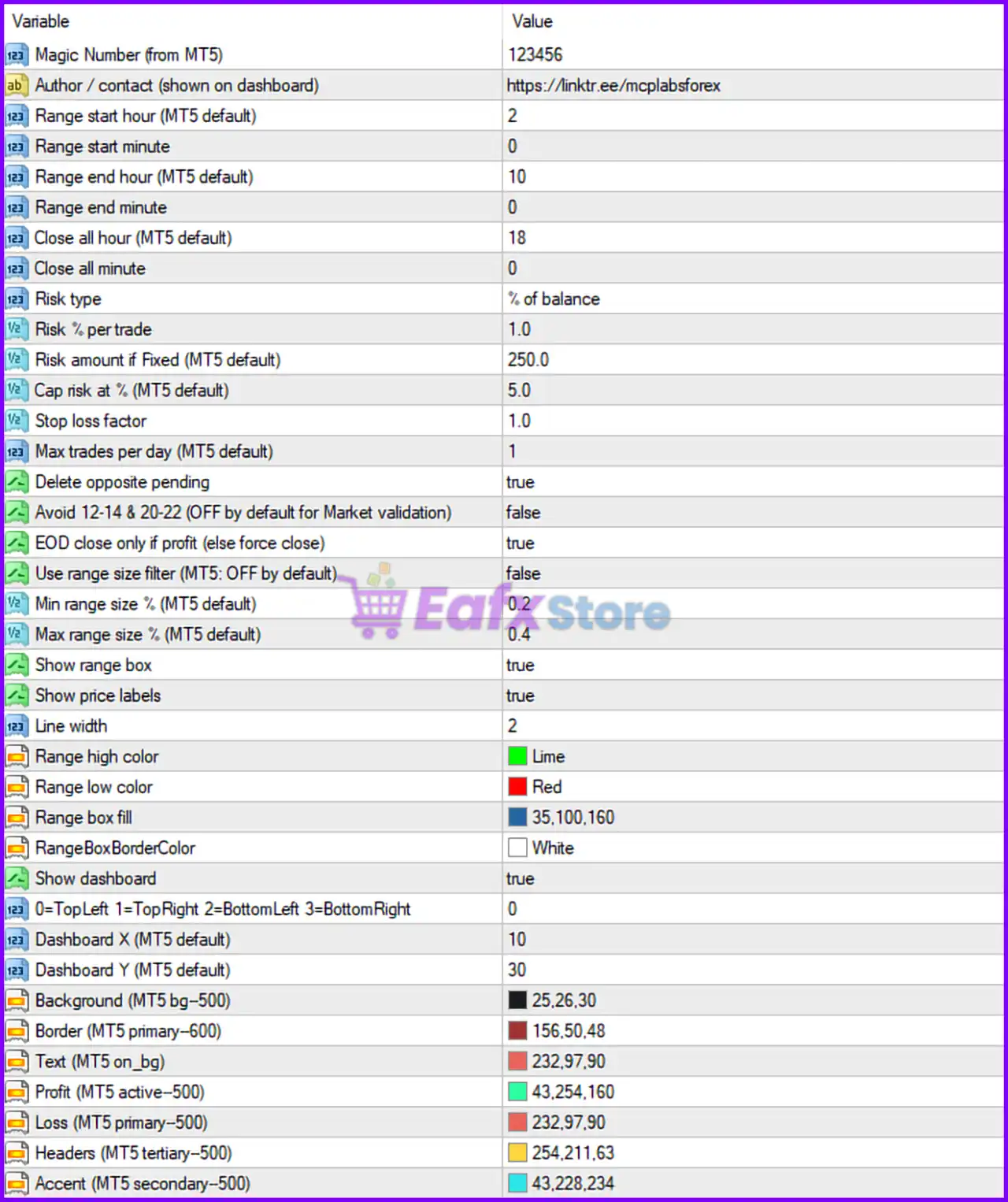
Full Parameters
- Magic Number (from MT5) = 123456: Unique identifier (123456) used to manage and track trades opened by the EA.
- Author / contact (shown on dashboard) = https://linktr.ee/mcplabsforex: Displays the author or contact link directly on the EA dashboard.
Range Trading Settings
- Range start hour (MT5 default) = 2: Defines the trading range start hour at 02:00.
- Range start minute = 0: Sets the range calculation start minute to 0.
- Range end hour (MT5 default) = 10: Defines the range calculation end hour at 10:00.
- Range end minute = 0: Sets the range calculation end minute to 0.
- Close all hour (MT5 default) = 18: All open trades will be closed at 18:00.
- Close all minute = 0: Defines the exact minute (0) for closing all trades.
Risk Management Settings
- Risk type = % of balance: Uses percentage-of-balance risk calculation mode.
- Risk % per trade = 1.0: Risks 1.0% of account balance per trade.
- Risk amount if Fixed (MT5 default) = 250.0: Fixed monetary risk amount set to 250.0 when fixed mode is used.
- Cap risk at % (MT5 default) = 5.0: Maximum total risk exposure capped at 5.0%.
- Stop loss factor = 1.0: Stop Loss multiplier factor set to 1.0.
- Max trades per day (MT5 default) = 1: Limits the EA to only 1 trade per day.
Trade Control Settings
- Delete opposite pending = true: Automatically removes opposite pending orders once one direction is triggered.
- Avoid 12-14 & 20-22 (OFF by default for Market validation) = false: Trading avoidance during 12:00–14:00 and 20:00–22:00 is disabled.
- EOD close only if profit (else force close) = true: Closes trades at end of day only if profitable; otherwise, positions are force closed.
Range Size Filter Settings
- Use range size filter (MT5: OFF by default) = false: Disables the range size filtering feature.
- Min range size % (MT5 default) = 0.2: Minimum acceptable range size set to 0.2%.
- Max range size % (MT5 default) = 0.4: Maximum acceptable range size set to 0.4%.
Visual & Chart Settings
- Show range box = true: Displays the breakout range box on the chart.
- Show price labels = true: Enables display of price labels for range levels.
- Line width = 2: Sets line thickness to 2 pixels.
- Range high color = Lime: Displays the range high line in Lime color.
- Range low color = Red: Displays the range low line in Red color.
- Range box fill = 35,100,160: Uses RGB color values (35,100,160) for the range box fill.
- RangeBoxBorderColor = White: Sets the range box border color to White.
Dashboard Settings
- Show dashboard = true: Enables the on-chart trading dashboard.
- 0=TopLeft 1=TopRight 2=BottomLeft 3=BottomRight = 0: Dashboard position set to Top Left corner.
- Dashboard X (MT5 default) = 10: Horizontal dashboard offset set to 10 pixels.
- Dashboard Y (MT5 default) = 30: Vertical dashboard offset set to 30 pixels.
Dashboard Theme Colors
- Background (MT5 bg-500) = 25,26,30: Dashboard background RGB color set to (25,26,30).
- Border (MT5 primary-600) = 156,50,48: Dashboard border RGB color set to (156,50,48).
- Text (MT5 on_bg) = 232,97,90: Dashboard text RGB color set to (232,97,90).
- Profit (MT5 active-500) = 43,254,160: Profit display RGB color set to (43,254,160).
- Loss (MT5 primary-500) = 232,97,90: Loss display RGB color set to (232,97,90).
- Headers (MT5 tertiary-500) = 254,211,63: Header RGB color set to (254,211,63).
- Accent (MT5 secondary-500) = 43,228,234: Accent RGB color set to (43,228,234).
Conclusion
The FTMO Smart Trader EA settings provide a highly disciplined trading framework tailored for prop firm and breakout trading strategies. With features such as percentage-based risk management, strict daily trade limits, range breakout visualization, and automated dashboard monitoring, this EA helps traders maintain consistency and control. Understanding each parameter allows traders to optimize execution, manage risk effectively and improve compliance with prop firm trading requirements.
FAQs
❓ What does Risk % per trade = 1.0 mean?
It means each trade risks 1.0% of the account balance.
❓ Why is Max trades per day = 1 important?
It limits overtrading and supports disciplined prop firm trading rules.
❓ What does Delete opposite pending = true do?
It removes opposite pending orders after one breakout direction activates.
❓ Why is Show range box = true useful?
It visually displays breakout zones directly on the chart.
❓ What is the purpose of Magic Number = 123456?
It uniquely identifies trades managed by FTMO Smart Trader EA MT4.