Introduction to Core Pulse X EA MT5
Core Pulse X EA MT5 is an automated trading Expert Advisor (EA) developed for the MetaTrader 5 platform, designed to combine fixed-lot precision trading with structured risk management and advanced trailing stop functionality.
The EA includes customizable lot controls, Stop Loss and Take Profit protection, and a specialized “Hunter Trail” trailing system for dynamic trade management.
With integrated panel support and flexible risk scaling, Core Pulse X EA MT5 is suitable for traders seeking disciplined and scalable automated trading.
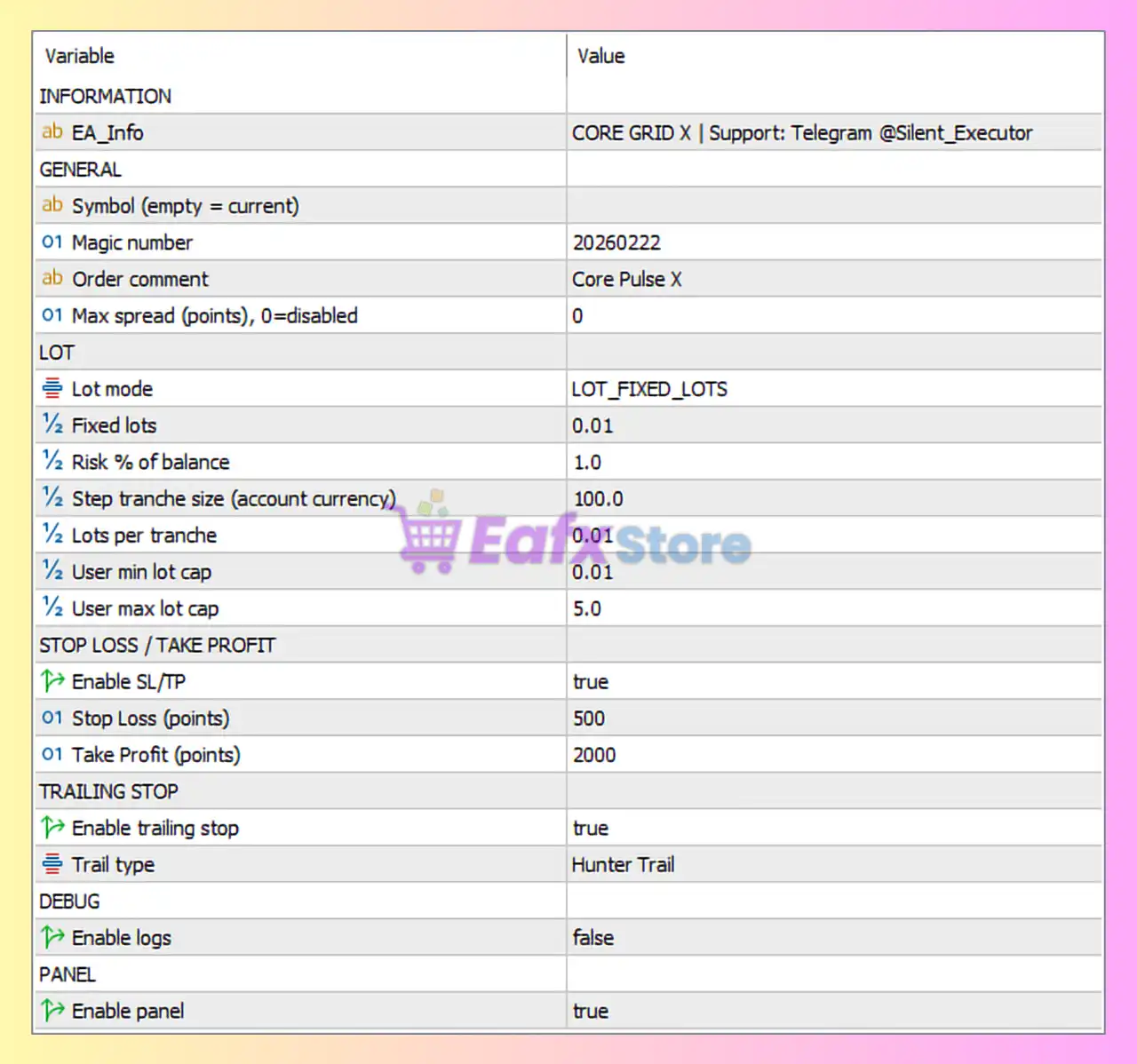
Full Parameters
GENERAL
- Symbol (empty = current) =: Field left empty, meaning the EA trades the currently attached chart symbol.
- Magic number = 20260222: Unique identifier (20260222) used to manage and track EA trades independently.
- Order comment = Core Pulse X: Adds “Core Pulse X” as the trade comment for executed positions.
- Max spread (points), 0=disabled = 0: Spread filter disabled because the value is set to 0.
LOT
- Lot mode = LOT_FIXED_LOTS: Uses fixed lot sizing mode for trading operations.
- Fixed lots = 0.01: Sets the default fixed lot size to 0.01 lots.
- Risk % of balance = 1.0: Risks 1.0% of account balance per trade when risk-based sizing is active.
- Step tranche size (account currency) = 100.0: Defines tranche size increments of 100.0 account currency units for scaling calculations.
- Lots per tranche = 0.01: Adds 0.01 lots for each tranche increment.
- User min lot cap = 0.01: Minimum allowed lot size restricted to 0.01 lots.
- User max lot cap = 5.0: Maximum allowed lot size capped at 5.0 lots.
STOP LOSS / TAKE PROFIT
- Enable SL/TP = true: Enables Stop Loss (SL) and Take Profit (TP) protection.
- Stop Loss (points) = 500: Sets the Stop Loss distance to 500 points.
- Take Profit (points) = 2000: Sets the Take Profit target to 2000 points.
TRAILING STOP
- Enable trailing stop = true: Activates Trailing Stop functionality.
- Trail type = Hunter Trail: Uses the “Hunter Trail” trailing stop algorithm for dynamic trade management.
DEBUG
- Enable logs = false: Disables debug logging and detailed execution logs.
PANEL
- Enable panel = true: Displays the EA information and control panel on the chart.
Conclusion
The Core Pulse X EA settings provide a balanced framework for automated trading with structured lot sizing, dynamic trailing stops and built-in risk controls.
By combining fixed-lot precision with scalable tranche management and advanced “Hunter Trail” functionality, the EA is designed to adapt to different market conditions while maintaining disciplined execution.
Understanding these parameters helps traders optimize performance, improve risk management and customize the EA according to their trading objectives.
FAQs
❓ What does Lot mode = LOT_FIXED_LOTS mean?
It means the EA uses fixed lot sizes instead of fully dynamic position sizing.
❓ Why is Enable SL/TP = true important?
It ensures all trades are protected with Stop Loss and Take Profit levels.
❓ What is the purpose of Trail type = Hunter Trail?
It applies a specialized trailing stop algorithm to dynamically secure profits.
❓ Why is User max lot cap = 5.0 used?
It limits maximum trade size to 5.0 lots for risk control.
❓ What does Magic number = 20260222 do?
It uniquely identifies trades opened by Core Pulse X EA MT5 for proper management and tracking.