Introduction to AI Quantum Scalper EA MT5
AI Quantum Scalper EA is an advanced automated scalping Expert Advisor (EA) developed for the MetaTrader 5 (MT5) platform. The EA combines multi-strategy trading logic, AI regime analysis, prop firm protection systems and intelligent risk management into a highly flexible trading solution.
Designed for traders who require precision scalping with institutional-style safety controls, AI Quantum Scalper includes trailing management, drawdown protection, server-time filters and dynamic money management features.
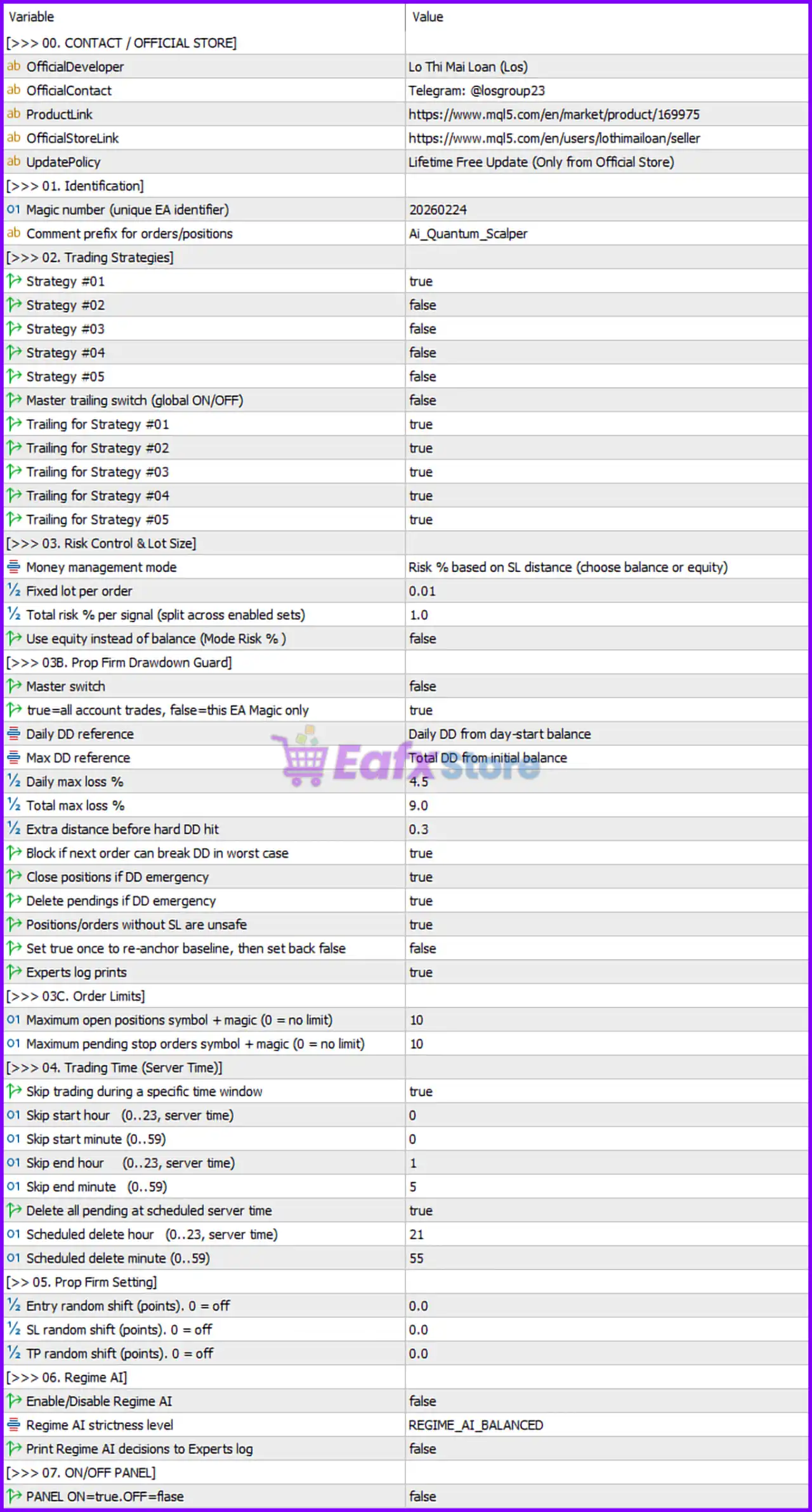
Full Parameters
[>>> 01. Identification]
- Magic number (unique EA identifier) = 20260224: Unique trade identifier used for managing and tracking EA positions.
- Comment prefix for orders/positions = AI_Quantum_Scalper: Adds “AI_Quantum_Scalper” as the trade comment prefix.
[>>> 02. Trading Strategies]
- Strategy #01 = true: Enables Strategy 01.
- Strategy #02 = false: Disables Strategy 02.
- Strategy #03 = false: Disables Strategy 03.
- Strategy #04 = false: Disables Strategy 04.
- Strategy #05 = false: Disables Strategy 05.
- Master trailing switch (global ON/OFF) = false: Disables the global Trailing stop control.
- Trailing for Strategy #01 = true: Enables trailing stop management for Strategy 01.
- Trailing for Strategy #02 = true: Enables trailing stop management for Strategy 02.
- Trailing for Strategy #03 = true: Enables trailing stop management for Strategy 03.
- Trailing for Strategy #04 = true: Enables trailing stop management for Strategy 04.
- Trailing for Strategy #05 = true: Enables trailing stop management for Strategy 05.
[>>> 03. Risk Control & Lot Size]
- Money management mode = Risk % based on SL distance (choose balance or equity): Uses percentage-based risk management calculated from Stop Loss distance.
- Fixed lot per order = 0.01: Sets fixed trading lot size to 0.01 lots.
- Total risk % per signal (split across enabled sets) = 1.0: Total risk allocation per signal limited to 1.0%.
- Use equity instead of balance (Mode Risk %) = false: Uses account balance instead of equity for risk calculations.
[>>> 03B. Prop Firm Drawdown Guard]
- Master switch = false: Disables the prop firm drawdown protection module.
- true=all account trades, false=this EA Magic only = true: Drawdown calculations include all account trades.
- Daily DD reference = Daily DD from day-start balance: Uses starting daily balance as daily drawdown reference.
- Max DD reference = Total DD from initial balance: Uses initial balance as maximum drawdown reference.
- Daily max loss % = 4.5: Daily maximum loss limited to 4.5%.
- Total max loss % = 9.0: Total account drawdown limited to 9.0%.
- Extra distance before hard DD hit = 0.3: Adds a 0.3% safety buffer before hard drawdown limits trigger.
- Block if next order can break DD in worst case = true: Prevents opening new orders if they could exceed drawdown limits.
- Close positions if DD emergency = true: Automatically closes positions during drawdown emergencies.
- Delete pendings if DD emergency = true: Removes pending orders during drawdown emergencies.
- Positions/orders without SL are unsafe = true: Treats positions without Stop Loss as unsafe.
- Set true once to re-anchor baseline, then set back false = false: Baseline reset function currently disabled.
- Experts log prints = true: Enables detailed logging in the Experts tab.
[>>> 03C. Order Limits]
- Maximum open positions symbol + magic (0 = no limit) = 10: Limits open positions per symbol and Magic Number to 10 trades.
- Maximum pending stop orders symbol + magic (0 = no limit) = 10: Limits pending stop orders per symbol and Magic Number to 10.
[>>> 04. Trading Time (Server Time)]
- Skip trading during a specific time window = true: Enables restricted trading hours.
- Skip start hour (0..23, server time) = 0: Trading restriction starts at 00:00 server time.
- Skip start minute (0..59) = 0: Trading restriction begins at minute 00.
- Skip end hour (0..23, server time) = 1: Trading restriction ends at 01:00 server time.
- Skip end minute (0..59) = 5: Trading restriction ends at minute 05.
- Delete all pending at scheduled server time = true: Deletes all pending orders at the scheduled server time.
- Scheduled delete hour (0..23, server time) = 21: Pending order deletion scheduled for 21:00 server time.
- Scheduled delete minute (0..59) = 55: Pending order deletion scheduled at minute 55.
[>>> 05. Prop Firm Setting]
- Entry random shift (points). 0 = off = 0.0: Entry price randomization disabled.
- SL random shift (points). 0 = off = 0.0: Stop Loss randomization disabled.
- TP random shift (points). 0 = off = 0.0: Take Profit randomization disabled.
[>>> 06. Regime AI]
- Enable/Disable Regime AI = false: Disables AI market regime analysis.
- Regime AI strictness level = REGIME_AI_BALANCED: AI strictness mode configured to BALANCED.
- Print Regime AI decisions to Experts log = false: AI decision logging disabled.
[>>> 07. ON/OFF PANEL]
- PANEL ON=true, OFF=false = false: Disables the information panel on the chart.
Conclusion
The AI Quantum Scalper EA MT5 settings provide a professional-grade scalping framework with advanced AI filtering, strict prop firm drawdown protection and flexible multi-strategy management.
By integrating percentage-based risk control, server-time filters, emergency drawdown handling, and customizable trailing systems, the EA is designed for disciplined and scalable automated trading. Understanding these settings helps traders optimize performance while maintaining strong account protection.
FAQs
❓ What does Money management mode = Risk % based on SL distance mean?
It calculates lot size automatically according to Stop Loss distance and account risk percentage.
❓ Why is Daily max loss % = 4.5 important?
It limits daily account losses to 4.5% for prop firm safety compliance.
❓ What is the purpose of Strategy #01 = true?
It enables the EA’s primary trading strategy while other strategies remain disabled.
❓ Why is Regime AI disabled by default?
The EA is configured to trade without AI regime filtering unless manually activated.
❓ What does Block if next order can break DD in worst case = true do?
It prevents new trades from opening if they could exceed maximum drawdown limits.